navigation system Hyundai Nexo 2019 User Guide
[x] Cancel search | Manufacturer: HYUNDAI, Model Year: 2019, Model line: Nexo, Model: Hyundai Nexo 2019Pages: 560, PDF Size: 24.2 MB
Page 263 of 560
Multimedia System
Multimedia system .................................................4-2
USB and iPod®port..........................................................4-2
Antenna ........................................................................\
.......4-2
Steering wheel audio controls .......................................4-3
Bluetooth®Wireless Technology ..................................4-4
Blue Link®center .............................................................4-4
Audio / Video / Navigation system (AVN) ..................4-4
4
Page 266 of 560
Bluetooth®Wireless
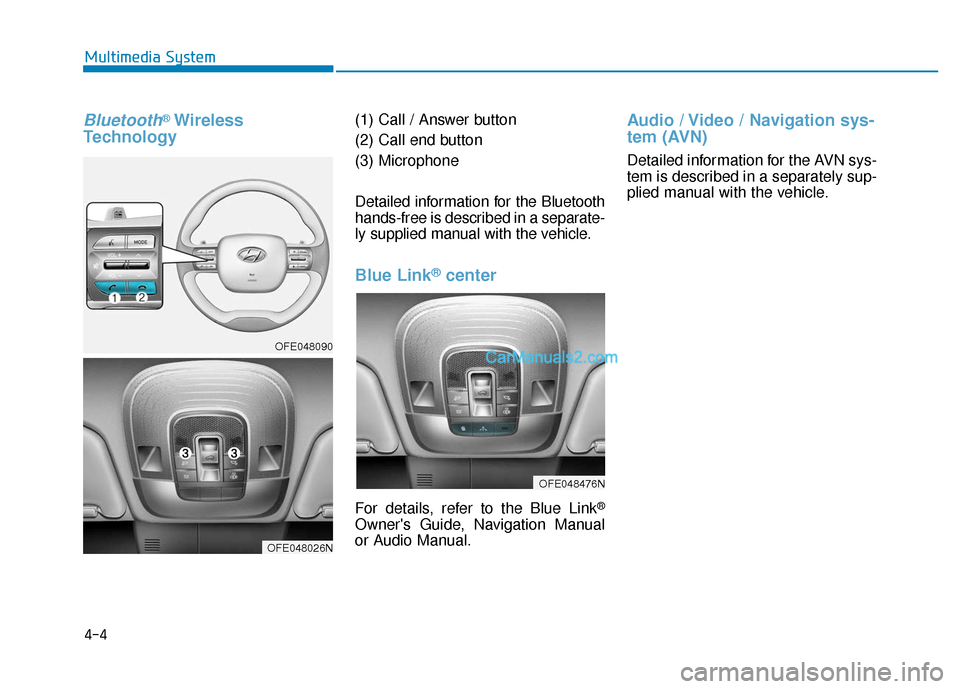
Technology(1) Call / Answer button
(2) Call end button
(3) Microphone
Detailed information for the Bluetooth
hands-free is described in a separate-
ly supplied manual with the vehicle.
Blue Link®center
For details, refer to the Blue Link®
Owner's Guide, Navigation Manual
or Audio Manual.
Audio / Video / Navigation sys-
tem (AVN)
Detailed information for the AVN sys-
tem is described in a separately sup-
plied manual with the vehicle.
4-4
Multimedia System
OFE048090
OFE048026N
OFE048476N
Page 322 of 560
5-56
Driving your vehicle
The driver can select the warning volume of Blind-Spot Collision
Warning in the Vehicle Settings in
the AVN screen by selecting
'Vehicle Settings →Driver
Assistance →Warning Volume →
High/Medium/Low'.
For more information refer to the
separately supplied Navigation
manual.
Information
If you change the warning volume, the
warning volume of other systems may
change. Always be aware before
changing the warning volume.
Operating Conditions
The system enters the ready status,
when 'Active assistance' or 'Warning
Only' is selected and the following
conditions are satisfied:
Active assistance
1) The Blind-Spot Collision- Avoidance Assist system will acti-
vate when :
- Vehicle speed is between 40 mph and 110 mph (60 km/h and
180 km/h).
- The system detects both of the lane lines.
- An approaching vehicle is detected next to or behind your
vehicle.
2) The Blind-Spot Collision Warning system will activate when
The vehicle speed is above approximately 20 mph (30 km/h). Warning Only
1) The Blind-Spot Collision Warning
system will activate when :
- The vehicle speed is approxi- mately 20 mph (30 km/h).
❈ The Blind-Spot Collision-Avoidance
Assist system is not activated.
i
Page 334 of 560
5-68
Driving your vehicle
System Setting and Activation
System setting
The driver can activate the sys-tems by placing the power button
to the ON position and by selecting
"Vehicle settings → Driver assis-
tance →Blind-spot safety → Rear
Cross-Traffic Safety" on AVN
screen. The RCCA and RCCW
turn on and get ready to be activat-
ed when 'Rear Cross-Traffic Safety'
is selected.
When the vehicle is turned off then on again, the systems are always
ready to be activated.
When the system is initially turned on and when the vehicle is turned
off then on again, the warning light
will illuminate for 3 seconds on the
outer side view mirror. The driver can select the initial warn-
ing activation time in the User
Settings in the AVN screen by select-
ing 'Vehicle settings
→Driver
Assistance →Warning Timing'. The
options for the initial Rear Cross-
Traffic Collision Warning includes the
following:
- Normal:
When this condition is selected, the
initial Rear Cross-Traffic Collision
Warning is activated normally. If this
setting feels sensitive, change the
option to 'Later'.
The warning activation time may feel
late if the a vehicle at the side or rear
abruptly accelerates.
- Later:
Select this warning activation time
when the traffic is light and you are
driving in a low speed.
Information
If you change the warning timing, the
warning time of other systems may
change. Always be aware before
changing the warning timing. The driver can select the warning
volume of the Rear Cross-Traffic
Collision Warning in the Vehicle
Settings in the AVN screen by select-
ing 'Vehicle settings
→Driver
Assistance →Warning Volume →
High/Medium/ Low'.
For more information refer to the
separately supplied Navigation
manual.
Information
If you change the warning volume, the
warning volume of other systems may
change. Always be aware before
changing the warning volume.
i
i
Page 556 of 560

I-7
Lighting ........................................................................\
...3-89Exterior Lights............................................................3-89
Welcome System ........................................................3-99
Luggage Net Holder .....................................................3-172
Maintenance services ........................................................7-4 Owner's Responsibility.................................................7-4
Owner Maintenance Precautions..................................7-4
Mirrors ........................................................................\
....3-23 Inside Rearview Mirror ..............................................3-23
Side View Mirrors ......................................................3-31
Motor Number ..................................................................8-8
Multimedia system............................................................4-2 USB and iPod
®port .....................................................4-2
Antenna ........................................................................\
4-2
Steering wheel audio controls ......................................4-3
Bluetooth
®Wireless Technology..................................4-4
Audio/Video/Navigation system (AVN) ......................4-4
Non-Powered Liftgate.....................................................3-43 Occupant Classification System (OCS)..........................2-58
Owner maintenance ..........................................................7-5
Owner maintenance schedule .......................................7-6
Paddle Shifter (Regenerative Braking Control) .............5-17
Parking Distance Warning (Reverse/Forward) System .......................................................................3\
-104
Power Brakes ..................................................................5-18
Power Button ....................................................................5-6 POWER Button Positions ............................................5-7
Starting the Vehicle ......................................................5-9
Turning Off the Vehicle..............................................5-10
Power Liftgate.................................................................3-45
Power Outlet .................................................................3-165
Rear Cross-traffic Collision Warning (RCCW)/ Rear Cross-traffic Collision-avoidance Assist
(RCCA)........................................................................\
5-67
System Description ....................................................5-67
System Setting and Activation ...................................5-68
Warning and System Control .....................................5-69
Limitations of the System ..........................................5-73
I
Index
M
N
O
P
R