change time HYUNDAI NEXO 2019 User Guide
[x] Cancel search | Manufacturer: HYUNDAI, Model Year: 2019, Model line: Nexo, Model: Hyundai Nexo 2019Pages: 561, PDF Size: 48.42 MB
Page 182 of 561
3-95
Convenient features of your vehicle
3
One-touch turn signal function
To activate the One Touch Turn
Signal function, push the turn signal
lever up or down to position (B) and
then release it.
The lane change signals will blink 3,
5 or 7 times.
You can activate or deactivate the
One Touch Turn Signal function or
choose the number of blinks (3, 5, or
7) from the Vehicle Settings mode in
the AVN screen.
For more details, refer to the sepa-
rately supplied Navigation manual.
Battery saver function
The purpose of this feature is to pre-
vent the battery from being dis-
charged. The system automatically
turns off the parking lamp when the
driver turns the vehicle off and opens
the driver-side door.
With this feature, the parking lamps
will turn off automatically if the driver
parks on the side of road at night.
If necessary, to keep the lamps on
when the vehicle is turned off, perform
the following:
1) Open the driver-side door.
2) Turn the parking lamps OFF and
ON again using the headlamp
switch on the steering column.
Headlight time-out function
(if equipped)
If the POWER button is placed in the
ACC position or the OFF position
with the headlamps ON, the head-
lamps (and/or parking lamps) remain
on for about 5 minutes. However, if
the driver's door is opened and
closed, the headlights are turned off
after 15 seconds. Also, with the vehi-
cle off if the driver's door is opened
and closed, the headlamps (and/or
parking lamps) are turned off after 15
seconds.
The headlamps (and/or parking
lamps) can be turned off by pressing
the lock button on the smart key
twice or turning the light switch to the
OFF or AUTO position.
You can activate or deactivate the
Headlamp Delay function from the
Vehicle Settings mode (Light) on the
AVN screen.
For more details, refer to the sepa-
rately supplied Navigation manual.
Page 203 of 561
3-116
Convenient features of your vehicle
Big vehicles such as buses or
trucks parked
Sensor covered with foreign mat-
ter, such as snow or water
An obstacle such as a trash can,
bicycle, shopping cart, etc. is near
Heavy wind
Wheel changed to an unauthorized
size
A problem with the wheel alignment
Vehicle leaned severely to one side
Front or rear distance sensors are
malfunction or not working properly.
(Refer to the Parking Distance
Warning system in chapter 3.)
requires battery replacement
Limitations of the System
When the vehicle has been
parked/stopped for a long time in a
cold environment, the Remote
Moving Forward/Backward may be
delayed depending on the vehicle
condition when the vehicle is
turned on remotely.
The RSPA system may suddenly
apply brake to avoid collision
against stationary or moving
object.
The system may be cancelled
unexpectedly when a person or
animal passes by near the vehicle.
The performance of the system
may be degraded and frequently
stop when driving in strong electric
field area.
Right after the parking place
search complete and beep sound
is generated, the search complete
may be cancelled according to the
surrounding environment Even while the system is in activa-
tion, the vehicle may collide with
the object existing within the blind-
spot area of the sensor.
When there is any obstacle within
the blind-spot area, drive out of the
parking space manually.
The system may not recognize the
object that appears suddenly.
The system does not work if there
is no car parked in front of the
parking space you are planning to
park.
Page 247 of 561
3-160
Convenient features of your vehicle
Auto Defogging System
(Additional Feature with
Automatic Temperature
Control System) (if equipped)
Auto defogging helps reduce the pos-
sibility of fogging up the inside of the
windshield by automatically sensing
the moisture on inside the windshield.
The auto defogging system operates
when the heater or air conditioning is
on.
Information
The auto defogging system may not
operate normally, when the outside
temperature is below 14 °F (-10 °C).When the Auto Defogging
System operates, the indi-
cator will illuminate.
If a high amount of humidity is
detected in the vehicle, the Auto
Defogging System will be enabled.
The following steps will be performed
automatically:
Step 1) The A/C button will turn ON.
Step 2) The air intake control will
change to Fresh mode.
Step 3) The mode will be changed to
defrost to direct airflow to the
windshield.
Step 4) The fan speed will be set to
MAX.
If the air conditioning is off or recircu-
lated air position is manually select-
ed while Auto Defogging System is
ON, the Auto Defogging System
Indicator will blink 3 times to signal
that the manual operation has been
canceled.
To cancel or reset the
Auto Defogging System
Press the front windshield defroster
button for 3 seconds when the
POWER button is in the ON position.
When the Auto Defogging System is
canceled, the ADS OFF symbol will
blink 3 times and ADS OFF will be
displayed on the climate control
information screen.
When the Auto Defogging System is
reset, the ADS OFF symbol will blink
6 times without a signal.
i
Page 249 of 561
3-162
Convenient features of your vehicle
Automatic Ventilation
(if equipped)
When the POWER button is in the
ON position or when the vehicle is in
the ready ( ) mode and tempera-
ture is below 59°F (15°C) with the
recirculated air position selected
more than five minutes, the air intake
position will automatically change to
the outside (fresh) air position.
To cancel or reset the Automatic
Ventilation
When the air conditioning system is
on, select Face Level mode and
press the recirculation mode button
five times within three seconds while
pressing A/C button.
When the Automatic Ventilation fea-
ture is enabled, the recirculation but-
ton LED indicator will blink 6 times.
When the Automatic Ventilation fea-
ture is disabled, the recirculation but-
ton LED indicator will blink 3 times.
Sunroof Inside Air
Recirculation (if equipped)
When the heater or air conditioning
system is on with the sunroof
opened, the fresh mode will be auto-
matically selected. If you press the
recirculation mode button with the
sunroof open, recirculation mode
activate but will only remain enabled
for 3 minutes. After 3 minutes the air
intake control will revert back to
Fresh mode.
When the sunroof is closed, the air
intake position will return to the orig-
inal position that was selected.
C CL
LI
IM
MA
AT
TE
E
C
CO
ON
NT
TR
RO
OL
L
A
AD
DD
DI
IT
TI
IO
ON
NA
AL
L
F
FE
EA
AT
TU
UR
RE
ES
S
Page 284 of 561
5-17
Driving your vehicle
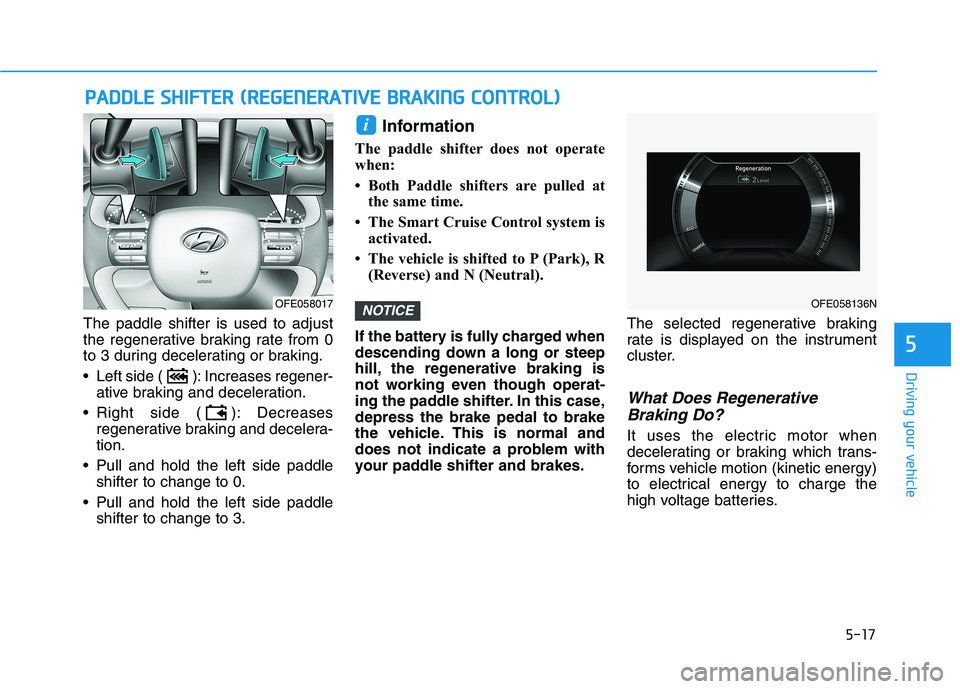
The paddle shifter is used to adjust
the regenerative braking rate from 0
to 3 during decelerating or braking.
Left side ( ): Increases regener-
ative braking and deceleration.
Right side ( ): Decreases
regenerative braking and decelera-
tion.
Pull and hold the left side paddle
shifter to change to 0.
Pull and hold the left side paddle
shifter to change to 3.
Information
The paddle shifter does not operate
when:
• Both Paddle shifters are pulled at
the same time.
• The Smart Cruise Control system is
activated.
• The vehicle is shifted to P (Park), R
(Reverse) and N (Neutral).
If the battery is fully charged when
descending down a long or steep
hill, the regenerative braking is
not working even though operat-
ing the paddle shifter. In this case,
depress the brake pedal to brake
the vehicle. This is normal and
does not indicate a problem with
your paddle shifter and brakes.The selected regenerative braking
rate is displayed on the instrument
cluster.
What Does Regenerative
Braking Do?
It uses the electric motor when
decelerating or braking which trans-
forms vehicle motion (kinetic energy)
to electrical energy to charge the
high voltage batteries.
NOTICE
i
P PA
AD
DD
DL
LE
E
S
SH
HI
IF
FT
TE
ER
R
(
(R
RE
EG
GE
EN
NE
ER
RA
AT
TI
IV
VE
E
B
BR
RA
AK
KI
IN
NG
G
C
CO
ON
NT
TR
RO
OL
L)
)
5
OFE058136NOFE058017
Page 293 of 561
5-26
Leaving
If you press the accelerator pedal
with the gear in D (Drive) or R
(Reverse), the Auto Hold will be
released automatically and the
vehicle will start to move. The
AUTO HOLD indicator changes
from green to white.
If the vehicle is restarted using the
cruise control toggle switch (RES+
or SET-) while Auto Hold and cruise
control is operating, the Auto Hold
will be released regardless of
accelerator pedal operation. The
AUTO HOLD indicator changes
from green to white. (if equipped
with Smart Cruise Control system)
Cancel
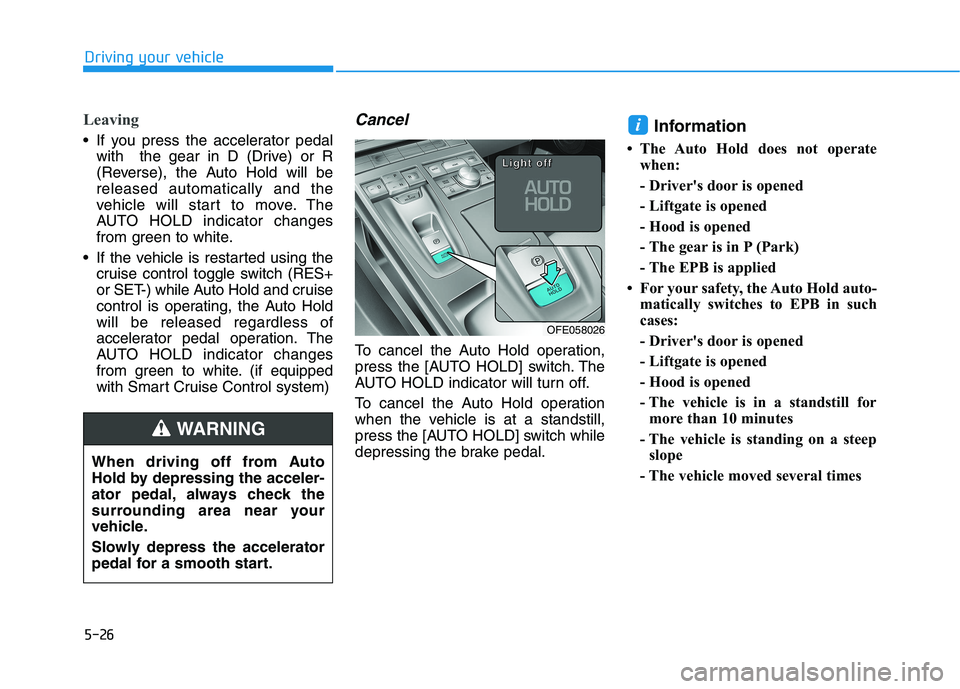
To cancel the Auto Hold operation,
press the [AUTO HOLD] switch. The
AUTO HOLD indicator will turn off.
To cancel the Auto Hold operation
when the vehicle is at a standstill,
press the [AUTO HOLD] switch while
depressing the brake pedal.
Information
• The Auto Hold does not operate
when:
- Driver's door is opened
- Liftgate is opened
- Hood is opened
- The gear is in P (Park)
- The EPB is applied
• For your safety, the Auto Hold auto-
matically switches to EPB in such
cases:
- Driver's door is opened
- Liftgate is opened
- Hood is opened
- The vehicle is in a standstill for
more than 10 minutes
- The vehicle is standing on a steep
slope
- The vehicle moved several times
i
Driving your vehicle
OFE058026
L L L L
i i i i
g g g g
h h h h
t t t t
o o o o
f f f f
f f f f
When driving off from Auto
Hold by depressing the acceler-
ator pedal, always check the
surrounding area near your
vehicle.
Slowly depress the accelerator
pedal for a smooth start.
WARNING
Page 296 of 561
5-29
Driving your vehicle
Anti-lock Brake System (ABS)
ABS is an electronic braking system
that helps prevent a braking skid.
ABS allows the driver to steer and
brake at the same time.
Using ABS
To obtain the maximum benefit from
your ABS in an emergency situation,
do not attempt to modulate your
brake pressure and do not try to
pump your brakes. Depress your
brake pedal as hard as possible.
When you apply your brakes under
conditions which may lock the
wheels, you may hear sounds from
the brakes, or feel a corresponding
sensation in the brake pedal. This is
normal and it means your ABS is
active.
ABS does not reduce the time or dis-
tance it takes to stop the vehicle.
Always maintain a safe distance from
the vehicle in front of you.
ABS will not prevent a skid that
results from sudden changes in
direction, such as trying to take a
corner too fast or making a sudden
lane change. Always drive at a safe
speed for the road and weather con-
ditions.
5
An Anti-Lock Braking System
(ABS) or an Electronic Stability
Control (ESC) system will not
prevent accidents due to
improper or dangerous driving
maneuvers. Even though vehi-
cle control is improved during
emergency braking, always
maintain a safe distance
between you and objects ahead
of you. Vehicle speeds should
always be reduced during
extreme road conditions. The
braking distance for cars
equipped with ABS or ESC may
be longer than for those without
these systems in the following
road conditions.
Drive your vehicle at reduced
speeds during the following
conditions:
Rough, gravel or snow-cov-
ered roads.
WARNING
On roads where the road sur-
face is pitted or has different
surface height.
Tire chains are installed on
your vehicle.
The safety features of an ABS
or ESC equipped vehicle should
not be tested by high speed
driving or cornering. This could
endanger the safety of yourself
or others.
Page 307 of 561
5-40
Driving your vehicle
The warning light illu-
minates on the LCD
display, when you can-
cel the FCA system.
The driver can monitor the FCA
ON/OFF status on the AVN screen.
Also, the warning light illuminates
when the ESC (Electronic Stability
Control) is turned off. If the warning
light remains ON when the FCA is
activated, have the system
checked by an authorized
HYUNDAI dealer.
The driver can select the initial
warning activation time on the AVN
screen.
Go to the "Vehicle settings →Driver
assistance →Warning time →
Normal/Later"The options for the initial Forward
Collision Warning includes the fol-
lowing:
- Normal :
When this condition is selected,
the initial Forward Collision
Warning is activated sensitively. If
you feel the warning activates too
early, set the Forward Collision
Warning to 'Later'.
Even though, 'Normal' is selected if
the front vehicle suddenly stops
the initial warning activation time
may not seem fast.
- Later :
When this condition is selected,
the initial Forward Collision
Warning is activated later than nor-
mal. This setting reduces the
amount of distance between the
vehicle, pedestrian or cyclists
ahead before the initial warning
occurs.
Select 'Later' when traffic is light
and when driving speed is slow.
Information
If you change the warning timing, the
warning time of other systems may
change. Always be aware before
changing the warning timing.
i
Page 322 of 561
5-55
Driving your vehicle
5
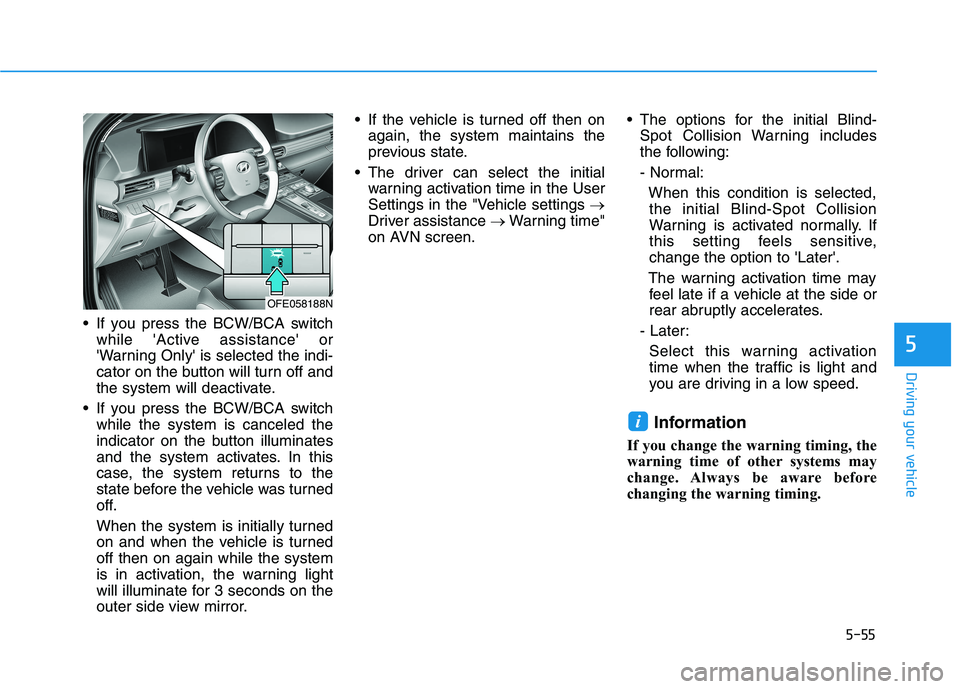
If you press the BCW/BCA switch
while 'Active assistance' or
'Warning Only' is selected the indi-
cator on the button will turn off and
the system will deactivate.
If you press the BCW/BCA switch
while the system is canceled the
indicator on the button illuminates
and the system activates. In this
case, the system returns to the
state before the vehicle was turned
off.
When the system is initially turned
on and when the vehicle is turned
off then on again while the system
is in activation, the warning light
will illuminate for 3 seconds on the
outer side view mirror. If the vehicle is turned off then on
again, the system maintains the
previous state.
The driver can select the initial
warning activation time in the User
Settings in the "Vehicle settings →
Driver assistance →Warning time"
on AVN screen. The options for the initial Blind-
Spot Collision Warning includes
the following:
- Normal:
When this condition is selected,
the initial Blind-Spot Collision
Warning is activated normally. If
this setting feels sensitive,
change the option to 'Later'.
The warning activation time may
feel late if a vehicle at the side or
rear abruptly accelerates.
- Later:
Select this warning activation
time when the traffic is light and
you are driving in a low speed.
Information
If you change the warning timing, the
warning time of other systems may
change. Always be aware before
changing the warning timing.
i
OFE058188N
Page 326 of 561
5-59
Driving your vehicle
5
Blind-Spot Collision-Avoidance Assist
(BCA) system is automatically deacti-
vated when:
- The vehicle drives a certain dis-
tance away
- The vehicle direction is changed
against the possible-colliding point
- The steering wheel is abruptly
moved
- The brake pedal is depressed
- After a certain period of time
The driver should drive the vehicle in
the middle of the vehicle lanes to
keep the system in the ready status.
When the vehicle drives too close to
one side of the vehicle lanes, the
system may not properly operate.
In addition, the system may not prop-
erly control your vehicle in accor-
dance with driving situations. Thus,
always pay close attention to road
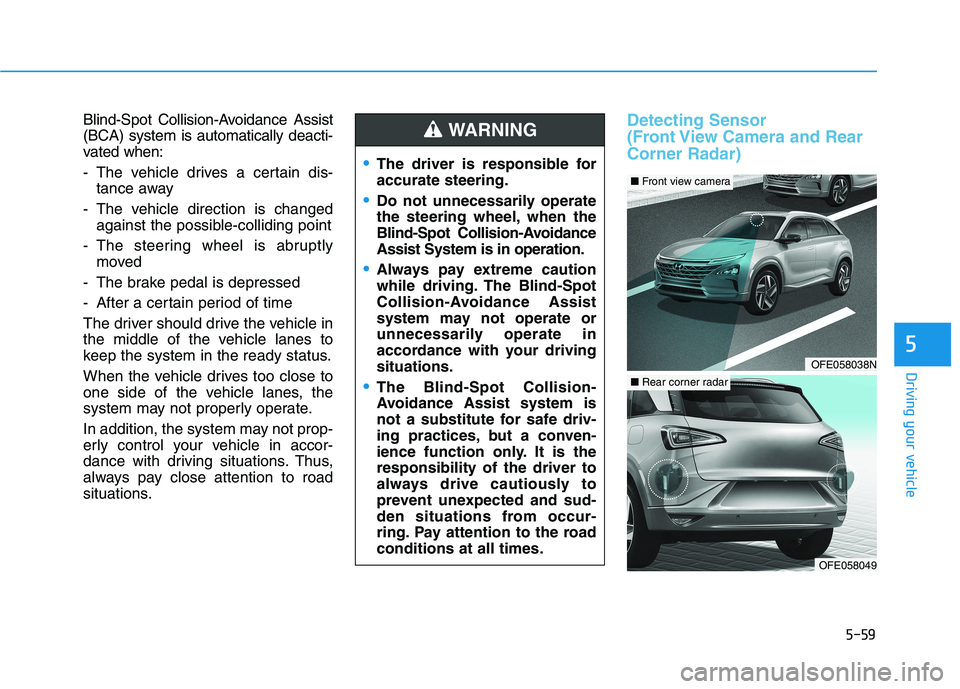
situations.Detecting Sensor
(Front View Camera and Rear
Corner Radar)
The driver is responsible for
accurate steering.
Do not unnecessarily operate
the steering wheel, when the
Blind-Spot Collision-Avoidance
Assist System is in operation.
Always pay extreme caution
while driving. The Blind-Spot
Collision-Avoidance Assist
system may not operate or
unnecessarily operate in
accordance with your driving
situations.
The Blind-Spot Collision-
Avoidance Assist system is
not a substitute for safe driv-
ing practices, but a conven-
ience function only. It is the
responsibility of the driver to
always drive cautiously to
prevent unexpected and sud-
den situations from occur-
ring. Pay attention to the road
conditions at all times.
WARNING
OFE058038N
■Front view camera
OFE058049
■Rear corner radar