charging HYUNDAI NEXO 2019 User Guide
[x] Cancel search | Manufacturer: HYUNDAI, Model Year: 2019, Model line: Nexo, Model: Hyundai Nexo 2019Pages: 561, PDF Size: 48.42 MB
Page 426 of 561
7
Maintenance
7
Maintenance
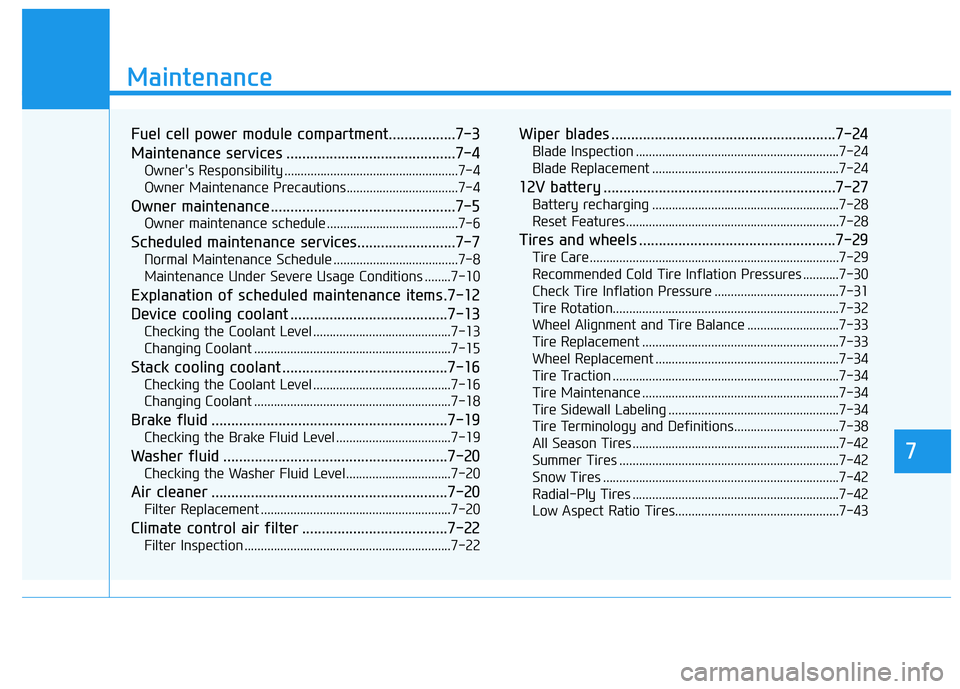
Fuel cell power module compartment.................7-3
Maintenance services ...........................................7-4
Owner's Responsibility .....................................................7-4
Owner Maintenance Precautions..................................7-4
Owner maintenance ...............................................7-5
Owner maintenance schedule ........................................7-6
Scheduled maintenance services.........................7-7
Normal Maintenance Schedule ......................................7-8
Maintenance Under Severe Usage Conditions ........7-10
Explanation of scheduled maintenance items .7-12
Device cooling coolant ........................................7-13
Checking the Coolant Level ..........................................7-13
Changing Coolant ............................................................7-15
Stack cooling coolant ..........................................7-16
Checking the Coolant Level ..........................................7-16
Changing Coolant ............................................................7-18
Brake fluid ............................................................7-19
Checking the Brake Fluid Level ...................................7-19
Washer fluid .........................................................7-20
Checking the Washer Fluid Level................................7-20
Air cleaner ............................................................7-20
Filter Replacement ..........................................................7-20
Climate control air filter .....................................7-22
Filter Inspection ...............................................................7-22
Wiper blades .........................................................7-24
Blade Inspection ..............................................................7-24
Blade Replacement .........................................................7-24
12V battery ...........................................................7-27
Battery recharging .........................................................7-28
Reset Features.................................................................7-28
Tires and wheels ..................................................7-29
Tire Care ........................................................................\
....7-29
Recommended Cold Tire Inflation Pressures ...........7-30
Check Tire Inflation Pressure ......................................7-31
Tire Rotation...................................................................\
..7-32
Wheel Alignment and Tire Balance ............................7-33
Tire Replacement ............................................................7-33
Wheel Replacement ........................................................7-34
Tire Traction .....................................................................7-3\
4
Tire Maintenance ............................................................7-34
Tire Sidewall Labeling ....................................................7-34
Tire Terminology and Definitions................................7-38
All Season Tires ...............................................................7-42
Summer Tires ...................................................................7-42
Snow Tires ........................................................................\
7-42
Radial-Ply Tires ...............................................................7-42
Low Aspect Ratio Tires..................................................7-43
7
Page 453 of 561
7-28
Maintenance
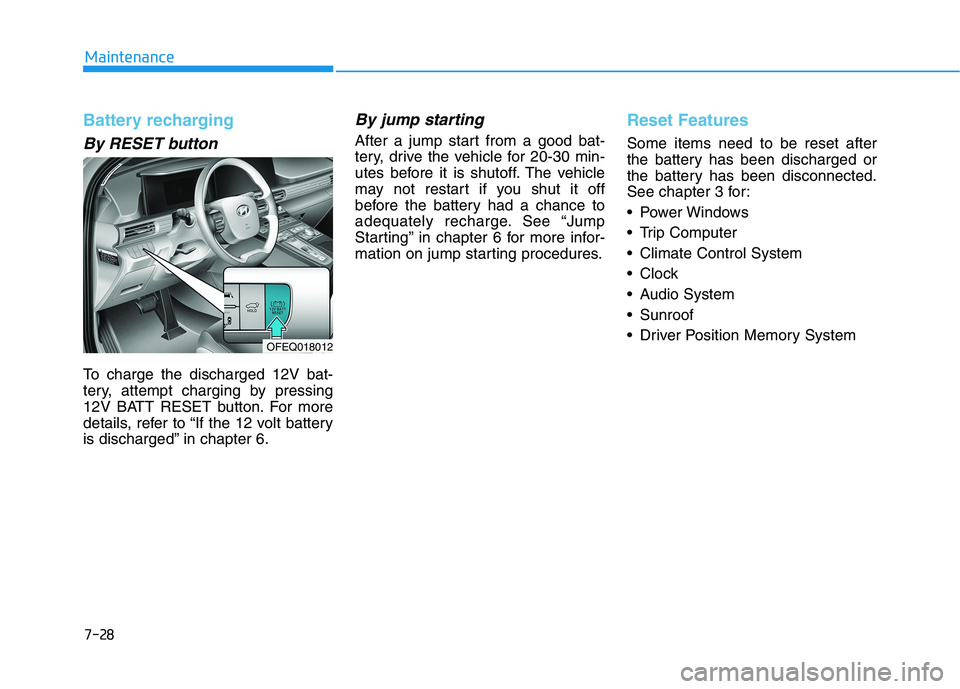
Battery recharging
By RESET button
To charge the discharged 12V bat-
tery, attempt charging by pressing
12V BATT RESET button. For more
details, refer to “If the 12 volt battery
is discharged” in chapter 6.
By jump starting
After a jump start from a good bat-
tery, drive the vehicle for 20-30 min-
utes before it is shutoff. The vehicle
may not restart if you shut it off
before the battery had a chance to
adequately recharge. See “Jump
Starting” in chapter 6 for more infor-
mation on jump starting procedures.
Reset Features
Some items need to be reset after
the battery has been discharged or
the battery has been disconnected.
See chapter 3 for:
Power Windows
Trip Computer
Climate Control System
Clock
Audio System
Sunroof
Driver Position Memory System
OFEQ018012
Page 515 of 561
H10
How to Start the Vehicle
1. Holding the smart key, sit in the
driver's seat.
2. Fasten the seat belt before start-
ing the vehicle.
3. Make sure to engage the parking
brake.
4. Turn OFF all electrical devices.
5. Make sure to depress and hold
the brake pedal.
6. While depressing the brake pedal,
shift to P (Park).
7. Depress and hold the brake pedal
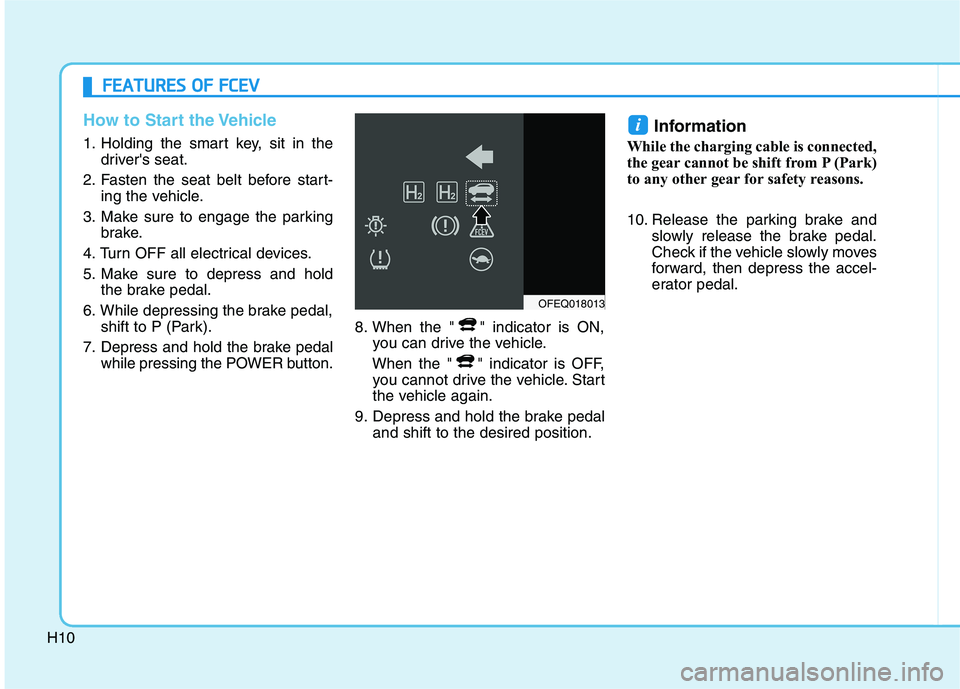
while pressing the POWER button.8. When the " " indicator is ON,
you can drive the vehicle.
When the " " indicator is OFF,
you cannot drive the vehicle. Start
the vehicle again.
9. Depress and hold the brake pedal
and shift to the desired position.
Information
While the charging cable is connected,
the gear cannot be shift from P (Park)
to any other gear for safety reasons.
10. Release the parking brake and
slowly release the brake pedal.
Check if the vehicle slowly moves
forward, then depress the accel-
erator pedal.
i
F FE
EA
AT
TU
UR
RE
ES
S
O
OF
F
F
FC
CE
EV
V
OFEQ018013
Page 520 of 561
H15
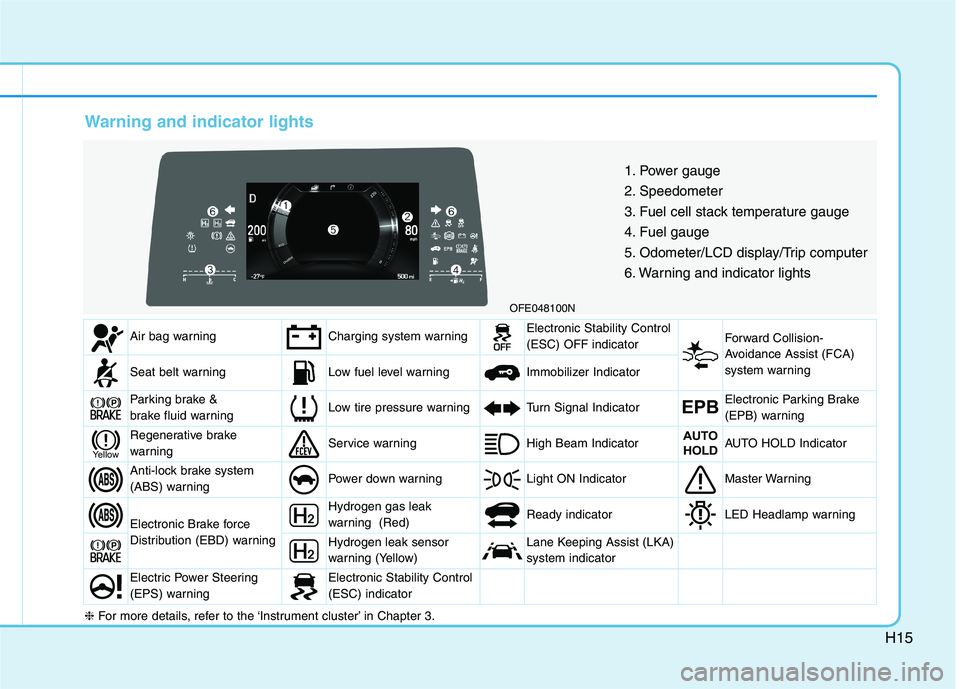
Warning and indicator lights
OFE048100N
1. Power gauge
2. Speedometer
3. Fuel cell stack temperature gauge
4. Fuel gauge
5. Odometer/LCD display/Trip computer
6. Warning and indicator lights
Air bag warningCharging system warningElectronic Stability Control
(ESC) OFF indicator Forward Collision-
Avoidance Assist (FCA)
system warning
Seat belt warningLow fuel level warning Immobilizer Indicator
Parking brake &
brake fluid warningLow tire pressure warningTurn Signal IndicatorEPBElectronic Parking Brake
(EPB) warning
Regenerative brake
warningService warning High Beam IndicatorAUTO
HOLDAUTO HOLD Indicator
Anti-lock brake system
(ABS) warningPower down warning Light ON IndicatorMaster Warning
Electronic Brake force
Distribution (EBD) warning
Hydrogen gas leak
warning (Red) Ready indicatorLED Headlamp warning
Hydrogen leak sensor
warning (Yellow)Lane Keeping Assist (LKA)
system indicator
Electric Power Steering
(EPS) warningElectronic Stability Control
(ESC) indicator
Yellow
❈For more details, refer to the ‘Instrument cluster’ in Chapter 3.
Page 530 of 561
H25
When the high voltage battery
is weak
When the high voltage battery is
weak due to driving on a hill for a
long time or accelerating and decel-
erating the vehicle repeatedly, the
acceleration performance may be
lower than usual. In this case, be
cautious not to overtake other vehi-
cles.
If the 12 volt battery is dis-
charged
This vehicle does not have a regular
12V battery that needs periodic
replacement. It is lithium ion polymer
type integrated into the high voltage
battery. The vehicle has a 12V bat-
tery protection system that cuts 12V
battery from vehicle draw to prevent
full discharge.
If the 12V battery is discharged, you
should try charging it by pressing the
"12V BATT RESET" button.
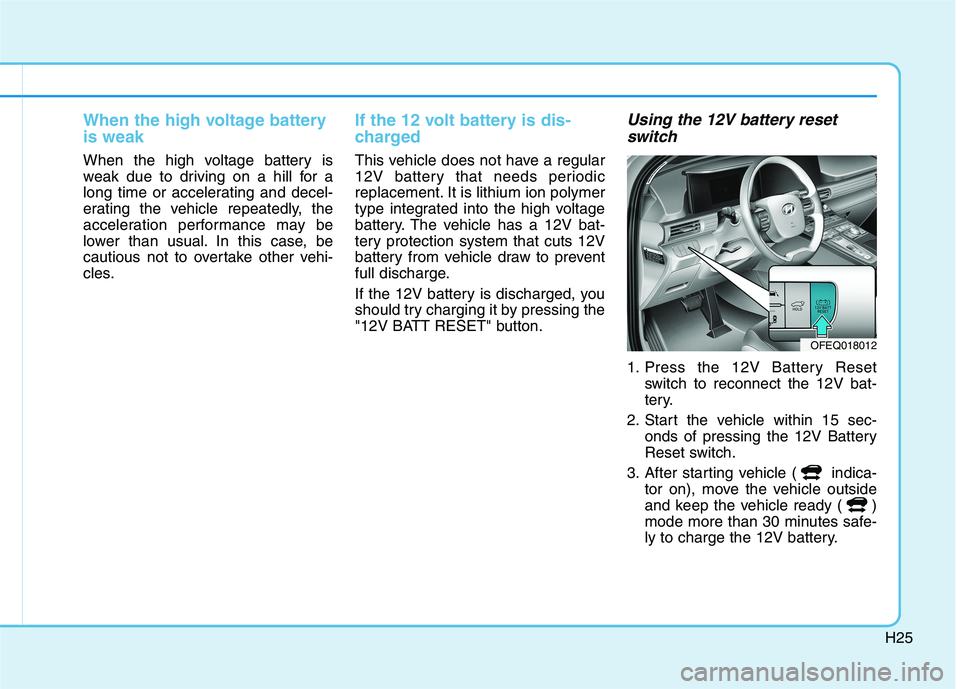
Using the 12V battery reset
switch
1. Press the 12V Battery Reset
switch to reconnect the 12V bat-
tery.
2. Start the vehicle within 15 sec-
onds of pressing the 12V Battery
Reset switch.
3. After starting vehicle ( indica-
tor on), move the vehicle outside
and keep the vehicle ready ( )
mode more than 30 minutes safe-
ly to charge the 12V battery.
OFEQ018012
Page 538 of 561
H33
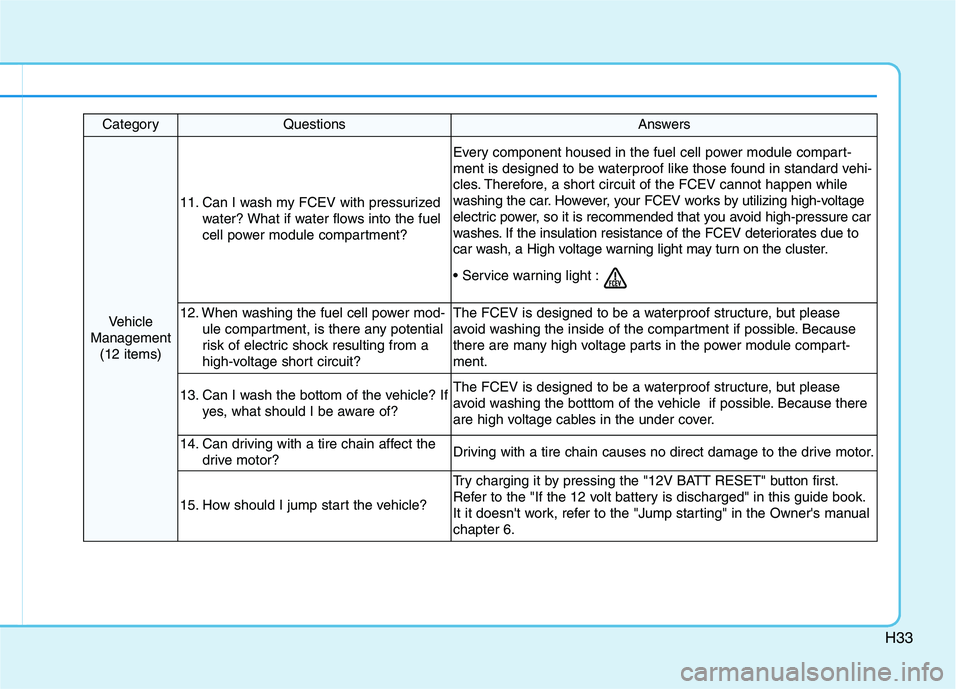
CategoryQuestionsAnswers
Vehicle
Management
(12 items)
11. Can I wash my FCEV with pressurized
water? What if water flows into the fuel
cell power module compartment?
Every component housed in the fuel cell power module compart-
ment is designed to be waterproof like those found in standard vehi-
cles. Therefore, a short circuit of the FCEV cannot happen while
washing the car. However, your FCEV works by utilizing high-voltage
electric power, so it is recommended that you avoid high-pressure car
washes. If the insulation resistance of the FCEV deteriorates due to
car wash, a High voltage warning light may turn on the cluster.
12. When washing the fuel cell power mod-
ule compartment, is there any potential
risk of electric shock resulting from a
high-voltage short circuit?The FCEV is designed to be a waterproof structure, but please
avoid washing the inside of the compartment if possible. Because
there are many high voltage parts in the power module compart-
ment.
13. Can I wash the bottom of the vehicle? If
yes, what should I be aware of?The FCEV is designed to be a waterproof structure, but please
avoid washing the botttom of the vehicle if possible. Because there
are high voltage cables in the under cover.
14. Can driving with a tire chain affect the
drive motor?Driving with a tire chain causes no direct damage to the drive motor.
15. How should I jump start the vehicle?
Try charging it by pressing the "12V BATT RESET" button first.
Refer to the "If the 12 volt battery is discharged" in this guide book.
It it doesn't work, refer to the "Jump starting" in the Owner's manual
chapter 6.
Page 552 of 561
I-2
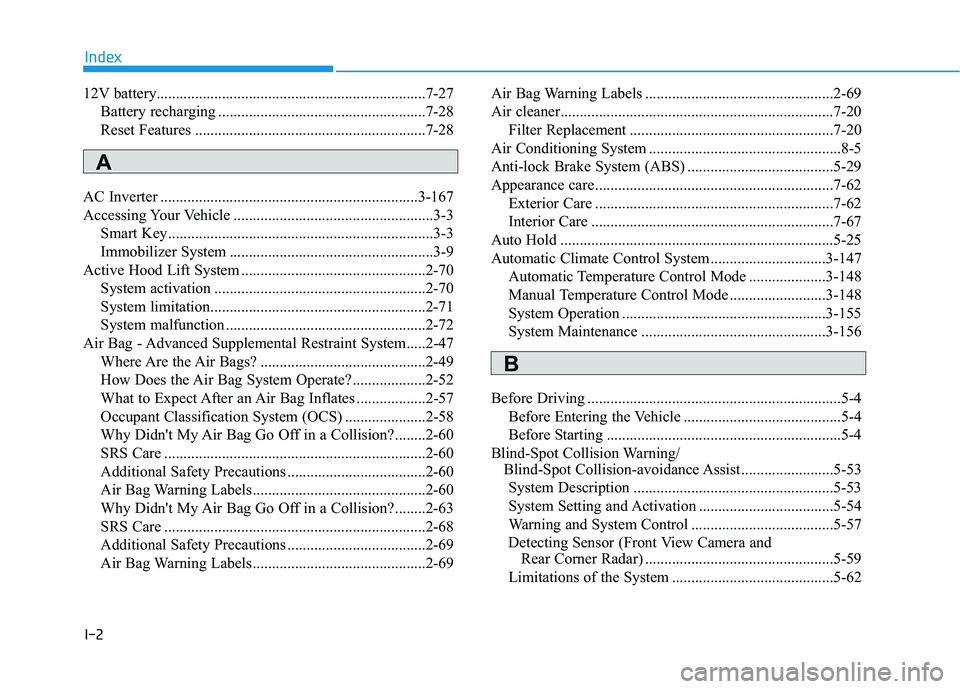
12V battery......................................................................7-27
Battery recharging ......................................................7-28
Reset Features ............................................................7-28
AC Inverter ...................................................................3-167
Accessing Your Vehicle ....................................................3-3
Smart Key.....................................................................3-3
Immobilizer System .....................................................3-9
Active Hood Lift System ................................................2-70
System activation .......................................................2-70
System limitation........................................................2-71
System malfunction ....................................................2-72
Air Bag - Advanced Supplemental Restraint System.....2-47
Where Are the Air Bags? ...........................................2-49
How Does the Air Bag System Operate? ...................2-52
What to Expect After an Air Bag Inflates ..................2-57
Occupant Classification System (OCS) .....................2-58
Why Didn't My Air Bag Go Off in a Collision?........2-60
SRS Care ....................................................................2-60
Additional Safety Precautions ....................................2-60
Air Bag Warning Labels.............................................2-60
Why Didn't My Air Bag Go Off in a Collision?........2-63
SRS Care ....................................................................2-68
Additional Safety Precautions ....................................2-69
Air Bag Warning Labels.............................................2-69Air Bag Warning Labels .................................................2-69
Air cleaner.......................................................................7-20
Filter Replacement .....................................................7-20
Air Conditioning System ..................................................8-5
Anti-lock Brake System (ABS) ......................................5-29
Appearance care..............................................................7-62
Exterior Care ..............................................................7-62
Interior Care ...............................................................7-67
Auto Hold .......................................................................5-25
Automatic Climate Control System..............................3-147
Automatic Temperature Control Mode ....................3-148
Manual Temperature Control Mode .........................3-148
System Operation .....................................................3-155
System Maintenance ................................................3-156
Before Driving ..................................................................5-4
Before Entering the Vehicle .........................................5-4
Before Starting .............................................................5-4
Blind-Spot Collision Warning/
Blind-Spot Collision-avoidance Assist ........................5-53
System Description ....................................................5-53
System Setting and Activation ...................................5-54
Warning and System Control .....................................5-57
Detecting Sensor (Front View Camera and
Rear Corner Radar) .................................................5-59
Limitations of the System ..........................................5-62
Index
A
B
Page 556 of 561
I-6
Instrument Cluster...........................................................3-58
Instrument Cluster Control .........................................3-59
Gauges and Meters .....................................................3-59
Warning and Indicator Lights.....................................3-65
LCD Display Messages ..............................................3-76
Instrument Panel Overview ..............................................1-5
Interior Care ....................................................................7-67
Interior Features ............................................................3-164
Cup Holder ...............................................................3-164
Sunvisor ....................................................................3-165
Power Outlet.............................................................3-166
AC Inverter...............................................................3-167
USB Charger ............................................................3-169
Wireless Cellular Phone Charging System ..............3-169
Clock ........................................................................3-171
Coat Hook ................................................................3-172
Floor Mat Anchor(s) .................................................3-172
Luggage Net Holder .................................................3-173
Cargo Security Screen ..............................................3-174
Interior Overview..............................................................1-4
Introduction of FCEV .......................................................H2Lane Following Assist (LFA) System ............................5-87
LFA operation .............................................................5-88
Warning message........................................................5-90
Limitations of the system ...........................................5-92
Lane Keeping Assist (LKA) System ..............................5-79
LKA System Operation ..............................................5-80
Warning Light and Message.......................................5-83
Limitations of the System ..........................................5-85
LKA System Function Change ..................................5-86
LCD Display ...................................................................3-81
LCD Display Control .................................................3-81
LCD Display Modes ..................................................3-82
LCD Display Messages (FCEV) .....................................H16
Leading Vehicle Departure Alert ..................................5-116
System Setting and Activation .................................5-116
Light bulbs ......................................................................7-57
Headlamp, front center lamp, turn signal lamp,
daytime running lamp, parking lamp,
side marker replacement .........................................7-58
Side Repeater Lamp Replacement .............................7-58
Rear Combination Light Bulb Replacement ..............7-59
High mounted stop lamp ............................................7-59
License Plate Light Bulb Replacement ......................7-60
Interior Light Bulb Replacement ...............................7-60
Index
L
Page 561 of 561
I-11
Wiper blades ...................................................................7-24
Blade Inspection .........................................................7-24
Blade Replacement .....................................................7-24
Wipers and Washers ......................................................3-101
Front Windshield Wipers..........................................3-101
Front Windshield Washers........................................3-103
Rear Window Wiper and Washer .............................3-104
Wireless Cellular Phone Charging System ...................3-169
I
Index