brake sensor HYUNDAI NEXO 2019 Owners Manual
[x] Cancel search | Manufacturer: HYUNDAI, Model Year: 2019, Model line: Nexo, Model: Hyundai Nexo 2019Pages: 561, PDF Size: 48.42 MB
Page 82 of 561
2-67
Safety system of your vehicle
2
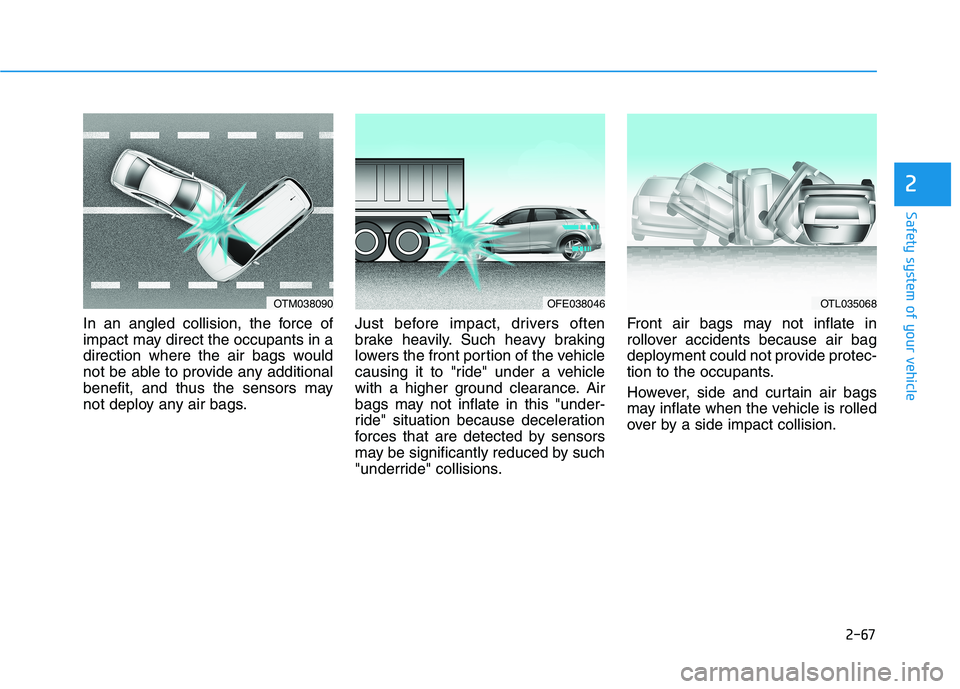
In an angled collision, the force of
impact may direct the occupants in a
direction where the air bags would
not be able to provide any additional
benefit, and thus the sensors may
not deploy any air bags.Just before impact, drivers often
brake heavily. Such heavy braking
lowers the front portion of the vehicle
causing it to "ride" under a vehicle
with a higher ground clearance. Air
bags may not inflate in this "under-
ride" situation because deceleration
forces that are detected by sensors
may be significantly reduced by such
"underride" collisions.Front air bags may not inflate in
rollover accidents because air bag
deployment could not provide protec-
tion to the occupants.
However, side and curtain air bags
may inflate when the vehicle is rolled
over by a side impact collision.
OTM038090OFE038046OTL035068
Page 176 of 561
3-89
Convenient features of your vehicle
3
L LI
IG
GH
HT
TI
IN
NG
G
Exterior Lights
Lighting control
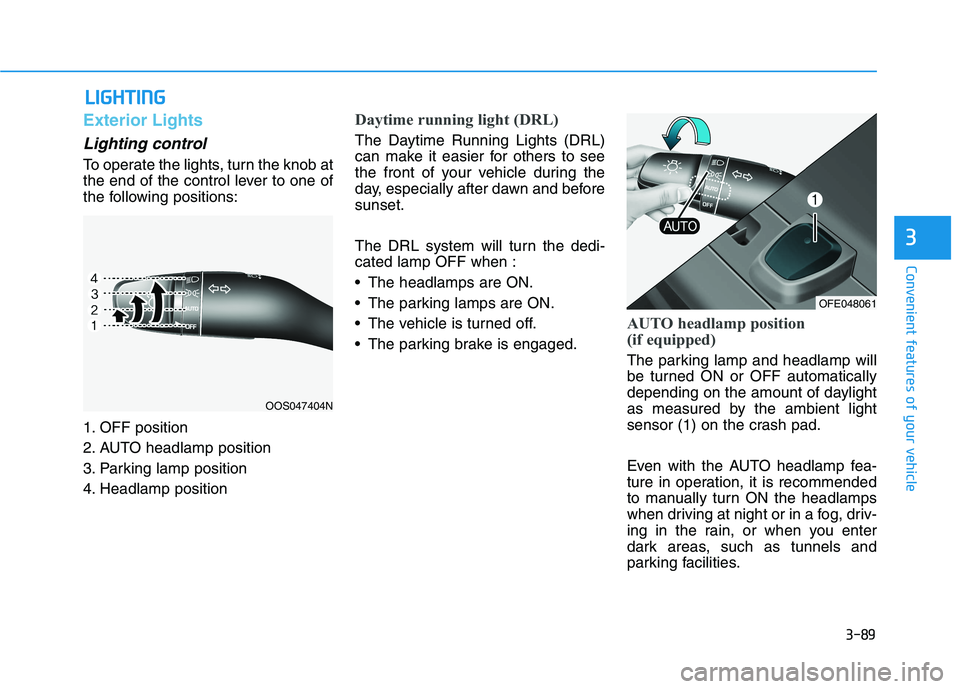
To operate the lights, turn the knob at
the end of the control lever to one of
the following positions:
1. OFF position
2. AUTO headlamp position
3. Parking lamp position
4. Headlamp position
Daytime running light (DRL)
The Daytime Running Lights (DRL)
can make it easier for others to see
the front of your vehicle during the
day, especially after dawn and before
sunset.
The DRL system will turn the dedi-
cated lamp OFF when :
The headlamps are ON.
The parking lamps are ON.
The vehicle is turned off.
The parking brake is engaged.
AUTO headlamp position
(if equipped)
The parking lamp and headlamp will
be turned ON or OFF automatically
depending on the amount of daylight
as measured by the ambient light
sensor (1) on the crash pad.
Even with the AUTO headlamp fea-
ture in operation, it is recommended
to manually turn ON the headlamps
when driving at night or in a fog, driv-
ing in the rain, or when you enter
dark areas, such as tunnels and
parking facilities.
OOS047404N
OFE048061
Page 194 of 561
3-107
Convenient features of your vehicle
3
Non-operational conditions of
Parking Distance Warning
(Reverse/Forward) system
The Parking Distance Warning
(Reverse/Forward) system may not
operate normally when any of the
following occur:
Moisture is frozen to the sensor.
Sensor is covered with foreign mat-
ter, such as snow or water, or the
sensor cover is blocked.
The Parking Distance Warning
(Reverse/Forward) system may
experience a malfunction when the
following occurs:
Driving on uneven road surfaces
such as unpaved roads, gravel,
bumps, or gradient.
Objects generating excessive noise
such as vehicle horns, loud motor-
cycle engines, or truck air brakes
can interfere with the sensor.
Heavy rain or water spray is present.
Wireless transmitters or mobile
phones are present near the sensor.
The sensor is covered with snow.
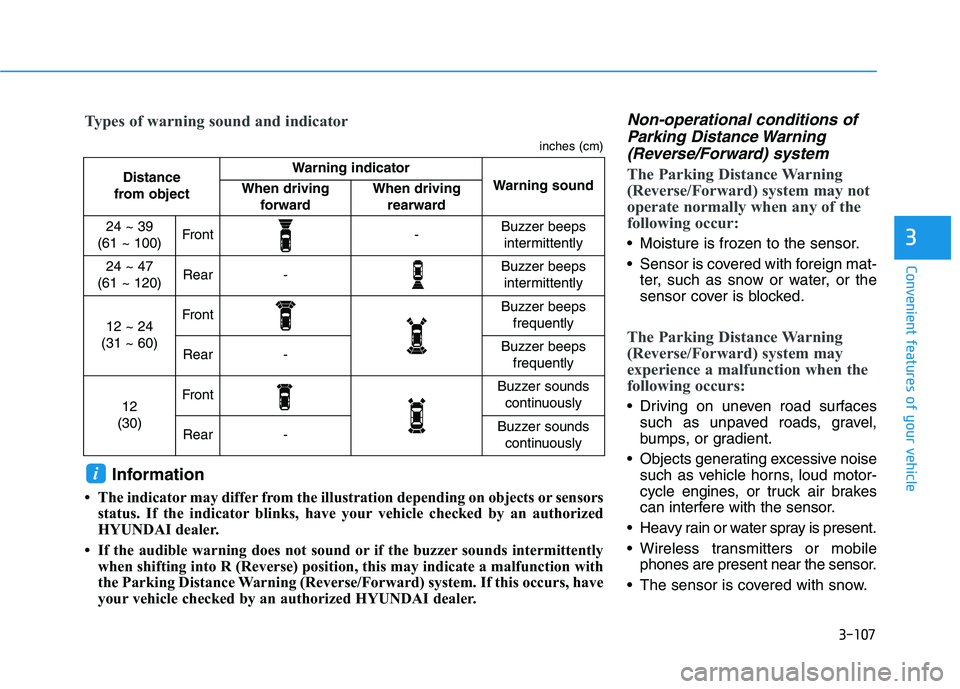
Distance
from object Warning indicator
Warning soundWhen driving
forwardWhen driving
rearward
24 ~ 39
(61 ~ 100)Front-Buzzer beeps
intermittently
24 ~ 47
(61 ~ 120)Rear-Buzzer beeps
intermittently
12 ~ 24
(31 ~ 60)FrontBuzzer beeps
frequently
Rear-Buzzer beeps
frequently
12
(30)FrontBuzzer sounds
continuously
Rear-Buzzer sounds
continuously
Types of warning sound and indicator
inches (cm)
Information
• The indicator may differ from the illustration depending on objects or sensors
status. If the indicator blinks, have your vehicle checked by an authorized
HYUNDAI dealer.
• If the audible warning does not sound or if the buzzer sounds intermittently
when shifting into R (Reverse) position, this may indicate a malfunction with
the Parking Distance Warning (Reverse/Forward) system. If this occurs, have
your vehicle checked by an authorized HYUNDAI dealer.
i
Page 203 of 561
3-116
Convenient features of your vehicle
Big vehicles such as buses or
trucks parked
Sensor covered with foreign mat-
ter, such as snow or water
An obstacle such as a trash can,
bicycle, shopping cart, etc. is near
Heavy wind
Wheel changed to an unauthorized
size
A problem with the wheel alignment
Vehicle leaned severely to one side
Front or rear distance sensors are
malfunction or not working properly.
(Refer to the Parking Distance
Warning system in chapter 3.)
requires battery replacement
Limitations of the System
When the vehicle has been
parked/stopped for a long time in a
cold environment, the Remote
Moving Forward/Backward may be
delayed depending on the vehicle
condition when the vehicle is
turned on remotely.
The RSPA system may suddenly
apply brake to avoid collision
against stationary or moving
object.
The system may be cancelled
unexpectedly when a person or
animal passes by near the vehicle.
The performance of the system
may be degraded and frequently
stop when driving in strong electric
field area.
Right after the parking place
search complete and beep sound
is generated, the search complete
may be cancelled according to the
surrounding environment Even while the system is in activa-
tion, the vehicle may collide with
the object existing within the blind-
spot area of the sensor.
When there is any obstacle within
the blind-spot area, drive out of the
parking space manually.
The system may not recognize the
object that appears suddenly.
The system does not work if there
is no car parked in front of the
parking space you are planning to
park.
Page 214 of 561
3-127
Convenient features of your vehicle
3
The Smart Parking assist is can-
celled while in operation when:
(1) The driver holds the steering
wheel while the steering wheel is
controlled
(2) The gear is shifted or the
Electronic Parking Brake (EPB) is
activated
(3) The hood opens
(4) The vehicle speed exceeds 3
mph (5 km/h)
(5) The vehicle accelerates suddenly
(6) The vehicle slips back while the
vehicle speed is controlled
(7) The wheel is stuck and the vehi-
cle is unable to move
(8) The obstacles are at the front and
back of the vehicle at the same
time
(9) About 3 minutes and 50 seconds
have passed after the Smart
Parking assist is activated
(10) The door opens while the driver’s
seatbelt is unfastened
(11) The gradient of the road
exceeds the range supported by
the Smart Parking assist(12) The steering, shifting gear and
drive assist are impossible
(13) The suspended status lasts for
over 1 minute
(14) The driver continuously presses
and releases the RSPA button
over 10 times
(15) The vehicle is unable to enter
the parking space while the
Smart Parking assist is in acti-
vation
(16) The Traction Control System
(TCS) is activated while the
vehicle speed is controlled
❈ When the Smart Parking assist is
cancelled, gear P (Park) and
Electronic Parking Brake (EPB)
are engaged automatically.
How the System Works
(Remote Smart Parking)
Remote smart Parking is available
with the driver outside the vehicle.
Make sure the conditions available
before activation the Remote smart
parking function.1. Select Remote Smart Parking:
Press the RSPA button with the
shift lever placed in D (Drive) or N
(Neutral) position.
However, the Smart Exit is select-
ed if you press the RSPA button
when the vehicle is in N (Neutral)
position after the initial startup.
2. Search for parking space: Slowly
move forward below 12 mph (20
km/h).
3. Search complete: Automatic
search by sensor.
However, check the actual parking
environment before parking the
vehicle.
4. Select parking type: Reverse
(left/right), parallel (left/right)
5. Operating instructions: Smart
Parking/Remote Smart Parking
6. Remote Smart Parking assist:
Steering wheel, gear shift and
vehicle speed control (reverse
parking)
7. Remote Smart Parking complete
Page 218 of 561
3-131
Convenient features of your vehicle
3
(12) The suspended status lasts for
over 1 minute
(13) The driver continuously presses
and releases the smart key’s
moving forward/backward but-
ton over 10 times
(14) The vehicle is unable to enter
the parking space
(15) The Traction Control System
(TCS) is activated while control-
ling the vehicle speed
(16) The smart key has failure
(17) The accelerator/brake pedal is
depressed while all the doors
are closed
(18) The brake pedal is depressed
while the driver’s door is open
and the smart key is outside the
vehicle
(19) The theft alarm system is acti-
vated
When the Remote Smart Parking
assist is cancelled, gear P (Park)
and Electronic Parking Brake
(EPB) are engaged automatically.
After engaged, the vehicle is auto-
matically turned off. Frequent beep sounds will gener-
ate to alert the deactivation of the
Remote Smart Parking Assist.
How the System Works
(Smart Exit)
Smart exit is available with the driver
on board. Make sure the conditions
available before activation the Smart
parking function.
1. Select Smart Exit:
Press the RSPA button with the
shift lever placed in P (Park) or N
(Neutral) position without driving
the vehicle after the initial startup.
*N (Neutral): Press RSPA button
after starting the vehicle and with-
out driving the vehicle. The Smart
Exit is selected. Then the Parking
mode is automatically selected
after driving.
*P (Park): After driving the vehicle
press RSPA button and Remote
Moving Forward/Backward is
automatically selected.
2. Search for smart exit space:
Automatic searching by sensor at
stopHowever, check the actual envi-
ronment before using Smart exit
function.
3. Select smart exit direction: Parallel
(left/right)
4. Smart Exit assist: Steering wheel,
gear shift and vehicle speed con-
trol (parallel exit)
5. Smart Exit complete
After the Smart Exit is complete,
make sure to check the surrounding
road conditions.
However, the Exit mode is activated
when below conditions are met:
The vehicle speed is kept under 3
mph (5 km/h) after the vehicle is
turned on.
The parallel parking by the Remote
Smart Parking assist is complete. Always be careful while exiting
for other vehicles or pedestrians.
WARNING
Page 268 of 561
Driving your vehicle
5
Before Driving ........................................................5-4
Before Entering the Vehicle ...........................................5-4
Before Starting ..................................................................5-4
Power Button..........................................................5-6
POWER Button Positions.................................................5-7
Starting the Vehicle ..........................................................5-9
Turning Off the Vehicle .................................................5-10
Reduction Gear.....................................................5-11
Reduction Gear Operation ............................................5-11
Parking ...............................................................................5-13
LCD Display Messages ...................................................5-13
Good Driving Practices ..................................................5-16
Paddle Shifter (Regenerative Braking
Control)..................................................................5-17
Braking System ....................................................5-18
Power Brakes ...................................................................5-18
Disc Brake Wear Indicator ............................................5-19
Electronic Parking Brake (EPB)...................................5-19
Auto Hold ..........................................................................5-25
Anti-lock Brake System (ABS) ....................................5-29
Electronic Stability Control (ESC)................................5-31
Vehicle Stability Management (VSM).........................5-34
Hill-Start Assist Control (HAC) ....................................5-36
Good Braking Practices .................................................5-36
Drive Mode Integrated Control System ............5-37
Drive mode change alert ...............................................5-38
ECO mode climate control ............................................5-38
Forward Collision-avoidance Assist (FCA)
System ...................................................................5-39
System Setting and Activation.....................................5-39
FCA Warning Message and System Control ............5-41
FCA Sensor (Front Radar/Front View Camera).......5-44
System Malfunction .......................................................5-46
Limitations of the System .............................................5-47
Blind-Spot Collision Warning/
Blind-Spot Collision-avoidance Assist..............5-53
System Description .........................................................5-53
System Setting and Activation.....................................5-54
Warning and System Control .......................................5-57
Detecting Sensor (Front View Camera and
Rear Corner Radar) ........................................................5-59
Limitations of the System .............................................5-62
Rear Cross-traffic Collision Warning (RCCW)/
Rear Cross-traffic Collision-avoidance Assist
(RCCA) ...................................................................5-67
System Description .........................................................5-67
System Setting and Activation.....................................5-68
Warning and System Control .......................................5-69
Limitations of the System .............................................5-73
Page 306 of 561
5-39
Driving your vehicle
5
The Forward Collision-Avoidance
Assist (FCA) system is designed to
help detect and monitor the vehicle
ahead or detect a pedestrian or
cyclists in the roadway through radar
signals and camera recognition to
warn the driver that a collision is
imminent, and if necessary, apply
emergency braking.System Setting and Activation
System setting
The driver can activate the FCA by
placing the power button to the ON
position and by selecting on the
AVN screen :
"Vehicle settings →Driver assis-
tance →Forward safety"
- If you select "Active assistance",
the FCA system activates. The
FCA produces warning mes-
sages and warning alarms in
accordance with the collision risk
levels. Also, it controls the brakes
in accordance with the collision
risk levels.
- If you select "Warning Only", the
FCA system activates and pro-
duces only warning alarms in
accordance with the collision risk
levels. You should control the
brake directly because the FCA
system do not control the brake.
- If you select "Off", the FCA sys-
tem deactivates,
F FO
OR
RW
WA
AR
RD
D
C
CO
OL
LL
LI
IS
SI
IO
ON
N-
-A
AV
VO
OI
ID
DA
AN
NC
CE
E
A
AS
SS
SI
IS
ST
T
(
(F
FC
CA
A)
)
S
SY
YS
ST
TE
EM
M
Take the following precautions
when using the Forward Collision-
Avoidance Assist (FCA) system:
This system is only a supple-
mental system and it is not
intended to, nor does it replace
the need for extreme care and
attention of the driver. The
sensing range and objects
detectable by the sensors are
limited. Pay attention to the
road conditions at all times.
NEVER drive too fast in accor-
dance with the road condi-
tions or while cornering.
Always drive cautiously to
prevent accidents from any
unexpected and sudden situa-
tions. The Forward Collision-
Avoidance system may not
always stop the vehicle com-
pletely and is only intended to
help mitigate a collision that
is imminent.
WARNING
Page 313 of 561
5-46
Driving your vehicle
System Malfunction
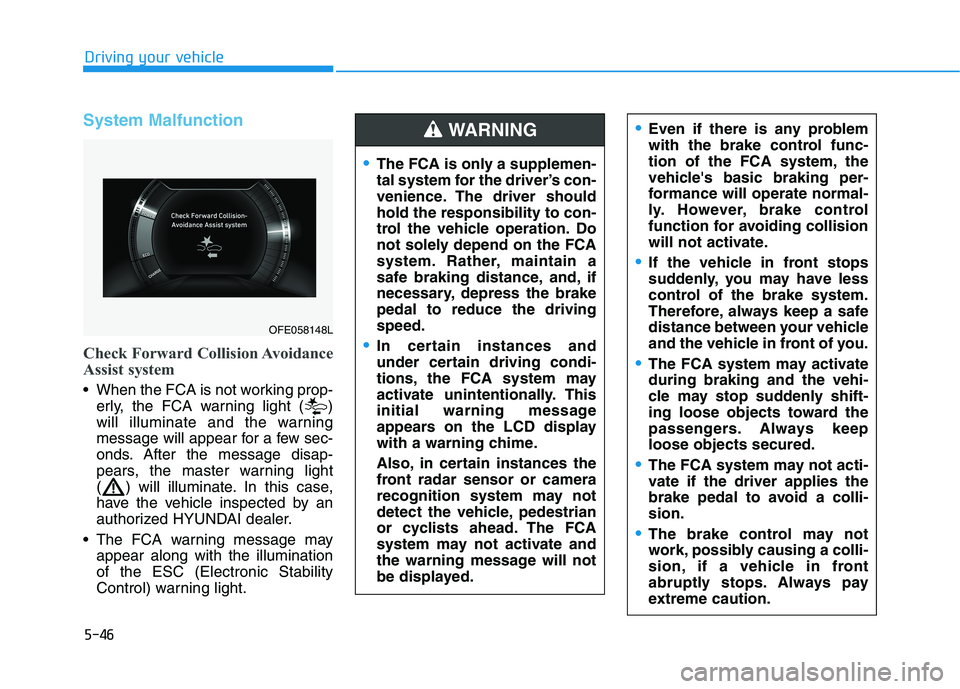
Check Forward Collision Avoidance
Assist system
When the FCA is not working prop-
erly, the FCA warning light ( )
will illuminate and the warning
message will appear for a few sec-
onds. After the message disap-
pears, the master warning light
( ) will illuminate. In this case,
have the vehicle inspected by an
authorized HYUNDAI dealer.
The FCA warning message may
appear along with the illumination
of the ESC (Electronic Stability
Control) warning light.
The FCA is only a supplemen-
tal system for the driver’s con-
venience. The driver should
hold the responsibility to con-
trol the vehicle operation. Do
not solely depend on the FCA
system. Rather, maintain a
safe braking distance, and, if
necessary, depress the brake
pedal to reduce the driving
speed.
In certain instances and
under certain driving condi-
tions, the FCA system may
activate unintentionally. This
initial warning message
appears on the LCD display
with a warning chime.
Also, in certain instances the
front radar sensor or camera
recognition system may not
detect the vehicle, pedestrian
or cyclists ahead. The FCA
system may not activate and
the warning message will not
be displayed.
WARNING Even if there is any problem
with the brake control func-
tion of the FCA system, the
vehicle's basic braking per-
formance will operate normal-
ly. However, brake control
function for avoiding collision
will not activate.
If the vehicle in front stops
suddenly, you may have less
control of the brake system.
Therefore, always keep a safe
distance between your vehicle
and the vehicle in front of you.
The FCA system may activate
during braking and the vehi-
cle may stop suddenly shift-
ing loose objects toward the
passengers. Always keep
loose objects secured.
The FCA system may not acti-
vate if the driver applies the
brake pedal to avoid a colli-
sion.
The brake control may not
work, possibly causing a colli-
sion, if a vehicle in front
abruptly stops. Always pay
extreme caution.
OFE058148L
Page 314 of 561
5-47
Driving your vehicle
5
Limitations of the System
The Forward Collision Avoidance
Assist (FCA) system is designed to
monitor the vehicle ahead or a
pedestrian or cyclists on the roadway
through radar signals and camera
recognition to warn the driver that a
collision is imminent, and if neces-
sary, apply emergency braking.
In certain situations, the radar sen-
sor or the camera may not be able to
detect the vehicle, a pedestrian or
cyclists ahead. In these cases, the
FCA system may not operate nor-
mally. The driver must pay careful
attention in the following situations
where the FCA operation may be
limited.
Detecting vehicles
The sensor may be limited when:
The radar sensor or camera is
blocked with a foreign object or
debris
Inclement weather such as heavy
rain or snow obscures the field of
view of the radar sensor or camera
There is interference by electro-
magnetic waves
The FCA system does not
detect cross traffic vehicles
that are approaching.
The FCA system cannot
detect the driver approaching
the side view of a parked vehi-
cle (for example on a dead
end street).
The FCA system cannot
detect the cross traffic cyclist
that are approaching.
In these cases, you must main-
tain a safe braking distance,
and if necessary, depress the
brake pedal to reduce the driv-
ing speed in order to maintain a
safe distance.
Occupants may get injured, if
the vehicle abruptly stops by
the activated FCA system. Pay
extreme caution.
The FCA system operates
only to detect vehicles, pedes-
trian or cyclist in front of the
vehicle.
The FCA system operates
only to detect vehicles or
pedestrians in front of the
vehicle.
The FCA system does not
operate when the vehicle is in
reverse.
The FCA system is not
designed to detect other
objects on the road such as
animals.
The FCA system does not
detect vehicles in the oppo-
site lane.
WARNING