warning HYUNDAI NEXO 2020 Owners Manual
[x] Cancel search | Manufacturer: HYUNDAI, Model Year: 2020, Model line: NEXO, Model: HYUNDAI NEXO 2020Pages: 561, PDF Size: 48.42 MB
Page 179 of 561
3-92
Convenient features of your vehicle
3. The High Beam Assist (HBA) will
turn on when vehicle speed is
above 25 mph (40 km/h).
away when the High Beam
Assist (HBA) is operating, the
High Beam Assist (HBA) will turn
off and the high beam will be on
continuously.
towards you when the high beam
is off, the high beam will turn on
without the High Beam Assist
(HBA) canceled. When you let
go of the light switch, the lever
will move to the middle and the
high beam will turn off.
towards you when the high beam
is on by the High Beam Assist
(HBA), the low beam will be on
and the High Beam Assist (HBA)
will turn off.
to the headlamp ON position, the
High Beam Assist (HBA) will turn
off and the low beam will be on
continuously.When the High Beam Assist (HBA) is
operating, the high beam switches to
low beam if any of the following con-
ditions occur :
- When the headlamp of an on-com-
ing vehicle is detected.
- When the tail lamp of a vehicle in
front is detected.
- When the headlamp or tail lamp of
a motorcycle or a bicycle is detect-
ed.
- When the surrounding ambient light
is bright enough that high beams
are not required.
- When streetlights or other lights
are detected.
- When the headlamp switch is not in
the AUTO position.
- When the High Beam Assist (HBA)
is off.
- When vehicle speed is below 22
mph (35 km/h).
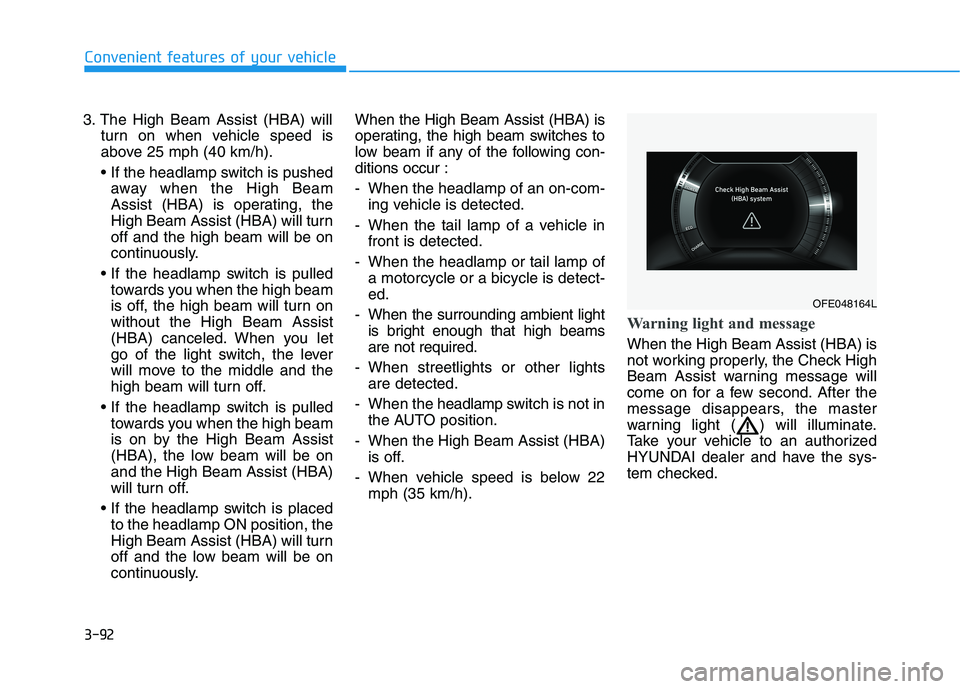
Warning light and message
When the High Beam Assist (HBA) is
not working properly, the Check High
Beam Assist warning message will
come on for a few second. After the
message disappears, the master
warning light ( ) will illuminate.
Take your vehicle to an authorized
HYUNDAI dealer and have the sys-
tem checked.
OFE048164L
Page 180 of 561
3-93
Convenient features of your vehicle
3
The system may not operate nor-
mally if any of the following con-
ditions should occur:
1) When the illumination from
an on-coming vehicle or a
vehicle in front is dim. Such
examples may include:
When the headlamps of an on-
coming vehicle or the tail
lamps of a vehicle in front is
covered with dust, snow, or
water.
When the headlamps on an on-
coming vehicle are OFF, but the
fog lamps are ON.
2) When the High Beam Assist
camera is adversely affected
by an external condition.
Such examples may include:
When the vehicle's head-
lamps have been damaged or
not repaired properly.
When the vehicle headlamps
are not aimed properly.
When the vehicle is driven on
a narrow curved road or rough
road.
When the vehicle is driven on
an uphill road or downhill
road.
When only part of the vehicle in
front is visible on a crossroad
or curved road.
When there is a traffic light,
reflecting sign, flashing sign or
mirror.
When the road conditions are
bad such as being wet or cov-
ered with snow.
When a vehicle suddenly
appears from a curve.
When the vehicle is tilted from
a flat tire or being towed.
When the Lane Keeping Assist
(LKA) system warning light
illuminates.
When the light from the on-
coming or front vehicle is not
detected because of exhaust
fume, smoke, fog, snow, etc.
When the front window is cov-
ered with foreign matters such
as ice, dust, fog, or is damaged.
3) When the forward visibility is
poor. Such examples may
include:
When the headlamps of an on-
coming vehicle or a vehicle in
front is not detected due to
poor outside visibility (smog,
smoke, dust, fog, heavy rain,
snow, etc.).
When the windshield visibility
is poor.
WARNING
Page 181 of 561
3-94
Convenient features of your vehicle
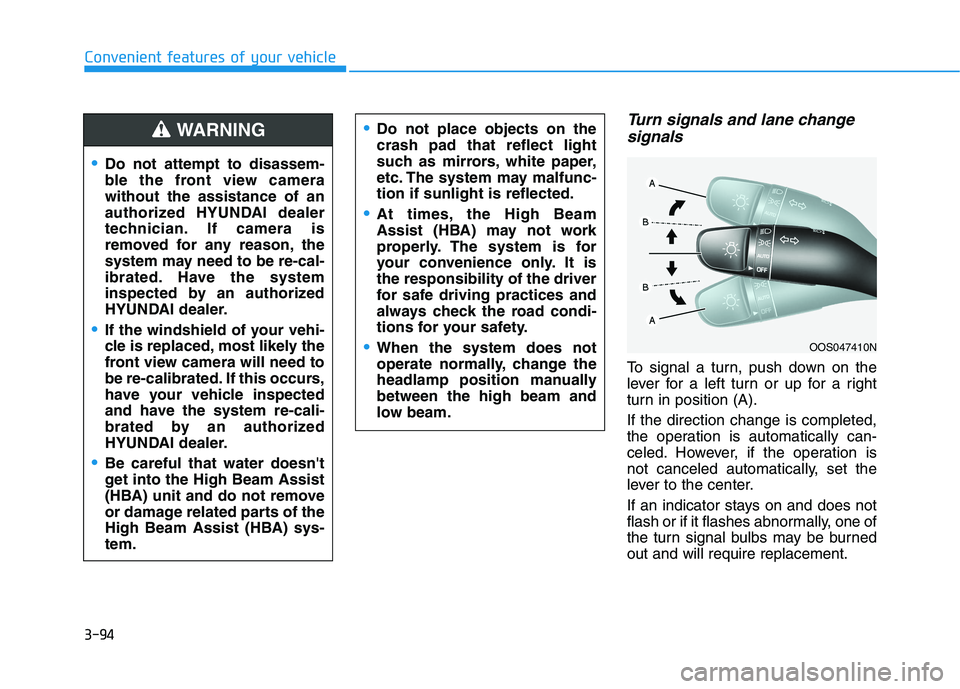
Turn signals and lane change
signals
To signal a turn, push down on the
lever for a left turn or up for a right
turn in position (A).
If the direction change is completed,
the operation is automatically can-
celed. However, if the operation is
not canceled automatically, set the
lever to the center.
If an indicator stays on and does not
flash or if it flashes abnormally, one of
the turn signal bulbs may be burned
out and will require replacement.
OOS047410N
Do not attempt to disassem-
ble the front view camera
without the assistance of an
authorized HYUNDAI dealer
technician. If camera is
removed for any reason, the
system may need to be re-cal-
ibrated. Have the system
inspected by an authorized
HYUNDAI dealer.
If the windshield of your vehi-
cle is replaced, most likely the
front view camera will need to
be re-calibrated. If this occurs,
have your vehicle inspected
and have the system re-cali-
brated by an authorized
HYUNDAI dealer.
Be careful that water doesn't
get into the High Beam Assist
(HBA) unit and do not remove
or damage related parts of the
High Beam Assist (HBA) sys-
tem.
Do not place objects on the
crash pad that reflect light
such as mirrors, white paper,
etc. The system may malfunc-
tion if sunlight is reflected.
At times, the High Beam
Assist (HBA) may not work
properly. The system is for
your convenience only. It is
the responsibility of the driver
for safe driving practices and
always check the road condi-
tions for your safety.
When the system does not
operate normally, change the
headlamp position manually
between the high beam and
low beam.
WARNING
Page 183 of 561
3-96
Convenient features of your vehicle
If the driver gets out of the vehicle
through other doors (except dri-
ver’s door), the battery saver func-
tion does not operate and the
headlamp delay function does not
turn off automatically. Therefore, It
causes the battery to be dis-
charged. In this case, make sure
to turn off the lamp before getting
out of the vehicle.
Interior Lights
Do not use the interior lights for
extended periods when the vehi-
cle is turned off or the battery will
discharge.
Interior lamp AUTO cut
The interior lamps will automatically
go off approximately 20 minutes after
the vehicle is turned off and the
doors are closed. If a door is opened,
the lamp will go off 40 minutes after
the vehicle is turned off. If the doors
are locked by the remote key or
smart key and the vehicle enters the
armed stage of the theft alarm sys-
tem, the lamps will go off five sec-
onds later.
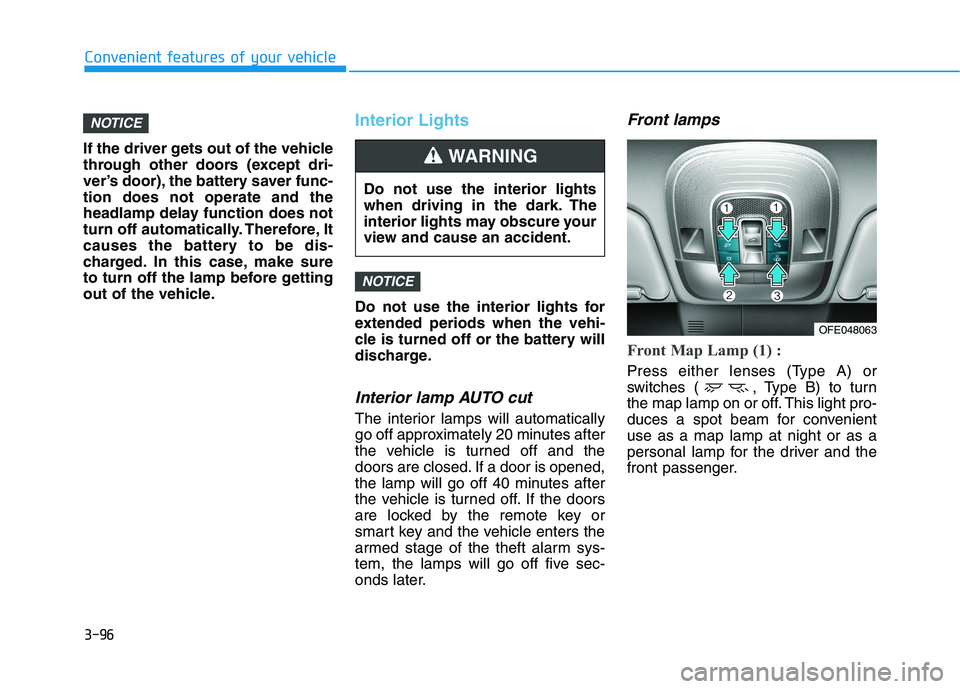
Front lamps
Front Map Lamp (1) :
Press either lenses (Type A) or
switches ( , Type B) to turn
the map lamp on or off. This light pro-
duces a spot beam for convenient
use as a map lamp at night or as a
personal lamp for the driver and the
front passenger.
NOTICE
NOTICE
Do not use the interior lights
when driving in the dark. The
interior lights may obscure your
view and cause an accident.
WARNING
OFE048063
Page 189 of 561
3-102
Convenient features of your vehicle
Information
If there is heavy accumulation of snow
or ice on the windshield, defrost the
windshield for about 10 minutes, or
until the snow and/or ice is removed
before using the windshield wipers to
ensure proper operation.
If you do not remove the snow and/or
ice before using the wiper and washer,
it may damage the wiper and washer
system.
AUTO - Automatic Wiper Control
(if equipped)
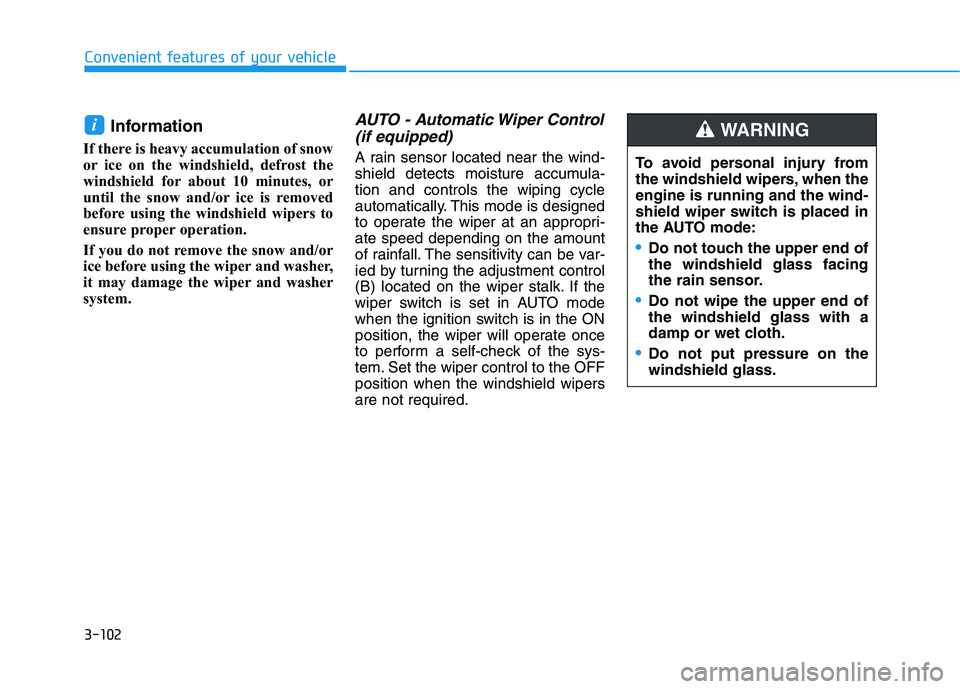
A rain sensor located near the wind-
shield detects moisture accumula-
tion and controls the wiping cycle
automatically. This mode is designed
to operate the wiper at an appropri-
ate speed depending on the amount
of rainfall. The sensitivity can be var-
ied by turning the adjustment control
(B) located on the wiper stalk. If the
wiper switch is set in AUTO mode
when the ignition switch is in the ON
position, the wiper will operate once
to perform a self-check of the sys-
tem. Set the wiper control to the OFF
position when the windshield wipers
are not required.
i
To avoid personal injury from
the windshield wipers, when the
engine is running and the wind-
shield wiper switch is placed in
the AUTO mode:
•Do not touch the upper end of
the windshield glass facing
the rain sensor.
Do not wipe the upper end of
the windshield glass with a
damp or wet cloth.
Do not put pressure on the
windshield glass.
WARNING
Page 190 of 561
3-103
Convenient features of your vehicle
When washing the vehicle, set
the wiper switch in the OFF posi-
tion to stop the auto wiper oper-
ation. The wiper may operate
and be damaged if the switch is
set in the AUTO mode while
washing the vehicle.
Do not remove the sensor cover.
Damage to system parts could
occur and may not be covered
by your vehicle warranty.
Because of using a photo sen-
sor, temporary malfunction
could occur according to sud-
den ambient light change while
driving.
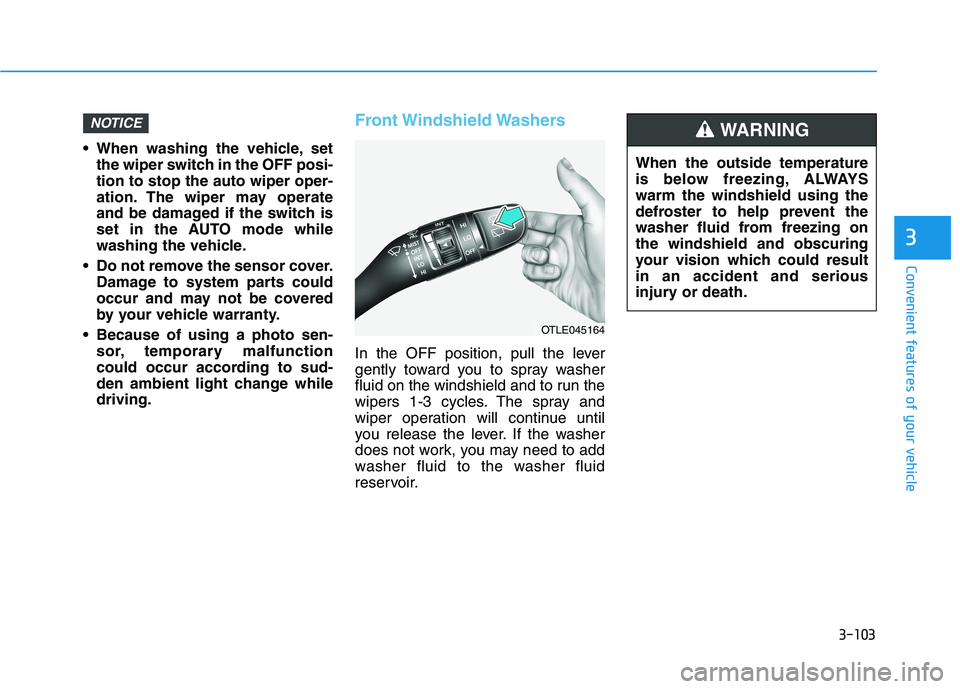
Front Windshield Washers
In the OFF position, pull the lever
gently toward you to spray washer
fluid on the windshield and to run the
wipers 1-3 cycles. The spray and
wiper operation will continue until
you release the lever. If the washer
does not work, you may need to add
washer fluid to the washer fluid
reservoir.
NOTICE
3
OTLE045164
When the outside temperature
is below freezing, ALWAYS
warm the windshield using the
defroster to help prevent the
washer fluid from freezing on
the windshield and obscuring
your vision which could result
in an accident and serious
injury or death.
WARNING
Page 192 of 561
![HYUNDAI NEXO 2020 Owners Manual 3-105
Convenient features of your vehicle
3
D DR
RI
IV
VE
ER
R
A
AS
SS
SI
IS
ST
T
S
SY
YS
ST
TE
EM
M
Parking Distance Warning
(Reverse/Forward) System
(if equipped)
[A] : Front Sensor, [B] : Rear](/img/35/41150/w960_41150-191.png "HYUNDAI NEXO 2020 Owners Manual 3-105
Convenient features of your vehicle
3
D DR
RI
IV
VE
ER
R
A
AS
SS
SI
IS
ST
T
S
SY
YS
ST
TE
EM
M
Parking Distance Warning
(Reverse/Forward) System
(if equipped)
[A] : Front Sensor, [B] : Rear")
3-105
Convenient features of your vehicle
3
D DR
RI
IV
VE
ER
R
A
AS
SS
SI
IS
ST
T
S
SY
YS
ST
TE
EM
M
Parking Distance Warning
(Reverse/Forward) System
(if equipped)
[A] : Front Sensor, [B] : Rear Sensor
The Parking Distance Warning
(Reverse/Forward) system assists
the driver during movement of the
vehicle by chiming if any object is
sensed within the distance of 39
inches (100 cm) in front and 47 inch-
es (120 cm) behind the vehicle.
This system is a supplemental sys-
tem that senses objects within the
range and location of the sensors, it
cannot detect objects in other areas
where sensors are not installed.
ALWAYS look around your
vehicle to make sure there are
no objects or obstacles
before moving the vehicle in
any direction to prevent a col-
lision.
Always pay close attention
when the vehicle is driven
close to objects, particularly
pedestrians, and especially
children.
Be aware that some objects
may not be visible on the
screen or be detected by the
sensors, due to the objects
distance, size or material, all
of which can limit the effec-
tiveness of the sensor.
WARNING
OFE048046N
OFE048047N
Page 193 of 561
3-106
Convenient features of your vehicle
Operation of the Parking
Distance Warning
(Reverse/Forward) System
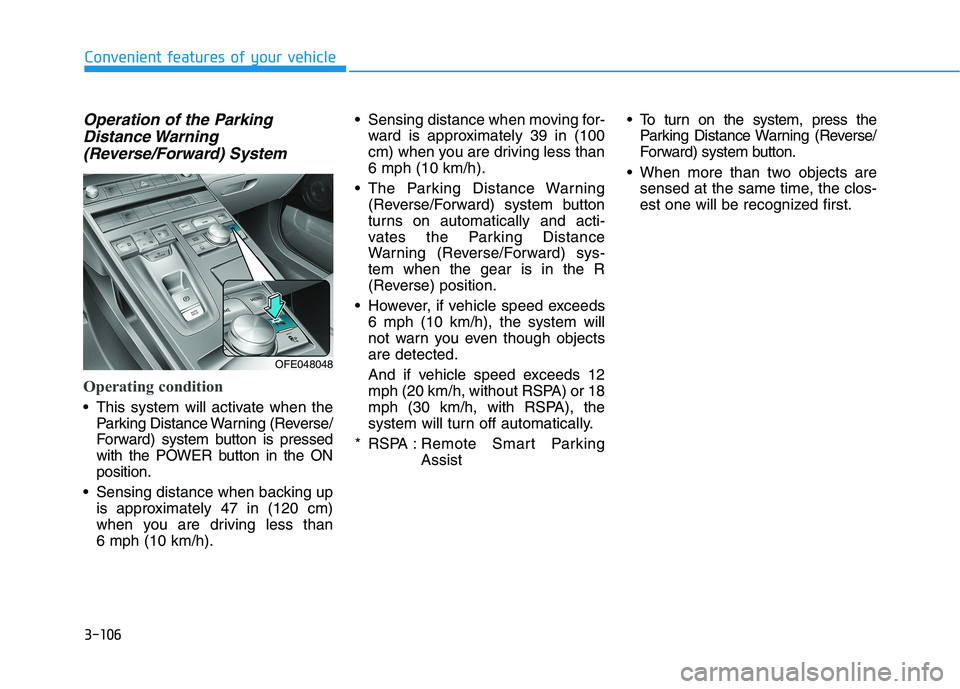
Operating condition
This system will activate when the
Parking Distance Warning (Reverse/
Forward) system button is pressed
with the POWER button in the ON
position.
Sensing distance when backing up
is approximately 47 in (120 cm)
when you are driving less than
6 mph (10 km/h). Sensing distance when moving for-
ward is approximately 39 in (100
cm) when you are driving less than
6 mph (10 km/h).
The Parking Distance Warning
(Reverse/Forward) system button
turns on automatically and acti-
vates the Parking Distance
Warning (Reverse/Forward) sys-
tem when the gear is in the R
(Reverse) position.
However, if vehicle speed exceeds
6 mph (10 km/h), the system will
not warn you even though objects
are detected.
And if vehicle speed exceeds 12
mph (20 km/h, without RSPA) or 18
mph (30 km/h, with RSPA), the
system will turn off automatically.
* RSPA : Remote Smart Parking
Assist To turn on the system, press the
Parking Distance Warning (Reverse/
Forward) system button.
When more than two objects are
sensed at the same time, the clos-
est one will be recognized first.
OFE048048
Page 194 of 561
3-107
Convenient features of your vehicle
3
Non-operational conditions of
Parking Distance Warning
(Reverse/Forward) system
The Parking Distance Warning
(Reverse/Forward) system may not
operate normally when any of the
following occur:
Moisture is frozen to the sensor.
Sensor is covered with foreign mat-
ter, such as snow or water, or the
sensor cover is blocked.
The Parking Distance Warning
(Reverse/Forward) system may
experience a malfunction when the
following occurs:
Driving on uneven road surfaces
such as unpaved roads, gravel,
bumps, or gradient.
Objects generating excessive noise
such as vehicle horns, loud motor-
cycle engines, or truck air brakes
can interfere with the sensor.
Heavy rain or water spray is present.
Wireless transmitters or mobile
phones are present near the sensor.
The sensor is covered with snow.
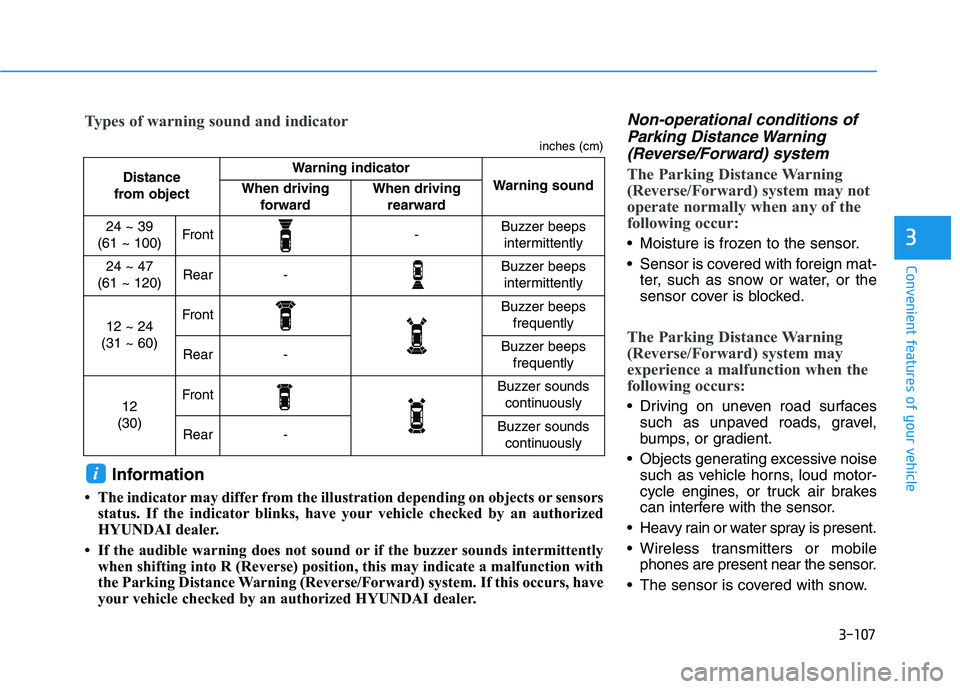
Distance
from object Warning indicator
Warning soundWhen driving
forwardWhen driving
rearward
24 ~ 39
(61 ~ 100)Front-Buzzer beeps
intermittently
24 ~ 47
(61 ~ 120)Rear-Buzzer beeps
intermittently
12 ~ 24
(31 ~ 60)FrontBuzzer beeps
frequently
Rear-Buzzer beeps
frequently
12
(30)FrontBuzzer sounds
continuously
Rear-Buzzer sounds
continuously
Types of warning sound and indicator
inches (cm)
Information
• The indicator may differ from the illustration depending on objects or sensors
status. If the indicator blinks, have your vehicle checked by an authorized
HYUNDAI dealer.
• If the audible warning does not sound or if the buzzer sounds intermittently
when shifting into R (Reverse) position, this may indicate a malfunction with
the Parking Distance Warning (Reverse/Forward) system. If this occurs, have
your vehicle checked by an authorized HYUNDAI dealer.
i
Page 195 of 561
3-108
Convenient features of your vehicle
Any non-factory equipment or
accessories have been installed, or
if the vehicle bumper height or sen-
sor installation has been modified.
Detecting range may decrease when:
Outside air temperature is
extremely hot or cold.
Undetectable objects smaller than
40 inches (1 m) and narrower than
6 inches (14 cm) in diameter.
The following objects may not be
recognized by the sensor:
Sharp or slim objects such as
ropes, chains or small poles.
Objects, which tend to absorb sen-
sor frequency such as clothes,
spongy material or snow.
Parking Distance Warning
(Reverse/Forward) system pre-
cautions
The Parking Distance Warning
(Reverse/Forward) system may not
operate consistently in some cir-
cumstances depending on the
speed of the vehicle and the
shapes of the objects detected.
The Parking Distance Warning
(Reverse/Forward) system may
malfunction if the vehicle bumper
height or sensor installation has
been modified or damaged. Any
non-factory installed equipment or
accessories may also interfere with
the sensor performance.
The sensor may not recognize
objects less than 15 in. (40 cm)
from the sensor, or it may sense an
incorrect distance. Use caution.
When the sensor is blocked with
snow, dirt, debris, or ice, the sys-
tem may be inoperative until the
snow or ice melts, or the debris is
removed. Use a soft cloth to wipe
debris away from the sensor. Do not push, scratch or strike the
sensor with any hard objects that
could damage the surface of the
sensor. Sensor damage could occur.
Do not spray the sensors or its sur-
rounding area directly with a high
pressure washer. Doing so may
cause the sensors to fail to operate
normally.
Your new vehicle warranty does
not cover any accidents or dam-
age to the vehicle or injuries to
its occupants related to a
Parking Distance Warning
(Reverse/Forward) system.
Always drive safely and cau-
tiously.
WARNING