sunroof HYUNDAI NEXO 2020 User Guide
[x] Cancel search | Manufacturer: HYUNDAI, Model Year: 2020, Model line: NEXO, Model: HYUNDAI NEXO 2020Pages: 561, PDF Size: 48.42 MB
Page 216 of 561
3-129
Convenient features of your vehicle
3
If the driver releases the button the
vehicle will stop and the assist will
stop temporarily. Press and hold
the button again to resume the
operation.
❈ You will hear frequent beep
sounds if the driver gets off the
vehicle after setting the Remote
Parking mode.
❈ Press the moving forward or back-
ward button again after checking
the distance (within about 10 ~ 16
ft. (3~5 m)) from the vehicles if the
vehicle didn’t move after pressing
and holding the smart key button
for about 5 seconds.7. Remote smart parking com-
plete
When the parking is complete, the
message is displayed on the AVN
screen and the vehicle is automati-
cally turned off. Drivers always
should check whether the door, win-
dow and sunroof are closed and the
door is locked.
When parking is complete:
- The parking complete sound (fre-
quent beep) is generated.
- The gear P (Park) and Electronic
Parking Brake (EPB) are engaged
automatically.
❈ Release the moving forward/back-
ward button on the smart key.
❈ The parking may complete bump-
ing on the stopper.
❈ When parking is complete, check
the surrounding conditions.Always check for obstacles
around your vehicle before
driving.
The function may be can-
celled if you attach something
(cover, etc.) to the steering
wheel.
Make sure all the passengers
exit the vehicle when the
Remote Smart Parking is
assisted.
Make sure all the smart keys
are outside the vehicle.
The smart key detection
range from the vehicle may
vary depending on the sur-
rounding environment
(indoor/outdoor, strong elec-
tric field area).
The smart key detection
range may change as the
vehicle moves. Maintain an
appropriate distance from the
vehicle.
CAUTION
Page 243 of 561
3-156
Convenient features of your vehicle
When using the air conditioning
system, monitor the temperature
gauge closely while driving up
hills or in heavy traffic when out-
side temperatures. Air condition-
ing system operation when climb-
ing a steep grade or in high out-
side ambient temperatures can
cause fuel cell stack overheating.
Continue to use the fan, but turn
the air conditioning system off if
the temperature gauge indicates
fuel cell stack overheating.
Air conditioning system operation
tips
If the vehicle has been parked in
direct sunlight during hot weather,
open the windows for a short time
to let the hot air inside the vehicle
escape.
After sufficient cooling has been
achieved, switch back from recircu-
lation mode to fresh mode. To help reduce moisture inside of
the windows on rainy or humid
days, decrease the humidity inside
the vehicle by operating the air
conditioning system with the win-
dows and sunroof closed.
Use the air conditioning system
every month only for a few minutes
to ensure maximum system per-
formance.
If you operate air conditioner exces-
sively, the difference between the
temperature of the outside air and
that of the windshield could cause
the outer surface of the windshield
to fog up, causing loss of visibility. In
this case, set the mode selection
knob or button to the position
and fan speed control to the lower
speed.
System Maintenance
Cabin air filter
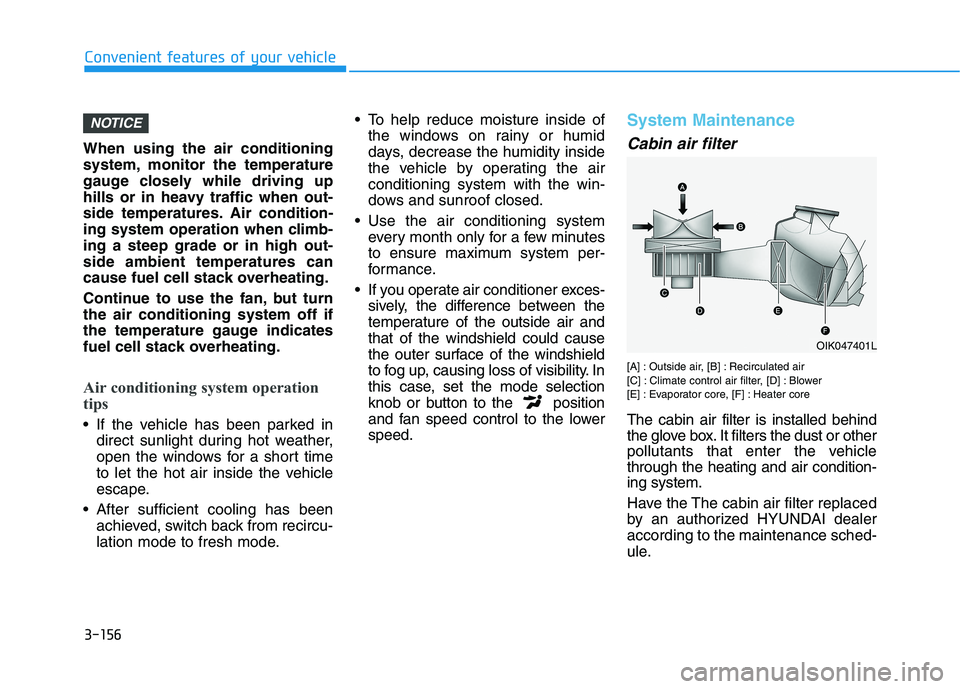
[A] : Outside air, [B] : Recirculated air
[C] : Climate control air filter, [D] : Blower
[E] : Evaporator core, [F] : Heater core
The cabin air filter is installed behind
the glove box. It filters the dust or other
pollutants that enter the vehicle
through the heating and air condition-
ing system.
Have the The cabin air filter replaced
by an authorized HYUNDAI dealer
according to the maintenance sched-
ule.
NOTICE
OIK047401L
Page 249 of 561
3-162
Convenient features of your vehicle
Automatic Ventilation
(if equipped)
When the POWER button is in the
ON position or when the vehicle is in
the ready ( ) mode and tempera-
ture is below 59°F (15°C) with the
recirculated air position selected
more than five minutes, the air intake
position will automatically change to
the outside (fresh) air position.
To cancel or reset the Automatic
Ventilation
When the air conditioning system is
on, select Face Level mode and
press the recirculation mode button
five times within three seconds while
pressing A/C button.
When the Automatic Ventilation fea-
ture is enabled, the recirculation but-
ton LED indicator will blink 6 times.
When the Automatic Ventilation fea-
ture is disabled, the recirculation but-
ton LED indicator will blink 3 times.
Sunroof Inside Air
Recirculation (if equipped)
When the heater or air conditioning
system is on with the sunroof
opened, the fresh mode will be auto-
matically selected. If you press the
recirculation mode button with the
sunroof open, recirculation mode
activate but will only remain enabled
for 3 minutes. After 3 minutes the air
intake control will revert back to
Fresh mode.
When the sunroof is closed, the air
intake position will return to the orig-
inal position that was selected.
C CL
LI
IM
MA
AT
TE
E
C
CO
ON
NT
TR
RO
OL
L
A
AD
DD
DI
IT
TI
IO
ON
NA
AL
L
F
FE
EA
AT
TU
UR
RE
ES
S
Page 263 of 561
Roof Side Rails (if equipped)
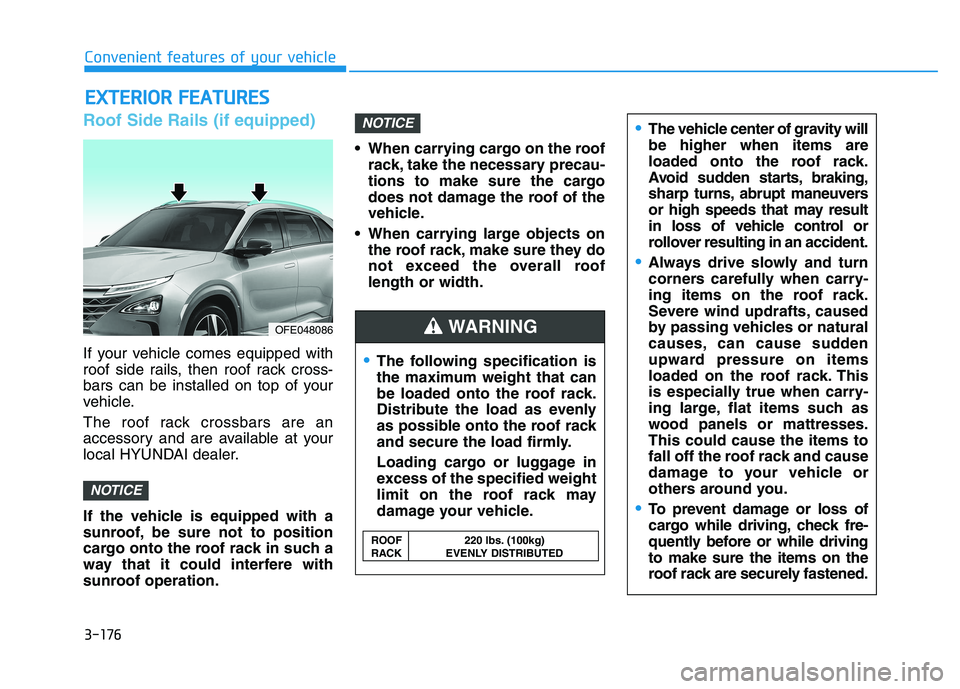
If your vehicle comes equipped with
roof side rails, then roof rack cross-
bars can be installed on top of your
vehicle.
The roof rack crossbars are an
accessory and are available at your
local HYUNDAI dealer.
If the vehicle is equipped with a
sunroof, be sure not to position
cargo onto the roof rack in such a
way that it could interfere with
sunroof operation. When carrying cargo on the roof
rack, take the necessary precau-
tions to make sure the cargo
does not damage the roof of the
vehicle.
When carrying large objects on
the roof rack, make sure they do
not exceed the overall roof
length or width.
NOTICE
NOTICE
E EX
XT
TE
ER
RI
IO
OR
R
F
FE
EA
AT
TU
UR
RE
ES
S
The following specification is
the maximum weight that can
be loaded onto the roof rack.
Distribute the load as evenly
as possible onto the roof rack
and secure the load firmly.
Loading cargo or luggage in
excess of the specified weight
limit on the roof rack may
damage your vehicle.
The vehicle center of gravity will
be higher when items are
loaded onto the roof rack.
Avoid sudden starts, braking,
sharp turns, abrupt maneuvers
or high speeds that may result
in loss of vehicle control or
rollover resulting in an accident.
Always drive slowly and turn
corners carefully when carry-
ing items on the roof rack.
Severe wind updrafts, caused
by passing vehicles or natural
causes, can cause sudden
upward pressure on items
loaded on the roof rack. This
is especially true when carry-
ing large, flat items such as
wood panels or mattresses.
This could cause the items to
fall off the roof rack and cause
damage to your vehicle or
others around you.
To prevent damage or loss of
cargo while driving, check fre-
quently before or while driving
to make sure the items on the
roof rack are securely fastened.
WARNING
ROOF 220 lbs. (100kg)
RACK EVENLY DISTRIBUTED
OFE048086
Convenient features of your vehicle
3-176
Page 404 of 561
6-6
What to do in an emergency
The following items may need to be
reset after the battery has been dis-
charged or the battery has been dis-
connected. See chapter 3 or 4 for:
Power Windows
Trip Computer
Climate Control System
Clock
Audio System
Sunroof
Driver Position Memory System
External power source using 12V
battery
The use of external power acces-
sories may reduce performance
and function of the vehicle.
Especially, the use of dash cam-
eras may shut off the power of the
vehicle prior to the dash camera's
automatic shut-down.
If the power of the vehicle is shut
off, start the vehicle as explained.
(refer to "Using the 12V Battery
Switch")
Jump Starting
In the event vehicle still does not
have a functional 12V battery (check
if interior lights will not turn on) then
you can try a jump start using a 12V
booster pack or jumper cables from
another vehicle's 12V battery
according to the following instruc-
tions.1. Position the vehicles close enough
that the jumper cables will reach,
but do not allow the vehicles to
touch.
2. Avoid fans or any moving parts in
the fuel cell power module com-
partment at all times, even when
the vehicles are turned off.
3. Turn off all electrical devices such
as radios, lights, air conditioning,
etc. Put the vehicles in P (Park)
and set the parking brake. Turn
both vehicles OFF.
NOTICE
Jump starting can be danger-
ous if done incorrectly. Follow
the jump starting procedure in
this section to avoid serious
injury or damage to your vehi-
cle. If in doubt about how to
properly jump start your vehi-
cle, we strongly recommend
that you have a service techni-
cian or towing service do it for
you.
CAUTION
Page 453 of 561
7-28
Maintenance
Battery recharging
By RESET button
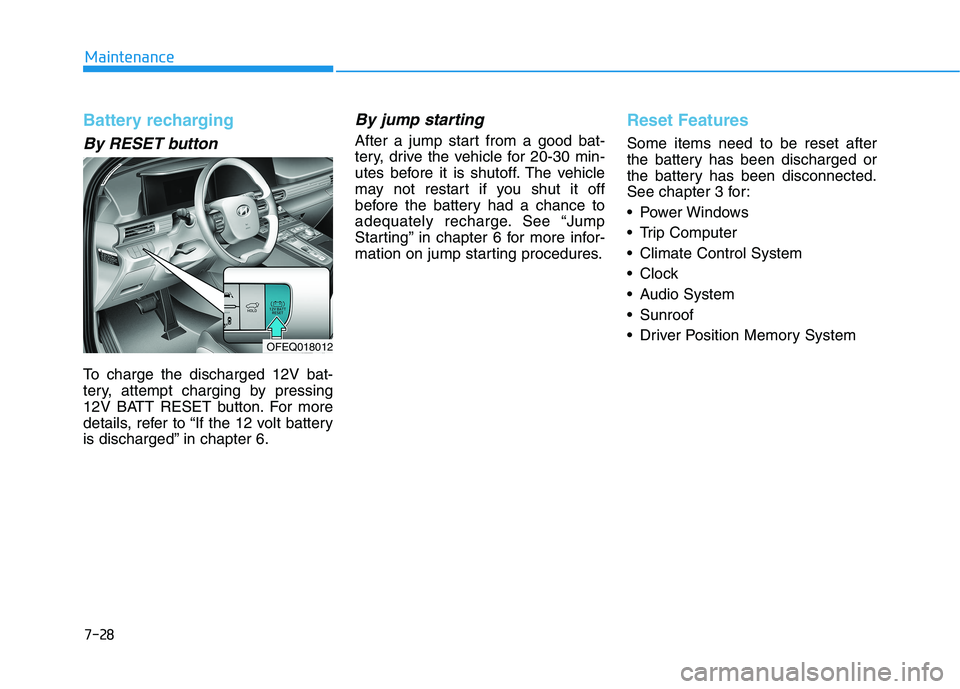
To charge the discharged 12V bat-
tery, attempt charging by pressing
12V BATT RESET button. For more
details, refer to “If the 12 volt battery
is discharged” in chapter 6.
By jump starting
After a jump start from a good bat-
tery, drive the vehicle for 20-30 min-
utes before it is shutoff. The vehicle
may not restart if you shut it off
before the battery had a chance to
adequately recharge. See “Jump
Starting” in chapter 6 for more infor-
mation on jump starting procedures.
Reset Features
Some items need to be reset after
the battery has been discharged or
the battery has been disconnected.
See chapter 3 for:
Power Windows
Trip Computer
Climate Control System
Clock
Audio System
Sunroof
Driver Position Memory System
OFEQ018012
Page 477 of 561
7-52
Maintenance
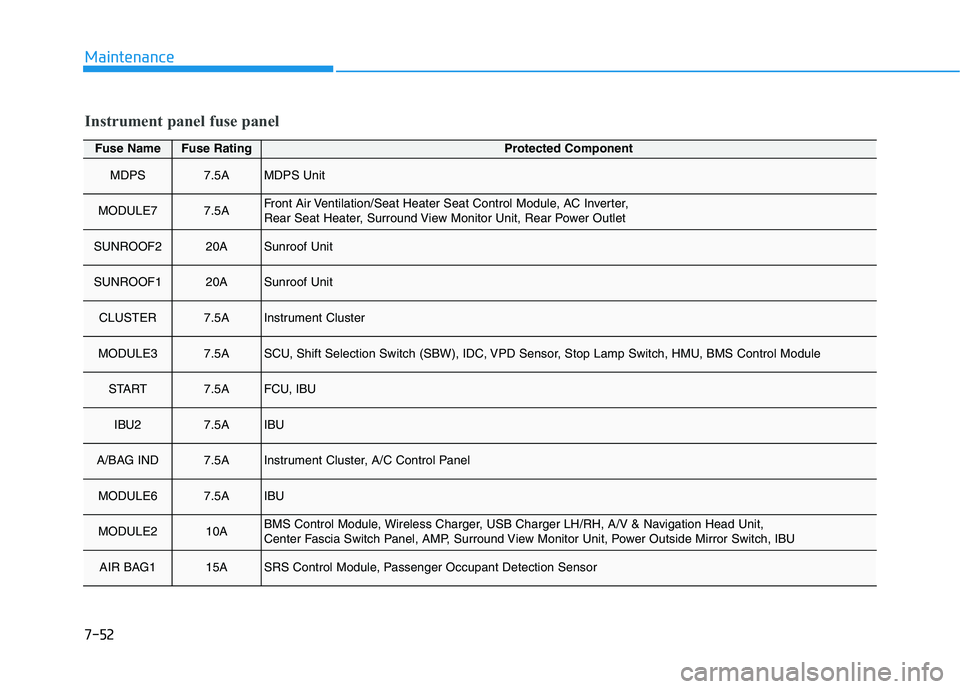
Fuse NameFuse RatingProtected Component
MDPS7.5AMDPS Unit
MODULE77.5AFront Air Ventilation/Seat Heater Seat Control Module, AC Inverter,
Rear Seat Heater, Surround View Monitor Unit, Rear Power Outlet
SUNROOF220ASunroof Unit
SUNROOF120ASunroof Unit
CLUSTER7.5AInstrument Cluster
MODULE37.5ASCU, Shift Selection Switch (SBW), IDC, VPD Sensor, Stop Lamp Switch, HMU, BMS Control Module
START7.5AFCU, IBU
IBU27.5AIBU
A/BAG IND7.5AInstrument Cluster, A/C Control Panel
MODULE67.5AIBU
MODULE210ABMS Control Module, Wireless Charger, USB Charger LH/RH, A/V & Navigation Head Unit,
Center Fascia Switch Panel, AMP, Surround View Monitor Unit, Power Outside Mirror Switch, IBU
AIR BAG115ASRS Control Module, Passenger Occupant Detection Sensor
Instrument panel fuse panel
Page 479 of 561
7-54
Maintenance
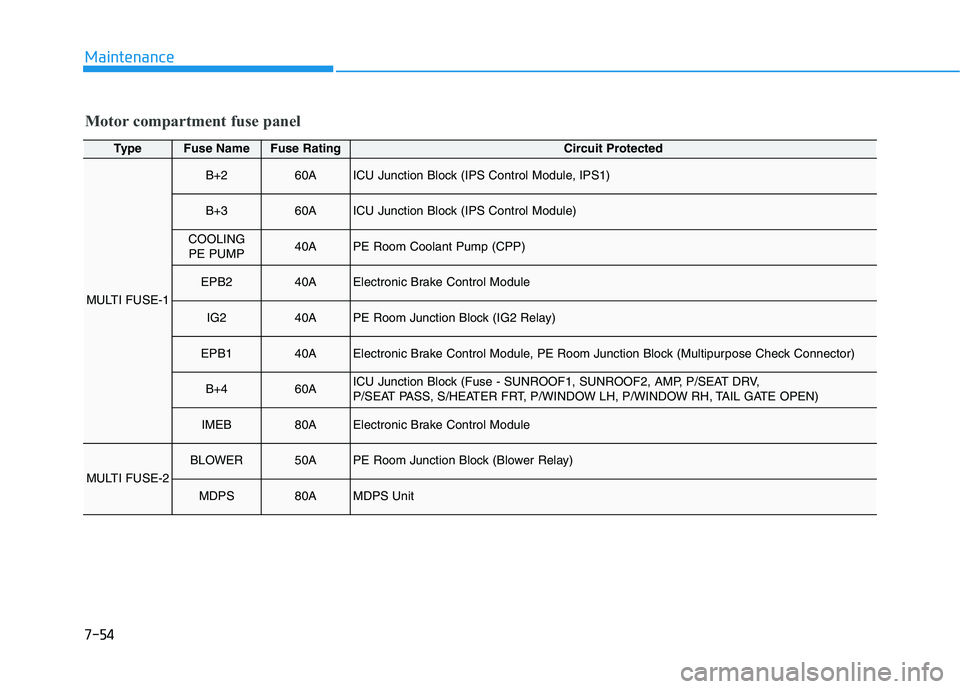
Motor compartment fuse panel
TypeFuse NameFuse RatingCircuit Protected
MULTI FUSE-1
B+260AICU Junction Block (IPS Control Module, IPS1)
B+360AICU Junction Block (IPS Control Module)
COOLING PE PUMP40APE Room Coolant Pump (CPP)
EPB240AElectronic Brake Control Module
IG240APE Room Junction Block (IG2 Relay)
EPB140AElectronic Brake Control Module, PE Room Junction Block (Multipurpose Check Connector)
B+460AICU Junction Block (Fuse - SUNROOF1, SUNROOF2, AMP, P/SEAT DRV,
P/SEAT PASS, S/HEATER FRT, P/WINDOW LH, P/WINDOW RH, TAIL GATE OPEN)
IMEB80AElectronic Brake Control Module
MULTI FUSE-2
BLOWER50APE Room Junction Block (Blower Relay)
MDPS80AMDPS Unit
Page 553 of 561
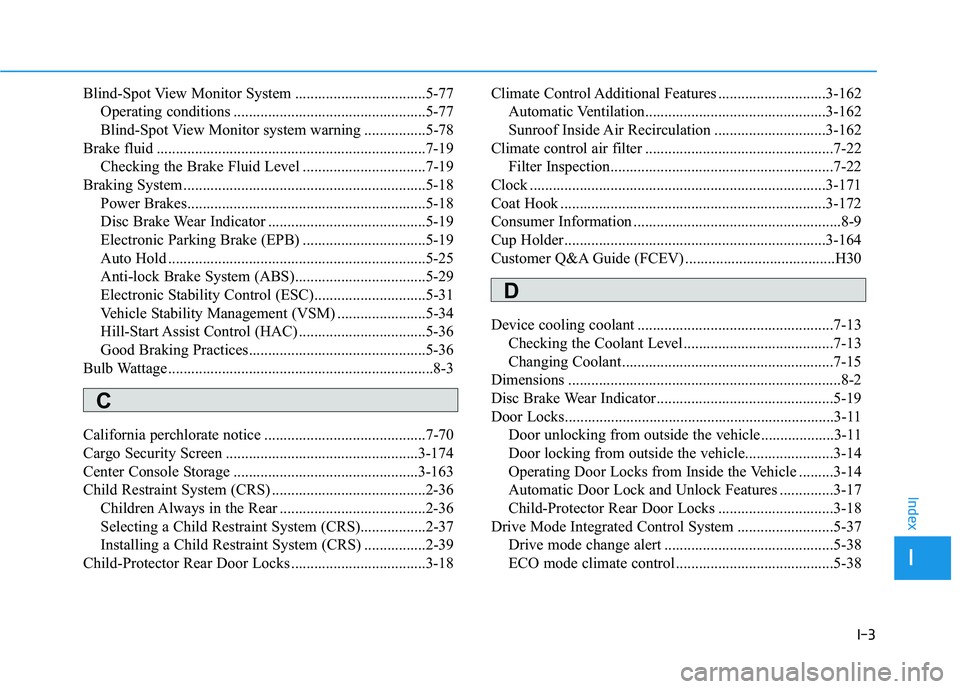
I-3
Blind-Spot View Monitor System ..................................5-77
Operating conditions ..................................................5-77
Blind-Spot View Monitor system warning ................5-78
Brake fluid ......................................................................7-19
Checking the Brake Fluid Level ................................7-19
Braking System ...............................................................5-18
Power Brakes..............................................................5-18
Disc Brake Wear Indicator .........................................5-19
Electronic Parking Brake (EPB) ................................5-19
Auto Hold ...................................................................5-25
Anti-lock Brake System (ABS)..................................5-29
Electronic Stability Control (ESC).............................5-31
Vehicle Stability Management (VSM) .......................5-34
Hill-Start Assist Control (HAC) .................................5-36
Good Braking Practices..............................................5-36
Bulb Wattage .....................................................................8-3
California perchlorate notice ..........................................7-70
Cargo Security Screen ..................................................3-174
Center Console Storage ................................................3-163
Child Restraint System (CRS) ........................................2-36
Children Always in the Rear ......................................2-36
Selecting a Child Restraint System (CRS).................2-37
Installing a Child Restraint System (CRS) ................2-39
Child-Protector Rear Door Locks ...................................3-18Climate Control Additional Features ............................3-162
Automatic Ventilation...............................................3-162
Sunroof Inside Air Recirculation .............................3-162
Climate control air filter .................................................7-22
Filter Inspection..........................................................7-22
Clock .............................................................................3-171
Coat Hook .....................................................................3-172
Consumer Information ......................................................8-9
Cup Holder....................................................................3-164
Customer Q&A Guide (FCEV) .......................................H30
Device cooling coolant ...................................................7-13
Checking the Coolant Level .......................................7-13
Changing Coolant.......................................................7-15
Dimensions .......................................................................8-2
Disc Brake Wear Indicator..............................................5-19
Door Locks......................................................................3-11
Door unlocking from outside the vehicle...................3-11
Door locking from outside the vehicle.......................3-14
Operating Door Locks from Inside the Vehicle .........3-14
Automatic Door Lock and Unlock Features ..............3-17
Child-Protector Rear Door Locks ..............................3-18
Drive Mode Integrated Control System .........................5-37
Drive mode change alert ............................................5-38
ECO mode climate control .........................................5-38
I
Index
C
D
Page 559 of 561
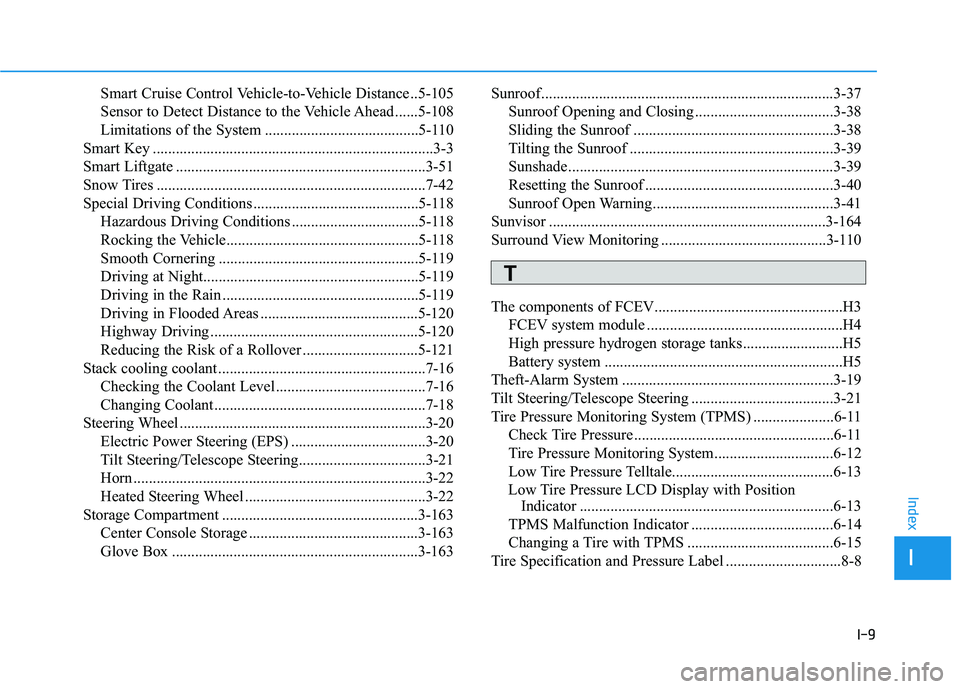
I-9
Smart Cruise Control Vehicle-to-Vehicle Distance ..5-105
Sensor to Detect Distance to the Vehicle Ahead ......5-108
Limitations of the System ........................................5-110
Smart Key .........................................................................3-3
Smart Liftgate .................................................................3-51
Snow Tires ......................................................................7-42
Special Driving Conditions ...........................................5-118
Hazardous Driving Conditions .................................5-118
Rocking the Vehicle..................................................5-118
Smooth Cornering ....................................................5-119
Driving at Night........................................................5-119
Driving in the Rain ...................................................5-119
Driving in Flooded Areas .........................................5-120
Highway Driving ......................................................5-120
Reducing the Risk of a Rollover ..............................5-121
Stack cooling coolant ......................................................7-16
Checking the Coolant Level .......................................7-16
Changing Coolant.......................................................7-18
Steering Wheel ................................................................3-20
Electric Power Steering (EPS) ...................................3-20
Tilt Steering/Telescope Steering.................................3-21
Horn ............................................................................3-22
Heated Steering Wheel ...............................................3-22
Storage Compartment ...................................................3-163
Center Console Storage ............................................3-163
Glove Box ................................................................3-163Sunroof............................................................................3-37
Sunroof Opening and Closing ....................................3-38
Sliding the Sunroof ....................................................3-38
Tilting the Sunroof .....................................................3-39
Sunshade.....................................................................3-39
Resetting the Sunroof .................................................3-40
Sunroof Open Warning...............................................3-41
Sunvisor ........................................................................3-164
Surround View Monitoring ...........................................3-110
The components of FCEV.................................................H3
FCEV system module ...................................................H4
High pressure hydrogen storage tanks..........................H5
Battery system ..............................................................H5
Theft-Alarm System .......................................................3-19
Tilt Steering/Telescope Steering .....................................3-21
Tire Pressure Monitoring System (TPMS) .....................6-11
Check Tire Pressure ....................................................6-11
Tire Pressure Monitoring System...............................6-12
Low Tire Pressure Telltale..........................................6-13
Low Tire Pressure LCD Display with Position
Indicator ..................................................................6-13
TPMS Malfunction Indicator .....................................6-14
Changing a Tire with TPMS ......................................6-15
Tire Specification and Pressure Label ..............................8-8
I
Index
T