tow HYUNDAI NEXO 2020 Owner's Manual
[x] Cancel search | Manufacturer: HYUNDAI, Model Year: 2020, Model line: NEXO, Model: HYUNDAI NEXO 2020Pages: 561, PDF Size: 48.42 MB
Page 261 of 561
3-174
Convenient features of your vehicle
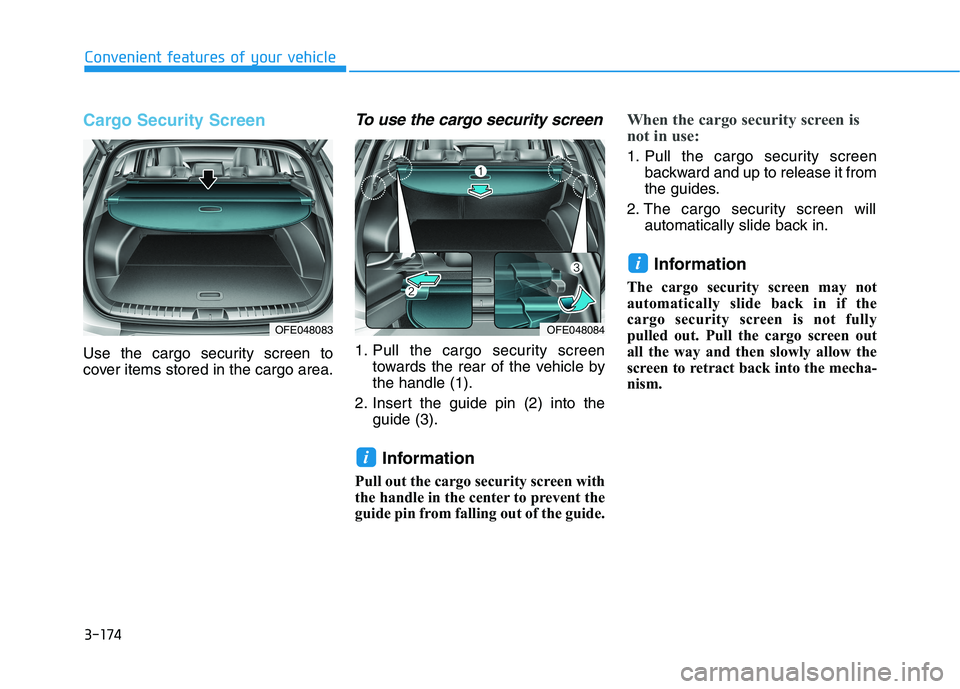
Cargo Security Screen
Use the cargo security screen to
cover items stored in the cargo area.
To use the cargo security screen
1. Pull the cargo security screen
towards the rear of the vehicle by
the handle (1).
2. Insert the guide pin (2) into the
guide (3).
Information
Pull out the cargo security screen with
the handle in the center to prevent the
guide pin from falling out of the guide.
When the cargo security screen is
not in use:
1. Pull the cargo security screen
backward and up to release it from
the guides.
2. The cargo security screen will
automatically slide back in.
Information
The cargo security screen may not
automatically slide back in if the
cargo security screen is not fully
pulled out. Pull the cargo screen out
all the way and then slowly allow the
screen to retract back into the mecha-
nism.
i
i
OFE048084OFE048083
Page 269 of 561
5
Blind-Spot View Monitor System ......................5-77
Operating conditions ......................................................5-77
Blind-Spot View Monitor system warning ...............5-78
Lane Keeping Assist (LKA) System ...................5-79
LKA System Operation...................................................5-80
Warning Light and Message.........................................5-83
Limitations of the System .............................................5-85
LKA System Function Change......................................5-86
Lane Following Assist (LFA) System.................5-87
LFA operation...................................................................5-88
Warning message ............................................................5-90
Limitations of the system .............................................5-92
Driver Attention Warning (DAW) System .........5-94
System Setting and Activation.....................................5-94
Resetting the System .....................................................5-95
System Standby ...............................................................5-96
System Malfunction .......................................................5-96
Smart Cruise Control With Stop &
Go System .............................................................5-98
Smart Cruise Control Switch ........................................5-99
To Adjust the Sensitivity of
Smart Cruise Control ....................................................5-100
To Convert to Cruise Control Mode .........................5-100
Smart Cruise Control Speed .......................................5-101Smart Cruise Control Vehicle-to-Vehicle
Distance ...........................................................................5-105
Sensor to Detect Distance to the Vehicle Ahead .5-108
Limitations of the System...........................................5-110
Leading Vehicle Departure Alert .....................5-116
System Setting and Activation ..................................5-116
Special Driving Conditions ................................5-118
Hazardous Driving Conditions....................................5-118
Rocking the Vehicle ......................................................5-118
Smooth Cornering .........................................................5-119
Driving at Night .............................................................5-119
Driving in the Rain ........................................................5-119
Driving in Flooded Areas.............................................5-120
Highway Driving ............................................................5-120
Reducing the Risk of a Rollover ...............................5-121
Winter Driving ....................................................5-122
Snow or Icy Conditions................................................5-122
Winter Precautions .......................................................5-124
Vehicle Load Limit..............................................5-126
Tire Loading Information Label .................................5-126
Trailer Towing .....................................................5-131
Page 291 of 561
5-24
Parking brake warning light
Check the Parking
Brake Warning Light
by placing the POWER
button to the ON posi-
tion (do not start the
vehicle).
This light will be illuminated when the
parking brake is applied with the
POWER button in the START or ON
position.
Before driving, be sure the parking
brake is released and the Brake
Warning Light is OFF.
If the Parking Brake Warning Light
remains on after the parking brake is
released while the vehicle is in the
ready ( ) mode, there may be a
malfunction in the brake system.
Immediate attention is necessary.
If at all possible, cease driving the
vehicle immediately. If that is not pos-
sible, use extreme caution while
operating the vehicle and only con-
tinue to drive the vehicle until you
can reach a safe location.
Emergency braking
If there is a problem with the brake
pedal while driving, emergency brak-
ing is possible by pulling up and
holding the EPB switch. Braking is
possible only while you are holding
the EPB switch.
Information
During emergency braking by the
EPB, the parking brake warning light
will illuminate to indicate that the sys-
tem is operating.If you continuously notice a noise
or burning smell when the EPB is
used for emergency braking, have
the system checked by an author-
ized HYUNDAI dealer.
When the EPB (Electronic Parking
Brake) does not release
If the EPB does not release normal-
ly, contact an authorized HYUNDAI
dealer by loading the vehicle on a
flatbed tow truck and have the sys-
tem checked.
NOTICE
i
Driving your vehicle
Do not operate the parking
brake while the vehicle is mov-
ing except in an emergency sit-
uation.
WARNING
Page 313 of 561
5-46
Driving your vehicle
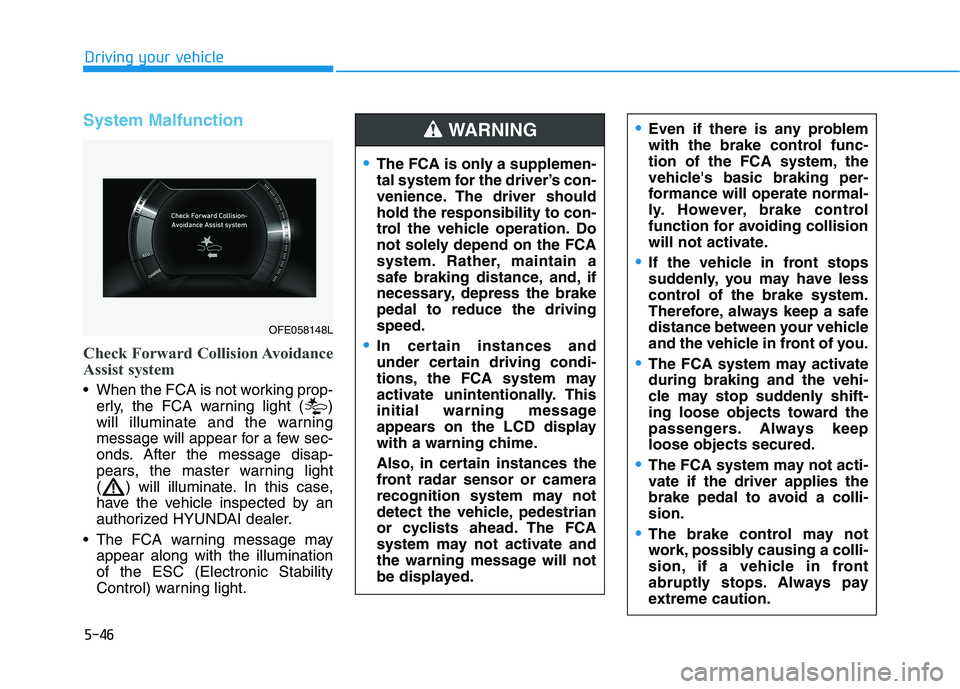
System Malfunction
Check Forward Collision Avoidance
Assist system
When the FCA is not working prop-
erly, the FCA warning light ( )
will illuminate and the warning
message will appear for a few sec-
onds. After the message disap-
pears, the master warning light
( ) will illuminate. In this case,
have the vehicle inspected by an
authorized HYUNDAI dealer.
The FCA warning message may
appear along with the illumination
of the ESC (Electronic Stability
Control) warning light.
The FCA is only a supplemen-
tal system for the driver’s con-
venience. The driver should
hold the responsibility to con-
trol the vehicle operation. Do
not solely depend on the FCA
system. Rather, maintain a
safe braking distance, and, if
necessary, depress the brake
pedal to reduce the driving
speed.
In certain instances and
under certain driving condi-
tions, the FCA system may
activate unintentionally. This
initial warning message
appears on the LCD display
with a warning chime.
Also, in certain instances the
front radar sensor or camera
recognition system may not
detect the vehicle, pedestrian
or cyclists ahead. The FCA
system may not activate and
the warning message will not
be displayed.
WARNING Even if there is any problem
with the brake control func-
tion of the FCA system, the
vehicle's basic braking per-
formance will operate normal-
ly. However, brake control
function for avoiding collision
will not activate.
If the vehicle in front stops
suddenly, you may have less
control of the brake system.
Therefore, always keep a safe
distance between your vehicle
and the vehicle in front of you.
The FCA system may activate
during braking and the vehi-
cle may stop suddenly shift-
ing loose objects toward the
passengers. Always keep
loose objects secured.
The FCA system may not acti-
vate if the driver applies the
brake pedal to avoid a colli-
sion.
The brake control may not
work, possibly causing a colli-
sion, if a vehicle in front
abruptly stops. Always pay
extreme caution.
OFE058148L
Page 315 of 561
5-48
Driving your vehicle
The vehicle is on unpaved or
uneven rough surfaces, or road
with sudden gradient changes.
The vehicle drives through a con-
struction area, on an unpaved
road, or above metal materials,
such as a railway
The vehicle in front is too small to
be detected (for example a motor-
cycle or a bicycle, etc.)
The camera’s field of view is not
well illuminated (either too dark or
too much reflection or too much
backlight that obscures the field of
view)
The camera does not recognize
the entire vehicle in front.
The vehicle in front is an oversize
vehicle or trailer that is too big to
be detected by the camera recog-
nition system (for example a tractor
trailer, etc.)
The vehicle in front does not have
rear lights or the rear lights are not
turned ON or the rear lights are
located unusually.
The outside brightness changes
suddenly, for example when enter-
ing or exiting a tunnel The vehicle drives inside a building,
such as a basement parking lot
The adverse road conditions cause
excessive vehicle vibrations while
driving
You are on a roundabout and the
vehicle in front circles
The camera lens is contaminated
due to tinted, filmed or coated
windshield, damaged glass, or
stuck of foreign matter (sticker,
bug, etc.) on the glass
The camera is damaged.
The brightness outside is too low
such as when the headlamps are
not on at night or the vehicle is
going through a tunnel.
Light coming from a street light or
an oncoming vehicle is reflected on
a wet road surface such as a pud-
dle in the road
The field of view in front is obstruct-
ed by sun glare
The shadow is on the road by a
median strip, trees, etc.
The vehicle drives through a toll-
gate. The windshield glass is fogged up; a
clear view of the road is obstructed
The radar/camera sensor recogni-
tion is limited
The rear part of the vehicle in front
is not normally visible (for example,
the vehicle is spinning or the vehi-
cle is overturned)
There is severe irregular reflection
from the radar sensor
The sensor recognition changes
suddenly when passing over a
speed bump
The vehicle in front is driving errat-
ically
The vehicle in front is moving verti-
cally to the driving direction
The vehicle in front is stopped ver-
tically
The vehicle in front is driving
towards your vehicle or reversing
You are on a roundabout and the
vehicle in front circles.
Page 319 of 561
5-52
Driving your vehicle
When the cyclist in front is riding
intersected with the driving direc-
tion
When there is any other electro-
magnetic interference
When the construction area, rail or
other metal object is near the
cyclist
If the bicycle material is not reflect-
ed well on the radar
Information
In some instances, the FCA system
may be canceled when subjected to
electromagnetic interference.
Information
This device complies with Part 15 of
the FCC rules.
Operation is subject to the following
two conditions:
1. This device may not cause harmful
interference.
2. This device must accept any inter-
ference received, including interfer-
ence that may cause undesired
operation.
i
i
Do not use the Forward
Collision Avoidance Assist
(FCA) system when towing a
vehicle. Application of the
FCA system while towing may
adversely affect the safety of
your vehicle or the towing
vehicle.
Use extreme caution when the
vehicle in front of you has
cargo that extends rearward
from the cab, or when the
vehicle in front of you has
higher ground clearance.
Forward Collision-Avoidance
Assist system may operate
when an object, which has
similar shape or characteris-
tic to a vehicle, pedestrian or
cyclist, is detected.
The FCA system is designed
to detect and monitor the
vehicle ahead or detect a
pedestrian or cyclist in the
roadway through radar sig-
nals and camera recognition.
It is not designed to detect,
motorcycles, or smaller
wheeled objects such as lug-
gage bags, shopping carts, or
strollers.
Never try to test the operation
of the FCA system. Doing so
may cause severe injury or
death.
If the front bumper, front
glass, radar or camera have
been replaced or repaired,
have your vehicle inspected
by an authorized HYUNDAI
dealer.
WARNING
Page 347 of 561
5-80
Driving your vehicle
LKA System Operation
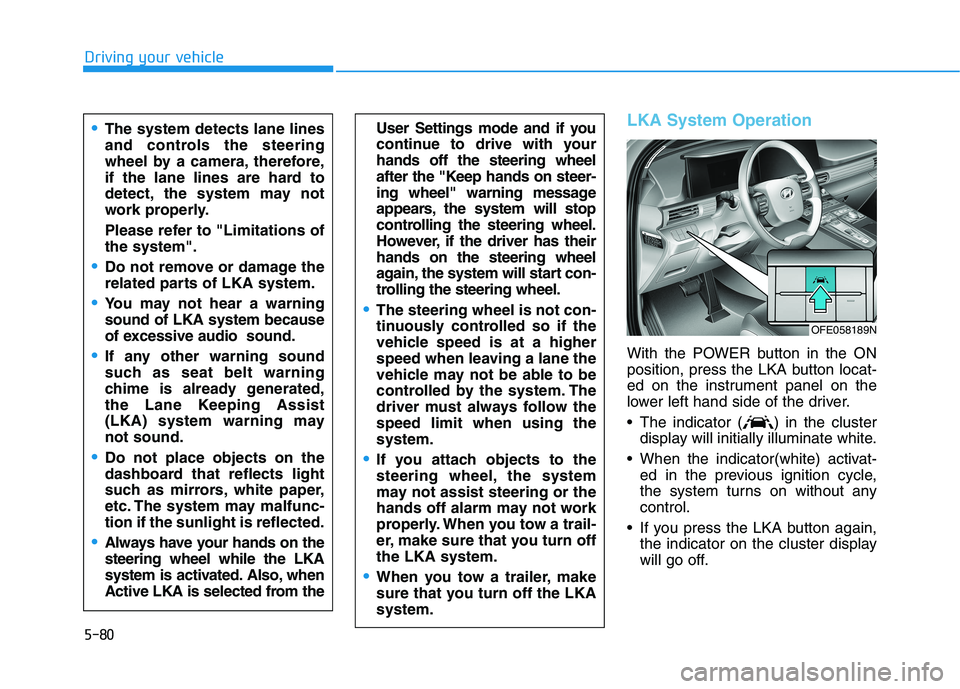
With the POWER button in the ON
position, press the LKA button locat-
ed on the instrument panel on the
lower left hand side of the driver.
The indicator ( ) in the cluster
display will initially illuminate white.
When the indicator(white) activat-
ed in the previous ignition cycle,
the system turns on without any
control.
If you press the LKA button again,
the indicator on the cluster display
will go off.
User Settings mode and if you
continue to drive with your
hands off the steering wheel
after the "Keep hands on steer-
ing wheel" warning message
appears, the system will stop
controlling the steering wheel.
However, if the driver has their
hands on the steering wheel
again, the system will start con-
trolling the steering wheel.
The steering wheel is not con-
tinuously controlled so if the
vehicle speed is at a higher
speed when leaving a lane the
vehicle may not be able to be
controlled by the system. The
driver must always follow the
speed limit when using the
system.
If you attach objects to the
steering wheel, the system
may not assist steering or the
hands off alarm may not work
properly. When you tow a trail-
er, make sure that you turn off
the LKA system.
When you tow a trailer, make
sure that you turn off the LKA
system.
The system detects lane lines
and controls the steering
wheel by a camera, therefore,
if the lane lines are hard to
detect, the system may not
work properly.
Please refer to "Limitations of
the system".
Do not remove or damage the
related parts of LKA system.
You may not hear a warning
sound of LKA system because
of excessive audio sound.
If any other warning sound
such as seat belt warning
chime is already generated,
the Lane Keeping Assist
(LKA) system warning may
not sound.
Do not place objects on the
dashboard that reflects light
such as mirrors, white paper,
etc. The system may malfunc-
tion if the sunlight is reflected.
Always have your hands on the
steering wheel while the LKA
system is activated. Also, when
Active LKA is selected from the
OFE058189N
Page 355 of 561
5-88
LFA operation
The driver can turn on the LFA sys-
tem with the vehicle on and by
selecting "Vehicle settings →Driver
assistance →Driving assist →LFA
(Lane Following Assist)" in the AVN
screen.
The set-up of the LFA system will be
maintained, as selected, when the
vehicle is restarted.
Driving your vehicle
The system detects lane
markers and controls the
steering wheel by a camera,
therefore, if the lane markers
are hard to detect, the system
may not work properly.
Please refer to "Limitations of
the system".
Do not remove or damage the
related parts of LFA system.
You may not hear a warning
sound of LFA system because
of excessive audio sound.
Do not place objects on the
dashboard that reflects light
such as mirrors, white paper,
etc. The system may malfunc-
tion if the sunlight is reflected.
Always have your hands on
the steering wheel while the
LFA system is activated. If you
continue to drive with your
hands off the steering wheel
after the "Keep hands on
steering wheel" warning mes-
sage appears, the system will
be turned off automatically.
However, if the driver has their
hands on the steering wheel
again, the system will start
controlling the steering wheel.
The steering wheel may not
be continuously controlled by
the system if the vehicle
speed is too high. The driver
must always follow the speed
limit when using the system.
If you attach objects to the
steering wheel, the system
may not assist steering nor-
mally or the hands off alarm
may not work properly.
When you tow a trailer, make
sure that you turn off the LFA
system.
Page 386 of 561
5-119
Driving your vehicle
5
Information
The ESC system (if equipped) must be
turned OFF before rocking the vehi-
cle.
If you are still stuck after rocking
the vehicle a few times, have the
vehicle pulled out by a tow vehicle
to avoid vehicle overheating, pos-
sible damage to the reduction
gear and tire damage. See
"Towing" in chapter 6.
Smooth Cornering
Avoid braking, especially when roads
are wet. Ideally, corners should
always be taken under gentle accel-
eration.
Driving at Night
Night driving presents more hazards
than driving in the daylight. Here are
some important tips to remember:
Slow down and keep more dis-
tance between you and other vehi-
cles, as it may be more difficult to
see at night, especially in areas
where there may not be any street
lights.
Adjust your mirrors to reduce the
glare from other driver's head-
lamps.
Keep your headlamps clean and
properly aimed. Dirty or improperly
aimed headlamps will make it
much more difficult to see at night.
Avoid staring directly at the head-
lamps of oncoming vehicles. You
could be temporarily blinded, and it
will take several seconds for your
eyes to readjust to the darkness.
Driving in the Rain
Rain and wet roads can make driving
dangerous. Here are a few things to
consider when driving in the rain or
on slick pavement:
Slow down and allow extra follow-
ing distance. A heavy rainfall
makes it harder to see and increas-
es the distance needed to stop
your vehicle.
Turn OFF your Cruise Control. (if
equipped)
Replace your windshield wiper
blades when they show signs of
streaking or missing areas on the
windshield.
Be sure your tires have enough
tread. If your tires do not have
enough tread, making a quick stop
on wet pavement can cause a skid
and possibly lead to an accident.
See "Tire Tread" in chapter 7.
Turn on your headlamps to make it
easier for others to see you.
Driving too fast through large pud-
dles can affect your brakes. If you
must go through puddles, try to
drive through them slowly.
NOTICE
i
Page 389 of 561
5-122
Driving your vehicle
The severe weather conditions of
winter quickly wear out tires and
cause other problems. To minimize
winter driving problems, you should
take the following suggestions:
Snow or Icy Conditions
You need to keep sufficient distance
between your vehicle and the vehicle
in front of you.
Apply the brakes gently. Speeding,
rapid acceleration, sudden brake
applications, and sharp turns are
potentially very hazardous practices.
During deceleration, use regenera-
tive braking to the fullest extent.
Sudden brake applications on snowy
or icy roads may cause the vehicle to
skid.
To drive your vehicle in deep snow, it
may be necessary to use snow tires
or to install tire chains on your tires.
Always carry emergency equipment.
Some of the items you may want to
carry include tire chains, tow straps
or chains, a flashlight, emergency
flares, sand, a shovel, jumper cables,
a window scraper, gloves, ground
cloth, coveralls, a blanket, etc.
Snow tires
If you mount snow tires on your vehi-
cle, make sure to use radial tires of
the same size and load range as the
original tires. Mount snow tires on all
four wheels to balance your vehicle’s
handling in all weather conditions.
The traction provided by snow tires
on dry roads may not be as high as
your vehicle's original equipment
tires. Check with the tire dealer for
maximum speed recommendations.
Information
Do not install studded tires without
first checking local, state and munici-
pal regulations for possible restric-
tions against their use.
Air cleaner filter (FCEV)
The snow may block the air cleaner
filter after driving the vehicle in heavy
snow when the ambient temperature
is below 50°F (10°C).
If a warning message "Air filter
blocked. Check filter or see user
manual" appears on LCD display
after turning off the vehicle, remove
the snow from the inside of the air
cleaner filter and turn on and off the
vehicle. If the warning message is
displayed again, the exhaust pipe
may be blocked. Then, move your
vehicle indoors and leave it inside
more than one day to defrost the
exhaust pipe.
If the warning message is displayed
again, have the vehicle checked by
an authorized HYUNDAI dealer.
i
W WI
IN
NT
TE
ER
R
D
DR
RI
IV
VI
IN
NG
G
Snow tires should be equivalent
in size and type to the vehicle's
standard tires. Otherwise, the
safety and handling of your
vehicle may be adversely affect-
ed.
WARNING