brake sensor HYUNDAI NEXO 2023 User Guide
[x] Cancel search | Manufacturer: HYUNDAI, Model Year: 2023, Model line: NEXO, Model: HYUNDAI NEXO 2023Pages: 558, PDF Size: 35.01 MB
Page 316 of 558
5-49
Driving your vehicle
5
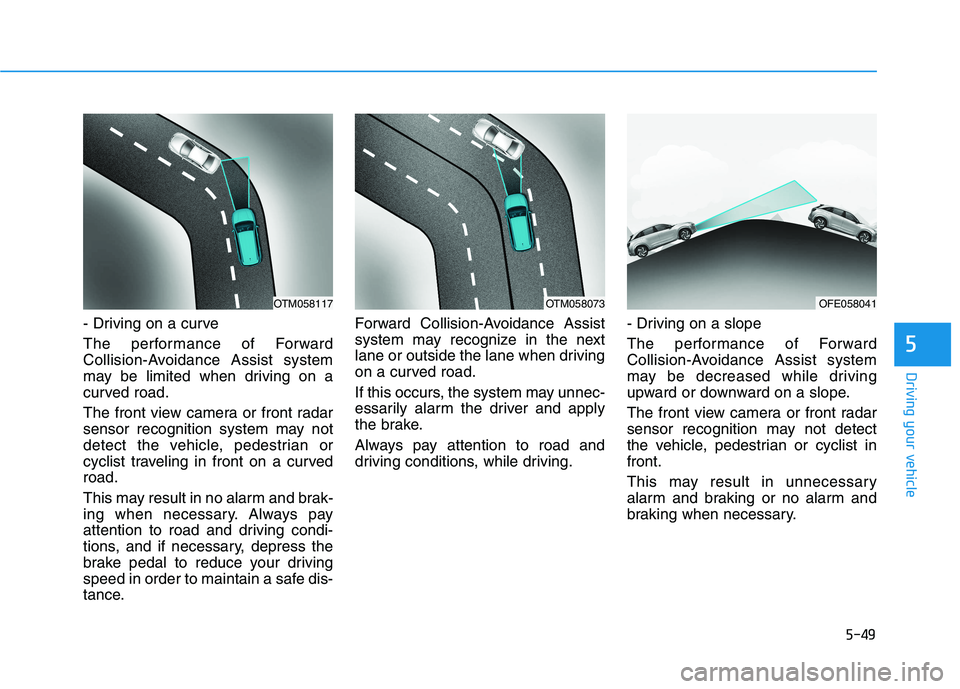
- Driving on a curve
The performance of Forward
Collision-Avoidance Assist system
may be limited when driving on a
curved road.
The front view camera or front radar
sensor recognition system may not
detect the vehicle, pedestrian or
cyclist traveling in front on a curvedroad.
This may result in no alarm and brak-
ing when necessary. Always pay
attention to road and driving condi-
tions, and if necessary, depress the
brake pedal to reduce your driving
speed in order to maintain a safe dis-
tance.Forward Collision-Avoidance Assist
system may recognize in the next
lane or outside the lane when driving
on a curved road.
If this occurs, the system may unnec-
essarily alarm the driver and apply
the brake.
Always pay attention to road and
driving conditions, while driving.
- Driving on a slope
The performance of Forward
Collision-Avoidance Assist system
may be decreased while driving
upward or downward on a slope.
The front view camera or front radar
sensor recognition may not detect
the vehicle, pedestrian or cyclist infront.
This may result in unnecessary
alarm and braking or no alarm and
braking when necessary.
OTM058073OTM058117OFE058041
Page 318 of 558
5-51
Driving your vehicle
5
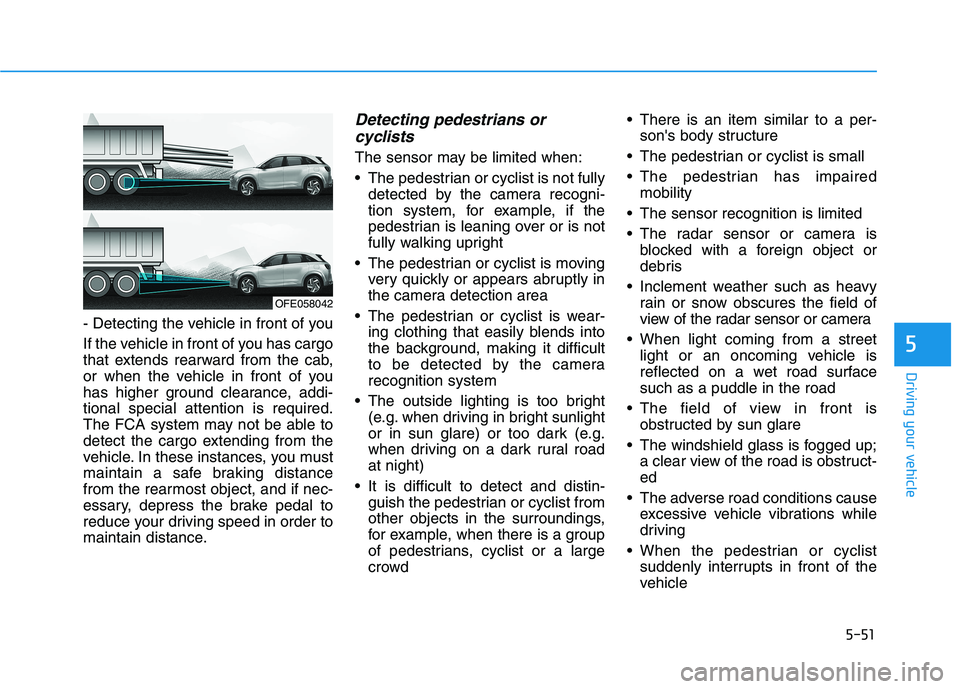
- Detecting the vehicle in front of you
If the vehicle in front of you has cargo
that extends rearward from the cab,
or when the vehicle in front of you
has higher ground clearance, addi-tional special attention is required.
The FCA system may not be able to
detect the cargo extending from the
vehicle. In these instances, you must
maintain a safe braking distance
from the rearmost object, and if nec-
essary, depress the brake pedal to
reduce your driving speed in order to
maintain distance.
Detecting pedestrians orcyclists
The sensor may be limited when:
The pedestrian or cyclist is not fully detected by the camera recogni-
tion system, for example, if the
pedestrian is leaning over or is not
fully walking upright
The pedestrian or cyclist is moving very quickly or appears abruptly in
the camera detection area
The pedestrian or cyclist is wear- ing clothing that easily blends into
the background, making it difficult
to be detected by the camerarecognition system
The outside lighting is too bright (e.g. when driving in bright sunlight
or in sun glare) or too dark (e.g.
when driving on a dark rural roadat night)
It is difficult to detect and distin- guish the pedestrian or cyclist from
other objects in the surroundings,
for example, when there is a group
of pedestrians, cyclist or a large
crowd There is an item similar to a per-
son's body structure
The pedestrian or cyclist is small
The pedestrian has impaired mobility
The sensor recognition is limited
The radar sensor or camera is blocked with a foreign object or
debris
Inclement weather such as heavy rain or snow obscures the field of
view of the radar sensor or camera
When light coming from a street light or an oncoming vehicle is
reflected on a wet road surfacesuch as a puddle in the road
The field of view in front is obstructed by sun glare
The windshield glass is fogged up; a clear view of the road is obstruct-ed
The adverse road conditions cause excessive vehicle vibrations while
driving
When the pedestrian or cyclist suddenly interrupts in front of the
vehicle
OFE058042
Page 326 of 558
5-59
Driving your vehicle
5
Blind-Spot Collision-Avoidance Assist (BCA) system is automatically deacti-
vated when:
- The vehicle drives a certain dis-tance away
- The vehicle direction is changed against the possible-colliding point
- The steering wheel is abruptly moved
- The brake pedal is depressed
- After a certain period of time
The driver should drive the vehicle in
the middle of the vehicle lanes to
keep the system in the ready status.
When the vehicle drives too close to
one side of the vehicle lanes, the
system may not properly operate.
In addition, the system may not prop-
erly control your vehicle in accor-
dance with driving situations. Thus,
always pay close attention to road
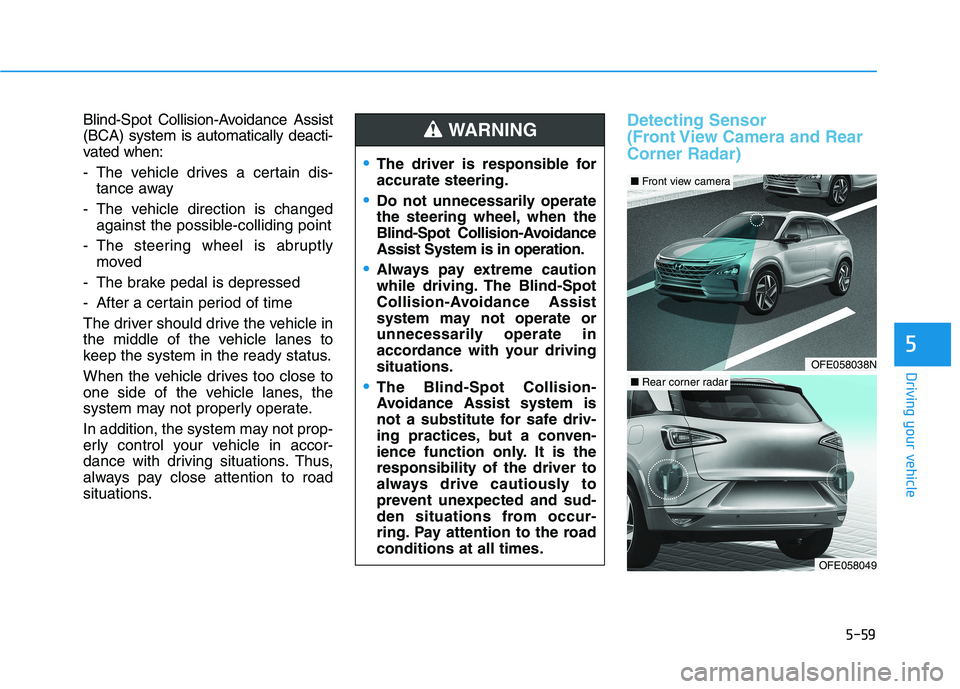
situations.Detecting Sensor
(Front View Camera and RearCorner Radar)
The driver is responsible for accurate steering.
Do not unnecessarily operate
the steering wheel, when the
Blind-Spot Collision-AvoidanceAssist System is in operation.
Always pay extreme caution
while driving. The Blind-Spot
Collision-Avoidance Assist
system may not operate or
unnecessarily operate in
accordance with your drivingsituations.
The Blind-Spot Collision-
Avoidance Assist system is
not a substitute for safe driv-
ing practices, but a conven-
ience function only. It is theresponsibility of the driver to
always drive cautiously to
prevent unexpected and sud-
den situations from occur-
ring. Pay attention to the roadconditions at all times.
WARNING
OFE058038N
■ Front view camera
OFE058049
■Rear corner radar
Page 330 of 558
5-63
Driving your vehicle
5
The vehicle driven on a curvedroad.
The vehicle driven through a toll- gate.
The road pavement (or the periph- eral ground) abnormally contains
metallic components (i.e. possibly
due to subway construction).
There is a fixed object near the vehicle, such as a guardrail.
While going down or up a steep road where the height of the lane is
different.
Driving on a narrow road where trees or grass or overgrown.
Driving in rural areas where the sensor does not detect another
vehicle or structure for an extended
period of time.
Driving on a wet road.
Driving on a road where the guardrail or wall is in double struc-
ture.
A big vehicle is near such as a bus or truck.
When the other vehicle approach- es very close. When the other vehicle passes at a
very fast speed.
While changing lanes.
If the vehicle has started at the same time as the vehicle next to
you and has accelerated.
When the vehicle in the next lane moves two lanes away from you
OR when the vehicle two lanes
away moves to the next lane from
you.
A motorcycle or bicycle is near.
A flat trailer is near.
If there are small objects in the detecting area such as a shopping
cart or a baby stroller.
If there is a low height vehicle such as a sports car.
The brake pedal is depressed.
ESC (Electronic Stability Control) is activated.
ESC (Electronic Stability Control) malfunctions.
The tire pressure is low or a tire is damaged.
The brake is reworked. The vehicle abruptly changes driv-
ing direction.
The vehicle makes sharp lane changes.
The vehicle sharply stops.
Temperature is extremely low around the vehicle.
The vehicle severely vibrates while driving over a bumpy road,
uneven/bumpy road, or concretepatch.
The vehicle drives on a slippery surface due to snow, water puddle,
or ice.
The Lane Keeping Assist (LKA) or Lane Departure Warning (LDW) do
not operate normally. (if equipped)
For more details refer to "Lane
Keeping Assist (LKA) system" in
this chapter.
Page 338 of 558
5-71
Driving your vehicle
5
Detecting Sensor
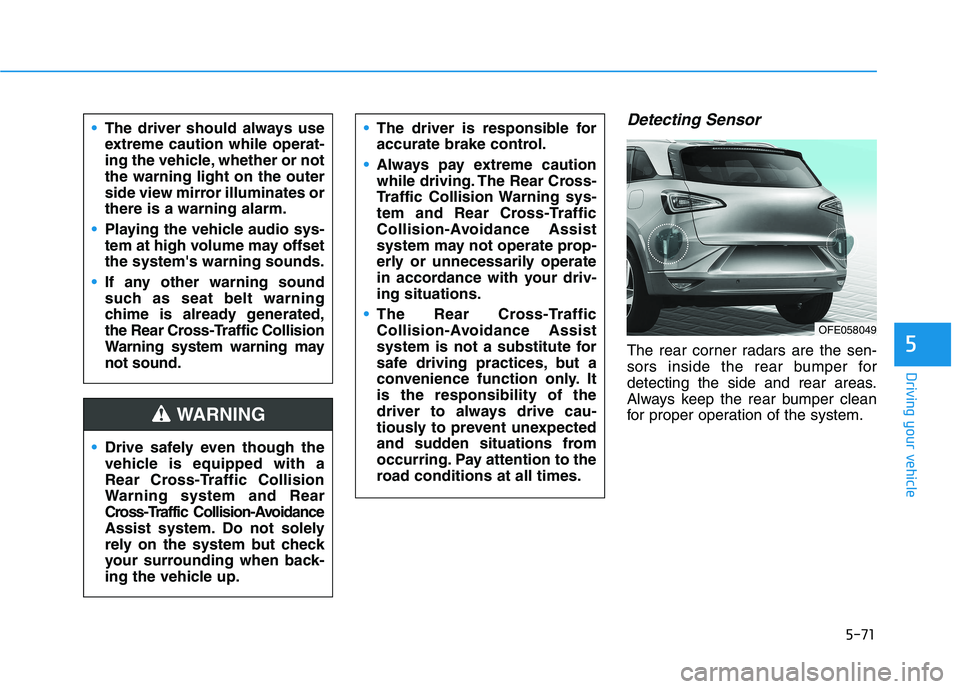
The rear corner radars are the sen-
sors inside the rear bumper for
detecting the side and rear areas.
Always keep the rear bumper clean
for proper operation of the system.
The driver should always use
extreme caution while operat-
ing the vehicle, whether or notthe warning light on the outer
side view mirror illuminates orthere is a warning alarm.
Playing the vehicle audio sys-
tem at high volume may offsetthe system's warning sounds.
If any other warning sound
such as seat belt warning
chime is already generated,
the Rear Cross-Traffic Collision
Warning system warning maynot sound.
Drive safely even though the
vehicle is equipped with a
Rear Cross-Traffic Collision
Warning system and Rear
Cross-Traffic Collision-Avoidance
Assist system. Do not solely
rely on the system but check
your surrounding when back-
ing the vehicle up.
The driver is responsible for
accurate brake control.
Always pay extreme caution
while driving. The Rear Cross-
Traffic Collision Warning sys-
tem and Rear Cross-Traffic
Collision-Avoidance Assist
system may not operate prop-
erly or unnecessarily operate
in accordance with your driv-ing situations.
The Rear Cross-Traffic
Collision-Avoidance Assist
system is not a substitute for
safe driving practices, but a
convenience function only. Itis the responsibility of the
driver to always drive cau-
tiously to prevent unexpected
and sudden situations from
occurring. Pay attention to the
road conditions at all times.
WARNING
OFE058049
Page 343 of 558
![HYUNDAI NEXO 2023 User Guide 5-76
Driving your vehicle
[A] : Structure, [B] : Wall
Pulling into the parking spacewhere there is a structure
The system may not operate proper-
ly when pulling in the vehicle to the
parking spac](/img/35/56173/w960_56173-342.png "HYUNDAI NEXO 2023 User Guide 5-76
Driving your vehicle
[A] : Structure, [B] : Wall
Pulling into the parking spacewhere there is a structure
The system may not operate proper-
ly when pulling in the vehicle to the
parking spac")
5-76
Driving your vehicle
[A] : Structure, [B] : Wall
Pulling into the parking spacewhere there is a structure
The system may not operate proper-
ly when pulling in the vehicle to the
parking space where there is a struc-
ture at the back or side of your vehi-
cle.
In certain instances, when backing
into the parking space, the system
may not detect the vehicle moving in
front of your vehicle. In this case, the
warning or brake may not operate
properly.
Always pay attention to the parking
space while driving. When the vehicle is parked rear-
ward
If the vehicle is parked rearward and
the sensor detects the another vehi-
cle in the rear area of the parking
space, the system can warn or con-
trol braking. Always pay attention to
the parking space while driving. Information
This device complies with Industry
Canada RSS-210 standard.
Operation is subject to the following
two conditions:
1. This device may not cause harmful interference.
2. This device must accept any inter- ference received, including interfer-
ence that may cause undesired
operation.
i
OTM058106LOTM058107
Page 370 of 558
5-103
Driving your vehicle
5
To temporarily accelerate withthe Smart Cruise Control on
If you want to speed up temporarily
when the Smart Cruise Control is on,
depress the accelerator pedal.
Increased speed will not interfere
with Smart Cruise Control operationor change the set speed.
To return to the set speed, take your
foot off the accelerator pedal.
If you push the toggle switch down
(SET-) at increased speed, the cruis-ing speed will be set again pedal.
Smart Cruise Control set speedwill be temporarily canceled
when:
Canceled manually
Depressing the brake pedal.
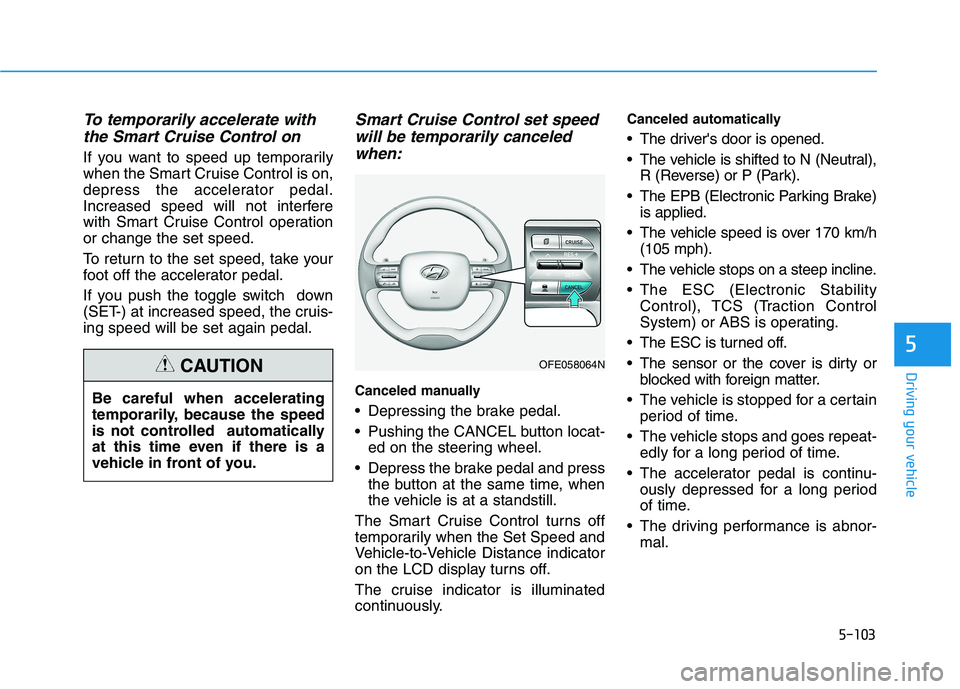
Pushing the CANCEL button locat- ed on the steering wheel.
Depress the brake pedal and press the button at the same time, when
the vehicle is at a standstill.
The Smart Cruise Control turns off
temporarily when the Set Speed and
Vehicle-to-Vehicle Distance indicator
on the LCD display turns off.
The cruise indicator is illuminated
continuously. Canceled automatically
The driver's door is opened.
The vehicle is shifted to N (Neutral),
R (Reverse) or P (Park).
The EPB (Electronic Parking Brake) is applied.
The vehicle speed is over 170 km/h (105 mph).
The vehicle stops on a steep incline.
The ESC (Electronic Stability Control), TCS (Traction Control
System) or ABS is operating.
The ESC is turned off.
The sensor or the cover is dirty or blocked with foreign matter.
The vehicle is stopped for a certain period of time.
The vehicle stops and goes repeat- edly for a long period of time.
The accelerator pedal is continu- ously depressed for a long period
of time.
The driving performance is abnor- mal.
Be careful when accelerating
temporarily, because the speed
is not controlled automatically
at this time even if there is a
vehicle in front of you.
CAUTIONOFE058064N
Page 379 of 558
5-112
Driving your vehicle
Lane changing
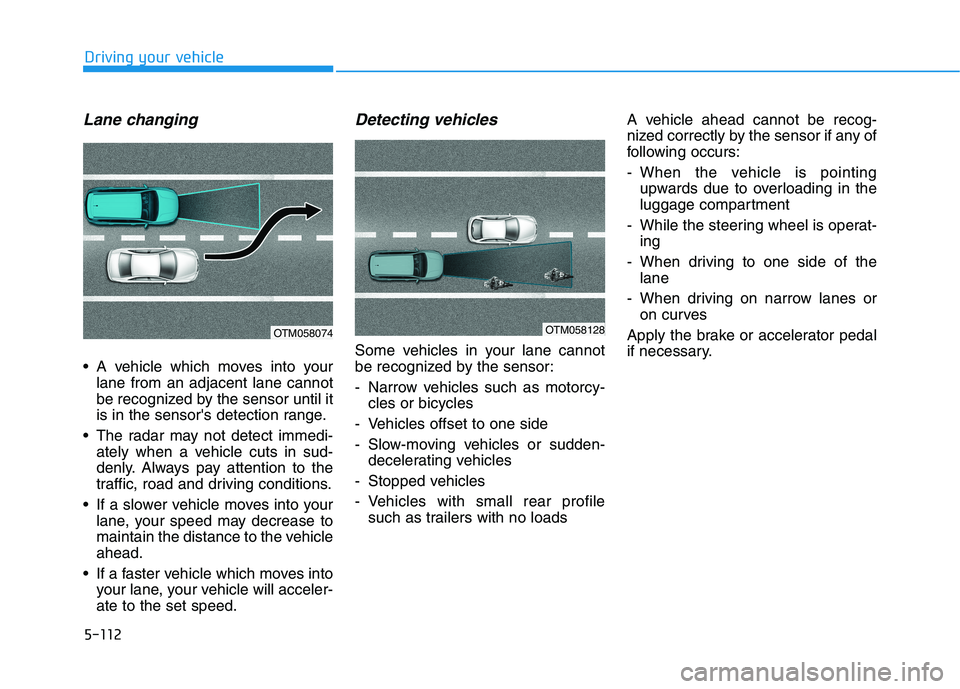
A vehicle which moves into yourlane from an adjacent lane cannot
be recognized by the sensor until it
is in the sensor's detection range.
The radar may not detect immedi- ately when a vehicle cuts in sud-
denly. Always pay attention to the
traffic, road and driving conditions.
If a slower vehicle moves into your lane, your speed may decrease to
maintain the distance to the vehicleahead.
If a faster vehicle which moves into your lane, your vehicle will acceler-ate to the set speed.
Detecting vehicles
Some vehicles in your lane cannot
be recognized by the sensor:
- Narrow vehicles such as motorcy-cles or bicycles
- Vehicles offset to one side
- Slow-moving vehicles or sudden- decelerating vehicles
- Stopped vehicles
- Vehicles with small rear profile such as trailers with no loads A vehicle ahead cannot be recog-
nized correctly by the sensor if any of
following occurs:
- When the vehicle is pointing
upwards due to overloading in the
luggage compartment
- While the steering wheel is operat- ing
- When driving to one side of the lane
- When driving on narrow lanes or on curves
Apply the brake or accelerator pedal
if necessary.
OTM058074OTM058128
Page 422 of 558
6-25
What to do in an emergency
6
When towing your vehicle in an emergency without wheel dollies:
1. Place the POWER button in theACC position.
2. Place the shift button in N (Neutral).
3. Release the parking brake.
Removable Towing Hook
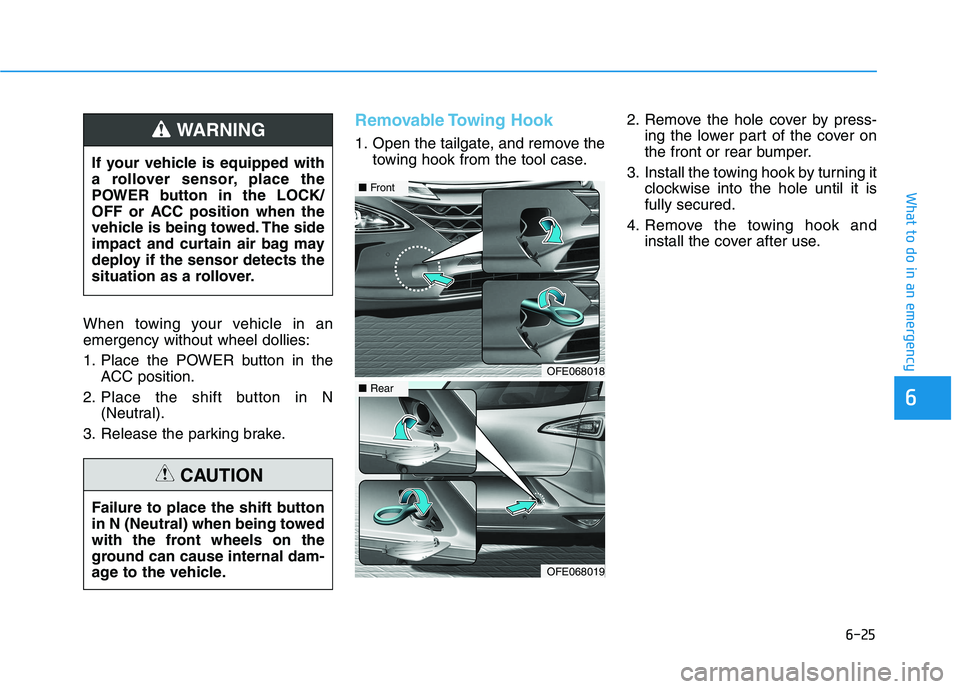
1. Open the tailgate, and remove the towing hook from the tool case. 2. Remove the hole cover by press-
ing the lower part of the cover on
the front or rear bumper.
3. Install the towing hook by turning it clockwise into the hole until it isfully secured.
4. Remove the towing hook and install the cover after use.
If your vehicle is equipped with
a rollover sensor, place the
POWER button in the LOCK/
OFF or ACC position when the
vehicle is being towed. The side
impact and curtain air bag may
deploy if the sensor detects the
situation as a rollover.WARNING
Failure to place the shift button
in N (Neutral) when being towed
with the front wheels on the
ground can cause internal dam-
age to the vehicle.
CAUTION
OFE068018
■
Front
OFE068019
■Rear
Page 474 of 558
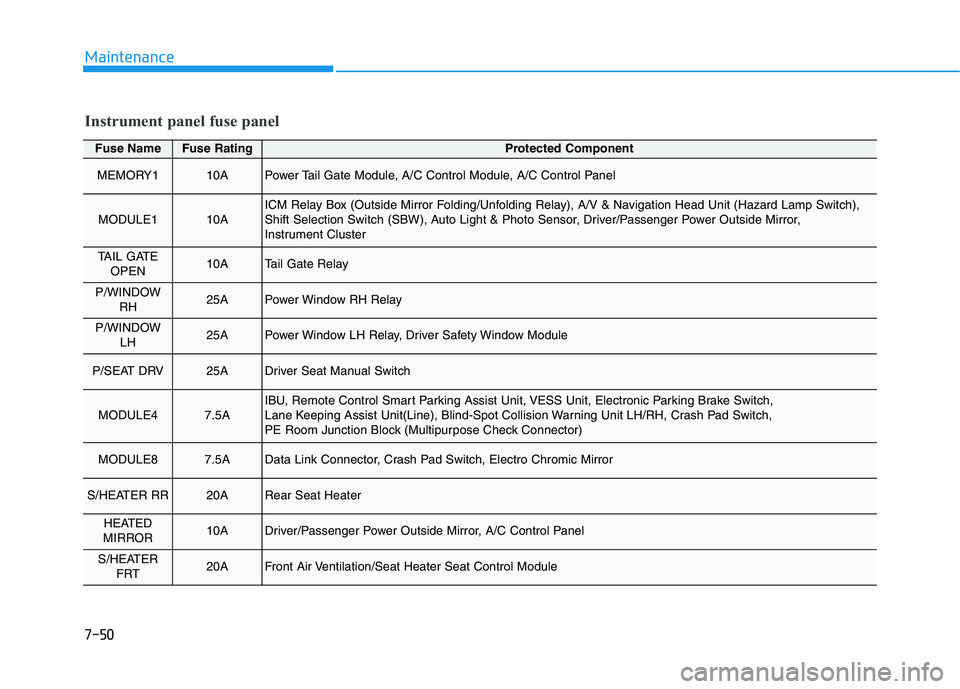
7-50
Maintenance
Fuse NameFuse RatingProtected Component
MEMORY110APower Tail Gate Module, A/C Control Module, A/C Control Panel
MODULE110AICM Relay Box (Outside Mirror Folding/Unfolding Relay), A/V & Navigation Head Unit (Hazard Lamp Switch),
Shift Selection Switch (SBW), Auto Light & Photo Sensor, Driver/Passenger Power Outside Mirror,
Instrument Cluster
TAIL GATEOPEN10ATail Gate Relay
P/WINDOW RH25APower Window RH Relay
P/WINDOW LH25APower Window LH Relay, Driver Safety Window Module
P/SEAT DRV25ADriver Seat Manual Switch
MODULE47.5AIBU, Remote Control Smart Parking Assist Unit, VESS Unit, Electronic Parking Brake Switch,
Lane Keeping Assist Unit(Line), Blind-Spot Collision Warning Unit LH/RH, Crash Pad Switch,
PE Room Junction Block (Multipurpose Check Connector)
MODULE87.5AData Link Connector, Crash Pad Switch, Electro Chromic Mirror
S/HEATER RR20ARear Seat Heater
HEATED
MIRROR10ADriver/Passenger Power Outside Mirror, A/C Control Panel
S/HEATER FRT20AFront Air Ventilation/Seat Heater Seat Control Module
Instrument panel fuse panel