steering HYUNDAI NEXO 2023 User Guide
[x] Cancel search | Manufacturer: HYUNDAI, Model Year: 2023, Model line: NEXO, Model: HYUNDAI NEXO 2023Pages: 558, PDF Size: 35.01 MB
Page 107 of 558
3-20
Electric Power Steering (EPS)
The system assists you with steering
the vehicle. If the vehicle is turned off
or if the power steering system
becomes inoperative, you may still
steer the vehicle, but it will require
increased steering effort.
Should you notice any change in the
effort required to steer during normal
vehicle operation, have the system
checked by an authorized HYUNDAI
dealer.Information
The following symptoms may occur
during normal vehicle operation:
The steering effort may be high immediately after placing the
POWER button in the ON position.
This happens as the system performs
the EPS system diagnostics. When
the diagnostics is completed, the
steering wheel will return to its nor-
mal condition.
A click noise may be heard from the EPS relay after the POWER button
is in the ON or OFF position.
Motor noise may be heard when the vehicle is at a stop or at a low driving
speed.
When you operate the steering wheel in low temperature, abnormal noise
may occur. If temperature rises, the
noise will disappear. This is a normal
condition. When an error is detected from the
EPS, the assistant function of steer-
ing effort will not be activated in
order to prevent fatal accidents.
Instrument cluster warning lights
may be on or the steering effort may
be high. When the following symp-
toms occur, immediately drive the
vehicle to a safe area and check it.
i
SSTT EEEERR IINN GG WW HHEEEELL
Convenient features of your vehicle
If the Electric Power Steering System does not operate nor-
mally, the warning light ( ) willilluminate on the instrument
cluster. You may steer the vehi-
cle, but it will require increased
steering efforts. Take your vehi-
cle to an authorized HYUNDAI
dealer and have the system
checked as soon as possible.
CAUTION
Page 108 of 558
3-21
Convenient features of your vehicle
3
Tilt Steering / Telescope Steering
Adjust the steering wheel so it points
toward your chest, not toward your
face. Make sure you can see the
instrument cluster warning lights and
gauges. After adjusting, push the
steering wheel both up and down to
be certain it is locked in position.
Always adjust the position of the
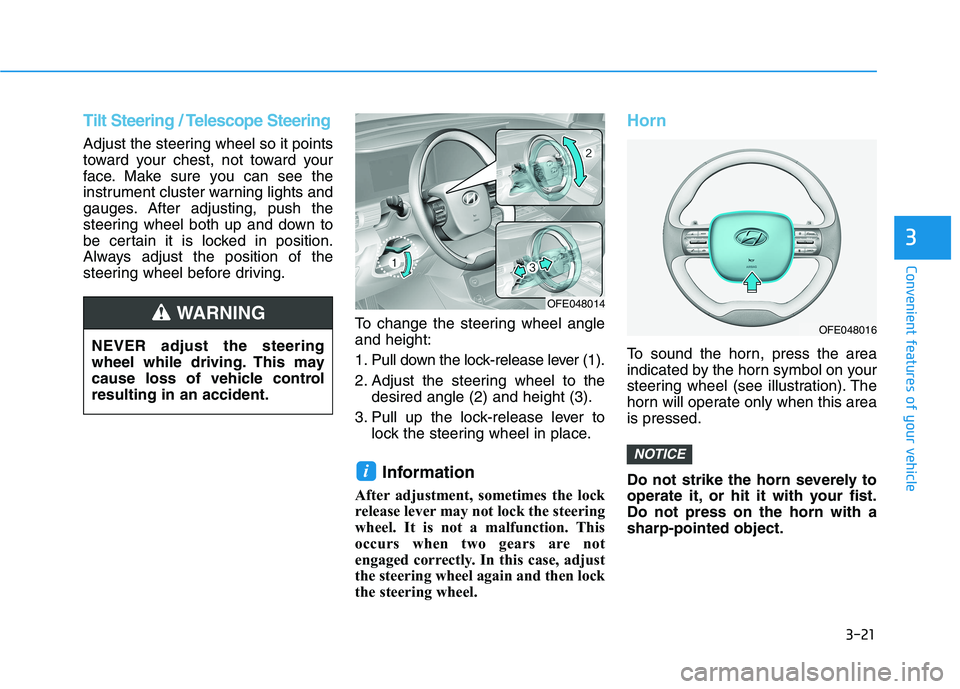
steering wheel before driving.To change the steering wheel angleand height:
1. Pull down the lock-release lever (1).
2. Adjust the steering wheel to thedesired angle (2) and height (3).
3. Pull up the lock-release lever to lock the steering wheel in place.
Information
After adjustment, sometimes the lock
release lever may not lock the steering
wheel. It is not a malfunction. This
occurs when two gears are not
engaged correctly. In this case, adjust
the steering wheel again and then lock
the steering wheel.
Horn
To sound the horn, press the area
indicated by the horn symbol on your
steering wheel (see illustration). The
horn will operate only when this areais pressed.
Do not strike the horn severely to
operate it, or hit it with your fist.Do not press on the horn with asharp-pointed object.
NOTICE
i
NEVER adjust the steering
wheel while driving. This may
cause loss of vehicle controlresulting in an accident.
WARNING OFE048014
OFE048016
Page 109 of 558
3-22
Convenient features of your vehicle
Heated Steering Wheel
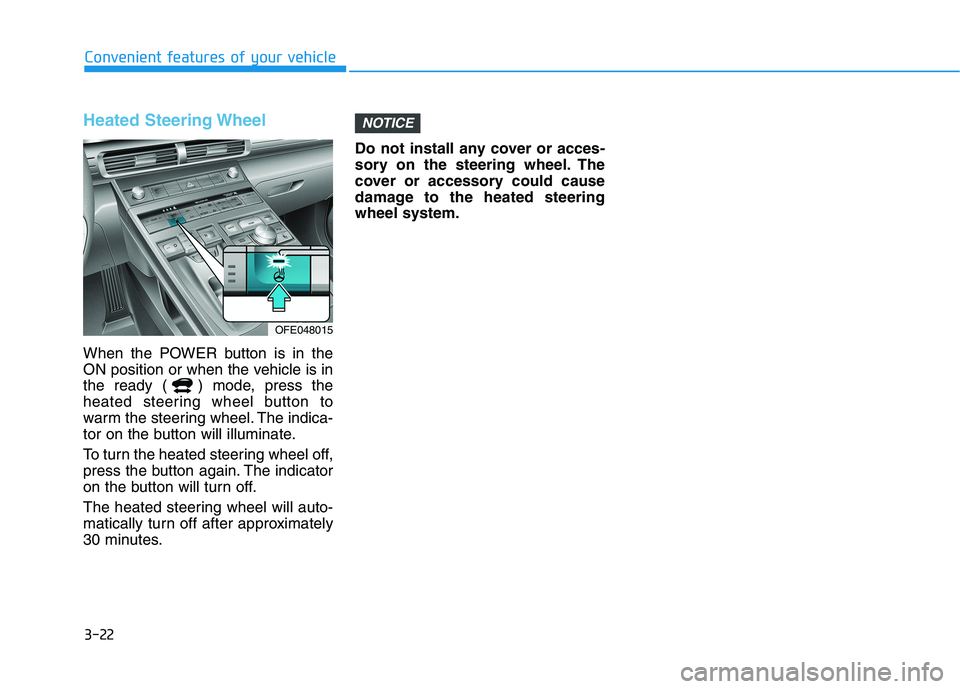
When the POWER button is in the
ON position or when the vehicle is in
the ready ( ) mode, press the
heated steering wheel button to
warm the steering wheel. The indica-
tor on the button will illuminate.
To turn the heated steering wheel off,
press the button again. The indicator
on the button will turn off.
The heated steering wheel will auto-
matically turn off after approximately
30 minutes.Do not install any cover or acces-
sory on the steering wheel. The
cover or accessory could cause
damage to the heated steeringwheel system.
NOTICE
OFE048015
Page 156 of 558
3-69
Convenient features of your vehicle
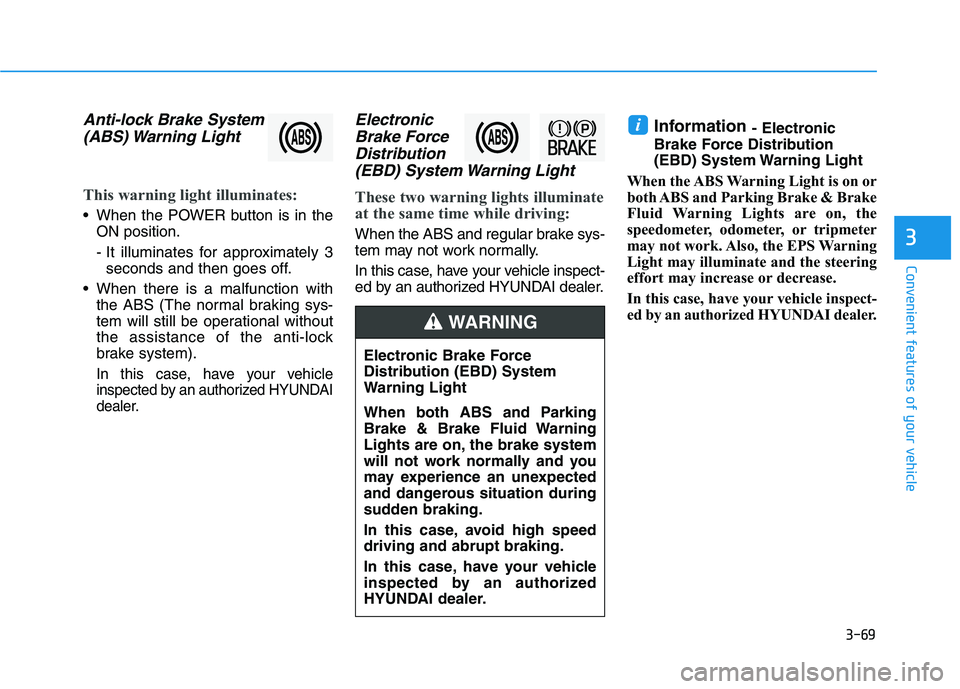
Anti-lock Brake System(ABS) Warning Light
This warning light illuminates:
When the POWER button is in the ON position.
- It illuminates for approximately 3seconds and then goes off.
When there is a malfunction with the ABS (The normal braking sys-
tem will still be operational without
the assistance of the anti-lock
brake system).
In this case, have your vehicle
inspected by an authorized HYUNDAI
dealer.
Electronic
Brake Force
Distribution (EBD) System Warning Light
These two warning lights illuminate
at the same time while driving:
When the ABS and regular brake sys-
tem may not work normally.
In this case, have your vehicle inspect-
ed by an authorized HYUNDAI dealer. Information
- Electronic
Brake Force Distribution
(EBD) System Warning Light
When the ABS Warning Light is on or
both ABS and Parking Brake & Brake
Fluid Warning Lights are on, the
speedometer, odometer, or tripmeter
may not work. Also, the EPS Warning
Light may illuminate and the steering
effort may increase or decrease.
In this case, have your vehicle inspect-
ed by an authorized HYUNDAI dealer.
i
3
Electronic Brake Force
Distribution (EBD) System
Warning Light
When both ABS and Parking
Brake & Brake Fluid Warning
Lights are on, the brake system
will not work normally and you
may experience an unexpected
and dangerous situation during
sudden braking.
In this case, avoid high speed driving and abrupt braking.
In this case, have your vehicle
inspected by an authorized
HYUNDAI dealer.
WARNING
Page 157 of 558
3-70
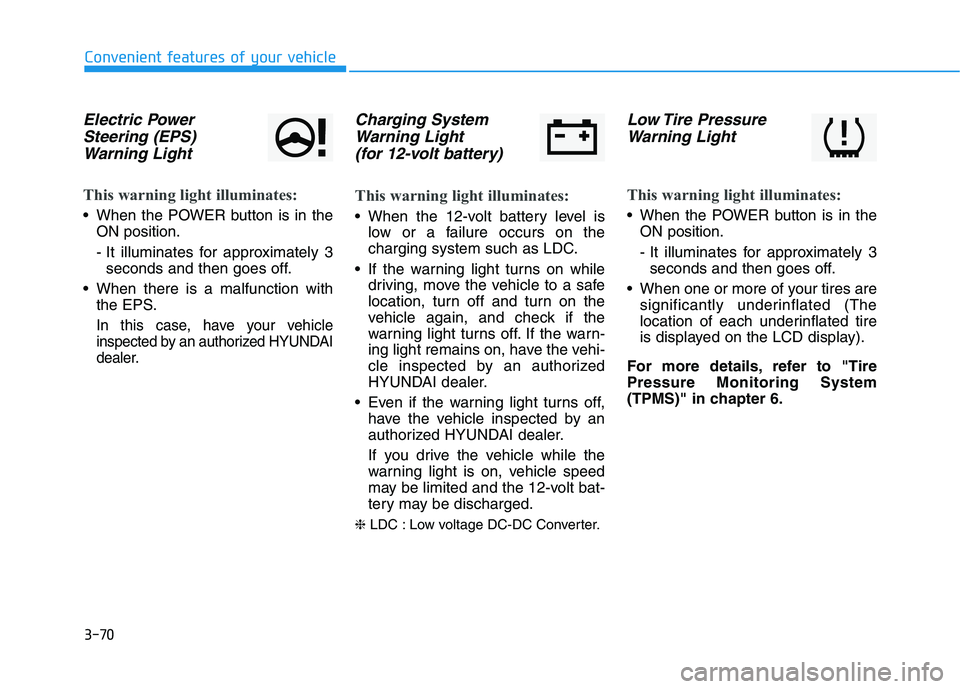
Electric PowerSteering (EPS)
Warning Light
This warning light illuminates:
When the POWER button is in the ON position.
- It illuminates for approximately 3seconds and then goes off.
When there is a malfunction with the EPS.
In this case, have your vehicle
inspected by an authorized HYUNDAI
dealer.
Charging System
Warning Light
(for 12-volt battery)
This warning light illuminates:
When the 12-volt battery level is low or a failure occurs on the
charging system such as LDC.
If the warning light turns on while driving, move the vehicle to a safe
location, turn off and turn on the
vehicle again, and check if the
warning light turns off. If the warn-
ing light remains on, have the vehi-
cle inspected by an authorized
HYUNDAI dealer.
Even if the warning light turns off, have the vehicle inspected by an
authorized HYUNDAI dealer.
If you drive the vehicle while the
warning light is on, vehicle speed
may be limited and the 12-volt bat-
tery may be discharged.
❈ LDC : Low voltage DC-DC Converter.
Low Tire Pressure
Warning Light
This warning light illuminates:
When the POWER button is in the ON position.
- It illuminates for approximately 3seconds and then goes off.
When one or more of your tires are significantly underinflated (The
location of each underinflated tire
is displayed on the LCD display).
For more details, refer to "TirePressure Monitoring System
(TPMS)" in chapter 6.
Convenient features of your vehicle
Page 163 of 558
3-76
LCD Display Messages
Shift to P
This warning message is displayed if
you try to turn off the vehicle with the
gear in the N (Neutral) position.
At this time, the POWER button
changes to the ACC position (If you
press the POWER button once more,
it will turn to the ON position).
Low Key Battery
This warning message is displayed if
the battery of the smart key is dis-
charged while changing the POWER
button to the OFF position.
Press POWER button whileturning wheel
This warning message is displayed if
the steering wheel does not unlock
normally when the POWER button ispressed.
You should press the POWER button
while turning the steering wheel rightand left.
Check Steering Wheel LockSystem
This warning message is displayed if
the steering wheel does not lock nor-
mally while the POWER buttonchanges to the OFF position.
Press brake pedal to start vehicle
This warning message is displayed if
the POWER button changes to the
ACC position twice by pressing the
button repeatedly without depressing
the brake pedal.
You can start the vehicle by depress-
ing the brake pedal.
Key not in vehicle
This warning message is displayed if
the smart key is not in the vehicle
when you press the POWER button.
When attempting to start the vehicle,
always have the smart key with you.
Convenient features of your vehicle
Page 172 of 558
3-85
Convenient features of your vehicle
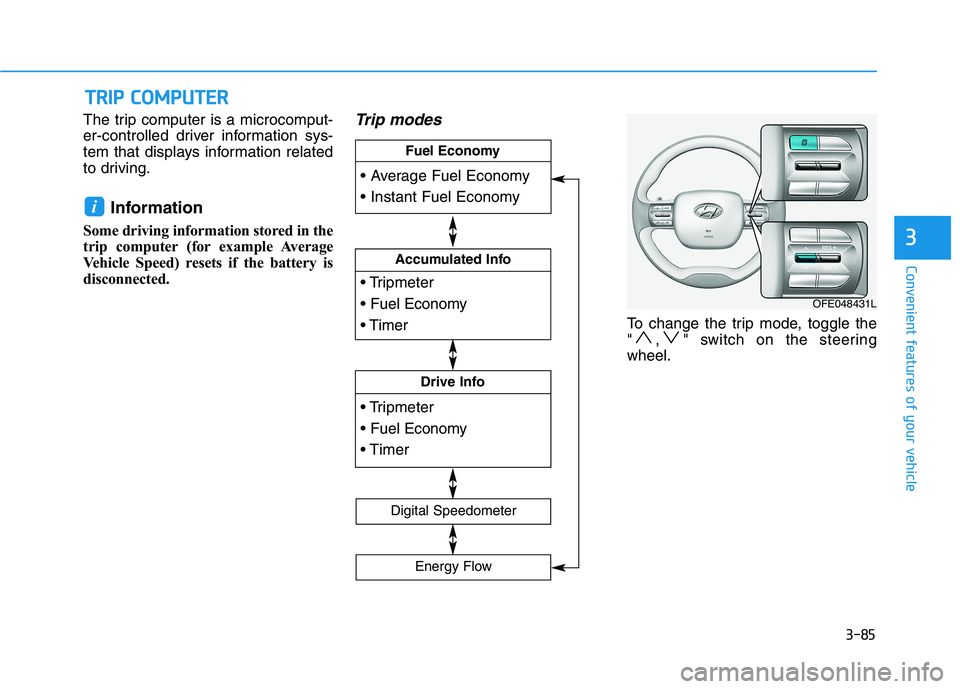
The trip computer is a microcomput-
er-controlled driver information sys-
tem that displays information related
to driving.Information
Some driving information stored in the
trip computer (for example Average
Vehicle Speed) resets if the battery is
disconnected.Trip modes
To change the trip mode, toggle the
" , " switch on the steeringwheel.
i
TT RR IIPP CC OO MM PPUU TTEERR
3
Accumulated Info
Drive Info
Fuel Economy
Digital Speedometer
Energy Flow
OFE048431L
Page 173 of 558
3-86
Convenient features of your vehicle
Average fuel economy/Instant fuel economy
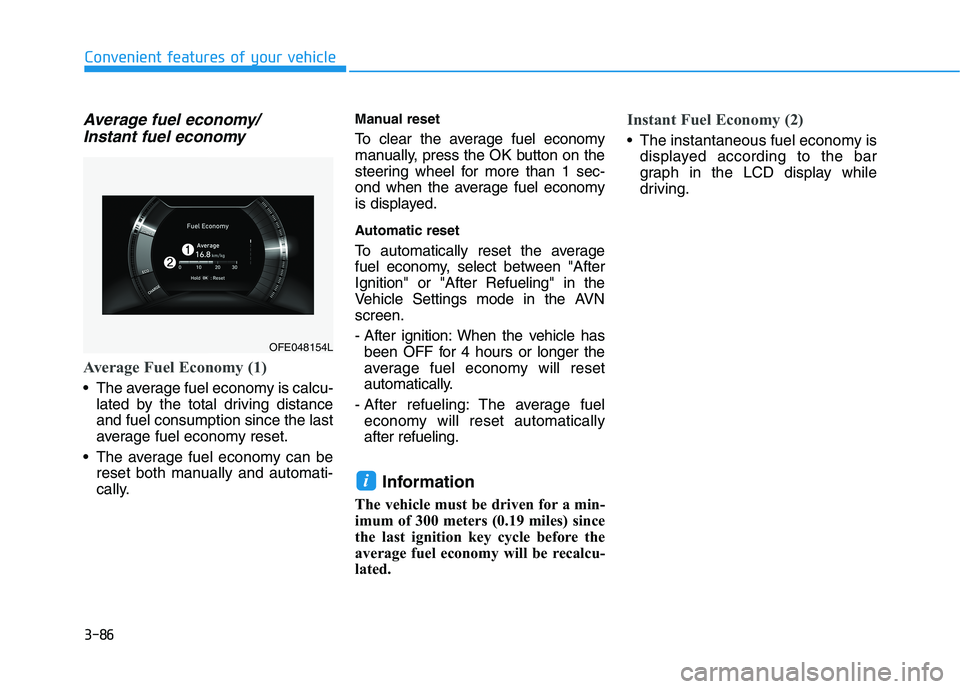
Average Fuel Economy (1)
The average fuel economy is calcu- lated by the total driving distance and fuel consumption since the last
average fuel economy reset.
The average fuel economy can be reset both manually and automati-
cally. Manual reset
To clear the average fuel economy
manually, press the OK button on the
steering wheel for more than 1 sec-
ond when the average fuel economy
is displayed.
Automatic reset
To automatically reset the average
fuel economy, select between "AfterIgnition" or "After Refueling" in the
Vehicle Settings mode in the AVNscreen.
- After ignition: When the vehicle has
been OFF for 4 hours or longer the
average fuel economy will reset
automatically.
- After refueling: The average fuel economy will reset automaticallyafter refueling.
Information
The vehicle must be driven for a min-
imum of 300 meters (0.19 miles) since
the last ignition key cycle before the
average fuel economy will be recalcu-
lated.
Instant Fuel Economy (2)
The instantaneous fuel economy is displayed according to the bar
graph in the LCD display while
driving.
i
OFE048154L
Page 182 of 558
3-95
Convenient features of your vehicle
3
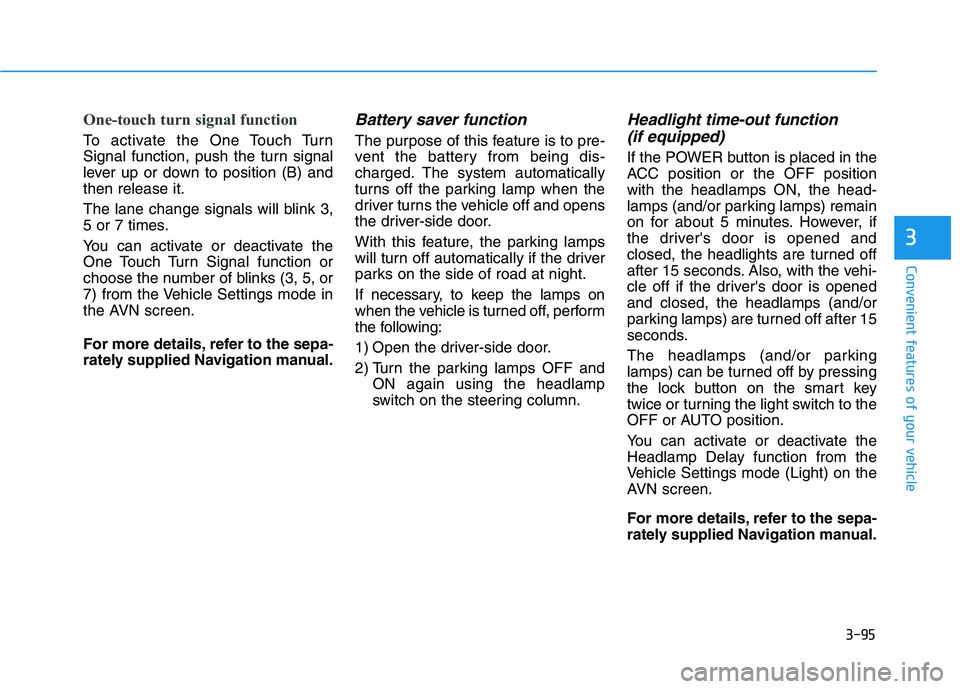
One-touch turn signal function
To activate the One Touch Turn
Signal function, push the turn signal
lever up or down to position (B) andthen release it.
The lane change signals will blink 3,
5 or 7 times.
You can activate or deactivate the
One Touch Turn Signal function or
choose the number of blinks (3, 5, or
7) from the Vehicle Settings mode in
the AVN screen.
For more details, refer to the sepa-
rately supplied Navigation manual.
Battery saver function
The purpose of this feature is to pre-
vent the battery from being dis-
charged. The system automatically
turns off the parking lamp when the
driver turns the vehicle off and opens
the driver-side door.
With this feature, the parking lamps
will turn off automatically if the driver
parks on the side of road at night.
If necessary, to keep the lamps on
when the vehicle is turned off, perform
the following:
1) Open the driver-side door.
2) Turn the parking lamps OFF andON again using the headlamp
switch on the steering column.
Headlight time-out function
(if equipped)
If the POWER button is placed in the
ACC position or the OFF positionwith the headlamps ON, the head-
lamps (and/or parking lamps) remain
on for about 5 minutes. However, if
the driver's door is opened and
closed, the headlights are turned off
after 15 seconds. Also, with the vehi-
cle off if the driver's door is openedand closed, the headlamps (and/or
parking lamps) are turned off after 15
seconds.
The headlamps (and/or parking
lamps) can be turned off by pressing
the lock button on the smart key
twice or turning the light switch to the
OFF or AUTO position.
You can activate or deactivate the
Headlamp Delay function from the
Vehicle Settings mode (Light) on the
AVN screen.
For more details, refer to the sepa-
rately supplied Navigation manual.
Page 200 of 558
3-113
Convenient features of your vehicle
3
REMOTE SMART PARKING ASSIST
(RSPA) system helps drivers park
their vehicle by using sensors to
detect parking spaces, control the
steering wheel, shift the gear and
adjust vehicle speed automatically
with instructions through sound and
AVN screen.
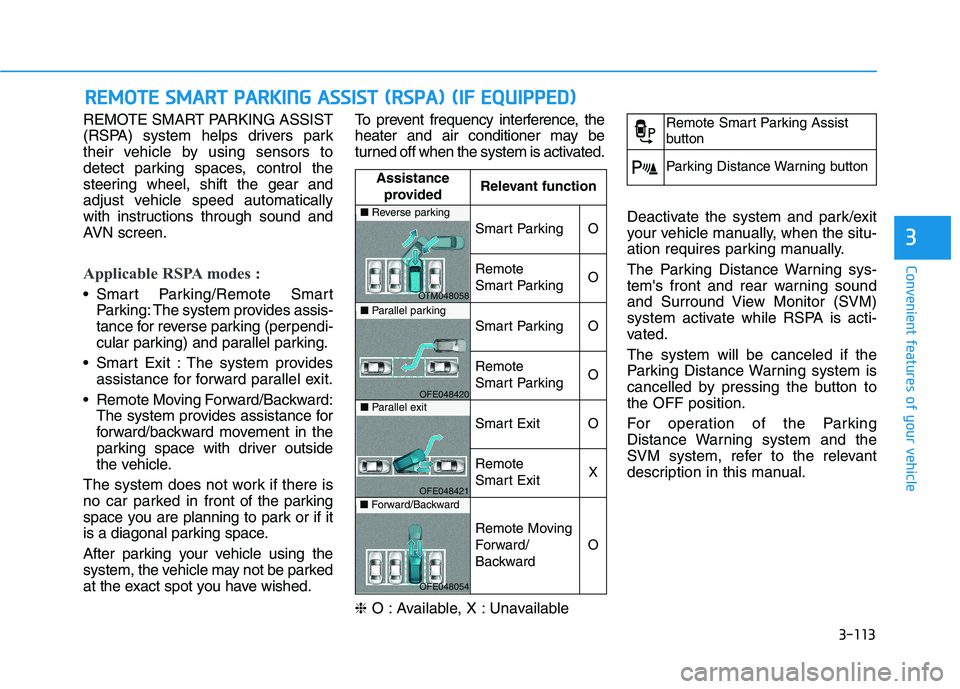
Applicable RSPA modes :
Smart Parking/Remote SmartParking: The system provides assis-
tance for reverse parking (perpendi-
cular parking) and parallel parking.
Smart Exit : The system provides assistance for forward parallel exit.
Remote Moving Forward/Backward: The system provides assistance for
forward/backward movement in the
parking space with driver outside
the vehicle.
The system does not work if there is
no car parked in front of the parking
space you are planning to park or if it
is a diagonal parking space.
After parking your vehicle using the
system, the vehicle may not be parked
at the exact spot you have wished. To prevent frequency interference, the
heater and air conditioner may be
turned off when the system is activated. ❈
O : Available, X : Unavailable Deactivate the system and park/exit
your vehicle manually, when the situ-
ation requires parking manually.
The Parking Distance Warning sys-
tem's front and rear warning sound
and Surround View Monitor (SVM)
system activate while RSPA is acti-
vated. The system will be canceled if the
Parking Distance Warning system is
cancelled by pressing the button tothe OFF position.
For operation of the Parking
Distance Warning system and the
SVM system, refer to the relevant
description in this manual.
RR
EEMM OOTTEE SS MM AARRTT PP AA RRKK IINN GG AA SSSSIISS TT (( RR SSPP AA )) (( IIFF EE QQ UUIIPP PP EEDD ))
Assistance
provided Relevant function
Smart ParkingO
Remote
Smart ParkingO
Smart ParkingO
Remote
Smart ParkingO
Smart ExitO
Remote
Smart ExitX
Remote Moving
Forward/
Backward
O
■
Reverse parking
OTM048058
■Parallel parking
OFE048420
■Parallel exit
OFE048421
■Forward/Backward
OFE048054
Remote Smart Parking Assist
button
Parking Distance Warning button