ECU HYUNDAI PALISADE 2021 User Guide
[x] Cancel search | Manufacturer: HYUNDAI, Model Year: 2021, Model line: PALISADE, Model: HYUNDAI PALISADE 2021Pages: 612, PDF Size: 33.36 MB
Page 67 of 612
2-50
Safety system of your vehicle
Lower Anchors and Tether for
Children (LATCH System)
The LATCH system holds a child
restraint during driving and in an acci-
dent. This system is designed to
make installation of the child restraint
easier and reduce the possibility of
improperly installing your child
restraint. The LATCH system uses
anchors in the vehicle and attach-
ments on the child restraint. The
LATCH system eliminates the need
to use seat belts to secure the child
restraint to the rear seats.
Lower anchors are metal bars built
into the vehicle. There are two lower
anchors for each LATCH seating
position that will accommodate a
child restraint with lower attachments.
To use the LATCH system in your
vehicle, you must have a child
restraint with LATCH attachments.
The child seat manufacturer will pro-
vide you with instructions on how to
use the child seat with its attachments
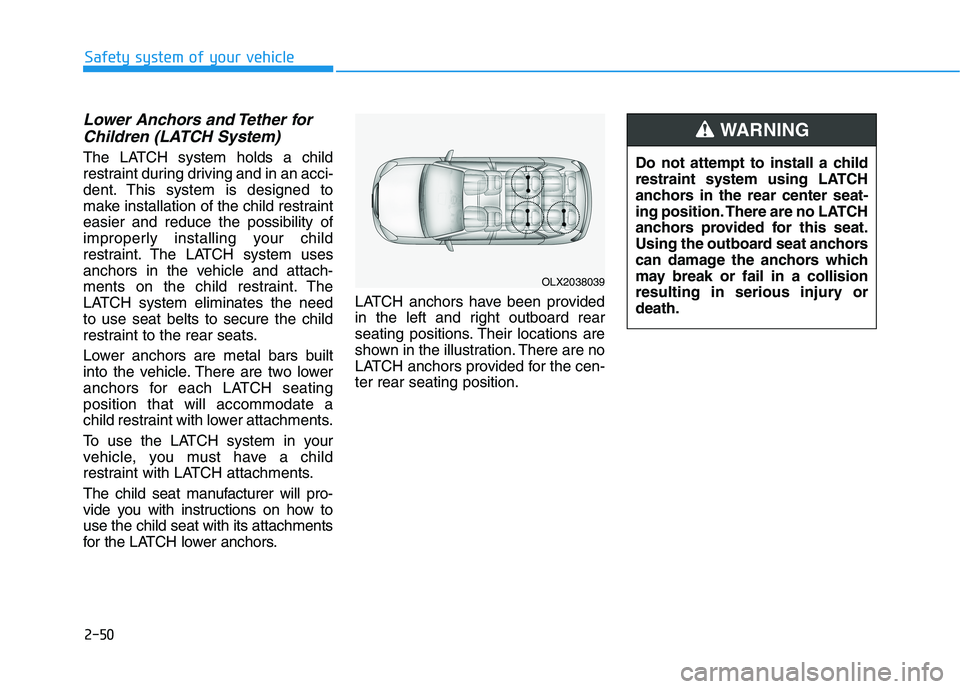
for the LATCH lower anchors.LATCH anchors have been provided
in the left and right outboard rear
seating positions. Their locations are
shown in the illustration. There are no
LATCH anchors provided for the cen-
ter rear seating position.
OLX2038039
Do not attempt to install a child
restraint system using LATCH
anchors in the rear center seat-
ing position. There are no LATCH
anchors provided for this seat.
Using the outboard seat anchors
can damage the anchors which
may break or fail in a collision
resulting in serious injury or
death.
WARNING
Page 68 of 612
![HYUNDAI PALISADE 2021 User Guide 2-51
Safety system of your vehicle
2
[1] : Lower Anchor Position Indicator,
[2] : Lower Anchor
The lower anchor position indicator
symbols are located on the left and
right rear seat backs to identify](/img/35/41162/w960_41162-67.png "HYUNDAI PALISADE 2021 User Guide 2-51
Safety system of your vehicle
2
[1] : Lower Anchor Position Indicator,
[2] : Lower Anchor
The lower anchor position indicator
symbols are located on the left and
right rear seat backs to identify")
2-51
Safety system of your vehicle
2
[1] : Lower Anchor Position Indicator,
[2] : Lower Anchor
The lower anchor position indicator
symbols are located on the left and
right rear seat backs to identify the
position of the lower anchors in your
vehicle (see arrows in illustration).
The LATCH anchors are located
between the seatback and the seat
cushion of the rear seat left and right
outboard seating positions.
Securing a child restraint with
the LATCH anchors system
To install a LATCH-compatible child
restraint in either of the rear outboard
seating positions:
1. Move the seat belt buckle away
from the lower anchors.
2. Move any other objects away from
the anchors that could prevent a
secure connection between the
child restraint and the lower
anchors.
3. Place the child restraint on the
vehicle seat, then attach the seat
to the lower anchors according to
the instructions provided by the
child restraint manufacturer.
4. Follow the child restraint instruc-
tions for properly adjusting and
tightening the lower attachments
on the child restraint to the lower
anchors.
OLX2038040L
Take the following precautions
when using the LATCH system:
Read and follow all installation
instructions provided with
your child restraint system.
To prevent the child from
reaching and taking hold of
unretracted seat belts, buckle
all unused rear seat belts and
retract the seat belt webbing
behind the child. Children can
be strangled if a shoulder belt
becomes wrapped around
their neck and the seat belt
tightens.
NEVER attach more than one
child restraint to a single
anchor. This could cause the
anchor or attachment to come
loose or break.
Always have the LATCH sys-
tem inspected by your author-
ized HYUNDAI dealer after an
accident. An accident can
damage the LATCH system
and may not properly secure
the child restraint.
WARNING
Page 69 of 612
2-52
Safety system of your vehicle
The recommended weight for the
LATCH system is under 65 lb (30
kg).
How to determine an appropriate
child restraint weight:
Child weight + Child restraint
weight < 65 lb (30kg)
Securing a child restraint seat
with "Tether Anchor" system
First secure the child restraint with
the LATCH lower anchors or the seat
belt. If the child restraint manufactur-
er recommends that the top tether
strap be attached, attach and tighten
the top tether strap to the top tether
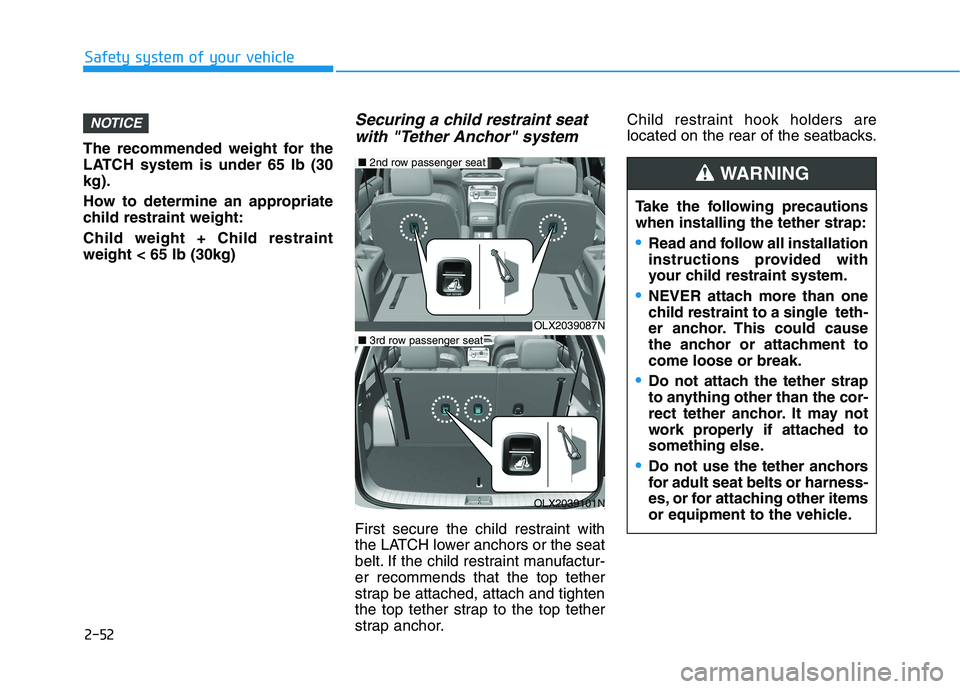
strap anchor.Child restraint hook holders are
located on the rear of the seatbacks.
NOTICE
OLX2039087N
■2nd row passenger seat
OLX2039101N
■3rd row passenger seat
Take the following precautions
when installing the tether strap:
Read and follow all installation
instructions provided with
your child restraint system.
NEVER attach more than one
child restraint to a single teth-
er anchor. This could cause
the anchor or attachment to
come loose or break.
Do not attach the tether strap
to anything other than the cor-
rect tether anchor. It may not
work properly if attached to
something else.
Do not use the tether anchors
for adult seat belts or harness-
es, or for attaching other items
or equipment to the vehicle.
WARNING
Page 70 of 612
2-53
Safety system of your vehicle
2
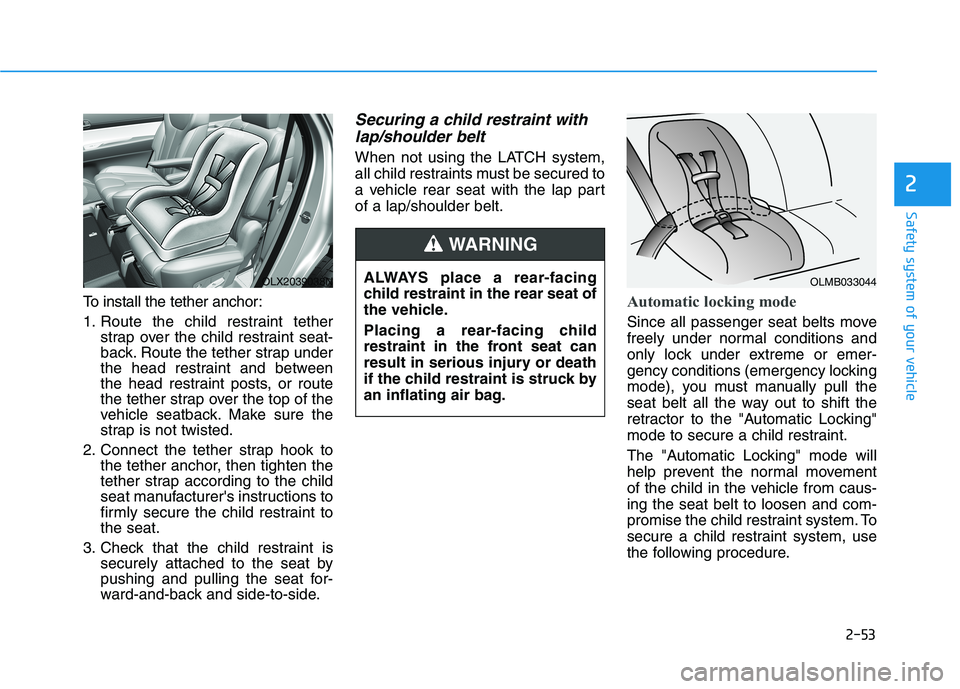
To install the tether anchor:
1. Route the child restraint tether
strap over the child restraint seat-
back. Route the tether strap under
the head restraint and between
the head restraint posts, or route
the tether strap over the top of the
vehicle seatback. Make sure the
strap is not twisted.
2. Connect the tether strap hook to
the tether anchor, then tighten the
tether strap according to the child
seat manufacturer's instructions to
firmly secure the child restraint to
the seat.
3. Check that the child restraint is
securely attached to the seat by
pushing and pulling the seat for-
ward-and-back and side-to-side.
Securing a child restraint with
lap/shoulder belt
When not using the LATCH system,
all child restraints must be secured to
a vehicle rear seat with the lap part
of a lap/shoulder belt.
Automatic locking mode
Since all passenger seat belts move
freely under normal conditions and
only lock under extreme or emer-
gency conditions (emergency locking
mode), you must manually pull the
seat belt all the way out to shift the
retractor to the "Automatic Locking"
mode to secure a child restraint.
The "Automatic Locking" mode will
help prevent the normal movement
of the child in the vehicle from caus-
ing the seat belt to loosen and com-
promise the child restraint system. To
secure a child restraint system, use
the following procedure. ALWAYS place a rear-facing
child restraint in the rear seat of
the vehicle.
Placing a rear-facing child
restraint in the front seat can
result in serious injury or death
if the child restraint is struck by
an inflating air bag.
WARNING
OLX2039038NOLMB033044
Page 79 of 612
2-62
Safety system of your vehicle
Curtain air bags
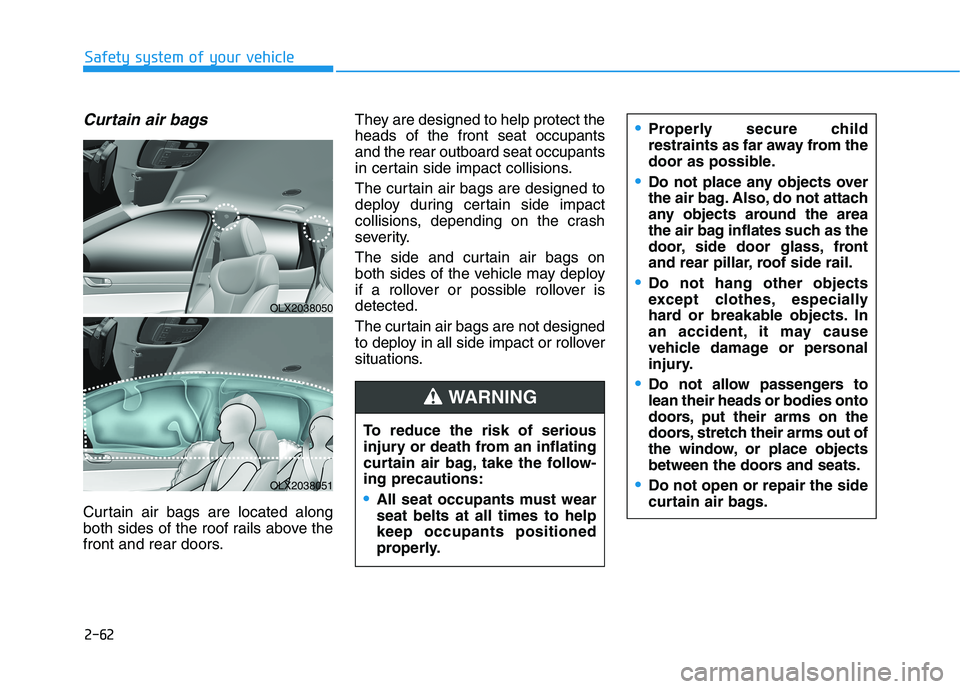
Curtain air bags are located along
both sides of the roof rails above the
front and rear doors.They are designed to help protect the
heads of the front seat occupants
and the rear outboard seat occupants
in certain side impact collisions.
The curtain air bags are designed to
deploy during certain side impact
collisions, depending on the crash
severity.
The side and curtain air bags on
both sides of the vehicle may deploy
if a rollover or possible rollover is
detected.
The curtain air bags are not designed
to deploy in all side impact or rollover
situations.
To reduce the risk of serious
injury or death from an inflating
curtain air bag, take the follow-
ing precautions:All seat occupants must wear
seat belts at all times to help
keep occupants positioned
properly.
Properly secure child
restraints as far away from the
door as possible.
Do not place any objects over
the air bag. Also, do not attach
any objects around the area
the air bag inflates such as the
door, side door glass, front
and rear pillar, roof side rail.
Do not hang other objects
except clothes, especially
hard or breakable objects. In
an accident, it may cause
vehicle damage or personal
injury.
Do not allow passengers to
lean their heads or bodies onto
doors, put their arms on the
doors, stretch their arms out of
the window, or place objects
between the doors and seats.
Do not open or repair the side
curtain air bags.
WARNING
OLX2038050
OLX2038051
Page 99 of 612
Convenient features of your vehicle
Windshield defrosting and defogging ............3-186
Auto Defogging System (Additional Feature with
Automatic Temperature Control System)................3-188
Rear Window Defroster ..............................................3-190
Climate control additional features.................3-191
Cluster ionizer ................................................................3-191
Automatic Ventilation ...................................................3-191
Sunroof Inside Air Recirculation ...............................3-191
Storage compartment ........................................3-192
Center Console Storage ..............................................3-192
Glove Box ........................................................................3-192
Luggage Tray .................................................................3-193
Interior features.................................................3-194
Cup Holder ......................................................................3-194
Conversation mirror......................................................3-196
Sunvisor ...........................................................................3-196
Power Outlet ..................................................................3-197
AC Inverter......................................................................3-198
USB Charger ...................................................................3-200Wireless Cellular Phone Charging System..............3-201
Clock .................................................................................3-203
Coat Hook .......................................................................3-203
Floor Mat Anchor(s).....................................................3-204
Luggage Net Holder .....................................................3-205
Cargo Security Screen .................................................3-205
Side Curtain ....................................................................3-207
Exterior features ...............................................3-209
Roof Side Rails .............................................................3-209
3
Page 111 of 612
![HYUNDAI PALISADE 2021 User Guide 3-15
Convenient features of your vehicle
Operating Door Locks from
Outside the Vehicle
Mechanical key
[A] : Unlock, [B] : Lock
First, pull the outside door handle (1)
and push the hook (2) located in](/img/35/41162/w960_41162-110.png "HYUNDAI PALISADE 2021 User Guide 3-15
Convenient features of your vehicle
Operating Door Locks from
Outside the Vehicle
Mechanical key
[A] : Unlock, [B] : Lock
First, pull the outside door handle (1)
and push the hook (2) located in")
3-15
Convenient features of your vehicle
Operating Door Locks from
Outside the Vehicle
Mechanical key
[A] : Unlock, [B] : Lock
First, pull the outside door handle (1)
and push the hook (2) located inside
of outside door handle by using the
mechanical key. And remove the
cover (3) and lower the cover down-
ward not to be damaged.
Be careful not to damage the
cover while removing it or mis-
place it after removing it.
After removing the cover, turn the
key toward the front of the vehicle to
unlock and toward the rear of the
vehicle to lock.
If you lock the driver's door with a
mechanical key, the driver's door will
lock. If you unlock the driver's door
with a mechanical key, you can open
and close the driver's door only.
Once the doors are unlocked, they
may be opened by pulling the door
handle. When closing the door, push
the door by hand. Make sure that
doors are closed securely.Remote key
To lock the doors, press the Door
Lock button (1) on the remote key.
Press the Door Unlock button (2) on
the remote key, the driver's door will
unlock. If you press the Door Unlock
button on the remote key again with-
in four seconds, then all the doors
will unlock.
Once the doors are unlocked, they
may be opened by pulling the door
handle. When closing the door, push
the door by hand. Make sure that
doors are closed securely.
NOTICE
D DO
OO
OR
R
L
LO
OC
CK
KS
S
3
OLX2049415N
OLX2048005
OLX2049052L
Page 112 of 612
3-16
Convenient features of your vehicle
Smart key
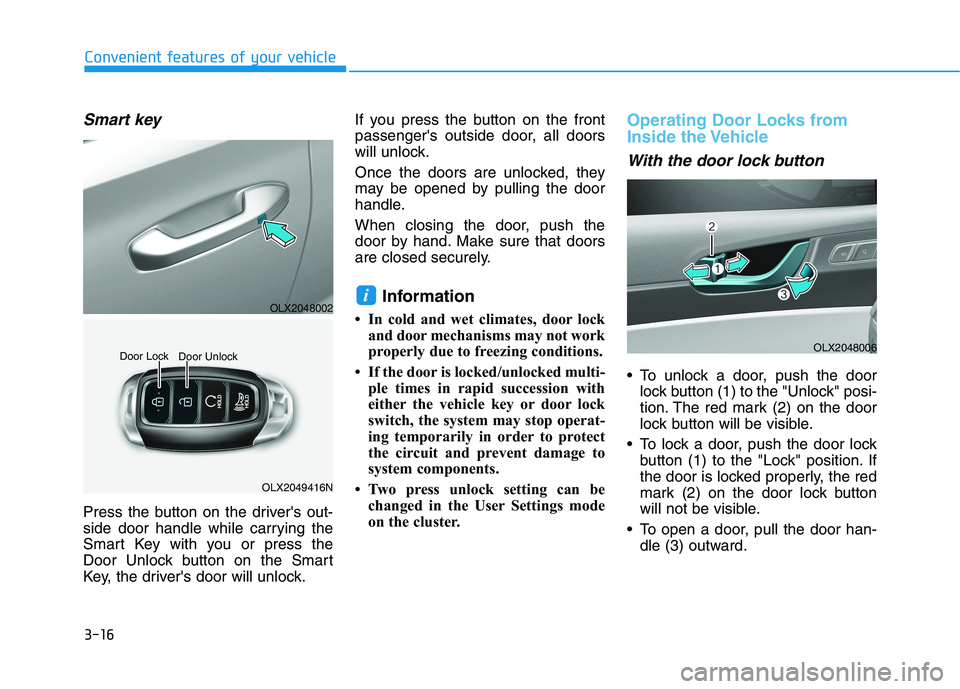
Press the button on the driver's out-
side door handle while carrying the
Smart Key with you or press the
Door Unlock button on the Smart
Key, the driver's door will unlock.If you press the button on the front
passenger's outside door, all doors
will unlock.
Once the doors are unlocked, they
may be opened by pulling the door
handle.
When closing the door, push the
door by hand. Make sure that doors
are closed securely.
Information
• In cold and wet climates, door lock
and door mechanisms may not work
properly due to freezing conditions.
• If the door is locked/unlocked multi-
ple times in rapid succession with
either the vehicle key or door lock
switch, the system may stop operat-
ing temporarily in order to protect
the circuit and prevent damage to
system components.
• Two press unlock setting can be
changed in the User Settings mode
on the cluster.
Operating Door Locks from
Inside the Vehicle
With the door lock button
To unlock a door, push the door
lock button (1) to the "Unlock" posi-
tion. The red mark (2) on the door
lock button will be visible.
To lock a door, push the door lock
button (1) to the "Lock" position. If
the door is locked properly, the red
mark (2) on the door lock button
will not be visible.
To open a door, pull the door han-
dle (3) outward.
i
OLX2049416N Door Lock
Door Unlock
OLX2048006
OLX2048002
Page 114 of 612
3-18
Convenient features of your vehicle
For Key Start Vehicles
(with Remote Key)
If the key is in the ignition switch
and any door is opened, the doors
will not lock even though the lock
button (2) is pressed.
For Push Button Start Vehicles
(with Smart Key)
If the smart key is in the vehicle
and any door is open, the doors
will not lock even though the lock
button (2) is pressed.
The doors should always be
fully closed and locked while
the vehicle is in motion. If the
doors are unlocked, the risk of
being thrown from the vehicle
in a crash is increased.
Do not pull the inner door
handle of the driver's or pas-
senger's door while the vehi-
cle is moving.
WARNING
Do not leave children or animals
unattended in your vehicle. An
enclosed vehicle can become
extremely hot, causing death or
serious injury to unattended
children or animals who cannot
escape the vehicle. Children
might operate features of the
vehicle that could injure them,
or they could encounter other
harm, possibly from someone
gaining entry to the vehicle.
WARNING
Always secure your vehicle.
Leaving your vehicle unlocked
increases the potential risk to
you or others from someone
hiding in your vehicle.
To secure your vehicle, while
depressing the brake, press the
P (Park) button, engage the
parking brake, and place the
ignition switch in the LOCK/OFF
position, close all windows,
lock all doors, and always take
the key with you.
WARNING
Page 122 of 612
3-26
Convenient features of your vehicle
This system helps to protect your vehi-
cle and valuables.The horn will
sound and the hazard warning lights
will blink continuously if any of the
following occur:
- A door is opened without using the
remote key or smart key.
- The liftgate is opened without
using the remote key or smart key.
- The engine hood is opened.
The alarm continues for 30 seconds
(repeats 2 times unless the system is
disarmed), then the system resets.
To turn off the alarm, unlock the
doors with the remote key or smart
key.
The Theft Alarm System automati-
cally sets 30 seconds after you lock
the doors and the liftgate. For the
system to activate, you must lock the
doors and the liftgate from outside
the vehicle with the remote key or
smart key or by pressing the button
on the outside of the door handle
with the smart key in your posses-
sion.
The hazard warning lights will blink
and the chime will sound once to
indicate the system is armed.Once the security system is set,
opening any door, the liftgate, or the
hood without using the remote key or
smart key will cause the alarm to
activate.
The Theft Alarm System will not set if
the hood, the liftgate, or any door is
not fully closed. If the system will not
set, check the hood, the liftgate, or
the doors are fully closed.
Do not attempt to alter this system or
add other devices to it.
Information
• Do not lock the doors until all pas-
sengers have left the vehicle. If the
remaining passenger leaves the
vehicle when the system is armed,
the alarm will be activated.
• If the vehicle is not disarmed with the
remote key or smart key, open the
doors by using the mechanical key
and place the ignition switch in the
ON position (for remote key) or start
the engine (for smart key) by direct-
ly pressing the ignition switch with
the smart key.
• If the system is disarmed by unlock-
ing the vehicle, but neither a door or
the liftgate is opened within 30 sec-
onds, the doors will relock and the
system will rearm automatically.
i
T TH
HE
EF
FT
T-
-A
AL
LA
AR
RM
M
S
SY
YS
ST
TE
EM
M