lane assist HYUNDAI PALISADE 2021 User Guide
[x] Cancel search | Manufacturer: HYUNDAI, Model Year: 2021, Model line: PALISADE, Model: HYUNDAI PALISADE 2021Pages: 612, PDF Size: 33.36 MB
Page 217 of 612
3-121
Convenient features of your vehicle
3
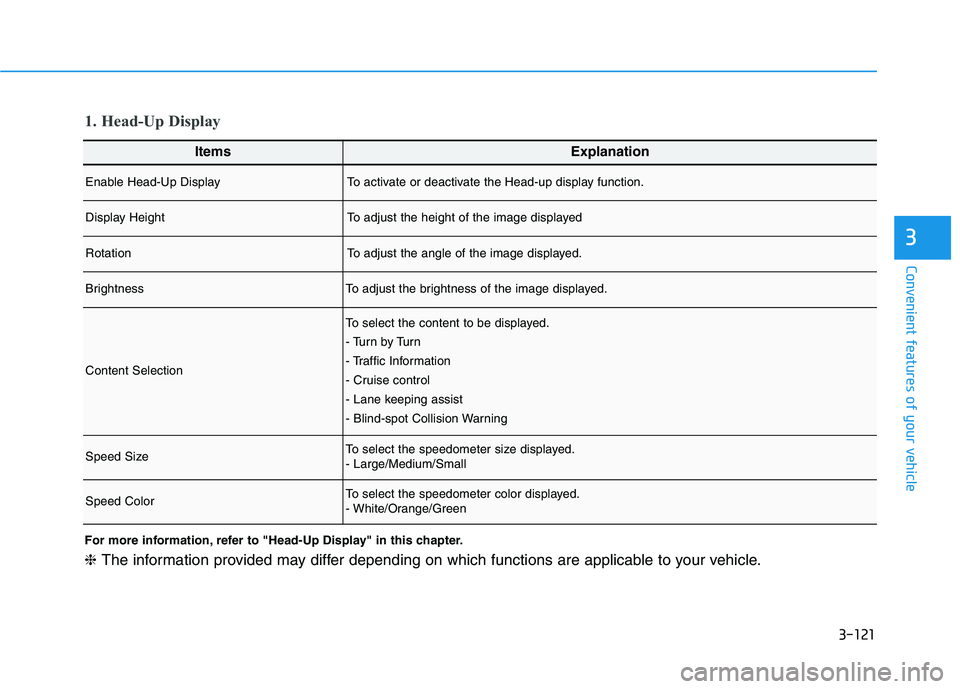
ItemsExplanation
Enable Head-Up DisplayTo activate or deactivate the Head-up display function.
Display HeightTo adjust the height of the image displayed
RotationTo adjust the angle of the image displayed.
BrightnessTo adjust the brightness of the image displayed.
Content Selection
To select the content to be displayed.
- Tu r n b y Tu r n
- Traffic Information
- Cruise control
- Lane keeping assist
- Blind-spot Collision Warning
Speed SizeTo select the speedometer size displayed.
- Large/Medium/Small
Speed ColorTo select the speedometer color displayed.
- White/Orange/Green
1. Head-Up Display
For more information, refer to "Head-Up Display" in this chapter.
❈The information provided may differ depending on which functions are applicable to your vehicle.
Page 218 of 612
3-122
Convenient features of your vehicle
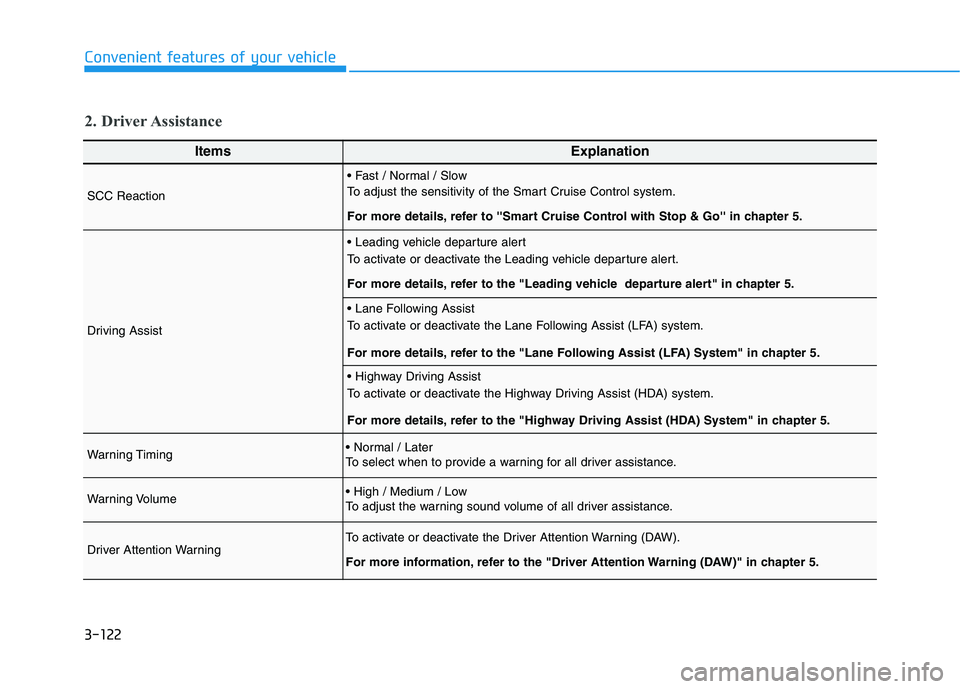
ItemsExplanation
SCC Reaction
To adjust the sensitivity of the Smart Cruise Control system.
For more details, refer to ''Smart Cruise Control with Stop & Go'' in chapter 5.
Driving Assist
To activate or deactivate the Leading vehicle departure alert.
For more details, refer to the "Leading vehicle departure alert" in chapter 5.
To activate or deactivate the Lane Following Assist (LFA) system.
For more details, refer to the "Lane Following Assist (LFA) System" in chapter 5.
To activate or deactivate the Highway Driving Assist (HDA) system.
For more details, refer to the "Highway Driving Assist (HDA) System" in chapter 5.
Warning Timing
To select when to provide a warning for all driver assistance.
Warning Volume
To adjust the warning sound volume of all driver assistance.
Driver Attention WarningTo activate or deactivate the Driver Attention Warning (DAW).
For more information, refer to the "Driver Attention Warning (DAW)" in chapter 5.
2. Driver Assistance
Page 219 of 612
3-123
Convenient features of your vehicle
3
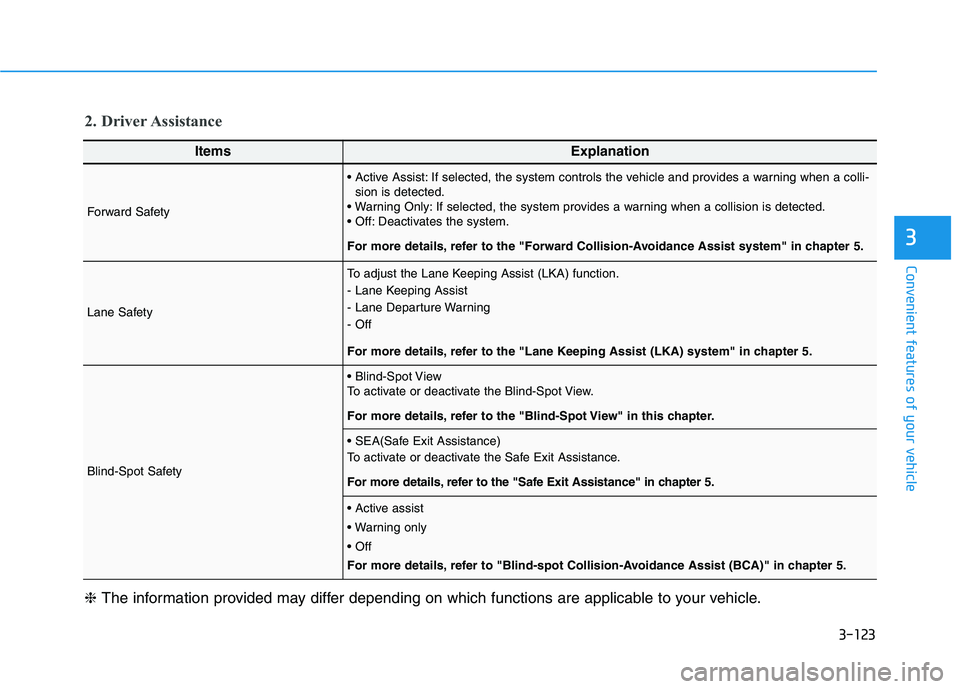
ItemsExplanation
Forward Safety
If selected, the system controls the vehicle and provides a warning when a colli-
sion is detected.
If selected, the system provides a warning when a collision is detected.
Deactivates the system.
For more details, refer to the "Forward Collision-Avoidance Assist system" in chapter 5.
Lane Safety
To adjust the Lane Keeping Assist (LKA) function.
- Lane Keeping Assist
- Lane Departure Warning
- Off
For more details, refer to the "Lane Keeping Assist (LKA) system" in chapter 5.
Blind-Spot Safety
To activate or deactivate the Blind-Spot View.
For more details, refer to the "Blind-Spot View" in this chapter.
To activate or deactivate the Safe Exit Assistance.
For more details, refer to the "Safe Exit Assistance" in chapter 5.
For more details, refer to "Blind-spot Collision-Avoidance Assist (BCA)" in chapter 5.
❈The information provided may differ depending on which functions are applicable to your vehicle.
2. Driver Assistance
Page 227 of 612
3-131
Convenient features of your vehicle
3
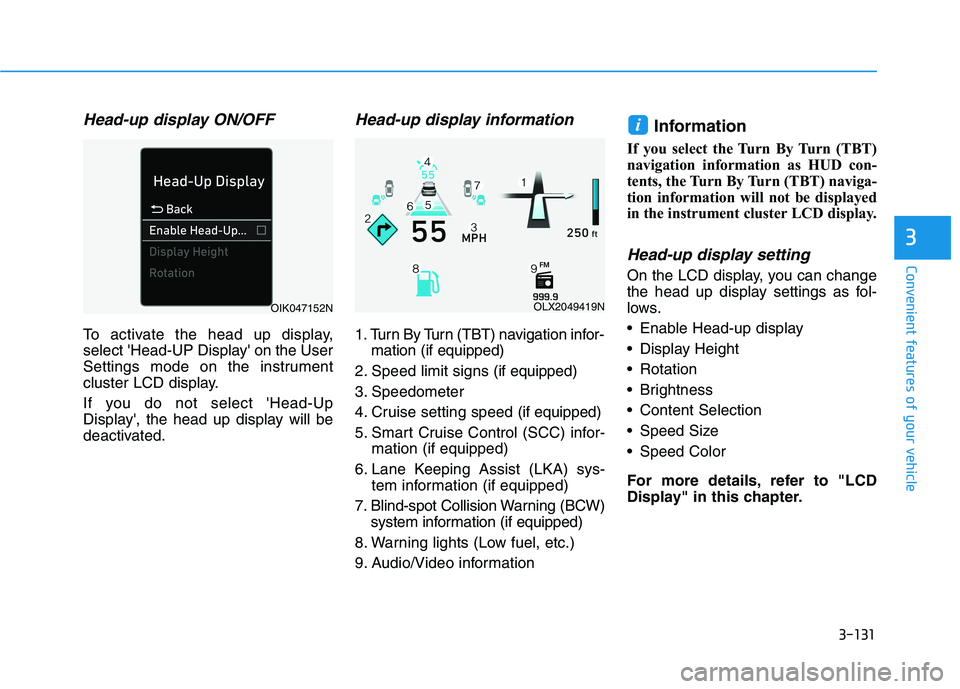
Head-up display ON/OFF
To activate the head up display,
select 'Head-UP Display' on the User
Settings mode on the instrument
cluster LCD display.
If you do not select 'Head-Up
Display', the head up display will be
deactivated.
Head-up display information
1. Turn By Turn (TBT) navigation infor-
mation (if equipped)
2. Speed limit signs (if equipped)
3. Speedometer
4. Cruise setting speed (if equipped)
5. Smart Cruise Control (SCC) infor-
mation (if equipped)
6. Lane Keeping Assist (LKA) sys-
tem information (if equipped)
7. Blind-spot Collision Warning (BCW)
system information (if equipped)
8. Warning lights (Low fuel, etc.)
9. Audio/Video information
Information
If you select the Turn By Turn (TBT)
navigation information as HUD con-
tents, the Turn By Turn (TBT) naviga-
tion information will not be displayed
in the instrument cluster LCD display.
Head-up display setting
On the LCD display, you can change
the head up display settings as fol-
lows.
Enable Head-up display
Display Height
Rotation
Brightness
Content Selection
Speed Size
Speed Color
For more details, refer to "LCD
Display" in this chapter.
i
OLX2049419NOIK047152N
Page 232 of 612
3-136
Convenient features of your vehicle
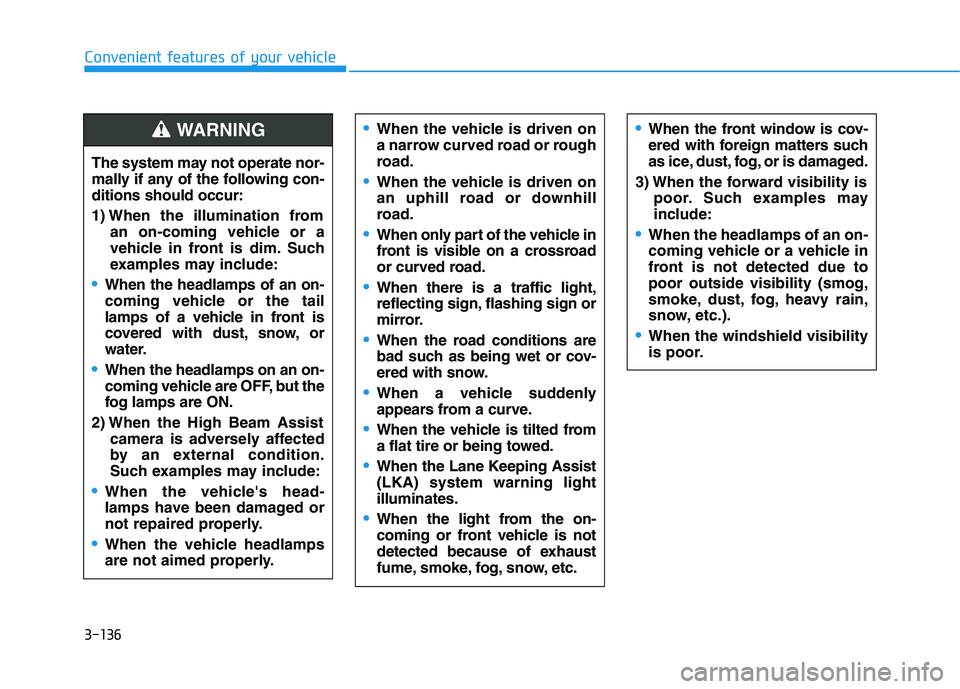
The system may not operate nor-
mally if any of the following con-
ditions should occur:
1) When the illumination from
an on-coming vehicle or a
vehicle in front is dim. Such
examples may include:
When the headlamps of an on-
coming vehicle or the tail
lamps of a vehicle in front is
covered with dust, snow, or
water.
When the headlamps on an on-
coming vehicle are OFF, but the
fog lamps are ON.
2) When the High Beam Assist
camera is adversely affected
by an external condition.
Such examples may include:
When the vehicle's head-
lamps have been damaged or
not repaired properly.
When the vehicle headlamps
are not aimed properly.
When the vehicle is driven on
a narrow curved road or rough
road.
When the vehicle is driven on
an uphill road or downhill
road.
When only part of the vehicle in
front is visible on a crossroad
or curved road.
When there is a traffic light,
reflecting sign, flashing sign or
mirror.
When the road conditions are
bad such as being wet or cov-
ered with snow.
When a vehicle suddenly
appears from a curve.
When the vehicle is tilted from
a flat tire or being towed.
When the Lane Keeping Assist
(LKA) system warning light
illuminates.
When the light from the on-
coming or front vehicle is not
detected because of exhaust
fume, smoke, fog, snow, etc.
When the front window is cov-
ered with foreign matters such
as ice, dust, fog, or is damaged.
3) When the forward visibility is
poor. Such examples may
include:
When the headlamps of an on-
coming vehicle or a vehicle in
front is not detected due to
poor outside visibility (smog,
smoke, dust, fog, heavy rain,
snow, etc.).
When the windshield visibility
is poor.
WARNING
Page 233 of 612
3-137
Convenient features of your vehicle
3
Turn signals and lane change
signals
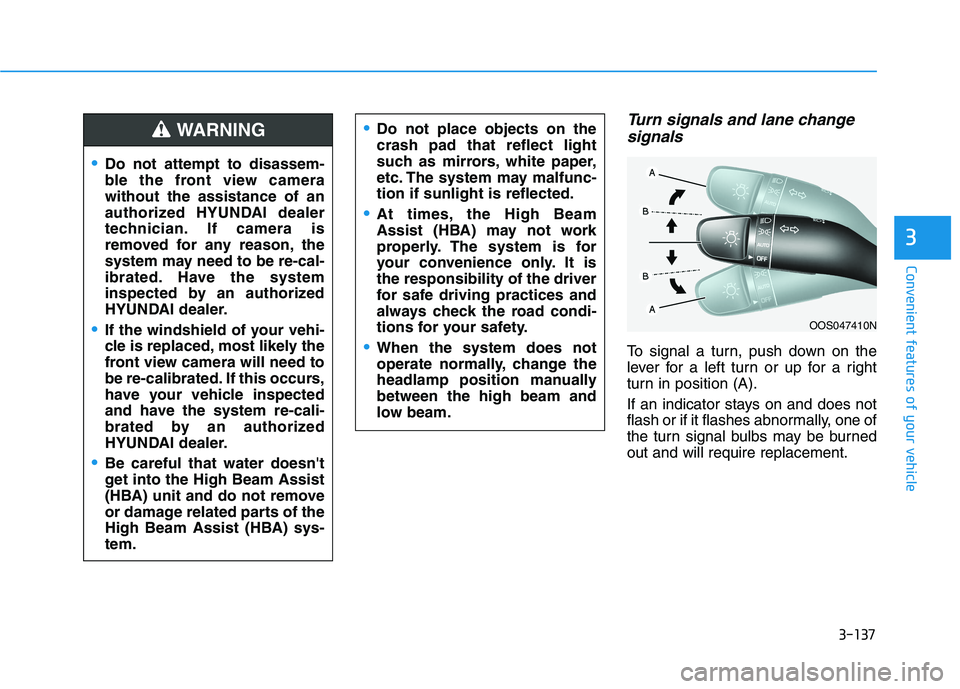
To signal a turn, push down on the
lever for a left turn or up for a right
turn in position (A).
If an indicator stays on and does not
flash or if it flashes abnormally, one of
the turn signal bulbs may be burned
out and will require replacement.
OOS047410N
Do not attempt to disassem-
ble the front view camera
without the assistance of an
authorized HYUNDAI dealer
technician. If camera is
removed for any reason, the
system may need to be re-cal-
ibrated. Have the system
inspected by an authorized
HYUNDAI dealer.
If the windshield of your vehi-
cle is replaced, most likely the
front view camera will need to
be re-calibrated. If this occurs,
have your vehicle inspected
and have the system re-cali-
brated by an authorized
HYUNDAI dealer.
Be careful that water doesn't
get into the High Beam Assist
(HBA) unit and do not remove
or damage related parts of the
High Beam Assist (HBA) sys-
tem.
Do not place objects on the
crash pad that reflect light
such as mirrors, white paper,
etc. The system may malfunc-
tion if sunlight is reflected.
At times, the High Beam
Assist (HBA) may not work
properly. The system is for
your convenience only. It is
the responsibility of the driver
for safe driving practices and
always check the road condi-
tions for your safety.
When the system does not
operate normally, change the
headlamp position manually
between the high beam and
low beam.
WARNING
Page 247 of 612
3-151
Convenient features of your vehicle
3
To turn off BVM system
1. The ignition switch is turned to the
OFF position.
2. The turn signal is deactivated
3. A warning screen pops up and
takes priority over the Blind-Spot
View Monitor system.System setting
With the engine ON, the Blind-spot
View Monitor system turns on and
gets ready to be activated when the
'User Settings →Driver Assistance
→ Blind-Spot Safety →Blind-Spot
View' is selected on the cluster. The
system stops operation when the set-
ting is deactivated.
Like all assistance systems,
BVM system has limitations.
Over-reliance on the system
may result in a collision.
Always look around your vehi-
cle to make sure there are no
objects or obstacles before
moving the vehicle in any
direction to prevent a colli-
sion.
Objects are closer than they
appear. Failure to visually
confirm that is safe to change
the lane before doing so may
result in crash and serious
injury or death.
Always keep the camera lens
clean. The camera may not
work normally if the lens is
covered with foreign material.
CAUTION
Page 311 of 612
5
Blind-Spot Collision Warning/
Blind-Spot Collision-Avoidance Assist .............5-78
System Description .........................................................5-78
System Setting and Operation .....................................5-79
Warning and System Control .......................................5-82
Detecting Sensor (Camera and Radar) ......................5-84
Limitations of the System .............................................5-87
Declaration of conformity .................................5-92
The radio frequency components
(Rear Corner Radar) complies: ....................................5-92
Rear Cross-Traffic Collision Warning (RCCW)/
Rear Cross-Traffic Collision-Avoidance Assist
(RCCA) ...................................................................5-93
System Description .........................................................5-93
System Setting and Operation .....................................5-94
Warning and System Control .......................................5-96
Detecting Sensor .............................................................5-99
Limitations of the System...........................................5-100
Lane Following Assist (LFA) system ...............5-104
LFA Setting and Operation .........................................5-105
Warning Message .........................................................5-106
Limitations of the System...........................................5-108
Lane Keeping Assist (LKA) system .................5-110
LKA System Operation.................................................5-111
Warning Light and Message ......................................5-113
Limitations of the System...........................................5-115
LKA System Function Change ...................................5-117
Driver Attention Warning (DAW) system .......5-118
System Setting and Operation...................................5-118
Resetting the System ...................................................5-119
System Standby.............................................................5-120
System Malfunction .....................................................5-120
Highway Driving Assist (HDA) system ............5-122
System Setting and Operation...................................5-122
Warning Message .........................................................5-125
Smart Cruise Control With Stop &
Go System ...........................................................5-129
Smart Cruise Control Switch ......................................5-130
Adjusting the Sensitivity of Smart Cruise
Control .............................................................................5-130
To Convert to Cruise Control Mode .........................5-131
Smart Cruise Control Speed .......................................5-132
Smart Cruise Control Vehicle-to-Vehicle
Distance ...........................................................................5-136
Sensor to Detect Distance to the
Vehicle Ahead ................................................................5-139
Limitations of the System...........................................5-141
Page 381 of 612
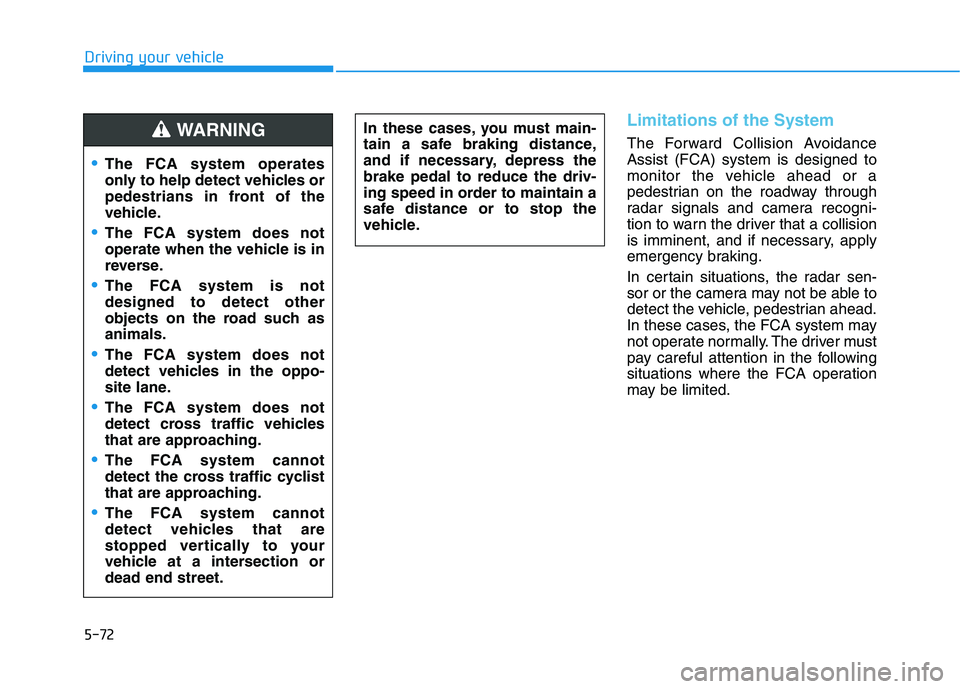
5-72
Driving your vehicle
Limitations of the System
The Forward Collision Avoidance
Assist (FCA) system is designed to
monitor the vehicle ahead or a
pedestrian on the roadway through
radar signals and camera recogni-
tion to warn the driver that a collision
is imminent, and if necessary, apply
emergency braking.
In certain situations, the radar sen-
sor or the camera may not be able to
detect the vehicle, pedestrian ahead.
In these cases, the FCA system may
not operate normally. The driver must
pay careful attention in the following
situations where the FCA operation
may be limited. In these cases, you must main-
tain a safe braking distance,
and if necessary, depress the
brake pedal to reduce the driv-
ing speed in order to maintain a
safe distance or to stop the
vehicle.
The FCA system operates
only to help detect vehicles or
pedestrians in front of the
vehicle.
The FCA system does not
operate when the vehicle is in
reverse.
The FCA system is not
designed to detect other
objects on the road such as
animals.
The FCA system does not
detect vehicles in the oppo-
site lane.
The FCA system does not
detect cross traffic vehicles
that are approaching.
The FCA system cannot
detect the cross traffic cyclist
that are approaching.
The FCA system cannot
detect vehicles that are
stopped vertically to your
vehicle at a intersection or
dead end street.
WARNING
Page 387 of 612
5-78
Driving your vehicle
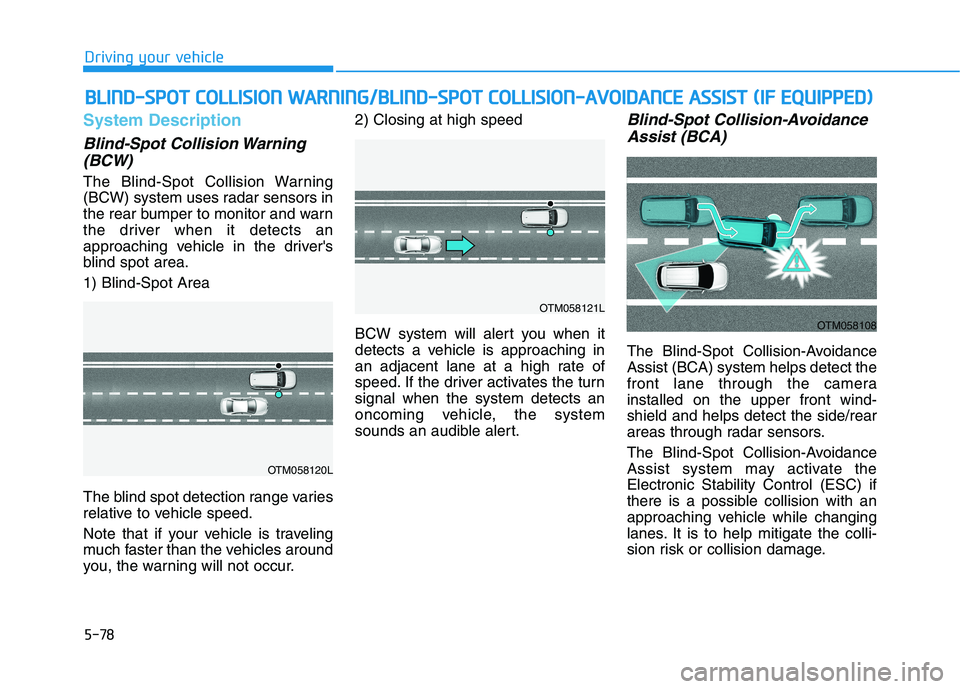
System Description
Blind-Spot Collision Warning
(BCW)
The Blind-Spot Collision Warning
(BCW) system uses radar sensors in
the rear bumper to monitor and warn
the driver when it detects an
approaching vehicle in the driver's
blind spot area.
1) Blind-Spot Area
The blind spot detection range varies
relative to vehicle speed.
Note that if your vehicle is traveling
much faster than the vehicles around
you, the warning will not occur.2) Closing at high speed
BCW system will alert you when it
detects a vehicle is approaching in
an adjacent lane at a high rate of
speed. If the driver activates the turn
signal when the system detects an
oncoming vehicle, the system
sounds an audible alert.
Blind-Spot Collision-Avoidance
Assist (BCA)
The Blind-Spot Collision-Avoidance
Assist (BCA) system helps detect the
front lane through the camera
installed on the upper front wind-
shield and helps detect the side/rear
areas through radar sensors.
The Blind-Spot Collision-Avoidance
Assist system may activate the
Electronic Stability Control (ESC) if
there is a possible collision with an
approaching vehicle while changing
lanes. It is to help mitigate the colli-
sion risk or collision damage.
B BL
LI
IN
ND
D-
-S
SP
PO
OT
T
C
CO
OL
LL
LI
IS
SI
IO
ON
N
W
WA
AR
RN
NI
IN
NG
G/
/B
BL
LI
IN
ND
D-
-S
SP
PO
OT
T
C
CO
OL
LL
LI
IS
SI
IO
ON
N-
-A
AV
VO
OI
ID
DA
AN
NC
CE
E
A
AS
SS
SI
IS
ST
T
(
(I
IF
F
E
EQ
QU
UI
IP
PP
PE
ED
D)
)
OTM058120L
OTM058121L
OTM058108