Volume HYUNDAI PALISADE 2022 User Guide
[x] Cancel search | Manufacturer: HYUNDAI, Model Year: 2022, Model line: PALISADE, Model: HYUNDAI PALISADE 2022Pages: 663, PDF Size: 15.74 MB
Page 435 of 663
5-101
Driving your vehicle
5
Blind-Spot Collision-
Avoidance Assist operation
Warning and control
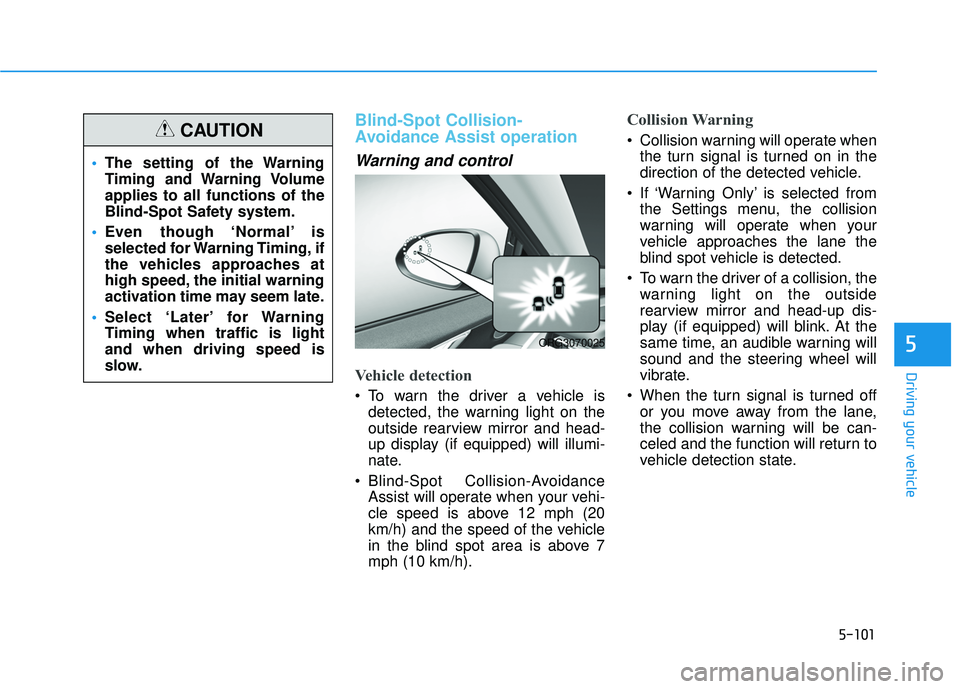
Vehicle detection
To warn the driver a vehicle isdetected, the warning light on the
outside rearview mirror and head-
up display (if equipped) will illumi-
nate.
Blind-Spot Collision-Avoidance Assist will operate when your vehi-
cle speed is above 12 mph (20
km/h) and the speed of the vehicle
in the blind spot area is above 7
mph (10 km/h).
Collision Warning
Collision warning will operate whenthe turn signal is turned on in the
direction of the detected vehicle.
If ‘Warning Only’ is selected from the Settings menu, the collision
warning will operate when your
vehicle approaches the lane the
blind spot vehicle is detected.
To warn the driver of a collision, the warning light on the outside
rearview mirror and head-up dis-
play (if equipped) will blink. At the
same time, an audible warning will
sound and the steering wheel will
vibrate.
When the turn signal is turned off or you move away from the lane,
the collision warning will be can-
celed and the function will return to
vehicle detection state.
The setting of the Warning
Timing and Warning Volume
applies to all functions of the
Blind-Spot Safety system.
Even though ‘Normal’ is
selected for Warning Timing, if
the vehicles approaches at
high speed, the initial warning
activation time may seem late.
Select ‘Later’ for Warning
Timing when traffic is light
and when driving speed is
slow.CAUTION
ORG3070025
Page 447 of 663
5-113
Driving your vehicle
5
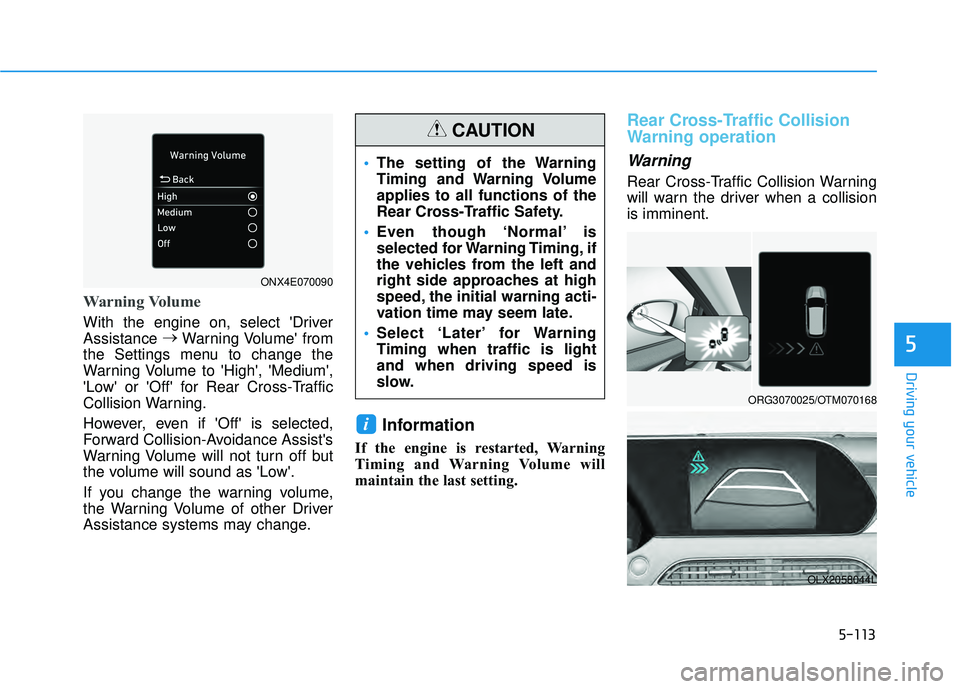
Warning Volume
With the engine on, select 'Driver
Assistance →
Warning Volume' from
the Settings menu to change the
Warning Volume to 'High', 'Medium',
'Low' or 'Off' for Rear Cross-Traffic
Collision Warning.
However, even if 'Off' is selected,
Forward Collision-Avoidance Assist's
Warning Volume will not turn off but
the volume will sound as 'Low'.
If you change the warning volume,
the Warning Volume of other Driver
Assistance systems may change.
Information
If the engine is restarted, Warning
Timing and Warning Volume will
maintain the last setting.
Rear Cross-Traffic Collision
Warning operation
Warning
Rear Cross-Traffic Collision Warning
will warn the driver when a collision
is imminent.
i
ORG3070025/OTM070168
OLX2058044L
The setting of the Warning
Timing and Warning Volume
applies to all functions of the
Rear Cross-Traffic Safety.
Even though ‘Normal’ is
selected for Warning Timing, if
the vehicles from the left and
right side approaches at high
speed, the initial warning acti-
vation time may seem late.
Select ‘Later’ for Warning
Timing when traffic is light
and when driving speed is
slow.
CAUTION
ONX4E070090
Page 455 of 663
5-121
Driving your vehicle
5
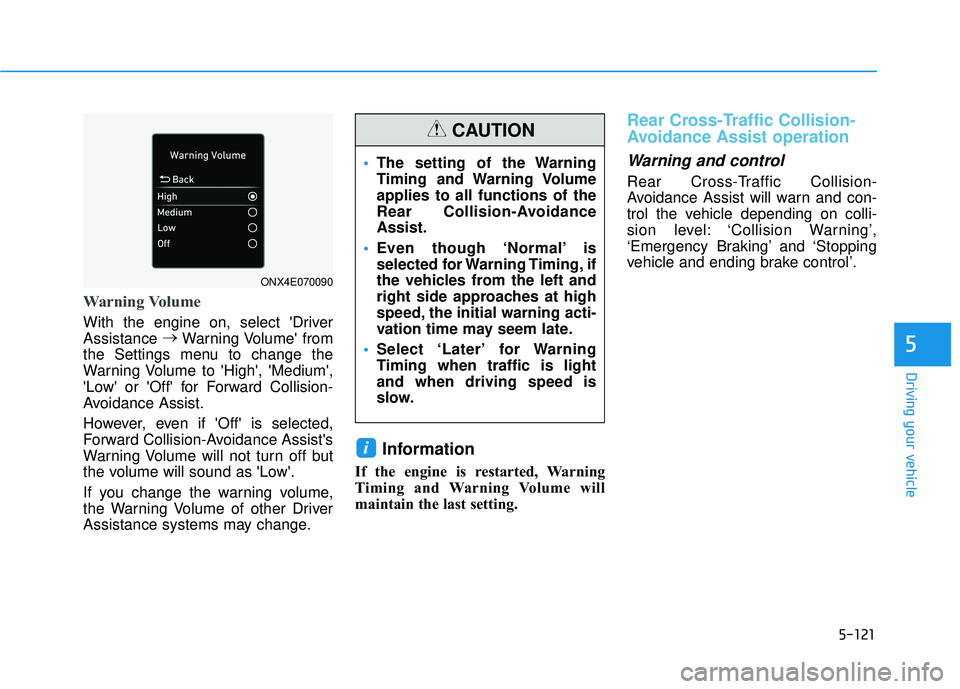
Warning Volume
With the engine on, select 'Driver
Assistance →
Warning Volume' from
the Settings menu to change the
Warning Volume to 'High', 'Medium',
'Low' or 'Off' for Forward Collision-
Avoidance Assist.
However, even if 'Off' is selected,
Forward Collision-Avoidance Assist's
Warning Volume will not turn off but
the volume will sound as 'Low'.
If you change the warning volume,
the Warning Volume of other Driver
Assistance systems may change.
Information
If the engine is restarted, Warning
Timing and Warning Volume will
maintain the last setting.
Rear Cross-Traffic Collision-
Avoidance Assist operation
Warning and control
Rear Cross-Traffic Collision-
Avoidance Assist will warn and con-
trol the vehicle depending on colli-
sion level: ‘Collision Warning’,
‘Emergency Braking’ and ‘Stopping
vehicle and ending brake control’.
i
The setting of the Warning
Timing and Warning Volume
applies to all functions of the
Rear Collision-Avoidance
Assist.
Even though ‘Normal’ is
selected for Warning Timing, if
the vehicles from the left and
right side approaches at high
speed, the initial warning acti-
vation time may seem late.
Select ‘Later’ for Warning
Timing when traffic is light
and when driving speed is
slow.
CAUTION
ONX4E070090
Page 466 of 663
5-132
Driving your vehicle
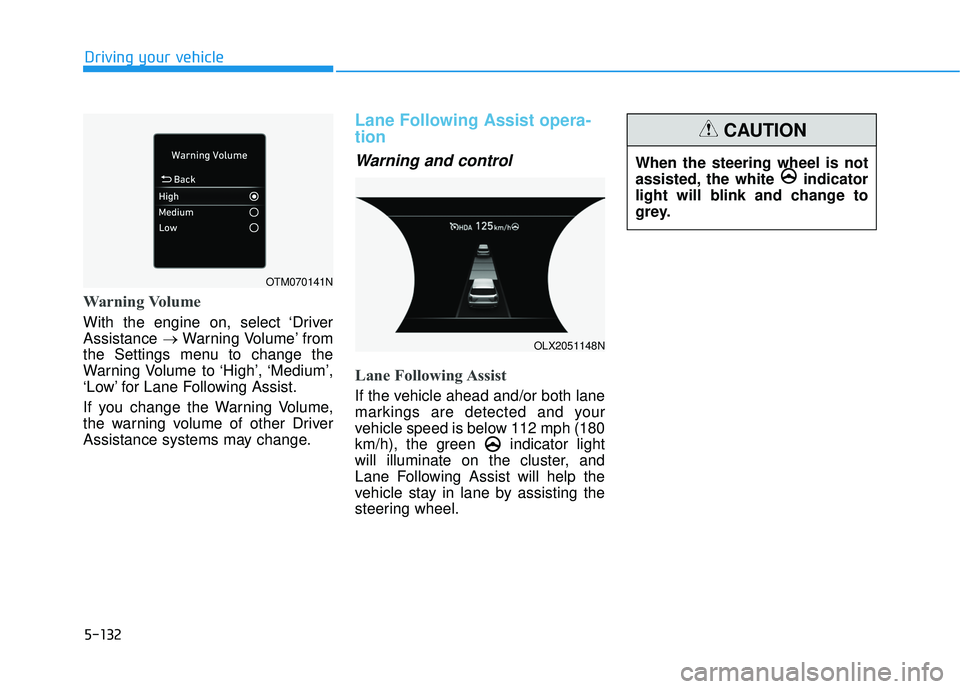
Warning Volume
With the engine on, select ‘Driver
Assistance →Warning Volume’ from
the Settings menu to change the
Warning Volume to ‘High’, ‘Medium’,
‘Low’ for Lane Following Assist.
If you change the Warning Volume,
the warning volume of other Driver
Assistance systems may change.
Lane Following Assist opera-
tion
Warning and control
Lane Following Assist
If the vehicle ahead and/or both lane
markings are detected and your
vehicle speed is below 112 mph (180
km/h), the green indicator light
will illuminate on the cluster, and
Lane Following Assist will help the
vehicle stay in lane by assisting the
steering wheel.
When the steering wheel is not
assisted, the white indicator
light will blink and change to
grey.
CAUTION
OTM070141N
OLX2051148N
Page 479 of 663
5-145
Driving your vehicle
Warning Volume
With the engine on, select ‘Driver
Assistance →Warning Volume’ from
the Settings menu to change the
Warning Volume to ‘High’, ‘Medium’
or ‘Low’ for Highway Driving Assist.
If you change the Warning Volume,
the Warning Volume of other Driver
Assistance systems may change.
Highway Driving Assist
Operation
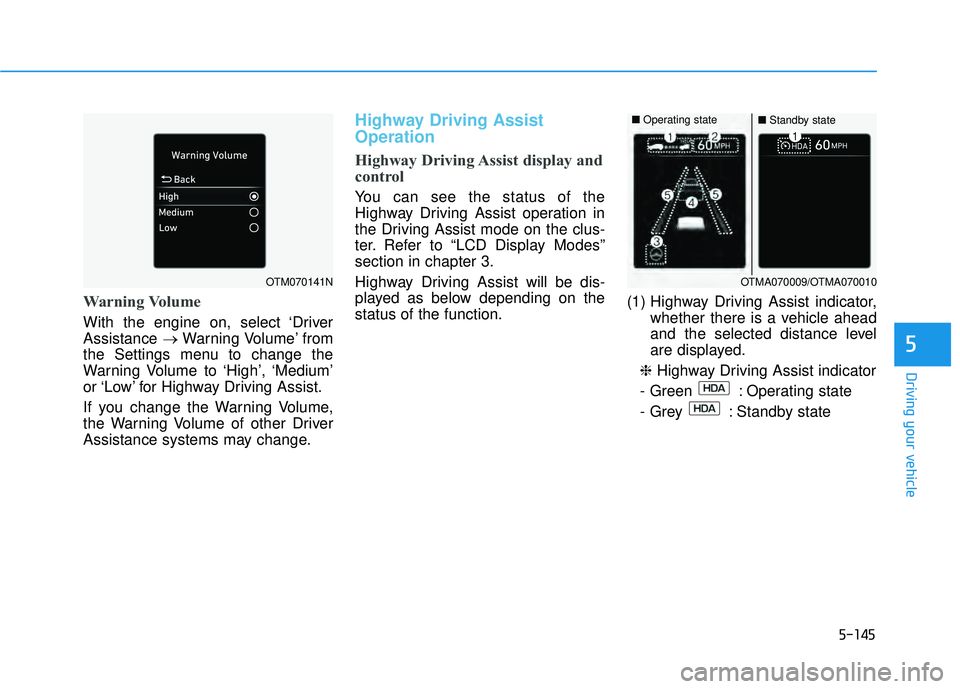
Highway Driving Assist display and
control
You can see the status of the
Highway Driving Assist operation in
the Driving Assist mode on the clus-
ter. Refer to “LCD Display Modes”
section in chapter 3.
Highway Driving Assist will be dis-
played as below depending on the
status of the function. (1) Highway Driving Assist indicator,
whether there is a vehicle ahead
and the selected distance level
are displayed.
❈ Highway Driving Assist indicator
- Green : Operating state
- Grey : Standby state
5
OTM070141NOTMA070009/OTMA070010
■ Operating state■Standby state
Page 490 of 663
5-156
Driving your vehicle
Warning Volume
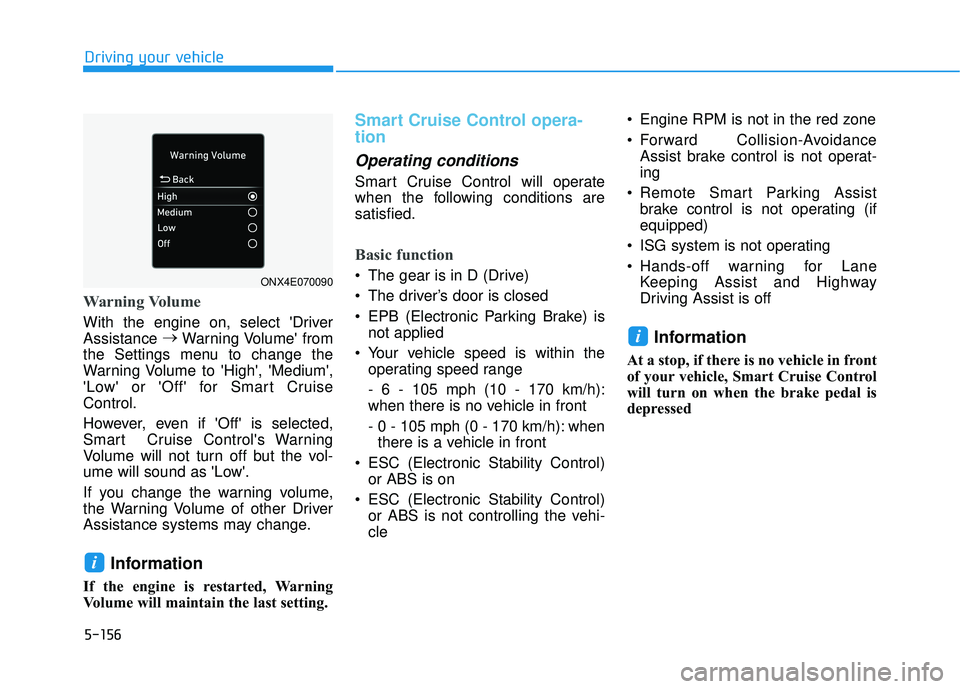
With the engine on, select 'Driver
Assistance →
Warning Volume' from
the Settings menu to change the
Warning Volume to 'High', 'Medium',
'Low' or 'Off' for Smart Cruise
Control.
However, even if 'Off' is selected,
Smart Cruise Control's Warning
Volume will not turn off but the vol-
ume will sound as 'Low'.
If you change the warning volume,
the Warning Volume of other Driver
Assistance systems may change.
Information
If the engine is restarted, Warning
Volume will maintain the last setting.
Smart Cruise Control opera-
tion
Operating conditions
Smart Cruise Control will operate
when the following conditions are
satisfied.
Basic function
The gear is in D (Drive)
The driver’s door is closed
EPB (Electronic Parking Brake) is not applied
Your vehicle speed is within the operating speed range
- 6 - 105 mph (10 - 170 km/h):
when there is no vehicle in front
- 0 - 105 mph (0 - 170 km/h): whenthere is a vehicle in front
ESC (Electronic Stability Control) or ABS is on
ESC (Electronic Stability Control) or ABS is not controlling the vehi-
cle Engine RPM is not in the red zone
Forward Collision-Avoidance
Assist brake control is not operat-
ing
Remote Smart Parking Assist brake control is not operating (if
equipped)
ISG system is not operating
Hands-off warning for Lane Keeping Assist and Highway
Driving Assist is off
Information
At a stop, if there is no vehicle in front
of your vehicle, Smart Cruise Control
will turn on when the brake pedal is
depressed
i
i
ONX4E070090
Page 578 of 663
7-19
7
Maintenance
Recommended engine coolant
When adding coolant, use only dis-tilled (deionized) water for your
vehicle and never mix hard water in
the coolant filled at the factory.
An improper coolant mixture can result in severe malfunction or
engine damage.
The engine in your vehicle has alu- minum engine parts and must be
protected by an ethylene-glycol
with phosphate based coolant to
prevent corrosion and freezing.
Do not use alcohol or methanol coolant or mix them with the spec-
ified coolant. Do not use a solution that contains
more than 60% antifreeze or less
than 35% antifreeze, which would
reduce the effectiveness of the
solution.
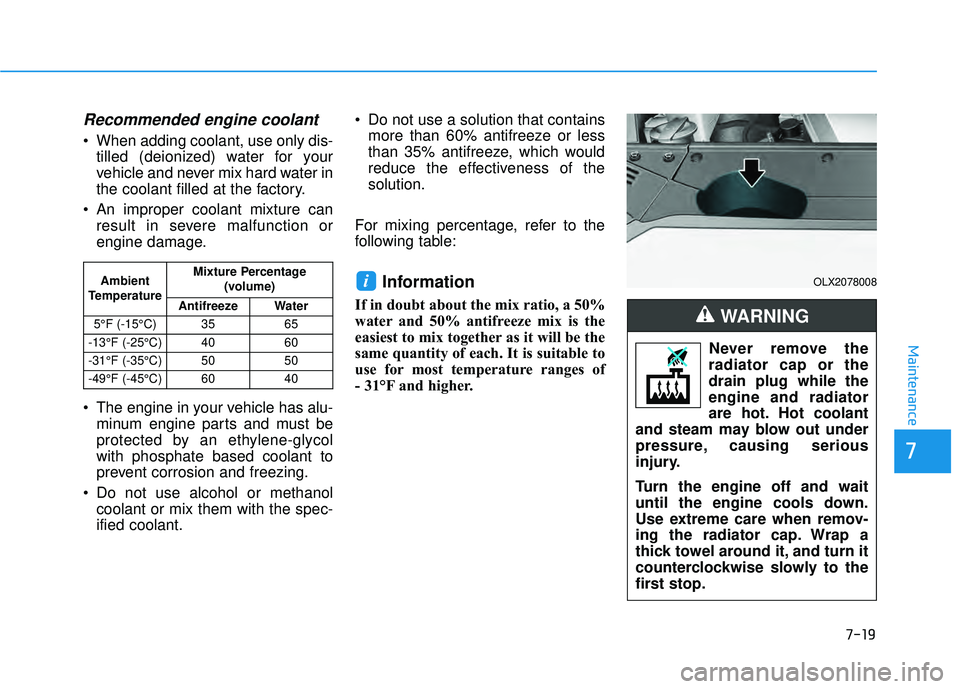
For mixing percentage, refer to the
following table:
Information
If in doubt about the mix ratio, a 50%
water and 50% antifreeze mix is the
easiest to mix together as it will be the
same quantity of each. It is suitable to
use for most temperature ranges of
- 31°F and higher.
iAmbient
Temperature Mixture Percentage
(volume)
Antifreeze Water
5°F (-15°C) 35 65
-13°F (-25°C) 40 60
-31°F (-35°C) 50 50
-49°F (-45°C) 60 40
Never remove the
radiator cap or the
drain plug while the
engine and radiator
are hot. Hot coolant
and steam may blow out under
pressure, causing serious
injury.
Turn the engine off and wait
until the engine cools down.
Use extreme care when remov-
ing the radiator cap. Wrap a
thick towel around it, and turn it
counterclockwise slowly to the
first stop.
WARNING
OLX2078008
Page 641 of 663
888
Specifications & Consumer information
8
Specifications, Consumer information and Reporting safety defects
8
Dimensions ..............................................................8-2
Engine ......................................................................8-\
2
Bulb Wattage ..........................................................8-3
Tires and Wheels ...................................................8-5
Volume and Weight ................................................8-6
Air Conditioning System........................................8-6
Recommended Lubricants and Capacities ..........8-7
Recommended SAE Viscosity Number .........................8-9
Vehicle Identification Number (VIN) .................8-10
Vehicle Ccertification Label................................8-10
Tire Specification and Pressure Label .............8-11
Engine Number .....................................................8-11
Consumer Information .........................................8-12
Reporting Safety Defects ...................................8-13
Page 646 of 663
8-6
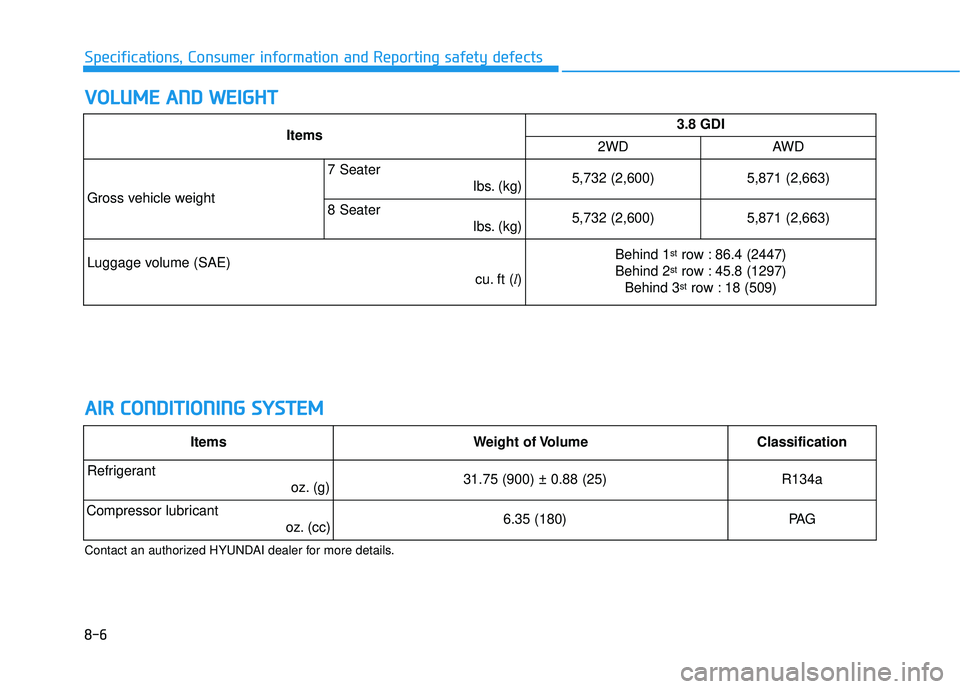
Specifications, Consumer information and Reporting safety defects
V VO O L LU U M M E E A A N N D D W W E EI IG G H H T T
A A I IR R C C O O N ND DI IT T I IO O N NI IN N G G S S Y Y S ST T E EM M
Contact an authorized HYUNDAI dealer for more details.
Items3.8 GDI
2WDAWD
Gross vehicle weight
7 Seater
lbs. (kg)5,732 (2,600)5,871 (2,663)
8 Seaterlbs. (kg)5,732 (2,600)5,871 (2,663)
Luggage volume (SAE) cu. ft (l)Behind 1strow : 86.4 (2447)
Behind 2strow : 45.8 (1297)
Behind 3strow : 18 (509)
ItemsWeight of VolumeClassification
Refrigerant oz. (g) 31.75 (900) ± 0.88 (25)R134a
Compressor lubricantoz. (cc) 6.35 (180)PA G
Page 647 of 663
8-7
88
Specifications, Consumer information and Reporting safety defects
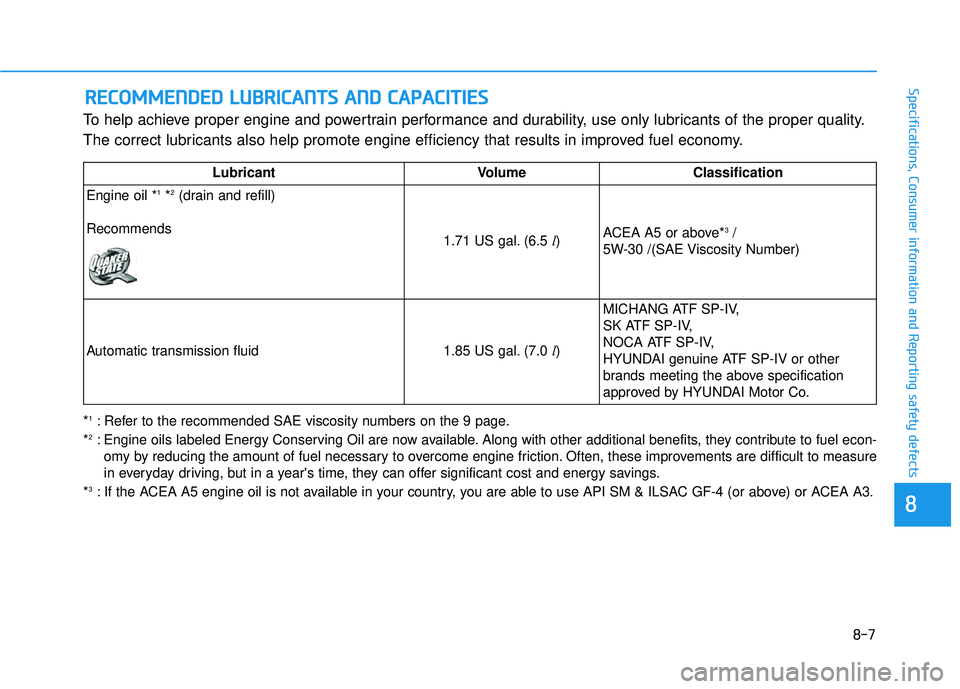
To help achieve proper engine and powertrain performance and durability, use only lubricants of the proper quality.
The correct lubricants also help promote engine efficiency that results in improved fuel economy.
R RE EC CO O M M M ME EN N D DE ED D L L U U B BR RI IC C A A N N T TS S A A N N D D C C A A P PA A C CI IT T I IE E S S
LubricantVolume Classification
Engine oil *
1*2(drain and refill)
Recommends
1.71 US gal. (6.5 l) ACEA A5 or above*3/
5W-30 /(SAE Viscosity Number)
Automatic transmission fluid1.85 US gal. (7.0 l)
MICHANG ATF SP-IV,
SK ATF SP-IV,
NOCA ATF SP-IV,
HYUNDAI genuine ATF SP-IV or other
brands meeting the above specification
approved by HYUNDAI Motor Co.
*1: Refer to the recommended SAE viscosity numbers on the 9 page.
*2: Engine oils labeled Energy Conserving Oil are now available. Along with other additional benefits, they contribute to fuel econ -
omy by reducing the amount of fuel necessary to overcome engine friction. Often, these improvements are difficult to measure
in everyday driving, but in a year's time, they can offer significant cost and energy savings.
*
3: If the ACEA A5 engine oil is not available in your country, you are able to use API SM & ILSAC GF-4 (or above) or ACEA A3.