change time HYUNDAI PALISADE 2022 User Guide
[x] Cancel search | Manufacturer: HYUNDAI, Model Year: 2022, Model line: PALISADE, Model: HYUNDAI PALISADE 2022Pages: 663, PDF Size: 15.74 MB
Page 140 of 663
3-44
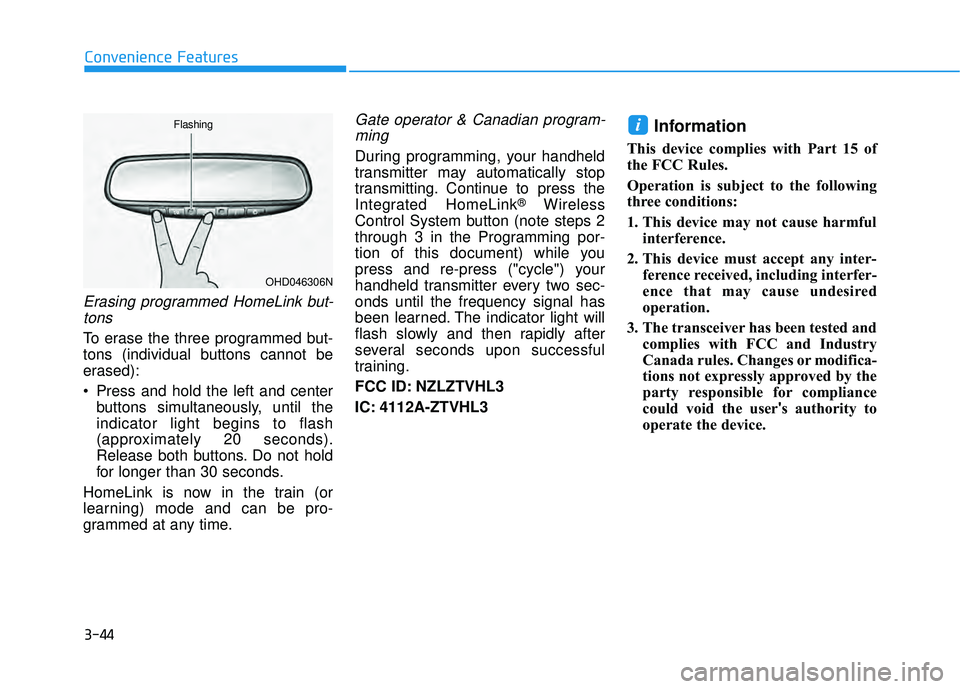
Erasing programmed HomeLink but-tons
To erase the three programmed but-
tons (individual buttons cannot be
erased):
Press and hold the left and center buttons simultaneously, until the
indicator light begins to flash
(approximately 20 seconds).
Release both buttons. Do not hold
for longer than 30 seconds.
HomeLink is now in the train (or
learning) mode and can be pro-
grammed at any time.
Gate operator & Canadian program- ming
During programming, your handheld
transmitter may automatically stop
transmitting. Continue to press the
Integrated HomeLink
®Wireless
Control System button (note steps 2
through 3 in the Programming por-
tion of this document) while you
press and re-press ("cycle") your
handheld transmitter every two sec-
onds until the frequency signal has
been learned. The indicator light will
flash slowly and then rapidly after
several seconds upon successful
training.
FCC ID: NZLZTVHL3
IC: 4112A-ZTVHL3
Information
This device complies with Part 15 of
the FCC Rules.
Operation is subject to the following
three conditions:
1. This device may not cause harmful interference.
2. This device must accept any inter- ference received, including interfer-
ence that may cause undesired
operation.
3. The transceiver has been tested and complies with FCC and Industry
Canada rules. Changes or modifica-
tions not expressly approved by the
party responsible for compliance
could void the user's authority to
operate the device.
i
Convenience Features
OHD046306N
Flashing
Page 143 of 663
3-47
Convenience Features
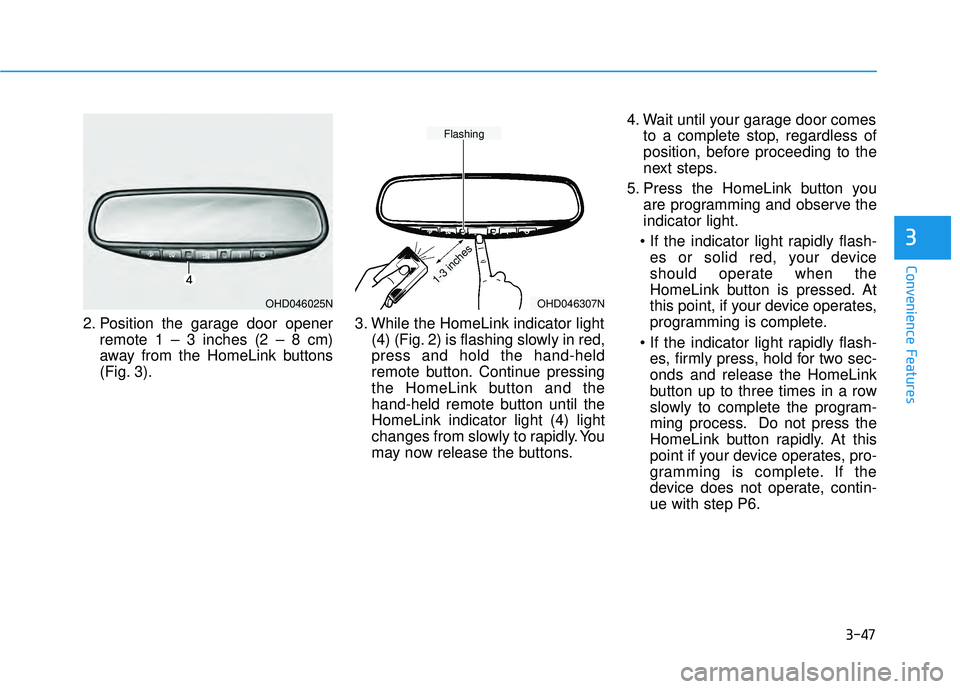
2. Position the garage door openerremote 1 – 3 inches (2 – 8 cm)
away from the HomeLink buttons
(Fig. 3). 3. While the HomeLink indicator light
(4) (Fig. 2) is flashing slowly in red,
press and hold the hand-held
remote button. Continue pressing
the HomeLink button and the
hand-held remote button until the
HomeLink indicator light (4) light
changes from slowly to rapidly. You
may now release the buttons. 4. Wait until your garage door comes
to a complete stop, regardless of
position, before proceeding to the
next steps.
5. Press the HomeLink button you are programming and observe the
indicator light.
es or solid red, your device
should operate when the
HomeLink button is pressed. At
this point, if your device operates,
programming is complete.
es, firmly press, hold for two sec-
onds and release the HomeLink
button up to three times in a row
slowly to complete the program-
ming process. Do not press the
HomeLink button rapidly. At this
point if your device operates, pro-
gramming is complete. If the
device does not operate, contin-
ue with step P6.
3
OHD046025NOHD046307N
Flashing
1-3 inches
Page 169 of 663
3-73
Convenience Features
3
The power liftgate can be oper-ated when the engine is not run-
ning. However, the power liftgate
operation consumes a large
amount of electic power.
To prevent the battery from
being discharged, do not oper-
ate it excessively (e.g. more than
5 times repeatedly).
To prevent the battery from being discharged, do not leave
the power liftgate in the open
position for a long time.
Do not modify or repair any part of the power liftgate by yourself.
This must be done by an author-
ized HYUNDAI dealer.
When jacking up the vehicle to change a tire or repair the vehi-
cle, do not operate the power
liftgate. This could cause the
power liftgate to operate
improperly.
In cold and wet climates, the power liftgate may not work
properly due to freezing condi-
tions.
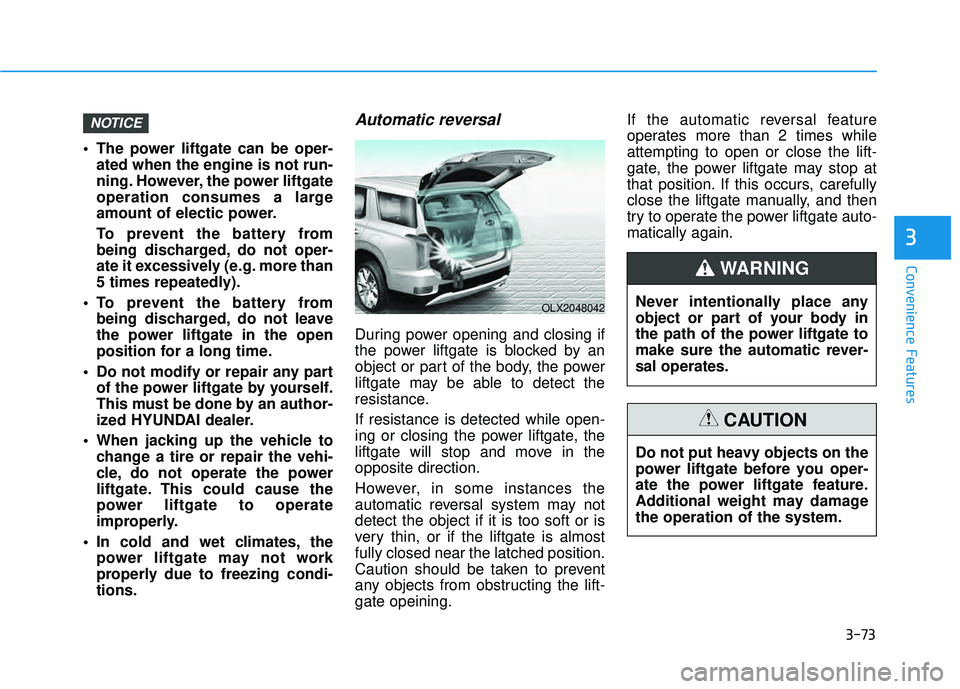
Automatic reversal
During power opening and closing if
the power liftgate is blocked by an
object or part of the body, the power
liftgate may be able to detect the
resistance.
If resistance is detected while open-
ing or closing the power liftgate, the
liftgate will stop and move in the
opposite direction.
However, in some instances the
automatic reversal system may not
detect the object if it is too soft or is
very thin, or if the liftgate is almost
fully closed near the latched position.
Caution should be taken to prevent
any objects from obstructing the lift-
gate opeining. If the automatic reversal feature
operates more than 2 times while
attempting to open or close the lift-
gate, the power liftgate may stop at
that position. If this occurs, carefully
close the liftgate manually, and then
try to operate the power liftgate auto-
matically again.
NOTICE
OLX2048042Never intentionally place any
object or part of your body in
the path of the power liftgate to
make sure the automatic rever-
sal operates.
WARNING
Do not put heavy objects on the
power liftgate before you oper-
ate the power liftgate feature.
Additional weight may damage
the operation of the system.
CAUTION
Page 199 of 663
3-103
Convenience Features
3
LCD Display Messages
Shift to P or N to start engine(for smart key system)
This warning message is displayed if
you try to start the engine with the
shift button not in the P (Park) or N
(Neutral) position.
Information
You can start the engine with the shift
button in the N (Neutral) position.
But, for your safety, we recommend
that you start the engine with the shift
button in the P (Park) position.
Low key battery (for smart key system)
This warning message is displayed if
the battery of the smart key is dis-
charged while changing the Engine
Start/Stop button to the OFF position.
Press brake pedal to startengine (for smart key system)
This warning message is displayed if
the Engine Start/Stop button
changes to the ACC position twice
by pressing the button repeatedly
without depressing the brake pedal.
You can start the vehicle by depress-
ing the brake pedal and then press-
ing the Engine Start/Stop button.
Key not in vehicle(for smart key system)
This warning message is displayed if
the smart key is not in the vehicle
when you press the Engine Start/
Stop button.
When attempting to start the vehicle,
always have the smart key with you.
Key not detected (for smart key system)
This warning message is displayed if
the smart key is not detected when you
press the Engine Start/Stop button.
Press START button again(for smart key system)
This message is displayed if you
were unable to start the vehicle when
the Engine Start/Stop button was
pressed.
If this occurs, attempt to start the
engine by pressing the Engine Start/
Stop button again.
If the warning message appears
each time you press the Engine
Start/Stop button, have your vehicle
inspected by an authorized
HYUNDAI dealer.i
Page 209 of 663
3-113
Convenience Features
3
The Master Warning Light illumi-
nates if one or more of the above
warning situations occur. At this time,
the LCD Modes Icon will change
from ( ) to ( ).
If the warning situation is solved, the
master warning light will be turned
off and the LCD Modes Icon will be
changed back to its previous icon
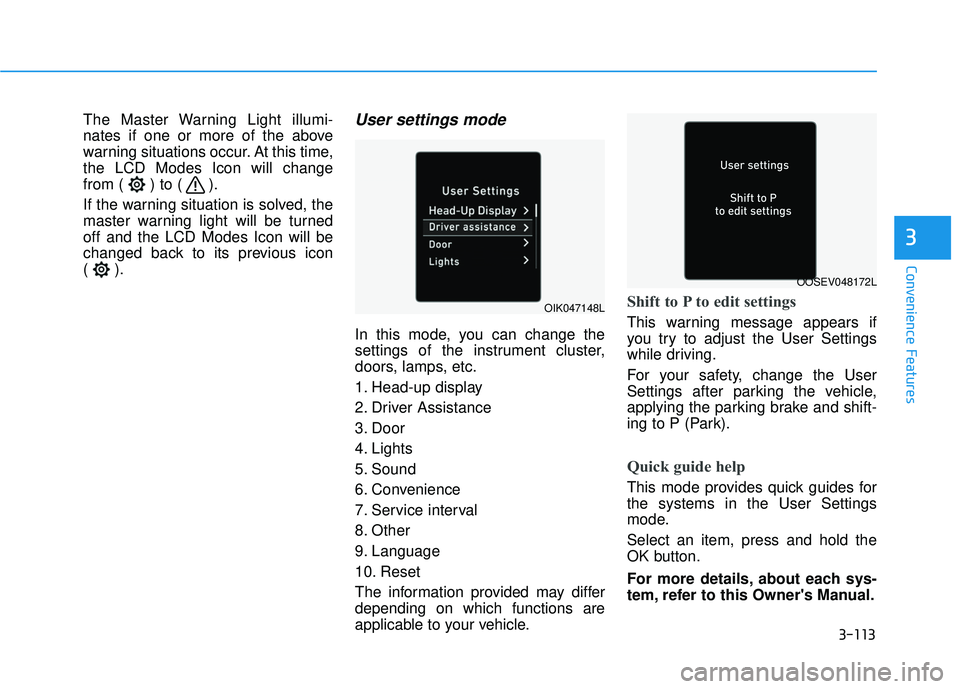
().User settings mode
In this mode, you can change the
settings of the instrument cluster,
doors, lamps, etc.
1. Head-up display
2. Driver Assistance
3. Door
4. Lights
5. Sound
6. Convenience
7. Service interval
8. Other
9. Language
10. Reset
The information provided may differ
depending on which functions are
applicable to your vehicle.
Shift to P to edit settings
This warning message appears if
you try to adjust the User Settings
while driving.
For your safety, change the User
Settings after parking the vehicle,
applying the parking brake and shift-
ing to P (Park).
Quick guide help
This mode provides quick guides for
the systems in the User Settings
mode.
Select an item, press and hold the
OK button.
For more details, about each sys-
tem, refer to this Owner's Manual.
OIK047148L
OOSEV048172L
Page 239 of 663
3-143
Convenience Features
3
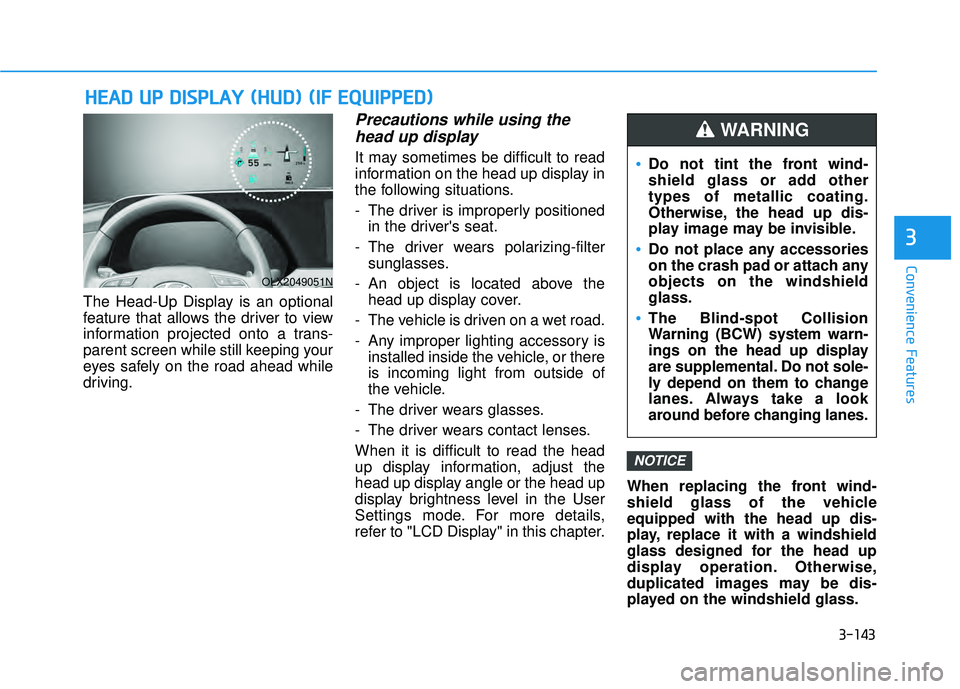
The Head-Up Display is an optional
feature that allows the driver to view
information projected onto a trans-
parent screen while still keeping your
eyes safely on the road ahead while
driving.
Precautions while using thehead up display
It may sometimes be difficult to read
information on the head up display in
the following situations.
- The driver is improperly positioned
in the driver's seat.
- The driver wears polarizing-filter sunglasses.
- An object is located above the head up display cover.
- The vehicle is driven on a wet road.
- Any improper lighting accessory is installed inside the vehicle, or there
is incoming light from outside of
the vehicle.
- The driver wears glasses.
- The driver wears contact lenses.
When it is difficult to read the head
up display information, adjust the
head up display angle or the head up
display brightness level in the User
Settings mode. For more details,
refer to "LCD Display" in this chapter. When replacing the front wind-
shield glass of the vehicle
equipped with the head up dis-
play, replace it with a windshield
glass designed for the head up
display operation. Otherwise,
duplicated images may be dis-
played on the windshield glass.
NOTICE
H H
E EA A D D U U P P D D I IS S P P L LA A Y Y ( ( H H U U D D) ) ( ( I IF F E E Q Q U UI IP P P PE ED D ) )
OLX2049051N
Do not tint the front wind-
shield glass or add other
types of metallic coating.
Otherwise, the head up dis-
play image may be invisible.
Do not place any accessories
on the crash pad or attach any
objects on the windshield
glass.
The Blind-spot Collision
Warning (BCW) system warn-
ings on the head up display
are supplemental. Do not sole-
ly depend on them to change
lanes. Always take a look
around before changing lanes.
WARNING
Page 244 of 663
3-148
Convenience Features
One-touch turn signal function
To activate the One Touch Turn
Signal function, push the turn signal
lever up or down to position (B) and
then release it.
The lane change signals will blink 3,
5 or 7 times.
You can activate or deactivate the
One Touch Turn Signal function or
choose the number of blinks (3, 5, or
7) from the User Settings mode in
the LCD display.
For more details, refer to the "LCD
Display" section in this chapter.
Battery saver function
The purpose of this feature is to help
prevent the battery from being dis-
charged. The system automatically
turns off the parking lamp when the
driver turns the vehicle off and opens
the driver-side door.
With this feature, the parking lamps
will turn off automatically if the driver
parks on the side of road at night.
However, the position lamps stay ON
even when the driver-side door is
opened if the headlamp switch is
turned to the position lamp or AUTO
(if equipped) position after the
engine is turned off.
If necessary, to keep the lamps on
turn the position lamps OFF and ON
again using the headlamp switch on
the steering column after the engine
is turned off.
Headlamp delay function
If the key is removed from the ignition
switch or placed in the ACC position
or the LOCK/OFF position with the
headlamps ON, the headlamps
(and/or parking lamps) remain on for
about 5 minutes. However, if the dri-
ver's door is opened and closed, the
headlights are turned off after 15
seconds. Also, with the engine off if
the driver's door is opened and
closed, the headlamps (and/or park-
ing lamps) are turned off after 15
seconds.
The headlamps (and/or parking
lamps) can be turned off by pressing
the lock button on the remote key or
smart key twice or turning the head-
lamp switch to the OFF or AUTO
position.
You can activate or deactivate the
Headlamp Delay function from the
User Settings mode in the LCD dis-
play.
For more details, refer to the "LCD
Display" section in this chapter.
Page 253 of 663
3-157
Convenience Features
3
At times, High Beam Assist
may not work properly. High
Beam Assist is for your con-
venience only. It is the respon-
sibility of the driver for safe
driving practices and always
check the road conditions for
your safety.
When High Beam Assist does
not operate normally, change
the headlamp position manu-
ally between high beam and
low beam.
WARNING
Page 276 of 663
3-180
Convenience features
Rear View while driving
The driver is able to check the rear
view on the screen while driving, it is
to assist with safe driving.
Operating conditions
The engine is ON.
Press the Parking/View button (1)when vehicle speed is above 9
mph (15 km/h), Rear View while
driving will appear on the screen.
The ( ) icon is touched on the Surround View Monitor screen
when vehicle speed is below 9
mph (15 km/h), Rear View while
driving will appear on the screen.
Off conditions
Press the Parking/View button (1)again, the screen will change back
to the previous infotainment sys-
tem screen.
Select other view modes from the Surround View Monitor screen
when vehicle speed is below 9
mph (15 km/h), Rear View while
driving will turn off.
Press one of the infotainment sys- tem button (3), the screen will
change to the infotainment system
screen.
Shift the gear to P (Park), Rear View while driving will turn off.
Surround View Monitor mal-
function and limitations
Surround View Monitor malfunc-tion
When Surround View Monitor is not
working properly, or the screen flick-
ers, or the camera image does not
display normally, have the vehicle
inspected by an authorized
HYUNDAI dealer.
Limitations of Surround ViewMonitor
When the vehicle is stopped for a
long time in winter or when the
vehicle is parked in an indoor park-
ing lot, the exhaust fumes may
temporarily blur the image.
The screen may be displayed abnormally, and an icon will appear
at the top left side of the screen
under the following circumstances:
- The tailgate is opened
- The driver or front passengerdoor is opened
- The outside rearview mirror is folded
Page 289 of 663
3-193
Convenience Features
3
Operation Tips
To keep dust or unpleasant fumesfrom entering the vehicle through
the ventilation system, temporarily
set the air intake control to recircu-
lation mode. Return the control to
fresh mode when the unpleasant
air outside has diminished. This will
help keep the driver alert and com-
fortable.
To help prevent the inside of the windshield from fogging, set the air
intake control to fresh mode and
fan speed to the desired position,
turn on the air conditioning system,
and adjust the temperature control
to the desired temperature.
Air conditioning
Your HYUNDAI vehicle air condition-
ing system is filled with R-134a
refrigerant.
1. Start the engine.
2. Press the air conditioning button.
3. Select the Face Level mode. 4. Set the air intake control to
Recirculation mode temporarily to
allow the cabin to cool quickly.
When the desired temperature in
the cabin is reached, change the
air intake control back to Fresh
mode.
5. Adjust the fan speed control and temperature control to maintain
maximum comfort.
When maximum cooling is desired,
set the temperature control to the
MAX A/C position, then set the fan
speed control to the highest setting.
When using the air conditioning
system, monitor the engine tem-
perature gauge closely while driv-
ing up hills or in heavy traffic when
outside temperatures are high. Air
conditioning system operation
when climbing a steep grade or in
high outside ambient tempera-
tures can cause engine overheat-
ing.
Continue to use the fan, but turn
the air conditioning system off if
the engine temperature gauge
indicates engine overheating.
Air conditioning system operation tips
If the vehicle has been parked in direct sunlight during hot weather,
open the windows for a short time
to let the hot air inside the vehicle
escape.
After sufficient cooling has been achieved, switch back from recircu-
lation mode to fresh mode.
To help reduce moisture inside of the windows on rainy or humid
days, decrease the humidity inside
the vehicle by operating the air con-
ditioning system with the windows
and sunroof closed.
Use the air conditioning system every month only for a few minutes
to ensure maximum system per-
formance.
If you operate air conditioner exces- sively, the difference between the
temperature of the outside air and
that of the windshield could cause
the outer surface of the windshield
to fog up, causing loss of visibility.
In this case, set the mode selection
knob or button to the position
and fan speed control to the lower
speed.
NOTICE