infotainment HYUNDAI PALISADE 2022 User Guide
[x] Cancel search | Manufacturer: HYUNDAI, Model Year: 2022, Model line: PALISADE, Model: HYUNDAI PALISADE 2022Pages: 663, PDF Size: 15.74 MB
Page 448 of 663
5-114
Driving your vehicle
Collision Warning
To warn the driver of an approach-ing vehicle from the rear left/right
side of your vehicle, the outside
rearview mirror will blink and a
warning will appear on the cluster.
At the same time, an audible warn-
ing will sound and the steering
wheel will vibrate. If the Rear View
Monitor is operating, a warning will
also appear on the infotainment
system screen.
Rear Cross-Traffic Collision Warning will operate when all the
following conditions are satisfied:
- The gear is shifted to R (Reverse)
- Vehicle speed is below 5 mph (8km/h)
- The approaching vehicle is within approximately 82 ft. (25 m) from
the left and right side of your vehi-
cle
- The speed of the vehicle approaching from the left and
right is above 3 mph (5 km/h)Information
If the operating conditions are satis-
fied, there will be a warning whenever
the vehicle approaches from the left or
right side even though your vehicle
speed is 0 mph (0 km/h).
i
Take the following precautions
when using Rear Cross-Traffic
Collision Warning:
For your safety, change the
Settings after parking the
vehicle at a safe location.
If any other system’s warning
message is displayed or audi-
ble warning is generated,
Rear Cross-Traffic Collision
Warning’s warning message
may not be displayed and
audible warning may not be
generated.
You may not hear the warning
sound of Rear Cross-Traffic
Collision Warning if the sur-
rounding is noisy.
Rear Cross-Traffic Collision
Warning may warn the driver
late or may not warn the driv-
er depending on the road and
driving conditions.
The driver should hold the
responsibility to control the
vehicle. Do not solely depend
on Rear Cross-Traffic
Collision Warning. Rather,
maintain a safe braking dis-
tance, and if necessary,
depress the brake pedal to
reduce driving speed or to
stop the vehicle.
WARNING
Page 456 of 663
5-122
Driving your vehicle
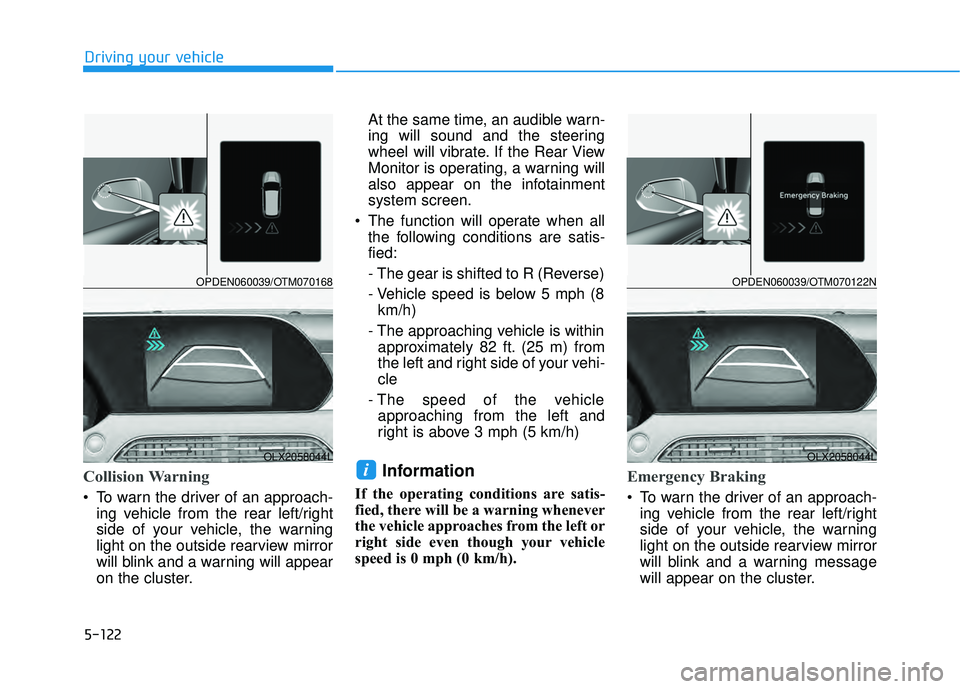
Collision Warning
To warn the driver of an approach-ing vehicle from the rear left/right
side of your vehicle, the warning
light on the outside rearview mirror
will blink and a warning will appear
on the cluster. At the same time, an audible warn-
ing will sound and the steering
wheel will vibrate. If the Rear View
Monitor is operating, a warning will
also appear on the infotainment
system screen.
The function will operate when all the following conditions are satis-
fied:
- The gear is shifted to R (Reverse)
- Vehicle speed is below 5 mph (8km/h)
- The approaching vehicle is within approximately 82 ft. (25 m) from
the left and right side of your vehi-
cle
- The speed of the vehicle approaching from the left and
right is above 3 mph (5 km/h)
Information
If the operating conditions are satis-
fied, there will be a warning whenever
the vehicle approaches from the left or
right side even though your vehicle
speed is 0 mph (0 km/h).
Emergency Braking
To warn the driver of an approach- ing vehicle from the rear left/right
side of your vehicle, the warning
light on the outside rearview mirror
will blink and a warning message
will appear on the cluster.
iOLX2058044L
OPDEN060039/OTM070168
OLX2058044L
OPDEN060039/OTM070122N
Page 457 of 663
5-123
Driving your vehicle
5
At the same time, an audible warn-
ing will sound and the steering
wheel will vibrate. If the Rear View
Monitor is operating, a warning will
also appear on the infotainment
system screen.
The function will operate when all the following conditions are satis-
fied:
- The gear is shifted to R (Reverse)
- Vehicle speed is below 5 mph (8km/h)
- The approaching vehicle is within approximately 5 ft. (1.5 m) from
the left and right side of your vehi-
cle
- The speed of the vehicle approaching from the left and
right is above 3 mph (5 km/h)
Emergency braking will be assist- ed to help prevent collision with
approaching vehicles from the left
and right.
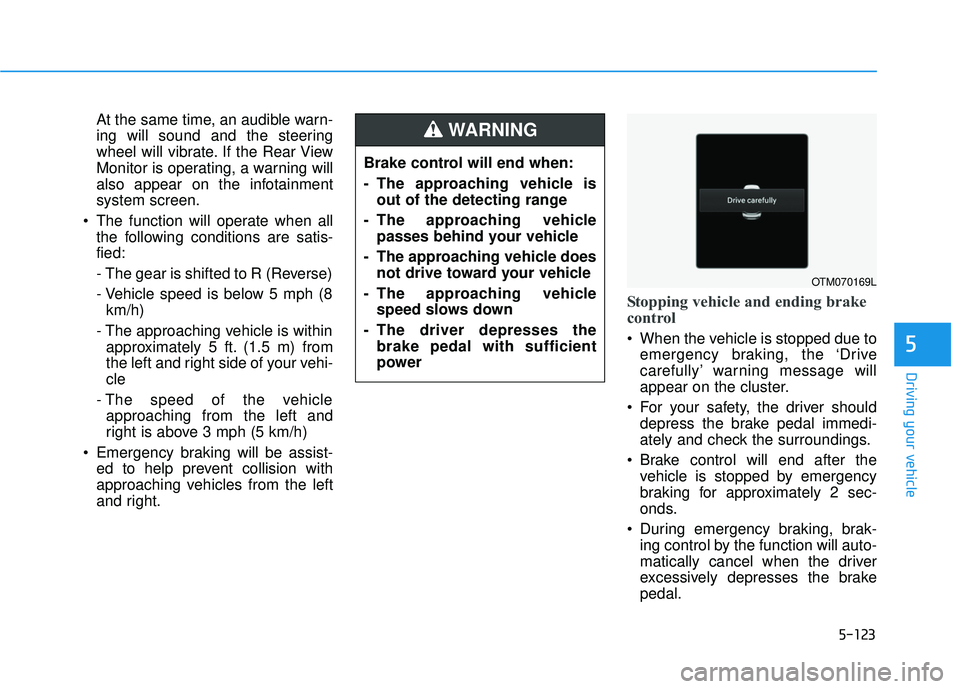
Stopping vehicle and ending brake
control
When the vehicle is stopped due toemergency braking, the ‘Drive
carefully’ warning message will
appear on the cluster.
For your safety, the driver should depress the brake pedal immedi-
ately and check the surroundings.
Brake control will end after the vehicle is stopped by emergency
braking for approximately 2 sec-
onds.
During emergency braking, brak- ing control by the function will auto-
matically cancel when the driver
excessively depresses the brake
pedal.
Brake control will end when:
- The approaching vehicle is
out of the detecting range
- The approaching vehicle passes behind your vehicle
- The approaching vehicle does not drive toward your vehicle
- The approaching vehicle speed slows down
- The driver depresses the brake pedal with sufficient
power
WARNING
OTM070169L
Page 468 of 663
5-134
Driving your vehicle
Information
• You may change settings from theinstrument cluster (User Settings)
or infotainment system (Vehicle
Settings), whichever option that is
provided with your vehicle. For
more details, see "User Settings"
section in chapter 4, or "Vehicle
Settings" section in supplied
Infotainment Manual.
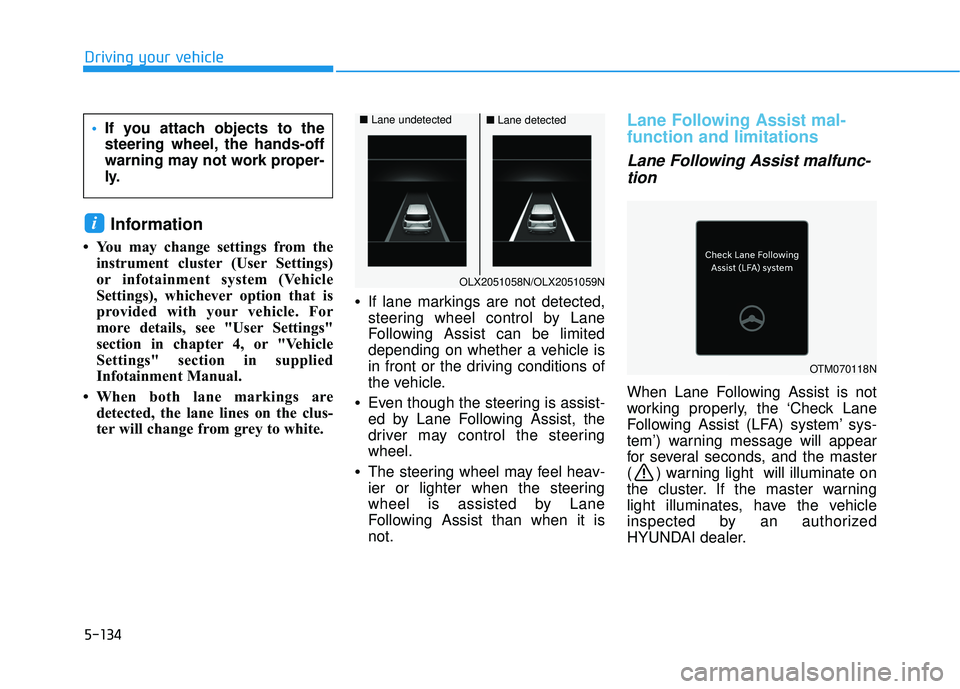
• When both lane markings are detected, the lane lines on the clus-
ter will change from grey to white. •
If lane markings are not detected,
steering wheel control by Lane
Following Assist can be limited
depending on whether a vehicle is
in front or the driving conditions of
the vehicle.
• Even though the steering is assist-
ed by Lane Following Assist, the
driver may control the steering
wheel.
• The steering wheel may feel heav-
ier or lighter when the steering
wheel is assisted by Lane
Following Assist than when it is
not.
Lane Following Assist mal-
function and limitations
Lane Following Assist malfunc-
tion
When Lane Following Assist is not
working properly, the ‘Check Lane
Following Assist (LFA) system’ sys-
tem’) warning message will appear
for several seconds, and the master
( ) warning light will illuminate on
the cluster. If the master warning
light illuminates, have the vehicle
inspected by an authorized
HYUNDAI dealer.
i
If you attach objects to the
steering wheel, the hands-off
warning may not work proper-
ly.
OLX2051058N/OLX2051059N
■ Lane undetected■Lane detected
OTM070118N
Page 473 of 663
5-139
Driving your vehicle
5
Taking a break
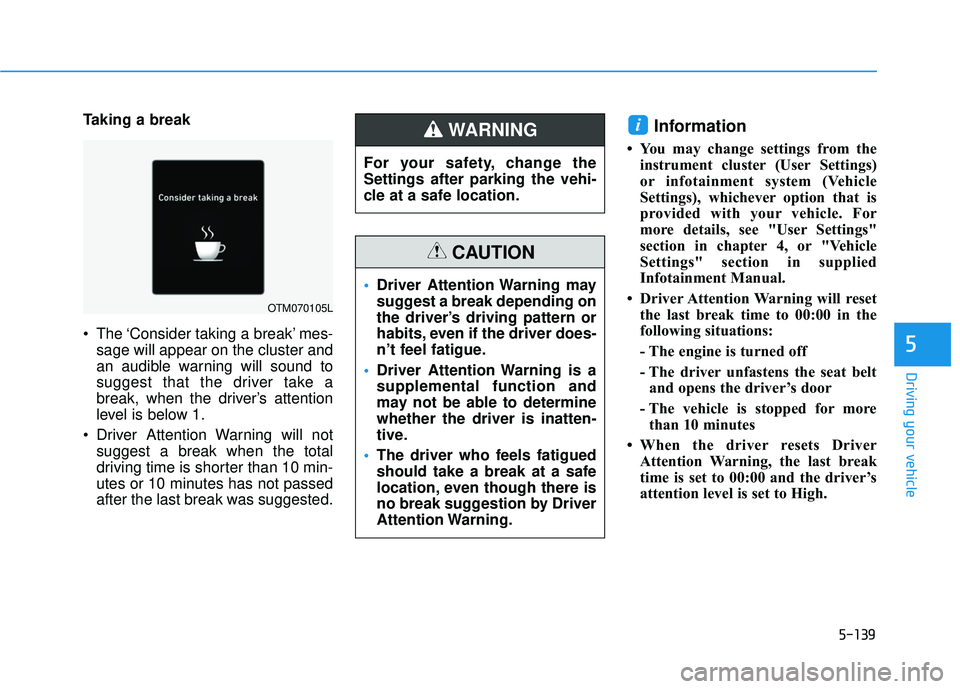
The ‘Consider taking a break’ mes-sage will appear on the cluster and
an audible warning will sound to
suggest that the driver take a
break, when the driver’s attention
level is below 1.
Driver Attention Warning will not suggest a break when the total
driving time is shorter than 10 min-
utes or 10 minutes has not passed
after the last break was suggested.Information
• You may change settings from theinstrument cluster (User Settings)
or infotainment system (Vehicle
Settings), whichever option that is
provided with your vehicle. For
more details, see "User Settings"
section in chapter 4, or "Vehicle
Settings" section in supplied
Infotainment Manual.
• Driver Attention Warning will reset the last break time to 00:00 in the
following situations:
- The engine is turned off
- The driver unfastens the seat beltand opens the driver’s door
- The vehicle is stopped for more than 10 minutes
• When the driver resets Driver Attention Warning, the last break
time is set to 00:00 and the driver’s
attention level is set to High.
i
OTM070105L
For your safety, change the
Settings after parking the vehi-
cle at a safe location.
WARNING
Driver Attention Warning may
suggest a break depending on
the driver’s driving pattern or
habits, even if the driver does-
n’t feel fatigue.
Driver Attention Warning is a
supplemental function and
may not be able to determine
whether the driver is inatten-
tive.
The driver who feels fatigued
should take a break at a safe
location, even though there is
no break suggestion by Driver
Attention Warning.
CAUTION
Page 483 of 663
5-149
Driving your vehicle
Limitations of Highway DrivingAssist
Highway Driving Assist may not
operate normally, or may not operate
under the following circumstances:
The map information and the actu-
al road is different because the
navigation is not updated
The map information and the actu- al road is different because of real-
time GPS data or map information
error
The infotainment system is over- loaded by simultaneously perform-
ing functions such as route search,
video playback, voice recognition,
etc.
GPS signals are blocked in areas such as a tunnel
The driver goes off course or the route to the destination is changed
or canceled by resetting the navi-
gation
The vehicle enters a service sta- tion or rest area
Android Auto or Car Play is operat- ing
5
Highway Driving Assist may
inadvertently operate or turn
off depending on road condi-
tions (navigation information)
and surroundings.
Lane Following Assist func-
tion may be temporarily dis-
abled when the front view
camera cannot detect lanes
properly or the hands-off
warning is on.
You may not hear the warning
sound of Highway Driving
Assist if the surrounding is
noisy.
If the vehicle is driven at high
speed above a certain speed
at a curve, your vehicle may
drive to one side or may
depart from the driving lane.
When you are towing a trailer
or another vehicle, we recom-
mend that Highway Driving
Assist is turned off due to
safety reasons.The hands–off warning mes-
sage may appear early or late
depending on how the steer-
ing wheel is held or road con-
ditions. Always have your
hands on the steering wheel
while driving.
For your safety, please read
the owner's manual before
using the Highway Driving
Assist.
Highway Driving Assist will
not operate when the engine
is started, or when the detect-
ing sensors or navigation is
being initialized.
Page 508 of 663
5-174
Limitations of Navigation-
based Smart Cruise Control
Navigation-based Smart Cruise
Control may not operate normally
under the following circumstances:
The navigation is not working prop-erly
Speed limit and road information in the navigation is not updated
The map information and the actu- al road is different because of real-
time GPS data or map information
error
The navigation searches for a route while driving
GPS signals are blocked in areas such as a tunnel
The navigation is updated while driving
Map information is not transmitted due to infotainment system's
abnormal operation
A road that divides into two or more roads and joins again
The driver goes off course the route set in the navigation The route to the destination is
changed or canceled by resetting
the navigation
The vehicle enters a service sta- tion or rest area
The speed limit of some sections changes according to the road sit-
uations
Android Auto or Car Play is operat- ing
The navigation cannot detect the current vehicle position (ex: elevat-
ed roads including overpass adja-
cent to general roads or nearby
roads exist in a parallel way)
The navigation is being updated while driving
The navigation is being restarted while driving
There is bad weather, such as heavy rain, heavy snow, etc.
Driving on a road under construc- tion
Driving on a road that is controlled
Driving on a road that is sharply curved
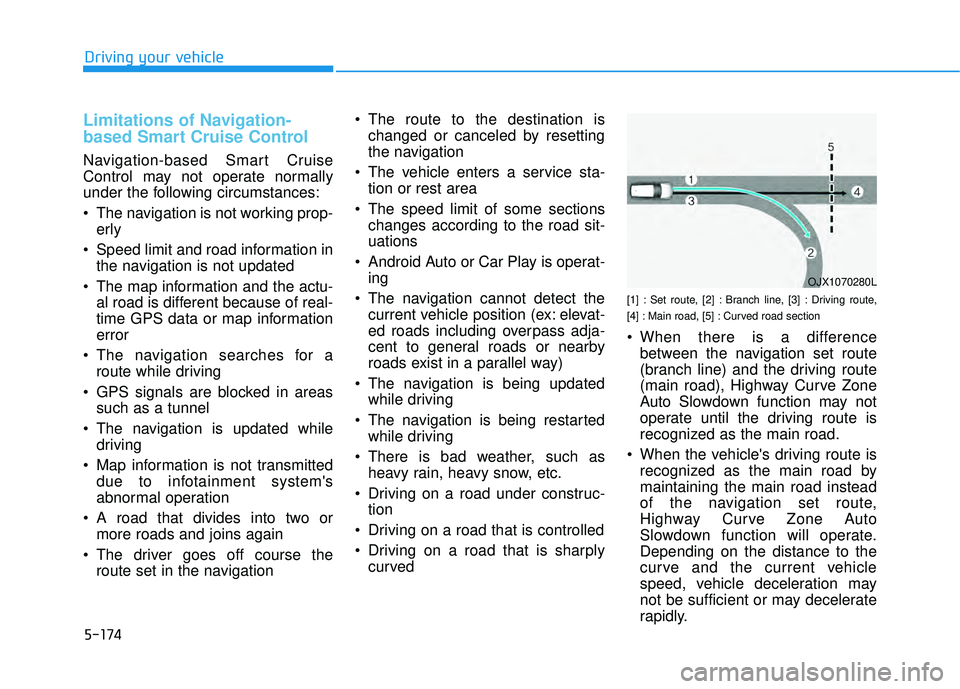
[1] : Set route, [2] : Branch line, [3] : Driving route,
[4] : Main road, [5] : Curved road section
When there is a differencebetween the navigation set route
(branch line) and the driving route
(main road), Highway Curve Zone
Auto Slowdown function may not
operate until the driving route is
recognized as the main road.
When the vehicle's driving route is recognized as the main road by
maintaining the main road instead
of the navigation set route,
Highway Curve Zone Auto
Slowdown function will operate.
Depending on the distance to the
curve and the current vehicle
speed, vehicle deceleration may
not be sufficient or may decelerate
rapidly.
Driving your vehicle
OJX1070280L
Page 658 of 663

I-5
Fuses ........................................................................\
.......7-48Engine Compartment Panel Fuse Replacement .........7-50
Fuse/Relay Panel Description ....................................7-51
Instrument Panel Fuse Replacement ..........................7-49
Hazard Warning Flasher ...................................................6-2
Head Up Display (HUD) ..............................................3-143
High Beam Assist (HBA) .............................................3-154 High Beam Assist malfunction and limitations .......3-156
High Beam Assist operation .....................................3-155
High Beam Assist setting .........................................3-154
Highway Driving Assist (HDA) ..................................5-143 Highway Driving Assist Malfunction and Limitations .............................................................5-148
Highway Driving Assist Operation ..........................5-145
Highway Driving Assist Settings .............................5-144
If the Engine Overheats ....................................................6-6
If the Engine Will Not Start ..............................................6-3 If the Engine Doesn't Turn Over or Turns Over Slowly .....................................................6-3
If the Engine Turns Over Normally but Doesn't Start ...............................................................6-3
If You Have a Flat Tire ...................................................6-14 Changing Tires ...........................................................6-16
Jack and Tools ............................................................6-14 Removing and Storing the Spare Tire ........................6-15
Ignition switch ..................................................................5-7 Engine Start/Stop Button ............................................5-10
Important Safety Precautions............................................2-2 Air Bag Hazards ...........................................................2-2
Always Wear Your Seat Belt ........................................2-2
Control Your Speed ......................................................2-3
Driver Distraction.........................................................2-2
Keep Your Vehicle in Safe Condition ..........................2-3
Restrain All Children....................................................2-2
In Case of an Emergency While Driving .........................6-2 If the Engine Stalls at a Crossroad or Crossing ...........6-2
If the Engine Stalls While Driving...............................6-2
If you Have a Flat Tire While Driving.........................6-3
Infotainment System .........................................................4-2 Antenna ........................................................................\
4-2
Audio (Display Audio) / Video / Navigation System (AVN) .........................................4-4
Bluetooth
®Wireless Technology .................................4-4
Steering Wheel Audio Controls....................................4-3
USB Port ......................................................................4-\
2
Instrument Cluster...........................................................3-82 Gauges and Meters .....................................................3-84
Instrument Cluster Control .........................................3-84
LCD Display Messages ............................................3-103
Transmission Shift Indicator ......................................3-89
Warning and Indicator Lights.....................................3-89
Instrument Panel Overview ..............................................1-5
I
Index
H
I