phone HYUNDAI PALISADE 2022 User Guide
[x] Cancel search | Manufacturer: HYUNDAI, Model Year: 2022, Model line: PALISADE, Model: HYUNDAI PALISADE 2022Pages: 663, PDF Size: 15.74 MB
Page 142 of 663
3-46
1. Programming homelink®
The following steps show how to pro-
gram HomeLink. If you have any
questions or are having difficulty pro-
gramming your HomeLink buttons,
refer o the HomeLink website or call
the HomeLink customer support toll-
free number. Do this, before going
back to the dealer who sold you the
car.
Visit the HomeLink website at:www.homelink.com. Then at the
top of the page, choose your vehi-
cle make. Then watch the You Tube
video, and/or access additional
website information.
If you choose to access the website via your cell
phone, scan the QR
code.
Or, call HomeLink customer sup- port at 1-800-355-3515 (Please
have the vehicle make/model AND
the opener device make/model
readily available.) 1) Programming Preparation
1. When programming a garage door
opener, it is advised to park the
vehicle outside of the garage.
2. It is recommended that a new bat- tery be placed in the hand-held
transmitter of the device being
programmed to HomeLink for
quicker training and accurate
transmission of the radio-frequen-
cy signal.
3. Place the ignition switch to the ACC(Accessory) position for pro-
gramming of HomeLink. 2) Programming a New HomeLink
Button
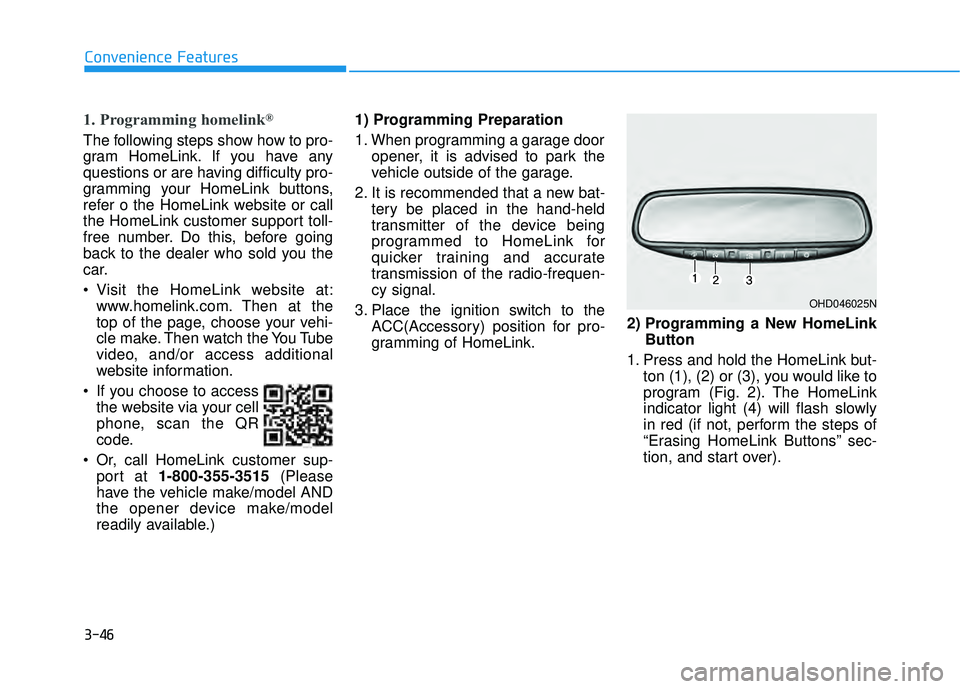
1. Press and hold the HomeLink but- ton (1), (2) or (3), you would like to
program (Fig. 2). The HomeLink
indicator light (4) will flash slowly
in red (if not, perform the steps of
“Erasing HomeLink Buttons” sec-
tion, and start over).
Convenience Features
OHD046025N
Page 174 of 663
3-78
Convenience Features
Information
• If you press the door unlock button(2), the Smart Liftgate function will
be deactivated temporarily. But, if
you do not open any door for 30 sec-
onds, the Smart Liftgate function
will be activated again.
• If you press the liftgate open button (3) for more than 1 second, the lift-
gate opens.
• The Smart Liftgate function will still be activated if you press the
door lock button (1) or liftgate open
button (3) on the smart key as long
as the Smart Liftgate is not already
in the Detect and Alert stage.
• In case you have deactivated the Smart Liftgate function by pressing
the smart key button and opened a
door, the Smart Liftgate function
can be activated again by closing
and locking all doors.
Detecting area
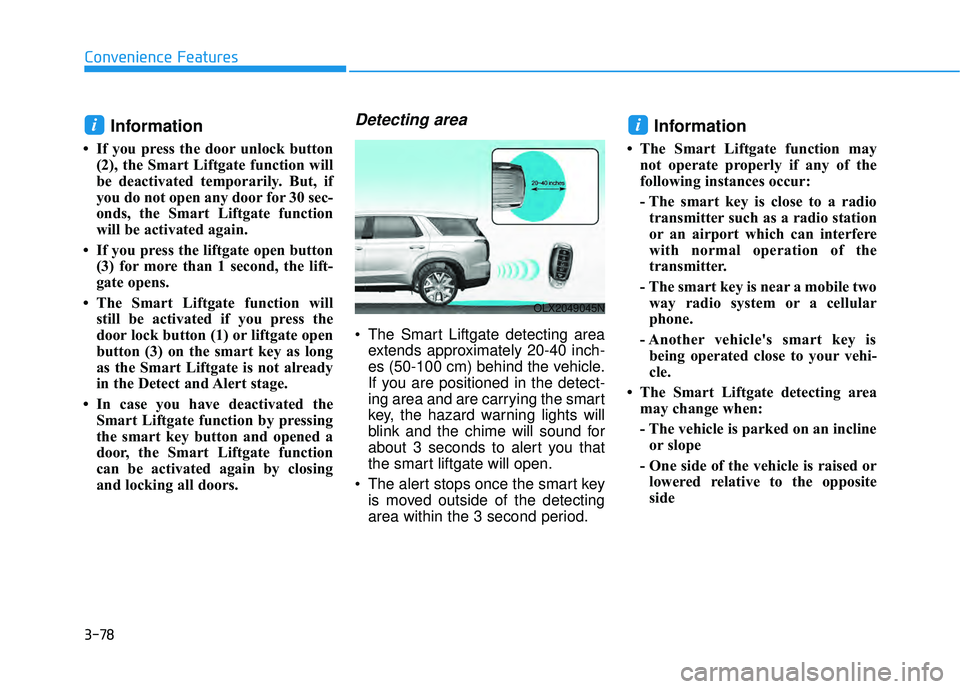
The Smart Liftgate detecting areaextends approximately 20-40 inch-
es (50-100 cm) behind the vehicle.
If you are positioned in the detect-
ing area and are carrying the smart
key, the hazard warning lights will
blink and the chime will sound for
about 3 seconds to alert you that
the smart liftgate will open.
The alert stops once the smart key is moved outside of the detecting
area within the 3 second period.
Information
• The Smart Liftgate function maynot operate properly if any of the
following instances occur:
- The smart key is close to a radiotransmitter such as a radio station
or an airport which can interfere
with normal operation of the
transmitter.
- The smart key is near a mobile two way radio system or a cellular
phone.
- Another vehicle's smart key is being operated close to your vehi-
cle.
• The Smart Liftgate detecting area may change when:
- The vehicle is parked on an inclineor slope
- One side of the vehicle is raised or lowered relative to the opposite
side
ii
OLX2049045N
Page 176 of 663
3-80
Convenience Features
Do not get back into a vehicle
once you have begun refuel-
ing. You can generate a build-
up of static electricity by
touching, rubbing or sliding
against any item or fabric
capable of producing static
electricity. Static electricity
discharge can ignite fuel
vapors causing a fire. If you
must re-enter the vehicle, you
should once again eliminate
potentially dangerous static
electricity discharge by touch-
ing a metal part of the vehicle,
away from the fuel filler neck,
nozzle or other gasoline
source, with your bare hand.
When using an approved
portable fuel container, be
sure to place the container on
the ground prior to refueling.
Static electricity discharge
from the container can ignite
fuel vapors causing a fire.
Once refueling has begun,
contact between your bare
hand and the vehicle should
be maintained until the filling
is complete.
Use only approved portable
plastic fuel containers designed
to carry and store gasoline.
When refueling, always move
the shift button to the P (Park)
position, set the parking
brake, and place the ignition
switch to the LOCK/OFF posi-
tion. Sparks produced by
electrical components related
to the engine can ignite fuel
vapors causing a fire.
Do not use matches or a
lighter and do not smoke or
leave a lit cigarette in your
vehicle while at a gas station,
especially during refueling.
Gasoline is highly flammable
and explosive. Failure to follow
these guidelines may result in
SERIOUS INJURY or DEATH:
Read and follow all warnings
posted at the gas station.
Before refueling, note the
location of the Emergency
Gasoline Shut-Off, if available,
at the gas station.
Before touching the fuel noz-
zle, you should eliminate the
potential build-up of static
electricity by touching a metal
part of the vehicle, a safe dis-
tance away from the fuel filler
neck, nozzle, or other gas
source, with your bare hand.
Do not use cellular phones
while refueling. Electric cur-
rent and/or electronic interfer-
ence from cellular phones can
potentially ignite fuel vapors
and cause a fire.
WARNING
Page 318 of 663
3-222
Convenience Features
Power Outlet
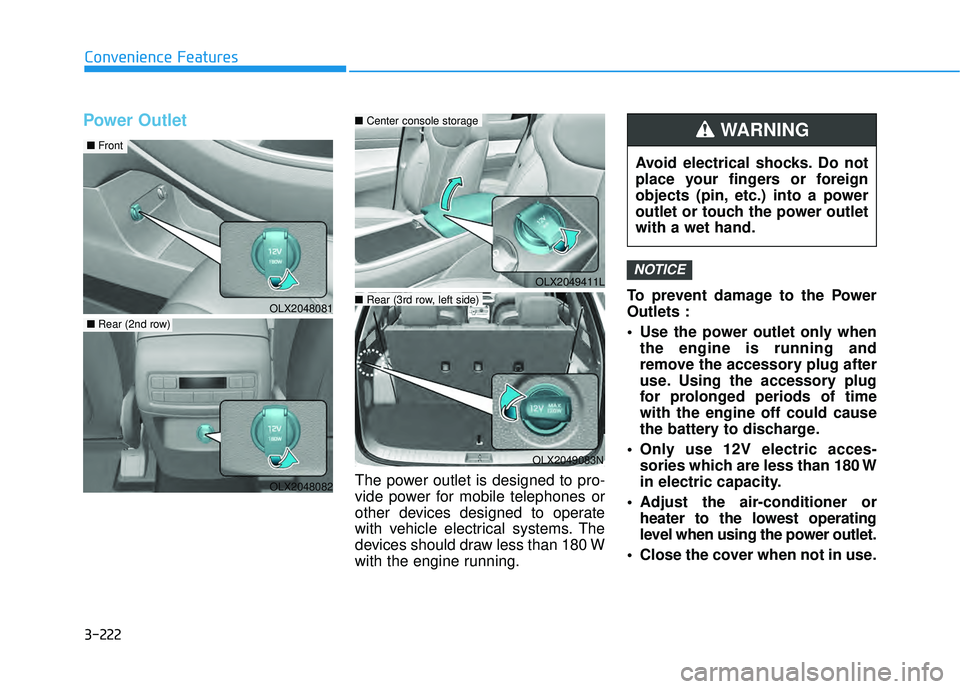
The power outlet is designed to pro-
vide power for mobile telephones or
other devices designed to operate
with vehicle electrical systems. The
devices should draw less than 180 W
with the engine running.To prevent damage to the Power
Outlets :
Use the power outlet only when
the engine is running and
remove the accessory plug after
use. Using the accessory plug
for prolonged periods of time
with the engine off could cause
the battery to discharge.
Only use 12V electric acces- sories which are less than 180 W
in electric capacity.
Adjust the air-conditioner or heater to the lowest operating
level when using the power outlet.
Close the cover when not in use.
NOTICEOLX2049411L
Avoid electrical shocks. Do not
place your fingers or foreign
objects (pin, etc.) into a power
outlet or touch the power outlet
with a wet hand.
WARNING
OLX2048081
■ Front
OLX2048082
■Rear (2nd row)
OLX2049083N
■Center console storage
■Rear (3rd row, left side)
Page 321 of 663
3-225
Convenience Features
3
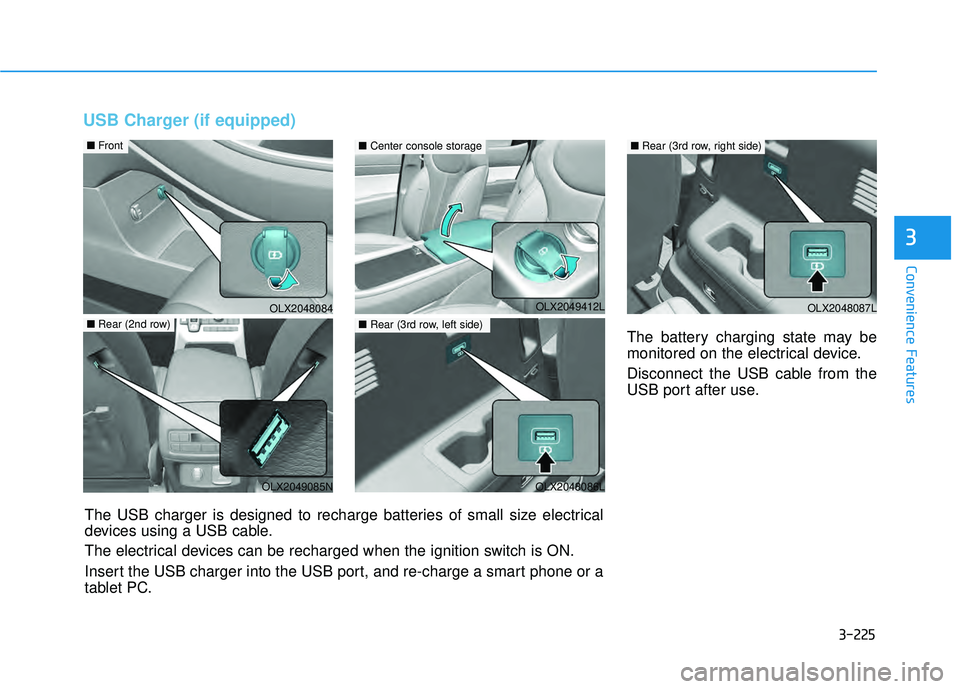
USB Charger (if equipped)
The battery charging state may be
monitored on the electrical device.
Disconnect the USB cable from the
USB port after use.
OLX2048084
■Front
OLX2049085N
■Rear (2nd row)
The USB charger is designed to recharge batteries of small size electrical
devices using a USB cable.
The electrical devices can be recharged when the ignition switch is ON.
Insert the USB charger into the USB port, and re-charge a smart phone or a
tablet PC.
OLX2048086L
■Rear (3rd row, left side)
■Center console storage
OLX2048087L
■Rear (3rd row, right side)
OLX2049412L
Page 322 of 663
3-226
Convenience Features
A smart phone or a tablet PC may get warmer during the re-charging
process. It does not indicate any
malfunction with the charging sys-
tem.
A smart phone or a tablet PC, which adopts a different re-charg-
ing method, may not be properly
re-charged. In this case, use an
exclusive charger of your device.
The charging terminal is only to recharge a device. Do not use the
charging terminal either to turn ON
an audio or to play media.
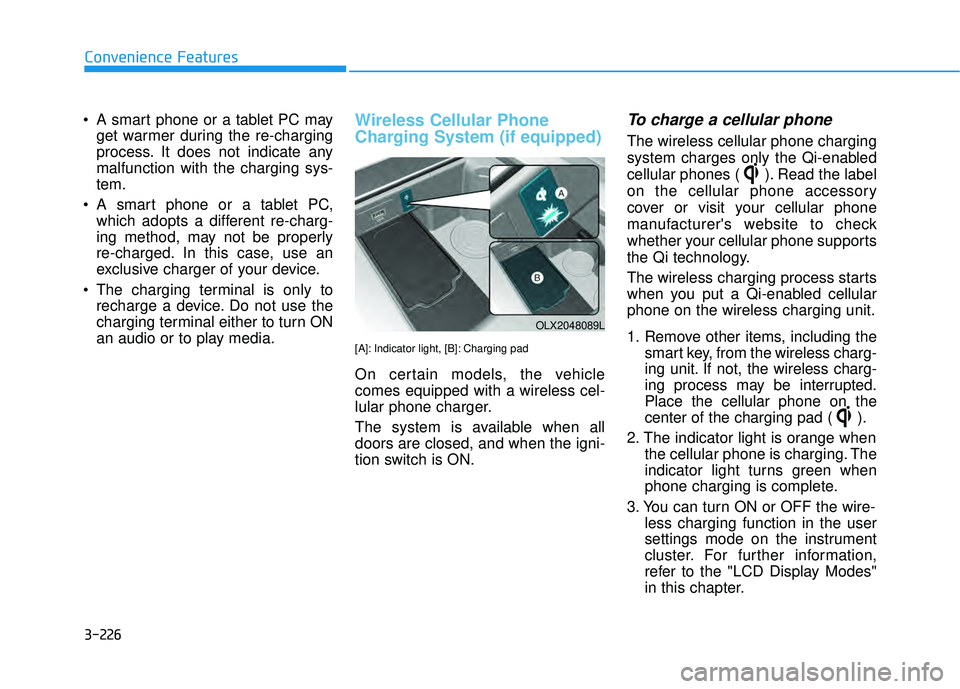
Wireless Cellular Phone
Charging System (if equipped)
[A]: Indicator light, [B]: Charging pad
On certain models, the vehicle
comes equipped with a wireless cel-
lular phone charger.
The system is available when all
doors are closed, and when the igni-
tion switch is ON.
To charge a cellular phone
The wireless cellular phone charging
system charges only the Qi-enabled
cellular phones ( ). Read the label
on the cellular phone accessory
cover or visit your cellular phone
manufacturer's website to check
whether your cellular phone supports
the Qi technology.
The wireless charging process starts
when you put a Qi-enabled cellular
phone on the wireless charging unit.
1. Remove other items, including the smart key, from the wireless charg-
ing unit. If not, the wireless charg-
ing process may be interrupted.
Place the cellular phone on the
center of the charging pad ( ).
2. The indicator light is orange when the cellular phone is charging. The
indicator light turns green when
phone charging is complete.
3. You can turn ON or OFF the wire- less charging function in the user
settings mode on the instrument
cluster. For further information,
refer to the "LCD Display Modes"
in this chapter.
OLX2048089L
Page 323 of 663
3-227
Convenience Features
3
If your cellular phone is not charging:
- Slightly change the position of thecellular phone on the charging
pad.
- Make sure the indicator light is orange.
The indicator light will blink orange for
10 seconds if there is a malfunction in
the wireless charging system.
In this case, temporarily stop the
charging process, and re-attempt to
charge your cellular phone again.
The system warns you with a mes-
sage on the LCD display if the cellular
phone is still on the wireless charging
unit after the engine is turned OFF
and the front door is opened.
Information
For some manufacturers' cellular
phones, the system may not warn you
even though the cellular phone is left
on the wireless charging unit. This is
due to the particular characteristic of
the cellular phone and not a malfunc-
tion of the wireless charging. The wireless cellular phone
charging system may not sup-
port certain cellular phones,
which are not verified for the Qi
specification ( ).
When placing your cellular phone on the charging mat,
position the phone in the middle
of the mat for optimal charging
performance. If your cell phone
is off to the side, the charging
rate may be less and in some
cases the cell phone may experi-
ence higher heat conduction.
In some cases, the wireless charging may stop temporarily
when the Remote Key or Smart
Key is used, either when starting
the vehicle or locking/unlocking
the doors, etc.
When charging certain cellular phones, the charging indicator
may not change to green when
the cell phone is fully charged.
The wireless charging process may temporarily stop, when tem-
perature abnormally increases
inside the wireless cellular phone
charging system. Stop the charg-
ing cellular phone and wait until
temperature falls to a certain level.
The wireless charging process may temporarily stop when there
is any metallic item, such as a
coin, between the wireless cellular
phone charging system and the
cellular phone.
When charging some cellular phones with a self-protection fea-
ture, the wireless charging speed
may decrease and the wireless
charging may stop.
If the cellular phone has a thick cover, the wireless charging may
not be possible.
If the cell phone is not completely contacting the charging pad, wire-
less charging may not operate
properly.
Some magnetic items like credit cards, phone cards or rail tickets
may be damaged if left with the
cellular phone during the charging
process.NOTICE
i
Page 324 of 663
3-228
Convenience Features
When any cellular phone without awireless charging function or a
metallic object is placed on the
charging pad, a small noise may
sound. This small sound is due to
the vehicle discerning compatibil-
ity of the object placed on the
charging pad. It does not affect
your vehicle or the cellular phone
in any way.
Information
If the ignition switch is in the OFF
position, the charging also stops.
Information
This device complies with part 15 of
the FCC Rules.
Operation is subject to the following
two conditions:
1. This device may not cause harmful interference, and
2. This device must accept any inter- ference received, including interfer-
ence that may cause undesired
operation.
Clock
You can set the time through info-
tainment system.
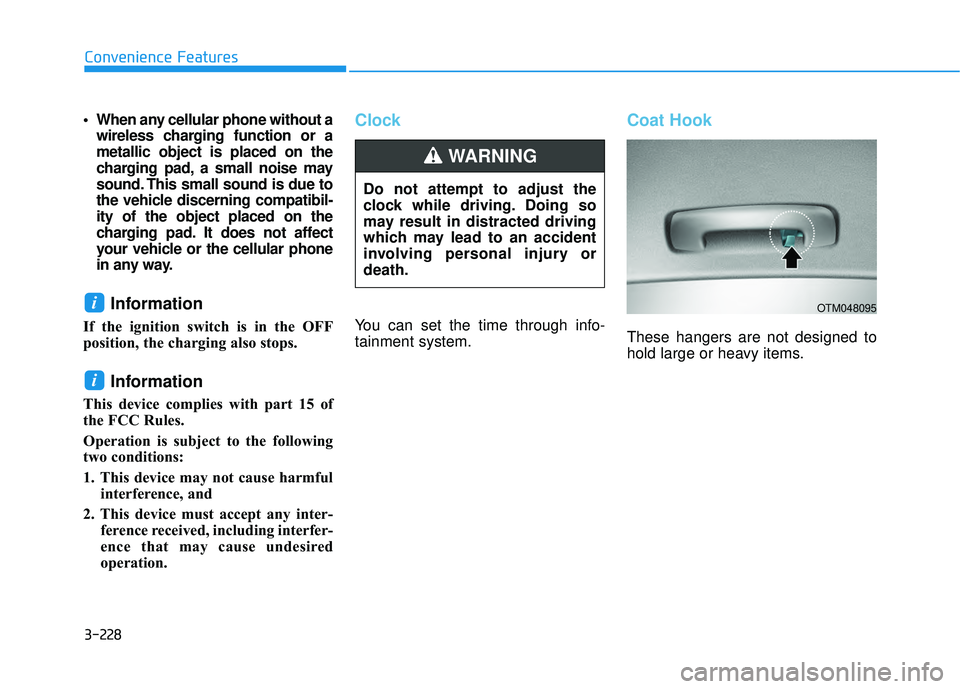
Coat Hook
These hangers are not designed to
hold large or heavy items.
i
iOTM048095
Do not attempt to adjust the
clock while driving. Doing so
may result in distracted driving
which may lead to an accident
involving personal injury or
death.
WARNING
Page 334 of 663
4-4
Multimedia System
MODE (3)
Press the MODE button to select
Radio and Media.
MUTE ( ) (4)
Press the MUTE button to mute thesound.
Press the MUTE button again to activate the sound.
Information
Detailed information for audio control
buttons are described in the separately
supplied manual with the vehicle.
Bluetooth®Wireless
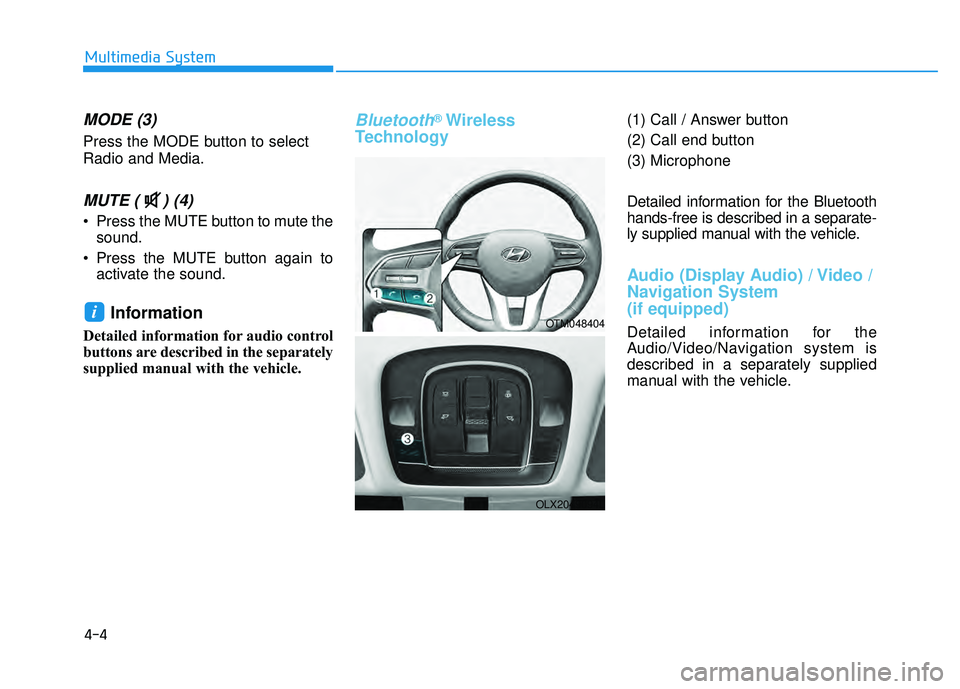
Technology(1) Call / Answer button
(2) Call end button
(3) Microphone
Detailed information for the Bluetooth
hands-free is described in a separate-
ly supplied manual with the vehicle.
Audio (Display Audio) / Video /
Navigation System
(if equipped)
Detailed information for the
Audio/Video/Navigation system is
described in a separately supplied
manual with the vehicle.
iOTM048404
OLX2049094L
Page 659 of 663
I-6
Interior features ............................................................3-219AC Inverter ..............................................................3-223
Cargo Security Screen ..............................................3-230
Clock ........................................................................\
3-228
Coat Hook ................................................................3-228
Conversation mirror .................................................3-221
Cup Holder ...............................................................3-219
Floor Mat Anchor(s) .................................................3-229
Luggage Net Holder .................................................3-230
Power Outlet.............................................................3-222
Side Curtain ..............................................................3-232
Sunvisor ....................................................................3-22\
1
USB Charger ...........................................................3-225
Wireless Cellular Phone Charging System ..............3-226
Interior Overview..............................................................1-4
ISG (Idle Stop and Go) system ......................................5-50 Calibrating the Battery Sensor ...................................5-54
ISG System Malfunction ............................................5-53
To Activate the ISG System .......................................5-50
To Deactivate the ISG System ..................................5-53
Jump Starting ....................................................................6-4 Lane Following Assist (LFA) ......................................5-131
Lane Following Assist malfunction and limitations ...............................................................5-134
Lane Following Assist operation..............................5-132
Lane Following Assist settings ................................5-131
Lane Keeping Assist (LKA) ..........................................5-78 Lane Keeping Assist malfunction and limitations .....5-82
Lane Keeping Assist operation ..................................5-80
Lane Keeping Assist settings ....................................5-78
LCD Display (Cluster type A and type B)....................3-109 LCD Display Control ...............................................3-109
LCD Display Modes ................................................3-110
LCD Display (Cluster type C) ......................................3-127 LCD Display Control ...............................................3-127
View Modes ............................................................3-128
Light bulbs ......................................................................7-\
61 Headlamp, Parking lamp, Daytime Running Light, Turn signal lamp and Side marker ...........................7-61
High Mounted Stop Lamp Bulb Replacement ...........7-66
Interior Light Bulb Replacement ...............................7-67
License Plate Light Bulb Replacement .....................7-66
Rear combination lamp light replacement .................7-64
Side Repeater Lamp Replacement .............................7-64
Lighting ........................................................................\
.3-145 Exterior Lights..........................................................3-145
Interior Lights...........................................................3-149
Welcome System .....................................................3-152
Index
J
L