height HYUNDAI PALISADE 2022 Owner's Manual
[x] Cancel search | Manufacturer: HYUNDAI, Model Year: 2022, Model line: PALISADE, Model: HYUNDAI PALISADE 2022Pages: 663, PDF Size: 15.74 MB
Page 216 of 663
3-120
Convenience Features
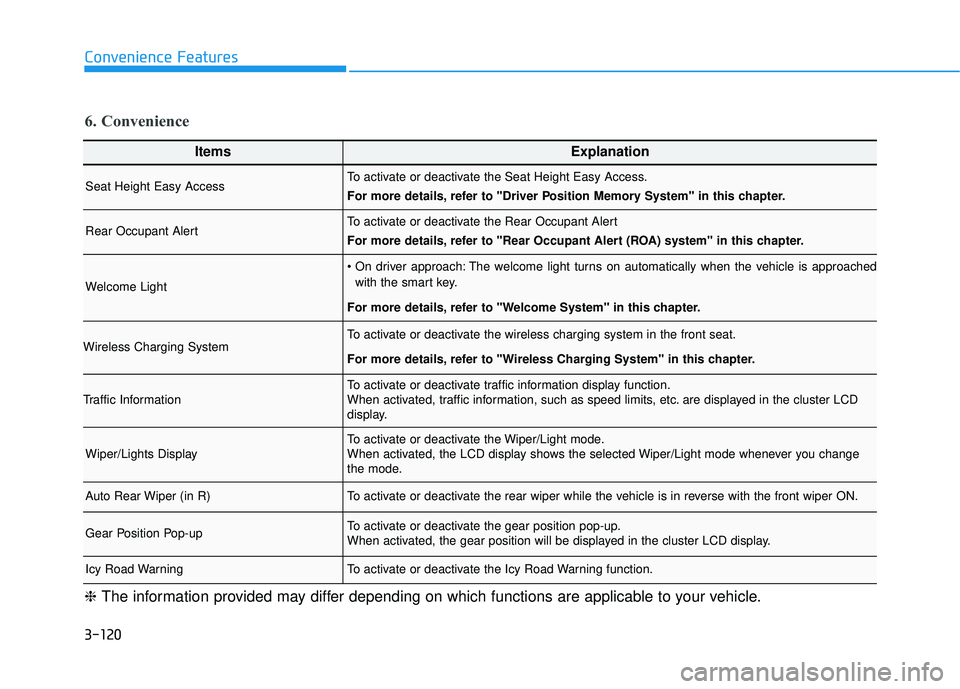
ItemsExplanation
Seat Height Easy AccessTo activate or deactivate the Seat Height Easy Access.
For more details, refer to "Driver Position Memory System" in this chapter.
Rear Occupant AlertTo activate or deactivate the Rear Occupant Alert
For more details, refer to "Rear Occupant Alert (ROA) system" in this chapter.
Welcome Light
The welcome light turns on automatically when the vehicle is approachedwith the smart key.
For more details, refer to ''Welcome System'' in this chapter.
Wireless Charging SystemTo activate or deactivate the wireless charging system in the front seat.
For more details, refer to "Wireless Charging System" in this chapter.
Traffic InformationTo activate or deactivate traffic information display function.
When activated, traffic information, such as speed limits, etc. are displayed in the cluster LCD
display.
Wiper/Lights DisplayTo activate or deactivate the Wiper/Light mode.
When activated, the LCD display shows the selected Wiper/Light mode whenever you change
the mode.
Auto Rear Wiper (in R)To activate or deactivate the rear wiper while the vehicle is in reverse with the front wiper ON.
Gear Position Pop-upTo activate or deactivate the gear position pop-up.
When activated, the gear position will be displayed in the cluster LCD display.
Icy Road WarningTo activate or deactivate the Icy Road Warning function.
6. Convenience
❈ The information provided may differ depending on which functions are applicable to your vehicle.
Page 228 of 663
3-132
Convenience Features
Displayed items of user's setting may differ from the content in this owner's manual since the contents vary
with the vehicle’s technical specifications.
NOTICE
O O P PT TI IO O N N M M E EN N U U ( ( C C L LU U S ST T E ER R T T Y Y P PE E C C ) )
While driving, please do not change the setting mode. It may distract your attention and cause the acci-
dent.
WARNING
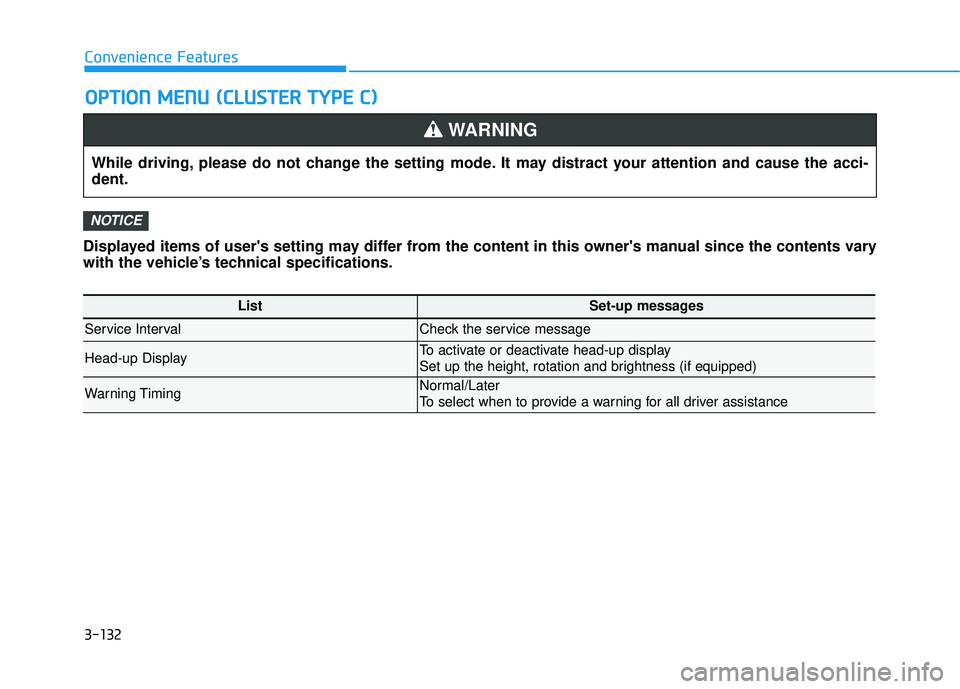
ListSet-up messages
Service IntervalCheck the service message
Head-up DisplayTo activate or deactivate head-up display
Set up the height, rotation and brightness (if equipped)
Warning TimingNormal/Later
To select when to provide a warning for all driver assistance
Page 230 of 663
3-134
Convenience Features
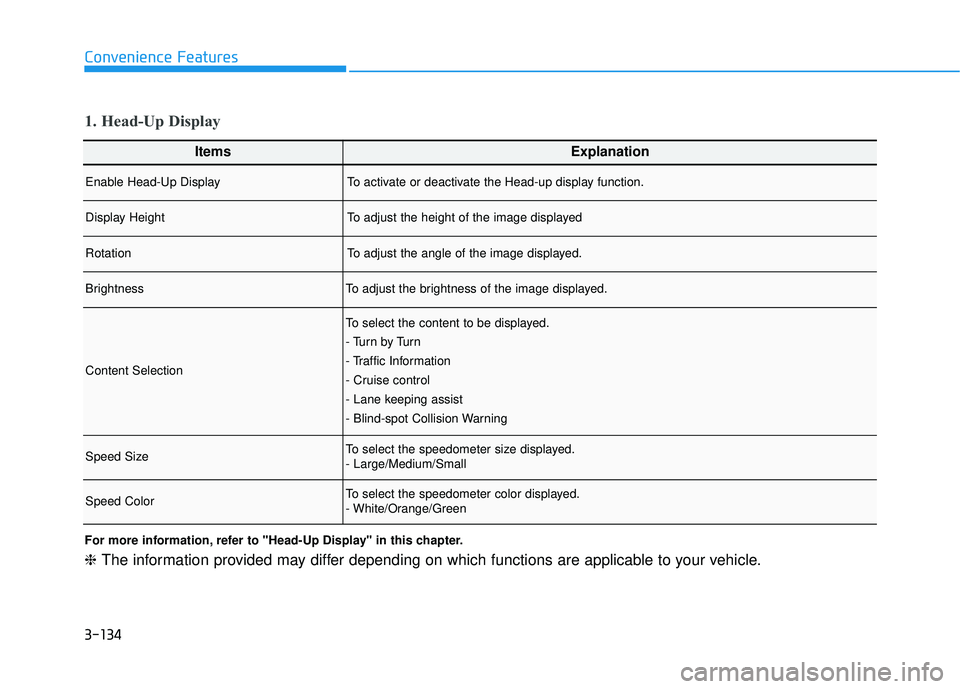
ItemsExplanation
Enable Head-Up DisplayTo activate or deactivate the Head-up display function.
Display HeightTo adjust the height of the image displayed
RotationTo adjust the angle of the image displayed.
BrightnessTo adjust the brightness of the image displayed.
Content Selection
To select the content to be displayed.
- Tu r n b y Tu r n
- Traffic Information
- Cruise control
- Lane keeping assist
- Blind-spot Collision Warning
Speed SizeTo select the speedometer size displayed.
- Large/Medium/Small
Speed ColorTo select the speedometer color displayed.
- White/Orange/Green
1. Head-Up Display
For more information, refer to "Head-Up Display" in this chapter.
❈The information provided may differ depending on which functions are applicable to your vehicle.
Page 236 of 663
3-140
Convenience Features
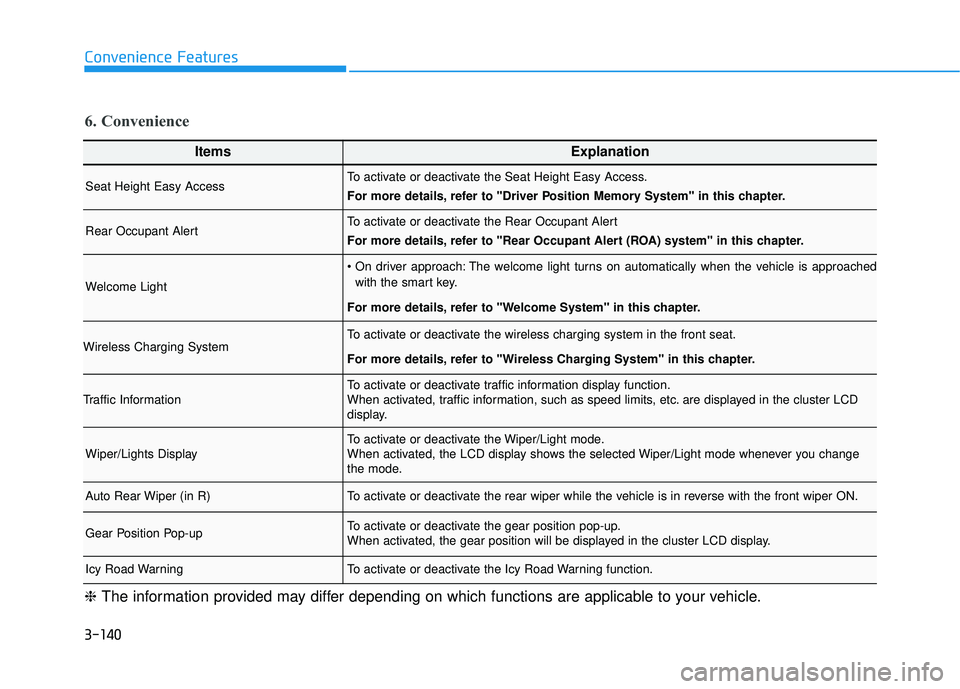
ItemsExplanation
Seat Height Easy AccessTo activate or deactivate the Seat Height Easy Access.
For more details, refer to "Driver Position Memory System" in this chapter.
Rear Occupant AlertTo activate or deactivate the Rear Occupant Alert
For more details, refer to "Rear Occupant Alert (ROA) system" in this chapter.
Welcome Light
The welcome light turns on automatically when the vehicle is approachedwith the smart key.
For more details, refer to ''Welcome System'' in this chapter.
Wireless Charging SystemTo activate or deactivate the wireless charging system in the front seat.
For more details, refer to "Wireless Charging System" in this chapter.
Traffic InformationTo activate or deactivate traffic information display function.
When activated, traffic information, such as speed limits, etc. are displayed in the cluster LCD
display.
Wiper/Lights DisplayTo activate or deactivate the Wiper/Light mode.
When activated, the LCD display shows the selected Wiper/Light mode whenever you change
the mode.
Auto Rear Wiper (in R)To activate or deactivate the rear wiper while the vehicle is in reverse with the front wiper ON.
Gear Position Pop-upTo activate or deactivate the gear position pop-up.
When activated, the gear position will be displayed in the cluster LCD display.
Icy Road WarningTo activate or deactivate the Icy Road Warning function.
6. Convenience
❈ The information provided may differ depending on which functions are applicable to your vehicle.
Page 240 of 663
3-144
Convenience Features
Head-up display ON/OFF
To activate the head up display,
select 'Head-UP Display' on the User
Settings mode on the instrument
cluster LCD display.
If you do not select 'Head-Up
Display', the head up display will be
deactivated.
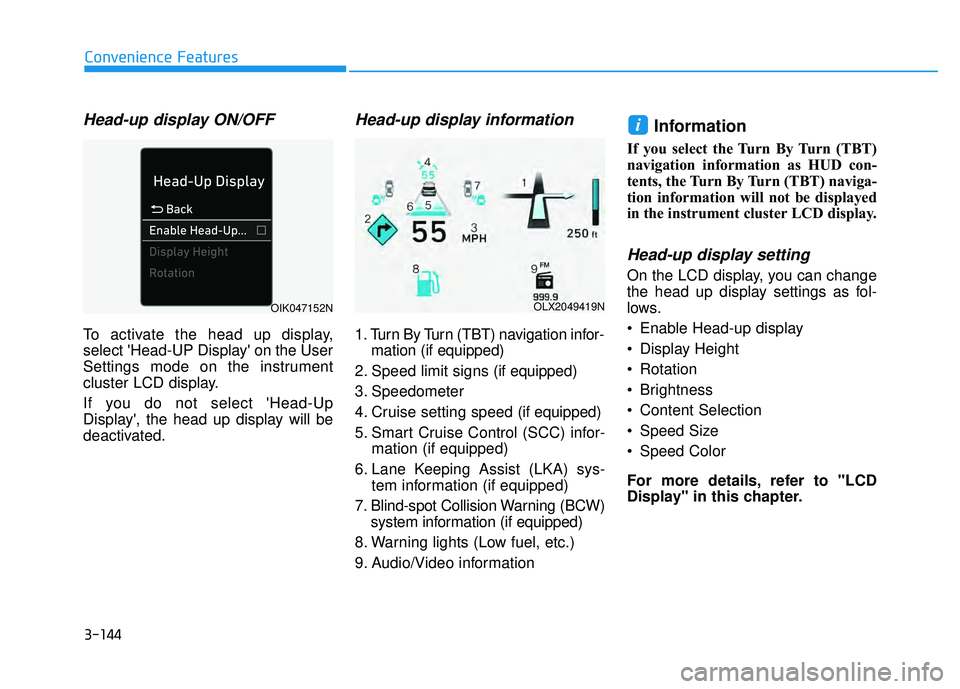
Head-up display information
1. Turn By Turn (TBT) navigation infor-mation (if equipped)
2. Speed limit signs (if equipped)
3. Speedometer
4. Cruise setting speed (if equipped)
5. Smart Cruise Control (SCC) infor- mation (if equipped)
6. Lane Keeping Assist (LKA) sys- tem information (if equipped)
7. Blind-spot Collision Warning (BCW) system information (if equipped)
8. Warning lights (Low fuel, etc.)
9. Audio/Video information
Information
If you select the Turn By Turn (TBT)
navigation information as HUD con-
tents, the Turn By Turn (TBT) naviga-
tion information will not be displayed
in the instrument cluster LCD display.
Head-up display setting
On the LCD display, you can change
the head up display settings as fol-
lows.
Enable Head-up display
Display Height
Rotation
Brightness
Content Selection
Speed Size
Speed Color
For more details, refer to "LCD
Display" in this chapter.
i
OLX2049419NOIK047152N
Page 265 of 663
3-169
Convenience features
3
Reverse Parking Distance Warningmay malfunction when:
- Heavy rain or water spray is pres-ent
- Water flows on the surface of the sensor
- Affected by another vehicle’s sen- sors
- The sensor is covered with snow
- Driving on uneven road, gravel roads or bushes
- Objects that generates ultrasonic waves are near the sensor
- Installing the license plate differ- ently from the original location
- The vehicle bumper height or ultrasonic sensor installation has
been modified
- Attaching equipments or acces- sories around the ultrasonic sen-
sors The following objects may not be
detected:
- Sharp or slim objects, such asropes, chains or small poles.
- Objects, which tend to absorb sensor frequency, such as
clothes, spongy material or snow.
- Objects smaller than 40 in. (100 cm) in length and narrower than 6
in. (14 cm) in diameter.
- Pedestrians, animals or objects that are very close to the ultra-
sonic sensors
Parking Distance Warning Indicators may be displayed differ-
ently from the actual detected loca-
tion when the obstacle is located
between the sensors.
Parking Distance Warning indica- tor may not occur sequentially
depending on vehicle speed or
obstacle shape.
If Reverse Parking Distance Warning needs repair, have the
vehicle inspected by an authorized
HYUNDAI dealer.
Page 271 of 663
3-175
Convenience features
3
Forward/Reverse Parking DistanceWarning may malfunction when:
- Heavy rain or water spray is pres-ent
- Water flows on the surface of the sensor
- Affected by another vehicle’s sen- sors
- The sensor is covered with snow
- Driving on uneven road, gravel roads or bushes
- Objects that generates ultrasonic waves are near the sensor
- Installing the license plate differ- ently from the original location
- The vehicle bumper height or ultrasonic sensor installation has
been modified
- Attaching equipments or acces- sories around the ultrasonic sen-
sors The following objects may not be
detected:
- Sharp or slim objects, such asropes, chains or small poles.
- Objects, which tend to absorb sensor frequency, such as
clothes, spongy material or snow.
- Objects smaller than 40 in. (100 cm) in length and narrower than 6
in. (14 cm) in diameter.
- Pedestrians, animals or objects that are very close to the ultra-
sonic sensors
Parking Distance Warning Indicators may be displayed differ-
ently from the actual detected loca-
tion when the obstacle is located
between the sensors.
Parking Distance Warning indica- tor may not occur sequentially
depending on vehicle speed or
obstacle shape.
If Forward/Reverse Parking Distance Warning needs repair,
have the vehicle inspected by an
authorized HYUNDAI dealer.
Page 277 of 663
3-181
Convenience features
3
Information
When Rear View while Driving is on,
it stays on while driving regardless of
vehicle speed.
When Rear View while Driving is on
while backing up, the screen changes
to the rear view.
i
Always keep the camera lens
clean. If the lens is covered
with foreign material, it may
adversely affect camera per-
formance and Surround View
Monitor may not operate nor-
mally. However, do not use
chemical solvents such as
strong detergents containing
high alkaline or volatile organ-
ic solvents (gasoline, ace-
tone, etc.). This may damage
the camera lens.
ALWAYS look around your
vehicle to make sure there are
no objects or obstacles
before moving the vehicle.
What you see on the screen
may differ from the actual
vehicle’s location.
The image shown on the
screen may differ from the
actual distance of the object.
Make sure to directly check
the vehicle's surroundings for
safety.
Surround View Monitor is
designed to be used on a flat
surface. Therefore, if used on
roads with different heights
such as curbs and speed
bumps, the image in the
screen my not look correct.
WARNING
Page 332 of 663
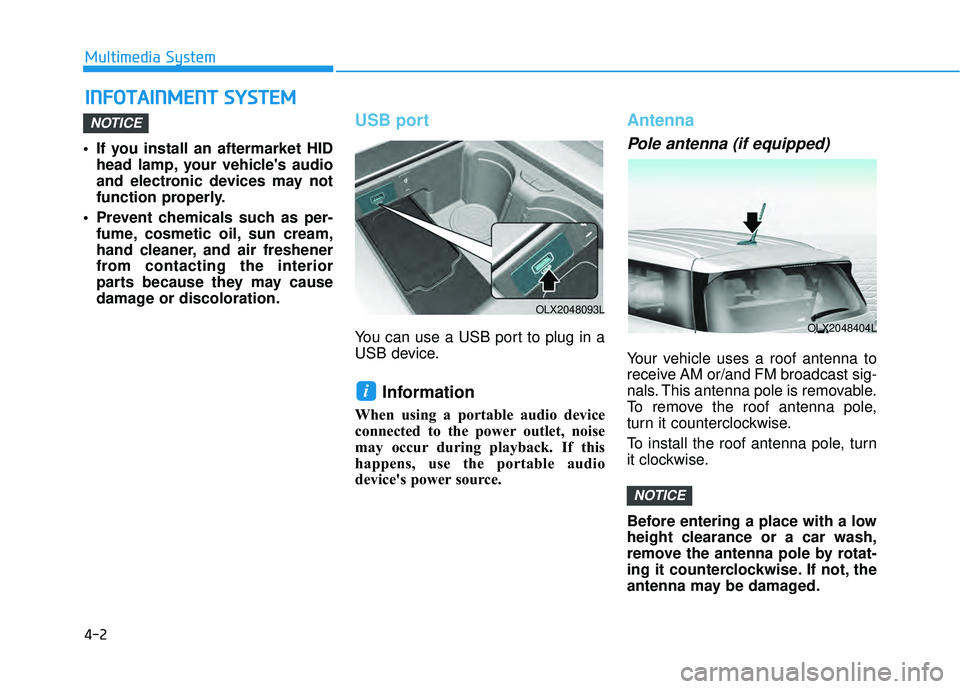
4-2
Multimedia System
• If you install an aftermarket HID head lamp, your vehicle's audio
and electronic devices may not
function properly.
Prevent chemicals such as per- fume, cosmetic oil, sun cream,
hand cleaner, and air freshener
from contacting the interior
parts because they may cause
damage or discoloration.
USB port
You can use a USB port to plug in a
USB device.
Information
When using a portable audio device
connected to the power outlet, noise
may occur during playback. If this
happens, use the portable audio
device's power source.
Antenna
Pole antenna (if equipped)
Your vehicle uses a roof antenna to
receive AM or/and FM broadcast sig-
nals. This antenna pole is removable.
To remove the roof antenna pole,
turn it counterclockwise.
To install the roof antenna pole, turn
it clockwise.
Before entering a place with a low
height clearance or a car wash,
remove the antenna pole by rotat-
ing it counterclockwise. If not, the
antenna may be damaged.
NOTICE
i
NOTICE
I IN N F FO O T TA A I IN N M M E EN N T T S S Y Y S ST T E EM M
OLX2048404L
OLX2048093L
Page 367 of 663
![HYUNDAI PALISADE 2022 Owners Manual 5-33
Driving your vehicle
5
AUTO HOLD conditions not met.
Close door and hood.
When you press the [AUTO HOLD]
switch, if the drivers door and engine
hood are not closed, a warning will
sound and a me](/img/35/41170/w960_41170-366.png "HYUNDAI PALISADE 2022 Owners Manual 5-33
Driving your vehicle
5
AUTO HOLD conditions not met.
Close door and hood.
When you press the [AUTO HOLD]
switch, if the drivers door and engine
hood are not closed, a warning will
sound and a me")
5-33
Driving your vehicle
5
AUTO HOLD conditions not met.
Close door and hood.
When you press the [AUTO HOLD]
switch, if the driver's door and engine
hood are not closed, a warning will
sound and a message will appear on
the cluster LCD display.
Press the [AUTO HOLD] switch after
closing the driver's door and hood.
Anti-lock Brake System (ABS)
ABS is an electronic braking system
that helps prevent a braking skid.
ABS allows the driver to steer and
brake at the same time.
An Anti-Lock Braking System
(ABS) or an Electronic Stability
Control (ESC) system will not
prevent accidents due to
improper or dangerous driving
maneuvers. Even though vehi-
cle control is improved during
emergency braking, always
maintain a safe distance
between you and objects ahead
of you. Vehicle speeds should
always be reduced during
extreme road conditions. The
braking distance for cars
equipped with ABS or ESC may
be longer than for those without
these systems in the following
road conditions.
Drive your vehicle at reduced
speeds during the following
conditions:
Rough, gravel or snow-cov-
ered roads.
On roads where the road sur-
face is pitted or has different
surface height.
WARNING
OTM058159L
Tire chains are installed on
your vehicle.
The safety features of an ABS
or ESC equipped vehicle should
not be tested by high speed
driving or cornering. This could
endanger the safety of yourself
or others.