light HYUNDAI PALISADE 2022 Owner's Manual
[x] Cancel search | Manufacturer: HYUNDAI, Model Year: 2022, Model line: PALISADE, Model: HYUNDAI PALISADE 2022Pages: 663, PDF Size: 15.74 MB
Page 107 of 663
3-11
Convenience Features
3
Opening the liftgate
Non-power liftgate
To unlock and open the liftgate:
1.Make sure you have the smart keyin your possession.
2.Press either the liftgate handle release switch on the vehicle for
more than one second. The hazard
warning lights will blink two times
and the liftgate latch will unlock.
3.Once the liftgate is opened and then closed, the liftgate will auto-
matically re-lock after 30 seconds.
Information
The liftgate handle switch will only
operate when the smart key is within
28 inches (0.7 m) from the liftgate
handle.
Power liftgate
To unlock and open the liftgate:
1.Make sure you have the smart keyin your possession.
2.Press either the liftgate handle release switch on the vehicle or
press and hold the Liftgate Unlock
button (4) on the smart key for
more than one second. The hazard
warning lights will blink two times
and the liftgate latch will open.
3.Once the liftgate is opened and then closed, the liftgate will auto-
matically re-lock after 30 seconds.
Information
The liftgate handle switch will only
operate when the smart key is within
28 inches (0.7 m) from the liftgate
handle.
Panic button
Press and hold the Panic button (5)
for more than one second. The horn
sounds and hazard warning lights
blink for about 30 seconds. To cancel
the panic mode, press any button on
the Smart Key.
Start-up
You can start the vehicle without
inserting the key.
For information, refer to the
"Engine Start/Stop Button" sec-
tion in chapter 5.
Information
Preventing the doors/liftgate from
locking/unlocking
• Activating the feature
With the engine off, press the lock
button on the smart key and immedi-
ately press the unlock button along
with the lock button for more than 4
seconds. When the feature is activat-
ed, the hazard warning lights will
blink four times.
iii
Page 121 of 663
3-25
Convenience Features
Warning volume
With the engine on, select 'Driver
Assistance →Warning Volume' from
the Settings menu to change the
Warning Volume to 'High', 'Medium',
'Low' or 'Off' for Safe Exit Assist.
However, even if 'Off' is selected, the
function's Warning Volume will not
turn off but the volume will sound as
'Low'.
If you change the Warning volume,
the warning volume of other Driver
assistance systems may change.
Safe Exit Assist operation
Warning and control
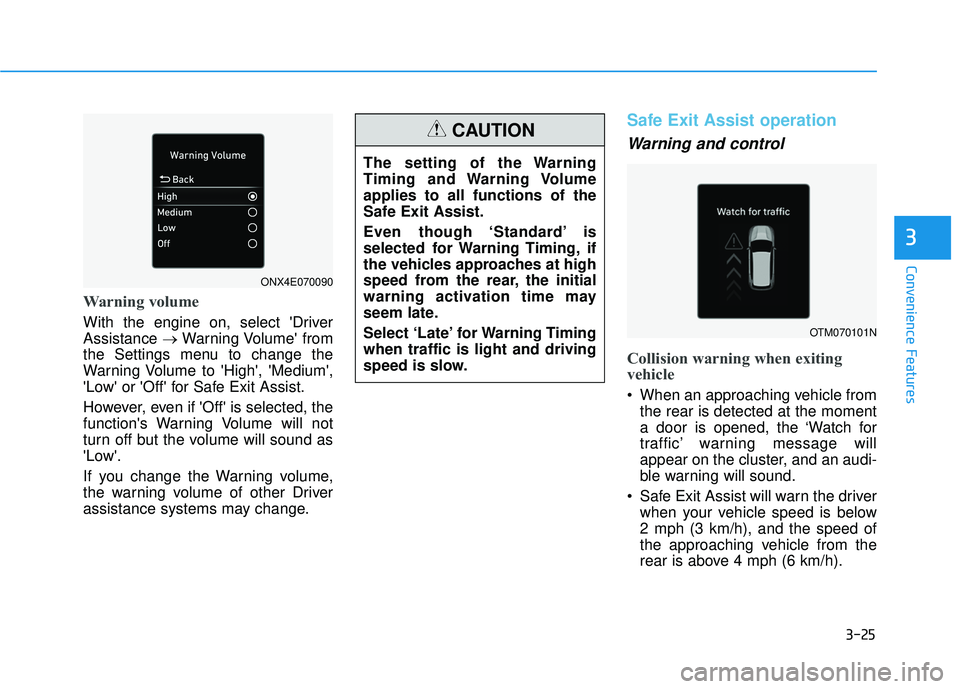
Collision warning when exiting
vehicle
When an approaching vehicle from the rear is detected at the moment
a door is opened, the ‘Watch for
traffic’ warning message will
appear on the cluster, and an audi-
ble warning will sound.
Safe Exit Assist will warn the driver when your vehicle speed is below
2 mph (3 km/h), and the speed of
the approaching vehicle from the
rear is above 4 mph (6 km/h).
3
The setting of the Warning
Timing and Warning Volume
applies to all functions of the
Safe Exit Assist.
Even though ‘Standard’ is
selected for Warning Timing, if
the vehicles approaches at high
speed from the rear, the initial
warning activation time may
seem late.
Select ‘Late’ for Warning Timing
when traffic is light and driving
speed is slow.
CAUTION
OTM070101N
ONX4E070090
Page 122 of 663
3-26
Safe Exit Assist linked with
Electronic child safety lock
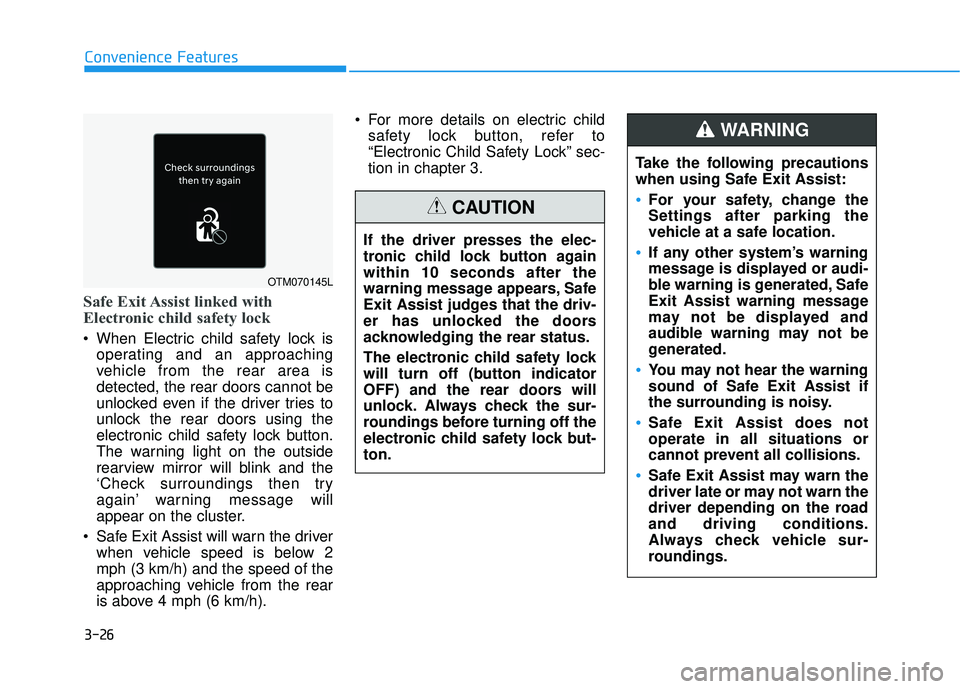
When Electric child safety lock isoperating and an approaching
vehicle from the rear area is
detected, the rear doors cannot be
unlocked even if the driver tries to
unlock the rear doors using the
electronic child safety lock button.
The warning light on the outside
rearview mirror will blink and the
‘Check surroundings then try
again’ warning message will
appear on the cluster.
Safe Exit Assist will warn the driver when vehicle speed is below 2
mph (3 km/h) and the speed of the
approaching vehicle from the rear
is above 4 mph (6 km/h). For more details on electric child
safety lock button, refer to
“Electronic Child Safety Lock” sec-
tion in chapter 3.
Convenience Features
OTM070145L
Take the following precautions
when using Safe Exit Assist:
For your safety, change the
Settings after parking the
vehicle at a safe location.
If any other system’s warning
message is displayed or audi-
ble warning is generated, Safe
Exit Assist warning message
may not be displayed and
audible warning may not be
generated.
You may not hear the warning
sound of Safe Exit Assist if
the surrounding is noisy.
Safe Exit Assist does not
operate in all situations or
cannot prevent all collisions.
Safe Exit Assist may warn the
driver late or may not warn the
driver depending on the road
and driving conditions.
Always check vehicle sur-
roundings.
WARNING
If the driver presses the elec-
tronic child lock button again
within 10 seconds after the
warning message appears, Safe
Exit Assist judges that the driv-
er has unlocked the doors
acknowledging the rear status.
The electronic child safety lock
will turn off (button indicator
OFF) and the rear doors will
unlock. Always check the sur-
roundings before turning off the
electronic child safety lock but-
ton.
CAUTION
Page 123 of 663
3-27
Convenience Features
Information
After the engine is turned off, Safe
Exit Assist operates approximately for
3 minutes, but turns off immediately if
the doors are locked.
Safe Exit Assist malfunction
and limitations
Safe Exit Assist malfunction
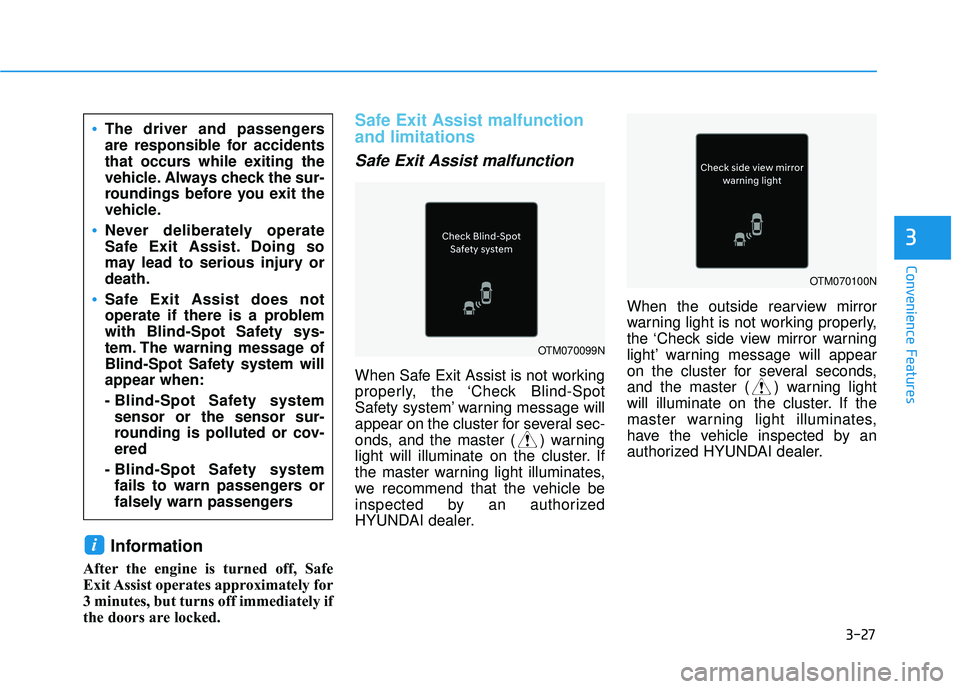
When Safe Exit Assist is not working
properly, the ‘Check Blind-Spot
Safety system’ warning message will
appear on the cluster for several sec-
onds, and the master ( ) warning
light will illuminate on the cluster. If
the master warning light illuminates,
we recommend that the vehicle be
inspected by an authorized
HYUNDAI dealer.When the outside rearview mirror
warning light is not working properly,
the ‘Check side view mirror warning
light’ warning message will appear
on the cluster for several seconds,
and the master ( ) warning light
will illuminate on the cluster. If the
master warning light illuminates,
have the vehicle inspected by an
authorized HYUNDAI dealer.
i
3
The driver and passengers
are responsible for accidents
that occurs while exiting the
vehicle. Always check the sur-
roundings before you exit the
vehicle.
Never deliberately operate
Safe Exit Assist. Doing so
may lead to serious injury or
death.
Safe Exit Assist does not
operate if there is a problem
with Blind-Spot Safety sys-
tem. The warning message of
Blind-Spot Safety system will
appear when:
- Blind-Spot Safety system
sensor or the sensor sur-
rounding is polluted or cov-
ered
- Blind-Spot Safety system fails to warn passengers or
falsely warn passengers
OTM070099N
OTM070100N
Page 127 of 663
3-31
Convenience Features
3
This system helps to protect your vehi-
cle and valuables.The horn will
sound and the hazard warning lights
will blink continuously if any of the
following occur:
- A door is opened without using the remote key or smart key.
- The liftgate is opened without using the remote key or smart key.
- The engine hood is opened.
The alarm continues for 30 seconds
(repeats 2 times unless the system is
disarmed), then the system resets.
To turn off the alarm, unlock the
doors with the remote key or smart
key.
The Theft Alarm System automati-
cally sets 30 seconds after you lock
the doors and the liftgate. For the
system to activate, you must lock the
doors and the liftgate from outside
the vehicle with the remote key or
smart key or by pressing the button
on the outside of the door handle
with the smart key in your posses-
sion.
The hazard warning lights will blink
and the chime will sound once to
indicate the system is armed. Once the security system is set,
opening any door, the liftgate, or the
hood without using the remote key or
smart key will cause the alarm to
activate.
The Theft Alarm System will not set if
the hood, the liftgate, or any door is
not fully closed. If the system will not
set, check the hood, the liftgate, or
the doors are fully closed.
Do not attempt to alter this system or
add other devices to it.Information
• Do not lock the doors until all pas-
sengers have left the vehicle. If the
remaining passenger leaves the
vehicle when the system is armed,
the alarm will be activated.
• If the vehicle is not disarmed with the remote key or smart key, open the
doors by using the mechanical key
and place the ignition switch in the
ON position (for remote key) or start
the engine (for smart key) by direct-
ly pressing the ignition switch with
the smart key.
• If the system is disarmed by unlock- ing the vehicle, but neither a door or
the liftgate is opened within 30 sec-
onds, the doors will relock and the
system will rearm automatically.
i
T TH H E EF FT T - -A A L LA A R RM M S S Y Y S ST T E EM M
Page 132 of 663
3-36
Convenience Features
S ST T E EE ER R I IN N G G W W H HE EE EL L
Electric Power Steering (EPS)
The system assists you with steering
the vehicle. If the vehicle is turned off
or if the power steering system
becomes inoperative, you may still
steer the vehicle, but it will require
increased steering effort.
Should you notice any change in the
effort required to steer during normal
vehicle operation, have the system
checked by an authorized HYUNDAI
dealer.
If the Electric Power Steering
System does not operate nor-
mally, the warning light ( ) will
illuminate on the instrument
cluster. You may steer the vehi-
cle, but it will require increased
steering efforts. Take your vehi-
cle to an authorized HYUNDAI
dealer and have the system
checked as soon as possible. When abnormality is detected in
the electric power steering sys-
tem, the steering assist function
will stop. At this time, the warn-
ing light turns on or blinks on
the cluster. The steering wheel
may become difficult to control
or operate. Have your vehicle
checked immediately, after mov-
ing the vehicle to a safe zone.
Information
The following symptoms may occur
during normal vehicle operation:
• The steering effort may be highimmediately after placing the igni-
tion switch in the ON position.
This happens as the system per-
forms the EPS system diagnostics.
When the diagnostics are complet-
ed, the steering wheel effort will
return to its normal condition.
• When the battery voltage is low, you might have to put more sterring
effrot. However, it is a temporary
conditions so that it will return to
normal condition after charging the
battery. • A click noise may be heard from the
EPS relay after the ignition switch is
in the ON or LOCK/OFF position.
• Motor noise may be heard when the vehicle is at a stop or at a low driv-
ing speed.
• When you operate the steering wheel in low temperatures, abnor-
mal noise may occur. If the temper-
ature rises, the noise will disappear.
This is a normal condition.
• When an error is detected from the EPS, the steering effort assist func-
tion will not be activated.
Instrument cluster warning lights
may be on or the steering effort may
be high. If these symptoms occur,
drive the vehicle to a safe area as
soon as it is safe to do so. Have the
system checked by an authorized
HYUNDAI dealer as soon as possi-
ble.
i
NOTICE
Page 133 of 663
3-37
Convenience Features
3
Tilt Steering / Telescopic
Steering
When adjusting the steering wheel to
a comfortable position, adjust the
steering wheel so that it points
toward your chest, not toward your
face. Make sure you can see the
instrument cluster warning lights and
gauges. After adjusting, push the
steering wheel both up and down to
be certain it is locked in position.
Always adjust the position of the
steering wheel before driving.
While adjusting the steering wheel
height, please do not push or pull
it hard since the fixture can be
damaged.To adjust the steering wheel angle
and height:
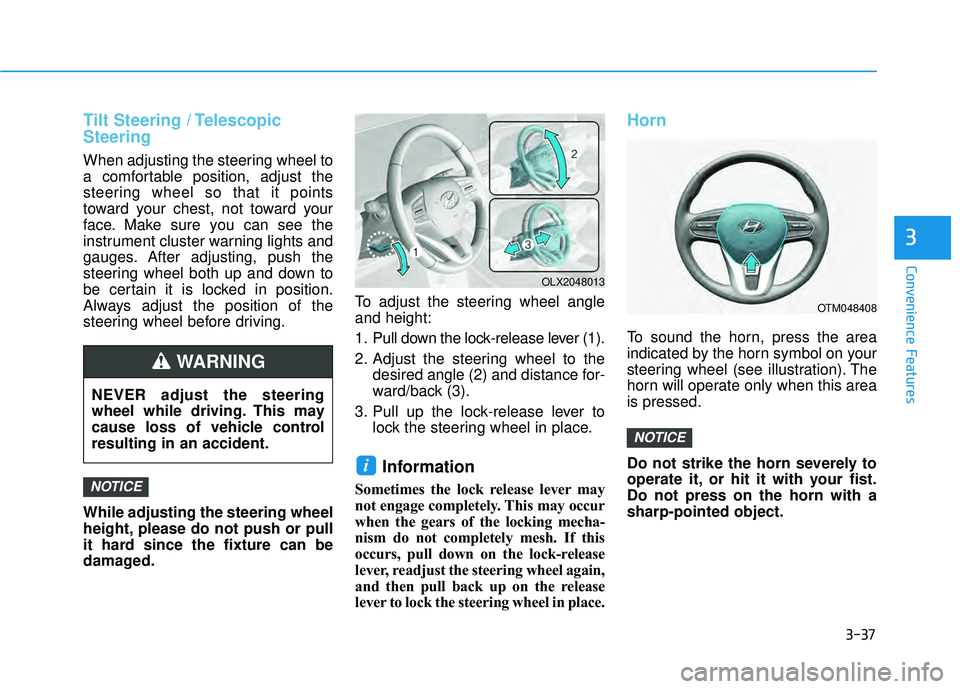
1. Pull down the lock-release lever (1).
2. Adjust the steering wheel to the
desired angle (2) and distance for-
ward/back (3).
3. Pull up the lock-release lever to lock the steering wheel in place.
Information
Sometimes the lock release lever may
not engage completely. This may occur
when the gears of the locking mecha-
nism do not completely mesh. If this
occurs, pull down on the lock-release
lever, readjust the steering wheel again,
and then pull back up on the release
lever to lock the steering wheel in place.
Horn
To sound the horn, press the area
indicated by the horn symbol on your
steering wheel (see illustration). The
horn will operate only when this area
is pressed.
Do not strike the horn severely to
operate it, or hit it with your fist.
Do not press on the horn with a
sharp-pointed object.
NOTICE
i
NOTICE
OTM048408
OLX2048013
NEVER adjust the steering
wheel while driving. This may
cause loss of vehicle control
resulting in an accident.
WARNING
Page 135 of 663
3-39
Convenience Features
3
M MI IR R R RO O R RS S
Inside Rearview Mirror
Before driving your vehicle, check to
see that your inside rearview mirror
is properly positioned. Adjust the
rearview mirror so that the view
through the rear window is properly
centered.
When cleaning the mirror, use a
paper towel or similar material
dampened with glass cleaner. Do
not spray glass cleaner directly on
the mirror as this may cause the
liquid cleaner to enter the mirror
housing.
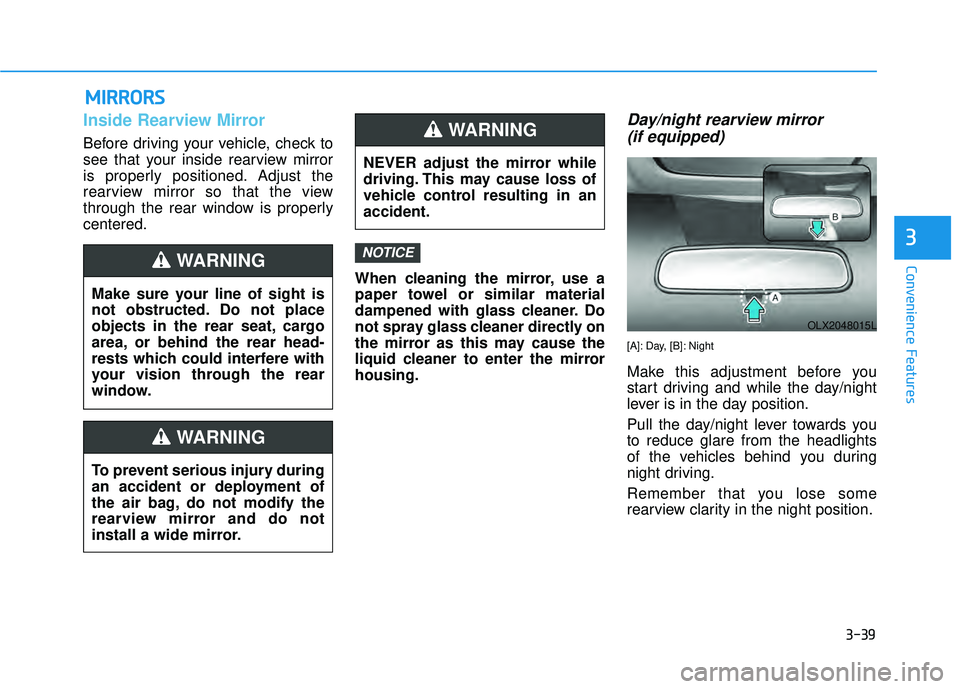
Day/night rearview mirror (if equipped)
[A]: Day, [B]: Night
Make this adjustment before you
start driving and while the day/night
lever is in the day position.
Pull the day/night lever towards you
to reduce glare from the headlights
of the vehicles behind you during
night driving.
Remember that you lose some
rearview clarity in the night position.
NOTICE
NEVER adjust the mirror while
driving. This may cause loss of
vehicle control resulting in an
accident.
WARNING
Make sure your line of sight is
not obstructed. Do not place
objects in the rear seat, cargo
area, or behind the rear head-
rests which could interfere with
your vision through the rear
window.
WARNING
To prevent serious injury during
an accident or deployment of
the air bag, do not modify the
rearview mirror and do not
install a wide mirror.
WARNING
OLX2048015L
Page 136 of 663
3-40
Convenience Features
Electrochromatic Mirror (ECM)(if equipped)
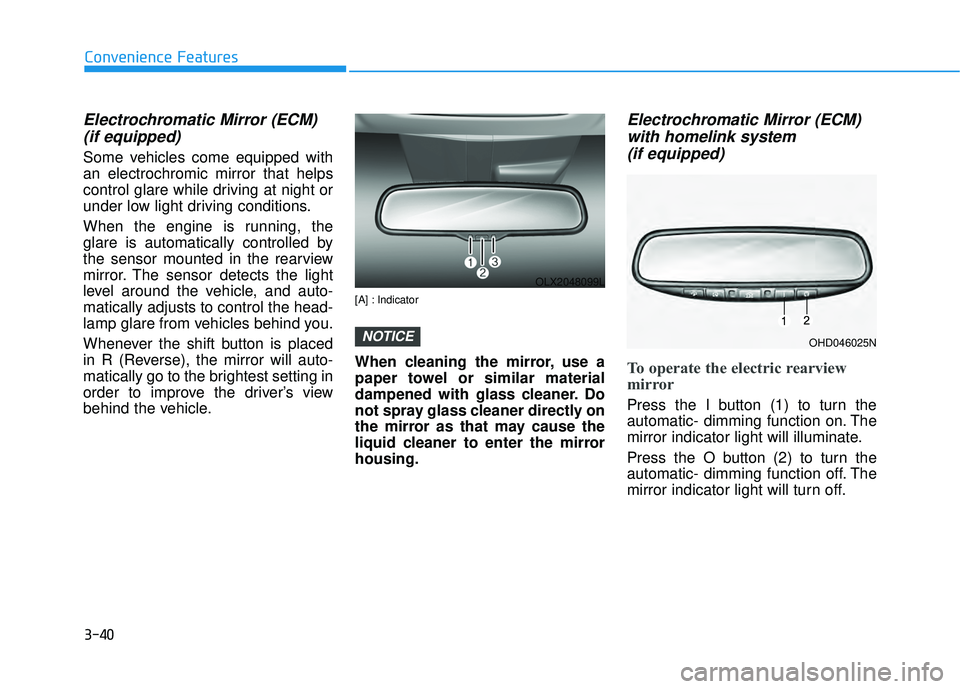
Some vehicles come equipped with
an electrochromic mirror that helps
control glare while driving at night or
under low light driving conditions.
When the engine is running, the
glare is automatically controlled by
the sensor mounted in the rearview
mirror. The sensor detects the light
level around the vehicle, and auto-
matically adjusts to control the head-
lamp glare from vehicles behind you.
Whenever the shift button is placed
in R (Reverse), the mirror will auto-
matically go to the brightest setting in
order to improve the driver’s view
behind the vehicle.
[A] : Indicator
When cleaning the mirror, use a
paper towel or similar material
dampened with glass cleaner. Do
not spray glass cleaner directly on
the mirror as that may cause the
liquid cleaner to enter the mirror
housing.
Electrochromatic Mirror (ECM)with homelink system (if equipped)
To operate the electric rearview
mirror
Press the I button (1) to turn the
automatic- dimming function on. The
mirror indicator light will illuminate.
Press the O button (2) to turn the
automatic- dimming function off. The
mirror indicator light will turn off.
NOTICE
OLX2048099L
OHD046025N
Page 137 of 663
3-41
Convenience Features
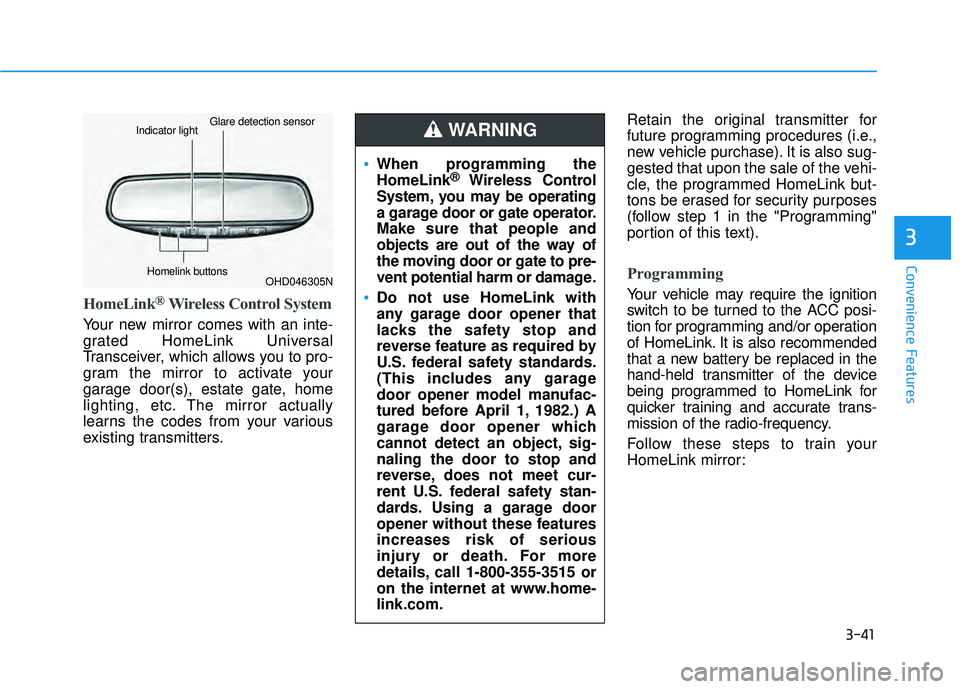
HomeLink®Wireless Control System
Your new mirror comes with an inte-
grated HomeLink Universal
Transceiver, which allows you to pro-
gram the mirror to activate your
garage door(s), estate gate, home
lighting, etc. The mirror actually
learns the codes from your various
existing transmitters.Retain the original transmitter for
future programming procedures (i.e.,
new vehicle purchase). It is also sug-
gested that upon the sale of the vehi-
cle, the programmed HomeLink but-
tons be erased for security purposes
(follow step 1 in the "Programming"
portion of this text).
Programming
Your vehicle may require the ignition
switch to be turned to the ACC posi-
tion for programming and/or operation
of HomeLink. It is also recommended
that a new battery be replaced in the
hand-held transmitter of the device
being programmed to HomeLink for
quicker training and accurate trans-
mission of the radio-frequency.
Follow these steps to train your
HomeLink mirror:
3
OHD046305N
Glare detection sensorIndicator light
Homelink buttons
When programming the
HomeLink®Wireless Control
System, you may be operating
a garage door or gate operator.
Make sure that people and
objects are out of the way of
the moving door or gate to pre-
vent potential harm or damage.
Do not use HomeLink with
any garage door opener that
lacks the safety stop and
reverse feature as required by
U.S. federal safety standards.
(This includes any garage
door opener model manufac-
tured before April 1, 1982.) A
garage door opener which
cannot detect an object, sig-
naling the door to stop and
reverse, does not meet cur-
rent U.S. federal safety stan-
dards. Using a garage door
opener without these features
increases risk of serious
injury or death. For more
details, call 1-800-355-3515 or
on the internet at www.home-
link.com.
WARNING