navigation HYUNDAI PALISADE 2022 Owner's Manual
[x] Cancel search | Manufacturer: HYUNDAI, Model Year: 2022, Model line: PALISADE, Model: HYUNDAI PALISADE 2022Pages: 663, PDF Size: 15.74 MB
Page 508 of 663
5-174
Limitations of Navigation-
based Smart Cruise Control
Navigation-based Smart Cruise
Control may not operate normally
under the following circumstances:
The navigation is not working prop-erly
Speed limit and road information in the navigation is not updated
The map information and the actu- al road is different because of real-
time GPS data or map information
error
The navigation searches for a route while driving
GPS signals are blocked in areas such as a tunnel
The navigation is updated while driving
Map information is not transmitted due to infotainment system's
abnormal operation
A road that divides into two or more roads and joins again
The driver goes off course the route set in the navigation The route to the destination is
changed or canceled by resetting
the navigation
The vehicle enters a service sta- tion or rest area
The speed limit of some sections changes according to the road sit-
uations
Android Auto or Car Play is operat- ing
The navigation cannot detect the current vehicle position (ex: elevat-
ed roads including overpass adja-
cent to general roads or nearby
roads exist in a parallel way)
The navigation is being updated while driving
The navigation is being restarted while driving
There is bad weather, such as heavy rain, heavy snow, etc.
Driving on a road under construc- tion
Driving on a road that is controlled
Driving on a road that is sharply curved
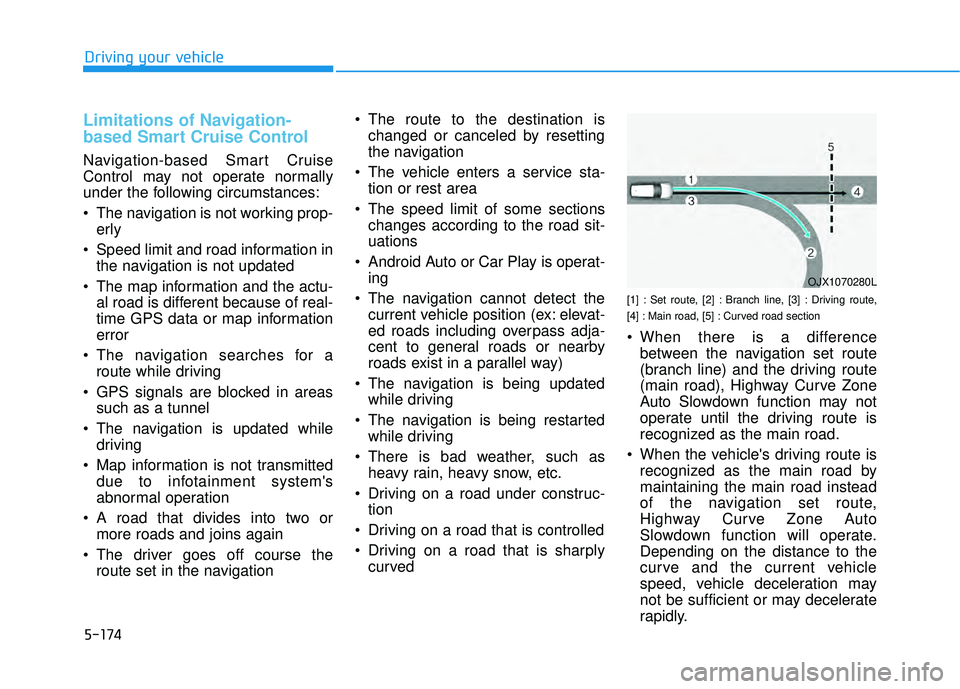
[1] : Set route, [2] : Branch line, [3] : Driving route,
[4] : Main road, [5] : Curved road section
When there is a differencebetween the navigation set route
(branch line) and the driving route
(main road), Highway Curve Zone
Auto Slowdown function may not
operate until the driving route is
recognized as the main road.
When the vehicle's driving route is recognized as the main road by
maintaining the main road instead
of the navigation set route,
Highway Curve Zone Auto
Slowdown function will operate.
Depending on the distance to the
curve and the current vehicle
speed, vehicle deceleration may
not be sufficient or may decelerate
rapidly.
Driving your vehicle
OJX1070280L
Page 509 of 663
![HYUNDAI PALISADE 2022 Owners Manual 5-175
Driving your vehicle
[1] : Set route, [2] : Branch line, [3] : Driving route,
[4] : Main road, [5] : Curved road section
When there is a differencebetween the navigation route
(main road) and](/img/35/41170/w960_41170-508.png "HYUNDAI PALISADE 2022 Owners Manual 5-175
Driving your vehicle
[1] : Set route, [2] : Branch line, [3] : Driving route,
[4] : Main road, [5] : Curved road section
When there is a differencebetween the navigation route
(main road) and")
5-175
Driving your vehicle
[1] : Set route, [2] : Branch line, [3] : Driving route,
[4] : Main road, [5] : Curved road section
When there is a differencebetween the navigation route
(main road) and the driving route
(branch line), Highway Curve Zone
Auto Slowdown function will oper-
ate based on the curve information
on the main road.
When it is judged that you are driv- ing out of the route by entering the
highway interchange or junction,
Highway Curve Zone Auto
Slowdown function will not operate.
[1] : Driving route, [2] : Branch line,
[3] : Curved road section, [4] : Main road
If there is no destination set on thenavigation, Highway Curve Zone
Auto Slowdown function will oper-
ate based on the curve information
on the main road.
Even if you depart from the main road, Highway Curve Zone Auto
Slowdown function may temporari-
ly operate due to navigation infor-
mation of the highway curve sec-
tion.5
OJX1070281LOJX1070282L
Navigation-based Smart
Cruise Control is not a substi-
tute for safe driving practices,
but a convenience function.
Always have your eyes on the
road, and it is the responsibil-
ity of the driver to avoid vio-
lating traffic laws.
The navigation’s speed limit
information may differ from
the actual speed limit informa-
tion on the road. It is the dri-
ver's responsibility to check
the speed limit on the actual
driving road or lane.
Navigation-based Smart
Cruise Control will automati-
cally be cancelled when you
leave the highway (or motor-
way) main road. Always pay
attention to road and driving
conditions while driving.
WARNING
Page 510 of 663
5-176
Information
• The time gap could occur betweenthe navigation’s guidance and when
Navigation-based Smart Cruise
Control operation starts and ends.
• The speed information on the clus- ter and navigation may differ.
• Even if you are driving at a speed lower than Smart Cruise Control set
speed, acceleration may be limited
by the curve sections ahead.
• If Navigation-based Smart Cruise Control is operating while leaving
the main road to enter an inter-
change, junction, rest area, etc., the
function may operate for a certain
period of time.
• Deceleration by Navigation-based Smart Cruise Control may feel it is
not sufficient due to road conditions
such as uneven road surfaces, nar-
row lanes, etc.
i
Driving your vehicle
Navigation-based Smart
Cruise Control may not oper-
ate due to the existence of
leading vehicles and the driv-
ing conditions of the vehicle.
Always pay attention to road
and driving conditions while
driving.
When you are towing a trailer
or another vehicle, we recom-
mend that Navigation-based
Smart Cruise Control is
turned off due to safety rea-
sons.
After you pass through a toll-
gate on a highway (or motor-
way), Navigation-based Smart
Cruise Control will operate
based on the first lane. If you
enter one of the other lanes,
Navigation-based Smart
Cruise Control may not oper-
ate properly.
The vehicle will accelerate if
the driver depresses the
accelerator pedal while
Navigation-based Smart
Cruise Control is operating,
and the function will not
decelerate the vehicle.
However, if the accelerator
pedal is depressed insuffi-
ciently, the vehicle may decel-
erate.
If the driver accelerates and
releases the accelerator pedal
while Navigation-based Smart
Cruise Control is operating,
the vehicle may not deceler-
ate sufficiently or may rapidly
decelerate to a safe speed.
If the curve is too large or too
small, Navigation-based
Smart Cruise Control may not
operate.
Page 546 of 663
6-12
What to do in an emergency
The TPMS Malfunction Indicator
may illuminate after blinking for
one minute if the vehicle is near
electric power supply cables or
radio transmitters such as police
stations, government and public
offices, broadcasting stations,
military installations, airports,
transmitting towers, etc.
Additionally, the TPMS Malfunction
Indicator may illuminate if snow
chains are used or electronic
devices such as computers, charg-
ers, remote starters, navigation,
etc. This may interfere with normal
operation of the TPMS.
Changing a Tire with TPMS
If you have a flat tire, the Low Tire
Pressure and LCD position indicator
will come on. Have the flat tire
repaired by an authorized HYUNDAI
dealer as soon as possible or
replace the flat tire with the spare
tire.
The spare tire does not come with a
tire pressure monitoring sensor.
When the low pressure tire or the flat
tire is replaced with the spare tire,
the Low Tire Pressure LCD position
indicator will remain on. Also, the
TPMS Malfunction Indicator will illu-
minate after blinking for one minute if
the vehicle is driven at speed above
15.5 mph (25 km/h) for approximate-
ly 20 minutes. Once the original tire equipped with
a tire pressure monitoring sensor is
reinflated to the recommended pres-
sure and reinstalled on the vehicle,
the Low Tire Pressure LCD position
indicator and TPMS Malfunction
Indicator will go off within a few min-
utes of driving.
If the indicators do not disappear
after a few minutes, please visit an
authorized HYUNDAI dealer.
Each wheel is equipped with a tire
pressure sensor mounted inside the
tire behind the valve stem (except for
the spare tire). You must use TPMS
specific wheels. It is recommended
that you always have your tires serv-
iced by an authorized HYUNDAI
dealer.
NOTICE
Never use a puncture-repairing
agent not approved by HYUNDAI
dealer to repair and/or inflate a
low pressure tire. Tire sealant
not approved by HYUNDAI deal-
er may damage the tire pressure
sensor.
CAUTION
Page 613 of 663
7-54
Maintenance
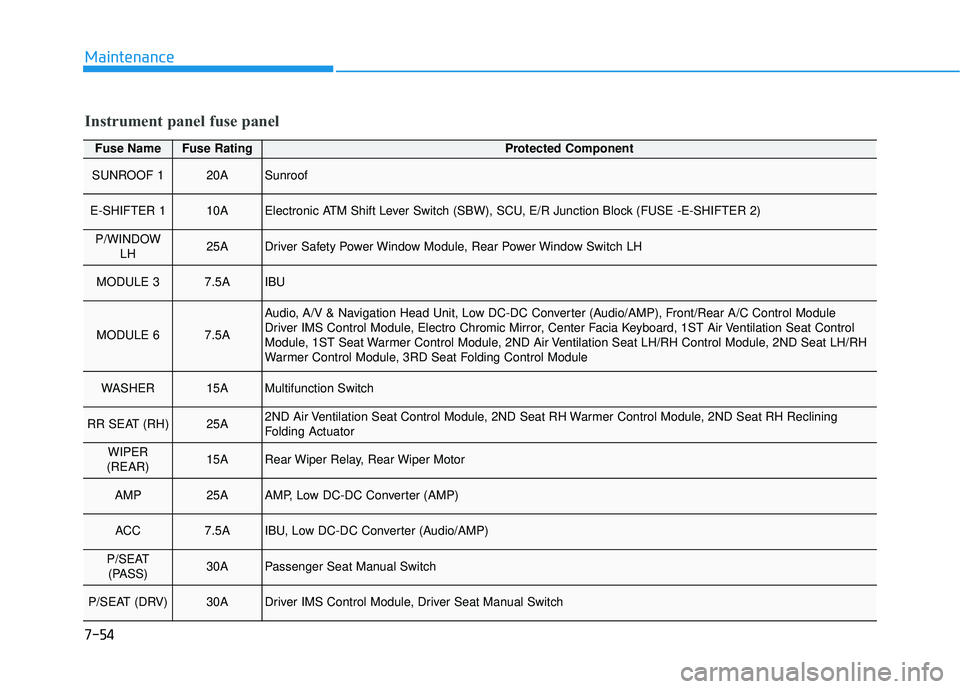
Fuse NameFuse RatingProtected Component
SUNROOF 120ASunroof
E-SHIFTER 110AElectronic ATM Shift Lever Switch (SBW), SCU, E/R Junction Block (FUSE -E-SHIFTER 2)
P/WINDOWLH25ADriver Safety Power Window Module, Rear Power Window Switch LH
MODULE 37.5AIBU
MODULE 67.5A
Audio, A/V & Navigation Head Unit, Low DC-DC Converter (Audio/AMP), Front/Rear A/C Control Module
Driver IMS Control Module, Electro Chromic Mirror, Center Facia Keyboard, 1ST Air Ventilation Seat Control
Module, 1ST Seat Warmer Control Module, 2ND Air Ventilation Seat LH/RH Control Module, 2ND Seat LH/RH
Warmer Control Module, 3RD Seat Folding Control Module
WASHER15AMultifunction Switch
RR SEAT (RH)25A2ND Air Ventilation Seat Control Module, 2ND Seat RH Warmer Control Module, 2ND Seat RH Reclining
Folding Actuator
WIPER
(REAR)15ARear Wiper Relay, Rear Wiper Motor
AMP25AAMP, Low DC-DC Converter (AMP)
ACC7.5AIBU, Low DC-DC Converter (Audio/AMP)
P/SEAT (PASS)30APassenger Seat Manual Switch
P/SEAT (DRV)30ADriver IMS Control Module, Driver Seat Manual Switch
Instrument panel fuse panel
Page 658 of 663

I-5
Fuses ........................................................................\
.......7-48Engine Compartment Panel Fuse Replacement .........7-50
Fuse/Relay Panel Description ....................................7-51
Instrument Panel Fuse Replacement ..........................7-49
Hazard Warning Flasher ...................................................6-2
Head Up Display (HUD) ..............................................3-143
High Beam Assist (HBA) .............................................3-154 High Beam Assist malfunction and limitations .......3-156
High Beam Assist operation .....................................3-155
High Beam Assist setting .........................................3-154
Highway Driving Assist (HDA) ..................................5-143 Highway Driving Assist Malfunction and Limitations .............................................................5-148
Highway Driving Assist Operation ..........................5-145
Highway Driving Assist Settings .............................5-144
If the Engine Overheats ....................................................6-6
If the Engine Will Not Start ..............................................6-3 If the Engine Doesn't Turn Over or Turns Over Slowly .....................................................6-3
If the Engine Turns Over Normally but Doesn't Start ...............................................................6-3
If You Have a Flat Tire ...................................................6-14 Changing Tires ...........................................................6-16
Jack and Tools ............................................................6-14 Removing and Storing the Spare Tire ........................6-15
Ignition switch ..................................................................5-7 Engine Start/Stop Button ............................................5-10
Important Safety Precautions............................................2-2 Air Bag Hazards ...........................................................2-2
Always Wear Your Seat Belt ........................................2-2
Control Your Speed ......................................................2-3
Driver Distraction.........................................................2-2
Keep Your Vehicle in Safe Condition ..........................2-3
Restrain All Children....................................................2-2
In Case of an Emergency While Driving .........................6-2 If the Engine Stalls at a Crossroad or Crossing ...........6-2
If the Engine Stalls While Driving...............................6-2
If you Have a Flat Tire While Driving.........................6-3
Infotainment System .........................................................4-2 Antenna ........................................................................\
4-2
Audio (Display Audio) / Video / Navigation System (AVN) .........................................4-4
Bluetooth
®Wireless Technology .................................4-4
Steering Wheel Audio Controls....................................4-3
USB Port ......................................................................4-\
2
Instrument Cluster...........................................................3-82 Gauges and Meters .....................................................3-84
Instrument Cluster Control .........................................3-84
LCD Display Messages ............................................3-103
Transmission Shift Indicator ......................................3-89
Warning and Indicator Lights.....................................3-89
Instrument Panel Overview ..............................................1-5
I
Index
H
I
Page 660 of 663
I-7
Maintenance services ........................................................7-4Owner Maintenance Precautions..................................7-4
Owner's Responsibility.................................................7-4
Manual Climate Control System ..................................3-184 Heating and Air Conditioning ..................................3-185
Rear climate control .................................................3-189
System Maintenance ................................................3-194
System Operation .....................................................3-192
Mirrors ........................................................................\
....3-39 Inside Rearview Mirror ..............................................3-39
Reverse Parking Aid Function ...................................3-54
Side View Mirrors ......................................................3-52
Navigation-based Smart Cruise Control (NSCC).........5-170 Limitations of Navigation-based Smart Cruise Control ............................................5-174
Navigation-based Smart Cruise Control Operation .5-171
Navigation-based Smart Cruise Control Settings ....5-170
Option Menu (Cluster type C) ......................................3-132
Owner maintenance ..........................................................7-5 Owner Maintenance Schedule......................................7-6 Rear Cross-Traffic Collision Warning (RCCW) ...........5-111
Rear Cross-Traffic Safety system operation ...........5-113
Rear Cross-Traffic Safety system malfunction and limitations ........................................................5-115
Rear Cross-Traffic Safety system settings ...............5-112
Rear Cross-Traffic Collision-Avoidance Assist (RCCA) ............................................................5-119
Rear Cross-Traffic Safety system malfunction and limitations ........................................................5-125
Rear Cross-Traffic Safety system operation ............5-121
Rear Cross-Traffic Safety system settings ...............5-120
Rear View Monitor (RVM) ..........................................3-162 Rear View Monitor malfunction and limitations .....3-165
Rear View Monitor operation...................................3-163
Rear View Monitor settings .....................................3-162
Recommended Lubricants and Capacities ........................8-7 Recommended SAE Viscosity Number .......................8-9
Reporting Safety Defects ................................................8-13
Reverse Parking Distance Warning (PDW)..................3-166 Reverse Parking Distance Warning malfunction and precautions.......................................................3-167
Reverse Parking Distance Warning operation..........3-166
Reverse Parking Distance Warning settings ............3-166
I
Index
M
N
R
O