play HYUNDAI PALISADE 2022 Repair Manual
[x] Cancel search | Manufacturer: HYUNDAI, Model Year: 2022, Model line: PALISADE, Model: HYUNDAI PALISADE 2022Pages: 663, PDF Size: 15.74 MB
Page 240 of 663
3-144
Convenience Features
Head-up display ON/OFF
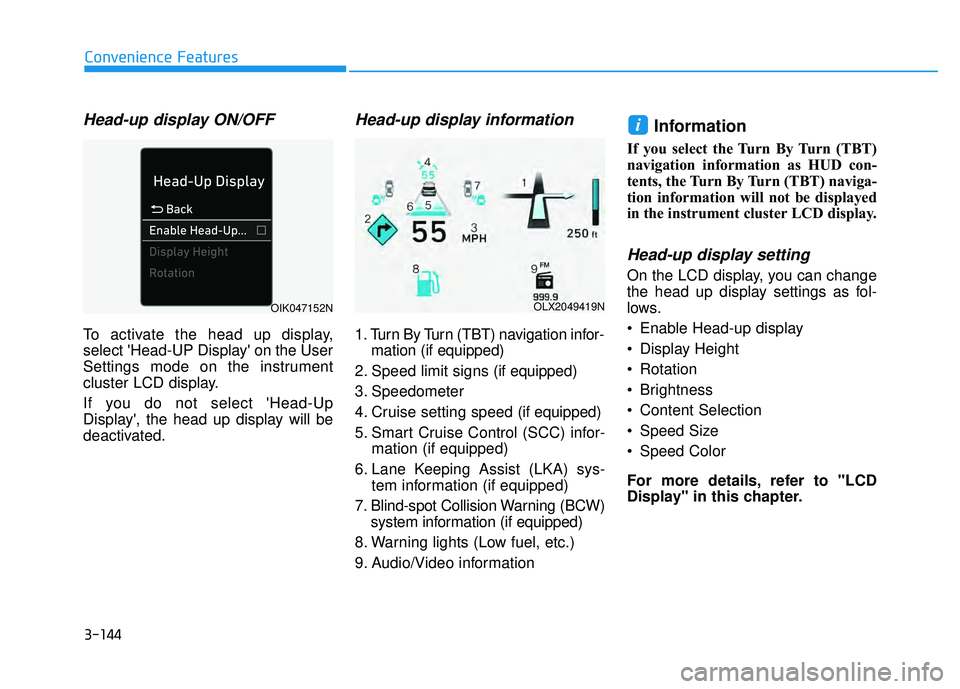
To activate the head up display,
select 'Head-UP Display' on the User
Settings mode on the instrument
cluster LCD display.
If you do not select 'Head-Up
Display', the head up display will be
deactivated.
Head-up display information
1. Turn By Turn (TBT) navigation infor-mation (if equipped)
2. Speed limit signs (if equipped)
3. Speedometer
4. Cruise setting speed (if equipped)
5. Smart Cruise Control (SCC) infor- mation (if equipped)
6. Lane Keeping Assist (LKA) sys- tem information (if equipped)
7. Blind-spot Collision Warning (BCW) system information (if equipped)
8. Warning lights (Low fuel, etc.)
9. Audio/Video information
Information
If you select the Turn By Turn (TBT)
navigation information as HUD con-
tents, the Turn By Turn (TBT) naviga-
tion information will not be displayed
in the instrument cluster LCD display.
Head-up display setting
On the LCD display, you can change
the head up display settings as fol-
lows.
Enable Head-up display
Display Height
Rotation
Brightness
Content Selection
Speed Size
Speed Color
For more details, refer to "LCD
Display" in this chapter.
i
OLX2049419NOIK047152N
Page 244 of 663
3-148
Convenience Features
One-touch turn signal function
To activate the One Touch Turn
Signal function, push the turn signal
lever up or down to position (B) and
then release it.
The lane change signals will blink 3,
5 or 7 times.
You can activate or deactivate the
One Touch Turn Signal function or
choose the number of blinks (3, 5, or
7) from the User Settings mode in
the LCD display.
For more details, refer to the "LCD
Display" section in this chapter.
Battery saver function
The purpose of this feature is to help
prevent the battery from being dis-
charged. The system automatically
turns off the parking lamp when the
driver turns the vehicle off and opens
the driver-side door.
With this feature, the parking lamps
will turn off automatically if the driver
parks on the side of road at night.
However, the position lamps stay ON
even when the driver-side door is
opened if the headlamp switch is
turned to the position lamp or AUTO
(if equipped) position after the
engine is turned off.
If necessary, to keep the lamps on
turn the position lamps OFF and ON
again using the headlamp switch on
the steering column after the engine
is turned off.
Headlamp delay function
If the key is removed from the ignition
switch or placed in the ACC position
or the LOCK/OFF position with the
headlamps ON, the headlamps
(and/or parking lamps) remain on for
about 5 minutes. However, if the dri-
ver's door is opened and closed, the
headlights are turned off after 15
seconds. Also, with the engine off if
the driver's door is opened and
closed, the headlamps (and/or park-
ing lamps) are turned off after 15
seconds.
The headlamps (and/or parking
lamps) can be turned off by pressing
the lock button on the remote key or
smart key twice or turning the head-
lamp switch to the OFF or AUTO
position.
You can activate or deactivate the
Headlamp Delay function from the
User Settings mode in the LCD dis-
play.
For more details, refer to the "LCD
Display" section in this chapter.
Page 248 of 663
3-152
Convenience Features
Escort light
When the vehicle is turned OFF and
the driver's door is opened, the pud-
dle lamp will come on for 30 sec-
onds. If the driver's door is closed
within the 30 seconds, the puddle
lamp will turn off after 15 seconds. If
the driver's door is closed and
locked, the puddle lamp will turn off
immediately.
The Puddle Lamp Escort Light will
turn on only the first time the driver's
door is opened after the engine is
turned off.
Welcome System (if equipped)
Welcome light
Puddle lamp (if equipped) and door
handle lamp (if equipped)
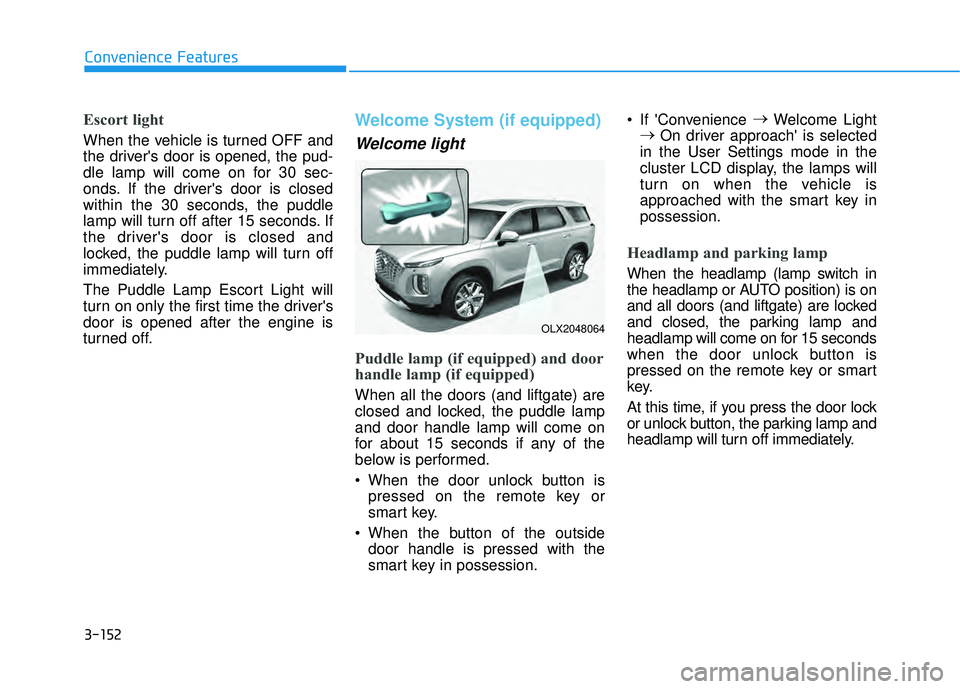
When all the doors (and liftgate) are
closed and locked, the puddle lamp
and door handle lamp will come on
for about 15 seconds if any of the
below is performed.
When the door unlock button ispressed on the remote key or
smart key.
When the button of the outside door handle is pressed with the
smart key in possession. If 'Convenience
→
Welcome Light
→ On driver approach' is selected
in the User Settings mode in the
cluster LCD display, the lamps will
turn on when the vehicle is
approached with the smart key in
possession.
Headlamp and parking lamp
When the headlamp (lamp switch in
the headlamp or AUTO position) is on
and all doors (and liftgate) are locked
and closed, the parking lamp and
headlamp will come on for 15 seconds
when the door unlock button is
pressed on the remote key or smart
key.
At this time, if you press the door lock
or unlock button, the parking lamp and
headlamp will turn off immediately.
OLX2048064
Page 251 of 663
3-155
Convenience Features
3
High Beam Assist operation
Display and control
After selecting ‘High Beam Assist’in the Settings menu, High Beam
Assist will operate by following the
procedure below.
- Place the headlamp switch in theAUTO position and push the
headlamp lever towards the
instrument cluster. The High
Beam Assist ( ) indicator light
will illuminate on the cluster and
High Beam Assist will be
enabled.
- When High Beam Assist is enabled, high beam will turn on
when vehicle speed is above 40
km/h (25 mph). When vehicle
speed is below 25 km/h (15 mph),
high beam will not turn on.
- The High Beam ( ) indicator light will illuminate on the cluster
when high beam is on. When High Beam Assist is operat-
ing, if the headlamp lever or switch
is used, High Beam Assist oper-
ates as follow:
- If the headlamp lever is pulledtowards you when the high beam
is off, the high beam will turn on
without High Beam Assist can-
celed. When you let go of the
headlamp lever, the lever will
move to the middle and the high
beam will turn off.
- If the headlamp lever is pulled towards you when the high beam
is on by High Beam Assist, low
beam will be on and the system
will turn off.
- If the headlamp switch is placed from AUTO to another position
(headlamp/position/off), High
Beam Assist will turn off and the
corresponding lamp will turn on. When High Beam Assist is operat-
ing, high beam switches to low
beam if any of the following condi-
tions occur:
- When the headlamp of anoncoming vehicle is detected.
- When the tail lamp of a vehicle in front is detected.
- When the headlamp or tail lamp of a motorcycle or a bicycle is
detected.
- When the surrounding ambient light is bright enough that high
beams are not required.
- When streetlights or other lights are detected.
Page 257 of 663
3-161
Convenience Features
3
To prevent possible damage tothe washer pump, do not oper-
ate the washer when the fluid
reservoir is empty.
To prevent possible damage to the wipers or windshield, do not
operate the wipers when the
windshield is dry.
To prevent damage to the wiper arms and other components, do
not attempt to move the wipers
manually.
To prevent possible damage to the wipers and washer system,
use anti-freezing washer fluids
in the winter season or cold
weather.
Rear Window Wiper and Washer
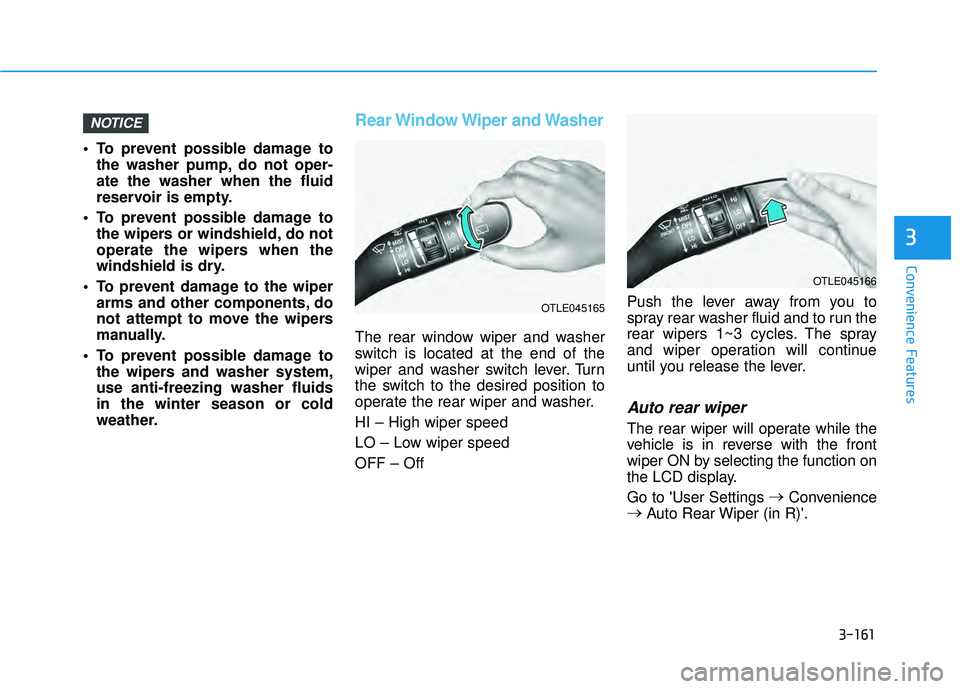
The rear window wiper and washer
switch is located at the end of the
wiper and washer switch lever. Turn
the switch to the desired position to
operate the rear wiper and washer.
HI – High wiper speed
LO – Low wiper speed
OFF – Off Push the lever away from you to
spray rear washer fluid and to run the
rear wipers 1~3 cycles. The spray
and wiper operation will continue
until you release the lever.
Auto rear wiper
The rear wiper will operate while the
vehicle is in reverse with the front
wiper ON by selecting the function on
the LCD display.
Go to 'User Settings
→
Convenience
→ Auto Rear Wiper (in R)'.
NOTICE
OTLE045166
OTLE045165
Page 258 of 663
3-162
Convenience features
R RE EA A R R V V I IE E W W M M O ON NI IT T O O R R ( ( R R V V M M ) ) ( ( I IF F E E Q Q U UI IP P P PE ED D ) )
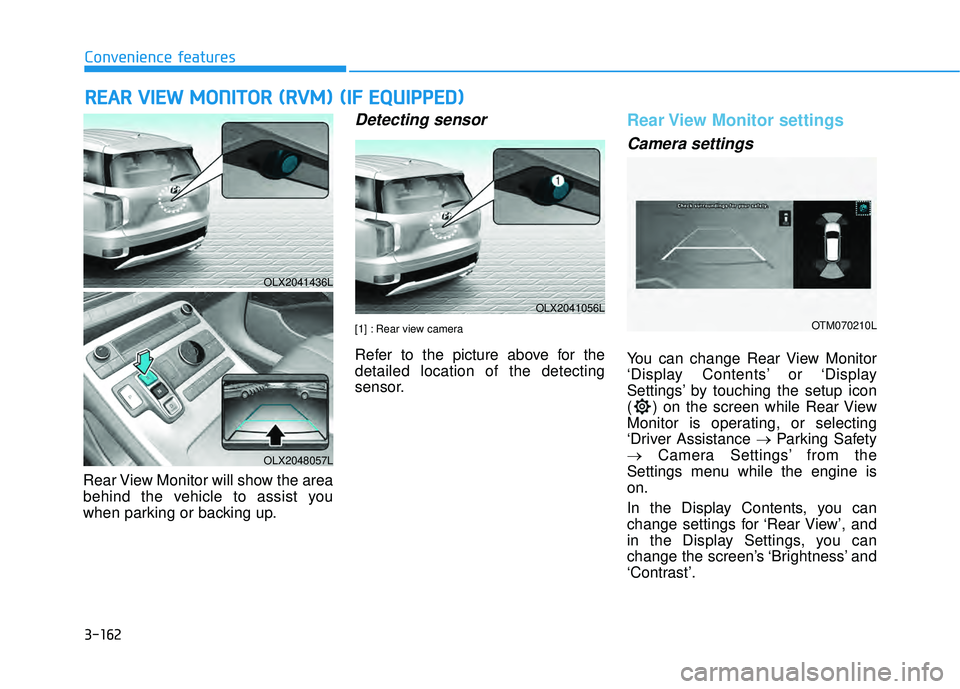
Rear View Monitor will show the area
behind the vehicle to assist you
when parking or backing up.
Detecting sensor
[1] : Rear view camera
Refer to the picture above for the
detailed location of the detecting
sensor.
Rear View Monitor settings
Camera settings
You can change Rear View Monitor
‘Display Contents’ or ‘Display
Settings’ by touching the setup icon
( ) on the screen while Rear View
Monitor is operating, or selecting
‘Driver Assistance → Parking Safety
→ Camera Settings’ from the
Settings menu while the engine is
on.
In the Display Contents, you can
change settings for ‘Rear View’, and
in the Display Settings, you can
change the screen’s ‘Brightness’ and
‘Contrast’.
OLX2041436L
OLX2048057L
OLX2041056L
OTM070210L
Page 260 of 663
3-164
Convenience features
Rear View while driving
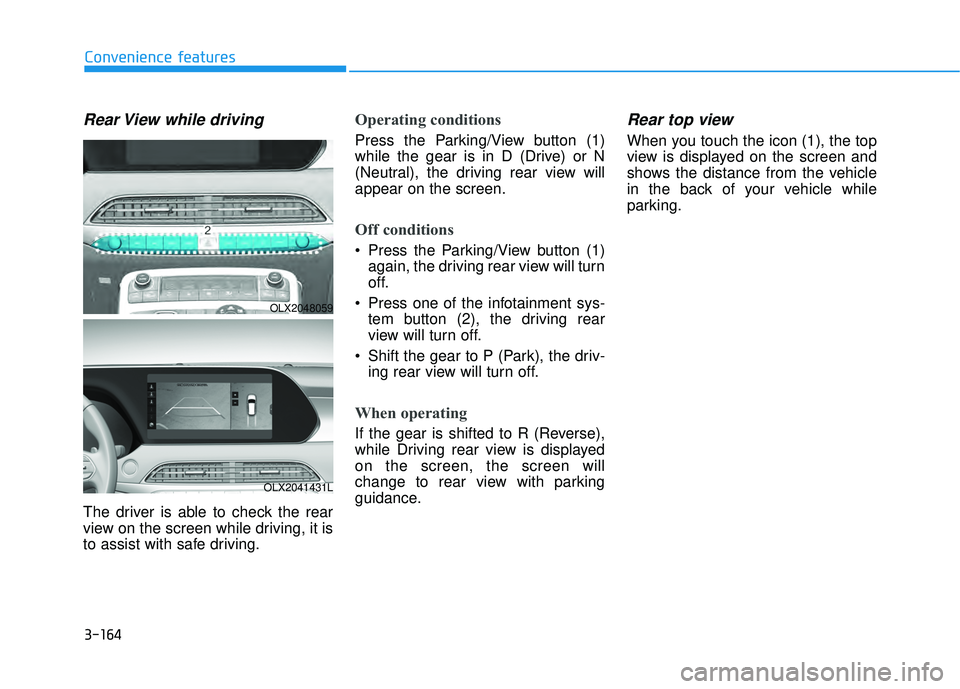
The driver is able to check the rear
view on the screen while driving, it is
to assist with safe driving.
Operating conditions
Press the Parking/View button (1)
while the gear is in D (Drive) or N
(Neutral), the driving rear view will
appear on the screen.
Off conditions
Press the Parking/View button (1)again, the driving rear view will turn
off.
Press one of the infotainment sys- tem button (2), the driving rear
view will turn off.
Shift the gear to P (Park), the driv- ing rear view will turn off.
When operating
If the gear is shifted to R (Reverse),
while Driving rear view is displayed
on the screen, the screen will
change to rear view with parking
guidance.
Rear top view
When you touch the icon (1), the top
view is displayed on the screen and
shows the distance from the vehicle
in the back of your vehicle while
parking.
OLX2048059
OLX2041431L
Page 261 of 663
3-165
Convenience features
3
Rear View Monitor malfunction
and limitations
Rear View Monitor malfunction
When Rear View Monitor is not work-
ing properly, or the screen flickers, or
the camera image does not display
normally, have the vehicle inspected
by an authorized HYUNDAI dealer.
Limitations of Rear ViewMonitor
When the vehicle is stopped for a
long time in winter or when the vehi-
cle is parked in an indoor parking lot,
the exhaust fumes may temporarily
blur the image.
The rear view camera does
not cover the complete area
behind the vehicle. The driver
should always check the rear
area directly through the
inside and outside rearview
mirror before parking or back-
ing up.
The image shown on the
screen may differ from the
actual distance of the object.
Make sure to directly check
the vehicle's surroundings for
safety.
Always keep the rear view
camera lens clean. If the lens
is covered with foreign mate-
rial, it may adversely affect
camera performance and Rear
View Monitor may not operate
normally. However, do not use
chemical solvents such as
strong detergents containing
high alkaline or volatile organ-
ic solvents (gasoline, acetone
etc.). This may damage the
camera lens.
WARNING
Page 265 of 663
3-169
Convenience features
3
Reverse Parking Distance Warningmay malfunction when:
- Heavy rain or water spray is pres-ent
- Water flows on the surface of the sensor
- Affected by another vehicle’s sen- sors
- The sensor is covered with snow
- Driving on uneven road, gravel roads or bushes
- Objects that generates ultrasonic waves are near the sensor
- Installing the license plate differ- ently from the original location
- The vehicle bumper height or ultrasonic sensor installation has
been modified
- Attaching equipments or acces- sories around the ultrasonic sen-
sors The following objects may not be
detected:
- Sharp or slim objects, such asropes, chains or small poles.
- Objects, which tend to absorb sensor frequency, such as
clothes, spongy material or snow.
- Objects smaller than 40 in. (100 cm) in length and narrower than 6
in. (14 cm) in diameter.
- Pedestrians, animals or objects that are very close to the ultra-
sonic sensors
Parking Distance Warning Indicators may be displayed differ-
ently from the actual detected loca-
tion when the obstacle is located
between the sensors.
Parking Distance Warning indica- tor may not occur sequentially
depending on vehicle speed or
obstacle shape.
If Reverse Parking Distance Warning needs repair, have the
vehicle inspected by an authorized
HYUNDAI dealer.
Page 271 of 663
3-175
Convenience features
3
Forward/Reverse Parking DistanceWarning may malfunction when:
- Heavy rain or water spray is pres-ent
- Water flows on the surface of the sensor
- Affected by another vehicle’s sen- sors
- The sensor is covered with snow
- Driving on uneven road, gravel roads or bushes
- Objects that generates ultrasonic waves are near the sensor
- Installing the license plate differ- ently from the original location
- The vehicle bumper height or ultrasonic sensor installation has
been modified
- Attaching equipments or acces- sories around the ultrasonic sen-
sors The following objects may not be
detected:
- Sharp or slim objects, such asropes, chains or small poles.
- Objects, which tend to absorb sensor frequency, such as
clothes, spongy material or snow.
- Objects smaller than 40 in. (100 cm) in length and narrower than 6
in. (14 cm) in diameter.
- Pedestrians, animals or objects that are very close to the ultra-
sonic sensors
Parking Distance Warning Indicators may be displayed differ-
ently from the actual detected loca-
tion when the obstacle is located
between the sensors.
Parking Distance Warning indica- tor may not occur sequentially
depending on vehicle speed or
obstacle shape.
If Forward/Reverse Parking Distance Warning needs repair,
have the vehicle inspected by an
authorized HYUNDAI dealer.