turn signal Hyundai Santa Fe 2003 Owner's Manual
[x] Cancel search | Manufacturer: HYUNDAI, Model Year: 2003, Model line: Santa Fe, Model: Hyundai Santa Fe 2003Pages: 221, PDF Size: 15.98 MB
Page 12 of 221
YOUR VEHICLE AT A GLANCE
B255A03O-AAT
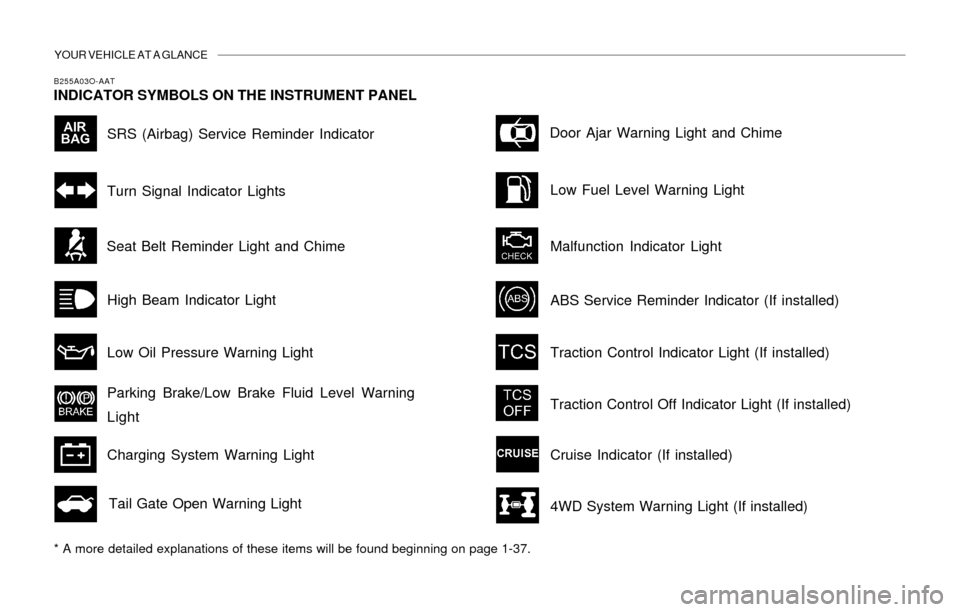
INDICATOR SYMBOLS ON THE INSTRUMENT PANEL
* A more detailed explanations of these items will be found beginning on page 1-37.
SRS (Airbag) Service Reminder Indicator
Turn Signal Indicator Lights
High Beam Indicator Light
Low Oil Pressure Warning Light
Parking Brake/Low Brake Fluid Level Warning
Light
Charging System Warning Light
Tail Gate Open Warning LightDoor Ajar Warning Light and Chime
Low Fuel Level Warning Light
Malfunction Indicator Light Seat Belt Reminder Light and Chime
Traction Control Indicator Light (If installed)
Cruise Indicator (If installed)
ABS Service Reminder Indicator (If installed)
4WD System Warning Light (If installed)
Traction Control Off Indicator Light (If installed)
Page 19 of 221
FEATURES OF YOUR HYUNDAI 1- 7
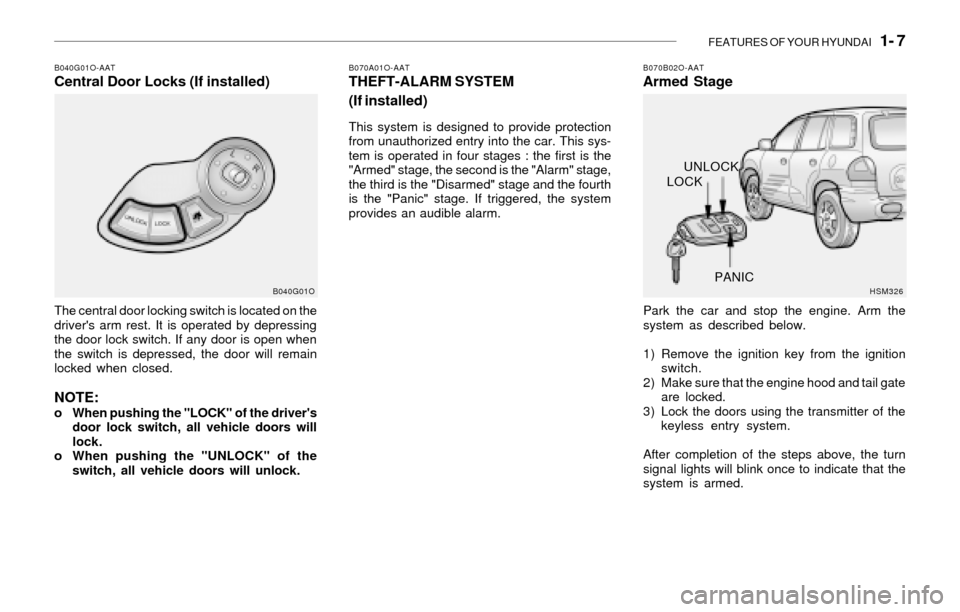
B040G01O-AATCentral Door Locks (If installed)
The central door locking switch is located on the
driver's arm rest. It is operated by depressing
the door lock switch. If any door is open when
the switch is depressed, the door will remain
locked when closed.
NOTE:o When pushing the "LOCK" of the driver's
door lock switch, all vehicle doors will
lock.
o When pushing the "UNLOCK" of the
switch, all vehicle doors will unlock.
B040G01O
B070A01O-AATTHEFT-ALARM SYSTEM
(If installed)
This system is designed to provide protection
from unauthorized entry into the car. This sys-
tem is operated in four stages : the first is the
"Armed" stage, the second is the "Alarm" stage,
the third is the "Disarmed" stage and the fourth
is the "Panic" stage. If triggered, the system
provides an audible alarm.
B070B02O-AATArmed Stage
Park the car and stop the engine. Arm the
system as described below.
1) Remove the ignition key from the ignition
switch.
2) Make sure that the engine hood and tail gate
are locked.
3) Lock the doors using the transmitter of the
keyless entry system.
After completion of the steps above, the turn
signal lights will blink once to indicate that the
system is armed.
HSM326
LOCKUNLOCK
PANIC
Page 20 of 221
1- 8 FEATURES OF YOUR HYUNDAI
B070C01O-AATAlarm Stage
The alarm will be activated if any of the following
occurs while the car is parked and the system
is armed.
1) A front or rear door is opened without using
the transmitter or the ignition key.
2) The tail gate is opened without using the
transmitter or the ignition key.
3) The engine hood is opened.
The siren will sound and the turn signal lights will
blink continuously for 27 seconds (This hap-
pens 3 times). To turn off the system, unlock the
door or tail gate using the transmitter or the
ignition key.
CAUTION:Avoid trying to start the engine while the
system is armed.
B070D03O-AATDisarmed Stage
The system will be disarmed by using the
transmitter or the ignition key.
The driver's door is unlocked by depressing
once the "UNLOCK" button on the transmitter.
If you wish to unlock all doors, press the "UN-
LOCK" button on the transmitter again within 4
seconds.
Whenever the step above is completed, the turn
signal lights will blink twice to indicate that the
system is disarmed.
NOTE:Once the system has been disarmed, it can
not be rearmed except by repeating the
arming procedures.
B070E01O-AATPanic Stage
1. Push the "PANIC" button on the transmitter.
2. At the same time, the siren will sound and the
turn signal lights will blink for 30 seconds.
3. To turn off the system, push the "PANIC"
button again on the transmitter.
NOTE:o If any door, tail gate or engine hood
remains open, the system will not be
armed. If this happens, rearm the system
as described above.
o If the "LOCK" button is pressed once
more within 4 seconds after pushing the
"LOCK" button on the transmitter, the
siren will sound once to indicate that the
system is armed.
CAUTION:Do not arm the system until all passengers
have left the car. If the system is armed while
a passenger(s) remains in the car, the alarm
may be activated when the remaining
passenger(s) leaves the car.
!
!
Page 21 of 221
FEATURES OF YOUR HYUNDAI 1- 9
B070F01O-AATKeyless Entry System (If installed)
Locking doors
1. Close all doors.
2. Push the "LOCK" button on the transmitter.
3. At the same time all doors lock, the turn signal
lights will blink once to indicate that the
system is armed.
Unlocking doors
1. Push the "UNLOCK" button on the transmit-
ter.
2. At the same time the driver's door unlocks,
the turn signal lights will blink twice to indicate
that the system is disarmed.
NOTE:If you wish to unlock all doors, press the
"UNLOCK" button on the transmitter again
within 4 seconds.
B070E02HP-GATReplacing the battery
When the transmitter's battery begins to get
weak, it may take several pushes on the button
to lock or unlock the doors, and the LED will not
light. Replace the battery as soon as possible.
Battery type : CR2032
Replacement instructions:
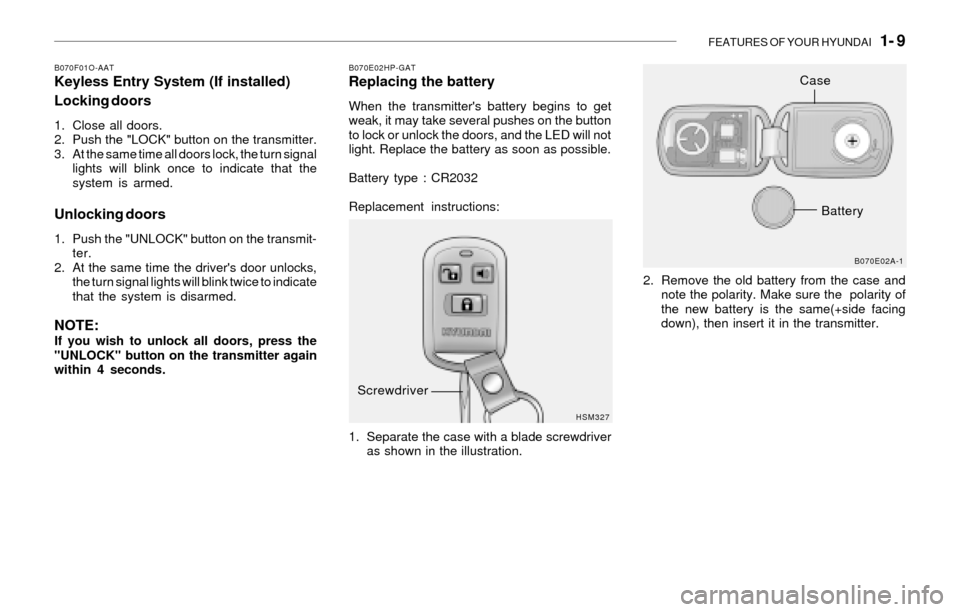
1. Separate the case with a blade screwdriver
as shown in the illustration.2. Remove the old battery from the case and
note the polarity. Make sure the polarity of
the new battery is the same(+side facing
down), then insert it in the transmitter.
HSM327B070E02A-1
Screwdriver
Case
Battery
Page 48 of 221
1- 36 FEATURES OF YOUR HYUNDAI
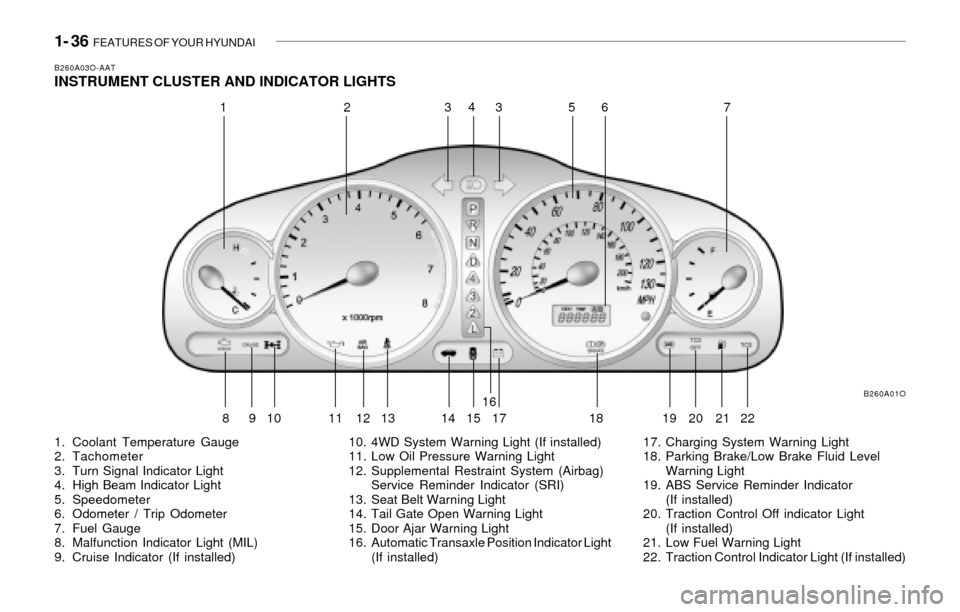
B260A03O-AATINSTRUMENT CLUSTER AND INDICATOR LIGHTS
1. Coolant Temperature Gauge
2. Tachometer
3. Turn Signal Indicator Light
4. High Beam Indicator Light
5. Speedometer
6. Odometer / Trip Odometer
7. Fuel Gauge
8. Malfunction Indicator Light (MIL)
9. Cruise Indicator (If installed)10. 4WD System Warning Light (If installed)
11. Low Oil Pressure Warning Light
12. Supplemental Restraint System (Airbag)
Service Reminder Indicator (SRI)
13. Seat Belt Warning Light
14. Tail Gate Open Warning Light
15. Door Ajar Warning Light
16. Automatic Transaxle Position Indicator Light
(If installed)17. Charging System Warning Light
18. Parking Brake/Low Brake Fluid Level
Warning Light
19. ABS Service Reminder Indicator
(If installed)
20. Traction Control Off indicator Light
(If installed)
21. Low Fuel Warning Light
22. Traction Control Indicator Light (If installed)
B260A01O
12334
567
8910
11 12 13 1416
17 18 19 20
152122
Page 49 of 221
FEATURES OF YOUR HYUNDAI 1- 37
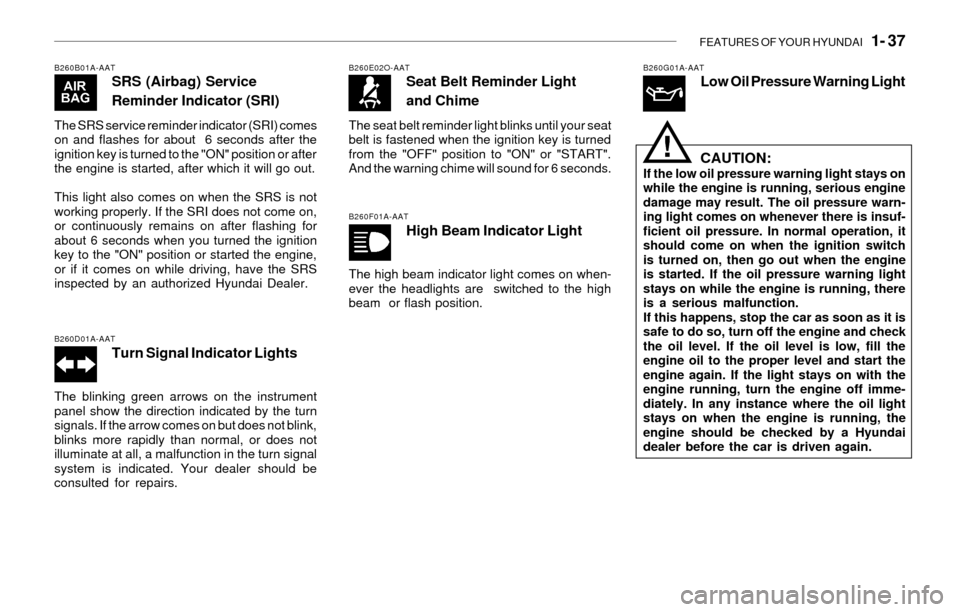
B260B01A-AATSRS (Airbag) Service
Reminder Indicator (SRI)
The SRS service reminder indicator (SRI) comes
on and flashes for about 6 seconds after the
ignition key is turned to the "ON" position or after
the engine is started, after which it will go out.
This light also comes on when the SRS is not
working properly. If the SRI does not come on,
or continuously remains on after flashing for
about 6 seconds when you turned the ignition
key to the "ON" position or started the engine,
or if it comes on while driving, have the SRS
inspected by an authorized Hyundai Dealer.
B260D01A-AATTurn Signal Indicator Lights
The blinking green arrows on the instrument
panel show the direction indicated by the turn
signals. If the arrow comes on but does not blink,
blinks more rapidly than normal, or does not
illuminate at all, a malfunction in the turn signal
system is indicated. Your dealer should be
consulted for repairs.
B260E02O-AATSeat Belt Reminder Light
and Chime
The seat belt reminder light blinks until your seat
belt is fastened when the ignition key is turned
from the "OFF" position to "ON" or "START".
And the warning chime will sound for 6 seconds.
B260F01A-AATHigh Beam Indicator Light
The high beam indicator light comes on when-
ever the headlights are switched to the high
beam or flash position.
B260G01A-AATLow Oil Pressure Warning Light
CAUTION:
If the low oil pressure warning light stays on
while the engine is running, serious engine
damage may result. The oil pressure warn-
ing light comes on whenever there is insuf-
ficient oil pressure. In normal operation, it
should come on when the ignition switch
is turned on, then go out when the engine
is started. If the oil pressure warning light
stays on while the engine is running, there
is a serious malfunction.
If this happens, stop the car as soon as it is
safe to do so, turn off the engine and check
the oil level. If the oil level is low, fill the
engine oil to the proper level and start the
engine again. If the light stays on with the
engine running, turn the engine off imme-
diately. In any instance where the oil light
stays on when the engine is running, the
engine should be checked by a Hyundai
dealer before the car is driven again.
!
Page 55 of 221
FEATURES OF YOUR HYUNDAI 1- 43
B340A01A-AATCOMBINATION TURN SIGNAL,
HEADLIGHT AND HIGH-BEAM
SWITCH
Turn Signal Operation
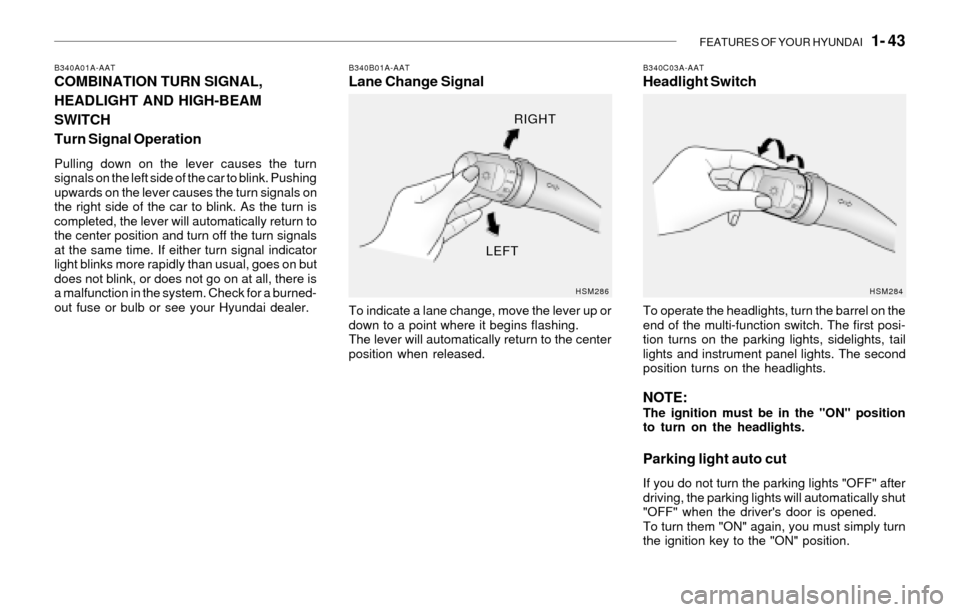
Pulling down on the lever causes the turn
signals on the left side of the car to blink. Pushing
upwards on the lever causes the turn signals on
the right side of the car to blink. As the turn is
completed, the lever will automatically return to
the center position and turn off the turn signals
at the same time. If either turn signal indicator
light blinks more rapidly than usual, goes on but
does not blink, or does not go on at all, there is
a malfunction in the system. Check for a burned-
out fuse or bulb or see your Hyundai dealer.
B340B01A-AATLane Change Signal
To indicate a lane change, move the lever up or
down to a point where it begins flashing.
The lever will automatically return to the center
position when released.
B340C03A-AATHeadlight Switch
To operate the headlights, turn the barrel on the
end of the multi-function switch. The first posi-
tion turns on the parking lights, sidelights, tail
lights and instrument panel lights. The second
position turns on the headlights.
NOTE:The ignition must be in the "ON" position
to turn on the headlights.
Parking light auto cut
If you do not turn the parking lights "OFF" after
driving, the parking lights will automatically shut
"OFF" when the driver's door is opened.
To turn them "ON" again, you must simply turn
the ignition key to the "ON" position.
HSM286HSM284
RIGHT
LEFT
Page 58 of 221
1- 46 FEATURES OF YOUR HYUNDAI
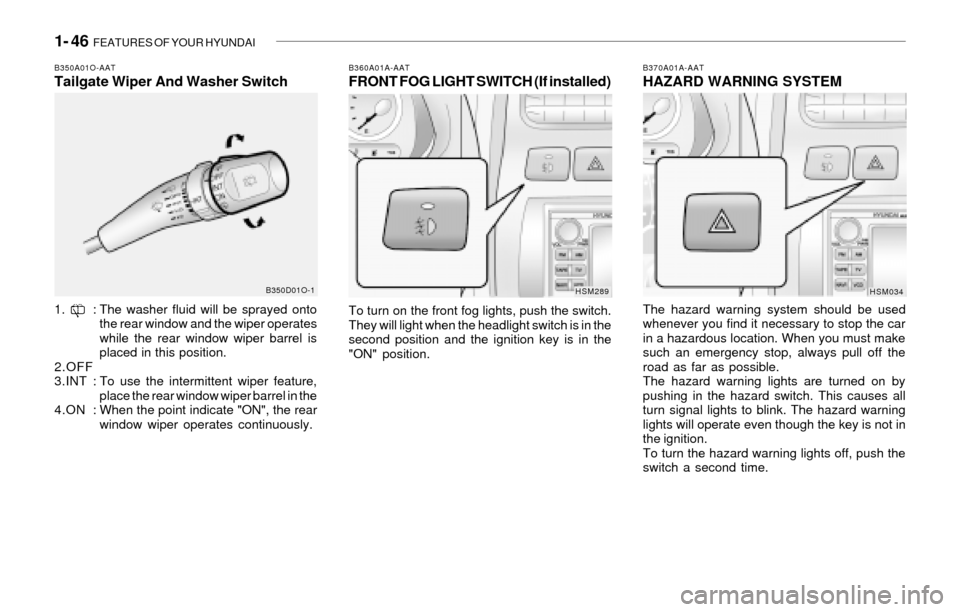
B370A01A-AATHAZARD WARNING SYSTEM
The hazard warning system should be used
whenever you find it necessary to stop the car
in a hazardous location. When you must make
such an emergency stop, always pull off the
road as far as possible.
The hazard warning lights are turned on by
pushing in the hazard switch. This causes all
turn signal lights to blink. The hazard warning
lights will operate even though the key is not in
the ignition.
To turn the hazard warning lights off, push the
switch a second time.
HSM034
B360A01A-AATFRONT FOG LIGHT SWITCH (If installed)
To turn on the front fog lights, push the switch.
They will light when the headlight switch is in the
second position and the ignition key is in the
"ON" position.
HSM289
B350A01O-AATTailgate Wiper And Washer Switch
1. : The washer fluid will be sprayed onto
the rear window and the wiper operates
while the rear window wiper barrel is
placed in this position.
2.OFF
3.INT : To use the intermittent wiper feature,
place the rear window wiper barrel in the
4.ON :When the point indicate "ON", the rear
window wiper operates continuously.
B350D01O-1
Page 105 of 221
FEATURES OF YOUR HYUNDAI 1- 93
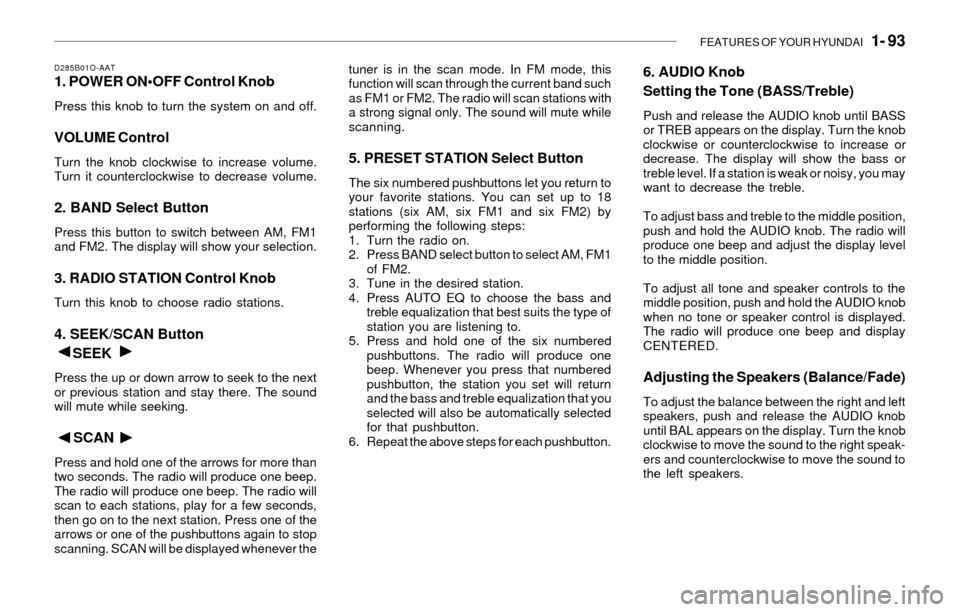
D285B01O-AAT1. POWER ON•OFF Control Knob
Press this knob to turn the system on and off.
VOLUME Control
Turn the knob clockwise to increase volume.
Turn it counterclockwise to decrease volume.
2. BAND Select Button
Press this button to switch between AM, FM1
and FM2. The display will show your selection.
3. RADIO STATION Control Knob
Turn this knob to choose radio stations.
4. SEEK/SCAN Button
SEEK
Press the up or down arrow to seek to the next
or previous station and stay there. The sound
will mute while seeking.
SCAN
Press and hold one of the arrows for more than
two seconds. The radio will produce one beep.
The radio will produce one beep. The radio will
scan to each stations, play for a few seconds,
then go on to the next station. Press one of the
arrows or one of the pushbuttons again to stop
scanning. SCAN will be displayed whenever thetuner is in the scan mode. In FM mode, this
function will scan through the current band such
as FM1 or FM2. The radio will scan stations with
a strong signal only. The sound will mute while
scanning.
5. PRESET STATION Select Button
The six numbered pushbuttons let you return to
your favorite stations. You can set up to 18
stations (six AM, six FM1 and six FM2) by
performing the following steps:
1. Turn the radio on.
2. Press BAND select button to select AM, FM1
of FM2.
3. Tune in the desired station.
4. Press AUTO EQ to choose the bass and
treble equalization that best suits the type of
station you are listening to.
5. Press and hold one of the six numbered
pushbuttons. The radio will produce one
beep. Whenever you press that numbered
pushbutton, the station you set will return
and the bass and treble equalization that you
selected will also be automatically selected
for that pushbutton.
6. Repeat the above steps for each pushbutton.
6. AUDIO Knob
Setting the Tone (BASS/Treble)
Push and release the AUDIO knob until BASS
or TREB appears on the display. Turn the knob
clockwise or counterclockwise to increase or
decrease. The display will show the bass or
treble level. If a station is weak or noisy, you may
want to decrease the treble.
To adjust bass and treble to the middle position,
push and hold the AUDIO knob. The radio will
produce one beep and adjust the display level
to the middle position.
To adjust all tone and speaker controls to the
middle position, push and hold the AUDIO knob
when no tone or speaker control is displayed.
The radio will produce one beep and display
CENTERED.
Adjusting the Speakers (Balance/Fade)
To adjust the balance between the right and left
speakers, push and release the AUDIO knob
until BAL appears on the display. Turn the knob
clockwise to move the sound to the right speak-
ers and counterclockwise to move the sound to
the left speakers.
Page 143 of 221
DRIVING YOUR HYUNDAI 2- 21
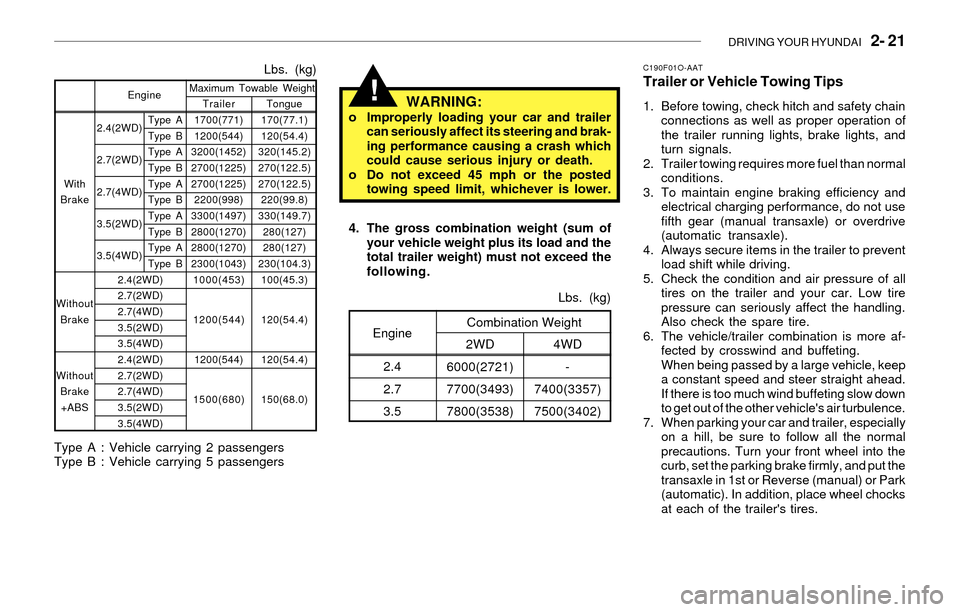
2.4(2WD)
2.7(2WD)
2.7(4WD)
3.5(2WD)
3.5(4WD)Tongue
170(77.1)
120(54.4)
320(145.2)
270(122.5)
270(122.5)
220(99.8)
330(149.7)
280(127)
280(127)
230(104.3)
100(45.3)
120(54.4)
120(54.4)
150(68.0)
Lbs. (kg)
Trailer
1700(771)
1200(544)
3200(1452)
2700(1225)
2700(1225)
2200(998)
3300(1497)
2800(1270)
2800(1270)
2300(1043)
1000(453)
1200(544)
1200(544)
1500(680) Maximum Towable Weight
Type A
Type B
Type A
Type B
Type A
Type B
Type A
Type B
Type A
Type B With
Brake
Without
Brake
Without
Brake
+ABSEngine
2.4(2WD)
2.7(2WD)
2.7(4WD)
3.5(2WD)
3.5(4WD)
2.4(2WD)
2.7(2WD)
2.7(4WD)
3.5(2WD)
3.5(4WD)
Type A : Vehicle carrying 2 passengers
Type B : Vehicle carrying 5 passengers
!
C190F01O-AATTrailer or Vehicle Towing Tips
1. Before towing, check hitch and safety chain
connections as well as proper operation of
the trailer running lights, brake lights, and
turn signals.
2. Trailer towing requires more fuel than normal
conditions.
3. To maintain engine braking efficiency and
electrical charging performance, do not use
fifth gear (manual transaxle) or overdrive
(automatic transaxle).
4. Always secure items in the trailer to prevent
load shift while driving.
5. Check the condition and air pressure of all
tires on the trailer and your car. Low tire
pressure can seriously affect the handling.
Also check the spare tire.
6. The vehicle/trailer combination is more af-
fected by crosswind and buffeting.
When being passed by a large vehicle, keep
a constant speed and steer straight ahead.
If there is too much wind buffeting slow down
to get out of the other vehicle's air turbulence.
7. When parking your car and trailer, especially
on a hill, be sure to follow all the normal
precautions. Turn your front wheel into the
curb, set the parking brake firmly, and put the
transaxle in 1st or Reverse (manual) or Park
(automatic). In addition, place wheel chocks
at each of the trailer's tires. 4. The gross combination weight (sum of
your vehicle weight plus its load and the
total trailer weight) must not exceed the
following.
4WD
-
7400(3357)
7500(3402)Lbs. (kg)
2WD
6000(2721)
7700(3493)
7800(3538)Combination WeightEngine
2.4
2.7
3.5
WARNING:o Improperly loading your car and trailer
can seriously affect its steering and brak-
ing performance causing a crash which
could cause serious injury or death.
o Do not exceed 45 mph or the posted
towing speed limit, whichever is lower.