stop start Hyundai Santa Fe 2004 User Guide
[x] Cancel search | Manufacturer: HYUNDAI, Model Year: 2004, Model line: Santa Fe, Model: Hyundai Santa Fe 2004Pages: 253, PDF Size: 22.41 MB
Page 130 of 253
1FEATURES OF YOUR HYUNDAI
117
D295D03O-AAT
1. LOAD Button
This compact disc playing will accommodate up
to six discs.
To insert one disc do the following:
1. Turn the ignition on.
2. Press and release the LOAD Button.
3. Wait for the light, located to the right of the
slot, to turn green.
4. Load a disc. Insert a disc partway into the
slot, label side up. The player will pull the disc
in.
NOTE:This CD player is suitable only for 12 cm
discs, do not use irregular shaped CDs.
When the disc is inserted, the CD symbol will be
displayed. If you select an EQ setting for your
disc, it will be activated each time you play a disc.
If the radio is on or off, the disc will begin to play
automatically.
To inset multiple discs do the followings:
1. Turn the ignition on.
2. Press and hold the LOAD button for two
seconds.
You will then hear two beeps and the light,
located to the right of the slot, will begin to
flash.3. Once the light stops flashing and turns green.
Load a disc. Insert a disc partway into the
slot, label side up.
The player will pull the disc in.
Once the disc is loaded, the light will begin
flashing again. Once the light stop flashing
and turns green you can then load another
disc. The disc player takes up to six discs.
Do not try to load more than six.
When a disc is inserted, the CD symbol will
be displayed. If more than one disc has been
loaded, number for each disc will be dis-
played. If you select an EQ setting for your
disc, it will be activated each time you play a
disc.
If the radio is on or off, the last disc loaded will
begin to play automatically.
4. To load more than one disc but less than six,
complete Steps 1, 2 and 3. When you have
finished loading discs, with the radio on or off,
press LOAD to cancel the loading function.
The radio will begin to play the last CD loaded.
As each new track starts to play, the track
number will appear on the display.
Playing a Specific Loaded CD
For every CD loaded, a number will appear on
the radio display. To play a specific CD, first
press the CD select button to start playing a CD.
Then press the numbered button that corre-
sponds to the CD you want to play.A small bar will appear under the CD number that
is playing, it could be due to one of the following
conditions:
o The road is too rough. The disc should play
when the road is smoother.
o The disc is dirty, scratched, wet or upside
down.
o The air is very humid. If so, wait about an hour
and try again.
If any error occurs repeatedly or if an error can't
be corrected, please contact your dealer. If
your radio displays an error message, write it
down and provide it to your dealer when report-
ing the problem.
2. CD EJECT Button
This button will eject a disc or discs, if you have
multiple discs loaded. To eject a disc or discs
from the disc player perform one of the following
steps:
o Press and release the eject button to eject
the disc that is currently playing.
o To eject all of the discs, press this button for
two seconds, you will hear three beeps, and
the light will flash to let you know when a disc
is being ejected.
Page 131 of 253
1FEATURES OF YOUR HYUNDAI
118
When the eject button is pressed, the receiver
will eject the disc and REMOVE CD will be
displayed. You can now remove the disc. If the
disc is not removed, after 25 seconds, the disc
will be automatically pulled back into the re-
ceiver, If you try to push the disc back into the
receiver, before the 25 second time period is
complete, the receiver will sense an error and
will try to eject the disc several times before
stopping. You cannot repeatedly press the eject
button to eject the disc after you have tried to
push the CD in manually. The receivers 25-
second eject timer will reset at each press of
eject, which will cause the receiver to not eject
the disc until the 25-second time period has
elapsed.
Once the player stops and the disc is ejected,
remove the disc. After removing the disc, press
the VOLUME PWR knob off and then on again.
This will clear the disc-sensing feature and
enable discs to be loaded into the player again.
3. REVERSE Button
Press and hold this button reverse quickly
within a track. Release it to play the passage.
You will hear sound at a reduced volume. The
display will show elapsed time.
4. FORWARD Button
Press and hold this button to advance quickly
within a track. Release it to play the passage.
You will hear sound at a reduced volume. The
display will show elapsed time.
5. REPEAT Button
With repeat button, you can repeat one track or
an entire disc. To use repeat, do the following:
o To repeat the track you are listening to,
press and release the RPT button. RPT
track will appear on the display. Press RPT
again to turn it off.
o To repeat the disc you are listening to, press
and hold the RPT button for two seconds.
Press RPT again to turn it off.
6. RANDOM Button
With random, you can listen to the tracks in
random, rather than sequential order, on all of
the discs or on one disc.
To use random, do the following:o Press and release the RDM button to play
the tracks on all of the discs that are loaded,
in random order. RDM will appear in the
display. Press RDM to turn if off.
o To play the tracks on the disc you are
listening to in random order, press and hold
RDM for more than two seconds. You will
hear three beeps and RDM will appear on the
display. Press RDM again to turn if off.
7. AUTO EQUALIZER
Press AUTO EQ to select the desired preset
equalization setting while playing a compact
disc. The equalization will be automatically set
whenever you play a compact disc.
8. SEEK/SCAN BUTTON
SEEK
Press the down arrow while playing a CD to go
to the start of the current track if more than ten
seconds have played. Press the up arrow to go
to the next track. If you press the button more
than once, the player will continue moving back-
ward or forward through the disc.
Page 132 of 253
1FEATURES OF YOUR HYUNDAI
119
SCAN
Press and hold either SEEK SCAN arrow for
more than two seconds until SCAN appears on
the display and you hear a beep. Use SEEK
SCAN to listen to each track for a few seconds.
The sounds will mute while scanning. SCAN will
appear on the display. Press either SEEK SCAN
arrow again, to stop scanning.
DISC SCAN
Press and hold either SEEK SCAN arrow for
more than four seconds until DISC SCAN ap-
pears on the display and you hear a beep. Use
DISC SCAN to listen to the first track, for ten
seconds of each disc loaded. The sound will
mute while scanning to the next track. DISC
SCAN will appear on the display. Press either
SEEK SCAN arrow again, to stop scanning.
9. Playing CD
o Insert the CD to start CD playback, during
radio operation or cassette tape playing.
o When discs are in the CD deck, if you press
the play button the CD player will begin
playing even if the radio or cassette player
is being used.
10. Using Song List Mode
The integrated 6-disc CD changer has a feature
called song list. This feature is capable of saving
20 track selections.
To save tracks into SONG LIST perform the
following steps:
1. The disc player must be on with at least one
disc loaded. See "LOAD/EJECT" previously
for more information.
2. The disc changer must not be in song list
mode. S-LIST should not appear in the dis-
play. If S-LIST is present, press SONG LIST
to turn it off.
3. Select the desired disc by pressing the
numbered pushbutton and then use the
SEEK SCAN up arrow button to locate the
track that you want to save. The track will
begin to play.
4. Press and hold LIST for two or more sec-
onds to save the track into memory. When
LIST is pressed a beep will be heard imme-
diately. After two seconds of pressing LIST
continuously, two beeps will sound, to con-
firm that the track has been saved.
5. Repeat Steps 3 and 4 for saving other
selections.To play the song list, press LIST. One beep will
be heard and SLIST will appear on the display.
The recorded tracks will begin to play in the
order that they were saved.
You may seek through the song list by using the
SEEK SCAN arrows. Seeking past the last
saved track will return you to the first saved
track.
To delete tracks from SONG LIST perform the
following steps:
1. The disc player must be turned on.
2. Press SONG LIST to turn song list on.
S-LIST will appear on the display.
3. Press the SEEK SCAN arrows to select the
desired track to be deleted.
4. Press and hold the SONG LIST button for
two seconds. When pressing SONG LIST
one beep will be heard immediately. After two
seconds of pressing the SONG LIST button
continuously, two beeps will be heard, to
confirm that the track had been deleted.
5. To delete entire lists, press and hold LIST
button for > 4 seconds when pressing list,
one beep will be heard immediately. After two
seconds of pressing the LIST button con-
tinuously, two beeps will be heard. After 4
seconds, a beep would be heard to confirm
that all the tracks had been deleted and the
display will show SLIST_EMPTY.
Page 143 of 253
2DRIVING YOUR HYUNDAI
6OPERATING THE MANUAL
TRANSAXLE
NOTE:
o To shift into reverse, rest the lever in
neutral for at least 3 seconds after your
car is completely stopped. Then move
the lever into the reverse position.
o During cold weather, shifting may be
difficult until the transaxle lubricant has
warmed up. This is normal and not harm-
ful to the transaxle.
o If you've come to a complete stop and
it's hard to shift into 1st or R(Reverse),
put the shift lever in N(Neutral) position
and release the clutch. Press the clutch
pedal back down, and then shift into 1st
or R(Reverse) gear position.
o Do not use the shift lever as a handrest
during driving, as this can result in pre-
mature wear of the transaxle shift forks.
CAUTION:When downshifting from fifth gear to fourth
gear, caution should be taken not to inad-
vertently press the gear lever sideways in
such a manner that second gear is en-
gaged. Such a drastic downshift may cause
the engine speed to increase to the point
that the tachometer will enter the red-zone.
Such over-revving of the engine may pos-
sibly cause engine damage.
!
4. Turn the ignition key to the "START" position
and release it when the engine starts.
After the engine has started, allow the engine
to run for 10 to 20 seconds prior to placing
the vehicle in gear.
The starter should not be operated for more
than 15 seconds at a time. Wait 15-30 sec-
onds between starting attempts to protect
the starter from overheating.C070A02A-AAT
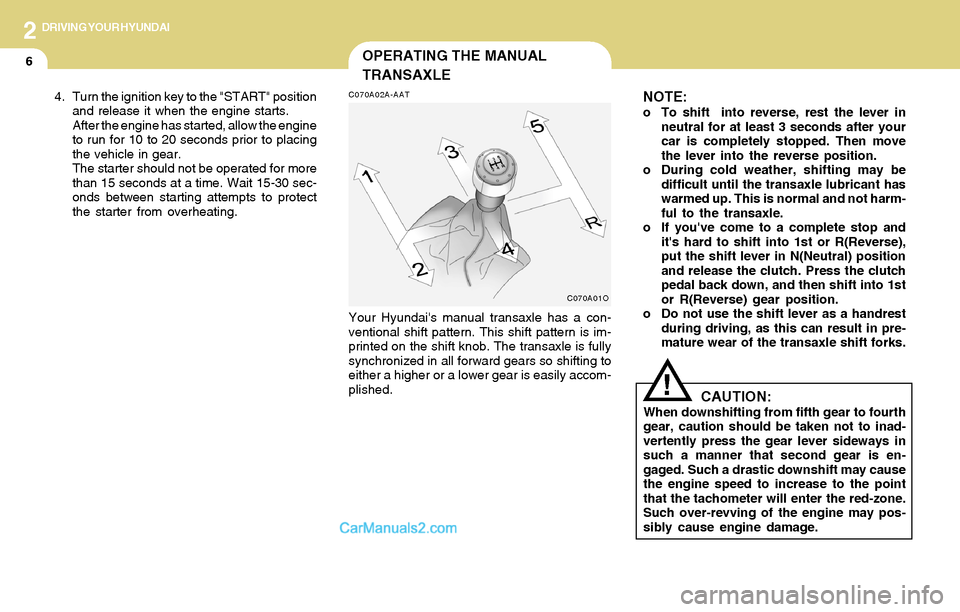
Your Hyundai's manual transaxle has a con-
ventional shift pattern. This shift pattern is im-
printed on the shift knob. The transaxle is fully
synchronized in all forward gears so shifting to
either a higher or a lower gear is easily accom-
plished.
C070A01O
Page 146 of 253
2DRIVING YOUR HYUNDAI
9
!
C090E01O-AAT
o D(Drive):
Use for normal driving. The transaxle will auto-
matically shift through a four gear sequence.
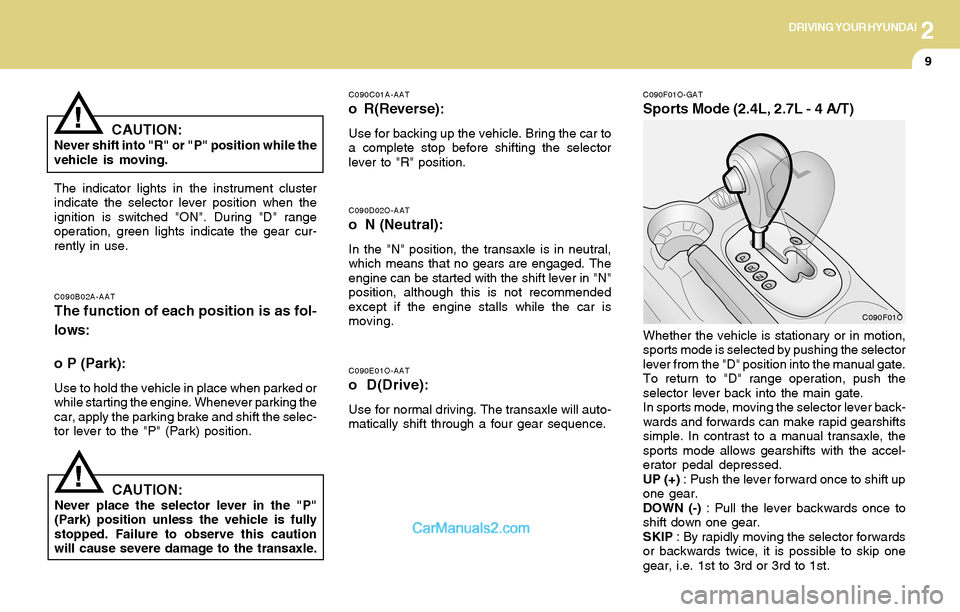
C090F01O-GAT
Sports Mode (2.4L, 2.7L - 4 A/T)
C090D02O-AAT
o N (Neutral):
In the "N" position, the transaxle is in neutral,
which means that no gears are engaged. The
engine can be started with the shift lever in "N"
position, although this is not recommended
except if the engine stalls while the car is
moving.
C090B02A-AATThe function of each position is as fol-
lows:
o P (Park):
Use to hold the vehicle in place when parked or
while starting the engine. Whenever parking the
car, apply the parking brake and shift the selec-
tor lever to the "P" (Park) position.
C090C01A-AAT
o R(Reverse):
Use for backing up the vehicle. Bring the car to
a complete stop before shifting the selector
lever to "R" position.
The indicator lights in the instrument cluster
indicate the selector lever position when the
ignition is switched "ON". During "D" range
operation, green lights indicate the gear cur-
rently in use.
CAUTION:Never place the selector lever in the "P"
(Park) position unless the vehicle is fully
stopped. Failure to observe this caution
will cause severe damage to the transaxle.Whether the vehicle is stationary or in motion,
sports mode is selected by pushing the selector
lever from the "D" position into the manual gate.
To return to "D" range operation, push the
selector lever back into the main gate.
In sports mode, moving the selector lever back-
wards and forwards can make rapid gearshifts
simple. In contrast to a manual transaxle, the
sports mode allows gearshifts with the accel-
erator pedal depressed.
UP (+) : Push the lever forward once to shift up
one gear.
DOWN (-) : Pull the lever backwards once to
shift down one gear.
SKIP : By rapidly moving the selector forwards
or backwards twice, it is possible to skip one
gear, i.e. 1st to 3rd or 3rd to 1st.
CAUTION:Never shift into "R" or "P" position while the
vehicle is moving.
!
C090F01O
Page 149 of 253
2DRIVING YOUR HYUNDAI
12
C090C01A-AAT
o R(Reverse):
Use for backing up the vehicle. Bring the car to
a complete stop before shifting the selector
lever to "R" position.
C090D02A-AAT
o N (Neutral):
In the "N" position, the transaxle is in neutral,
which means that no gears are engaged. The
engine can be started with the shift lever in "N"
position, although this is not recommended
except if the engine stalls while the car is
moving.
C090E01L-AATo D (Drive):
Use for normal driving. This position is used for
most city and highway driving, for starting from
a full stop to maximum speed. The transaxle will
automatically shift through a five gear sequence.
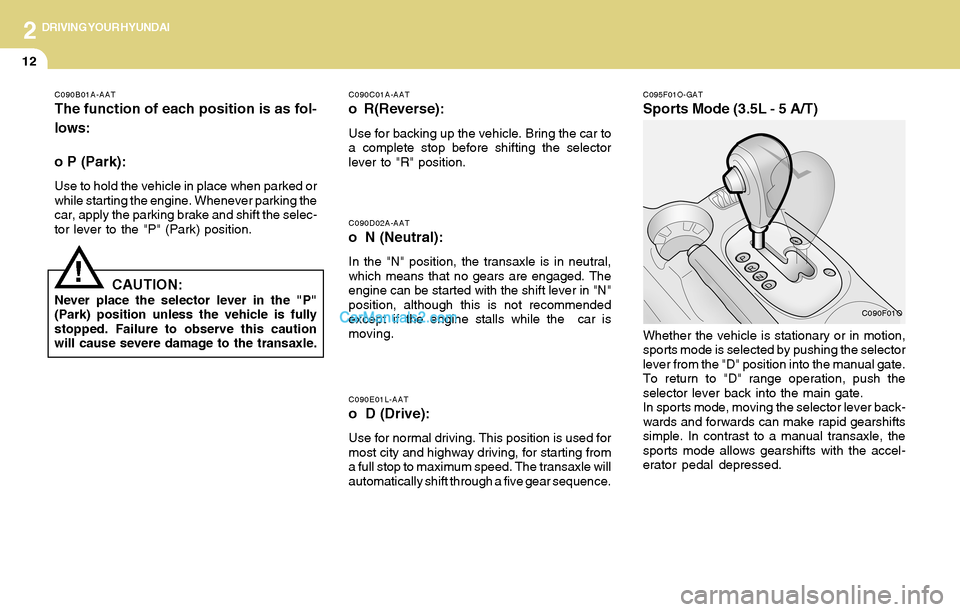
C095F01O-GAT
Sports Mode (3.5L - 5 A/T)
C090F01O
Whether the vehicle is stationary or in motion,
sports mode is selected by pushing the selector
lever from the "D" position into the manual gate.
To return to "D" range operation, push the
selector lever back into the main gate.
In sports mode, moving the selector lever back-
wards and forwards can make rapid gearshifts
simple. In contrast to a manual transaxle, the
sports mode allows gearshifts with the accel-
erator pedal depressed.
C090B01A-AAT
The function of each position is as fol-
lows:
o P (Park):
Use to hold the vehicle in place when parked or
while starting the engine. Whenever parking the
car, apply the parking brake and shift the selec-
tor lever to the "P" (Park) position.
CAUTION:Never place the selector lever in the "P"
(Park) position unless the vehicle is fully
stopped. Failure to observe this caution
will cause severe damage to the transaxle.
!
Page 153 of 253
2DRIVING YOUR HYUNDAI
16
C300D02O-AAT
Indicator and Warning
The TCS indicator should illuminate when the
ignition key is turned to ON or START but should
go out after three seconds.
If the indicator does not illuminate, have it checked
by an authorized dealer.
Should there be any unusual conditions in the
device while driving, TCS illuminates as a warn-
ing.
If TCS illuminates, pull your car to a safe place
and stop the engine. Then, start the engine
again to check if the TCS indicator goes out.
If the indicator remains lit even after the engine
has been started, have your car checked by an
authorized Hyundai dealer.
NOTE:When the TCS indicator illuminates, trac-
tion control is automatically deactivated
for safety.
C300B01O-AAT
TCS ON Mode
When the TCS is running, the TCS indicator in
the instrument cluster will blink.
NOTE:1) The TCS mode will automatically be
turned ON after the engine is turned off
and restarted.
2) When the traction control system is op-
erating properly, you can feel a slight
pulsation in the vehicle. This is only the
effect of brake control and indicates
nothing unusual.
3) When the engine starts, a click is heard
from the engine compartment; however,
this is only the sound of traction control
being checked.
4) When moving out of the mud or fresh
snow, pressing the accelerator pedal
may not cause the engine speed to in-
crease due to TCS operation.
!
!CAUTION:When the TCS indicator blinks, SLIP func-
tion has been activated. It also means that
the road is slippery or your car is accelerat-
ing excessively. In this situation, gently
release foot pressure from the accelerator
pedal and maintain moderate speed.
WARNING:Traction control is only a driving aid; all
normal precautions for driving in inclement
weather and on slippery road surfaces
should be observed.
Page 155 of 253
2DRIVING YOUR HYUNDAI
18FULL-TIME 4WD OPERATION
!WARNING:This vehicle is designed primarily for on
road use. Driving the vehicle in challenging
off-road conditions for which it was not
designed may result in damage to the ve-
hicle. Driving in conditions that exceed the
vehicle's intended design or the driver's
experience level may result in severe injury
or death.
Driving 4WD Safely
(1) Be sure to wear the seat belt.
(2) Do not drive in challenging off-road condi-
tions or areas that exceed the vehicle's
basic design intent or the driver's experi-
ence level.
(3) Drive at lower speeds in strong crosswinds.
Because of your vehicle's high center of
gravity, its stability will be affected in cross-
winds. Slower speeds ensure better vehicle
control.
(4) Check the brake condition after driving in wet
or muddy conditions. Press the brake sev-
eral times as you move slowly until you feel
normal braking forces return.
(5) Do not drive the vehicle through water. (i.e.
streams, rivers, lakes, etc.)
C310D01O-AAT
Indicators and Warning
The indicators should illuminate when the igni-
tion key is turned to ON or START but should
go out after three seconds.
If the indicators do not illuminate, or the TCS or
TCS-OFF indicator does not go out after 3
seconds, have it checked by an authorized
dealer.
Should there be any unusual conditions in the
device while driving, TCS-OFF indicator illumi-
nates as a warning.
If TCS-OFF indicator illuminates, pull your car
to a safe place and stop the engine.
Then, start the engine again to check if the TCS-
OFF indicator goes out.
If the indicator remains lit even after the engine
has been started, have your car checked by an
authorized Hyundai dealer.
NOTE:1) When the TCS-OFF indicator illuminates,
traction control is automatically deacti-
vated for safety.
2) This warning function is not provided
when the driver selects the TCS-OFF
mode.
C350A02O-AAT
(If installed)
Engine power can be delivered to all front and
rear wheels for maximum power. Full-time 4WD
is useful when good traction is required, such
as, when driving on slippery, wet or snow-
covered roads and when moving out of mud.
These vehicles, however, are not designed for
challenging off-road use. Full-time 4WD ve-
hicles are designed primarily to improve traction
and performance on paved roads and high-
ways in wet and/or slippery conditions. Occa-
sional off-road use such as established un-
paved roads and trails is OK. It is always
important when traveling off-highway that the
driver carefully reduce their speed to a level that
does not exceed the safe operating speed for
those conditions. In general, off-road conditions
provide less traction and braking effectiveness
than on road conditions. These factors must be
carefully considered when driving off-road.
Keeping the vehicle in contact with the driving
surface and under control in these conditions is
always the driver's responsibility for the safety
of him/herself and his or her passengers.
Page 159 of 253
2DRIVING YOUR HYUNDAI
22DRIVING FOR ECONOMY
o Be sure that the wheels are aligned cor-
rectly. Improper alignment can result from
hitting curbs or driving too fast over irregular
surfaces. Poor alignment causes faster tire
wear and may also result in other problems
as well as greater fuel consumption.
o Keep your car in good condition. For better
fuel economy and reduced maintenance
costs, maintain your car in accordance with
the maintenance schedule in Section 5. If
you drive your car in severe conditions,
more frequent maintenance is required (see
Section 5 for details).
o Keep your car clean. For maximum service,
your Hyundai should be kept clean and free
of corrosive materials. It is especially impor-
tant that mud, dirt, ice, etc. not be allowed to
accumulate on the underside of the car. This
extra weight can result in increased fuel
consumption and also contribute to corro-
sion.
o Travel lightly. Don't carry unnecessary
weight in your car. Weight reduces fuel
economy.
o Don't let the engine idle longer than neces-
sary. If you are waiting (and not in traffic),
turn off your engine and restart only when
you're ready to go.o Remember, your Hyundai does not require
extended warm-up. As soon as the engine
is running smoothly, you can drive away. In
very cold weather, however, give your en-
gine a slightly longer warm-up period.
o Don't "lug" or "over-rev" the engine. Lugging
is driving too slowly in too high a gear result-
ing in the engine bucking. If this happens,
shift to a lower gear. Over-revving is racing
the engine beyond its safe limit. This can be
avoided by shifting at the recommended
speeds.
o Use your air conditioning sparingly. The air
conditioning system is operated by engine
power so your fuel economy is reduced
when you use it.C140A01A-AAT
You can save fuel and get more miles from your
car if you follow these suggestions:
o Drive smoothly. Accelerate at a moderate
rate. Don't make "jack-rabbit" starts or full-
throttle shifts and maintain a steady cruising
speed. Don't race between stoplights. Try to
adjust your speed to that of the other traffic
so you don't have to change speeds unnec-
essarily. Avoid heavy traffic whenever pos-
sible. Always maintain a safe distance from
other vehicles so you can avoid unneces-
sary braking. This also reduces brake wear.
o Drive at a moderate speed. The faster you
drive, the more fuel your car uses. Driving at
a moderate speed, especially on the high-
way, is one of the most effective ways to
reduce fuel consumption.
o Don't "ride" the brake or clutch pedal. This
can increase fuel consumption and also
increase wear on these components. In
addition, driving with your foot resting on the
brake pedal may cause the brakes to over-
heat, which reduces their effectiveness and
may lead to more serious consequences.
o Take care of your tires. Keep them inflated
to the recommended pressure. Incorrect
inflation, either too much or too little, results
in unnecessary tire wear. Check the tire
pressures at least once a month.
Page 165 of 253
2DRIVING YOUR HYUNDAI
28
8. If the trailer has electric brakes, start your
vehicle and trailer moving, and then apply the
trailer brake controller by hand to be sure the
brakes are working. This lets you check
your electrical connection at the same time.
9. During your trip, check occasionally to be
sure that the load is secure, and that the
lights and any trailer brakes are still working.
10.Avoid jerky starts, sudden acceleration or
sudden stops.
11.Avoid sharp turns and rapid lane changes.
12.Avoid holding the brake pedal down too long
or too frequently. This could cause the brakes
to overheat, resulting in reduced braking
efficiency.
13.When going down a hill, shift into a lower gear
and use the engine braking effect.
When ascending a long grade, downshift the
transaxle to a lower gear and reduce speed
to reduce chances of engine overloading
and/or overheating.
14.If you have to stop while going uphill, do not
hold the vehicle in place by pressing on the
accelerator. This can cause the automatic
transaxle to overheat. Use the parking brake
or footbrake.
15.If the transaxle shifts frequently while going
up a hill, shift down one gear.
NOTE:When towing check transaxle fluid more
frequently.
!
C190F01O-AAT
Trailer or Vehicle Towing Tips
1. Before towing, check hitch and safety chain
connections as well as proper operation of
the trailer running lights, brake lights, and
turn signals.
2. Trailer towing requires more fuel than normal
conditions.
3. To maintain engine braking efficiency, do not
tow a trailer with the transaxle in fifth gear
(manual transaxle) or overdrive (automatic
transaxle).
4. Always secure items in the trailer to prevent
load shift while driving.
5. Check the condition and air pressure of all
tires on the trailer and your car. Low tire
pressure can seriously affect the handling.
Also check the spare tire.
6. The vehicle/trailer combination is more af-
fected by crosswind and buffeting.
When being passed by a large vehicle, keep
a constant speed and steer straight ahead.
If there is too much wind buffeting, slow down
to get out of the other vehicle's air turbulence.
7. When parking your car and trailer, especially
on a hill, be sure to follow all the normal
precautions. Turn your front wheel into the
curb, set the parking brake firmly, and put the
transaxle in 1st or Reverse (manual) or Park
(automatic). In addition, place wheel chocks
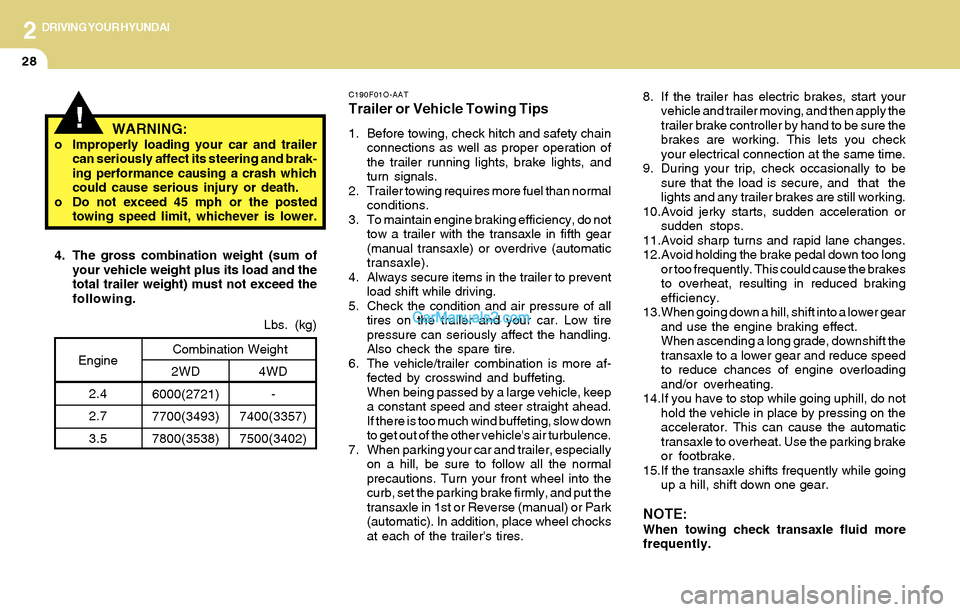
at each of the trailer's tires. 4. The gross combination weight (sum of
your vehicle weight plus its load and the
total trailer weight) must not exceed the
following.
4WD
-
7400(3357)
7500(3402)Lbs. (kg)
2WD
6000(2721)
7700(3493)
7800(3538)Combination WeightEngine
2.4
2.7
3.5
WARNING:o Improperly loading your car and trailer
can seriously affect its steering and brak-
ing performance causing a crash which
could cause serious injury or death.
o Do not exceed 45 mph or the posted
towing speed limit, whichever is lower.