disc Hyundai Santa Fe 2004 Owner's Guide
[x] Cancel search | Manufacturer: HYUNDAI, Model Year: 2004, Model line: Santa Fe, Model: Hyundai Santa Fe 2004Pages: 253, PDF Size: 22.41 MB
Page 125 of 253
1FEATURES OF YOUR HYUNDAI
112
8. Care of Your Compact Discs
Handle disc careful. Store them in their original
cases or other protective cases away from
direct sunlight and dust. If the surface of a disc
is soiled, dampen a clean, soft cloth in a mild,
neutral detergent solution and clean it, wiping
from the center to the edge.
Be sure never to touch the side without writing
when handling discs. Pick up discs by grasping
the outer edges or the edge of the hole and the
outer edge.
9. Care of Your Compact Disc Player
The use of CD lens cleaner discs is not advised,
due to the risk of contaminating the lens of the
CD optics with lubricants internal to the CD
mechanism.
10. CD Adapter Kits
It is possible to use a portable CD player adapter
kit with your cassette tape player after disabling
the tight/loose tape sensing feature on your tape
player.To disable the feature, use the following steps:
1. Turn the radio off.
2. Press and hold the TAPE CD Button. The
radio will display READY and flash the cas-
sette icon.
3. Insert the adapter into the cassette slot. It will
power up the radio and begin playing
This override routine will remain active until
EJECT button is pressed.
NOTE:Before you add any sound equipment to
your vehicle--like a tape player, CB radio,
mobile telephone or two-way radio--be sure
you can add what you want. If you can, it's
very important to do it properly. Added
sound equipment may interfere with the
operation of your vehicle's engine, Delphi
Electronics radio or other systems, and
even damage them. Your vehicle's systems
may interfere with the operation of sound
equipment that has been added improp-
erly. So, before adding sound equipment,
check with your dealer and be sure to check
federal rules covering mobile radio and
telephone units.
!CAUTION:o Do not insert warped or poor quality
discs into the CD player as damage to the
unit may occur.
o Do not insert anything like coins into the
player slot as damage to the unit may
occur.
o Do not place beverages close to the
audio system. The playback mechanism
may be damaged if you spill them.
o Do not impact on the audio system, or
the playback mechanism could be dam-
aged.
o Driving on the off-roads or other vibra-
tions may skip your compact disc.
Do not use the audio system on off-
roads as the discs could be scratched
and damaged.
o Do not grip or pull out the disc with your
hand while the disc is being pulled into
the unit by the self loading mechanism.
These can cause poor disc scratching to
occur or trouble in the compact disc
player.
o Avoid using CD-Recordable or CD-
Rewritable as the player could not be
operated in recording way of the CD
maker. When using the compact disc
player, genuine CDs are recommended.
Page 129 of 253
1FEATURES OF YOUR HYUNDAI
116
D295C01O-AAT
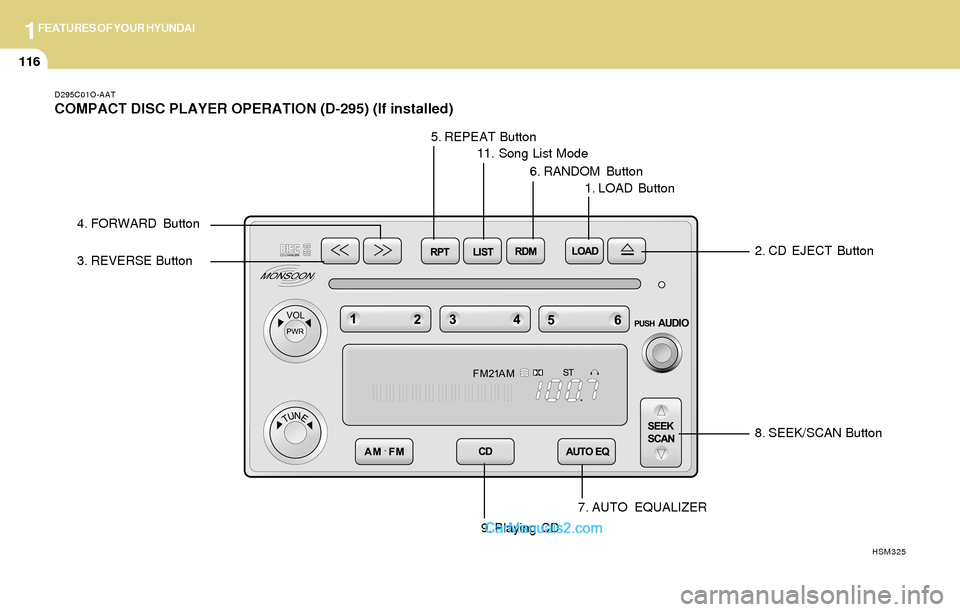
COMPACT DISC PLAYER OPERATION (D-295) (If installed)
8. SEEK/SCAN Button
7. AUTO EQUALIZER
HSM325
3. REVERSE Button
4. FORWARD Button
5. REPEAT Button
11. Song List Mode
6. RANDOM Button
1. LOAD Button
2. CD EJECT Button
9. Playing CD
Page 130 of 253
1FEATURES OF YOUR HYUNDAI
117
D295D03O-AAT
1. LOAD Button
This compact disc playing will accommodate up
to six discs.
To insert one disc do the following:
1. Turn the ignition on.
2. Press and release the LOAD Button.
3. Wait for the light, located to the right of the
slot, to turn green.
4. Load a disc. Insert a disc partway into the
slot, label side up. The player will pull the disc
in.
NOTE:This CD player is suitable only for 12 cm
discs, do not use irregular shaped CDs.
When the disc is inserted, the CD symbol will be
displayed. If you select an EQ setting for your
disc, it will be activated each time you play a disc.
If the radio is on or off, the disc will begin to play
automatically.
To inset multiple discs do the followings:
1. Turn the ignition on.
2. Press and hold the LOAD button for two
seconds.
You will then hear two beeps and the light,
located to the right of the slot, will begin to
flash.3. Once the light stops flashing and turns green.
Load a disc. Insert a disc partway into the
slot, label side up.
The player will pull the disc in.
Once the disc is loaded, the light will begin
flashing again. Once the light stop flashing
and turns green you can then load another
disc. The disc player takes up to six discs.
Do not try to load more than six.
When a disc is inserted, the CD symbol will
be displayed. If more than one disc has been
loaded, number for each disc will be dis-
played. If you select an EQ setting for your
disc, it will be activated each time you play a
disc.
If the radio is on or off, the last disc loaded will
begin to play automatically.
4. To load more than one disc but less than six,
complete Steps 1, 2 and 3. When you have
finished loading discs, with the radio on or off,
press LOAD to cancel the loading function.
The radio will begin to play the last CD loaded.
As each new track starts to play, the track
number will appear on the display.
Playing a Specific Loaded CD
For every CD loaded, a number will appear on
the radio display. To play a specific CD, first
press the CD select button to start playing a CD.
Then press the numbered button that corre-
sponds to the CD you want to play.A small bar will appear under the CD number that
is playing, it could be due to one of the following
conditions:
o The road is too rough. The disc should play
when the road is smoother.
o The disc is dirty, scratched, wet or upside
down.
o The air is very humid. If so, wait about an hour
and try again.
If any error occurs repeatedly or if an error can't
be corrected, please contact your dealer. If
your radio displays an error message, write it
down and provide it to your dealer when report-
ing the problem.
2. CD EJECT Button
This button will eject a disc or discs, if you have
multiple discs loaded. To eject a disc or discs
from the disc player perform one of the following
steps:
o Press and release the eject button to eject
the disc that is currently playing.
o To eject all of the discs, press this button for
two seconds, you will hear three beeps, and
the light will flash to let you know when a disc
is being ejected.
Page 131 of 253
1FEATURES OF YOUR HYUNDAI
118
When the eject button is pressed, the receiver
will eject the disc and REMOVE CD will be
displayed. You can now remove the disc. If the
disc is not removed, after 25 seconds, the disc
will be automatically pulled back into the re-
ceiver, If you try to push the disc back into the
receiver, before the 25 second time period is
complete, the receiver will sense an error and
will try to eject the disc several times before
stopping. You cannot repeatedly press the eject
button to eject the disc after you have tried to
push the CD in manually. The receivers 25-
second eject timer will reset at each press of
eject, which will cause the receiver to not eject
the disc until the 25-second time period has
elapsed.
Once the player stops and the disc is ejected,
remove the disc. After removing the disc, press
the VOLUME PWR knob off and then on again.
This will clear the disc-sensing feature and
enable discs to be loaded into the player again.
3. REVERSE Button
Press and hold this button reverse quickly
within a track. Release it to play the passage.
You will hear sound at a reduced volume. The
display will show elapsed time.
4. FORWARD Button
Press and hold this button to advance quickly
within a track. Release it to play the passage.
You will hear sound at a reduced volume. The
display will show elapsed time.
5. REPEAT Button
With repeat button, you can repeat one track or
an entire disc. To use repeat, do the following:
o To repeat the track you are listening to,
press and release the RPT button. RPT
track will appear on the display. Press RPT
again to turn it off.
o To repeat the disc you are listening to, press
and hold the RPT button for two seconds.
Press RPT again to turn it off.
6. RANDOM Button
With random, you can listen to the tracks in
random, rather than sequential order, on all of
the discs or on one disc.
To use random, do the following:o Press and release the RDM button to play
the tracks on all of the discs that are loaded,
in random order. RDM will appear in the
display. Press RDM to turn if off.
o To play the tracks on the disc you are
listening to in random order, press and hold
RDM for more than two seconds. You will
hear three beeps and RDM will appear on the
display. Press RDM again to turn if off.
7. AUTO EQUALIZER
Press AUTO EQ to select the desired preset
equalization setting while playing a compact
disc. The equalization will be automatically set
whenever you play a compact disc.
8. SEEK/SCAN BUTTON
SEEK
Press the down arrow while playing a CD to go
to the start of the current track if more than ten
seconds have played. Press the up arrow to go
to the next track. If you press the button more
than once, the player will continue moving back-
ward or forward through the disc.
Page 132 of 253
1FEATURES OF YOUR HYUNDAI
119
SCAN
Press and hold either SEEK SCAN arrow for
more than two seconds until SCAN appears on
the display and you hear a beep. Use SEEK
SCAN to listen to each track for a few seconds.
The sounds will mute while scanning. SCAN will
appear on the display. Press either SEEK SCAN
arrow again, to stop scanning.
DISC SCAN
Press and hold either SEEK SCAN arrow for
more than four seconds until DISC SCAN ap-
pears on the display and you hear a beep. Use
DISC SCAN to listen to the first track, for ten
seconds of each disc loaded. The sound will
mute while scanning to the next track. DISC
SCAN will appear on the display. Press either
SEEK SCAN arrow again, to stop scanning.
9. Playing CD
o Insert the CD to start CD playback, during
radio operation or cassette tape playing.
o When discs are in the CD deck, if you press
the play button the CD player will begin
playing even if the radio or cassette player
is being used.
10. Using Song List Mode
The integrated 6-disc CD changer has a feature
called song list. This feature is capable of saving
20 track selections.
To save tracks into SONG LIST perform the
following steps:
1. The disc player must be on with at least one
disc loaded. See "LOAD/EJECT" previously
for more information.
2. The disc changer must not be in song list
mode. S-LIST should not appear in the dis-
play. If S-LIST is present, press SONG LIST
to turn it off.
3. Select the desired disc by pressing the
numbered pushbutton and then use the
SEEK SCAN up arrow button to locate the
track that you want to save. The track will
begin to play.
4. Press and hold LIST for two or more sec-
onds to save the track into memory. When
LIST is pressed a beep will be heard imme-
diately. After two seconds of pressing LIST
continuously, two beeps will sound, to con-
firm that the track has been saved.
5. Repeat Steps 3 and 4 for saving other
selections.To play the song list, press LIST. One beep will
be heard and SLIST will appear on the display.
The recorded tracks will begin to play in the
order that they were saved.
You may seek through the song list by using the
SEEK SCAN arrows. Seeking past the last
saved track will return you to the first saved
track.
To delete tracks from SONG LIST perform the
following steps:
1. The disc player must be turned on.
2. Press SONG LIST to turn song list on.
S-LIST will appear on the display.
3. Press the SEEK SCAN arrows to select the
desired track to be deleted.
4. Press and hold the SONG LIST button for
two seconds. When pressing SONG LIST
one beep will be heard immediately. After two
seconds of pressing the SONG LIST button
continuously, two beeps will be heard, to
confirm that the track had been deleted.
5. To delete entire lists, press and hold LIST
button for > 4 seconds when pressing list,
one beep will be heard immediately. After two
seconds of pressing the LIST button con-
tinuously, two beeps will be heard. After 4
seconds, a beep would be heard to confirm
that all the tracks had been deleted and the
display will show SLIST_EMPTY.
Page 133 of 253
1FEATURES OF YOUR HYUNDAI
120
!CAUTION:o Do not insert warped or poor quality
discs into the CD player as damage to the
unit may occur.
o Do not insert anything like coins into the
player slot as damage to the unit may
occur.
o Do not place beverages close to the
audio system. The playback mechanism
may be damaged if you spill them.
o Do not impact on the audio system, or
the playback mechanism could be dam-
aged.
o Driving on the off-roads or other vibra-
tions may skip your compact disc.
Do not use the audio system on off-
roads as the discs could be scratched
and damaged.
o Do not grip or pull out the disc with your
hand while the disc is being pulled into
the unit by the self loading mechanism.
These can cause poor disc scratching to
occur or trouble in the compact disc
player.
o Avoid using CD-Recordable or CD-
Rewritable as the player could not be
operated in recording way of the CD
maker. When using the compact disc
player, genuine CDs are recommended.
Page 134 of 253
1FEATURES OF YOUR HYUNDAI
121CARE OF CASSETTE TAPESCARE OF DISCS
B850A02L B850A02F-AAT
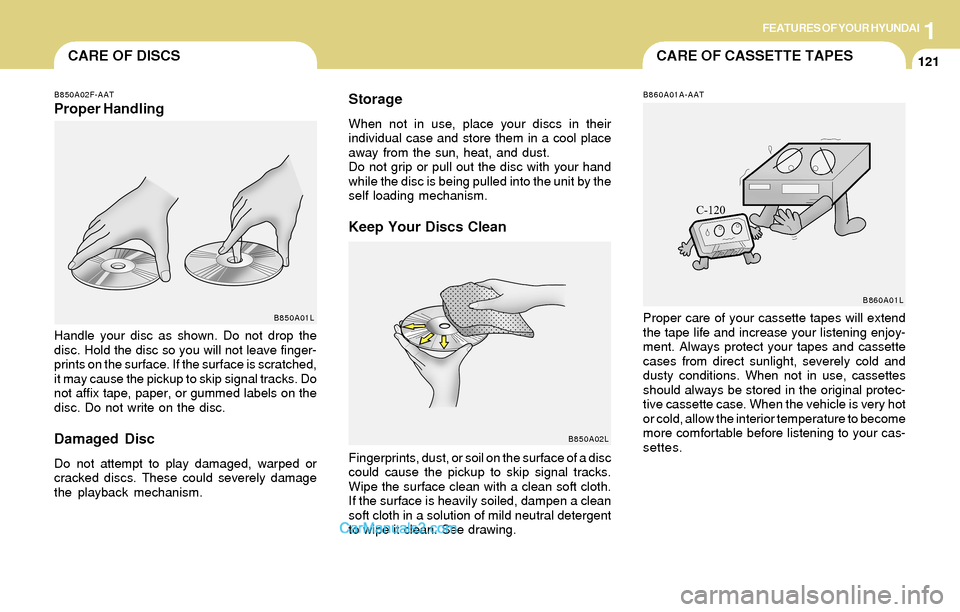
Proper HandlingStorageWhen not in use, place your discs in their
individual case and store them in a cool place
away from the sun, heat, and dust.
Do not grip or pull out the disc with your hand
while the disc is being pulled into the unit by the
self loading mechanism.
Keep Your Discs Clean
Handle your disc as shown. Do not drop the
disc. Hold the disc so you will not leave finger-
prints on the surface. If the surface is scratched,
it may cause the pickup to skip signal tracks. Do
not affix tape, paper, or gummed labels on the
disc. Do not write on the disc.
Damaged Disc
Do not attempt to play damaged, warped or
cracked discs. These could severely damage
the playback mechanism.Fingerprints, dust, or soil on the surface of a disc
could cause the pickup to skip signal tracks.
Wipe the surface clean with a clean soft cloth.
If the surface is heavily soiled, dampen a clean
soft cloth in a solution of mild neutral detergent
to wipe it clean. See drawing.
B860A01A-AAT
Proper care of your cassette tapes will extend
the tape life and increase your listening enjoy-
ment. Always protect your tapes and cassette
cases from direct sunlight, severely cold and
dusty conditions. When not in use, cassettes
should always be stored in the original protec-
tive cassette case. When the vehicle is very hot
or cold, allow the interior temperature to become
more comfortable before listening to your cas-
settes.B850A01L
B860A01L
Page 141 of 253
2DRIVING YOUR HYUNDAI
4KEY POSITIONSTO START THE ENGINE
C040A01A-AAT
CAUTION:The engine should not be turned off or the
key removed from the ignition key cylinder
while the car is in motion. The steering
wheel is locked by removing the key.
NOTE:Do not hold the key in the "START" position
for more than 15 seconds.
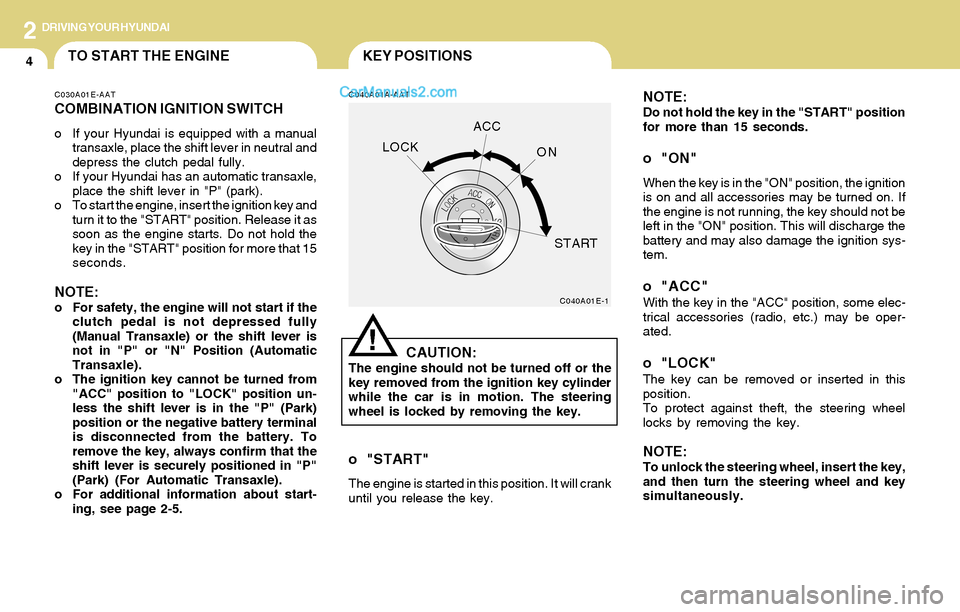
o "ON"
When the key is in the "ON" position, the ignition
is on and all accessories may be turned on. If
the engine is not running, the key should not be
left in the "ON" position. This will discharge the
battery and may also damage the ignition sys-
tem.
o "ACC"With the key in the "ACC" position, some elec-
trical accessories (radio, etc.) may be oper-
ated.
o "LOCK"The key can be removed or inserted in this
position.
To protect against theft, the steering wheel
locks by removing the key.
NOTE:To unlock the steering wheel, insert the key,
and then turn the steering wheel and key
simultaneously.
C040A01E-1
LOCKACC
ON
START
!
C030A01E-AAT
COMBINATION IGNITION SWITCH
o If your Hyundai is equipped with a manual
transaxle, place the shift lever in neutral and
depress the clutch pedal fully.
o If your Hyundai has an automatic transaxle,
place the shift lever in "P" (park).
o To start the engine, insert the ignition key and
turn it to the "START" position. Release it as
soon as the engine starts. Do not hold the
key in the "START" position for more that 15
seconds.
NOTE:o For safety, the engine will not start if the
clutch pedal is not depressed fully
(Manual Transaxle) or the shift lever is
not in "P" or "N" Position (Automatic
Transaxle).
o The ignition key cannot be turned from
"ACC" position to "LOCK" position un-
less the shift lever is in the "P" (Park)
position or the negative battery terminal
is disconnected from the battery. To
remove the key, always confirm that the
shift lever is securely positioned in "P"
(Park) (For Automatic Transaxle).
o For additional information about start-
ing, see page 2-5.
o "START"
The engine is started in this position. It will crank
until you release the key.
Page 145 of 253
2DRIVING YOUR HYUNDAI
8OPERATING THE AUTOMATIC
TRANSAXLE (2.4L, 2.7L - 4 A/T)
!WARNING:o Avoid high cornering speeds.
o Do not make quick steering wheel move-
ments, such as sharp lane changes or
fast, sharp turns.
o Always wear your seat belts.
In a collision crash, un unbelted person
is significantly more likely to die than a
person wearing a seatbelt.
o The risk of rollover is greatly increased if
you lose control of your vehicle at high-
way speeds.
o Loss of control often occurs if two or
more wheels drop off the roadway and
the driver oversteers to reenter the road-
way.
o In the event your vehicle leaves the road-
way, do not steer sharply. Instead, slow
down before pulling back into the travel
lanes.
o Never exceed posted speed limits.
C090A01O-GAT
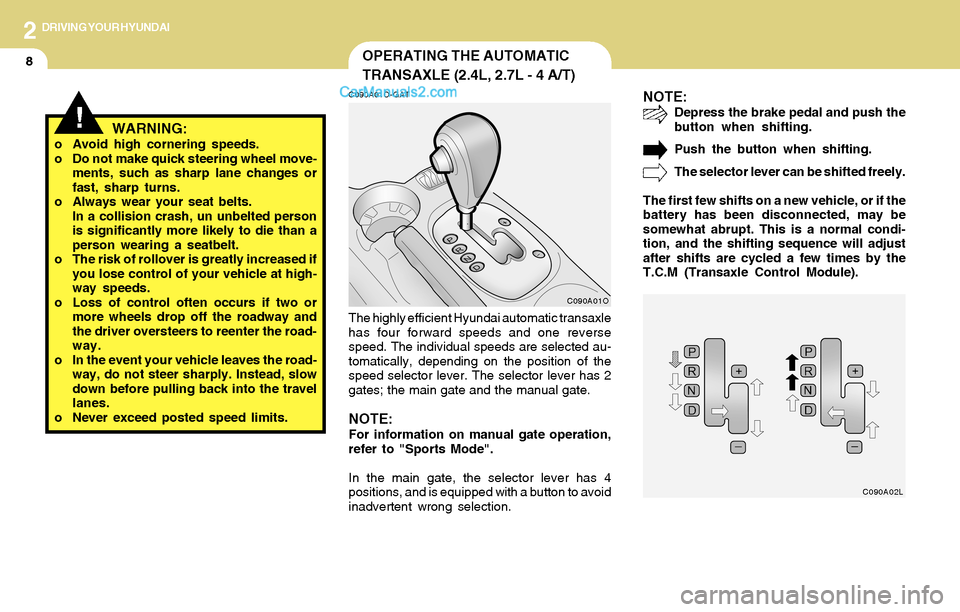
The highly efficient Hyundai automatic transaxle
has four forward speeds and one reverse
speed. The individual speeds are selected au-
tomatically, depending on the position of the
speed selector lever. The selector lever has 2
gates; the main gate and the manual gate.
NOTE:For information on manual gate operation,
refer to "Sports Mode".
In the main gate, the selector lever has 4
positions, and is equipped with a button to avoid
inadvertent wrong selection.
NOTE:Depress the brake pedal and push the
button when shifting.
Push the button when shifting.
The selector lever can be shifted freely.
The first few shifts on a new vehicle, or if the
battery has been disconnected, may be
somewhat abrupt. This is a normal condi-
tion, and the shifting sequence will adjust
after shifts are cycled a few times by the
T.C.M (Transaxle Control Module).
C090A01O
C090A02L
Page 148 of 253
2DRIVING YOUR HYUNDAI
11OPERATING THE AUTOMATIC
TRANSAXLE (3.5L - 5 A/T)
C090A02L-AAT
C090A01O
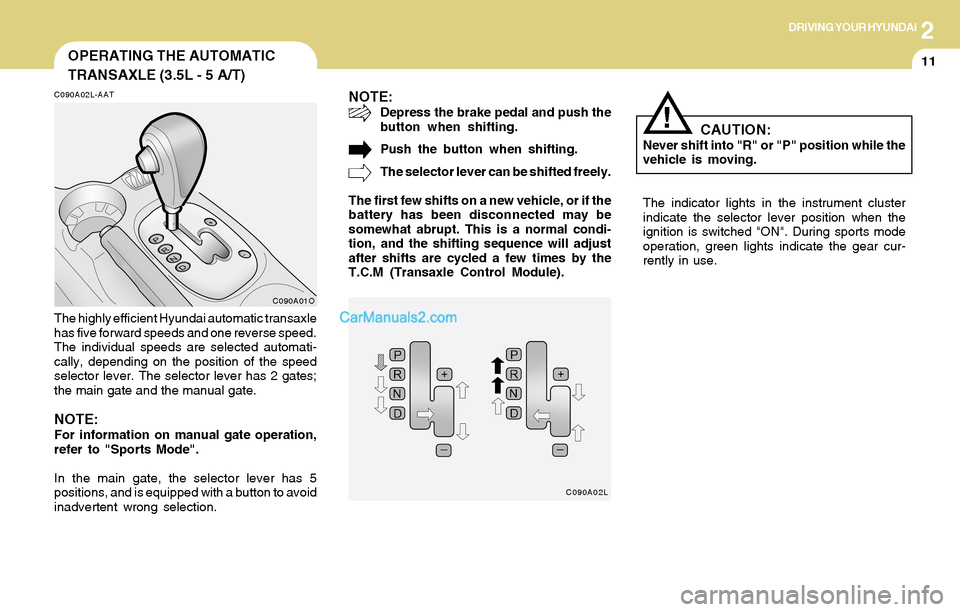
The highly efficient Hyundai automatic transaxle
has five forward speeds and one reverse speed.
The individual speeds are selected automati-
cally, depending on the position of the speed
selector lever. The selector lever has 2 gates;
the main gate and the manual gate.
NOTE:For information on manual gate operation,
refer to "Sports Mode".
In the main gate, the selector lever has 5
positions, and is equipped with a button to avoid
inadvertent wrong selection.
NOTE:Depress the brake pedal and push the
button when shifting.
Push the button when shifting.
The selector lever can be shifted freely.
The first few shifts on a new vehicle, or if the
battery has been disconnected may be
somewhat abrupt. This is a normal condi-
tion, and the shifting sequence will adjust
after shifts are cycled a few times by the
T.C.M (Transaxle Control Module).
The indicator lights in the instrument cluster
indicate the selector lever position when the
ignition is switched "ON". During sports mode
operation, green lights indicate the gear cur-
rently in use.
C090A02L
CAUTION:Never shift into "R" or "P" position while the
vehicle is moving.
!