lock Hyundai Santa Fe 2005 Owner's Guide
[x] Cancel search | Manufacturer: HYUNDAI, Model Year: 2005, Model line: Santa Fe, Model: Hyundai Santa Fe 2005Pages: 277, PDF Size: 10.53 MB
Page 81 of 277
1FEATURES OF YOUR HYUNDAI70
B460D01O-GATManual Operation of SunroofIf the sunroof does not electrically operate:
1. Open the spectacle case.2. Turn the hexagonal bolts counterclockwise
to remove the overhead console with a
socket wrench.
B460D01OB460D02O
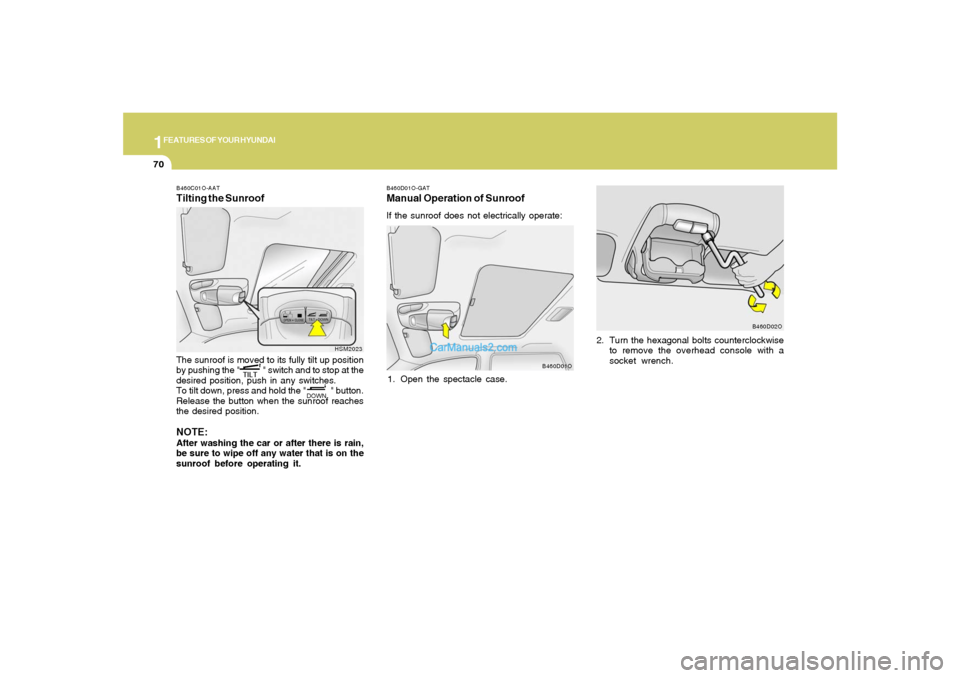
B460C01O-AATTilting the SunroofThe sunroof is moved to its fully tilt up position
by pushing the " " switch and to stop at the
desired position, push in any switches.
To tilt down, press and hold the " " button.
Release the button when the sunroof reaches
the desired position.NOTE:After washing the car or after there is rain,
be sure to wipe off any water that is on the
sunroof before operating it.
HSM2023
Page 82 of 277
1
FEATURES OF YOUR HYUNDAI
71
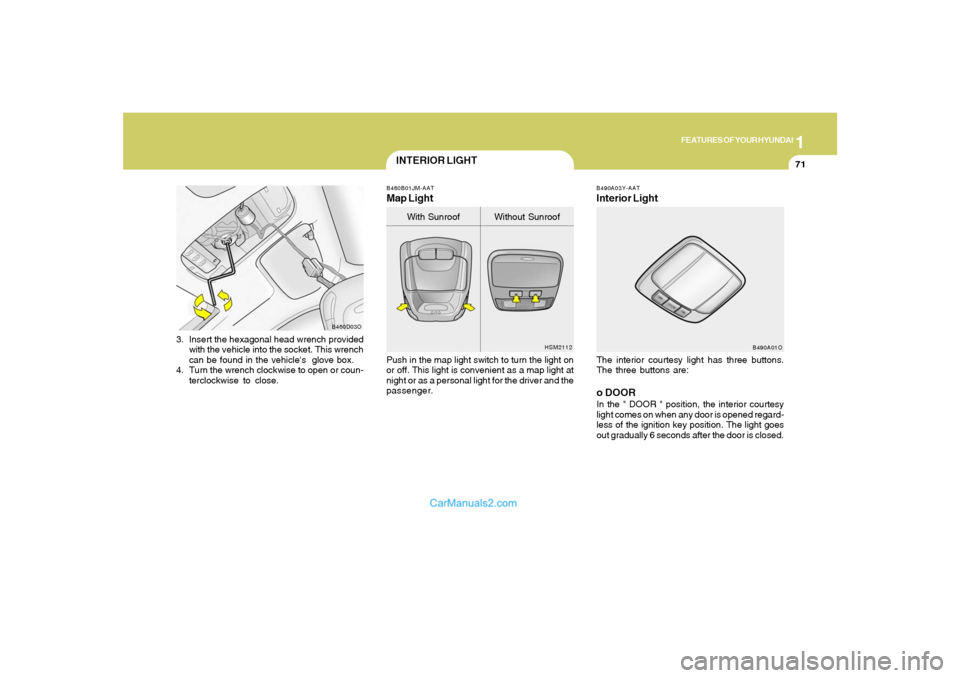
3. Insert the hexagonal head wrench provided
with the vehicle into the socket. This wrench
can be found in the vehicle's glove box.
4. Turn the wrench clockwise to open or coun-
terclockwise to close.
B460D03O
INTERIOR LIGHT
B490A03Y-AATInterior LightThe interior courtesy light has three buttons.
The three buttons are:o DOORIn the " DOOR " position, the interior courtesy
light comes on when any door is opened regard-
less of the ignition key position. The light goes
out gradually 6 seconds after the door is closed.
B490A01O B480B01JM-AAT
Map LightPush in the map light switch to turn the light on
or off. This light is convenient as a map light at
night or as a personal light for the driver and the
passenger.
HSM2112
With Sunroof Without Sunroof
Page 83 of 277
1FEATURES OF YOUR HYUNDAI72
GLOVE BOX
SPECTACLE CASE
!
B500A01S-AAT
WARNING:
To avoid the possibility of injury in case of
an accident or a sudden stop, the glove box
door should be kept closed when the car is
in motion.
B500A01O
UNLOCKLOCK
!
B491A03O-GAT
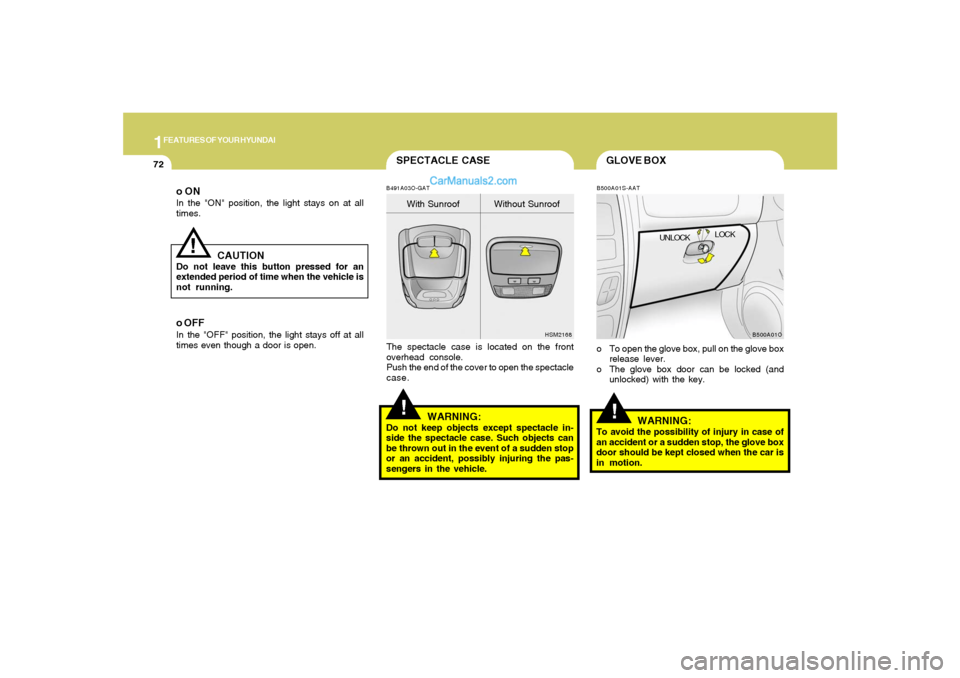
HSM2168The spectacle case is located on the front
overhead console.
Push the end of the cover to open the spectacle
case.
WARNING:
Do not keep objects except spectacle in-
side the spectacle case. Such objects can
be thrown out in the event of a sudden stop
or an accident, possibly injuring the pas-
sengers in the vehicle.With Sunroof Without Sunroof
o ONIn the "ON" position, the light stays on at all
times.
!
CAUTION
Do not leave this button pressed for an
extended period of time when the vehicle is
not running.o OFFIn the "OFF" position, the light stays off at all
times even though a door is open.
o To open the glove box, pull on the glove box
release lever.
o The glove box door can be locked (and
unlocked) with the key.
Page 89 of 277
1FEATURES OF YOUR HYUNDAI78
Operating HomeLinkSimply press the appropriate HomeLink button
to activate the trained product (garage door,
security system, entry door lock, estate gate,
lighting, etc.). The original handheld transmit-
ters may also be used at any time. 3. Return to the vehicle and firmly press and
release the programmed HomeLink button.
Press and release the same HomeLink but-
ton a second time to complete the program-
ming process. (Some devices may require
you to press and release a third time to
complete the programming.)
4. Now HomeLink mirror and rolling-code-
equipped device should be synchronized.
The remaining HomeLink buttons may now
be programmed if this has not been done
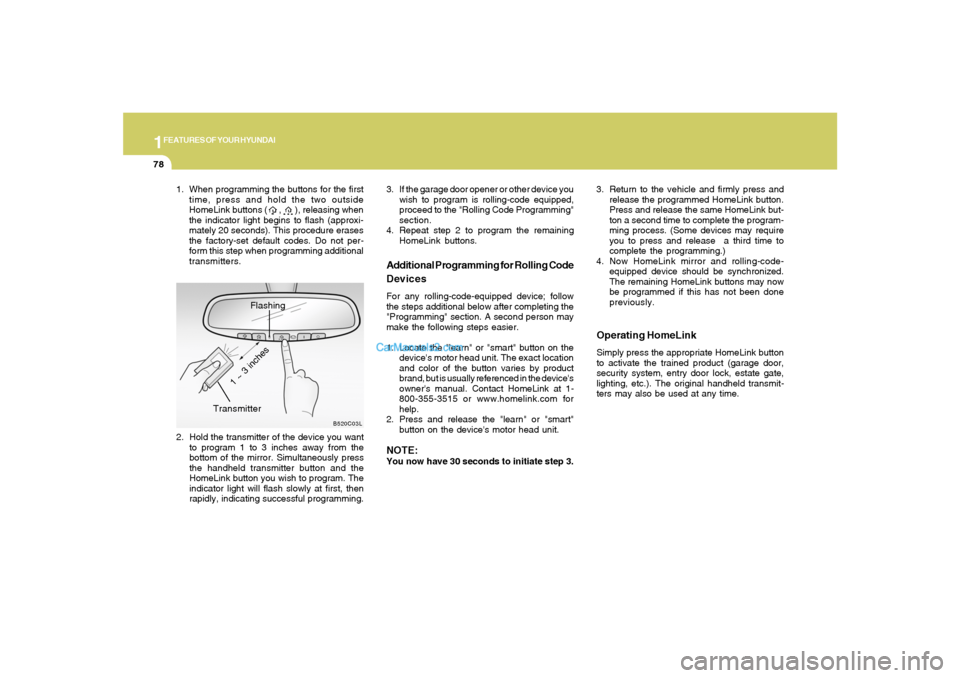
previously. 1. When programming the buttons for the first
time, press and hold the two outside
HomeLink buttons ( , ), releasing when
the indicator light begins to flash (approxi-
mately 20 seconds). This procedure erases
the factory-set default codes. Do not per-
form this step when programming additional
transmitters.
Flashing
2. Hold the transmitter of the device you want
to program 1 to 3 inches away from the
bottom of the mirror. Simultaneously press
the handheld transmitter button and the
HomeLink button you wish to program. The
indicator light will flash slowly at first, then
rapidly, indicating successful programming.
B520C03L
Transmitter
1 ~ 3 inches
Additional Programming for Rolling Code
DevicesFor any rolling-code-equipped device; follow
the steps additional below after completing the
"Programming" section. A second person may
make the following steps easier.
1. Locate the "learn" or "smart" button on the
device's motor head unit. The exact location
and color of the button varies by product
brand, but is usually referenced in the device's
owner's manual. Contact HomeLink at 1-
800-355-3515 or www.homelink.com for
help.
2. Press and release the "learn" or "smart"
button on the device's motor head unit.NOTE:You now have 30 seconds to initiate step 3. 3. If the garage door opener or other device you
wish to program is rolling-code equipped,
proceed to the "Rolling Code Programming"
section.
4. Repeat step 2 to program the remaining
HomeLink buttons.
Page 91 of 277
1FEATURES OF YOUR HYUNDAI80
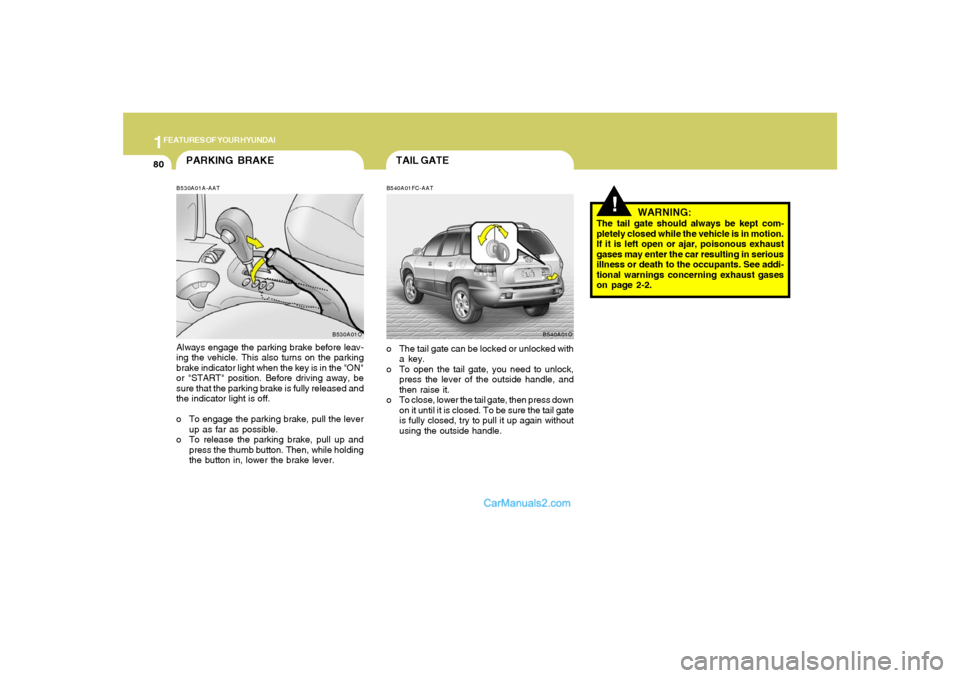
PARKING BRAKEB530A01A-AATAlways engage the parking brake before leav-
ing the vehicle. This also turns on the parking
brake indicator light when the key is in the "ON"
or "START" position. Before driving away, be
sure that the parking brake is fully released and
the indicator light is off.
o To engage the parking brake, pull the lever
up as far as possible.
o To release the parking brake, pull up and
press the thumb button. Then, while holding
the button in, lower the brake lever.
B530A01O
TAIL GATEB540A01FC-AAT
B540A01Oo The tail gate can be locked or unlocked with
a key.
o To open the tail gate, you need to unlock,
press the lever of the outside handle, and
then raise it.
o To close, lower the tail gate, then press down
on it until it is closed. To be sure the tail gate
is fully closed, try to pull it up again without
using the outside handle.
!
WARNING:
The tail gate should always be kept com-
pletely closed while the vehicle is in motion.
If it is left open or ajar, poisonous exhaust
gases may enter the car resulting in serious
illness or death to the occupants. See addi-
tional warnings concerning exhaust gases
on page 2-2.
Page 92 of 277
1
FEATURES OF YOUR HYUNDAI
81
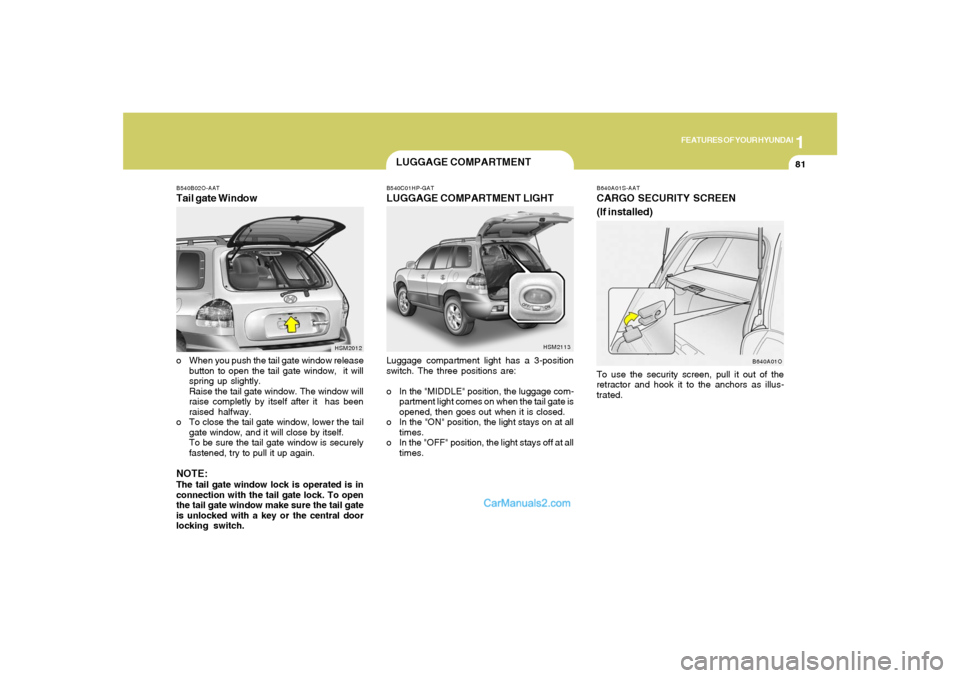
B540B02O-AATTail gate Window
HSM2012
o When you push the tail gate window release
button to open the tail gate window, it will
spring up slightly.
Raise the tail gate window. The window will
raise completly by itself after it has been
raised halfway.
o To close the tail gate window, lower the tail
gate window, and it will close by itself.
To be sure the tail gate window is securely
fastened, try to pull it up again.NOTE:The tail gate window lock is operated is in
connection with the tail gate lock. To open
the tail gate window make sure the tail gate
is unlocked with a key or the central door
locking switch.
B540C01HP-GATLUGGAGE COMPARTMENT LIGHTLuggage compartment light has a 3-position
switch. The three positions are:
o In the "MIDDLE" position, the luggage com-
partment light comes on when the tail gate is
opened, then goes out when it is closed.
o In the "ON" position, the light stays on at all
times.
o In the "OFF" position, the light stays off at all
times.
HSM2113
LUGGAGE COMPARTMENT
B640A01S-AATCARGO SECURITY SCREEN
(If installed)
B640A01O
To use the security screen, pull it out of the
retractor and hook it to the anchors as illus-
trated.
Page 97 of 277
1FEATURES OF YOUR HYUNDAI86
SUN VISOR
FLOOR MAT ANCHOR
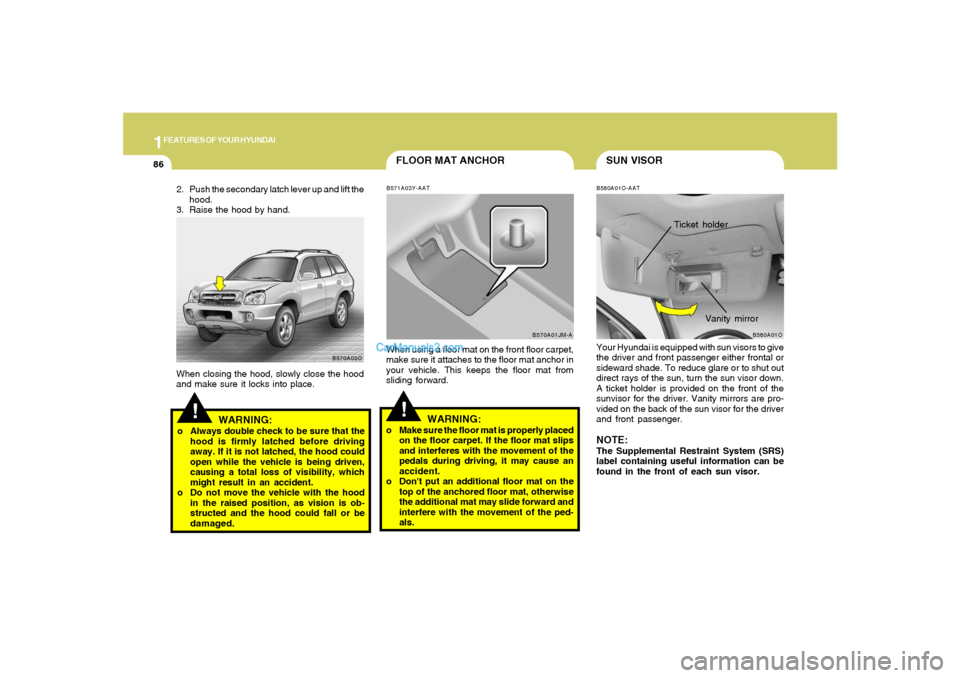
B580A01O-AATYour Hyundai is equipped with sun visors to give
the driver and front passenger either frontal or
sideward shade. To reduce glare or to shut out
direct rays of the sun, turn the sun visor down.
A ticket holder is provided on the front of the
sunvisor for the driver. Vanity mirrors are pro-
vided on the back of the sun visor for the driver
and front passenger.NOTE:The Supplemental Restraint System (SRS)
label containing useful information can be
found in the front of each sun visor.
B580A01O
Vanity mirror
!
B571A03Y-AATWhen using a floor mat on the front floor carpet,
make sure it attaches to the floor mat anchor in
your vehicle. This keeps the floor mat from
sliding forward.
WARNING:
o Make sure the floor mat is properly placed
on the floor carpet. If the floor mat slips
and interferes with the movement of the
pedals during driving, it may cause an
accident.
o Don't put an additional floor mat on the
top of the anchored floor mat, otherwise
the additional mat may slide forward and
interfere with the movement of the ped-
als.
!
WARNING:
o Always double check to be sure that the
hood is firmly latched before driving
away. If it is not latched, the hood could
open while the vehicle is being driven,
causing a total loss of visibility, which
might result in an accident.
o Do not move the vehicle with the hood
in the raised position, as vision is ob-
structed and the hood could fall or be
damaged. 2. Push the secondary latch lever up and lift the
hood.
3. Raise the hood by hand.
B570A03O
When closing the hood, slowly close the hood
and make sure it locks into place.
B570A01JM-A
Ticket holder
Page 98 of 277
1
FEATURES OF YOUR HYUNDAI
87
STEERING WHEEL TILT LEVER!
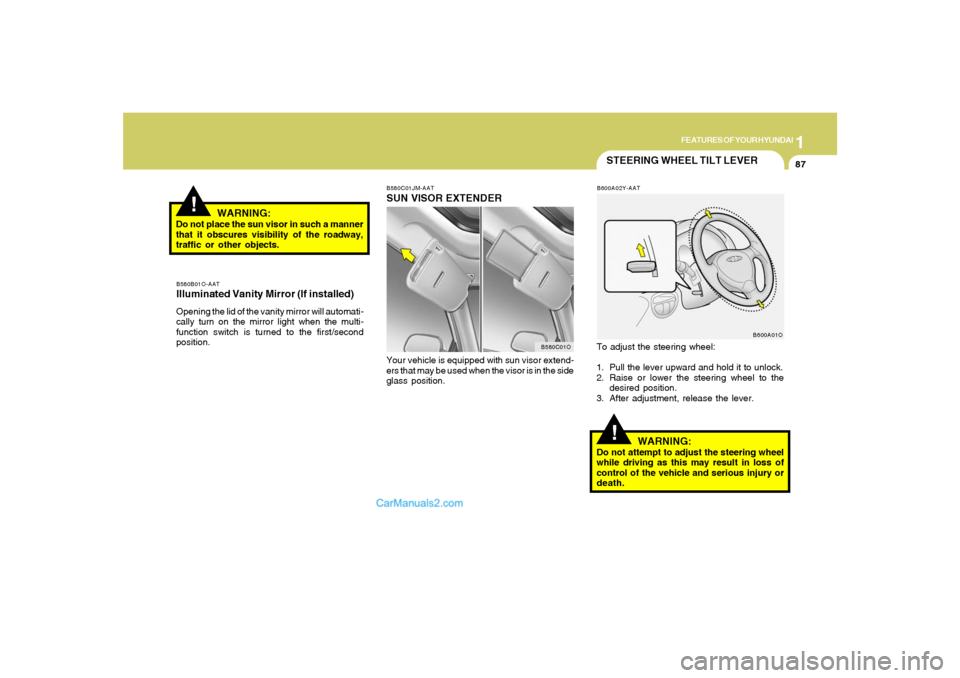
To adjust the steering wheel:
1. Pull the lever upward and hold it to unlock.
2. Raise or lower the steering wheel to the
desired position.
3. After adjustment, release the lever.
WARNING:
Do not attempt to adjust the steering wheel
while driving as this may result in loss of
control of the vehicle and serious injury or
death.
B580B01O-AATIlluminated Vanity Mirror (If installed)Opening the lid of the vanity mirror will automati-
cally turn on the mirror light when the multi-
function switch is turned to the first/second
position.
B600A02Y-AAT
B600A01O
!
WARNING:
Do not place the sun visor in such a manner
that it obscures visibility of the roadway,
traffic or other objects.
B580C01O B580C01JM-AAT
SUN VISOR EXTENDERYour vehicle is equipped with sun visor extend-
ers that may be used when the visor is in the side
glass position.
Page 111 of 277
1FEATURES OF YOUR HYUNDAI
100
B730A01L-AATOperation Tipso To keep dust or unpleasant fumes from
entering the car through the ventilation sys-
tem, temporarily set the air intake control
switch to the position.
Be sure to return the control switch to
the position when the irritation has
passed to keep fresh air in the vehicle. This
will help keep the driver alert and comfort-
able.
o Air for the heating/cooling system is drawn
in through the grilles just ahead of the wind-
shield. Care should be taken that these are
not blocked by leaves, snow, ice or other
obstructions.
o To prevent interior fog on the windshield, set
the air intake control switch to the fresh air
( ) position, fan speed to the desired
position, turn on the air conditioning system,
and adjust temperature control to desired
temperature.
Page 121 of 277
1FEATURES OF YOUR HYUNDAI
110
!
o Fading - As your car moves away from the
radio station, the signal will weaken and
sound will begin to fade. When this occurs,
we suggest that you select another stronger
station.
o Flutter/Static - Weak FM signals or large
obstructions between the transmitter and
your radio can disturb the signal causing
static or fluttering noises to occur. Reducing
the treble level may lessen this effect until the
disturbance clears.o Station Swapping - As an FM signal weak-
ens, another more powerful signal near the
same frequency may begin to play. This is
because your radio is designed to lock onto
the clearest signal. If this occurs, select
another station with a stronger signal.
o Multi-Path Cancellation - Radio signals being
received from several directions can cause
distortion or fluttering. This can be caused by
a direct and reflected signal from the same
station, or by signals from two stations with
close frequencies. If this occurs, select
another station until the condition has passed.
B750B03Y-AATUsing a cellular phone or a two-way radioWhen a cellular phone is used inside the vehicle,
noise may be produced from the audio equip-
ment. This does not mean that something is
wrong with the audio equipment. In such a case,
use the cellular phone at a place as far as
possible from the audio equipment.
WARNING:
Don't use a cellular phone when you are
driving. Stop at a safe place to use a cellular
phone.
B750A04L
B750A05L