Audio system Hyundai Santa Fe 2008 Owner's Guide
[x] Cancel search | Manufacturer: HYUNDAI, Model Year: 2008, Model line: Santa Fe, Model: Hyundai Santa Fe 2008Pages: 355, PDF Size: 12.36 MB
Page 199 of 355
1
FEATURES OF YOUR HYUNDAI
187
FEATURES OF YOUR HYUNDAI
187187187187
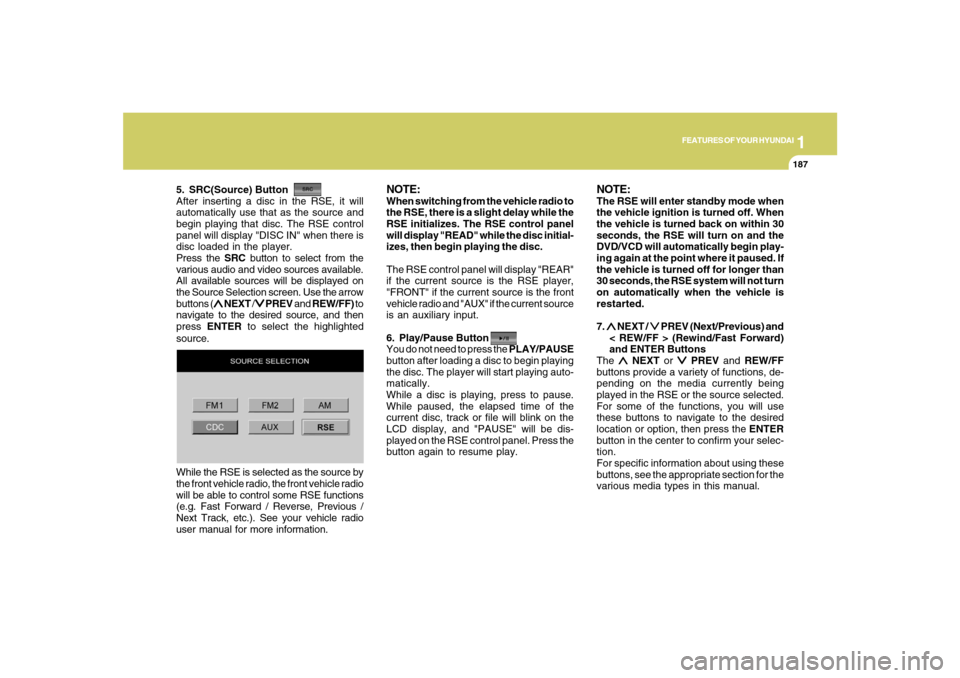
5. SRC(Source) Button
After inserting a disc in the RSE, it will
automatically use that as the source and
begin playing that disc. The RSE control
panel will display "DISC IN" when there is
disc loaded in the player.
Press the SRC button to select from the
various audio and video sources available.
All available sources will be displayed on
the Source Selection screen. Use the arrow
buttons (
∧ ∧∧ ∧
∧ NEXT /
∨ ∨∨ ∨
∨ PREV and REW/FF) to
navigate to the desired source, and then
press ENTER to select the highlighted
source.
NOTE:When switching from the vehicle radio to
the RSE, there is a slight delay while the
RSE initializes. The RSE control panel
will display "READ" while the disc initial-
izes, then begin playing the disc.
The RSE control panel will display "REAR"
if the current source is the RSE player,
"FRONT" if the current source is the front
vehicle radio and "AUX" if the current source
is an auxiliary input.
6. Play/Pause Button
You do not need to press the PLAY/PAUSE
button after loading a disc to begin playing
the disc. The player will start playing auto-
matically.
While a disc is playing, press to pause.
While paused, the elapsed time of the
current disc, track or file will blink on the
LCD display, and "PAUSE" will be dis-
played on the RSE control panel. Press the
button again to resume play.
NOTE:The RSE will enter standby mode when
the vehicle ignition is turned off. When
the vehicle is turned back on within 30
seconds, the RSE will turn on and the
DVD/VCD will automatically begin play-
ing again at the point where it paused. If
the vehicle is turned off for longer than
30 seconds, the RSE system will not turn
on automatically when the vehicle is
restarted.
7. ∧ ∧∧ ∧
∧ NEXT /
∨ ∨∨ ∨
∨ PREV (Next/Previous) and
< REW/FF > (Rewind/Fast Forward)
and ENTER Buttons
The
∧ ∧∧ ∧
∧ NEXT or
∨ ∨∨ ∨
∨ PREV and REW/FF
buttons provide a variety of functions, de-
pending on the media currently being
played in the RSE or the source selected.
For some of the functions, you will use
these buttons to navigate to the desired
location or option, then press the ENTER
button in the center to confirm your selec-
tion.
For specific information about using these
buttons, see the appropriate section for the
various media types in this manual. While the RSE is selected as the source by
the front vehicle radio, the front vehicle radio
will be able to control some RSE functions
(e.g. Fast Forward / Reverse, Previous /
Next Track, etc.). See your vehicle radio
user manual for more information.
Page 202 of 355
1FEATURES OF YOUR HYUNDAI
190
NOTE:Some DVDs do not permit chapter navi-
gation.
Instead of using the
∨ ∨∨ ∨
∨ PREV/
∧ ∧∧ ∧
∧ NEXT
buttons, you can also enter the chapter
number using the numbers on the remote
controller. While a DVD/VCD is playing,
press the number button(s) that correspond
to the desired chapter and press ENTER.
4. Stop a Disc
The disc will automatically stop when any
other source (e.g. the vehicle radio or an
external game) is selected. When you
switch back to the DVD, it will begin playing
at the point where it stopped.
While the player is running, press the RSE
control panel POWER/VOLUME knob, or
the ON/OFF button on the remote control-
ler, to stop a disc and turn off the RSE
system and the DVD player. When the
RSE is turned on again, the disc will begin
playing at the point where it stopped.5. Eject a Disc
To eject a disc press the button. A disc
can be ejected even when the unit or the
vehicle is turned off.
NOTE:The player has an Auto-Reload Disc
Protection feature to protect discs from
accidental damage. If a disc is not re-
moved within 12 seconds after being
ejected, it will be pulled back into the
player.
CD PLAYER OPERATIONThe RSE will play audio CDs in both stan-
dard (12 cm) and mini-disc (8 cm) format.NOTE:While the player will accept DVD ROM or
CD ROM disc, the RSE cannot play disc
in this format will eject the disc.
1. Volume Control
You can adjust the volume of the audio
heard in the vehicle speakers from the
RSE control panel or the remote controller.
From the RSE control panel, rotate the
POWER/VOLUME knob. From the remote
controller, press "VOL +" to increase and
"VOL -" to decrease the volume.
Adjusting the volume in this way will not
adjust the wireless headphone volume.
To adjust the headphones, roll the VOL
control wheel.B470E01CM-AAT
Page 306 of 355
6
DO-IT-YOURSELF MAINTENANCE
20
G200C01CM-GATPower connectorNOTE:
o If the power connector is pulled out of
the fuse panel, the warning chime,
audio, clock and interior lamps, etc.,
will not operate. The following items
must be reset after replacement.
- Digital Clock
- Trip computer
- Automatic heating and cooling con-
trol system
- Audio
o Even though the power connector is
pulled out, the battery can still be
discharged by operation of the head-
lights or other electrical devices.
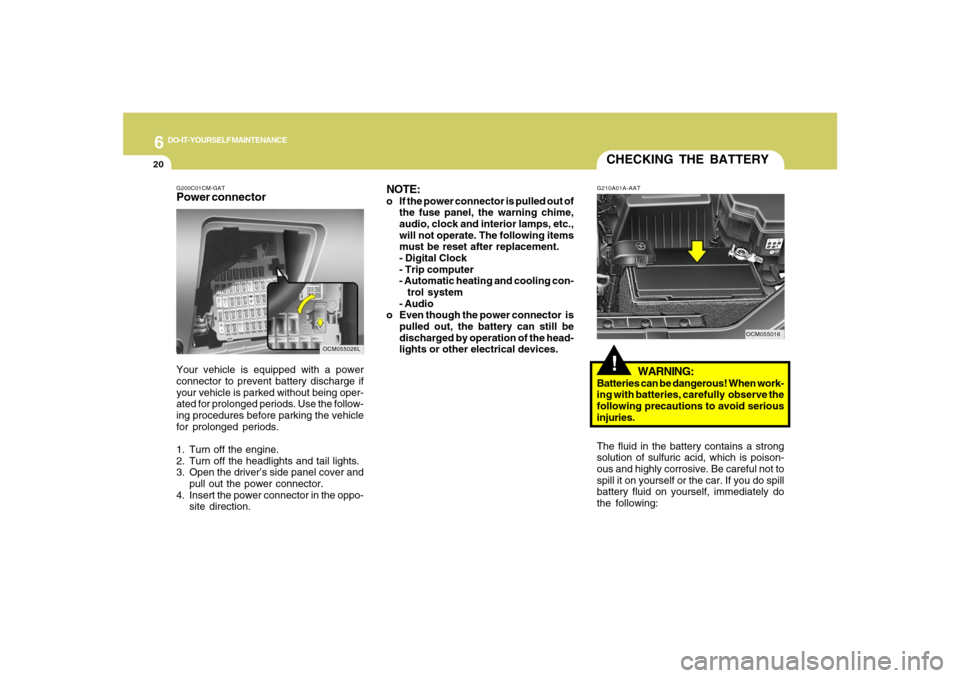
Your vehicle is equipped with a power
connector to prevent battery discharge if
your vehicle is parked without being oper-
ated for prolonged periods. Use the follow-
ing procedures before parking the vehicle
for prolonged periods.
1. Turn off the engine.
2. Turn off the headlights and tail lights.
3. Open the driver’s side panel cover and
pull out the power connector.
4. Insert the power connector in the oppo-
site direction.
OCM055026L
CHECKING THE BATTERY!
G210A01A-AAT
WARNING:
Batteries can be dangerous! When work-
ing with batteries, carefully observe the
following precautions to avoid serious
injuries.
The fluid in the battery contains a strong
solution of sulfuric acid, which is poison-
ous and highly corrosive. Be careful not to
spill it on yourself or the car. If you do spill
battery fluid on yourself, immediately do
the following:
OCM055016
Page 321 of 355
6
DO-IT-YOURSELF MAINTENANCE
35
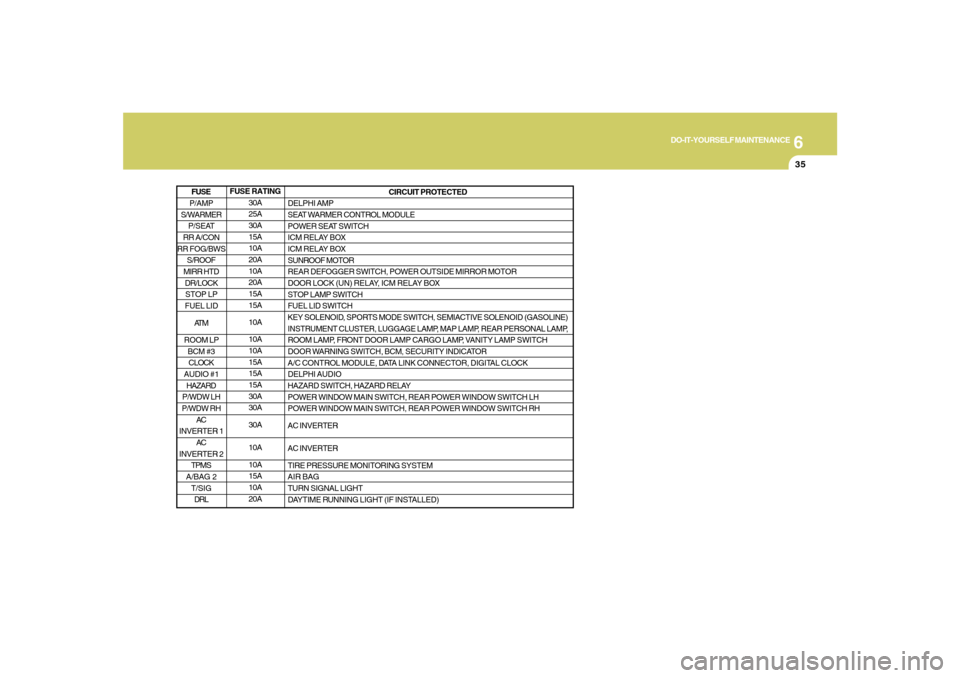
FUSE RATING
30A
25A
30A
15A
10A
20A
10A
20A
15A
15A
10A
10A
10A
15A
15A
15A
30A
30A
30A
10A
10A
15A
10A
20ACIRCUIT PROTECTED
DELPHI AMP
SEAT WARMER CONTROL MODULE
POWER SEAT SWITCH
ICM RELAY BOX
ICM RELAY BOX
SUNROOF MOTOR
REAR DEFOGGER SWITCH, POWER OUTSIDE MIRROR MOTOR
DOOR LOCK (UN) RELAY, ICM RELAY BOX
STOP LAMP SWITCH
FUEL LID SWITCH
KEY SOLENOID, SPORTS MODE SWITCH, SEMIACTIVE SOLENOID (GASOLINE)
INSTRUMENT CLUSTER, LUGGAGE LAMP, MAP LAMP, REAR PERSONAL LAMP,
ROOM LAMP, FRONT DOOR LAMP CARGO LAMP, VANITY LAMP SWITCH
DOOR WARNING SWITCH, BCM, SECURITY INDICATOR
A/C CONTROL MODULE, DATA LINK CONNECTOR, DIGITAL CLOCK
DELPHI AUDIO
HAZARD SWITCH, HAZARD RELAY
POWER WINDOW MAIN SWITCH, REAR POWER WINDOW SWITCH LH
POWER WINDOW MAIN SWITCH, REAR POWER WINDOW SWITCH RH
AC INVERTER
AC INVERTER
TIRE PRESSURE MONITORING SYSTEM
AIR BAG
TURN SIGNAL LIGHT
DAYTIME RUNNING LIGHT (IF INSTALLED)
P/AMP
S/WARMER
P/SEAT
RR A/CON
RR FOG/BWS
S/ROOF
MIRR HTD
DR/LOCK
STOP LP
FUEL LID
AT M
ROOM LP
BCM #3
CLOCK
AUDIO #1
HAZARD
P/WDW LH
P/WDW RH
AC
INVERTER 1
AC
INVERTER 2
TPMS
A/BAG 2
T/SIG
DRLFUSE
Page 349 of 355
10
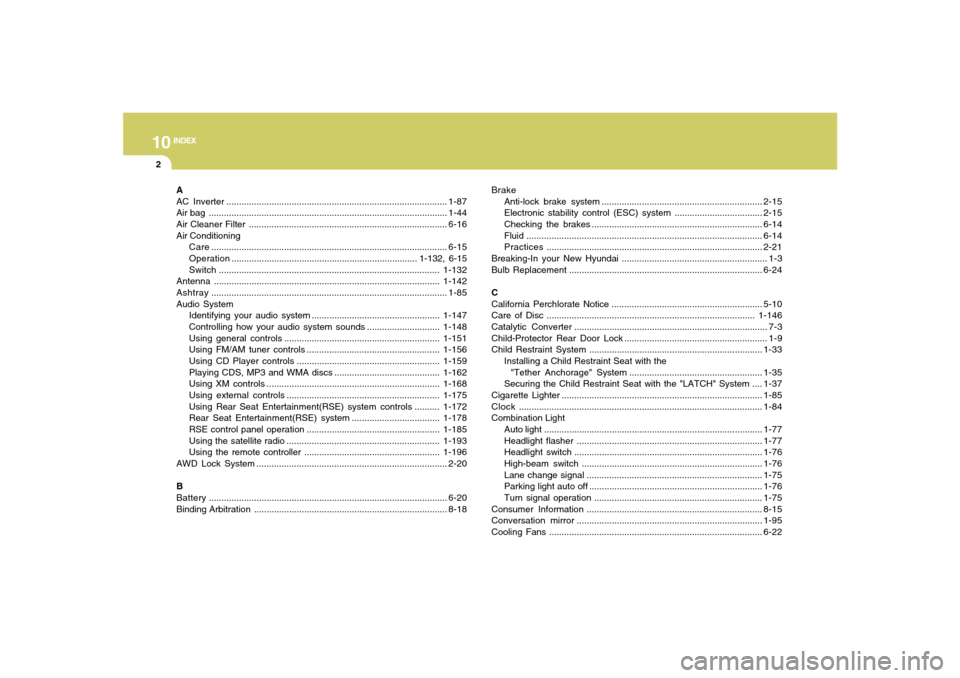
INDEX
2
A
AC Inverter........................................................................................1-87
Air bag ...............................................................................................1-44
Air Cleaner Filter ...............................................................................6-16
Air Conditioning
Care..............................................................................................6-15
Operation.......................................................................... 1-132, 6-15
Switch........................................................................................1-132
Antenna..........................................................................................1-142
Ashtray..............................................................................................1-85
Audio System
Identifying your audio system ...................................................1-147
Controlling how your audio system sounds.............................1-148
Using general controls..............................................................1-151
Using FM/AM tuner controls .....................................................1-156
Using CD Player controls.........................................................1-159
Playing CDS, MP3 and WMA discs..........................................1-162
Using XM controls .....................................................................1-168
Using external controls.............................................................1-175
Using Rear Seat Entertainment(RSE) system controls..........1-172
Rear Seat Entertainment(RSE) system ...................................1-178
RSE control panel operation.....................................................1-185
Using the satellite radio .............................................................1-193
Using the remote controller ......................................................1-196
AWD Lock System ............................................................................2-20
B
Battery...............................................................................................6-20
Binding Arbitration.............................................................................8-18Brake
Anti-lock brake system ................................................................2-15
Electronic stability control (ESC) system...................................2-15
Checking the brakes ....................................................................6-14
Fluid ..............................................................................................6-14
Practices......................................................................................2-21
Breaking-In your New Hyundai .......................................................... 1-3
Bulb Replacement.............................................................................6-24
C
California Perchlorate Notice ............................................................5-10
Care of Disc ...................................................................................1-146
Catalytic Converter............................................................................. 7-3
Child-Protector Rear Door Lock ......................................................... 1-9
Child Restraint System.....................................................................1-33
Installing a Child Restraint Seat with the
"Tether Anchorage" System .....................................................1-35
Securing the Child Restraint Seat with the "LATCH" System ....1-37
Cigarette Lighter................................................................................1-85
Clock.................................................................................................1-84
Combination Light
Auto light.......................................................................................1-77
Headlight flasher..........................................................................1-77
Headlight switch...........................................................................1-76
High-beam switch........................................................................1-76
Lane change signal ......................................................................1-75
Parking light auto off .....................................................................1-76
Turn signal operation...................................................................1-75
Consumer Information......................................................................8-15
Conversation mirror..........................................................................1-95
Cooling Fans.....................................................................................6-22