Audio system Hyundai Santa Fe 2008 Owner's Guide
[x] Cancel search | Manufacturer: HYUNDAI, Model Year: 2008, Model line: Santa Fe, Model: Hyundai Santa Fe 2008Pages: 355, PDF Size: 12.36 MB
Page 181 of 355
1169169169169169169
FEATURES OF YOUR HYUNDAI
1. CAT UP '
∧ ∧∧ ∧
∧' / DOWN '
∨ ∨∨ ∨
∨' buttons
Press CAT UP '
∧ ∧∧ ∧
∧' / DOWN '
∨ ∨∨ ∨
∨' buttons to
go to next/previous categories. Once
reached the desired category, press the
ENTER knob to select the category. The
audio system will play the first channel of
the new category. If there is no ENTER
carried out 5 seconds after the last CAT UP
'
∧ ∧∧ ∧
∧' / DOWN '
∨ ∨∨ ∨
∨' button, the category up/
down is canceled and the audio system
reverts the display back to current active
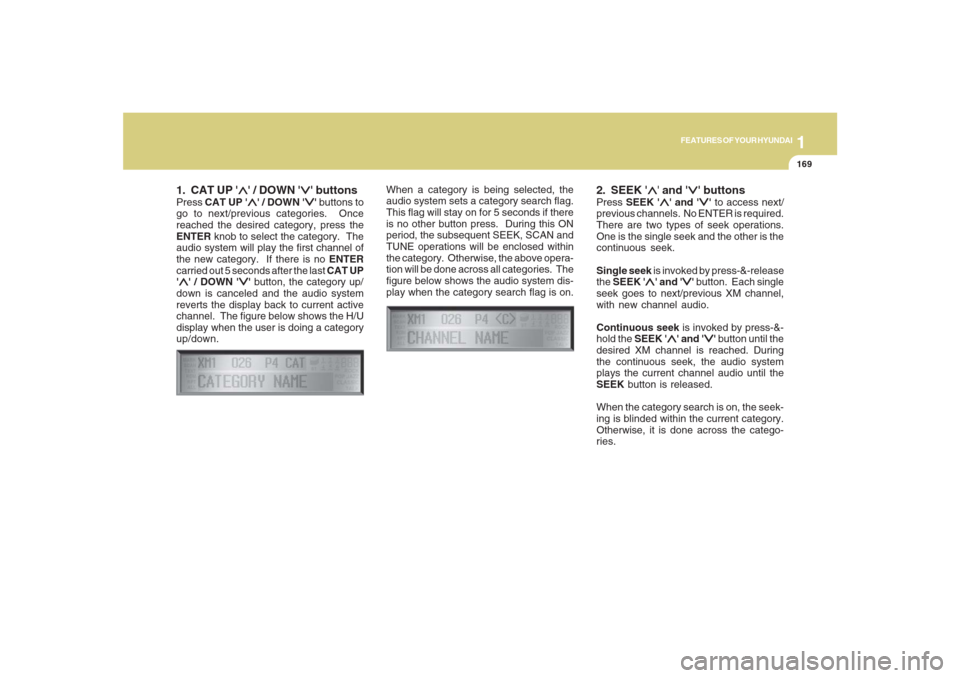
channel. The figure below shows the H/U
display when the user is doing a category
up/down.When a category is being selected, the
audio system sets a category search flag.
This flag will stay on for 5 seconds if there
is no other button press. During this ON
period, the subsequent SEEK, SCAN and
TUNE operations will be enclosed within
the category. Otherwise, the above opera-
tion will be done across all categories. The
figure below shows the audio system dis-
play when the category search flag is on.
2. SEEK '
∧ ∧∧ ∧
∧' and '
∨ ∨∨ ∨
∨' buttons
Press SEEK '
∧ ∧∧ ∧
∧' and '
∨ ∨∨ ∨
∨' to access next/
previous channels. No ENTER is required.
There are two types of seek operations.
One is the single seek and the other is the
continuous seek.
Single seek is invoked by press-&-release
the SEEK '
∧ ∧∧ ∧
∧' and '
∨ ∨∨ ∨
∨' button. Each single
seek goes to next/previous XM channel,
with new channel audio.
Continuous seek is invoked by press-&-
hold the SEEK '
∧ ∧∧ ∧
∧' and '
∨ ∨∨ ∨
∨' button until the
desired XM channel is reached. During
the continuous seek, the audio system
plays the current channel audio until the
SEEK button is released.
When the category search is on, the seek-
ing is blinded within the current category.
Otherwise, it is done across the catego-
ries.
Page 182 of 355
1FEATURES OF YOUR HYUNDAI
170
3. TUNE KnobTurn the TUNE knob to scroll through the
XM channels. This is called manual tun-
ing. Upon reaching the desired channel,
press the knob (ENTER) to make a selec-
tion. During manual tuning, the audio sys-
tem plays the current channel audio until
a selection is made.
If there is no ENTER being pressed 5
seconds after stopped turning the TUNE
knob, the manual tune will be canceled.
The audio system then reverts the display
back to its current channel.
When the category search is on, the manual
tuning is blinded within the current cat-
egory. Otherwise, it is done across the
categories.
4. Channel Preset buttons (1~6)There are 6 Preset buttons in each XM
band you can use to store your favorite XM
channels. Saving a channel as a preset
gives you one-touch access to the channel
you want. Remember that the 6 presets
channels you stored are for the specific XM
band mode you are in. There are a total of
3 XM bands. That means you can store up
to 18 of your favorite channels in the preset
memory.NOTE:Remember that if you store a channel as
preset 3 in XM2 mode, you must first
select XM2 mode before you can use
that preset button.
Using PresetsTo save a XM channel as a preset:
1. Take note of the band selection dis-
played on the LCD screen (XM1, XM2
or XM3)
2. Select a XM channel you want using
either the SEEK '
∧ ∧∧ ∧
∧' and '
∨ ∨∨ ∨
∨' buttons or
the TUNE Knob.
3. Choose the preset button (1 – 6) you
want to store that channel.
4. Press and hold the Preset button for
more than 2 seconds.
The system beeps to indicate that it has
saved the new channel and displays
the preset number on the LCD screen.
NOTE:Saving a new channel erases the previ-
ous setting saved in that preset.
Page 183 of 355
1171171171171171171
FEATURES OF YOUR HYUNDAI
To call back a preset channel:
1. Select the band (XM1, XM2 or XM3) you
want using the XM button.
2. Press the preset button you want.
The system automatically jumps to the
preset channel. The channel informa-
tion and preset number are displayed
on the LCD screen.5. SCAN buttonChannel scan function
Press the SCAN button to scan all the
channels in XM. The audio system plays
the audio of a channel for 10 seconds
before scanning for the next channel. When
the category search is on, the channel
scan is blinded within the current category.
Otherwise, it is done across the catego-
ries.
If you want to keep listening to a particular
channel and want to stop the scanning,
press the SCAN button again.
This function is useful for providing you
with a good overview of all the radio sta-
tions within range of your tuner.Preset scan function
Press and hold the SCAN button for more
than 2 seconds. Each preset channel will
be automatically played for 10 seconds. If
you want to keep listening to a particular
preset channel and want to stop the scan-
ning, press the SCAN button again.
6. INFO buttonINFO button brings out the extra channel
info of the current played channel. The
audio system shows the following extra
channel info in sequence when the INFO
is pressed several times. First, it shows the
song/program title. Then, it follows by the
name of the artist/feature. The last one is
the category name. Another press of INFO
button brings the display back to the status
of the current played channel.Checking RADIO IDEvery SDAR box comes with one unique
RADIO ID. You need ID to make subscrip-
tion with XM service provider. Do single
seek to channel 0 using SEEK '
∧ ∧∧ ∧
∧' and '
∨ ∨∨ ∨
∨'
buttons. The audio system will then dis-
play the RADIO ID of the SDAR box.
Buttons not in use in tuner modeThe following buttons and functions are
not used in XM mode.
-<< button
->> button
-RPT button
-RDM button
-MARK button
Page 184 of 355
1FEATURES OF YOUR HYUNDAI
172
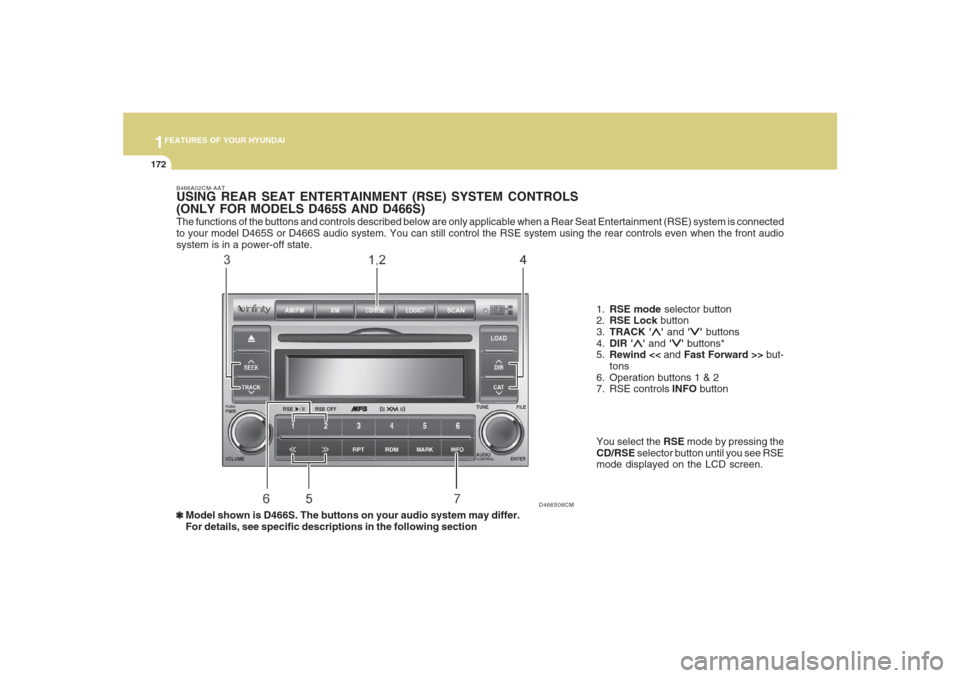
The functions of the buttons and controls described below are only applicable when a Rear Seat Entertainment (RSE) system is connected
to your model D465S or D466S audio system. You can still control the RSE system using the rear controls even when the front audio
system is in a power-off state.
D466S06CM B466A02CM-AAT
USING REAR SEAT ENTERTAINMENT (RSE) SYSTEM CONTROLS
(ONLY FOR MODELS D465S AND D466S)
1.RSE mode selector button
2.RSE Lock button
3.TRACK '
∧ ∧∧ ∧
∧' and '
∨ ∨∨ ∨
∨' buttons
4.DIR '
∧ ∧∧ ∧
∧' and '
∨ ∨∨ ∨
∨' buttons*
5.Rewind << and Fast Forward >> but-
tons
6. Operation buttons 1 & 2
7. RSE controls INFO button
❃ ❃❃ ❃
❃Model shown is D466S. The buttons on your audio system may differ.
For details, see specific descriptions in the following sectionYou select the RSE mode by pressing the
CD/RSE selector button until you see RSE
mode displayed on the LCD screen.
Page 185 of 355
1173173173173173173
FEATURES OF YOUR HYUNDAI
B466B02CM-AAT1. CD/RSE button (Switching to RSE
mode)Switch between RSE mode and CD mode
by pressing the CD/RSE selector button
until you see RSE mode displayed in the
LCD screen. In RSE mode, you can control
the RSE system from the controls on the
front panel of the audio system.NOTE:o If you are in Radio mode, press the
CD/RSE selector button once to switch
to CD mode and then press the CD/
RSE selector button again to switch to
RSE mode.
o If the CD changer does not contain
any CDs, you must press the CD/RSE
selector button a second time within
5 seconds of the first. Otherwise, the
audio system will automatically switch
back to radio mode.
2. RSE Lock buttonIn any mode, press and hold the CD/RSE
selector button for more than 2 seconds to
lock or release the RSE from the LOCK
mode. The LCD screen displays LOCK to
indicate that the system is in LOCK mode.
When the LOCK mode is engaged, only
the POWER ON/OFF button and the EJECT
button on the RSE system will be func-
tional.
This function is useful if you do not want
rear-seat passengers (e.g. children) to play
with the controls or otherwise interrupt disc
playback.
3. Track '
∧ ∧∧ ∧
∧' and '
∨ ∨∨ ∨
∨' buttons
If the RSE system is playing a disc and the
audio system is in RSE mode, press the
TRACK '
∧ ∧∧ ∧
∧' and '
∨ ∨∨ ∨
∨' buttons to select and
play the next or previous track on the disc
being played in the RSE.
The LCD screen displays the track status
as you press the buttons. You can press
the button several times to select the track
you want.
Page 186 of 355
1FEATURES OF YOUR HYUNDAI
174
4. Dir '
∧ ∧∧ ∧
∧' and '
∨ ∨∨ ∨
∨' buttons*
If the RSE system is playing an MP3 disc*
and the audio system is in RSE mode,
press the DIR '
∧ ∧∧ ∧
∧' or '
∨ ∨∨ ∨
∨' buttons to switch
to the next or previous directory on the CD.
The LCD screen displays the name of the
directory you have switched to and auto-
matically begins playback of the first track
in the directory.
* NOTE:The DIR '
∧ ∧∧ ∧
∧' or '
∨ ∨∨ ∨
∨' buttons can only be
used when you are playing a CD which
has organized its tracks in the form of
directories. Normally, only MP3 CDs will
contain a directory tree which you can
navigate using these buttons.
5. << and >> buttons (Rewind and
Fast Forward)If the RSE system is playing a disc and the
audio system is in RSE mode, press and
hold the << or >> button to rewind or fast-
forward playback of the current track. The
LCD screen displays the elapsed time of
the track you are rewinding or fast-for-
warding. Release the << or >> button when
you have reached the point you want.
Playback resumes automatically at the
selected point.6. Operation buttons (1-2)If a disc is loaded in the RSE system and
the audio system is in RSE mode,
o Press button 1 to play/pause the play-
back of the disc loaded in the RSE
system DVD player
o Press button 2 to power off the RSE
system but continues to play the disc in
the DVD player.
7. INFO buttonIf the RSE system is playing a disc and the
audio system is in RSE mode, press INFO
for detailed information on the assignment
of operational / playback controls to the
buttons on the audio system’s front panel.Buttons not in use in RSE modeThe following buttons and functions are
not used in RSE mode.
-RPT button
-RDM button
-MARK button
-SCAN button
- Number buttons 3, 4, 5, 6
Page 187 of 355
1175175175175175175
FEATURES OF YOUR HYUNDAI
USING EXTERNAL CONTROLSThe Dimmer controlThe Dimmer control setting determines
the brightness of the entire vehicle’s dis-
plays.
Turn the scroll wheel up or down to in-
crease or decrease the brightness of the
vehicle’s instrument panels, backlit dis-
plays and the audio system’s LCD screen
and backlit controls.
Steering wheel audio controlsSteering wheel-mounted audio controls
allow you to make adjustments to the most
frequently used audio controls without tak-
ing your eyes off the road. Control Function
MODE button Press this button to switch between the FM1/FM2/AM/XM1/
XM2/XM3/CD/RSE modes. Check the LCD screen display
to confirm if you have selected the mode you want.
NOTE:
The modes available depend on the model of your audio
system and also on whether any auxiliary/RSE device is
connected to your audio system.
-VOL+ rocker switchPress and hold to decrease (-) or increase (+) the volume.
-SEEK+ rocker switchIn Tuner mode:
Press and release + and – to switch to the next or previous
preset station. For example, to switch from preset station 1
to preset station 3, press + twice.Press and hold (about 1 second) + and – to scan up and
down the frequency range for the next available radio station
and automatically lock on to that frequency.
In CD mode:
During CD playback,
press and release – and + to select and
play the previous or next track on the disc. The LCD screen
displays the track number as you press the buttons. You can
press the button several times to select the track you want.
Page 189 of 355
1177177177177177177
FEATURES OF YOUR HYUNDAI
MUTE button Press to mute all sound from your audio system. Press
again to unmute the sound.
NOTE:
Playback progress is not affected when you mute the
sound.
Page 191 of 355
1
FEATURES OF YOUR HYUNDAI
179
FEATURES OF YOUR HYUNDAI
179179179179
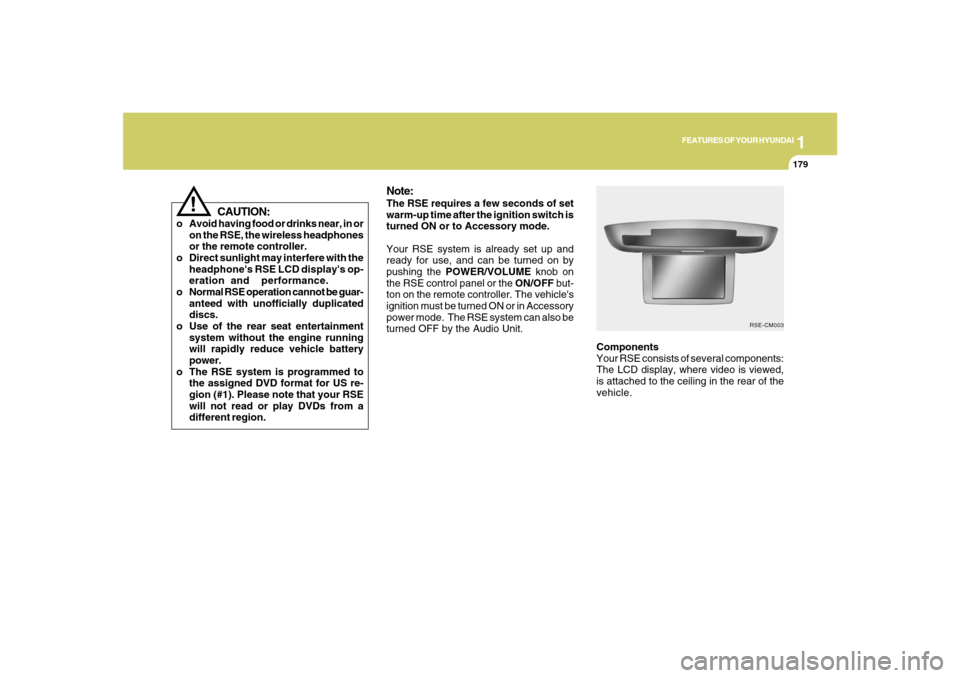
Components
Your RSE consists of several components:
The LCD display, where video is viewed,
is attached to the ceiling in the rear of the
vehicle.
Note:The RSE requires a few seconds of set
warm-up time after the ignition switch is
turned ON or to Accessory mode.
Your RSE system is already set up and
ready for use, and can be turned on by
pushing the POWER/VOLUME knob on
the RSE control panel or the ON/OFF but-
ton on the remote controller. The vehicle's
ignition must be turned ON or in Accessory
power mode. The RSE system can also be
turned OFF by the Audio Unit.
RSE-CM003
!
CAUTION:
o Avoid having food or drinks near, in or
on the RSE, the wireless headphones
or the remote controller.
o Direct sunlight may interfere with the
headphone's RSE LCD display's op-
eration and performance.
o Normal RSE operation cannot be guar-
anteed with unofficially duplicated
discs.
o Use of the rear seat entertainment
system without the engine running
will rapidly reduce vehicle battery
power.
o The RSE system is programmed to
the assigned DVD format for US re-
gion (#1). Please note that your RSE
will not read or play DVDs from a
different region.
Page 195 of 355
1
FEATURES OF YOUR HYUNDAI
183
FEATURES OF YOUR HYUNDAI
183183183183
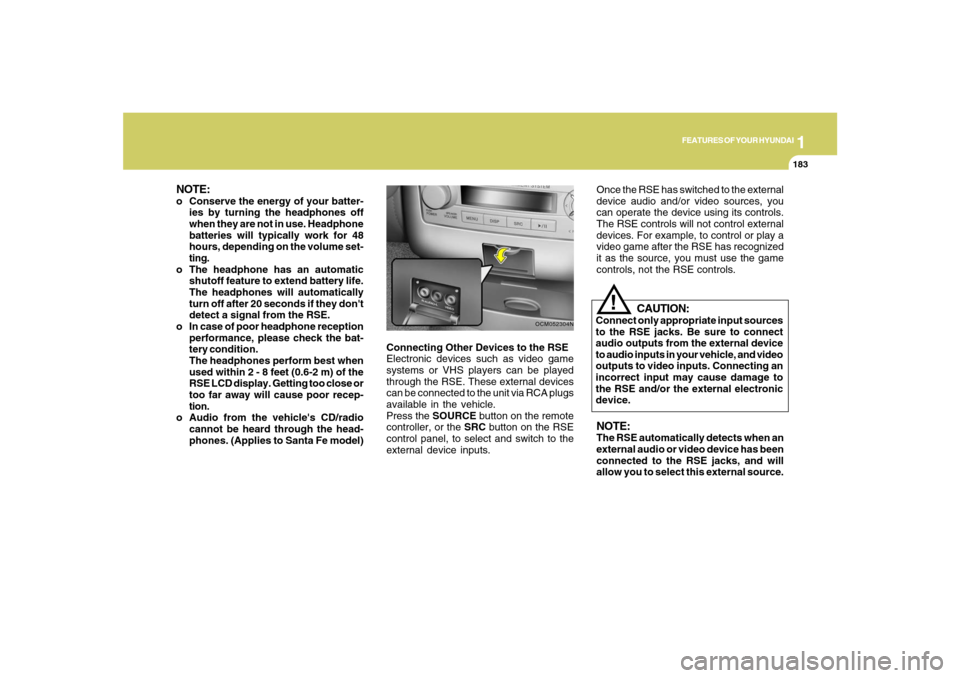
Connecting Other Devices to the RSE
Electronic devices such as video game
systems or VHS players can be played
through the RSE. These external devices
can be connected to the unit via RCA plugs
available in the vehicle.
Press the SOURCE button on the remote
controller, or the SRC button on the RSE
control panel, to select and switch to the
external device inputs.
OCM052304N
Once the RSE has switched to the external
device audio and/or video sources, you
can operate the device using its controls.
The RSE controls will not control external
devices. For example, to control or play a
video game after the RSE has recognized
it as the source, you must use the game
controls, not the RSE controls.NOTE:The RSE automatically detects when an
external audio or video device has been
connected to the RSE jacks, and will
allow you to select this external source.
CAUTION:
Connect only appropriate input sources
to the RSE jacks. Be sure to connect
audio outputs from the external device
to audio inputs in your vehicle, and video
outputs to video inputs. Connecting an
incorrect input may cause damage to
the RSE and/or the external electronic
device.
!
NOTE:o Conserve the energy of your batter-
ies by turning the headphones off
when they are not in use. Headphone
batteries will typically work for 48
hours, depending on the volume set-
ting.
o The headphone has an automatic
shutoff feature to extend battery life.
The headphones will automatically
turn off after 20 seconds if they don't
detect a signal from the RSE.
o In case of poor headphone reception
performance, please check the bat-
tery condition.
The headphones perform best when
used within 2 - 8 feet (0.6-2 m) of the
RSE LCD display. Getting too close or
too far away will cause poor recep-
tion.
o Audio from the vehicle's CD/radio
cannot be heard through the head-
phones. (Applies to Santa Fe model)