light Hyundai Santa Fe 2012 Repair Manual
[x] Cancel search | Manufacturer: HYUNDAI, Model Year: 2012, Model line: Santa Fe, Model: Hyundai Santa Fe 2012Pages: 419, PDF Size: 5.61 MB
Page 161 of 419
Features of your vehicle
82
4
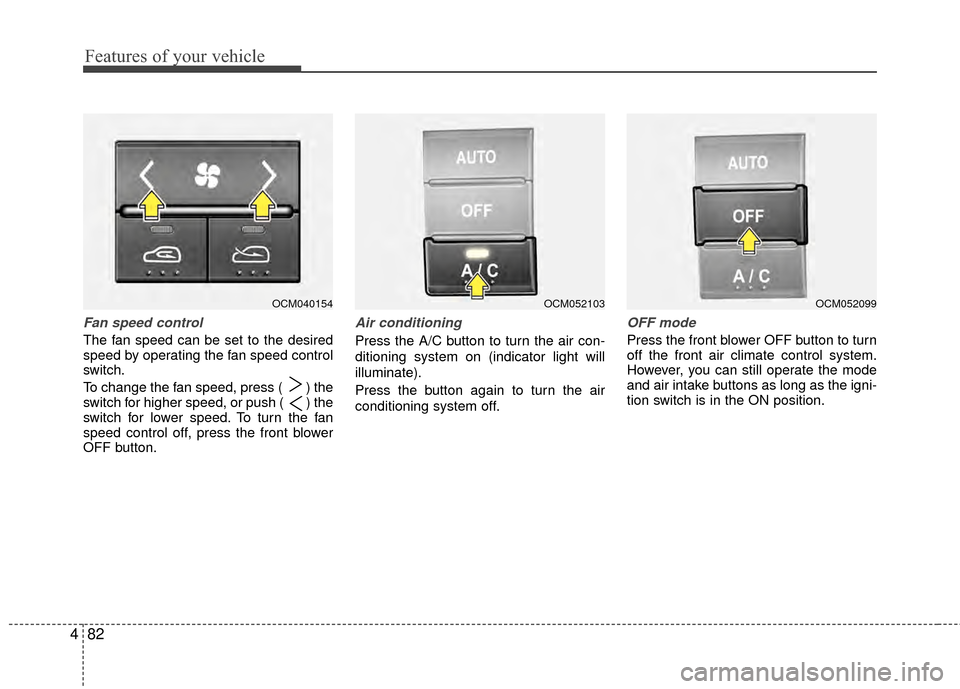
Fan speed control
The fan speed can be set to the desired
speed by operating the fan speed control
switch.
To change the fan speed, press ( ) the
switch for higher speed, or push ( ) the
switch for lower speed. To turn the fan
speed control off, press the front blower
OFF button.
Air conditioning
Press the A/C button to turn the air con-
ditioning system on (indicator light will
illuminate).
Press the button again to turn the air
conditioning system off.
OFF mode
Press the front blower OFF button to turn
off the front air climate control system.
However, you can still operate the mode
and air intake buttons as long as the igni-
tion switch is in the ON position.
OCM040154OCM052103OCM052099
Page 163 of 419

Features of your vehicle
84
4
✽
✽
NOTICE
• When using the air conditioning sys-
tem, monitor the temperature gauge
closely while driving up hills or in
heavy traffic when outside tempera-
tures are high. Air conditioning sys-
tem operation may cause engine over-
heating. Continue to use the blower
fan but turn the air conditioning sys-
tem off if the temperature gauge indi-
cates engine overheating.
• When opening the windows in humid weather air conditioning may create
water droplets inside the vehicle.
Since excessive water droplets may
cause damage to electrical equipment,
air conditioning should only be used
with the windows closed.
Air conditioning system operation tips
If the vehicle has been parked in direct
sunlight during hot weather, open the
windows for a short time to let the hot
air inside the vehicle escape.
Use air conditioning to reduce humidi- ty and moisture inside the vehicle on
rainy or humid days.
During air conditioning system opera- tion, you may occasionally notice a
slight change in engine speed as the
air conditioning compressor cycles.
This is a normal system operation
characteristic.
Use the air conditioning system every month only for a few minutes to ensure
maximum system performance. When using the air conditioning sys-
tem, you may notice clear water drip-
ping (or even puddling) on the ground
under the passenger side of the vehi-
cle. This is a normal system operation
characteristic.
Operating the air conditioning system in the recirculated air position provides
maximum cooling, however, continual
operation in this mode may cause the
air inside the vehicle to become stale.
During cooling operation, you may occasionally notice a misty air flow
because of rapid cooling and humid air
intake. This is a normal system opera-
tion characteristic.
Page 168 of 419
489
Features of your vehicle
D270000AUN
These compartments can be used to
store small items required by the driver
or passengers.
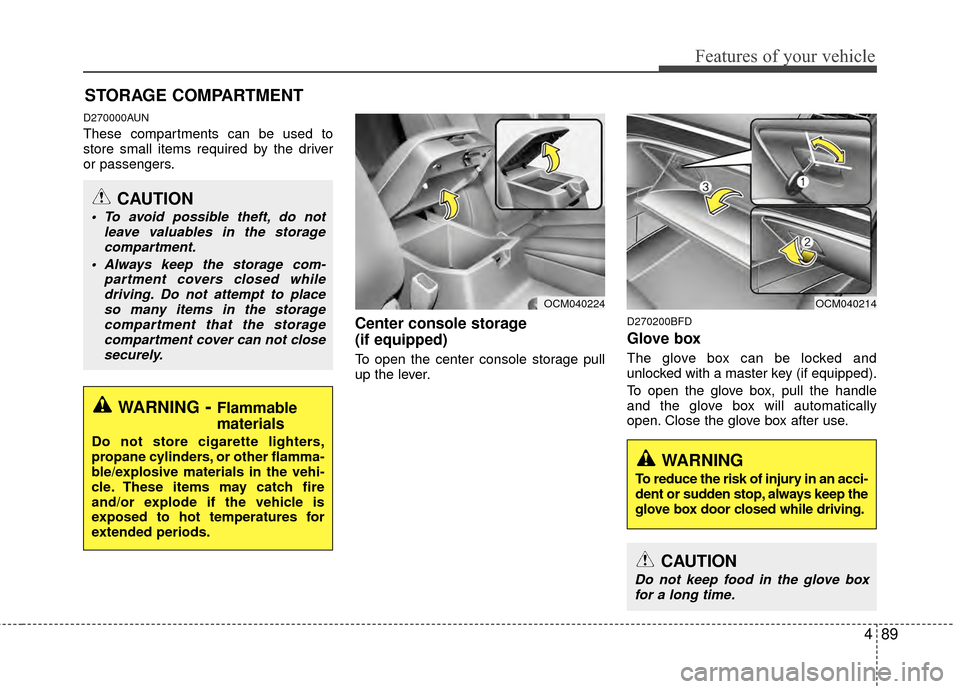
Center console storage
(if equipped)
To open the center console storage pull
up the lever.
D270200BFD
Glove box
The glove box can be locked and
unlocked with a master key (if equipped).
To open the glove box, pull the handle
and the glove box will automatically
open. Close the glove box after use.
STORAGE COMPARTMENT
WARNING- Flammable
materials
Do not store cigarette lighters,
propane cylinders, or other flamma-
ble/explosive materials in the vehi-
cle. These items may catch fire
and/or explode if the vehicle is
exposed to hot temperatures for
extended periods.
CAUTION
To avoid possible theft, do not
leave valuables in the storagecompartment.
Always keep the storage com- partment covers closed whiledriving. Do not attempt to placeso many items in the storagecompartment that the storagecompartment cover can not closesecurely.
OCM040224OCM040214
WARNING
To reduce the risk of injury in an acci-
dent or sudden stop, always keep the
glove box door closed while driving.
CAUTION
Do not keep food in the glove boxfor a long time.
Page 171 of 419
Features of your vehicle
92
4
INTERIOR FEATURES
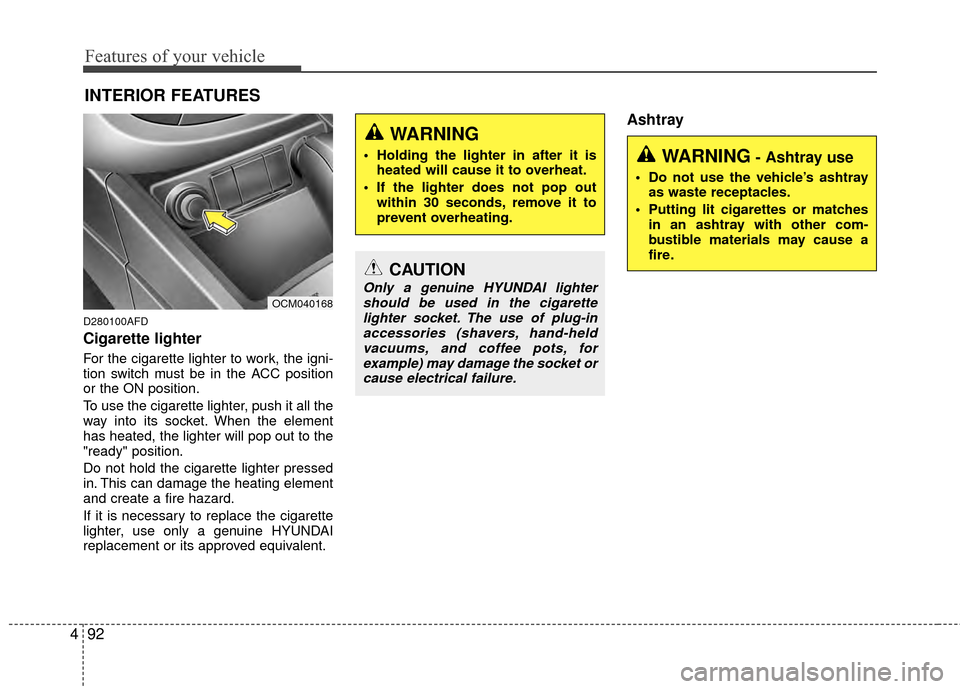
D280100AFD
Cigarette lighter
For the cigarette lighter to work, the igni-
tion switch must be in the ACC position
or the ON position.
To use the cigarette lighter, push it all the
way into its socket. When the element
has heated, the lighter will pop out to the
"ready" position.
Do not hold the cigarette lighter pressed
in. This can damage the heating element
and create a fire hazard.
If it is necessary to replace the cigarette
lighter, use only a genuine HYUNDAI
replacement or its approved equivalent.
Ashtray
OCM040168
CAUTION
Only a genuine HYUNDAI lighter
should be used in the cigarettelighter socket. The use of plug-inaccessories (shavers, hand-held vacuums, and coffee pots, forexample) may damage the socket orcause electrical failure.
WARNING- Ashtray use
Do not use the vehicle’s ashtray as waste receptacles.
Putting lit cigarettes or matches in an ashtray with other com-
bustible materials may cause a
fire.
WARNING
Holding the lighter in after it isheated will cause it to overheat.
If the lighter does not pop out within 30 seconds, remove it to
prevent overheating.
Page 172 of 419
493
Features of your vehicle
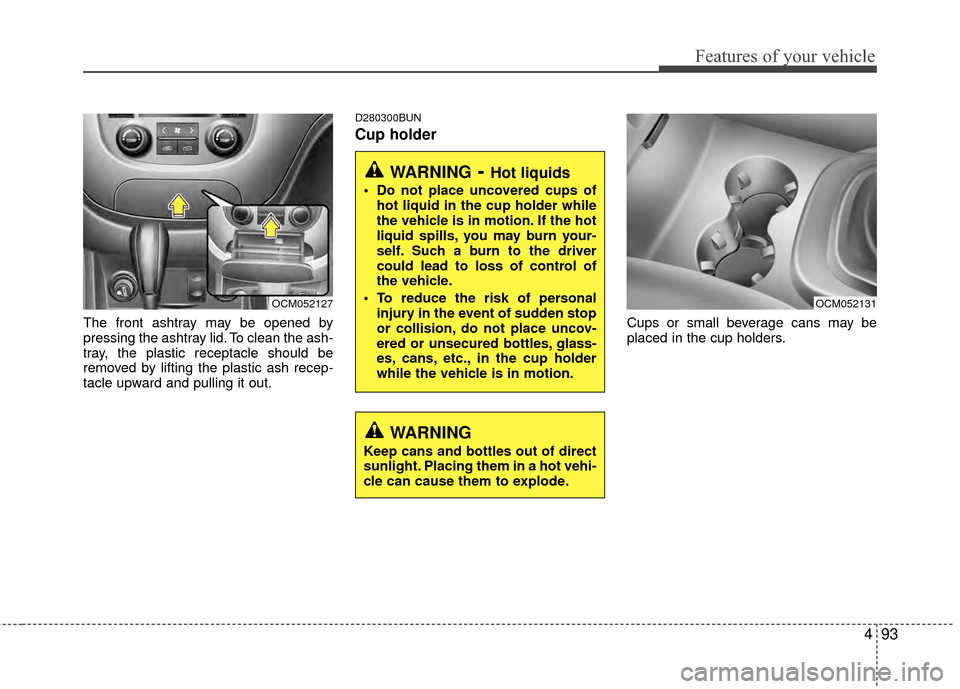
The front ashtray may be opened by
pressing the ashtray lid. To clean the ash-
tray, the plastic receptacle should be
removed by lifting the plastic ash recep-
tacle upward and pulling it out.
D280300BUN
Cup holder
Cups or small beverage cans may be
placed in the cup holders.
OCM052127
WARNING- Hot liquids
Do not place uncovered cups ofhot liquid in the cup holder while
the vehicle is in motion. If the hot
liquid spills, you may burn your-
self. Such a burn to the driver
could lead to loss of control of
the vehicle.
To reduce the risk of personal injury in the event of sudden stop
or collision, do not place uncov-
ered or unsecured bottles, glass-
es, cans, etc., in the cup holder
while the vehicle is in motion.
OCM052131
WARNING
Keep cans and bottles out of direct
sunlight. Placing them in a hot vehi-
cle can cause them to explode.
Page 173 of 419
Features of your vehicle
94
4
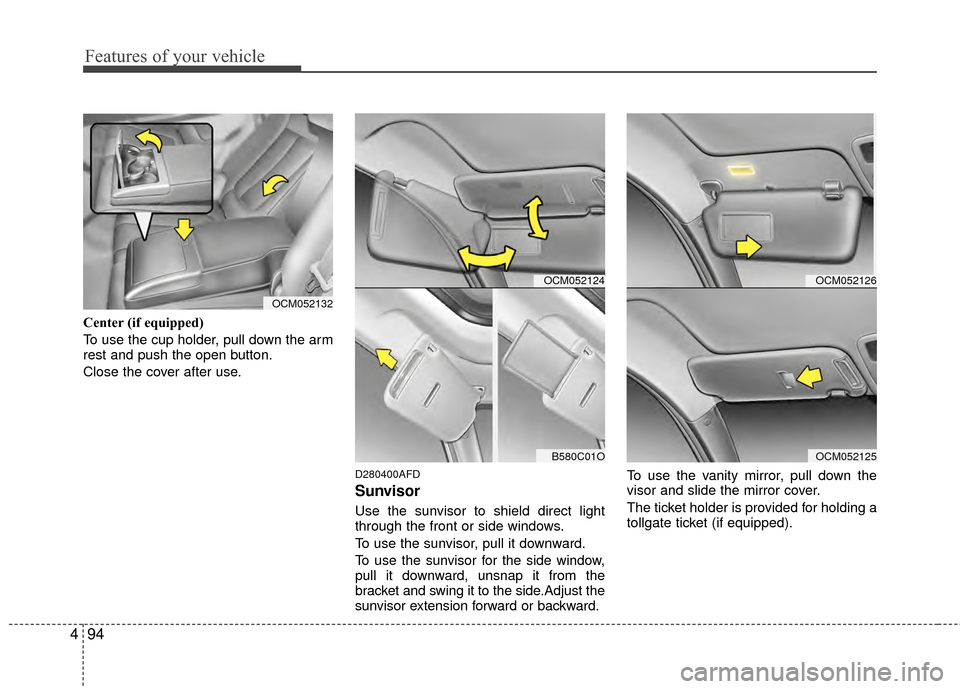
Center (if equipped)
To use the cup holder, pull down the arm
rest and push the open button.
Close the cover after use.
D280400AFD
Sunvisor
Use the sunvisor to shield direct light
through the front or side windows.
To use the sunvisor, pull it downward.
To use the sunvisor for the side window,
pull it downward, unsnap it from the
bracket and swing it to the side.Adjust the
sunvisor extension forward or backward. To use the vanity mirror, pull down the
visor and slide the mirror cover.
The ticket holder is provided for holding a
tollgate ticket (if equipped).
OCM052132
OCM052124
B580C01O
OCM052126
OCM052125
Page 193 of 419
Features of your vehicle
114
4
CD/AUX Selection Button
If an auxiliary device is connected, it
switches to the AUX mode from the
other mode to play the sound from the
auxiliary player. If the CD is loaded,
turns to CD mode, and if a device is
connected to AUX then it toggles
CD
➟AUX➟CD... when the button is
pressed each time (It will not turn to
AUX if the auxiliary device is not con-
nected). If no CD or auxiliary device is
connected, it displays "NO Media" for 3
seconds and returns to the previous
mode.
CD/AUX/RSE Selection Button If the auxiliary device is connected, it
switches to the AUX mode from the
other mode to play the sound from the
auxiliary player. If the CD is loaded,
turns to CD mode, and if a device is
connected to AUX and there is a CD in
the RSE then it toggles:
CD
➟AUX➟RSE➟CD... when the but-
ton is pressed each time (It will not turn
to AUX and RSE if the auxiliary device
is not connected and there is no CD in
the RSE). If no CD, and auxiliary device is not
connected, it displays "NO Media" for 3
seconds and returns to the previous
mode.
8. CD Indicator (CDP Only)
When car ignition switch is ACC or ON
and if the CD is loaded, this indicator is
lighted. If the CD is ejected the light is
turned off.
9. Folder Moving Button
Moves [FOLDER ] button child fold-
er of the current folder and displays the
first song in the folder. Press TUNE/
ENTER knob to move to the folder dis-
played. It will play the first song in the
folder.
Moves [CAT ], [PTY ], [FOLDER ] button parent folder and displays the
first song in the folder. Press
TUNE/ENTER knob to move to the
folder displayed.
10. Search/ENTER Button
Turn this button clockwise to display the
songs next to the currently played song.
Turn the button counterclockwise to dis-
play the songs before the currently
played song. Press the button to skip and
play the selected song.
11. SCAN Play Button
Plays first 10 seconds of each song in
the DISC. To cancel the mode, press the
button once again.
12. DISC Selection Button
[DISC ] Change Button changesdisc to the previous disc.
[DISC ] Change Button changes disc to the next disc.
13. CD LOAD Button
Push [LOAD] button to load CDs to avail-
able CDC deck (from 1~6). Push [LOAD]
button for more than 2 seconds to load
into all available decks. The last CD will
play. 10 seconds idle status will disable
loading process.
Page 201 of 419
Features of your vehicle
122
4
When using an iPod with the exclusive
cable: Connect the exclusive cable to the
multiple terminal in the lower center area
to the right hand side of the cigarette
lighter. When the iPod is connected, the
'iPod' icon will be displayed on the top left
corner of the display screen.
❈Exclusive cable : Allows radio system
and iPod to be integrated together.
1. INFO Selection Button
Displays the information of the file cur-
rently played in the order of TITLE
➟
ARTIST➟ALBUM➟NORMAL DISPLAY➟
TITLE➟... (Displays no information if the
file has no song information.)
2. Track Moving Button
Press the [TRACK ] button for less than 0.8 second to play from the begin-
ning of the song currently played.
Press the button for less than 0.8 sec-
ond and press it again within 1 second
to move and play the previous track.
Press the button for 0.8 second or
longer to play the song in reverse
direction in fast speed. Press the [SEEK ] button for less
than 0.8 second to move to the next
track. Press the button for 0.8 second
or longer to play the song in forward
direction in fast speed.
3. RANDOM Playback Button
Press the button for less than 0.8 second
to activate or deactivate the random play-
back of the songs within the current cat-
egory. Press the button for longer than
0.8 second to randomly play all songs in
the entire album of the iPod. Press the
button once again to cancel the mode.
4. REPEAT Button
Repeats the song currently played.
5. iPod Selection Button
If iPod is connected, the audio switches
to the iPod mode from the CD mode to
play the song files stored in the iPod. If no
CD and auxiliary device is connected, it
displays "NO Media" for 3 seconds and
returns to the previous mode.
6. Menu/Category Selection Button
The menu button(preset 6) allows you to
see what category you are currently in
the iPod. The menu button along with the
Search/ENTER button will allow you to
select from the following list:
Songs, Composers, Playlists, Artists,
Albums, Genres.
7. Search/ENTER Button
When you turn the button clockwise or
counterclockwise, it will scroll to various
categories: songs, composers, playlists,
artists, albums, genres.
When you press ENTER on a desired
category, you can scroll through the list
of items in that category by turning the
button clockwise, or counterclockwise.
If you want to listen to the song displayed
in the song category, press the button,
when you have arrived at an item you
want to select within a category press the
ENTER button. Then it will skip to the
selected song and begin to play.
Page 207 of 419
Features of your vehicle
128
4
RSE (Rear Seat Entertainment)
An auxiliary device must be connected
to, or a DVD loaded into the RSE unit in
rear seat area before the RSE/AUX but-
ton on the radio can be activated.
1. TRACK UP/DOWN Button
Push [TRACK ] button for less than
0.8 second to play from the beginning
of current song.
Push [TRACK ] button for less than 0.8 second and press again within 1
second to play the previous song.
Push [TRACK ] button for 0.8 sec- ond or longer to initiate reverse direc-
tion high speed sound search of cur-
rent song.
Push [SEEK ] button for less than 0.8 second to play the next song.
Push [SEEK ] button for 0.8 second or longer to initiate high speed sound
search of current song.
2. RSE Selection Button
When you press this button, the system
will switch to RSE mode and you will be
able to listen to the source played in the
RSE unit. (If RSE unit has no disc, can
not select)
3. RSE Hold and RSE Power Off
If you press and hold this button for less
than 0.8 second, the LED of the button
will light and RSE unit will be locked. If
you press and hold this button for more
than 0.8 second, RSE unit will be turned
off with a beep and [RSE] will disappear
from LCD.
4. Folder Moving Button
Press [FOLDER ] button to play theprevious track.
Press [CAT ] button to play the next track.
CAUTION IN USING
RSE DEVICE
When listening to the CD on the
H/UNIT in RSE, the mode cannot beconverted to USB on the H/UNIT and will be displayed on the LCD.
Page 218 of 419
4139
Features of your vehicle
D320000AEN
Important Safety Information
It is always important to operate your
vehicle in a safe manner and to avoid dis-
traction while driving. This manual pro-
vides information that will help you safely
operate your Rear Seat Entertainment
System (RSE). Please read it completely
before using the system.
This device complies with part 15 of
the FCC rules.
Operation is subject to the following two
conditions:
1. This device may not cause harmfulinterference, and
2. This device must accept any interfer- ence received, including interference
that may cause undesired operation.
Welcome
The Rear Seat Entertainment System is
a compact, built-in, easy-to-use enter-
tainment system designed to provide
family fun while you are on the road.
Enjoy great quality sound from the vehi-
cle speakers, or have a private, quiet lis-
tening with the wireless headphones.
The overhead display unit is mounted to
the ceiling in the rear passenger area of
the vehicle, allowing rear-seat passen-
gers to play DVD movies, video CDs or
music CDs. Users may also plug in a
game platform or VHS player into an aux-
iliary input to show the programs through
the RSE display. The RSE can also
access to the vehicle's front radio pro-
grams.
System Overview
Connections / Setup
Your Rear Seat Entertainment system
will play DVD movies, video CDs, music
CDs or music MP3 discs, and is
designed to make your time on the road
more enjoyable. Please follow these
instructions carefully to get the most out
of your RSE.
REAR SEAT ENTERTAINMENT SYSTEM (RSE) (IF EQUIPPED)
CAUTION
Avoid having food or drinks near, in or on the RSE, the wirelessheadphones or the remote con-troller.
Direct sunlight may interfere with the headphone's operation andperformance.
Normal RSE operation cannot be guaranteed with unofficiallyduplicated discs.
(Continued)
WARNING
Changes or modifications not
expressly approved by the party
responsible for compliance could
void the user's authority to operate
the equipment.