Port Hyundai Santa Fe 2013 Owner's Manual
[x] Cancel search | Manufacturer: HYUNDAI, Model Year: 2013, Model line: Santa Fe, Model: Hyundai Santa Fe 2013Pages: 711, PDF Size: 14.72 MB
Page 2 of 711
F2
Your Hyundai should not be modified in any way. Such modifications may adversely affect the per-
formance, safety or durability of your Hyundai and may, in addition, violate conditions of the limited
warranties covering the vehicle. Certain modifications may also be in violation of regulations estab-
lished by the Department of Transportation and other government agencies in your country.
Your vehicle is equipped with electronic fuel injection and other electronic components. It is possible
for an improperly installed/adjusted two-way radio or cellular telephone to adversely affect electronic
systems. For this reason, we recommend that you carefully follow the radio manufacturer's instruc-
tions or consult your Hyundai dealer for precautionary measures or special instructions if you choose
to install one of these devices.
CAUTION: MODIFICATIONS TO YOUR HYUNDAI
TWO-WAY RADIO OR CELLULAR TELEPHONE INSTALLATION
Page 7 of 711
Introduction
2 1
We want to help you get the greatest
possible driving pleasure from your
vehicle. Your Owner’s Manual can
assist you in many ways. We strong-
ly recommend that you read the
entire manual. In order to minimize
the chance of death or injury, you
must read the WARNING and CAU-
TION sections in the manual.
Illustrations complement the words
in this manual to best explain how to
enjoy your vehicle. By reading your
manual, you will learn about fea-
tures, important safety information,
and driving tips under various road
conditions.
The general layout of the manual is
provided in the Table of Contents.
Use the index when looking for a
specific area or subject; it has an
alphabetical listing of all information
in your manual.
Sections: This manual has eight sec-
tions plus an index. Each section
begins with a brief list of contents so
you can tell at a glance if that section
has the information you want.You will find various WARNINGS,
CAUTIONS, and NOTICES in this
manual. These were prepared to
enhance your personal safety. You
should carefully read and follow ALL
procedures and recommendations
provided in these WARNINGS, CAU-
TIONS and NOTICES.
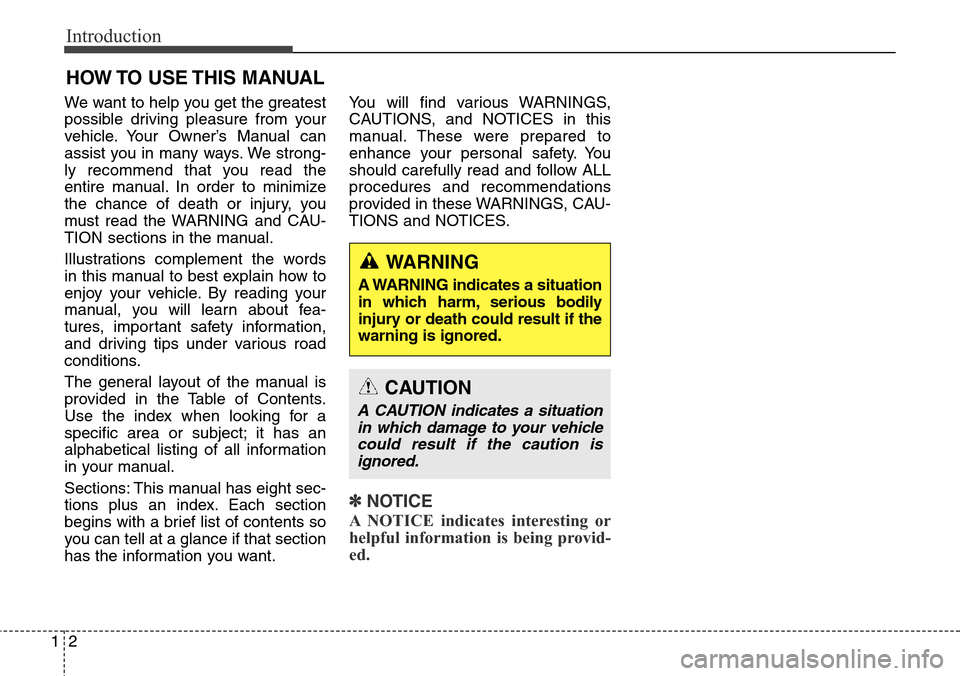
✽ NOTICE
A NOTICE indicates interesting or
helpful information is being provid-
ed.
HOW TO USE THIS MANUAL
WARNING
A WARNING indicates a situation
in which harm, serious bodily
injury or death could result if the
warning is ignored.
CAUTION
A CAUTION indicates a situation
in which damage to your vehicle
could result if the caution is
ignored.
Page 27 of 711
Safety features of your vehicle
2 3
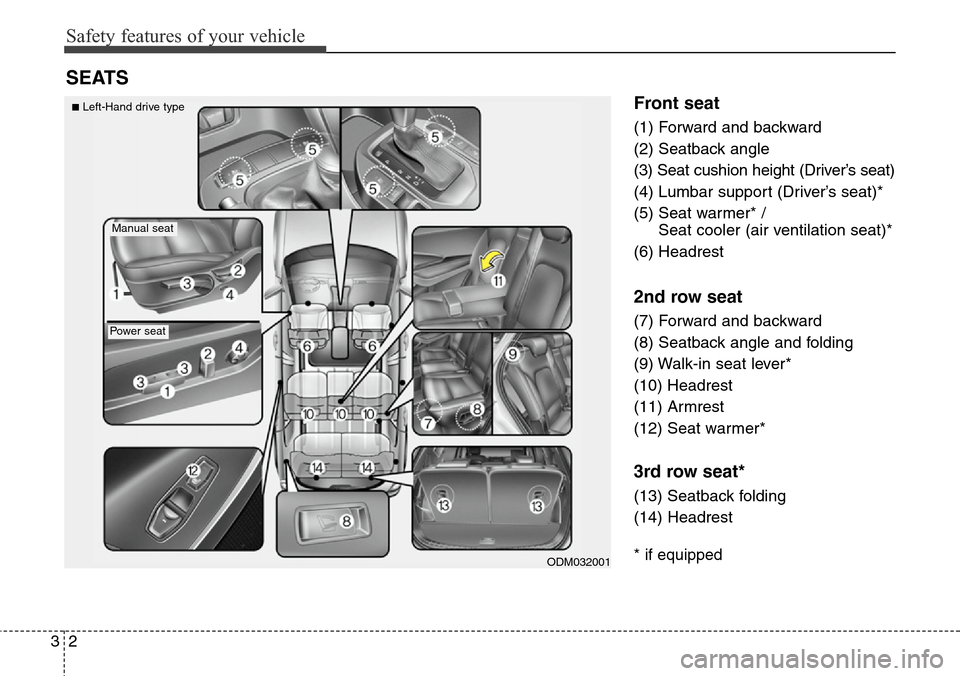
Front seat
(1) Forward and backward
(2) Seatback angle
(3) Seat cushion height (Driver’s seat)
(4) Lumbar support (Driver’s seat)*
(5) Seat warmer* /
Seat cooler (air ventilation seat)*
(6) Headrest
2nd row seat
(7) Forward and backward
(8) Seatback angle and folding
(9) Walk-in seat lever*
(10) Headrest
(11) Armrest
(12) Seat warmer*
3rd row seat*
(13) Seatback folding
(14) Headrest
* if equipped
SEATS
ODM032001
Manual seat
Power seat
■Left-Hand drive type
Page 28 of 711
33
Safety features of your vehicle
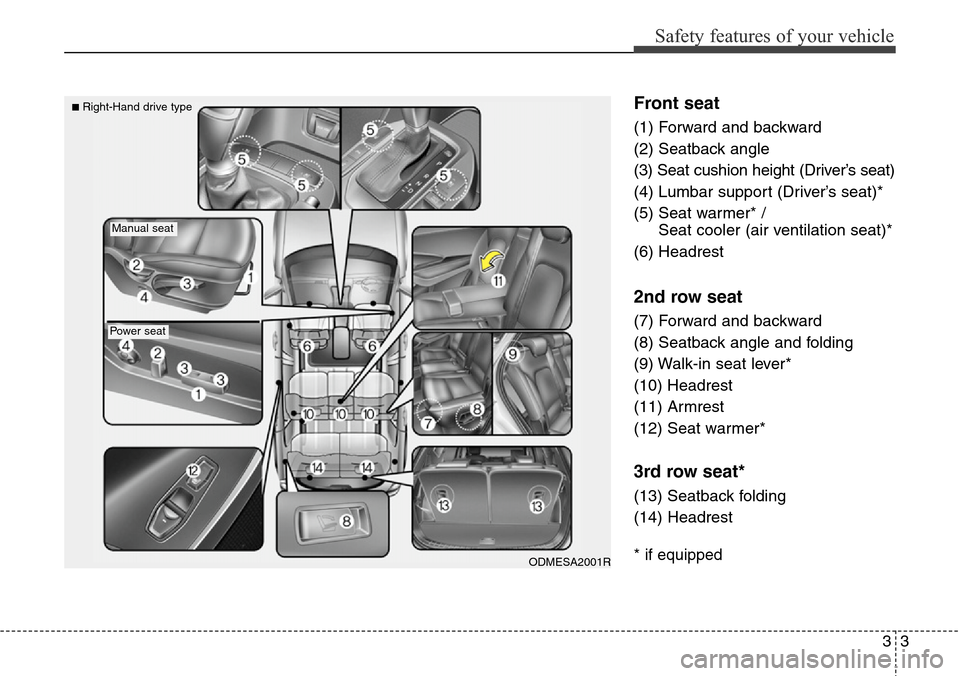
Front seat
(1) Forward and backward
(2) Seatback angle
(3) Seat cushion height (Driver’s seat)
(4) Lumbar support (Driver’s seat)*
(5) Seat warmer* /
Seat cooler (air ventilation seat)*
(6) Headrest
2nd row seat
(7) Forward and backward
(8) Seatback angle and folding
(9) Walk-in seat lever*
(10) Headrest
(11) Armrest
(12) Seat warmer*
3rd row seat*
(13) Seatback folding
(14) Headrest
* if equippedODMESA2001R
Manual seat
Power seat
■Right-Hand drive type
Page 29 of 711
Safety features of your vehicle
4 3
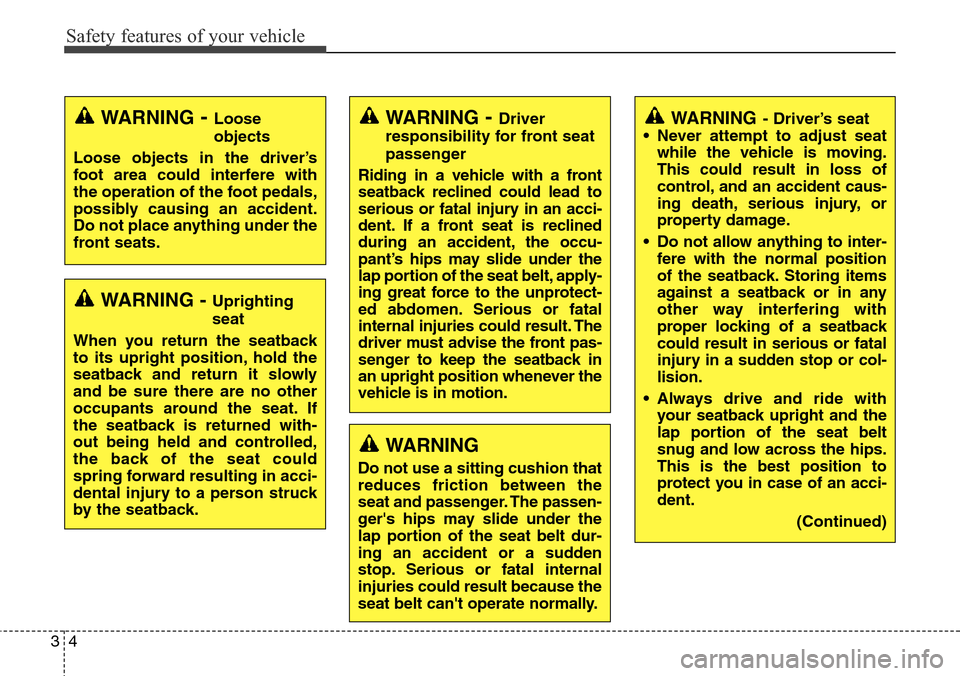
WARNING - Uprighting
seat
When you return the seatback
to its upright position, hold the
seatback and return it slowly
and be sure there are no other
occupants around the seat. If
the seatback is returned with-
out being held and controlled,
the back of the seat could
spring forward resulting in acci-
dental injury to a person struck
by the seatback.
WARNING- Loose
objects
Loose objects in the driver’s
foot area could interfere with
the operation of the foot pedals,
possibly causing an accident.
Do not place anything under the
front seats.WARNING- Driver
responsibility for front seat
passenger
Riding in a vehicle with a front
seatback reclined could lead to
serious or fatal injury in an acci-
dent. If a front seat is reclined
during an accident, the occu-
pant’s hips may slide under the
lap portion of the seat belt, apply-
ing great force to the unprotect-
ed abdomen. Serious or fatal
internal injuries could result. The
driver must advise the front pas-
senger to keep the seatback in
an upright position whenever the
vehicle is in motion.
WARNING
Do not use a sitting cushion that
reduces friction between the
seat and passenger. The passen-
ger's hips may slide under the
lap portion of the seat belt dur-
ing an accident or a sudden
stop. Serious or fatal internal
injuries could result because the
seat belt can't operate normally.
WARNING- Driver’s seat
• Never attempt to adjust seat
while the vehicle is moving.
This could result in loss of
control, and an accident caus-
ing death, serious injury, or
property damage.
• Do not allow anything to inter-
fere with the normal position
of the seatback. Storing items
against a seatback or in any
other way interfering with
proper locking of a seatback
could result in serious or fatal
injury in a sudden stop or col-
lision.
• Always drive and ride with
your seatback upright and the
lap portion of the seat belt
snug and low across the hips.
This is the best position to
protect you in case of an acci-
dent.
(Continued)
Page 31 of 711
Safety features of your vehicle
6 3
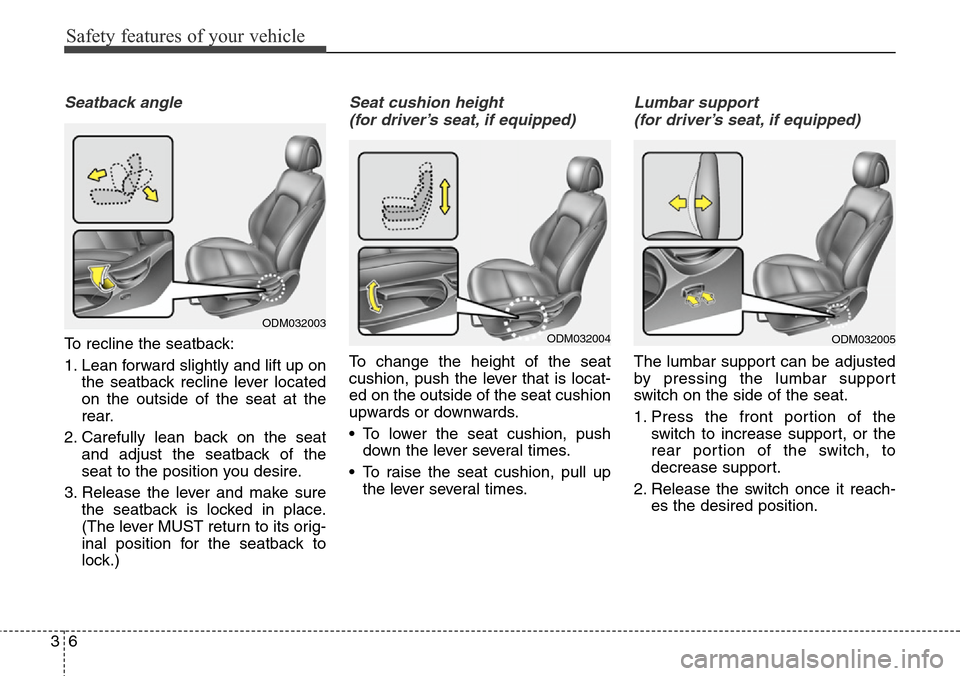
Seatback angle
To recline the seatback:
1. Lean forward slightly and lift up on
the seatback recline lever located
on the outside of the seat at the
rear.
2. Carefully lean back on the seat
and adjust the seatback of the
seat to the position you desire.
3. Release the lever and make sure
the seatback is locked in place.
(The lever MUST return to its orig-
inal position for the seatback to
lock.)
Seat cushion height
(for driver’s seat, if equipped)
To change the height of the seat
cushion, push the lever that is locat-
ed on the outside of the seat cushion
upwards or downwards.
• To lower the seat cushion, push
down the lever several times.
• To raise the seat cushion, pull up
the lever several times.
Lumbar support
(for driver’s seat, if equipped)
The lumbar support can be adjusted
by pressing the lumbar support
switch on the side of the seat.
1. Press the front portion of the
switch to increase support, or the
rear portion of the switch, to
decrease support.
2. Release the switch once it reach-
es the desired position.
ODM032003ODM032004ODM032005
Page 33 of 711
Safety features of your vehicle
8 3
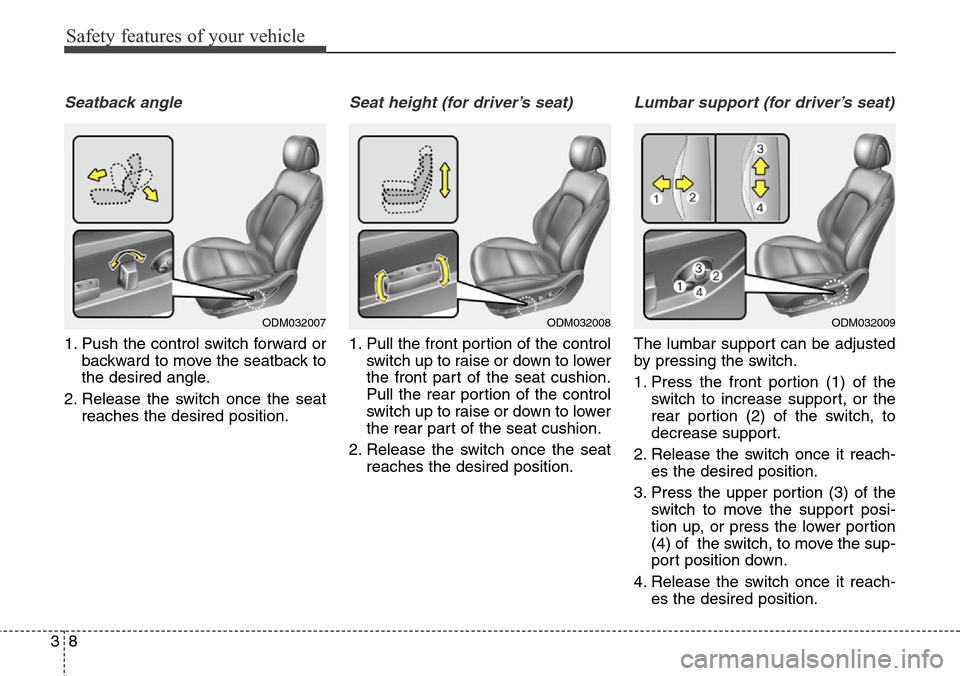
Seatback angle
1. Push the control switch forward or
backward to move the seatback to
the desired angle.
2. Release the switch once the seat
reaches the desired position.
Seat height (for driver’s seat)
1. Pull the front portion of the control
switch up to raise or down to lower
the front part of the seat cushion.
Pull the rear portion of the control
switch up to raise or down to lower
the rear part of the seat cushion.
2. Release the switch once the seat
reaches the desired position.
Lumbar support (for driver’s seat)
The lumbar support can be adjusted
by pressing the switch.
1. Press the front portion (1) of the
switch to increase support, or the
rear portion (2) of the switch, to
decrease support.
2. Release the switch once it reach-
es the desired position.
3. Press the upper portion (3) of the
switch to move the support posi-
tion up, or press the lower portion
(4) of the switch, to move the sup-
port position down.
4. Release the switch once it reach-
es the desired position.
ODM032007ODM032008ODM032009
Page 36 of 711
311
Safety features of your vehicle
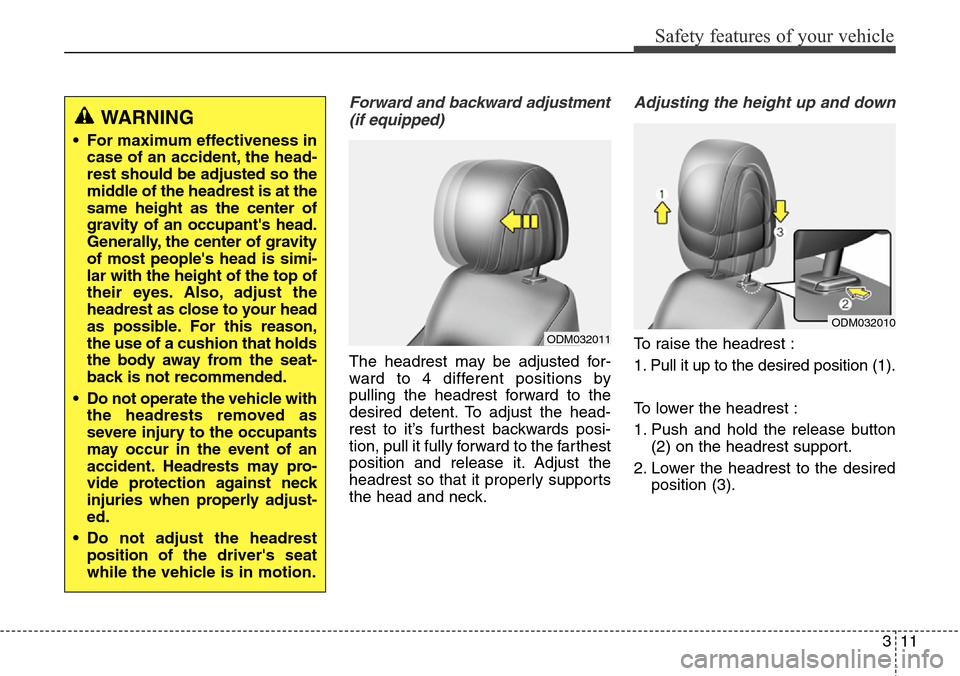
Forward and backward adjustment
(if equipped)
The headrest may be adjusted for-
ward to 4 different positions by
pulling the headrest forward to the
desired detent. To adjust the head-
rest to it’s furthest backwards posi-
tion, pull it fully forward to the farthest
position and release it. Adjust the
headrest so that it properly supports
the head and neck.
Adjusting the height up and down
To raise the headrest :
1. Pull it up to the desired position (1).
To lower the headrest :
1. Push and hold the release button
(2) on the headrest support.
2. Lower the headrest to the desired
position (3).
WARNING
• For maximum effectiveness in
case of an accident, the head-
rest should be adjusted so the
middle of the headrest is at the
same height as the center of
gravity of an occupant's head.
Generally, the center of gravity
of most people's head is simi-
lar with the height of the top of
their eyes. Also, adjust the
headrest as close to your head
as possible. For this reason,
the use of a cushion that holds
the body away from the seat-
back is not recommended.
• Do not operate the vehicle with
the headrests removed as
severe injury to the occupants
may occur in the event of an
accident. Headrests may pro-
vide protection against neck
injuries when properly adjust-
ed.
• Do not adjust the headrest
position of the driver's seat
while the vehicle is in motion.
ODM032011
ODM032010
Page 48 of 711

323
Safety features of your vehicle
Adjusting the height up and down
To raise the headrest :
1. Pull it up to the desired position
(1).
To lower the headrest :
1. Push and hold the release button
(2) on the headrest support
2. Lower the headrest to the desired
position (3).
Removal and installation
To remove the headrest :
1. Raise it as far as it can go.
2. Press the release button (1) while
pulling upward (2).
To reinstall the headrest :
1. Put the headrest poles (3) into the
holes while pressing the release
button (1).
2. Adjust the headrest to the appro-
priate height.
ODM032023ODM032024
(Continued)
• Do not operate the vehicle
with the headrests removed.
Severe injury to an occupant
may occur in the event of an
accident. Headrests may pro-
vide protection against severe
neck injuries when properly
adjusted.
CAUTION
When there is no occupant in
the rear seats, adjust the height
of the headrest to the lowest
position. The rear seat headrest
can reduce the visibility of the
rear area.
Page 53 of 711

Safety features of your vehicle
28 3
If the driver's seat belt is not fastened
when the ignition switch is turned ON
or if it is unfastened after the ignition
switch is ON, the seat belt warning
chime will sound for approximately 6
seconds. At this time, if the seat belt
is fastened, the chime will stop at
once. (if equipped)Ty p e B
As a reminder to the driver, the dri-
ver’s seat belt warning lights will illu-
minate for approximately 6 seconds
each time you turn the ignition switch
ON regardless of belt fastening.
If the driver’s seat belt is not fastened
when the ignition switch is turned ON
or if it is disconnected after the igni-
tion switch is turned ON, the seat
belt warning light will illuminate until
the belt is fastened.
If you continue not to fasten the seat
belt and you drive over 9 km/h, the
illuminated warning light will start to
blink until you drive under 6 km/h.
If you continue not to fasten the seat
belt and you drive over 20 km/h (12
mph) the seat belt warning chime will
sound for approximately 100 sec-
onds and the corresponding warning
light will blink.Lap/shoulder belt
To fasten your seat belt:
To fasten your seat belt, pull it out of
the retractor and insert the metal tab
(1) into the buckle (2). There will be
an audible "click" when the tab locks
into the buckle.
The seat belt automatically adjusts to
the proper length only after the lap
belt portion is adjusted manually so
that it fits snugly around your hips. If
you lean forward in a slow, easy
motion, the belt will extend and let
you move around. If there is a sud-
den stop or impact, however, the belt
will lock into position. It will also lock
if you try to lean forward too quickly.
B180A01NF
1
2