Radio Hyundai Santa Fe 2014 Owner's Manual
[x] Cancel search | Manufacturer: HYUNDAI, Model Year: 2014, Model line: Santa Fe, Model: Hyundai Santa Fe 2014Pages: 711, PDF Size: 14.72 MB
Page 2 of 711
F2
Your Hyundai should not be modified in any way. Such modifications may adversely affect the per-
formance, safety or durability of your Hyundai and may, in addition, violate conditions of the limited
warranties covering the vehicle. Certain modifications may also be in violation of regulations estab-
lished by the Department of Transportation and other government agencies in your country.
Your vehicle is equipped with electronic fuel injection and other electronic components. It is possible
for an improperly installed/adjusted two-way radio or cellular telephone to adversely affect electronic
systems. For this reason, we recommend that you carefully follow the radio manufacturer's instruc-
tions or consult your Hyundai dealer for precautionary measures or special instructions if you choose
to install one of these devices.
CAUTION: MODIFICATIONS TO YOUR HYUNDAI
TWO-WAY RADIO OR CELLULAR TELEPHONE INSTALLATION
Page 111 of 711
Features of your vehicle
10 4
Transmitter precautions
✽NOTICE
The transmitter will not work if any
of following occur:
• The ignition key is in ignition
switch.
- You exceed the operating dis-
tance limit (about 30 m [90 feet]).
- The battery in the transmitter is
weak.
- Other vehicles or objects may be
blocking the signal.
- The weather is extremely cold.
- The transmitter is close to a
radio transmitter such as a radio
station or an airport which can
interfere with normal operation
of the transmitter.
When the transmitter does not work
correctly, open and close the door
with the ignition key. If you have a
problem with the transmitter, we rec-
ommend that you contact an author-
ized HYUNDAI dealer.
(Continued)(Continued)
• If the transmitter is in close prox-
imity to your cell phone or smart
phone, the signal from the trans-
mitter could be blocked by normal
operation of your cell phone or
smart phone. This is especially
important when the phone is
active such as making call, receiv-
ing calls, text messaging, and/or
sending/ receiving emails. Avoid
placing the transmitter and your
cell phone or smart phone in the
same pants or jacket pocket and
maintain adequate distance
between the two devices.
CAUTION
Keep the transmitter away from
water or any liquid. If the key-
less entry system is inoperative
due to exposure to water or liq-
uids, it will not be covered by
your manufacturer vehicle war-
ranty.
CAUTION
Changes or modifications not
expressly approved by the party
responsible for compliance
could void the user’s authority
to operate the equipment. If the
keyless entry system is inopera-
tive due to changes or modifica-
tions not expressly approved by
the party responsible for com-
pliance, it will not be covered by
your manufacturer’s vehicle
warranty.
CAUTION
Keep the transmitter away from
electromagnetic materials that
blocks electromagnetic waves
to the key surface.
Page 115 of 711
Features of your vehicle
14 4
Unlocking
1. Carry the smart key.
2. Press the button of the front out-
side door handle.
3. All doors will unlock and the hazard
warning lights will blink twice. Also,
the outside rearview mirror will auto-
matically unfold when the outside
rearview mirror folding switch is in
the AUTO position (if equipped).
✽NOTICE
• The button will only operate when
the smart key is within 0.7 m (28
in.) from the outside door handle.
• When the smart key is recognized
in the area of 0.7 m (28 in.) from
the front outside door handle, other
people can also open the doors.
• After unlocking all doors, the
doors will lock automatically
unless a door is opened.
Tailgate unlocking
1.Carry the smart key.
2.Press the tailgate handle switch.
3.The tailgate will unlock.
✽NOTICE
• Once the tailgate is opened and
then closed, the tailgate will lock
automatically.
• The button will only operate when
the smart key is within 0.7 m (28
in.) from the tailgate handle.
Smart key precautions
✽NOTICE
• If, for some reason, you happen to
lose your smart key, you will not be
able to start the engine. Tow the
vehicle, if necessary, and we rec-
ommend that you contact an
authorized HYUNDAI dealer.
• A maximum of 2 smart keys can be
registered to a single vehicle. If you
lose a smart key, we recommend
that you take the vehicle and key to
your authorized HYUNDAI dealer
to protect it from potential theft.
• The smart key will not work if any
of the following occurs:
- The smart key is close to a radio
transmitter such as a radio sta-
tion or an airport which can
interfere with normal operation
of the smart key.
- The smart key is near a mobile
two-way radio system or a cellu-
lar phone.
- Another vehicle’s smart key is
being operated close to your
vehicle.
(Continued)
Page 292 of 711
4191
Features of your vehicle
Audio remote control
(if equipped)
❈ The actual feature in the vehicle may differ
from the illustration.
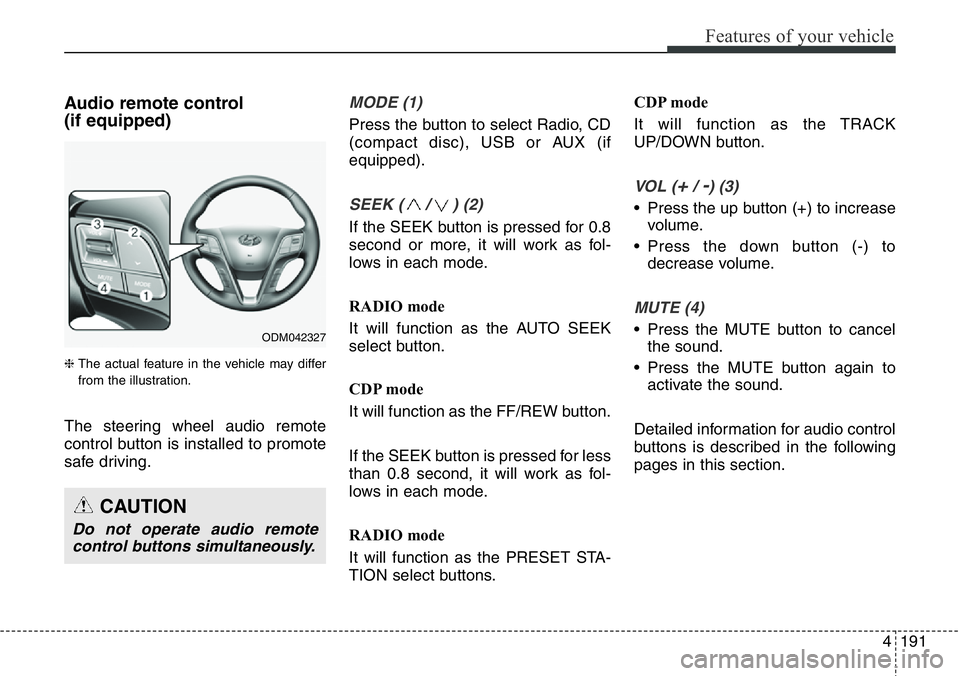
The steering wheel audio remote
control button is installed to promote
safe driving.
MODE (1)
Press the button to select Radio, CD
(compact disc), USB or AUX (if
equipped).
SEEK ( / ) (2)
If the SEEK button is pressed for 0.8
second or more, it will work as fol-
lows in each mode.
RADIO mode
It will function as the AUTO SEEK
select button.
CDP mode
It will function as the FF/REW button.
If the SEEK button is pressed for less
than 0.8 second, it will work as fol-
lows in each mode.
RADIO mode
It will function as the PRESET STA-
TION select buttons.CDP mode
It will function as the TRACK
UP/DOWN button.
VOL (+/ -) (3)
• Press the up button (+) to increase
volume.
• Press the down button (-) to
decrease volume.
MUTE (4)
• Press the MUTE button to cancel
the sound.
• Press the MUTE button again to
activate the sound.
Detailed information for audio control
buttons is described in the following
pages in this section.
CAUTION
Do not operate audio remote
control buttons simultaneously.
ODM042327
Page 293 of 711
Features of your vehicle
192 4
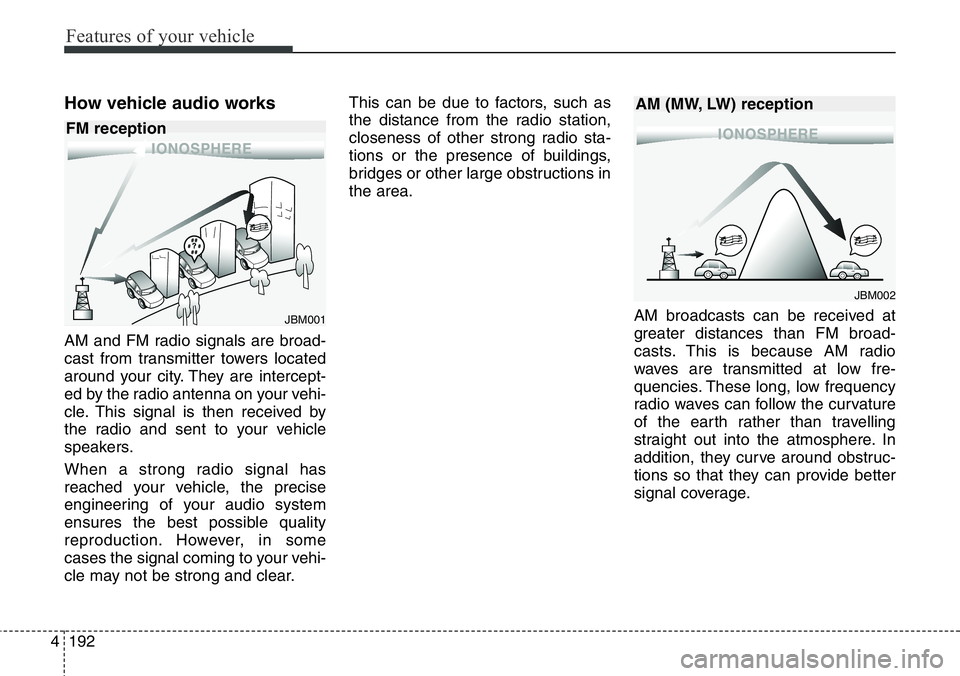
How vehicle audio works
AM and FM radio signals are broad-
cast from transmitter towers located
around your city. They are intercept-
ed by the radio antenna on your vehi-
cle. This signal is then received by
the radio and sent to your vehicle
speakers.
When a strong radio signal has
reached your vehicle, the precise
engineering of your audio system
ensures the best possible quality
reproduction. However, in some
cases the signal coming to your vehi-
cle may not be strong and clear.This can be due to factors, such as
the distance from the radio station,
closeness of other strong radio sta-
tions or the presence of buildings,
bridges or other large obstructions in
the area.
AM broadcasts can be received at
greater distances than FM broad-
casts. This is because AM radio
waves are transmitted at low fre-
quencies. These long, low frequency
radio waves can follow the curvature
of the earth rather than travelling
straight out into the atmosphere. In
addition, they curve around obstruc-
tions so that they can provide better
signal coverage.
JBM001
JBM002
FM receptionAM (MW, LW) reception
Page 294 of 711
4193
Features of your vehicle
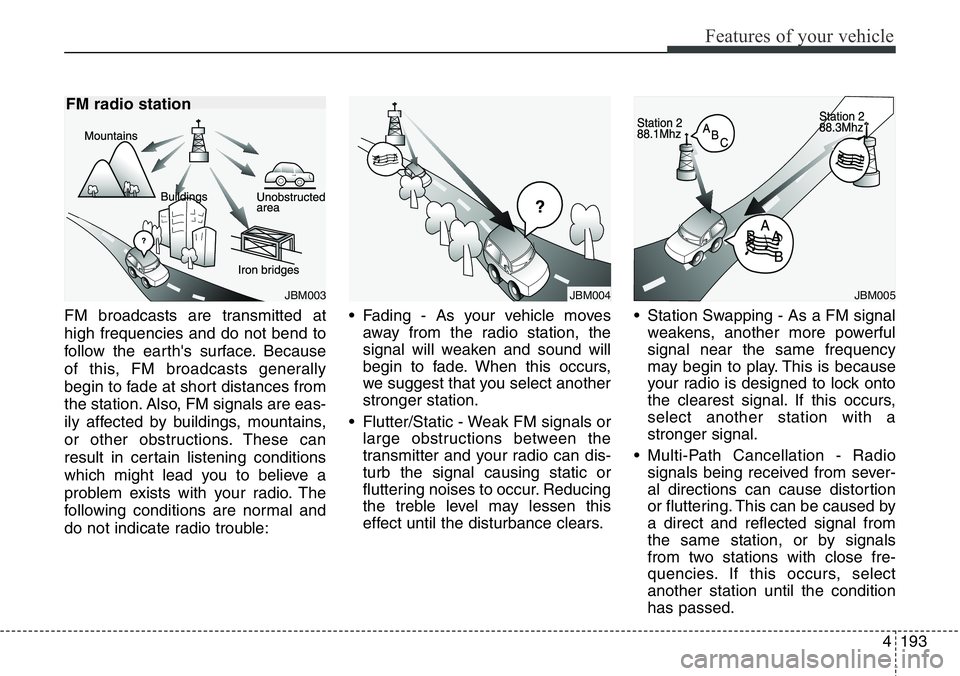
FM broadcasts are transmitted at
high frequencies and do not bend to
follow the earth's surface. Because
of this, FM broadcasts generally
begin to fade at short distances from
the station. Also, FM signals are eas-
ily affected by buildings, mountains,
or other obstructions. These can
result in certain listening conditions
which might lead you to believe a
problem exists with your radio. The
following conditions are normal and
do not indicate radio trouble:• Fading - As your vehicle moves
away from the radio station, the
signal will weaken and sound will
begin to fade. When this occurs,
we suggest that you select another
stronger station.
• Flutter/Static - Weak FM signals or
large obstructions between the
transmitter and your radio can dis-
turb the signal causing static or
fluttering noises to occur. Reducing
the treble level may lessen this
effect until the disturbance clears.• Station Swapping - As a FM signal
weakens, another more powerful
signal near the same frequency
may begin to play. This is because
your radio is designed to lock onto
the clearest signal. If this occurs,
select another station with a
stronger signal.
• Multi-Path Cancellation - Radio
signals being received from sever-
al directions can cause distortion
or fluttering. This can be caused by
a direct and reflected signal from
the same station, or by signals
from two stations with close fre-
quencies. If this occurs, select
another station until the condition
has passed.
JBM004JBM005JBM003
FM radio station
Page 295 of 711
Features of your vehicle
194 4
Using a cellular phone or a two-
way radio
When a cellular phone is used inside
the vehicle, noise may be produced
from the audio system. This does not
mean that something is wrong with
the audio equipment. In such a case,
use the cellular phone at a place as
far as possible from the audio equip-
ment.
Caring for disc
• If the temperature inside the car is
too high, open the car windows to
ventilate before using the system.
• It is illegal to copy and use
MP3/WMA files without permis-
sion. Use CDs that are created
only by lawful means.
• Do not apply volatile agents, such
as benzene and thinner, normal
cleaners and magnetic sprays
made for analogue disc onto CDs.
• To prevent the disc surface from
getting damaged, hold CDs by the
edges or the center hole only.
• Clean the disc surface with a piece
of soft cloth before playback (wipe
it from the center to the outside
edge).
• Do not damage the disc surface or
attach pieces of sticky tape or
paper.
• Make certain only CDs are insert-
ed into the CD player (Do not insert
more than one CD at a time).
• Keep CDs in their cases after use
to protect them from scratches or
dirt.
CAUTION
When using a communication
system such as a cellular phone
or a radio set inside the vehicle,
a separate external antenna
must be fitted. When a cellular
phone or a radio set is used
with an internal antenna alone,
it may interfere with the vehi-
cle's electrical system and
adversely affect safe operation
of the vehicle.
WARNING
Do not use a cellular phone
while driving. Stop at a safe
location to use a cellular phone.
Page 299 of 711
Features of your vehicle
198 4
✽NOTICE - USING THE USB
DEVICE
• To use an external USB device,
make sure the device is not con-
nected when starting up the vehi-
cle. Connect the device after start-
ing up.
• If you start the engine when the
USB device is connected, it may
damage the USB device. (USB
flashdrives are very sensitive to
electric shock.)
• If the engine is started up or
turned off while the external USB
device is connected, the external
USB device may not work.
• The System may not play inau-
thentic MP3 or WMA files.
1) It can only play MP3 files with
the compression rate between
8Kbps ~ 320Kbps.
2) It can only play WMA music
files with the compression rate
between 8Kbps ~ 320Kbps.
• Take precautions for static elec-
tricity when connecting or discon-
necting the external USB device.
• An encrypted MP3 PLAYER is
not recognizable.
(Continued)(Continued)
• Depending on the condition of the
external USB device, the connect-
ed external USB device can be
unrecognizable.
• When the formatted byte/sector
setting of External USB device is
not either 512BYTE or
2048BYTE, then the device will
not be recognized.
• Use only a USB device formatted
to FAT 12/16/32.
• USB devices without USB I/F
authentication may not be recog-
nizable.
• Make sure the USB connection
terminal does not come in contact
with the human body or other
objects.
• If you repeatedly connect or dis-
connect the USB device in a short
period of time, it may break the
device.
• You may hear a strange noise
when connecting or disconnecting
a USB device.
(Continued)(Continued)
• If you disconnect the external USB
device during playback in USB
mode, the external USB device can
be damaged or may malfunction.
Therefore, disconnect the external
USB device when the audio is
turned off or in another mode.
(e.g, Radio, CD)
• Depending on the type and capac-
ity of the external USB device or
the type of the files stored in the
device, there is a difference in the
time taken for recognition of the
device.
• Do not use the USB device for pur-
poses other than playing music
files.
• Playing videos through the USB is
not supported.
• Use of USB accessories such as
rechargers or heaters using USB
I/F may lower performance or
cause trouble.
(Continued)
Page 304 of 711
4203
Features of your vehicle
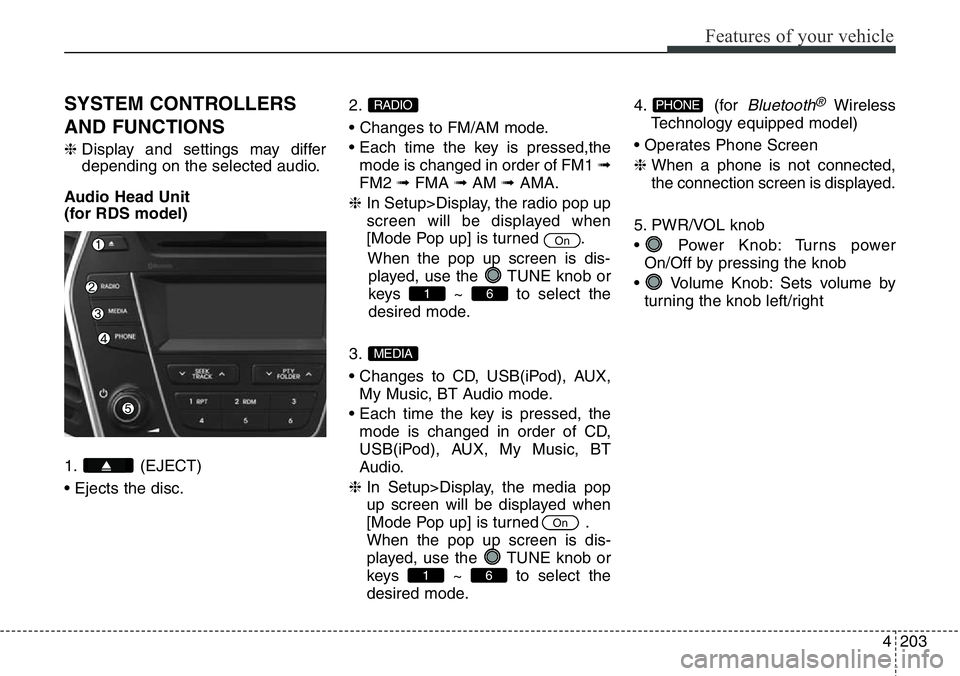
SYSTEM CONTROLLERS
AND FUNCTIONS
❈Display and settings may differ
depending on the selected audio.
Audio Head Unit
(for RDS model)
1. (EJECT)
• Ejects the disc.2.
• Changes to FM/AM mode.
• Each time the key is pressed,the
mode is changed in order of FM1 ➟
FM2 ➟FMA ➟AM ➟AMA.
❈ In Setup>Display, the radio pop up
screen will be displayed when
[Mode Pop up] is turned .
When the pop up screen is dis-
played, use the TUNE knob or
keys ~ to select the
desired mode.
3.
• Changes to CD, USB(iPod), AUX,
My Music, BT Audio mode.
• Each time the key is pressed, the
mode is changed in order of CD,
USB(iPod), AUX, My Music, BT
Audio.
❈ In Setup>Display, the media pop
up screen will be displayed when
[Mode Pop up] is turned .
When the pop up screen is dis-
played, use the TUNE knob or
keys ~ to select the
desired mode.4. (for
Bluetooth®Wireless
Technology equipped model)
• Operates Phone Screen
❈ When a phone is not connected,
the connection screen is displayed.
5. PWR/VOL knob
• Power Knob: Turns power
On/Off by pressing the knob
• Volume Knob: Sets volume by
turning the knob left/rightPHONE
61
On
MEDIA
61
On
RADIO
Page 305 of 711
Features of your vehicle
204 4
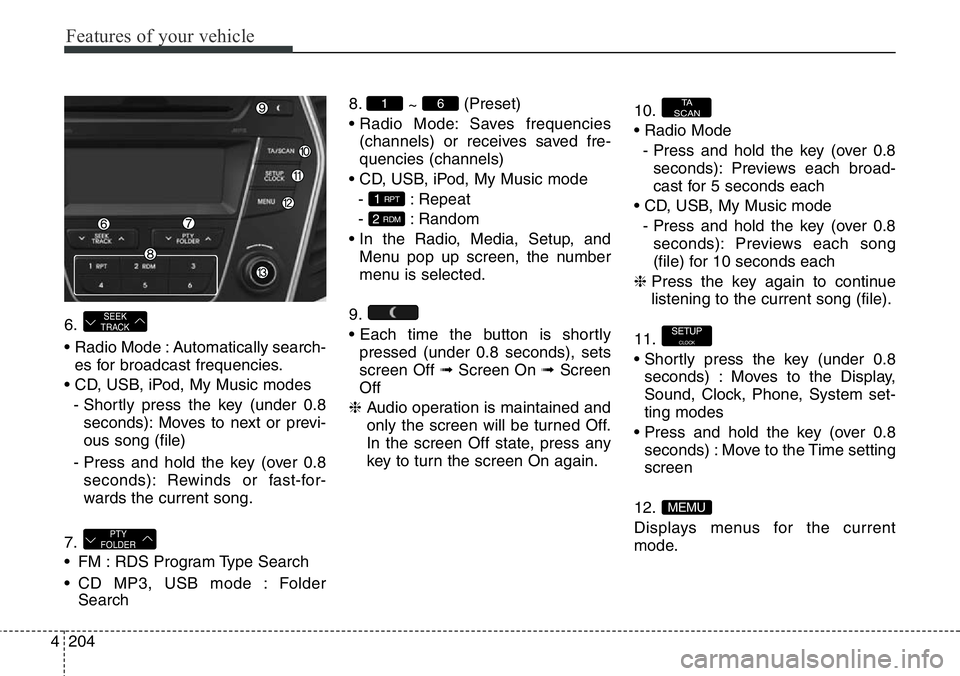
6.
• Radio Mode : Automatically search-
es for broadcast frequencies.
• CD, USB, iPod, My Music modes
- Shortly press the key (under 0.8
seconds): Moves to next or previ-
ous song (file)
- Press and hold the key (over 0.8
seconds): Rewinds or fast-for-
wards the current song.
7.
• FM : RDS Program Type Search
• CD MP3, USB mode : Folder
Search8.
~ (Preset)
• Radio Mode: Saves frequencies
(channels) or receives saved fre-
quencies (channels)
• CD, USB, iPod, My Music mode
- : Repeat
- : Random
• In the Radio, Media, Setup, and
Menu pop up screen, the number
menu is selected.
9.
• Each time the button is shortly
pressed (under 0.8 seconds), sets
screen Off ➟Screen On ➟Screen
Off
❈ Audio operation is maintained and
only the screen will be turned Off.
In the screen Off state, press any
key to turn the screen On again.10.
• Radio Mode
- Press and hold the key (over 0.8
seconds): Previews each broad-
cast for 5 seconds each
• CD, USB, My Music mode
- Press and hold the key (over 0.8
seconds): Previews each song
(file) for 10 seconds each
❈ Press the key again to continue
listening to the current song (file).
11.
• Shortly press the key (under 0.8
seconds) : Moves to the Display,
Sound, Clock, Phone, System set-
ting modes
• Press and hold the key (over 0.8
seconds) : Move to the Time setting
screen
12.
Displays menus for the current
mode.
MEMU
SETUPCLOCK
TA
SCAN
2 RDM
1 RPT
61
PTY
FOLDER
SEEK
TRACK