phone Hyundai Santa Fe 2016 Navigation Manual
[x] Cancel search | Manufacturer: HYUNDAI, Model Year: 2016, Model line: Santa Fe, Model: Hyundai Santa Fe 2016Pages: 66, PDF Size: 4.46 MB
Page 39 of 66
Understanding Bluetooth
wireless technology
Bluetooth wireless technology establish-
es a wireless link between two devices,
such as your phone and the unit.
The first time you use two devices
together you must connect them by
establishing a relationship using a PIN
code. After the initial connecting, the
two devices can connect automatically
each time you turn them on.
Note
• There may be restrictions on using
Bluetooth technology in some loca-
tions.
• Due to the variety of Bluetooth phones
and their firmware version, your device
may respond differently when per-
forming over Bluetooth.
• As difference in functional operation
by model is mainly resulted from fea-
ture of a hands-free phone, consult
manufacturer of a phone if you have
any question.
• You can check the Bluetooth phone
compatibility list on the web-site
(http://www.navigation.com/hyundai).
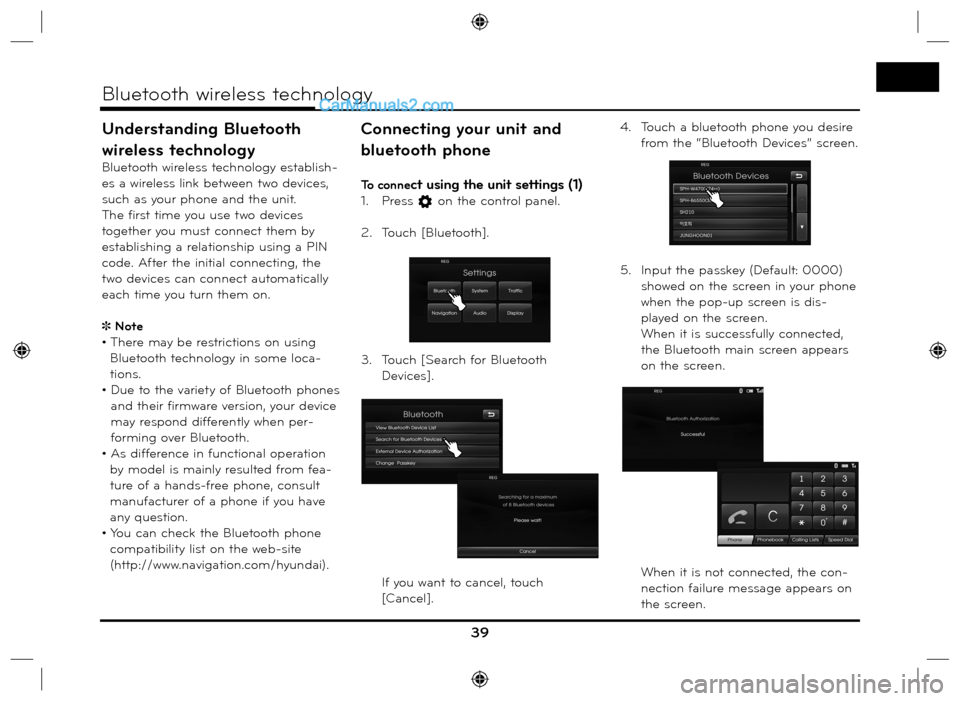
Connecting your unit and
bluetooth phone
To connect using the unit settings (1)
1. Press on the control panel.
2. Touch [Bluetooth].
3. Touch [Search for Bluetooth
Devices].
If you want to cancel, touch
[Cancel].4. Touch a bluetooth phone you desire
from the “Bluetooth Devices” screen.
5. Input the passkey (Default: 0000)
showed on the screen in your phone
when the pop-up screen is dis-
played on the screen.
When it is successfully connected,
the Bluetooth main screen appears
on the screen.
When it is not connected, the con-
nection failure message appears on
the screen.
39
Bluetooth wireless technology
Page 40 of 66
![Hyundai Santa Fe 2016 Navigation Manual To connect using the unit
settings (2)
1. Press on the control panel.
2. Press [Search for Bluetooth
Devices].
3. Follow steps 4-5 on the page 39.
Note
If you touch
on the control panel
a](/img/35/16333/w960_16333-39.png "Hyundai Santa Fe 2016 Navigation Manual To connect using the unit
settings (2)
1. Press on the control panel.
2. Press [Search for Bluetooth
Devices].
3. Follow steps 4-5 on the page 39.
Note
If you touch
on the control panel
a")
To connect using the unit
settings (2)
1. Press on the control panel.
2. Press [Search for Bluetooth
Devices].
3. Follow steps 4-5 on the page 39.
Note
If you touch
on the control panel
again after connected via Bluetooth
wireless technology, the Bluetooth main
screen appears on the screen.
To connect using the phone
settings
Your phone’s Bluetooth feature may
be set to off by default. To use the
Bluetooth feature, Bluetooth must be
turned on in your phone. Refer to your
phone’s user guide.
1. Enable the phone’s Bluetooth
component. This might be in a
menu called Settings, Bluetooth,
Connections, or Hands-free.
2. Press [
] > Touch [Bluetooth] >
[External Device Authorization].
If you want to cancel, touch [Cancel].
3. Initiate a search for Bluetooth
devices. These settings might be
located in a menu called Bluetooth,
Connections, or Hands-free.
4. Select the your device from the list
of phone.5. Input the passkey (Default: 0000)
showed on the screen in your phone
when the pop-up screen is dis-
played on the screen.
When it is successfully connected,
the [Bluetooth] screen appears on
the screen.
Note
• It works the same as the wired head-
set for mobile phone. The headset
functionality is for telephone conversa-
tion. It is not for listening to music.
• Unlike the hands-free functionality,
Headset connection will allow only two
functions “answering calls” and “mak-
ing a call from the latest call”. Also the
caller’s number is not displayed when
answering calls.
• If connecting through a Bluetooth
phone, the hands-free connection or
headset connection may not operate
depending on the type of the phone.
40
Bluetooth wireless technology
Page 41 of 66
![Hyundai Santa Fe 2016 Navigation Manual Disconnecting/Connecting
again the bluetooth phone
1. Touch [View Bluetooth Device List] on
the “Bluetooth” Screen.
2. Touch the connected phone. And
then touch [Yes].
Your phone is disconne](/img/35/16333/w960_16333-40.png "Hyundai Santa Fe 2016 Navigation Manual Disconnecting/Connecting
again the bluetooth phone
1. Touch [View Bluetooth Device List] on
the “Bluetooth” Screen.
2. Touch the connected phone. And
then touch [Yes].
Your phone is disconne")
Disconnecting/Connecting
again the bluetooth phone
1. Touch [View Bluetooth Device List] on
the “Bluetooth” Screen.
2. Touch the connected phone. And
then touch [Yes].
Your phone is disconnected and the
mark disappears.3. Touch the disconnected phone again
to connect your phone. And then
touch [Yes].
The
mark appears again.
Deleting a connected phone
If you no longer need to use a con-
nected phone, you can delete it.
1. Touch [View Bluetooth Device List] on
the “Bluetooth” screen.
2. Touch
on the right-hand side of the
device name of the phone you want to
delete. 3. Touch [Yes].
• The connected phone is deleted.
• When not deleting a connected
phone, touch [No].
Changing the passkey
You can change the passkey.
1. Input the passkey using the keypad
and
.
2. Touch [OK].
41
Bluetooth wireless technology
Page 42 of 66
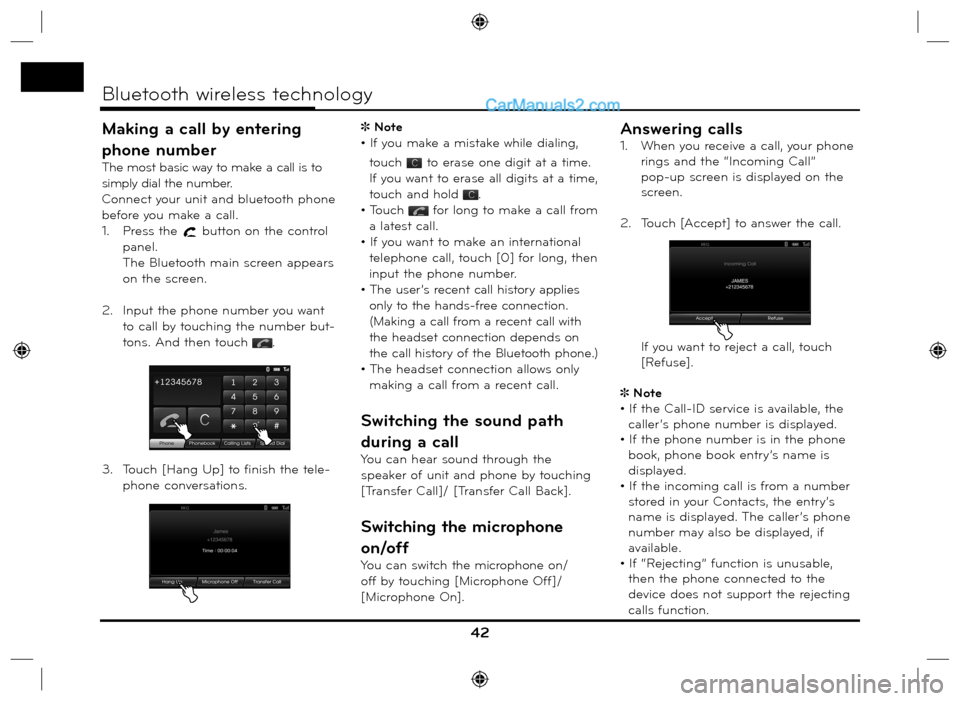
Making a call by entering
phone number
The most basic way to make a call is to
simply dial the number.
Connect your unit and bluetooth phone
before you make a call.
1. Press the
button on the control
panel.
The Bluetooth main screen appears
on the screen.
2. Input the phone number you want
to call by touching the number but-
tons. And then touch
.
3. Touch [Hang Up] to finish the tele-
phone conversations. Note
• If you make a mistake while dialing,
touch
to erase one digit at a time.
If you want to erase all digits at a time,
touch and hold
.
• Touch
for long to make a call from
a latest call.
• If you want to make an international
telephone call, touch [0] for long, then
input the phone number.
• The user’s recent call history applies
only to the hands-free connection.
(Making a call from a recent call with
the headset connection depends on
the call history of the Bluetooth phone.)
• The headset connection allows only
making a call from a recent call.
Switching the sound path
during a call
You can hear sound through the
speaker of unit and phone by touching
[Transfer Call]/ [Transfer Call Back].
Switching the microphone
on/off
You can switch the microphone on/
off by touching [Microphone Off]/
[Microphone On].
Answering calls
1. When you receive a call, your phone
rings and the “Incoming Call”
pop-up screen is displayed on the
screen.
2. Touch [Accept] to answer the call.
If you want to reject a call, touch
[Refuse].
Note
• If the Call-ID service is available, the
caller’s phone number is displayed.
• If the phone number is in the phone
book, phone book entry’s name is
displayed.
• If the incoming call is from a number
stored in your Contacts, the entry’s
name is displayed. The caller’s phone
number may also be displayed, if
available.
• If “Rejecting” function is unusable,
then the phone connected to the
device does not support the rejecting
calls function.
42
Bluetooth wireless technology
Page 43 of 66
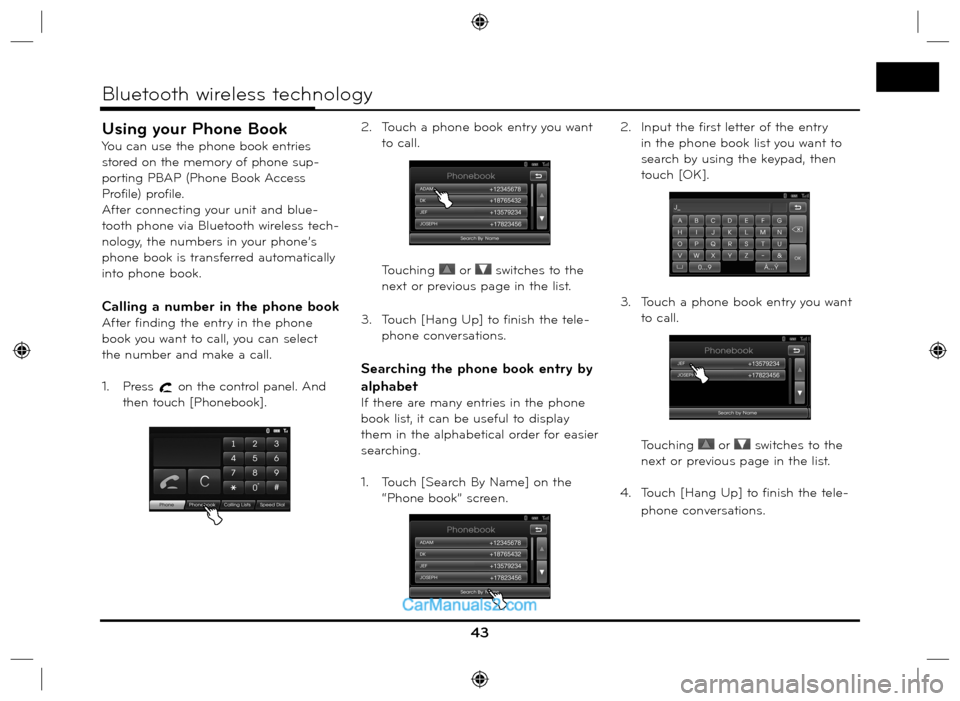
Using your Phone Book
You can use the phone book entries
stored on the memory of phone sup-
porting PBAP (Phone Book Access
Profile) profile.
After connecting your unit and blue-
tooth phone via Bluetooth wireless tech-
nology, the numbers in your phone’s
phone book is transferred automatically
into phone book.
Calling a number in the phone book
After finding the entry in the phone
book you want to call, you can select
the number and make a call.
1. Press
on the control panel. And
then touch [Phonebook].2. Touch a phone book entry you want
to call.
Touching
or switches to the
next or previous page in the list.
3. Touch [Hang Up] to finish the tele-
phone conversations.
Searching the phone book entry by
alphabet
If there are many entries in the phone
book list, it can be useful to display
them in the alphabetical order for easier
searching.
1. Touch [Search By Name] on the
“Phone book” screen.2. Input the first letter of the entry
in the phone book list you want to
search by using the keypad, then
touch [OK].
3. Touch a phone book entry you want
to call.
Touching
or switches to the
next or previous page in the list.
4. Touch [Hang Up] to finish the tele-
phone conversations.
43
Bluetooth wireless technology
Page 44 of 66
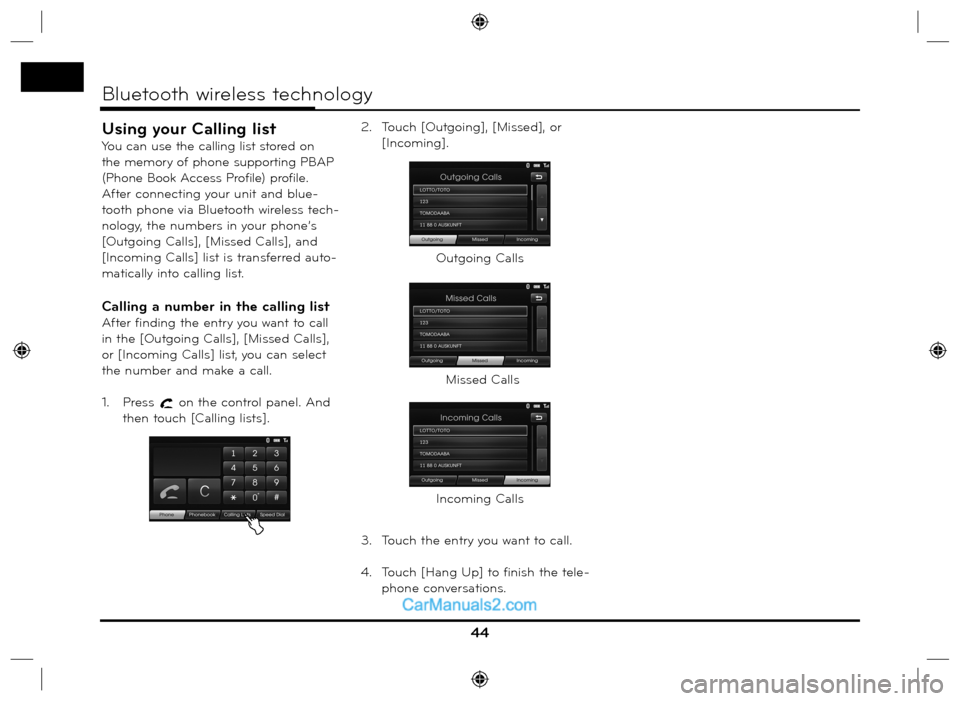
Using your Calling list
You can use the calling list stored on
the memory of phone supporting PBAP
(Phone Book Access Profile) profile.
After connecting your unit and blue-
tooth phone via Bluetooth wireless tech-
nology, the numbers in your phone’s
[Outgoing Calls], [Missed Calls], and
[Incoming Calls] list is transferred auto-
matically into calling list.
Calling a number in the calling list
After finding the entry you want to call
in the [Outgoing Calls], [Missed Calls],
or [Incoming Calls] list, you can select
the number and make a call.
1. Press
on the control panel. And
then touch [Calling lists].2. Touch [Outgoing], [Missed], or
[Incoming].
3. Touch the entry you want to call.
4. Touch [Hang Up] to finish the tele-
phone conversations.
44
Bluetooth wireless technology
Outgoing Calls
Missed Calls
Incoming Calls
Page 45 of 66
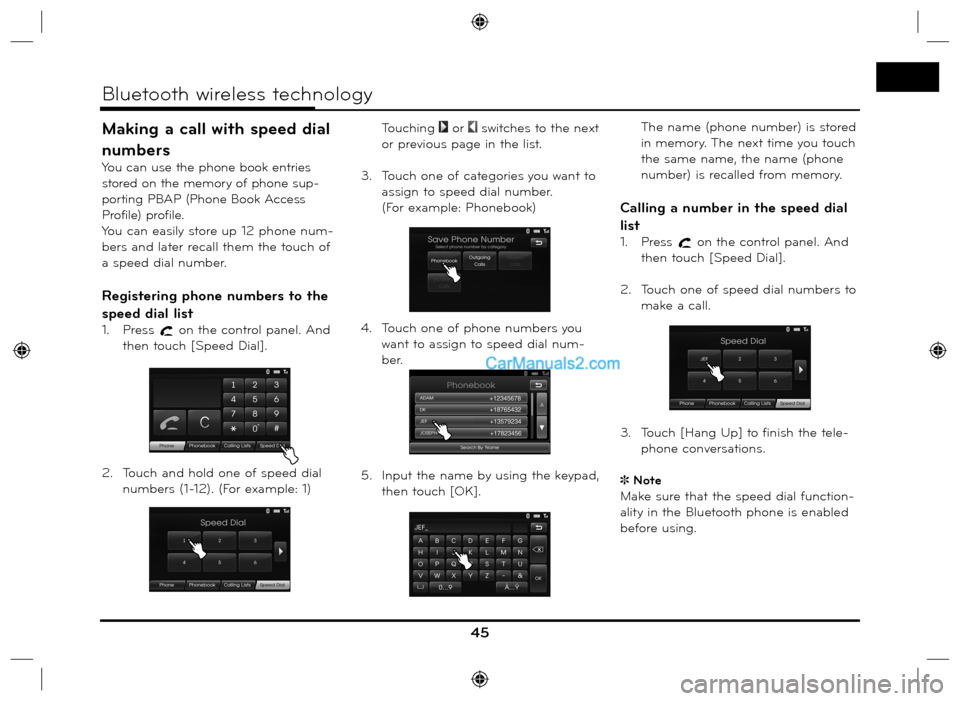
Making a call with speed dial
numbers
You can use the phone book entries
stored on the memory of phone sup-
porting PBAP (Phone Book Access
Profile) profile.
You can easily store up 12 phone num-
bers and later recall them the touch of
a speed dial number.
Registering phone numbers to the
speed dial list
1. Press on the control panel. And
then touch [Speed Dial].
2. Touch and hold one of speed dial
numbers (1-12). (For example: 1)
Touching
or switches to the next
or previous page in the list.
3. Touch one of categories you want to
assign to speed dial number.
(For example: Phonebook)
4. Touch one of phone numbers you
want to assign to speed dial num-
ber.
5. Input the name by using the keypad,
then touch [OK].
The name (phone number) is stored
in memory. The next time you touch
the same name, the name (phone
number) is recalled from memory.
Calling a number in the speed dial
list
1. Press on the control panel. And
then touch [Speed Dial].
2. Touch one of speed dial numbers to
make a call.
3. Touch [Hang Up] to finish the tele-
phone conversations.
Note
Make sure that the speed dial function-
ality in the Bluetooth phone is enabled
before using.
45
Bluetooth wireless technology
Page 50 of 66
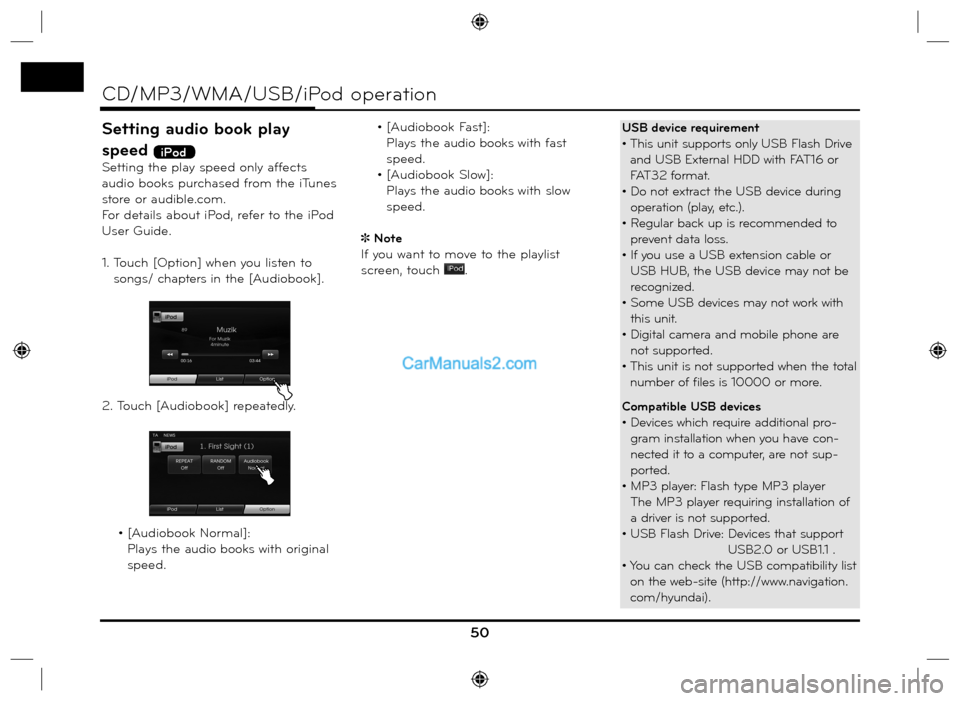
Setting audio book play
speed
iPod
Setting the play speed only affects
audio books purchased from the iTunes
store or audible.com.
For details about iPod, refer to the iPod
User Guide.
1. Touch [Option] when you listen to
songs/ chapters in the [Audiobook].
2. Touch [Audiobook] repeatedly.
• [Audiobook Normal]:
Plays the audio books with original
speed. • [Audiobook Fast]:
Plays the audio books with fast
speed.
• [Audiobook Slow]:
Plays the audio books with slow
speed.
Note
If you want to move to the playlist
screen, touch
.
50
CD/MP3/WMA/USB/iPod operation
USB device requirement
• This unit supports only USB Flash Drive
and USB External HDD with FAT16 or
FAT32 format.
• Do not extract the USB device during
operation (play, etc.).
• Regular back up is recommended to
prevent data loss.
• If you use a USB extension cable or
USB HUB, the USB device may not be
recognized.
• Some USB devices may not work with
this unit.
• Digital camera and mobile phone are
not supported.
• This unit is not supported when the total
number of files is 10000 or more.
Compatible USB devices
• Devices which require additional pro-
gram installation when you have con-
nected it to a computer, are not sup-
ported.
• MP3 player: Flash type MP3 player
The MP3 player requiring installation of
a driver is not supported.
• USB Flash Drive: Devices that support
USB2.0 or USB1.1 .
• You can check the USB compatibility list
on the web-site (http://www.navigation.
com/hyundai).
Page 56 of 66
Voice recognition
Voice recognition allows hands-free
operation of the AV system (RADIO,
CD, USB, iPod), navigation and other
systems equipped on this vehicle, such
as the phone.
Note
To get the best recognition perfor-
mance out of voice recognition, observe
the following:
• Keep the interior of the vehicle as
quiet as possible. Close the windows
to eliminate the surrounding noises
(traffic noises, vibration sounds, etc.),
which may prevent the system from
recognizing the voice commands cor-
rectly.
• Wait until a beep sounds before
speaking a command. Otherwise,
the command will not be recognized
properly.
• Speak in a natural voice without paus-
ing between words.
• The supporting languages in Voice
recognition system are English,
German, French, Spanish and Italian at
this moment.
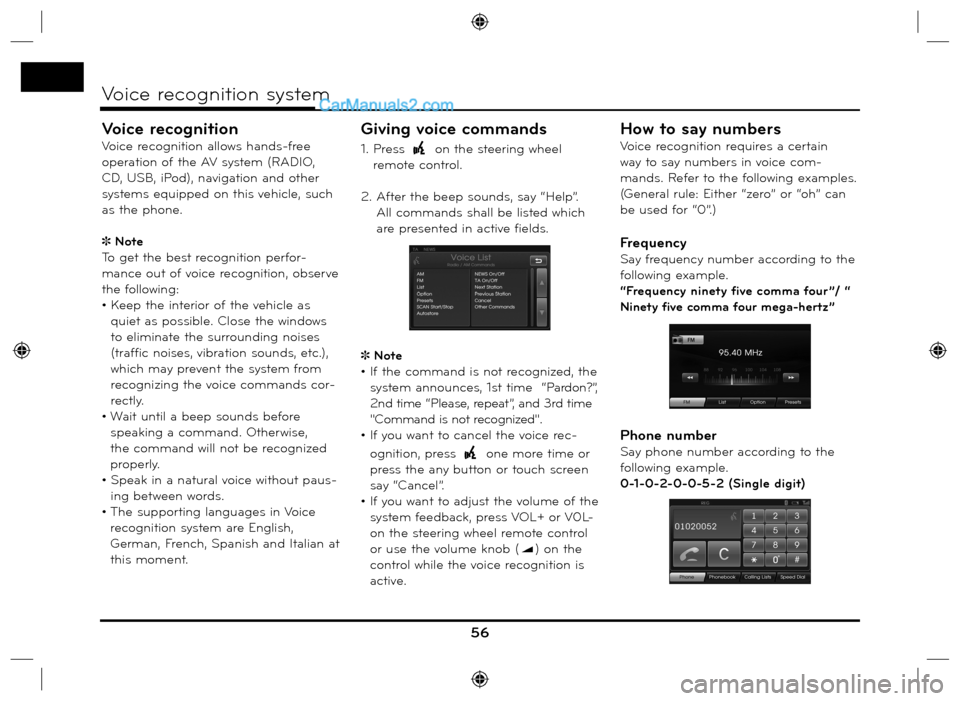
Giving voice commands
1. Press on the steering wheel
remote control.
2. After the beep sounds, say “Help”.
All commands shall be listed which
are presented in active fields.
Note
• If the command is not recognized, the
system announces, 1st time “Pardon?”,
2nd time “Please, repeat”, and 3rd time
"Command is not recognized".
• If you want to cancel the voice rec-
ognition, press
one more time or
press the any button or touch screen
say “Cancel”.
• If you want to adjust the volume of the
system feedback, press VOL+ or V0L-
on the steering wheel remote control
or use the volume knob (
) on the
control while the voice recognition is
active.
How to say numbers
Voice recognition requires a certain
way to say numbers in voice com-
mands. Refer to the following examples.
(General rule: Either “zero” or “oh” can
be used for “0”.)
Frequency
Say frequency number according to the
following example.
“Frequency ninety five comma four ”/ “
Ninety five comma four mega-hertz”
Phone number
Say phone number according to the
following example.
0-1-0-2-0-0-5-2 (Single digit)
56
Voice recognition system
Page 58 of 66
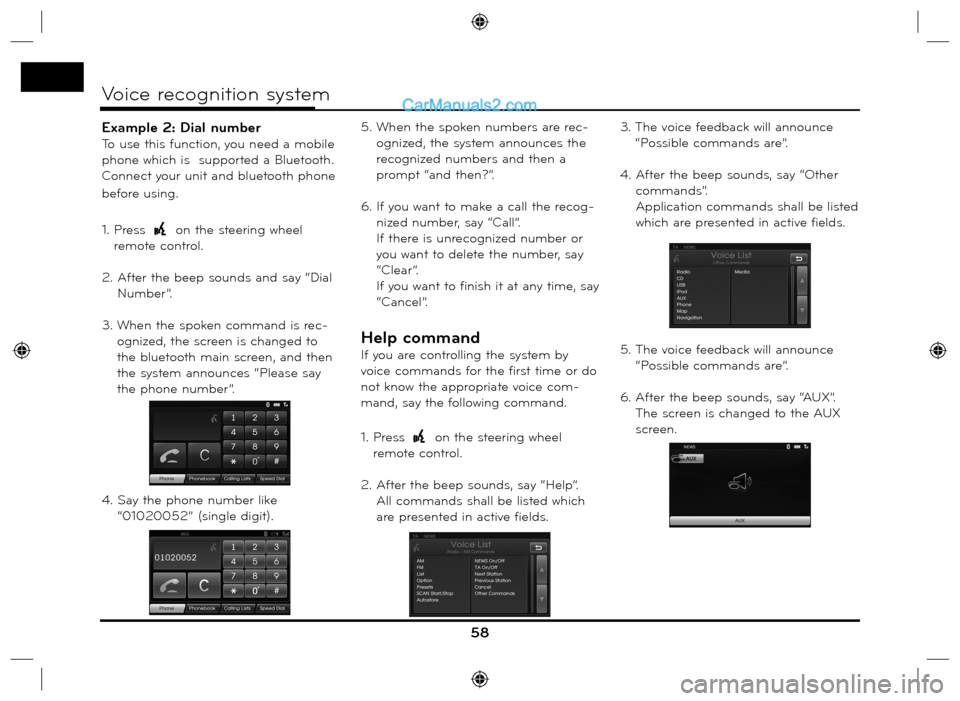
Example 2: Dial number
To use this function, you need a mobile
phone which is supported a Bluetooth.
Connect your unit and bluetooth phone
before using.
1. Press
on the steering wheel
remote control.
2. After the beep sounds and say “Dial
Number”.
3. When the spoken command is rec-
ognized, the screen is changed to
the bluetooth main screen, and then
the system announces “Please say
the phone number”.
4. Say the phone number like
“01020052” (single digit).5. When the spoken numbers are rec-
ognized, the system announces the
recognized numbers and then a
prompt “and then?”.
6. If you want to make a call the recog-
nized number, say “Call”.
If there is unrecognized number or
you want to delete the number, say
“Clear”.
If you want to finish it at any time, say
“Cancel”.
Help command
If you are controlling the system by
voice commands for the first time or do
not know the appropriate voice com-
mand, say the following command.
1. Press
on the steering wheel
remote control.
2. After the beep sounds, say “Help”.
All commands shall be listed which
are presented in active fields.3. The voice feedback will announce
“Possible commands are”.
4. After the beep sounds, say “Other
commands”.
Application commands shall be listed
which are presented in active fields.
5. The voice feedback will announce
“Possible commands are”.
6. After the beep sounds, say “AUX”.
The screen is changed to the AUX
screen.
58
Voice recognition system