ad blue Hyundai Santa Fe 2016 Navigation Manual
[x] Cancel search | Manufacturer: HYUNDAI, Model Year: 2016, Model line: Santa Fe, Model: Hyundai Santa Fe 2016Pages: 66, PDF Size: 4.46 MB
Page 2 of 66
2
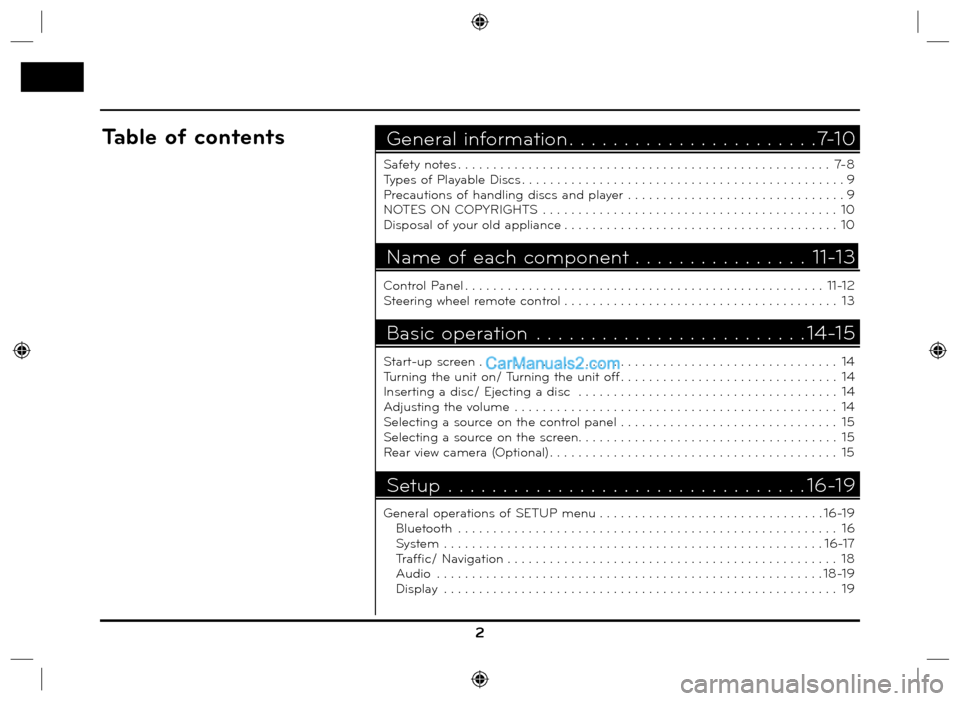
Safety notes . . . . . . . . . . . . . . . . . . . . . . . . . . . . . . . . . . . . . . . . . . . . . . . . . . . . . 7-8
Types of Playable Discs . . . . . . . . . . . . . . . . . . . . . . . . . . . . . . . . . . . . . . . . . . . . . . 9
Precautions of handling discs and player . . . . . . . . . . . . . . . . . . . . . . . . . . . . . . . 9
NOTES ON COPYRIGHTS . . . . . . . . . . . . . . . . . . . . . . . . . . . . . . . . . . . . . . . . . . 10
Disposal of your old appliance . . . . . . . . . . . . . . . . . . . . . . . . . . . . . . . . . . . . . . . 10
Control Panel . . . . . . . . . . . . . . . . . . . . . . . . . . . . . . . . . . . . . . . . . . . . . . . . . . . 11-12
Steering wheel remote control . . . . . . . . . . . . . . . . . . . . . . . . . . . . . . . . . . . . . . . 13
Start-up screen . . . . . . . . . . . . . . . . . . . . . . . . . . . . . . . . . . . . . . . . . . . . . . . . . . . 14
Turning the unit on/ Turning the unit off . . . . . . . . . . . . . . . . . . . . . . . . . . . . . . . 14
Inserting a disc/ Ejecting a disc . . . . . . . . . . . . . . . . . . . . . . . . . . . . . . . . . . . . . 14
Adjusting the volume . . . . . . . . . . . . . . . . . . . . . . . . . . . . . . . . . . . . . . . . . . . . . . 14
Selecting a source on the control panel . . . . . . . . . . . . . . . . . . . . . . . . . . . . . . . 15
Selecting a source on the screen. . . . . . . . . . . . . . . . . . . . . . . . . . . . . . . . . . . . . 15
Rear view camera (Optional) . . . . . . . . . . . . . . . . . . . . . . . . . . . . . . . . . . . . . . . . . 15
General operations of SETUP menu . . . . . . . . . . . . . . . . . . . . . . . . . . . . . . . . 16-19
Bluetooth . . . . . . . . . . . . . . . . . . . . . . . . . . . . . . . . . . . . . . . . . . . . . . . . . . . . . . 16
System . . . . . . . . . . . . . . . . . . . . . . . . . . . . . . . . . . . . . . . . . . . . . . . . . . . . . . 16-17
Traffic/ Navigation . . . . . . . . . . . . . . . . . . . . . . . . . . . . . . . . . . . . . . . . . . . . . . . 18
Audio . . . . . . . . . . . . . . . . . . . . . . . . . . . . . . . . . . . . . . . . . . . . . . . . . . . . . . . 18-19
Display . . . . . . . . . . . . . . . . . . . . . . . . . . . . . . . . . . . . . . . . . . . . . . . . . . . . . . . . 19
General information . . . . . . . . . . . . . . . . . . . . . . .7-10Table of contents
Name of each component . . . . . . . . . . . . . . . . 11-13
Basic operation . . . . . . . . . . . . . . . . . . . . . . . . . 14-15
Setup . . . . . . . . . . . . . . . . . . . . . . . . . . . . . . . . . 16-19
Page 4 of 66
4
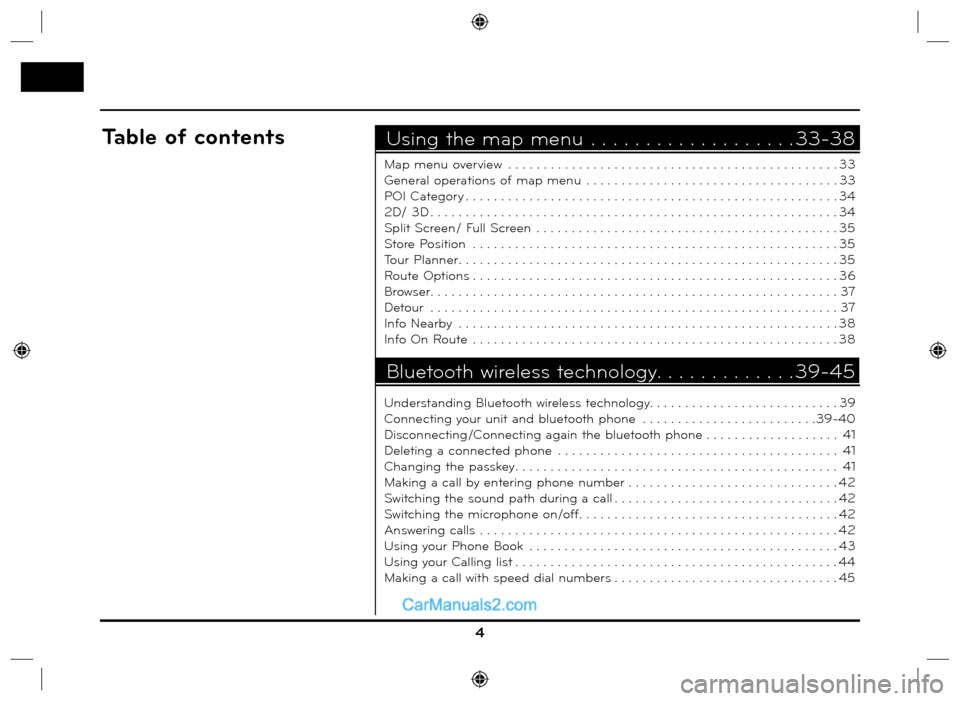
Map menu overview . . . . . . . . . . . . . . . . . . . . . . . . . . . . . . . . . . . . . . . . . . . . . . . 33
General operations of map menu . . . . . . . . . . . . . . . . . . . . . . . . . . . . . . . . . . . . 33
POI Category . . . . . . . . . . . . . . . . . . . . . . . . . . . . . . . . . . . . . . . . . . . . . . . . . . . . . 34
2D/ 3D . . . . . . . . . . . . . . . . . . . . . . . . . . . . . . . . . . . . . . . . . . . . . . . . . . . . . . . . . . 34
Split Screen/ Full Screen . . . . . . . . . . . . . . . . . . . . . . . . . . . . . . . . . . . . . . . . . . . 35
Store Position . . . . . . . . . . . . . . . . . . . . . . . . . . . . . . . . . . . . . . . . . . . . . . . . . . . . 35
Tour Planner . . . . . . . . . . . . . . . . . . . . . . . . . . . . . . . . . . . . . . . . . . . . . . . . . . . . . . 35
Route Options . . . . . . . . . . . . . . . . . . . . . . . . . . . . . . . . . . . . . . . . . . . . . . . . . . . . 36
Browser. . . . . . . . . . . . . . . . . . . . . . . . . . . . . . . . . . . . . . . . . . . . . . . . . . . . . . . . . . 37
Detour . . . . . . . . . . . . . . . . . . . . . . . . . . . . . . . . . . . . . . . . . . . . . . . . . . . . . . . . . . 37
Info Nearby . . . . . . . . . . . . . . . . . . . . . . . . . . . . . . . . . . . . . . . . . . . . . . . . . . . . . . 38
Info On Route . . . . . . . . . . . . . . . . . . . . . . . . . . . . . . . . . . . . . . . . . . . . . . . . . . . . 38
Understanding Bluetooth wireless technology. . . . . . . . . . . . . . . . . . . . . . . . . . . 39
Connecting your unit and bluetooth phone . . . . . . . . . . . . . . . . . . . . . . . . .39-40
Disconnecting/Connecting again the bluetooth phone . . . . . . . . . . . . . . . . . . . 41
Deleting a connected phone . . . . . . . . . . . . . . . . . . . . . . . . . . . . . . . . . . . . . . . . 41
Changing the passkey. . . . . . . . . . . . . . . . . . . . . . . . . . . . . . . . . . . . . . . . . . . . . . 41
Making a call by entering phone number . . . . . . . . . . . . . . . . . . . . . . . . . . . . . . 42
Switching the sound path during a call . . . . . . . . . . . . . . . . . . . . . . . . . . . . . . . . 42
Switching the microphone on/off. . . . . . . . . . . . . . . . . . . . . . . . . . . . . . . . . . . . . 42
Answering calls . . . . . . . . . . . . . . . . . . . . . . . . . . . . . . . . . . . . . . . . . . . . . . . . . . . 42
Using your Phone Book . . . . . . . . . . . . . . . . . . . . . . . . . . . . . . . . . . . . . . . . . . . . 43
Using your Calling list . . . . . . . . . . . . . . . . . . . . . . . . . . . . . . . . . . . . . . . . . . . . . . 44
Making a call with speed dial numbers . . . . . . . . . . . . . . . . . . . . . . . . . . . . . . . . 45
Using the map menu . . . . . . . . . . . . . . . . . . . 33-38Table of contents
Bluetooth wireless technology. . . . . . . . . . . . .39-45
Page 10 of 66
NOTES ON COPYRIGHTS
It is forbidden by law to copy, broadcast,
show, broadcast via cable, play in pub-
lic, or rent copyrighted material without
permission.
This product features the copy protec-
tion function developed by Macrovision.
Copy protection signals are recorded on
some discs. When playing the pictures
of these discs on a unit, picture noise
will appear. This product incorporates
copyright protection technology that
is protected by method claims of cer-
tain U.S. patents and other intellectual
property rights owned by Macrovision
Corporation and other rights own-
ers. Use of this copyright protection
technology must be authorized by
Macrovision Corporation, and is intend-
ed for home and other limited viewing
uses only unless otherwise authorized
by Macrovision Corporation. Reverse
engineering or disassembly is prohib-
ited.
Disposal of your old
appliance
1. When this crossed-out wheeled bin
symbol is attached to a product, it
means the product is covered by the
European Directive 2002/96/EC.
2. All electrical and electronic products
should be disposed of separately
from the municipal waste stream
via designated collection facilities
appointed by the government or the
local authorities.
3. The correct disposal of your old
appliance will help prevent potential
negative consequences for the envi-
ronment and human health.
4. For more detailed information about
disposal of your old appliance, please
contact your city office, waste dis-
posal service or the shop where you
purchased the product.
iPod is a trademark of Apple Inc., regis-
tered in the U.S. and other countries.
“Made for iPod” means that an elec-
tronic accessory has been designed to
connect specifically to iPod and has
been certified by the developer to meet
Apple performance standards.
“The Bluetooth word mark and logos
are owned by the Bluetooth SIG, Inc.
and any use of such marks by LG
Electronics is under license. Other
trademarks and trade names are those
of their respective owners.”
10
General information
Page 12 of 66
9. Right rotary ()
Rotate it clockwise/counterclockwise.
• Searches the previous or next
radio frequency.
- Manual tuning
• Skips a track/file up/down in all list
screen.
• ZOOM IN/ ZOOM OUT
- Rotate to change the map scale
on the map screen.
Repeat voice guidance (
)
Press to repeat the voice guidance.
10. MAP
Press to display the current location
map screen.
11. NAV
Press to enter a destination menu.
Various methods for entering a des-
tination are available. 12 SETUP (
)
• Press to access system settings.
(Page 16)
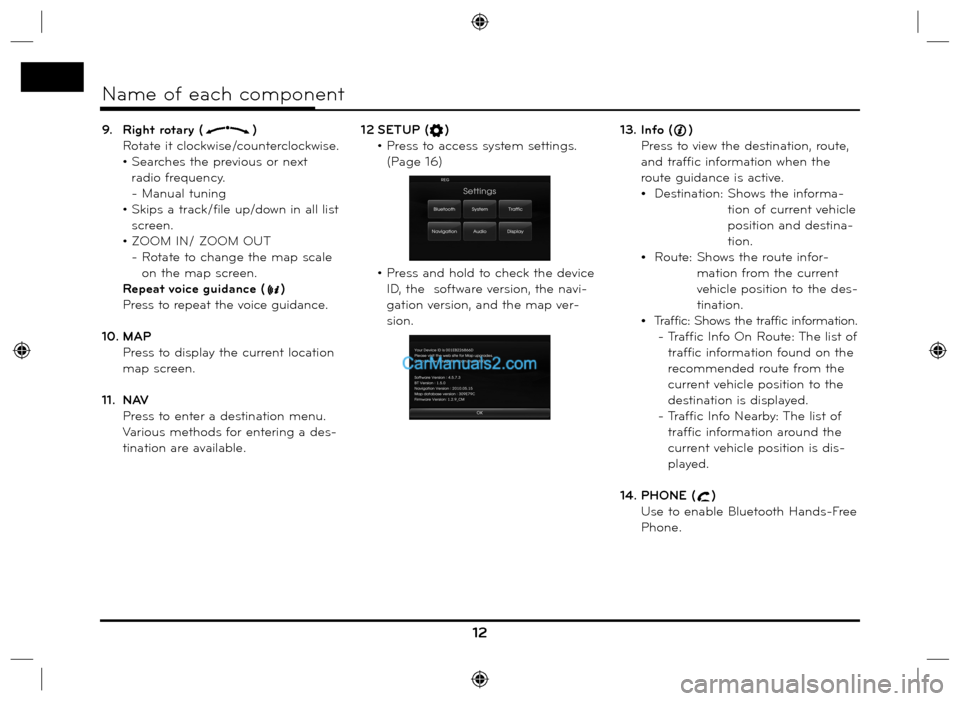
• Press and hold to check the device
ID, the software version, the navi-
gation version, and the map ver-
sion.13. Info ()
Press to view the destination, route,
and traffic information when the
route guidance is active.
Destination: Shows the informa-
tion of current vehicle
position and destina-
tion.
Route: Shows the route infor-
mation from the current
vehicle position to the des-
tination.
Traffic: Shows the traffic information.
- Traffic Info On Route: The list of
traffic information found on the
recommended route from the
current vehicle position to the
destination is displayed.
- Traffic Info Nearby: The list of
traffic information around the
current vehicle position is dis-
played.
14. PHONE (
)
Use to enable Bluetooth Hands-Free
Phone.
12
Name of each component
Page 13 of 66
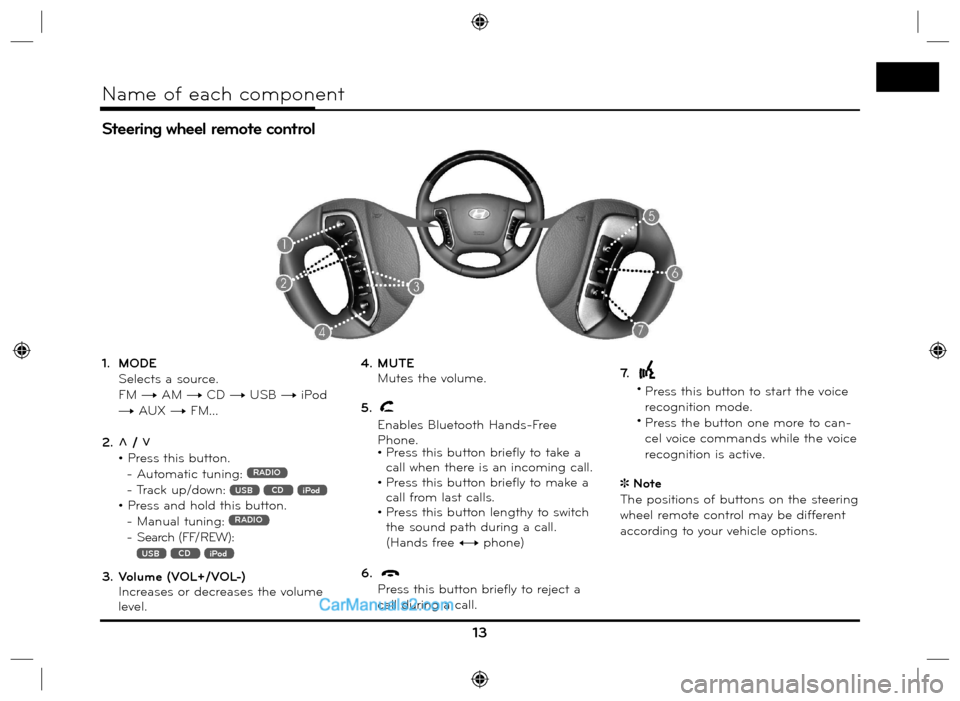
1. MODE
Selects a source.
FM t AM t CD t USB t iPod
t AUX t FM...
2. U / u
• Press this button.
- Automatic tuning:
RADIO
- Track up/down: USB CD iPod
• Press and hold this button.
- Manual tuning: RADIO
- Search (FF/REW):
USB CD iPod
3. Volume (VOL+/VOL-)
Increases or decreases the volume
level.4. MUTE
Mutes the volume.
5.
Enables Bluetooth Hands-Free
Phone.
• Press this button briefly to take a
call when there is an incoming call.
• Press this button briefly to make a
call from last calls.
• Press this button lengthy to switch
the sound path during a call.
(Hands free y phone)
6.
Press this button briefly to reject a
call during a call.7.
•
Press this button to start the voice
recognition mode.
•
Press the button one more to can-
cel voice commands while the voice
recognition is active.
Note
The positions of buttons on the steering
wheel remote control may be different
according to your vehicle options.
Steering wheel remote control
13
Name of each component
Page 16 of 66
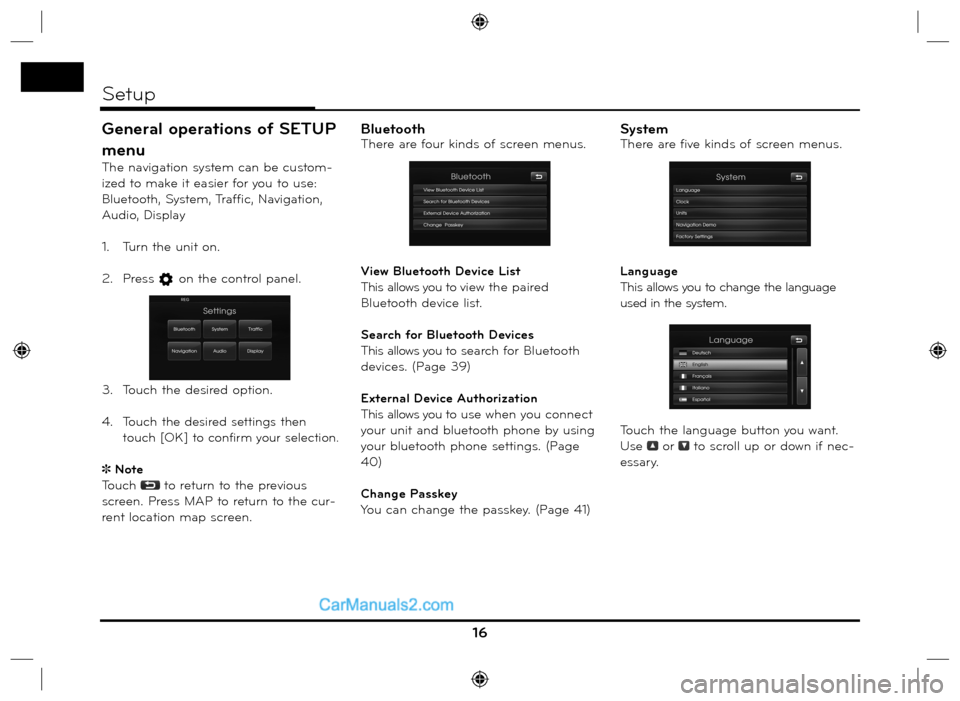
General operations of SETUP
menu
The navigation system can be custom-
ized to make it easier for you to use:
Bluetooth, System, Traffic, Navigation,
Audio, Display
1. Turn the unit on.
2. Press
on the control panel.
3. Touch the desired option.
4. Touch
the desired settings then
t
ouch [OK] to confirm your selection.
Note
Touch
to return to the previous
screen. Press MAP to return to the cur-
rent location map screen.
BluetoothThere are four kinds of screen menus.
View Bluetooth Device List
This allows you to view the paired
Bluetooth device list.
Search for Bluetooth Devices
This allows you to search for Bluetooth
devices. (Page 39)
External Device Authorization
This allows you to use when you connect
your unit and bluetooth phone by using
your bluetooth phone settings. (Page
40)
Change Passkey
You can change the passkey. (Page 41)SystemThere are five kinds of screen menus.
Language
This allows you to change the language
used in the system.
Touch the language button you want.
Use
or to scroll up or down if nec-
essary.
16
Setup
Page 25 of 66
![Hyundai Santa Fe 2016 Navigation Manual Near Position
1. Press [NAV] > Touch [POI] > [Near
Position].
2. Touch one of the subcategory.
(For example: Emergency)
3. Touch one of the subcategory in next
level. (For example: Hospital)
4](/img/35/16333/w960_16333-24.png "Hyundai Santa Fe 2016 Navigation Manual Near Position
1. Press [NAV] > Touch [POI] > [Near
Position].
2. Touch one of the subcategory.
(For example: Emergency)
3. Touch one of the subcategory in next
level. (For example: Hospital)
4")
Near Position
1. Press [NAV] > Touch [POI] > [Near
Position].
2. Touch one of the subcategory.
(For example: Emergency)
3. Touch one of the subcategory in next
level. (For example: Hospital)
4. Touch the preferred POI.5. Touch [OK] after confirming the
location of the displayed POI.
If you want to call on the telephone,
touch [
]. It is available only when
the bluetooth is active.
6. Touch [Start].
7. Touch the preferred route.8. Touch [Start].
Drive in accordance with the screen
and voice information.
25
Destination input menu
Page 26 of 66
![Hyundai Santa Fe 2016 Navigation Manual Near Destination
1. Press [NAV] > Touch [POI] > [Near
Destination].
2. Follow steps 2-8 on the page 25
(Near Position).
In City
1. Press [NAV] > Touch [POI] > [In Cit y].
2. Set the part cha](/img/35/16333/w960_16333-25.png "Hyundai Santa Fe 2016 Navigation Manual Near Destination
1. Press [NAV] > Touch [POI] > [Near
Destination].
2. Follow steps 2-8 on the page 25
(Near Position).
In City
1. Press [NAV] > Touch [POI] > [In Cit y].
2. Set the part cha")
Near Destination
1. Press [NAV] > Touch [POI] > [Near
Destination].
2. Follow steps 2-8 on the page 25
(Near Position).
In City
1. Press [NAV] > Touch [POI] > [In Cit y].
2. Set the part characters of city name
and then touch [OK].
3. Touch the city in the list.
4. Follow steps 2-8 on the page 25
(Near Position).
Name
1. Press [NAV] > Touch [POI] > [Name].
2. Set the preferred country.
3. Input the part characters of the
facility name and then touch [OK].
4. Follow steps 4-8 on the page 25
(Near Position).
Hyundai service
1. Press [NAV] > Touch [POI] > [Hyundai
service].
2. Follow steps 4-8 on the page 25
(Near Position).
Note
The information of position may dif-
fer from actual location due to some
changes of dealership and dealer loca-
tion information.
Phone Number
1. Press [NAV] > Touch [POI] > [Phone
Number].
2. Input the phone number and then
touch [OK].
3. Touch the preferred phone number
from the list.
4. Touch [OK] after confirming the
location of the displayed POI.
If you want to call on the telephone,
touch [
]. It is available only when
the bluetooth is active.
5. Follow steps 6-8 on the page 25
(Near Position).
26
Destination input menu
Page 37 of 66
![Hyundai Santa Fe 2016 Navigation Manual Browser
You can view an enlarged screen of
route section when the route guidance
is active.
1. Press [MAP] > Touch [Menu] >
[Route] > [Browser].
2. Touch [Previous] or [Next] to view
the rout](/img/35/16333/w960_16333-36.png "Hyundai Santa Fe 2016 Navigation Manual Browser
You can view an enlarged screen of
route section when the route guidance
is active.
1. Press [MAP] > Touch [Menu] >
[Route] > [Browser].
2. Touch [Previous] or [Next] to view
the rout")
Browser
You can view an enlarged screen of
route section when the route guidance
is active.
1. Press [MAP] > Touch [Menu] >
[Route] > [Browser].
2. Touch [Previous] or [Next] to view
the route sections.
3. Touch [Section] to view the enlarged
screen of route section.
4. Touch [Route] to return to the previ-
ous screen.
5. Touch
to return to the current
vehicle map screen.
Detour
If you want to make a detour due to
traffic conditions, you can use the
detour function to calculate an alterna-
tive route from the vehicle location to
the destination.
1. Press [MAP] > Touch [Menu] >
[Route] > [Detour].
2. Touch [Shorter] or [Longer] to set
a route which take a detour as the
distance you select.
- Blue: Original route
- Red: Detour route
3. Touch [Start].4. Touch the preferred route, then
touch [Start].
Drive in accordance with the screen
and voice information.
Note
If you don’t need to take a detour
when you are navigating a route , touch
[Menu] > [Route] > [Detour] > [Delete].
.
37
Using the map menu
Page 39 of 66
Understanding Bluetooth
wireless technology
Bluetooth wireless technology establish-
es a wireless link between two devices,
such as your phone and the unit.
The first time you use two devices
together you must connect them by
establishing a relationship using a PIN
code. After the initial connecting, the
two devices can connect automatically
each time you turn them on.
Note
• There may be restrictions on using
Bluetooth technology in some loca-
tions.
• Due to the variety of Bluetooth phones
and their firmware version, your device
may respond differently when per-
forming over Bluetooth.
• As difference in functional operation
by model is mainly resulted from fea-
ture of a hands-free phone, consult
manufacturer of a phone if you have
any question.
• You can check the Bluetooth phone
compatibility list on the web-site
(http://www.navigation.com/hyundai).
Connecting your unit and
bluetooth phone
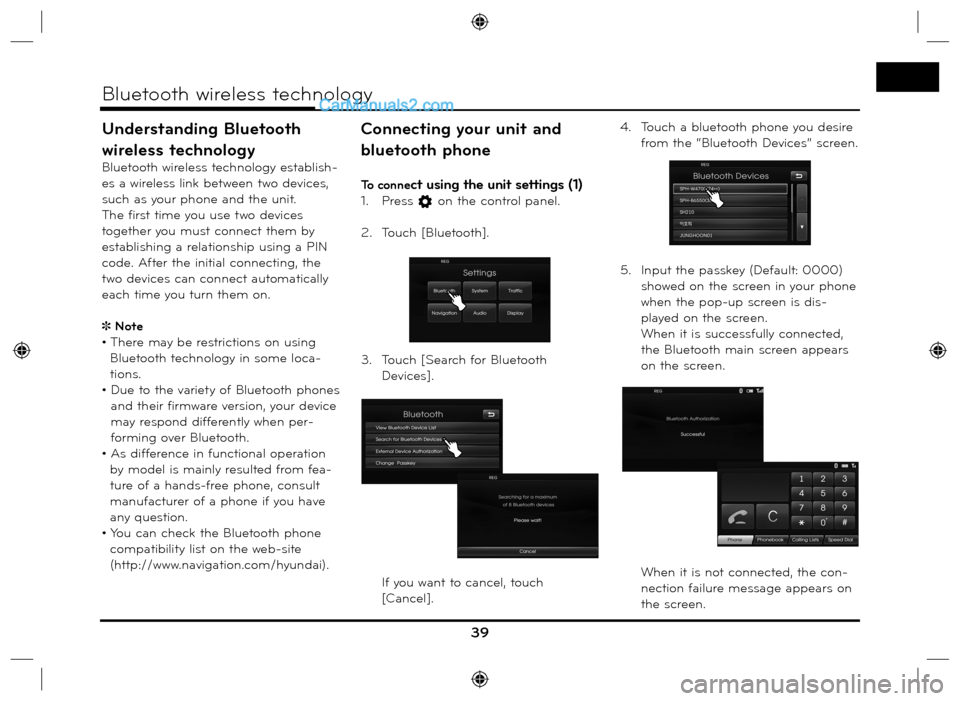
To connect using the unit settings (1)
1. Press on the control panel.
2. Touch [Bluetooth].
3. Touch [Search for Bluetooth
Devices].
If you want to cancel, touch
[Cancel].4. Touch a bluetooth phone you desire
from the “Bluetooth Devices” screen.
5. Input the passkey (Default: 0000)
showed on the screen in your phone
when the pop-up screen is dis-
played on the screen.
When it is successfully connected,
the Bluetooth main screen appears
on the screen.
When it is not connected, the con-
nection failure message appears on
the screen.
39
Bluetooth wireless technology