door lock Hyundai Santa Fe 2016 - RHD (UK, Australia) Owner's Guide
[x] Cancel search | Manufacturer: HYUNDAI, Model Year: 2016, Model line: Santa Fe, Model: Hyundai Santa Fe 2016Pages: 699, PDF Size: 15.65 MB
Page 120 of 699
Features of your vehicle
22 4
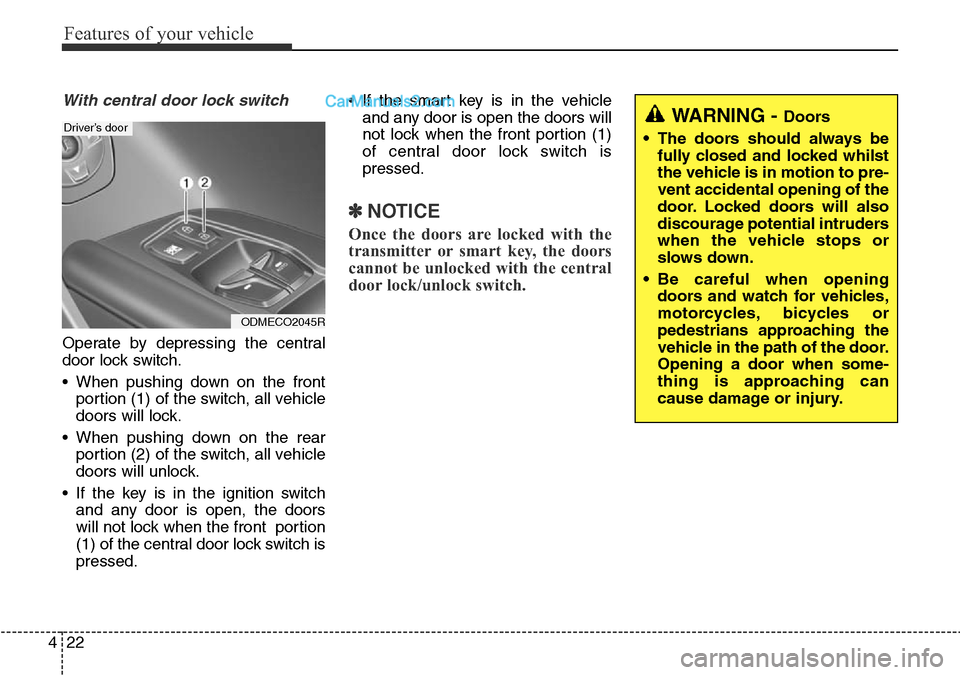
With central door lock switch
Operate by depressing the central
door lock switch.
• When pushing down on the front
portion (1) of the switch, all vehicle
doors will lock.
• When pushing down on the rear
portion (2) of the switch, all vehicle
doors will unlock.
• If the key is in the ignition switch
and any door is open, the doors
will not lock when the front portion
(1) of the central door lock switch is
pressed.• If the smart key is in the vehicle
and any door is open the doors will
not lock when the front portion (1)
of central door lock switch is
pressed.
✽NOTICE
Once the doors are locked with the
transmitter or smart key, the doors
cannot be unlocked with the central
door lock/unlock switch.
WARNING - Doors
• The doors should always be
fully closed and locked whilst
the vehicle is in motion to pre-
vent accidental opening of the
door. Locked doors will also
discourage potential intruders
when the vehicle stops or
slows down.
• Be careful when opening
doors and watch for vehicles,
motorcycles, bicycles or
pedestrians approaching the
vehicle in the path of the door.
Opening a door when some-
thing is approaching can
cause damage or injury.
ODMECO2045R
Driver’s door
Page 121 of 699
423
Features of your vehicle
Deadlocks (if equipped)
Some vehicles are equipped with a
deadlock system. Deadlocks prevent
opening of a door from either inside
or outside the vehicle once the dead-
locks have been activated providing
an additional measure of vehicle
security.
To lock the vehicle using the deadlock
function, the doors must be locked by
using the transmitter or smart key. To
unlock the vehicle, the transmitter or
smart key must be used again.
Door lock/unlock features
Impact sensing door unlock sys-
tem
All doors will automatically unlock
when an impact causes the air bags
to deploy.
Speed sensing door lock system
(if equipped)
All doors will automatically lock after
the vehicle speed exceeds 9 mph
(15 km/h).
You can activate or deactivate the
auto door lock/unlock features in the
vehicle. Refer to "User setting" in this
section.
WARNING
Do not lock the doors with the
transmitter or the smart key
with anybody left in the vehicle.
The passenger in the vehicle
cannot unlock the doors with
the door lock button. For exam-
ple, if the door is locked with
the transmitter, the passenger
in the vehicle cannot unlock the
door without the transmitter.
WARNING- Unlocked
vehicles
Leaving your vehicle unlocked
can invite theft or possible harm
to you or others from someone
hiding in your vehicle whilst
you are gone. Always remove
the ignition key, engage the
parking brake, close all win-
dows and lock all doors when
leaving your vehicle unattend-
ed.
WARNING- Unattended
children
An enclosed vehicle can
become extremely hot, causing
death or severe injury to unat-
tended children or animals who
cannot escape the vehicle.
Furthermore, children might
operate features of the vehicle
that could injure them, or they
could encounter other harm,
possibly from someone gaining
entry to the vehicle. Never leave
children or animals unattended
in your vehicle.
Page 122 of 699
Features of your vehicle
24 4
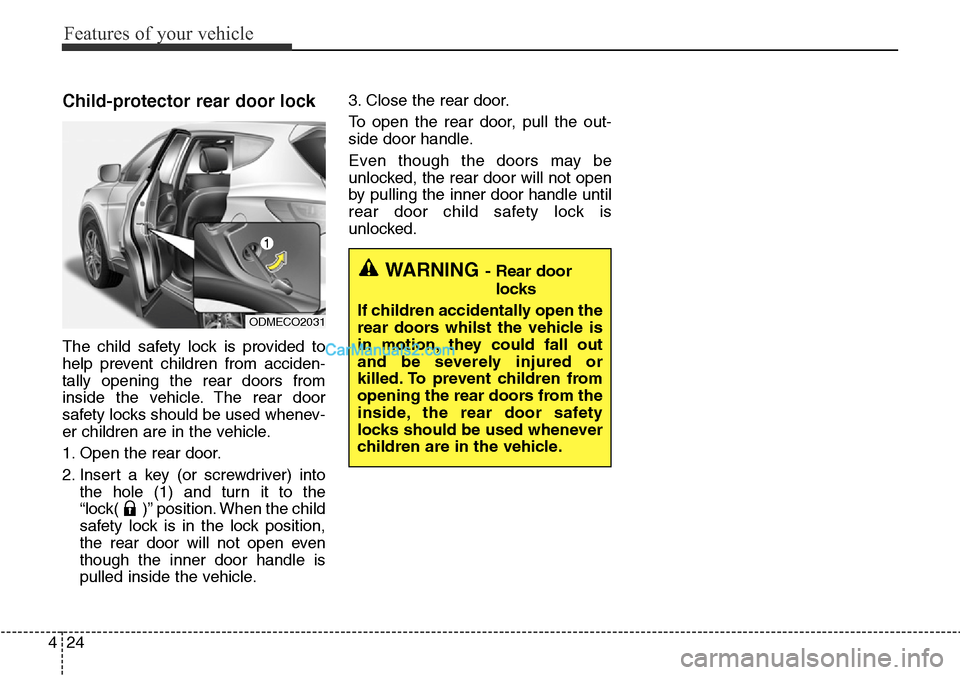
Child-protector rear door lock
The child safety lock is provided to
help prevent children from acciden-
tally opening the rear doors from
inside the vehicle. The rear door
safety locks should be used whenev-
er children are in the vehicle.
1. Open the rear door.
2. Insert a key (or screwdriver) into
the hole (1) and turn it to the
“lock( )” position. When the child
safety lock is in the lock position,
the rear door will not open even
though the inner door handle is
pulled inside the vehicle.3. Close the rear door.
To open the rear door, pull the out-
side door handle.
Even though the doors may be
unlocked, the rear door will not open
by pulling the inner door handle until
rear door child safety lock is
unlocked.
WARNING- Rear door
locks
If children accidentally open the
rear doors whilst the vehicle is
in motion, they could fall out
and be severely injured or
killed. To prevent children from
opening the rear doors from the
inside, the rear door safety
locks should be used whenever
children are in the vehicle.
ODMECO2031
Page 123 of 699
425
Features of your vehicle
Non-power tailgate
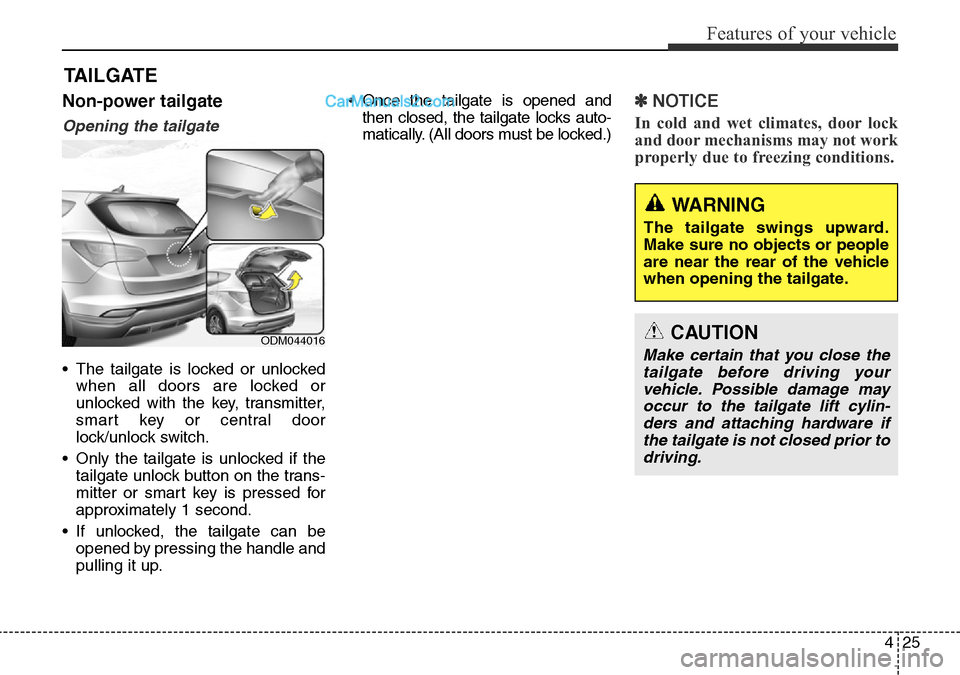
Opening the tailgate
• The tailgate is locked or unlocked
when all doors are locked or
unlocked with the key, transmitter,
smart key or central door
lock/unlock switch.
• Only the tailgate is unlocked if the
tailgate unlock button on the trans-
mitter or smart key is pressed for
approximately 1 second.
• If unlocked, the tailgate can be
opened by pressing the handle and
pulling it up.• Once the tailgate is opened and
then closed, the tailgate locks auto-
matically. (All doors must be locked.)
✽NOTICE
In cold and wet climates, door lock
and door mechanisms may not work
properly due to freezing conditions.
TAILGATE
WARNING
The tailgate swings upward.
Make sure no objects or people
are near the rear of the vehicle
when opening the tailgate.
CAUTION
Make certain that you close the
tailgate before driving your
vehicle. Possible damage may
occur to the tailgate lift cylin-
ders and attaching hardware if
the tailgate is not closed prior to
driving.ODM044016
Page 131 of 699
433
Features of your vehicle
How to use the Smart Tailgate
The tailgate can be opened with no-
touch activation satisfying all the
conditions below.
• After 15 seconds when all doors
are closed and locked
• Positioned in the detecting area for
more than 3 seconds.
✽NOTICE
• The Smart Tailgate does not oper-
ate when:
- The smart key is detected within
15 seconds after the doors are
closed and locked, and is contin-
uously detected.
- The smart key is detected within
15 seconds after the doors are
closed and locked, and 1.5 m (60
in.) from the front door handles.
(for vehicles equipped with
Welcome Light)
- A door is not locked or closed.
- The smart key is in the vehicle.
1. Setting
To activate the Smart Tailgate, go to
User Settings Mode and select
Smart Tailgate on the LCD display.
❈For more details, refer to "LCD
Display" in this chapter.
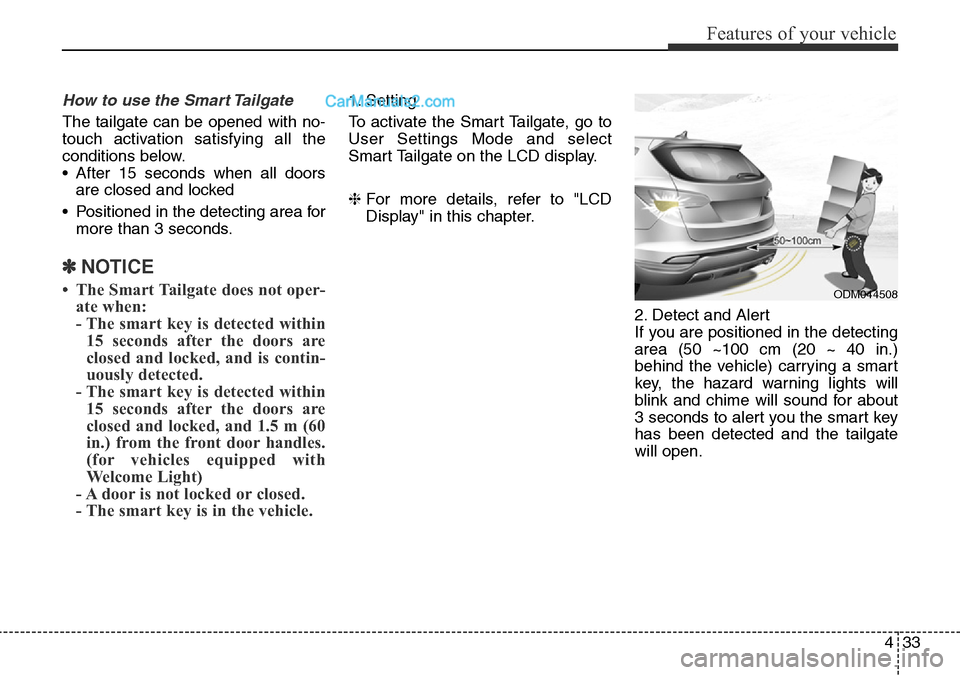
2. Detect and Alert
If you are positioned in the detecting
area (50 ~100 cm (20 ~ 40 in.)
behind the vehicle) carrying a smart
key, the hazard warning lights will
blink and chime will sound for about
3 seconds to alert you the smart key
has been detected and the tailgate
will open.
ODM044508
Page 133 of 699
435
Features of your vehicle
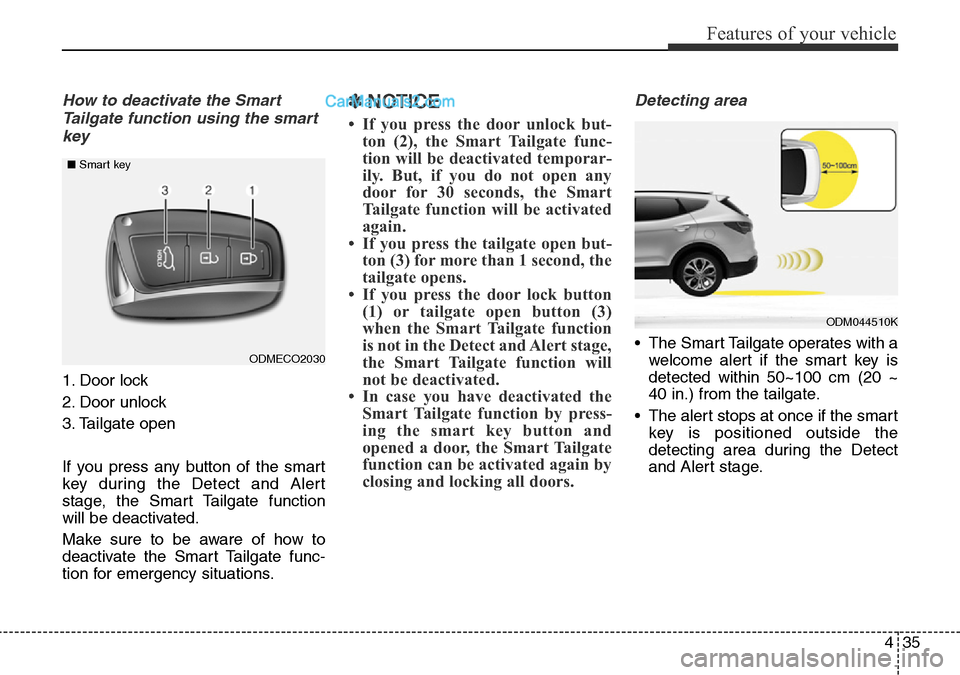
How to deactivate the Smart
Tailgate function using the smart
key
1. Door lock
2. Door unlock
3. Tailgate open
If you press any button of the smart
key during the Detect and Alert
stage, the Smart Tailgate function
will be deactivated.
Make sure to be aware of how to
deactivate the Smart Tailgate func-
tion for emergency situations.
✽NOTICE
• If you press the door unlock but-
ton (2), the Smart Tailgate func-
tion will be deactivated temporar-
ily. But, if you do not open any
door for 30 seconds, the Smart
Tailgate function will be activated
again.
• If you press the tailgate open but-
ton (3) for more than 1 second, the
tailgate opens.
• If you press the door lock button
(1) or tailgate open button (3)
when the Smart Tailgate function
is not in the Detect and Alert stage,
the Smart Tailgate function will
not be deactivated.
• In case you have deactivated the
Smart Tailgate function by press-
ing the smart key button and
opened a door, the Smart Tailgate
function can be activated again by
closing and locking all doors.
Detecting area
• The Smart Tailgate operates with a
welcome alert if the smart key is
detected within 50~100 cm (20 ~
40 in.) from the tailgate.
• The alert stops at once if the smart
key is positioned outside the
detecting area during the Detect
and Alert stage.ODMECO2030 ■Smart key
ODM044510K
Page 135 of 699
437
Features of your vehicle
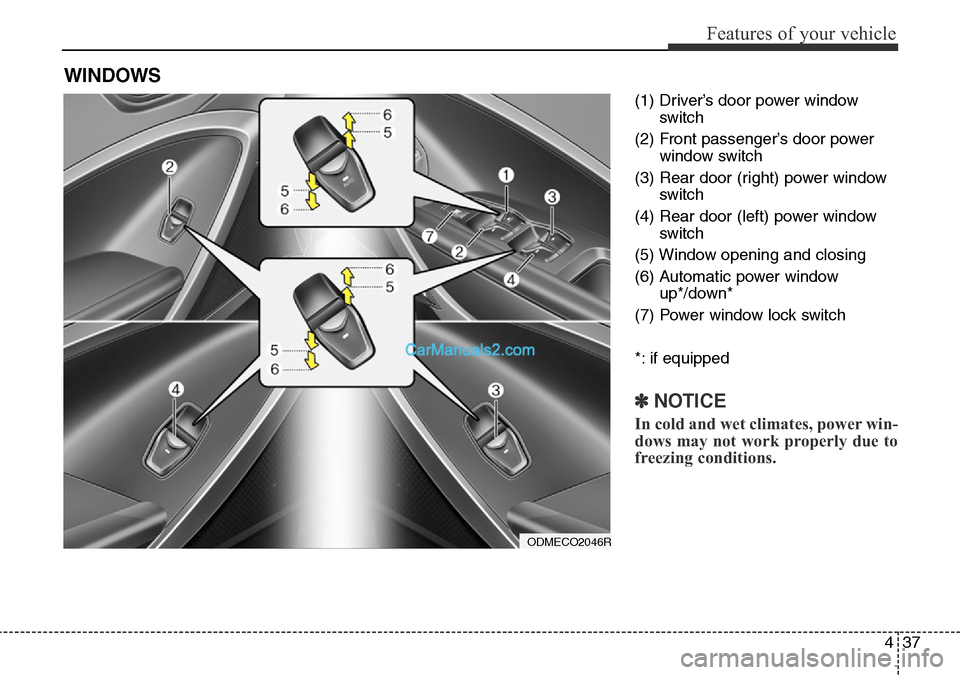
(1) Driver’s door power window
switch
(2) Front passenger’s door power
window switch
(3) Rear door (right) power window
switch
(4) Rear door (left) power window
switch
(5) Window opening and closing
(6) Automatic power window
up*/down*
(7) Power window lock switch
*: if equipped
✽NOTICE
In cold and wet climates, power win-
dows may not work properly due to
freezing conditions.
WINDOWS
ODMECO2046R
Page 136 of 699
Features of your vehicle
38 4
Power windows
The ignition switch must be in the ON
position for power windows to oper-
ate. Each door has a power window
switch that controls the door’s win-
dow. The driver’s door has a master
power window switch that controls all
the windows in the vehicle. Also, the
driver has a power window lock
switch which can block the operation
of rear passenger windows.
The power windows can be operated
for approximately 30 seconds after
the ignition key is removed or turned
to the ACC or LOCK position.
However, if the front doors are
opened, the power windows cannot
be operated even within the 30 sec-
onds period.
✽NOTICE
Whilst driving with the rear win-
dows down or with the sunroof (if
equipped) in an open (or partially
open position), your vehicle may
demonstrate a wind buffeting or
pulsation noise. This noise is a nor-
mal occurrence and can be reduced
or eliminated by taking the follow-
ing actions. If the noise occurs with
one or both of the rear windows
down, partially lower both front
windows approximately one inch.
If you experience the noise with the
sunroof open, slightly reduce the
size of the sunroof opening.
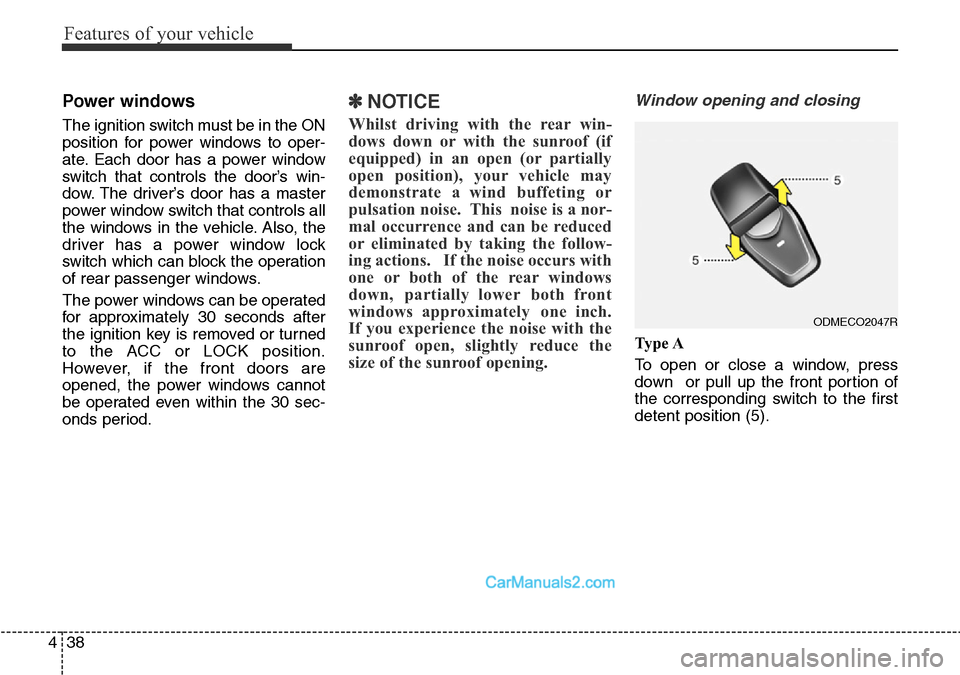
Window opening and closing
Ty p e A
To open or close a window, press
down or pull up the front portion of
the corresponding switch to the first
detent position (5).
ODMECO2047R
Page 138 of 699
Features of your vehicle
40 4
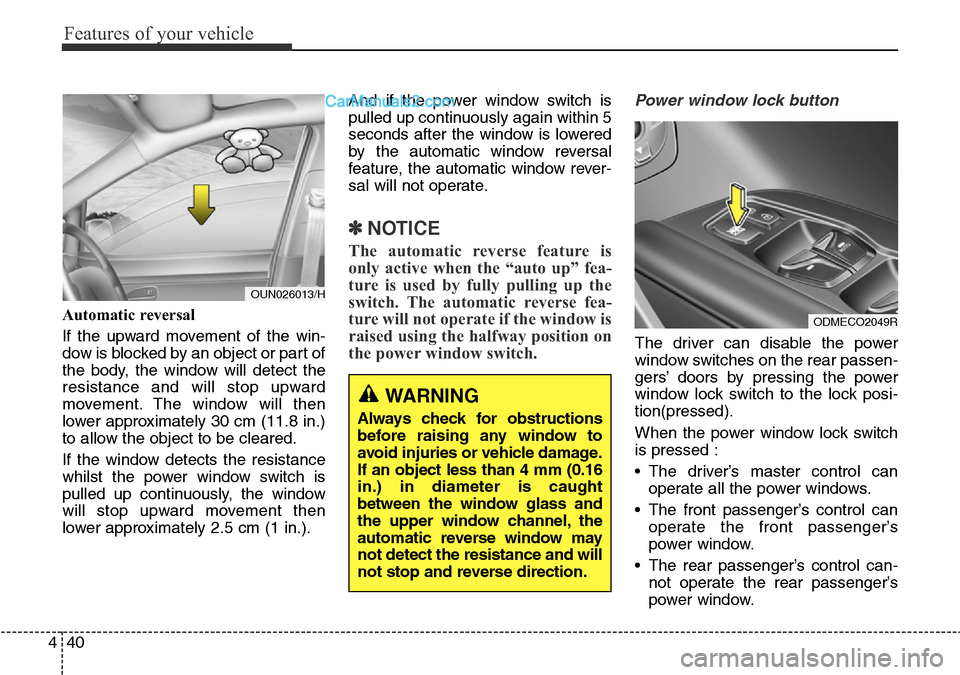
Automatic reversal
If the upward movement of the win-
dow is blocked by an object or part of
the body, the window will detect the
resistance and will stop upward
movement. The window will then
lower approximately 30 cm (11.8 in.)
to allow the object to be cleared.
If the window detects the resistance
whilst the power window switch is
pulled up continuously, the window
will stop upward movement then
lower approximately 2.5 cm (1 in.).And if the power window switch is
pulled up continuously again within 5
seconds after the window is lowered
by the automatic window reversal
feature, the automatic window rever-
sal will not operate.
✽NOTICE
The automatic reverse feature is
only active when the “auto up” fea-
ture is used by fully pulling up the
switch. The automatic reverse fea-
ture will not operate if the window is
raised using the halfway position on
the power window switch.
Power window lock button
The driver can disable the power
window switches on the rear passen-
gers’ doors by pressing the power
window lock switch to the lock posi-
tion(pressed).
When the power window lock switch
is pressed :
• The driver’s master control can
operate all the power windows.
• The front passenger’s control can
operate the front passenger’s
power window.
• The rear passenger’s control can-
not operate the rear passenger’s
power window.
WARNING
Always check for obstructions
before raising any window to
avoid injuries or vehicle damage.
If an object less than 4 mm (0.16
in.) in diameter is caught
between the window glass and
the upper window channel, the
automatic reverse window may
not detect the resistance and will
not stop and reverse direction.
ODMECO2049R
OUN026013/H
Page 139 of 699
441
Features of your vehicle
WARNING - Windows
• NEVER leave the keys in your
vehicle with unsupervised
children, when the engine is
running.
• NEVER leave any child unat-
tended in the vehicle. Even
very young children may inad-
vertently cause the vehicle to
move, entangle themselves in
the windows, or otherwise
injure themselves or others.
• Always double check to make
sure all arms, hands, head
and other obstructions are
safely out of the way before
closing a window.
• Do not allow children to play
with the power windows. Keep
the driver’s door power win-
dow lock switch in the LOCK
position (pressed). Serious
injury can result from uninten-
tional window operation by
the child.
• Do not extend face or arms
outside the window whilst
driving.CAUTION
• To prevent possible damage
to the power window system,
do not open or close two win-
dows or more at the same
time. This will also ensure the
longevity of the fuse.
• Never try to operate the main
switch on the driver's door
and the individual door win-
dow switch in opposing direc-
tions at the same time. If this
is done, the window will stop
and cannot be opened or
closed.