horn Hyundai Santa Fe 2016 Owner's Manual
[x] Cancel search | Manufacturer: HYUNDAI, Model Year: 2016, Model line: Santa Fe, Model: Hyundai Santa Fe 2016Pages: 759, PDF Size: 29.36 MB
Page 19 of 759
Your vehicle at a glance
62
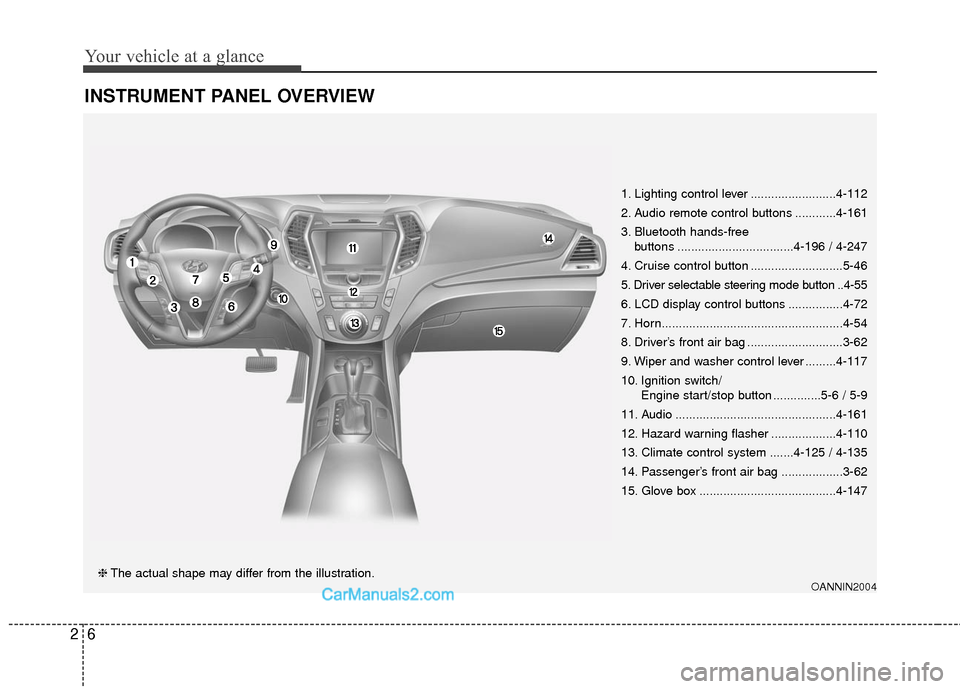
INSTRUMENT PANEL OVERVIEW
OANNIN2004❈The actual shape may differ from the illustration. 1. Lighting control lever .........................4-112
2. Audio remote control buttons ............4-161
3. Bluetooth hands-free
buttons ..................................4-196 / 4-247
4. Cruise control button ...........................5-46
5. Driver selectable steering mode button ..4-55
6. LCD display control buttons ................4-72
7. Horn.....................................................4-54
8. Driver’s front air bag ............................3-62
9. Wiper and washer control lever .........4-117
10. Ignition switch/ Engine start/stop button ..............5-6 / 5-9
11. Audio ...............................................4-161
12. Hazard warning flasher ...................4-110
13. Climate control system .......4-125 / 4-135
14. Passenger’s front air bag ..................3-62
15. Glove box ........................................4-147
Page 102 of 759
45
Features of your vehicle
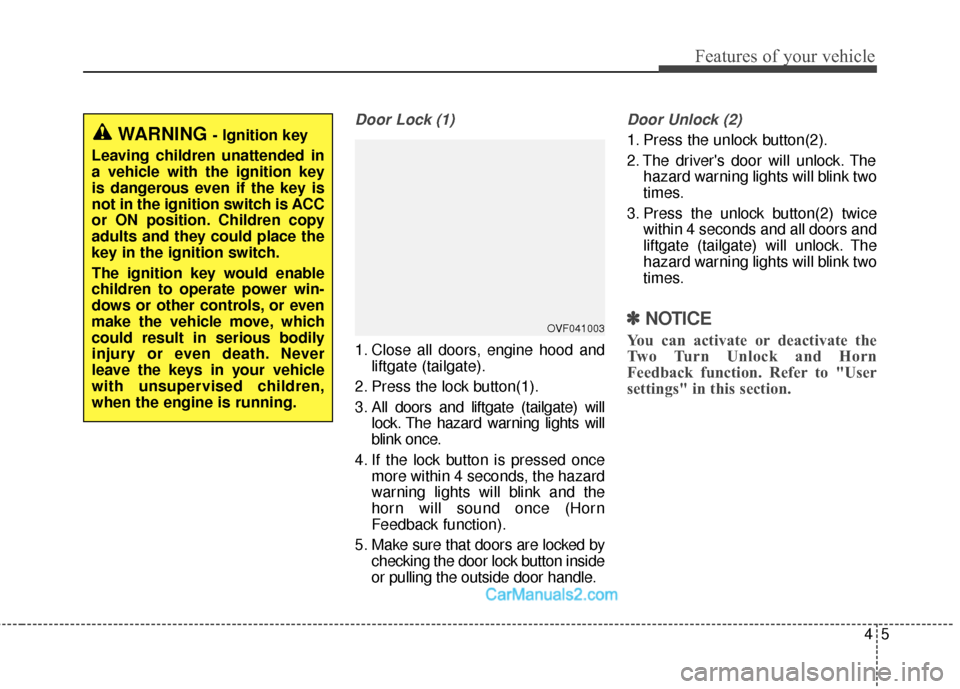
Door Lock (1)
1. Close all doors, engine hood andliftgate (tailgate).
2. Press the lock button(1).
3. All doors and liftgate (tailgate) will lock. The hazard warning lights will
blink once.
4. If the lock button is pressed once more within 4 seconds, the hazard
warning lights will blink and the
horn will sound once (Horn
Feedback function).
5. Make sure that doors are locked by checking the door lock button inside
or pulling the outside door handle.
Door Unlock (2)
1. Press the unlock button(2).
2. The driver's door will unlock. Thehazard warning lights will blink two
times.
3. Press the unlock button(2) twice within 4 seconds and all doors and
liftgate (tailgate) will unlock. The
hazard warning lights will blink two
times.
✽ ✽NOTICE
You can activate or deactivate the
Two Turn Unlock and Horn
Feedback function. Refer to "User
settings" in this section.
WARNING - Ignition key
Leaving children unattended in
a vehicle with the ignition key
is dangerous even if the key is
not in the ignition switch is ACC
or ON position. Children copy
adults and they could place the
key in the ignition switch.
The ignition key would enable
children to operate power win-
dows or other controls, or even
make the vehicle move, which
could result in serious bodily
injury or even death. Never
leave the keys in your vehicle
with unsupervised children,
when the engine is running.
OVF041003
Page 103 of 759
Features of your vehicle
64
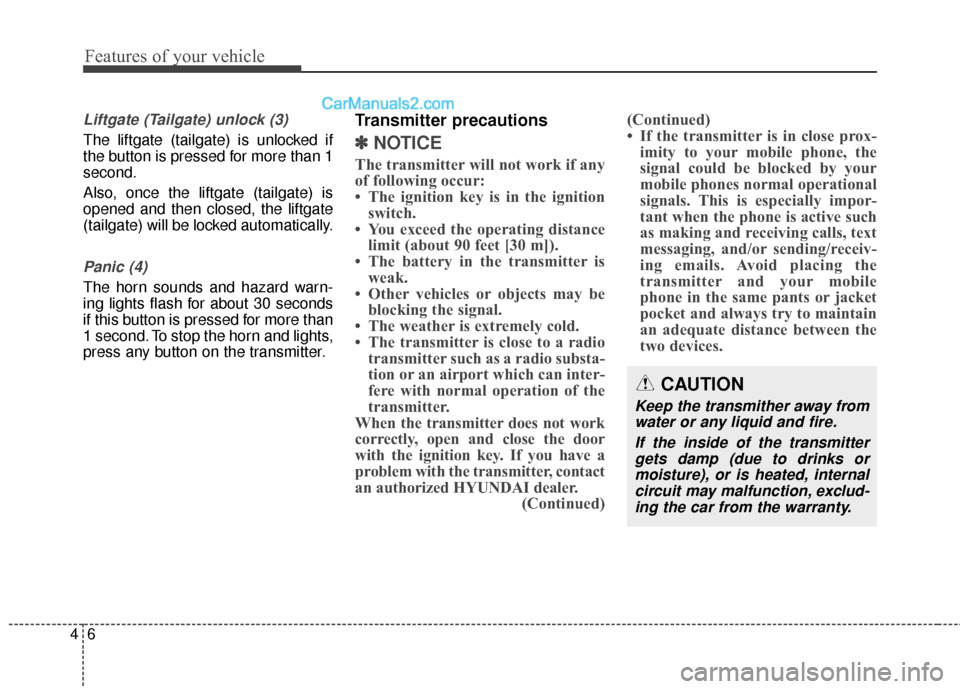
Liftgate (Tailgate) unlock (3)
The liftgate (tailgate) is unlocked if
the button is pressed for more than 1
second.
Also, once the liftgate (tailgate) is
opened and then closed, the liftgate
(tailgate) will be locked automatically.
Panic (4)
The horn sounds and hazard warn-
ing lights flash for about 30 seconds
if this button is pressed for more than
1 second. To stop the horn and lights,
press any button on the transmitter.
Transmitter precautions
✽ ✽NOTICE
The transmitter will not work if any
of following occur:
• The ignition key is in the ignition
switch.
• You exceed the operating distance limit (about 90 feet [30 m]).
• The battery in the transmitter is weak.
• Other vehicles or objects may be blocking the signal.
• The weather is extremely cold.
• The transmitter is close to a radio transmitter such as a radio substa-
tion or an airport which can inter-
fere with normal operation of the
transmitter.
When the transmitter does not work
correctly, open and close the door
with the ignition key. If you have a
problem with the transmitter, contact
an authorized HYUNDAI dealer. (Continued)(Continued)
• If the transmitter is in close prox-
imity to your mobile phone, the
signal could be blocked by your
mobile phones normal operational
signals. This is especially impor-
tant when the phone is active such
as making and receiving calls, text
messaging, and/or sending/receiv-
ing emails. Avoid placing the
transmitter and your mobile
phone in the same pants or jacket
pocket and always try to maintain
an adequate distance between the
two devices.
CAUTION
Keep the transmither away from
water or any liquid and fire.
If the inside of the transmittergets damp (due to drinks ormoisture), or is heated, internalcircuit may malfunction, exclud-ing the car from the warranty.
Page 110 of 759
413
Features of your vehicle
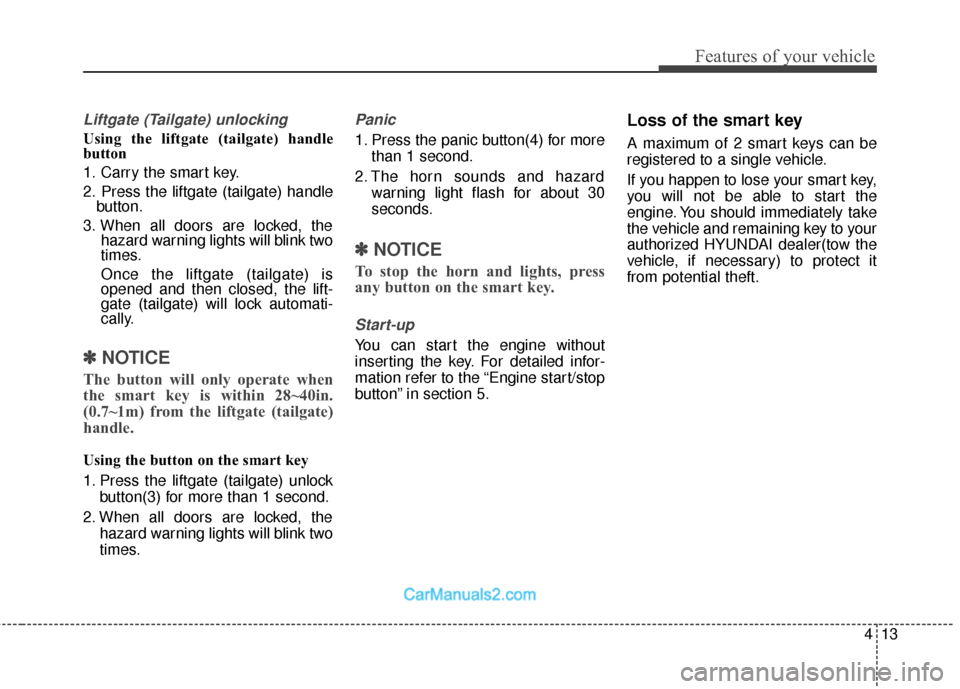
Liftgate (Tailgate) unlocking
Using the liftgate (tailgate) handle
button
1. Carry the smart key.
2. Press the liftgate (tailgate) handlebutton.
3. When all doors are locked, the hazard warning lights will blink two
times.
Once the liftgate (tailgate) is
opened and then closed, the lift-
gate (tailgate) will lock automati-
cally.
✽ ✽NOTICE
The button will only operate when
the smart key is within 28~40in.
(0.7~1m) from the liftgate (tailgate)
handle.
Using the button on the smart key
1. Press the liftgate (tailgate) unlock
button(3) for more than 1 second.
2. When all doors are locked, the hazard warning lights will blink two
times.
Panic
1. Press the panic button(4) for morethan 1 second.
2. The horn sounds and hazard warning light flash for about 30
seconds.
✽ ✽NOTICE
To stop the horn and lights, press
any button on the smart key.
Start-up
You can start the engine without
inserting the key. For detailed infor-
mation refer to the “Engine start/stop
button” in section 5.
Loss of the smart key
A maximum of 2 smart keys can be
registered to a single vehicle.
If you happen to lose your smart key,
you will not be able to start the
engine. You should immediately take
the vehicle and remaining key to your
authorized HYUNDAI dealer(tow the
vehicle, if necessary) to protect it
from potential theft.
Page 116 of 759
419
Features of your vehicle
Theft-alarm stage
The alarm will be activated if any of
the following occurs while the system
is armed.
transmitter, smart key or mechanical
key.
without using the transmitter or
smart key.
The horn will sound and the hazard
warning lights will blink continuously
for approximately 30 seconds. The
alarm will repeat once more unless
the system is disarmed. To turn off
the system, unlock the doors with the
mechanical key or transmitter or
smart key.
Disarmed stage
Using the smart key (if equipped)
The system will be disarmed when
the doors are unlocked by pressing
the unlock button on the smart key or
pressing the lock/unlock button of the
front outside door handle with the
smart key in your possession.
After unlocking the doors, the hazard
warning lights and chime will operate
twice to indicate that the system is
disarmed.
After unlocking the doors, if any door
is not opened within 30 seconds, the
system will be rearmed.
Using the transmitter (if equipped)
The system will be disarmed when
the doors are unlocked by pressing
the unlock button on the transmitter.
After unlocking the doors, the hazard
warning lights will blink twice to indi-
cate that the system is disarmed.
After unlocking the doors, if any door
is not opened within 30 seconds, the
system will be rearmed.
Using the mechanical key
The system will be disarmed when
the doors are unlocked with the
mechanical key.
✽ ✽ NOTICE
If you lock or unlock the doors by
using the mechanical key, the haz-
ard warning light and chime sound
won't operate.
Page 152 of 759
455
Features of your vehicle
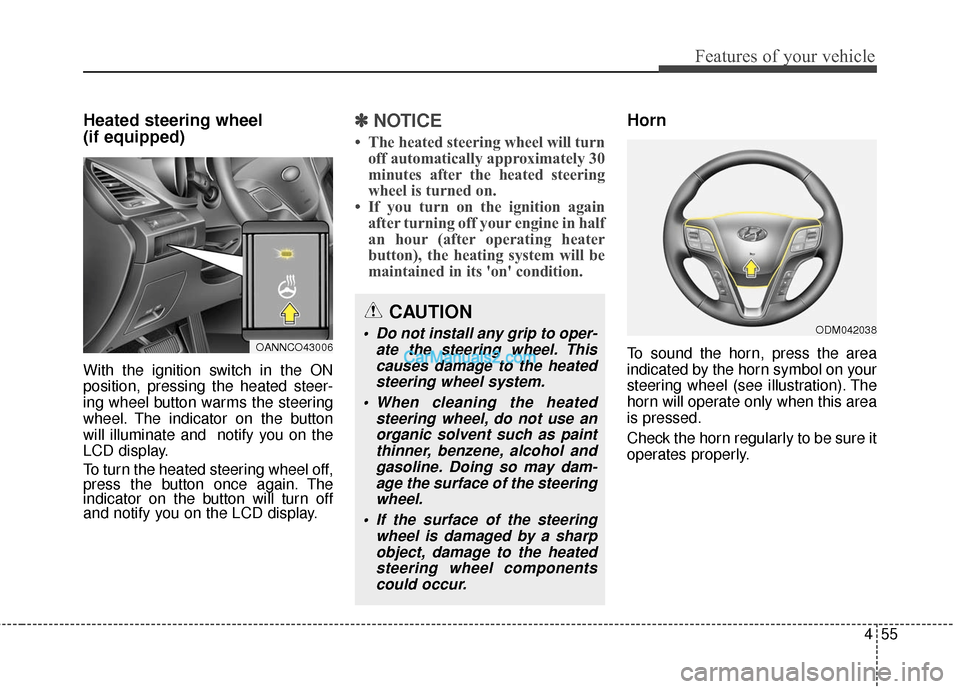
Heated steering wheel
(if equipped)
With the ignition switch in the ON
position, pressing the heated steer-
ing wheel button warms the steering
wheel. The indicator on the button
will illuminate and notify you on the
LCD display.
To turn the heated steering wheel off,
press the button once again. The
indicator on the button will turn off
and notify you on the LCD display.
✽ ✽NOTICE
• The heated steering wheel will turn
off automatically approximately 30
minutes after the heated steering
wheel is turned on.
• If you turn on the ignition again after turning off your engine in half
an hour (after operating heater
button), the heating system will be
maintained in its 'on' condition.
Horn
To sound the horn, press the area
indicated by the horn symbol on your
steering wheel (see illustration). The
horn will operate only when this area
is pressed.
Check the horn regularly to be sure it
operates properly.
CAUTION
Do not install any grip to oper-
ate the steering wheel. Thiscauses damage to the heatedsteering wheel system.
When cleaning the heated steering wheel, do not use anorganic solvent such as paintthinner, benzene, alcohol andgasoline. Doing so may dam-age the surface of the steeringwheel.
If the surface of the steering wheel is damaged by a sharpobject, damage to the heatedsteering wheel componentscould occur.OANNCO43006
ODM042038
Page 153 of 759
Features of your vehicle
56
4
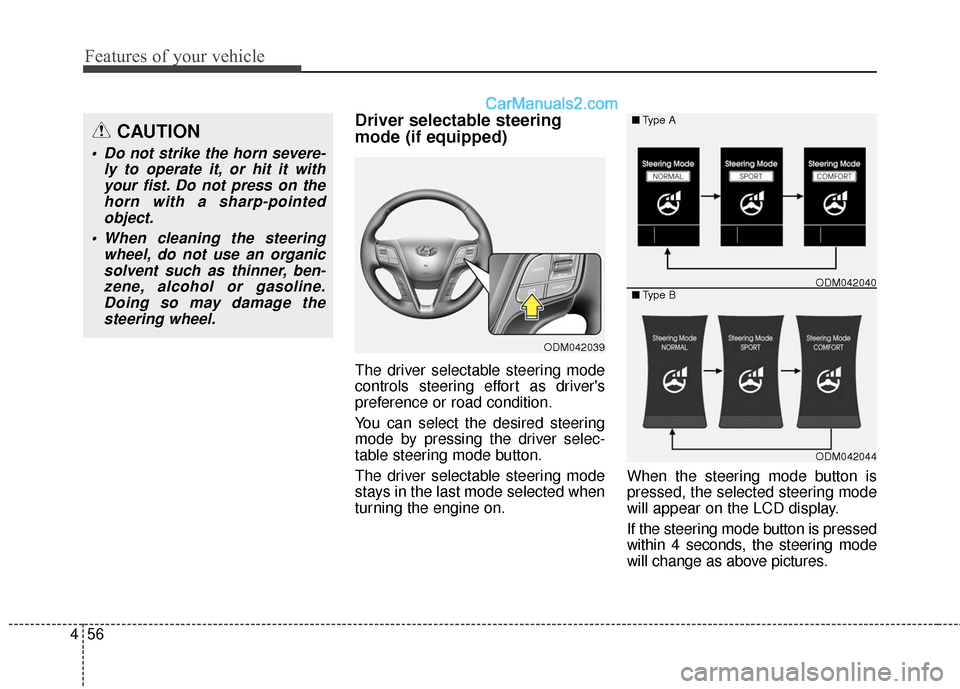
Driver selectable steering
mode (if equipped)
The driver selectable steering mode
controls steering effort as driver's
preference or road condition.
You can select the desired steering
mode by pressing the driver selec-
table steering mode button.
The driver selectable steering mode
stays in the last mode selected when
turning the engine on. When the steering mode button is
pressed, the selected steering mode
will appear on the LCD display.
If the steering mode button is pressed
within 4 seconds, the steering mode
will change as above pictures.
ODM042039
ODM042044
■
Type A
■ Type B
ODM042040
CAUTION
Do not strike the horn severe-
ly to operate it, or hit it withyour fist. Do not press on thehorn with a sharp-pointedobject.
When cleaning the steering wheel, do not use an organicsolvent such as thinner, ben-zene, alcohol or gasoline.Doing so may damage thesteering wheel.
Page 177 of 759
Features of your vehicle
80
4
Two Press Unlock (if equipped)
Off (not checked) :
The two press unlock function will
be deactivated. Therefore, all doors
will unlock if the door is unlocked.
On (checked) : The driver’s door will unlock if the
door is unlocked. When the door is
unlocked again within 4 seconds,
all doors will unlock.
Power Liftgate (Power Tailgate)
(if equipped)
If this item is checked, the power lift-
gate (power tailgate) system function
will be activated.
Smart Liftgate (Smart Tailgate)
(if equipped)
If this item is checked, the Smart
Liftgate (Smart Tailgate) system func-
tion will be activated.
For more details, refer to "Liftgate
(Tailgate)" in this chapter. Horn Feedback (if equipped)
Off (not checked) :
The Horn feedback operation will
be deactivated.
On (checked) : After locking the door by pressing
the lock button on the transmitter, if
you press the lock button again
within 4 seconds, the warning
sound will operate once to indicate
that all doors are locked.Lamp
Head Lamp Delay (if equipped)
If this item is checked, the headlamp
delay and headlamp welcome func-
tion will be activated.
Welcome Light (if equipped)
If this item is checked, the welcome
light function of the puddle lamp will
be activated.
Auto Triple Turn
(One-touch triple turn signal)
(if equipped)
If this item is checked, the lane
change signals will blink 3 times when
the turn signal lever is moved slightly.
One Touch Turn Signal (if equipped)
Off:
The one touch turn signal function
will be deactivated.
3, 5, 7 Flashing : The lane change signals will blink
3, 5, or 7 times when the turn sig-
nal lever is moved slightly.
For more details, refer to ''Light'' in
this chapter.
Page 203 of 759
Features of your vehicle
106
4
This system will activate when
backing up with the ignition switch
ON.
If the vehicle is moving at a speed
over 10 km/h (6 mph), the system
will be deactivated.
The sensing distance while the rear parking assist system is in
operation is approximately 47 in.
(120 cm).
When more than two objects are sensed at the same time, the clos-
est object will be recognized first.Types of warning sound
When an object is 47 in. to 24 in.(120 cm to 61 cm) from the rear
bumper: Buzzer beeps intermit-
tently.
When an object is 23 in. to 12 in. (60 cm to 31 cm) from the rear
bumper: Buzzer beeps more fre-
quently.
When an object is within 11.8 in. (30 cm) of the rear bumper:
Buzzer sounds continuously.
Non-operational conditions of
rear parking assist system
The rear parking assist system
may not operate properly when:
1. Moisture is frozen to the sensor. (It will operate normally when the
moisture has been cleared.)
2. The sensor is covered with foreign matter, such as snow or water, or
the sensor cover is blocked. (It will
operate normally when the materi-
al is removed or the sensor is no
longer blocked.)
3. Driving on uneven road surfaces (unpaved roads, gravel, bumps,
gradient).
4. Objects generating excessive noise (vehicle horns, loud motor-
cycle engines, or truck air brakes)
are within range of the sensor.
5. Heavy rain or water spray exists.
6. Wireless transmitters or mobile phones are within range of the
sensor.
7. Trailer towing.
Page 713 of 759
771
Maintenance
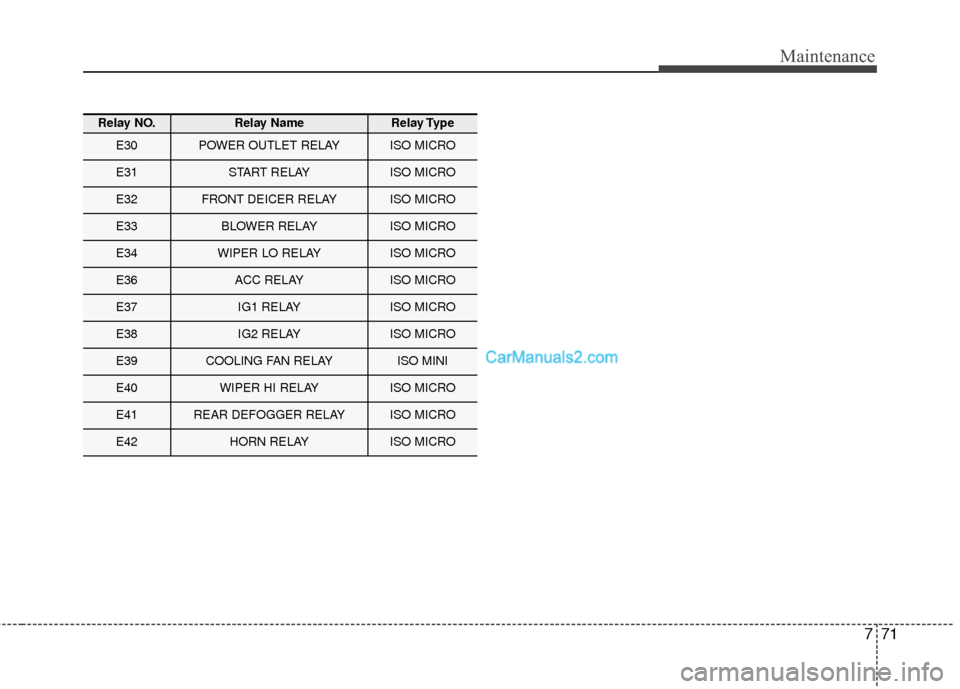
Relay NO.Relay NameRelay Type
E30POWER OUTLET RELAYISO MICRO
E31START RELAYISO MICRO
E32FRONT DEICER RELAYISO MICRO
E33BLOWER RELAYISO MICRO
E34WIPER LO RELAYISO MICRO
E36ACC RELAYISO MICRO
E37IG1 RELAYISO MICRO
E38IG2 RELAYISO MICRO
E39COOLING FAN RELAYISO MINI
E40WIPER HI RELAYISO MICRO
E41REAR DEFOGGER RELAYISO MICRO
E42HORN RELAYISO MICRO