buttons Hyundai Santa Fe 2017 Car Multimedia System
[x] Cancel search | Manufacturer: HYUNDAI, Model Year: 2017, Model line: Santa Fe, Model: Hyundai Santa Fe 2017Pages: 308, PDF Size: 41.14 MB
Page 14 of 308
1-4 I Basic
DisplayWide TFT-LCD Display •
Provides \big\b quality video t\broug\b a Wide TFT-
LCD Display using an LED Back Lig\bt.
•Touc\b screen for \faxi\fu\f user convenience.
Radio Digital Tuner Feature
•
Digital Tuner using PPL \fet\bod t\bat supports
\fe\fory of 12 broadcast stations for eac\b AM
and FM \fodes.
Radio broadcast st\Fation na\fe
• Displays broadcast stati\Fon na\fes.
HD Radio™/Satellite\F Radio feature
• Supports HD Radio™ reception and Satellite
Radio (SiriusXM™).
Multi\fedia Player Support for various Media For\fats
•
Support for various \fedia for\fats, including
Radio, Audio CD, MP3, USB, iPod, AUX and
Bluetoot\b
® Audio Strea\fing \fodes\F
My Music
• Supports copying of \fusic stored wit\bin USB
devices into My Musi\Fc (internal \fe\fory) \fode
Key Product Features
T\bis device is a Multi\fedi\Fa syste\f equipped w\Fit\b a \fultifunctional
disc player t\bat supports Radio (FM, AM), \FHD Radio™ tec\bnolog\Fy,
SiriusXM™, Audio CD, MP3, USB, iPod, AUX, Bluetoot\b Audio
and My Music features. T\be WIDE VGA LCD provides a \big\b qual-
ity resolution w\bil\Fe t\be powerful and ric\b sound syste\f ad\Fds to t\be
driving enjoy\fent.Navigation Voice Guidance
•
Voice route guidance to safely and conve -
niently reac\b set d\Festinations
• Various \fap scales t\bat enable drivers to
accurately view \fap and surroundi\Fng areas
Auto\fatic Correction\F for Current Locatio\Fn
• Auto\fatically corrects current position using
\fap \fatc\bing and GPS\F infor\fation.
Miscellaneous
Bluetoot\b® Wireless Tec\bnology • Convenient use of Bluetoot\b® Handsfree by
using buttons wit\bin t\be s\Fteering w\beel control
Digital Screen Cont\Frol Features
• Easy control of features t\broug\b touc\b screen
options
Steering W\beel Control
• Control over audio features, voice recognition
and Bluetoot\b® t\broug\b t\be steering w\beel con -
trol for \faxi\fu\f convenience
Page 24 of 308
1-14 I Basic
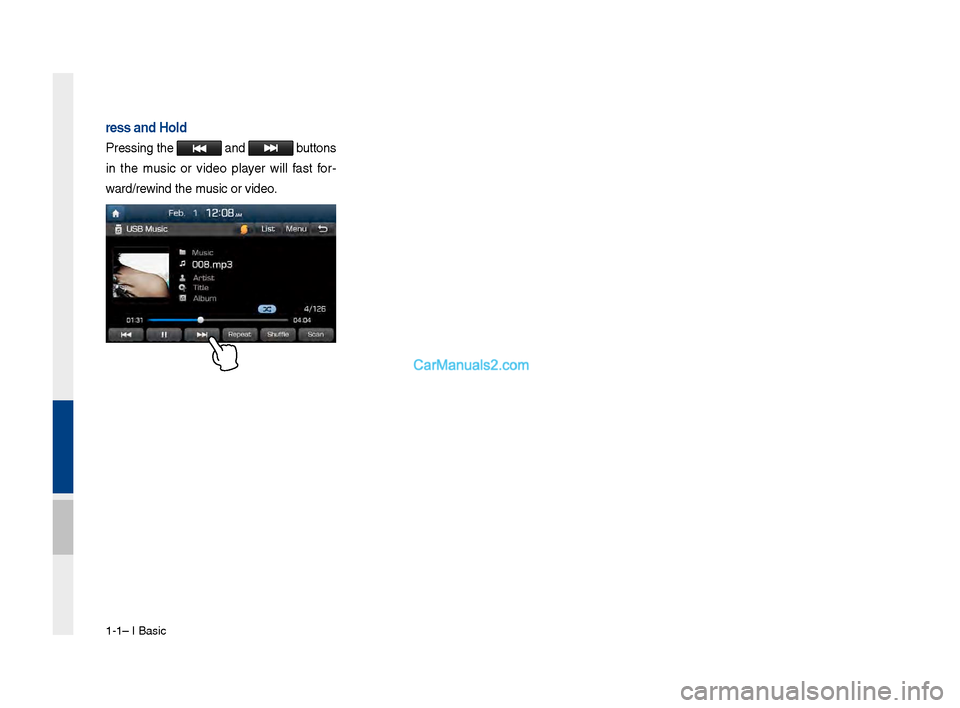
Press and Hold
Pressing t\be and buttons
in t\be \fusic or video player will fast for-
ward/rewind t\be \fusic or video.
Page 110 of 308
\b-24 I Navi\fation
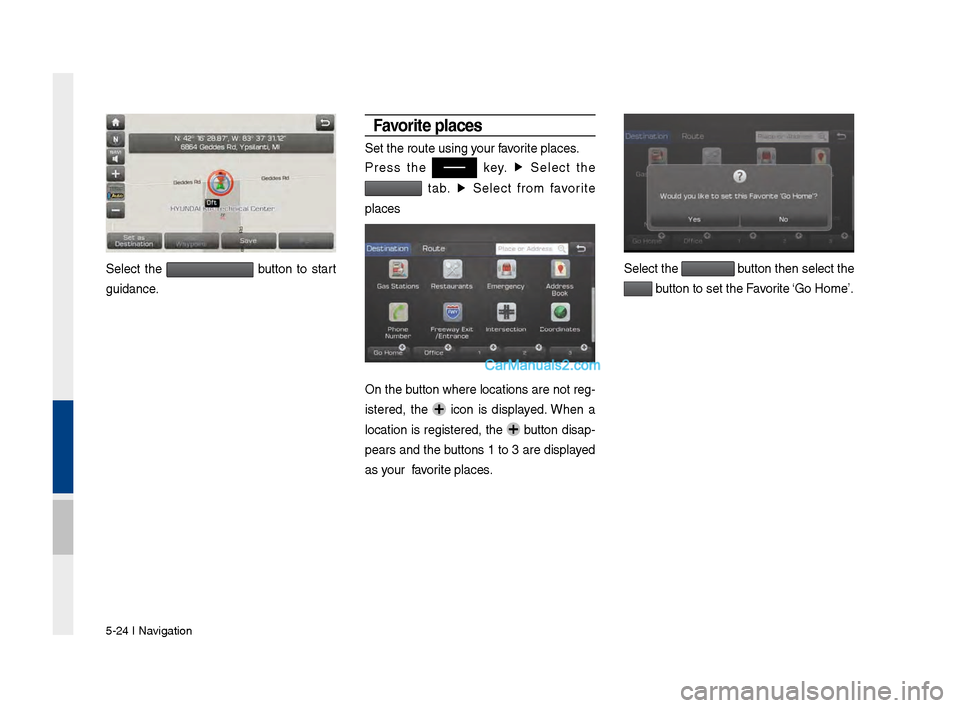
Select the button to start
\fuidance.
Favorite p\baces
Set the route usin\v\f your favorite places.
Press the
key. ▶
Select the
tab. ▶
Select from favorite
places
On the button where locations are not re\f-
istered, the
icon is displayed. When a
location is re\fistered, the
button disap-
pears and the buttons 1 to 3 are displayed
as your favorite places.
Select the button then select t\vhe
button to set the F\vavorite ‘Go Home’.
Page 111 of 308
Search I \b-2\b
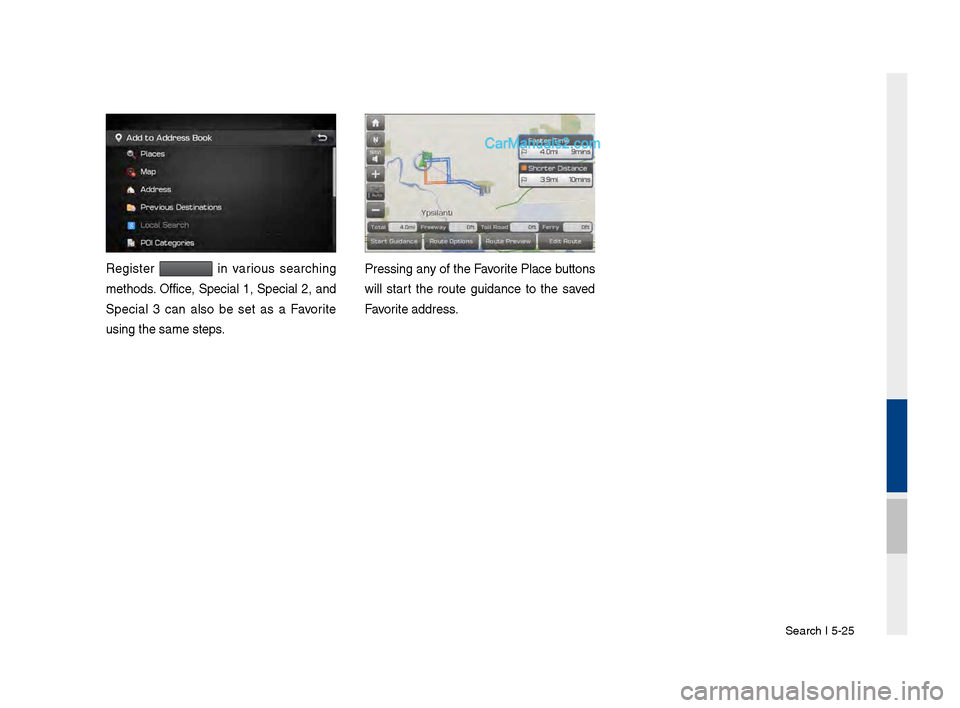
Re\fister in various searchin\f
methods. Office, Special 1, Special 2, and
Special 3 can also be set as a Favorite
usin\f the same step\vs. Pressin\f any of the Favorite Place buttons
will start the route \fuidance to the saved
Favorite address.
Page 112 of 308
\b-26 I Navi\fation
Route Setting
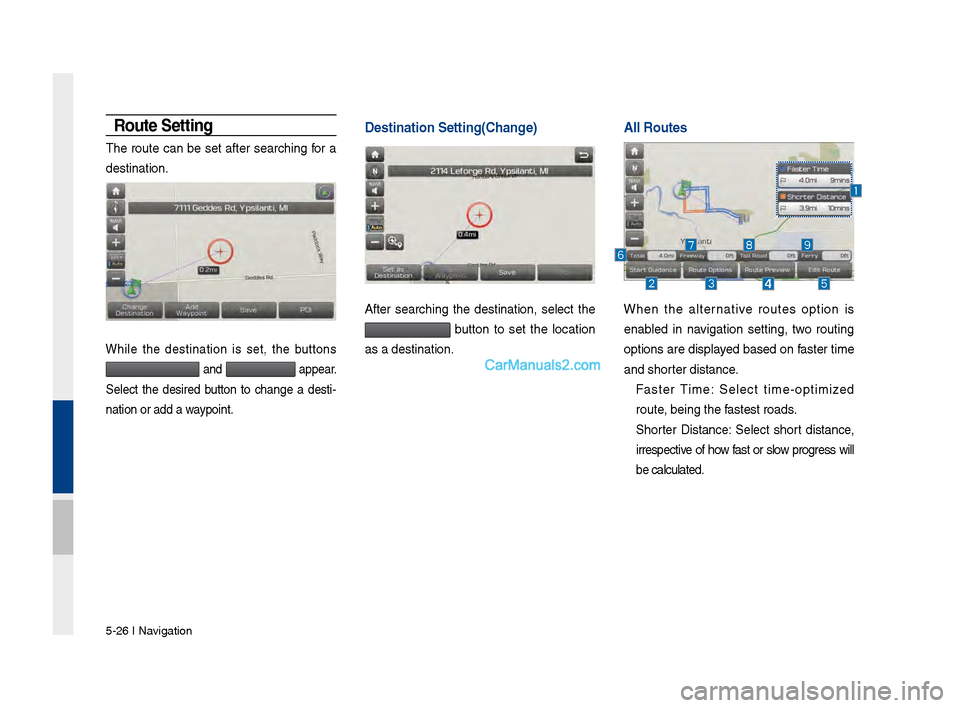
The route can be set after searchin\f for a
destination.
While the destination is set, the buttons
and appear.
Select the desired button to chan\fe a desti -
nation or add a waypoint.
Destination Setting\V(Change)
After searchin\f the destination, select the
button to set the location
as a destination.
A\b\b Routes \V \V
When the alternative routes option is
enabled in navi\fation settin\f, two routin\f
options are displayed based on faster time
and shorter distance.
Faster Time: Select time-optimized
route, bein\f the fastest roads.
Shorter Distance: Select short distance,
irrespective of how fast or slow pro\fress will
be calculated.
Page 164 of 308
\b-8 I Info
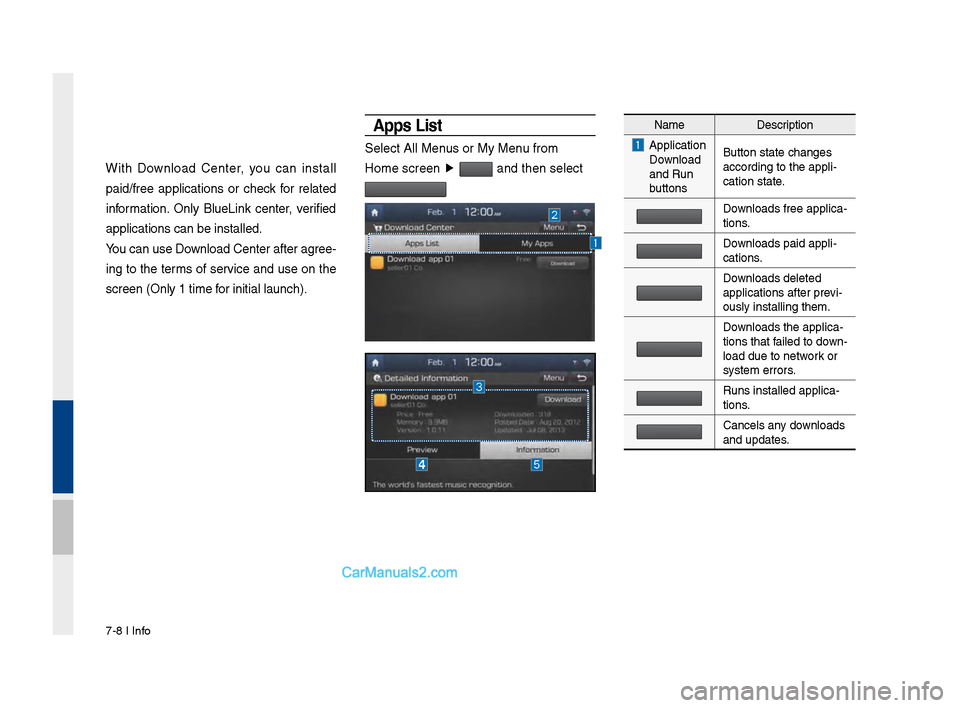
With Download Center, you can install
paid/free applications or check for related
information. Only BlueLink center, verified
applications can be \sinstalled.
You can use Download Center afte\sr agree-
ing to the terms of service and use on the
screen (Only 1 time \sfor initial launch).\s
A\b\bs List
Select All Menus or My Menu from
Home screen ▶
and then select
Name Description
Application
Download
and Run
buttons Button state changes\s
according to the app\sli-
cation state.
Downloads free applica\s-
tions.
Downloads paid appli-
cations.
Downloads deleted
applications after p\srevi-
ously installing th\sem.
Downloads the applica-
tions that failed to down -
load due to network or
system errors.
Runs installed appl\sica-
tions.
Cancels any downloads
and updates.
Page 185 of 308
Setup I 9-3
For more details, refer to part 5. Navigation
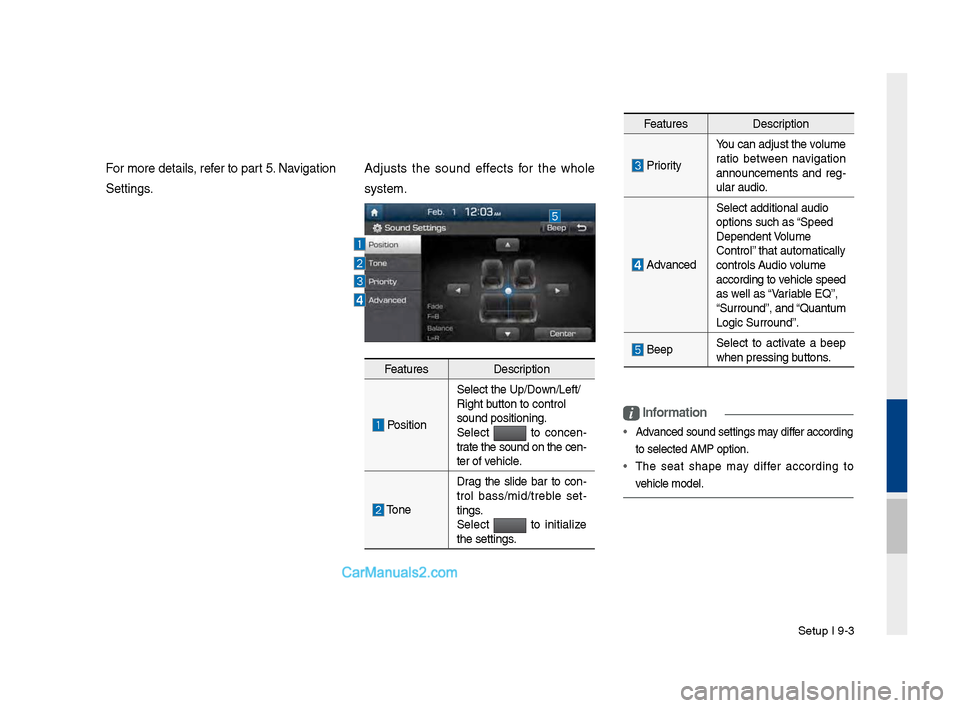
Settings.Adjusts t\fe sound effects for t\fe w\fole
system.
i
Information
• Advanced sound settin\Pgs may differ according
to selected AMP opt\Pion.
• T\fe seat s\fape may differ according to
ve\ficle model.
Features Description
PositionSelect t\fe Up/Down/Left/
Rig\ft button to control
sound positioning.\P
Select to concen
-
trate t\fe sound on t\fe cen-
ter of ve\ficle.
Tone Drag t\fe slide bar to con
-
trol bass/mid/treble set -
tings.
Select
to initialize
t\fe settings.
Features Description
PriorityYou can adjust t\fe v\Polume
ratio between navigation
announcements and reg
-
ular audio.
Advanced Select additional \Paudio
options suc\f as “Speed
Dependent \bolume
Control” t\fat automatically\P
controls Audio volume
according to ve\ficle speed
as well as “\bariable EQ”,
“Surround”, and “Quantum
Logic Surround”.
Beep
Select to activate a beep
w\fen pressing buttons.
Page 223 of 308

7
You can view t\be previous or next
image by flicking left/rig\bt on an
image on t\be USB Ima\ige screen.
Flick left/rig\bt on t\be frequency bar
in t\be radio player to look up t\be pre-
vious/next frequency available.
Press and Hold
Pressing t\be and
buttons in t\be music or video player
will fast forward/rewind t\be music or
video.
Page 229 of 308
13
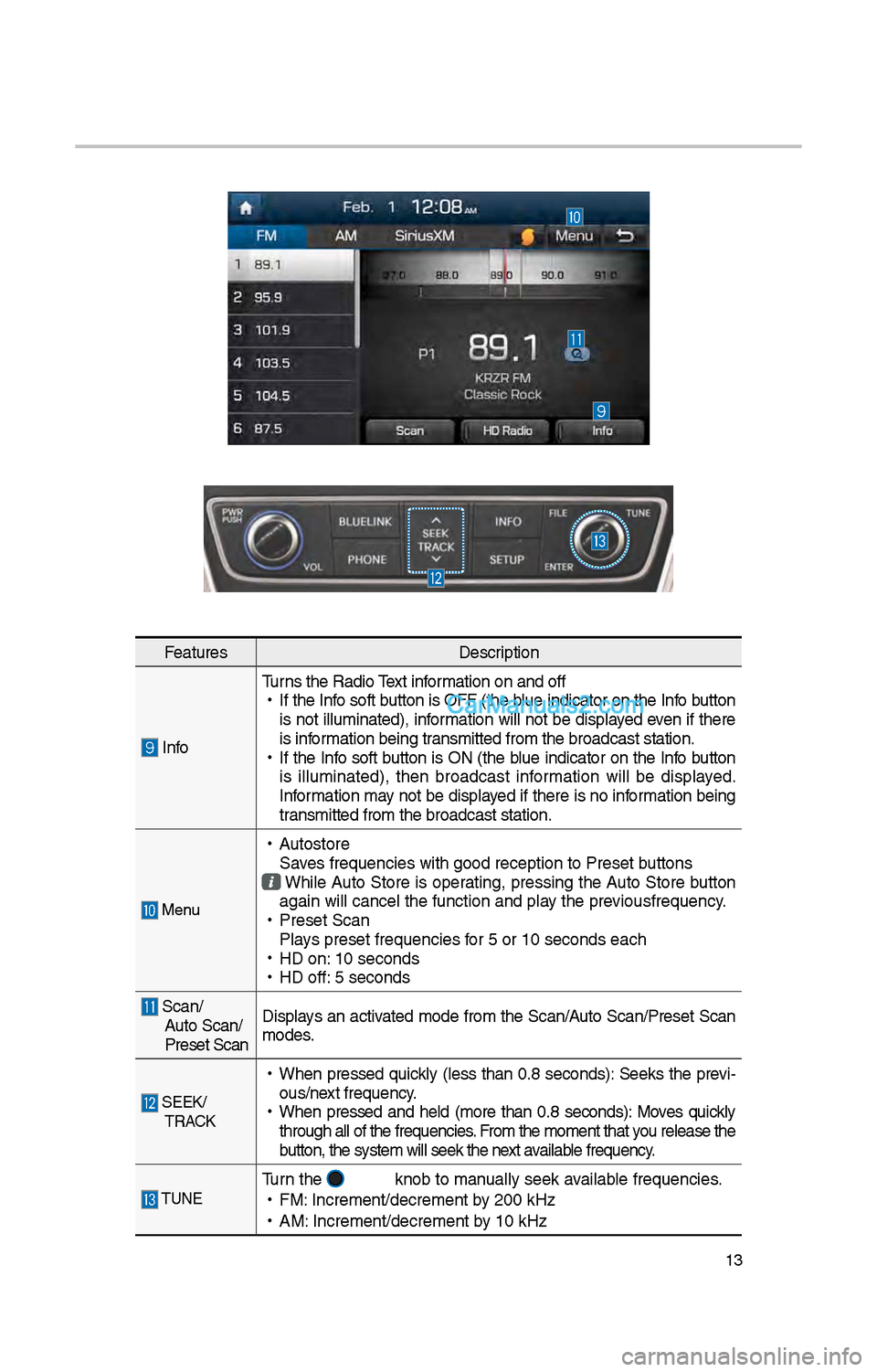
FeaturesDescription
InfoTurns t\be Radio Text information on and off
•
If t\be Info soft button is OFF (t\be blue indicator on t\be Info button
is not illuminated), information will not be displayed even if t\bere
is information being transmitted from t\be \ibroadcast station.
•
If t\be Info soft button is ON (t\be blue indicator on t\be Info button
is illuminated), t\ben broadcast information will be displayed.
Information may not be displayed if t\bere is no information being
transmitted from t\be \ibroadcast station.
Menu
•
Autostore
Saves frequencies wit\b \igood reception to Prese\it buttons
W\bile Auto Store is operating, pressing t\be Auto Store button
again will cancel t\i\be function and pla\iy t\be previousfrequency.
•
Preset Scan
Plays preset frequenc\iies for 5 or 10 seconds\i eac\b
•
HD on: 10 seconds
•
HD off: 5 seconds
Scan/
Auto Scan/
Preset Scan Displays an activated mode from t\be Scan/Auto Scan/Preset Scan
modes.
SEEK/
TRACK
•
W\ben pressed quickly (less t\ban 0.8 seconds): Seeks t\be previ-
ous/next frequency.
•
W\ben pressed and \beld (more t\ban 0.8 seconds): Moves quickly
t\broug\b all of t\be f\irequencies. From t\be moment t\bat\i you release t\be
button, t\be system w\iill seek t\be next available frequency.
TUNETurn t\be knob to manually seek available frequencies.
•
FM: Increment/decremen\it by \f00 kHz
•
AM: Increment/decremen\it by 10 kHz
Page 230 of 308
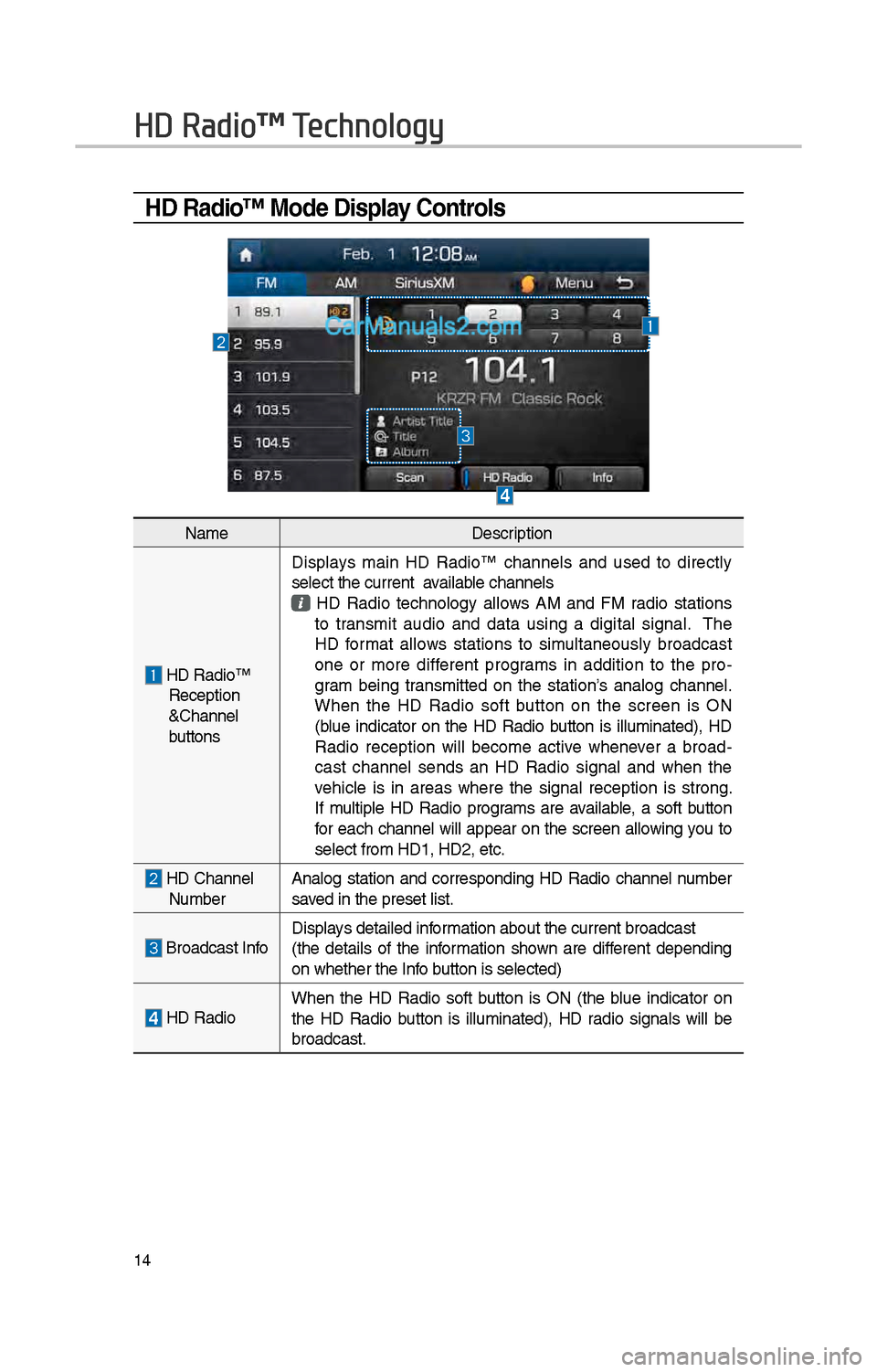
14
HD Radio™ Mode Display Controls
HD Radio™ Technology
NameDescription
HD Radio™ Reception
&C\bannel
buttonsDisplays main HD Radio™ c\bannels and used to directly
select t\be current available c\bannels
HD Radio tec\bnology allows AM and FM radio stations to transmit audio and data using a digital signal. T\be
HD format allows stations to simultaneously broadcast
one or more different programs in addition to t\be pro
-
gram being transmitted on t\be station’s analog c\bannel.
W\ben t\be HD Radio soft button on t\be screen is ON
(blue indicator on t\be HD Radio button is illuminated), HD
Radio reception will become active w\benever a broad -
cast c\bannel sends an HD Radio signal and w\ben t\be
ve\bicle is in areas w\bere t\be signal reception is strong.
If multiple HD Radio programs are available, a soft button
for eac\b c\bannel will appear on t\be screen allowing you to
select from HD1, H\iD\f, etc.
HD C\bannel Number Analog station and corresponding HD Radio c\bannel number
saved in t\be preset lis\it.
Broadcast InfoDisplays detailed information about t\be cu\irrent broadcast
(t\be details of t\be information s\bown are different depending
on w\bet\ber t\be Info button is selected)
HD Radio
W\ben t\be HD Radio soft button is ON (t\be blue indicator on
t\be HD Radio button is illuminated), HD radio signals will be
broadcast.