engine Hyundai Santa Fe 2017 Owner's Guide
[x] Cancel search | Manufacturer: HYUNDAI, Model Year: 2017, Model line: Santa Fe, Model: Hyundai Santa Fe 2017Pages: 569, PDF Size: 16.88 MB
Page 113 of 569
Features of your vehicle
10
4
Record your key number
The key code num-
ber is stamped or
printed on the key
code tag attached to
the key set. Should
you lose your keys,
this number will enable an author-
ized HYUNDAI dealer to duplicate
the keys easily. Remove the key
code tag and store it in a safe place.
Also, record the key code number
and keep it in a safe and handy
place, but not in the vehicle.
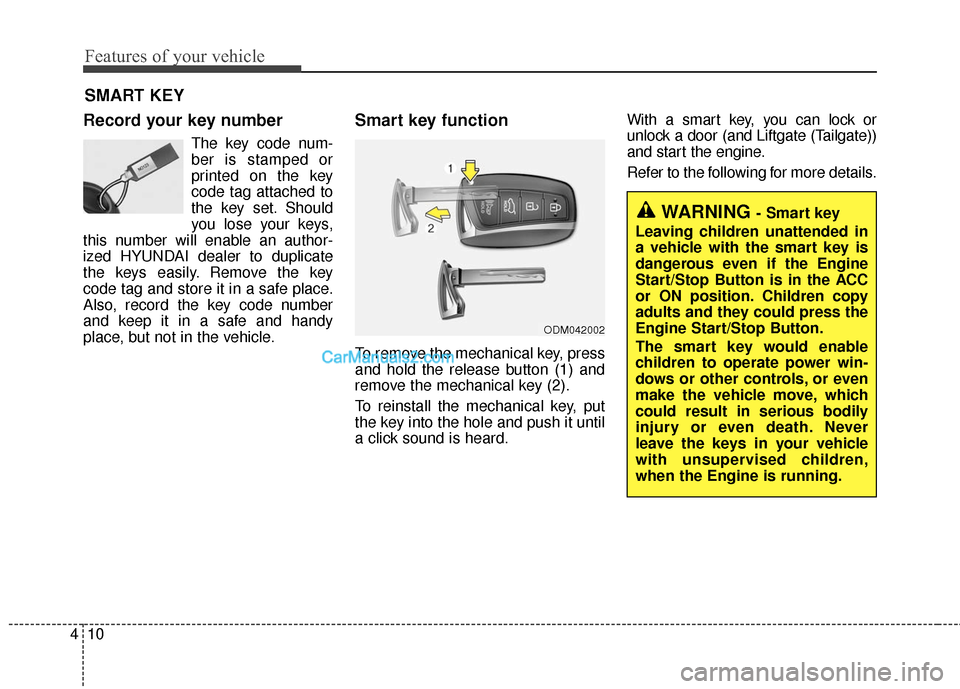
Smart key function
To remove the mechanical key, press
and hold the release button (1) and
remove the mechanical key (2).
To reinstall the mechanical key, put
the key into the hole and push it until
a click sound is heard. With a smart key, you can lock or
unlock a door (and Liftgate (Tailgate))
and start the engine.
Refer to the following for more details.
SMART KEY
ODM042002
WARNING - Smart key
Leaving children unattended in
a vehicle with the smart key is
dangerous even if the Engine
Start/Stop Button is in the ACC
or ON position. Children copy
adults and they could press the
Engine Start/Stop Button.
The smart key would enable
children to operate power win-
dows or other controls, or even
make the vehicle move, which
could result in serious bodily
injury or even death. Never
leave the keys in your vehicle
with unsupervised children,
when the Engine is running.
Page 114 of 569
411
Features of your vehicle
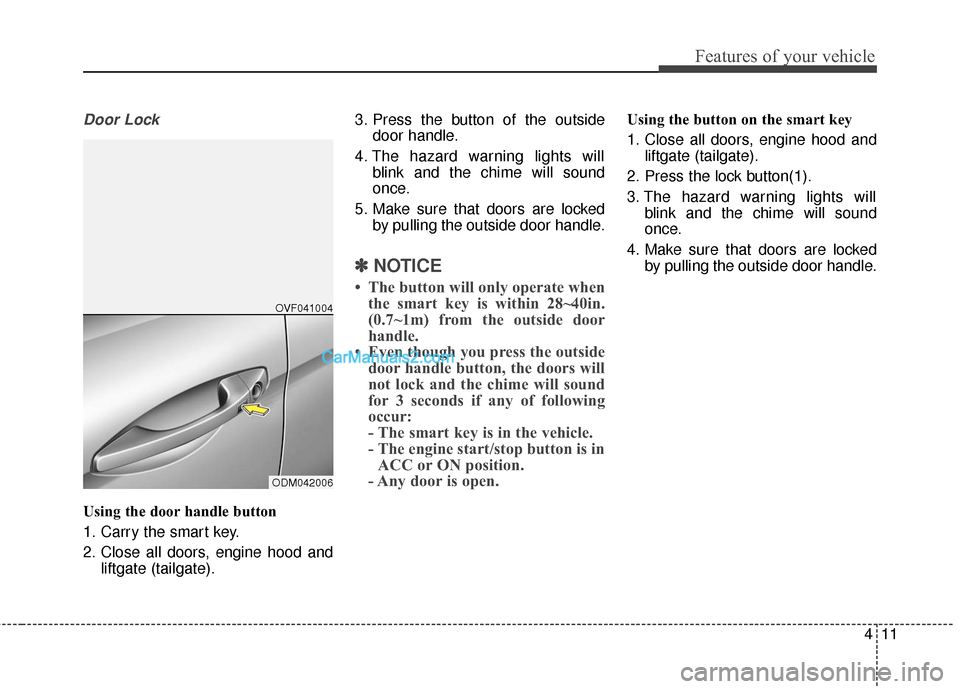
Door Lock
Using the door handle button
1. Carry the smart key.
2. Close all doors, engine hood andliftgate (tailgate). 3. Press the button of the outside
door handle.
4. The hazard warning lights will blink and the chime will sound
once.
5. Make sure that doors are locked by pulling the outside door handle.
✽ ✽NOTICE
• The button will only operate when
the smart key is within 28~40in.
(0.7~1m) from the outside door
handle.
• Even though you press the outside door handle button, the doors will
not lock and the chime will sound
for 3 seconds if any of following
occur:
- The smart key is in the vehicle.
- The engine start/stop button is inACC or ON position.
- Any door is open.
Using the button on the smart key
1. Close all doors, engine hood and
liftgate (tailgate).
2. Press the lock button(1).
3. The hazard warning lights will blink and the chime will sound
once.
4. Make sure that doors are locked by pulling the outside door handle.
ODM042006OVF041004
Page 116 of 569
413
Features of your vehicle
Liftgate (Tailgate) unlocking
Using the liftgate (tailgate) handle
button
1. Carry the smart key.
2. Press the liftgate (tailgate) handlebutton.
3. When all doors are locked, the hazard warning lights will blink two
times.
Once the liftgate (tailgate) is
opened and then closed, the lift-
gate (tailgate) will lock automati-
cally.
✽ ✽NOTICE
The button will only operate when
the smart key is within 28~40in.
(0.7~1m) from the liftgate (tailgate)
handle.
Using the button on the smart key
1. Press the liftgate (tailgate) unlock
button(3) for more than 1 second.
2. When all doors are locked, the hazard warning lights will blink two
times.
Panic
1. Press the panic button(4) for morethan 1 second.
2. The horn sounds and hazard warning light flash for about 30
seconds.
✽ ✽NOTICE
To stop the horn and lights, press
any button on the smart key.
Start-up
You can start the engine without
inserting the key. For detailed infor-
mation refer to the "Engine start/stop
button" in section 5.
Loss of the smart key
A maximum of 2 smart keys can be
registered to a single vehicle.
If you happen to lose your smart key,
you will not be able to start the
engine. You should immediately take
the vehicle and remaining key to your
authorized HYUNDAI dealer(tow the
vehicle, if necessary) to protect it
from potential theft.
Page 117 of 569
Features of your vehicle
14
4
Smart key precautions
The smart key will not work if any
of the following occur:
- The smart key is close to a radiotransmitter such as a radio sta-
tion or an airport which can inter-
fere with normal operation of the
smart key.
- The smart key is near a mobile two way radio system or a cellular
phone.
- Another vehicle’s smart key is being operated close to your
vehicle.
When the smart key does not work correctly, open and close the door
with the mechanical key and con-
tact an authorized HYUNDAI deal-
er. If the smart key is in close proximi-
ty to your cell phone or smart
phone, the signal from the smart
key could be blocked by normal
operation of your cell phone or
smart phone. This is especially
important when the phone is active
such as making a call, receiving
calls, text messaging, and/or send-
ing/receiving emails. Avoid placing
the smart key and your cell phone
or smart phone in the same pants
or jacket pocket and maintain ade-
quate distance between the two
devices.
Smart key immobilizer system
Your vehicle is equipped with an
electronic engine immobilizer system
to reduce the risk of unauthorized
vehicle use.
Your immobilizer system is com-
prised of a small transponder in the
smart key and electronic devices
inside the vehicle.
With the immobilizer system, when-
ever you turn the engine start/stop
button to the ON position by pressing
the button while carrying the smart
key, it checks and determines and
verifies if the smart key is valid or
not.
If the key is determined to be valid,
the engine will start.
If the key is determined to be invalid,
the engine will not start.
CAUTION
Keep the smart key away fromwater or any liquid and fire. Ifthe inside of the smart key getsdamp (due to drinks or mois-ture), or is heated, internal cir-cuit may malfunction.
Page 118 of 569
415
Features of your vehicle
To deactivate the immobilizersystem:
Turn the engine start/stop button to
the ON position by pressing the but-
ton while carrying the smart key.
To activate the immobilizer system:
Turn the engine start/stop button to
the OFF position. The immobilizer
system activates automatically.
Without a valid smart key for your
vehicle, the engine will not start.
✽ ✽ NOTICE
When starting the engine, do not use
the key with other immobilizer keys
around. Otherwise the engine may
not start or may stop soon after it
starts. Keep each key separate in
order to avoid a starting malfunction.
✽ ✽NOTICE
If you need additional keys or lose
your keys, contact an authorized
HYUNDAI dealer.
CAUTION
In order to prevent theft of your
vehicle, do not leave spare keysanywhere in your vehicle. YourImmobilizer password is a cus-tomer unique password andshould be kept confidential. Donot leave this number anywherein your vehicle.
CAUTION
The transponder in your smartkey is an important part of theimmobilizer system. It isdesigned to give years of trou-ble-free service, however youshould avoid exposure to mois-ture, static electricity and roughhandling. Immobilizer systemmalfunction could occur.
CAUTION
Do not change, alter or adjustthe immobilizer system becauseit could cause the immobilizersystem to malfunction andshould only be serviced by anauthorized HYUNDAI dealer.
Malfunctions caused by improp-er alterations, adjustments ormodifications to the immobilizersystem are not covered by yourvehicle manufacturer warranty.
CAUTION
Do not put metal accessoriesnear the smart key.
The engine may not startbecause the metal accessoriesmay interrupt the transpondersignal from transmitting normal-ly.
Page 120 of 569
417
Features of your vehicle
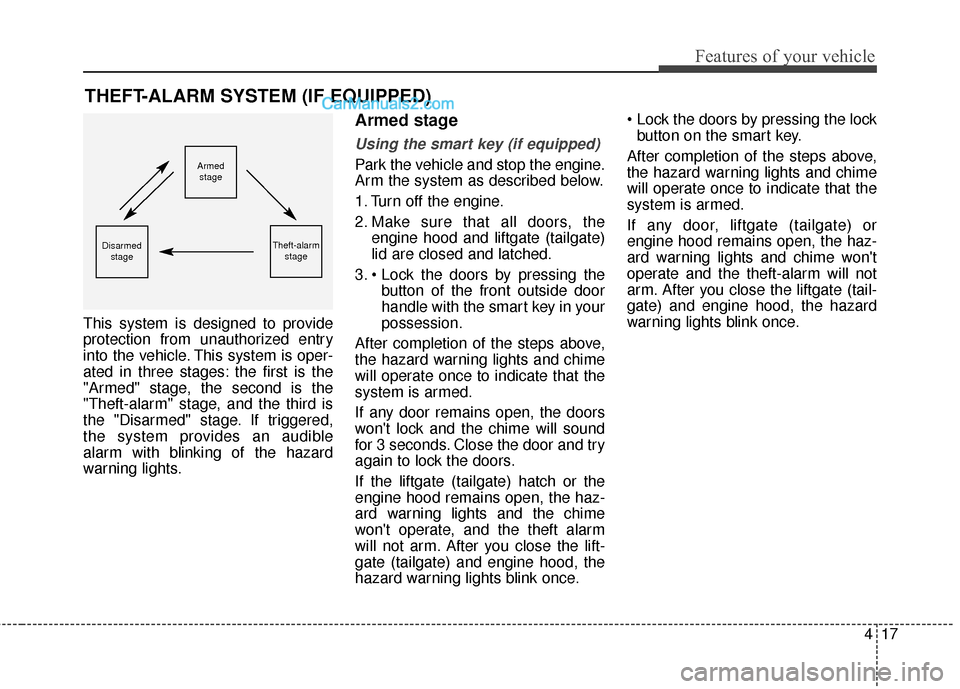
This system is designed to provide
protection from unauthorized entry
into the vehicle. This system is oper-
ated in three stages: the first is the
"Armed" stage, the second is the
"Theft-alarm" stage, and the third is
the "Disarmed" stage. If triggered,
the system provides an audible
alarm with blinking of the hazard
warning lights.
Armed stage
Using the smart key (if equipped)
Park the vehicle and stop the engine.
Arm the system as described below.
1. Turn off the engine.
2. Make sure that all doors, theengine hood and liftgate (tailgate)
lid are closed and latched.
3. button of the front outside door
handle with the smart key in your
possession.
After completion of the steps above,
the hazard warning lights and chime
will operate once to indicate that the
system is armed.
If any door remains open, the doors
won't lock and the chime will sound
for 3 seconds. Close the door and try
again to lock the doors.
If the liftgate (tailgate) hatch or the
engine hood remains open, the haz-
ard warning lights and the chime
won't operate, and the theft alarm
will not arm. After you close the lift-
gate (tailgate) and engine hood, the
hazard warning lights blink once.
button on the smart key.
After completion of the steps above,
the hazard warning lights and chime
will operate once to indicate that the
system is armed.
If any door, liftgate (tailgate) or
engine hood remains open, the haz-
ard warning lights and chime won't
operate and the theft-alarm will not
arm. After you close the liftgate (tail-
gate) and engine hood, the hazard
warning lights blink once.
THEFT-ALARM SYSTEM (IF EQUIPPED)
Armed stage
Theft-alarm stageDisarmedstage
Page 121 of 569
Features of your vehicle
18
4
Using the transmitter (if equipped)
Park the vehicle and stop the engine.
Arm the system as described below.
1. Turn off the engine and remove
the ignition key from the ignition
switch.
2. Make sure that all doors, the engine hood and liftgate (tailgate)
are closed and latched.
3. Lock the doors by pressing the lock button on the transmitter.
After completion of the steps above,
the hazard warning lights will blink
once to indicate that the system is
armed.
If any door, liftgate (tailgate) or
engine hood remains open, the haz-
ard warning lights won't operate and
theft-alarm will not arm. After you
close all doors, liftgate (tailgate) and
engine hood, the hazard warning
lights blink once.
Using the mechanical key
Park the vehicle and stop the engine.
Arm the system as described below.
1. Turn off the engine and remove the key from the ignition switch(if
equipped).
2. Make sure that all doors, the engine hood and liftgate (tailgate)
are closed and latched.
3. Lock the doors by inserting the key into the key hole on the front out-
side door handle and turning the
key toward the rear of the vehicle.
If any door, liftgate (tailgate) or
engine hood remains open, the theft-
alarm will not arm.
✽ ✽ NOTICE
If you lock or unlock the doors by
using the mechanical key, the haz-
ard warning light won't operate.
Do not arm the system until all
passengers have left the vehicle. If
the system is armed while a pas-
senger(s) remains in the vehicle,
the alarm may be activated when
the remaining passenger(s) leave
the vehicle. If any door (or trunk)
or engine hood is opened within
30 seconds after the system
enters the armed stage, the sys-
tem is disarmed to prevent an
unnecessary alarm.
Page 123 of 569
Features of your vehicle
20
4
✽
✽
NOTICE
• Avoid trying to start the engine
while the alarm is activated. The
vehicle starting motor is disabled
during the theft-alarm stage.
• If you lose your keys, contact your authorized HYUNDAI dealer.
CAUTION
Do not change, alter or adjust
the theft-alarm system becauseit could cause the theft-alarmsystem to malfunction andshould only be serviced by anauthorized HYUNDAI dealer.
Malfunctions caused by improp-er alterations, adjustments ormodifications to the theft-alarmsystem are not covered by yourvehicle manufacturer warranty.
Page 128 of 569
425
Features of your vehicle
Impact sensing door unlock
system
All doors will be automatically
unlocked if an impact or collision is
detected by the impact sensors while
the ignition switch is ON.
However, the doors may not be
unlocked if mechanical problems
occur with the door lock system or
battery.
✽ ✽NOTICE
You can select some auto door
lock/unlock features in “User
Settings” as follows;
• Speed sensing auto door lock
• Auto door unlock when the igni-
tion key is removed from the igni-
tion switch or engine is turned off.
• Auto door lock/unlock by shifting the shift lever out of P(Park) or
into P(Park).
For more information, refer to
“User Settings” in this section.
Child-protector rear door lock
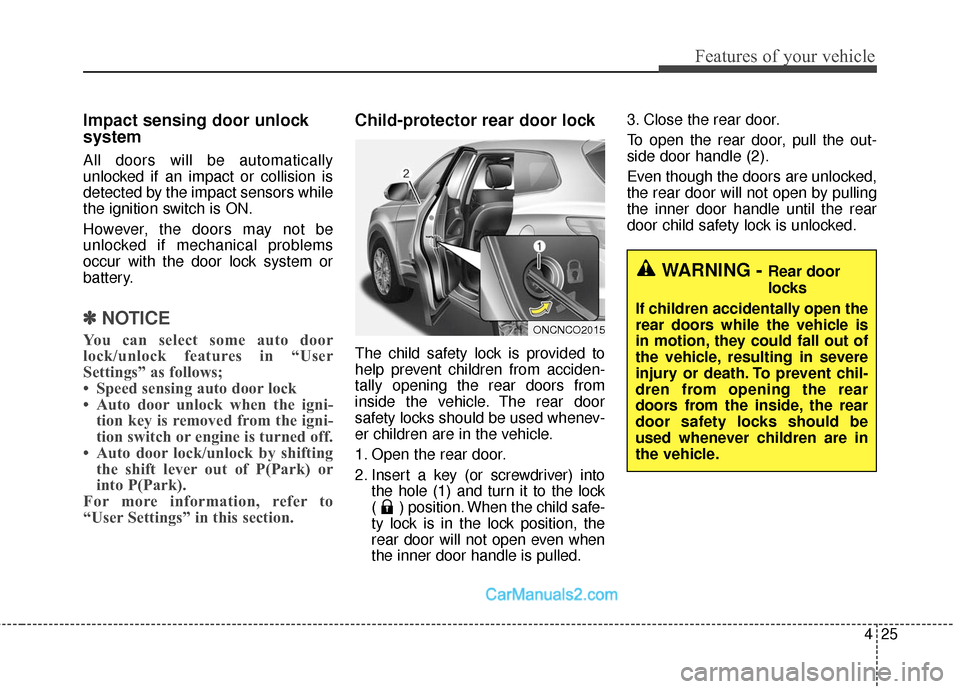
The child safety lock is provided to
help prevent children from acciden-
tally opening the rear doors from
inside the vehicle. The rear door
safety locks should be used whenev-
er children are in the vehicle.
1. Open the rear door.
2. Insert a key (or screwdriver) into
the hole (1) and turn it to the lock
( ) position. When the child safe-
ty lock is in the lock position, the
rear door will not open even when
the inner door handle is pulled. 3. Close the rear door.
To open the rear door, pull the out-
side door handle (2).
Even though the doors are unlocked,
the rear door will not open by pulling
the inner door handle until the rear
door child safety lock is unlocked.
WARNING - Rear door
locks
If children accidentally open the
rear doors while the vehicle is
in motion, they could fall out of
the vehicle, resulting in severe
injury or death. To prevent chil-
dren from opening the rear
doors from the inside, the rear
door safety locks should be
used whenever children are in
the vehicle.
ONCNCO2015
Page 131 of 569
Features of your vehicle
28
4
✽
✽
NOTICE
When the engine is not running, the
power liftgate (power tailgate) can
be operated regardless of gear posi-
tion.
However, if ignition switch is ON
position, the power liftgate (power
tailgate) can operate when the auto-
matic shift lever is in P (Park).CAUTION
Do not close or open the power
liftgate (power tailgate) manual-ly. This may cause damage tothe power liftgate (power tail-gate). If it is necessary to closeor open the power liftgate(power tailgate) manually whenthe battery is discharged or dis-connected, do not apply exces-sive force.
WARNING
Make sure there are no people
or objects around the liftgate
(tailgate) before operating the
power liftgate (power tailgate).
Wait until the liftgate (tailgate) is
opened fully and stopped before
loading or unloading cargo or
passengers from the vehicle.
WARNING
Never leave children or animals
unattended in your vehicle.
Children or animals might oper-
ate the power liftgate (power
tailgate) that could result in
injury to themselves or others,
or damage the vehicle.