audio Hyundai Santa Fe 2017 Owner's Manual
[x] Cancel search | Manufacturer: HYUNDAI, Model Year: 2017, Model line: Santa Fe, Model: Hyundai Santa Fe 2017Pages: 569, PDF Size: 16.88 MB
Page 20 of 569
Your vehicle at a glance
62
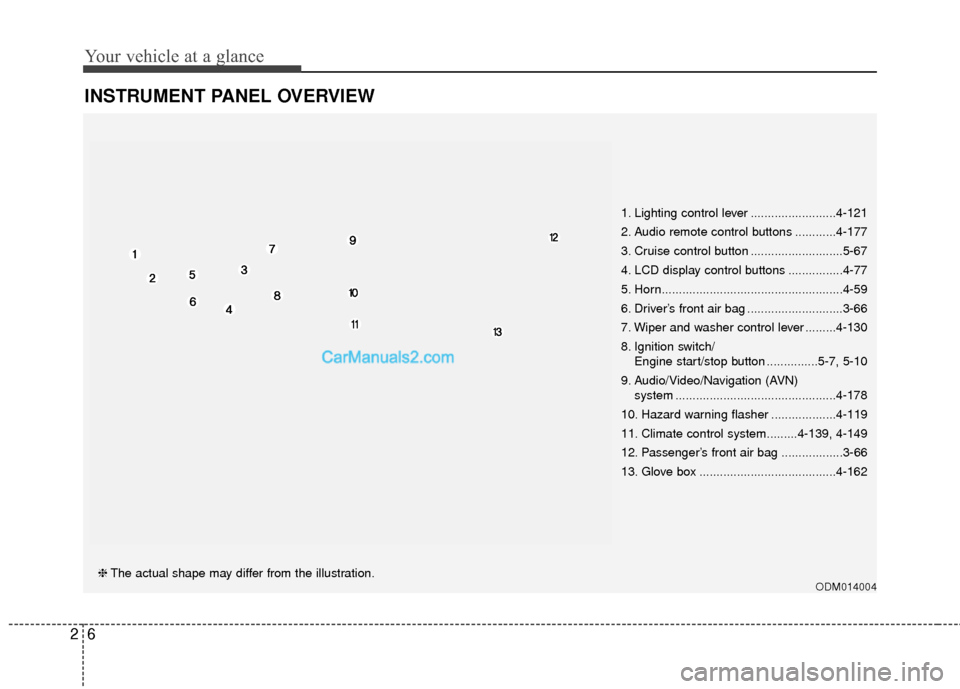
INSTRUMENT PANEL OVERVIEW
ODM014004❈The actual shape may differ from the illustration. 1. Lighting control lever .........................4-121
2. Audio remote control buttons ............4-177
3. Cruise control button ...........................5-67
4. LCD display control buttons ................4-77
5. Horn.....................................................4-59
6. Driver’s front air bag ............................3-66
7. Wiper and washer control lever .........4-130
8. Ignition switch/
Engine start/stop button ...............5-7, 5-10
9. Audio/Video/Navigation (AVN) system ...............................................4-178
10. Hazard warning flasher ...................4-119
11. Climate control system.........4-139, 4-149
12. Passenger’s front air bag ..................3-66
13. Glove box ........................................4-162
Page 106 of 569
Welcome system . . . . . . . . . . . . . . . . . . . . . . . . . . 4-136
. . . . . . . . . . . . . . . . . . . . . . . . . . 4-136
. . . . . . . . . . . . . . . . . . . . . . . . . . . . . . . . 4-136
Defroster . . . . . . . . . . . . . . . . . . . . . . . . . . . . . . . . 4-137
. . . . . . . . . . . . . . . . . . . . . . . 4-137
. . . . . . . . . . . . . . . . . . . . . . . . . . . 4-138
Manual climate control system . . . . . . . . . . . . . . 4-139
. . . . . . . . . . . . . . . . . . 4-140
rdrow climate control . . . . . . . . . . . . . . . . . . . . . . . 4-145
. . . . . . . . . . . . . . . . . . . . . . . . . . . . 4-145
. . . . . . . . . . . . . . . . . . . . . . 4-147
refrigerant and compressor lubricant . . . . . . . . . 4-148
. . . . . . . . . . . . . 4-148
Automatic climate control system. . . . . . . . . . . . 4-149
. . . . . . . . . 4-151
. . . . . . . . . . . 4-152
rdrow climate control . . . . . . . . . . . . . . . . . . . . . . . 4-158
Windshield defrosting and defogging . . . . . . . . . 4-159
. . . . . . . . . . . . . . . . 4-159
. . . . . . . . . . . . . . 4-160
Storage compartments . . . . . . . . . . . . . . . . . . . . . 4-162
. . . . . . . . . . . . . . . . . . . . . . . 4-162
. . . . . . . . . . . . . . . . . . . . . . . . . . . . . . . . . . 4-16\
2 . . . . . . . . . . . . . . . . . . . . . . . . . . . . . . . . . . 4-16\
3
. . . . . . . . . . . . . . . . . . . . . . . . . . . . . 4-163
. . . . . . . . . . . . . . . . . . . . . . . . . . . . . . . 4-164
Interior features . . . . . . . . . . . . . . . . . . . . . . . . . . 4-165
. . . . . . . . . . . . . . . . . . . . . . . . . . . . . . . . . 4-165
. . . . . . . . . . . . . . . . . . . . . . . . . . . . . . . . . . . 4-\
166
. . . . . . . . . . . . . . . . . . . . . . . . . . . . . . . . 4-167
. . . . . . . . . . . . . . . . . . . . . . . . . . . . . . . . . 4-169
. . . . . . . . . . . . . . . . . . . . . . . . . . . . . . 4-170
USB and iPod
®port . . . . . . . . . . . . . . . . . . . . . 4-172
. . . . . . . . . . . . . . . . . . . . . . . . . . . . . . . 4-172
. . . . . . . . . . . . . . . . . . . . . . . . . 4-173
. . . . . . . . . . . . . . . . . . . . . . . . 4-173
. . . . . . . . . . . . . . . . . . . . . . . . . . . . . . . . 4-175
Exterior features. . . . . . . . . . . . . . . . . . . . . . . . . . 4-176
. . . . . . . . . . . . . . . . . . . . . . . . . . . . . . . . . . 4-17\
6
Audio system . . . . . . . . . . . . . . . . . . . . . . . . . . . . . 4-177
. . . . . . . . . . . . . . . . . . . . . . . . . . . . . . . . . . . 4-\
177
. . . . . . . . . . . . . . . . . . 4-177
. . . . . . . . 4-178
. . . . . . . . . . . . . . . . . . . . . 4-179
. . . . . . . . . . . . . . . . . . . . . . . . . . . . . 4-181
4
Page 171 of 569
Features of your vehicle
68
4
NVS®is a registered trademark and
Z-Nav™ is a trademark of the
Gentex Corporation, Zeeland,
Michigan. HomeLink
®is a registered
trademark owned by Johnson
Controls, Incorporated, Milwaukee,
Wisconsin.
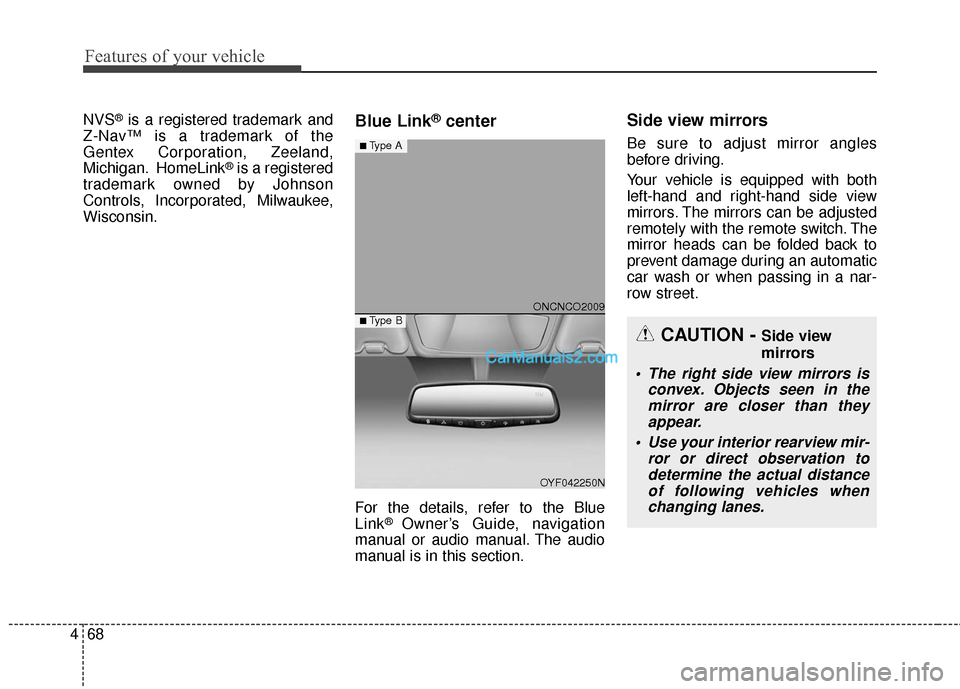
Blue Link®center
For the details, refer to the Blue
Link® Owner’s Guide, navigation
manual or audio manual. The audio
manual is in this section.
Side view mirrors
Be sure to adjust mirror angles
before driving.
Your vehicle is equipped with both
left-hand and right-hand side view
mirrors. The mirrors can be adjusted
remotely with the remote switch. The
mirror heads can be folded back to
prevent damage during an automatic
car wash or when passing in a nar-
row street.
CAUTION - Side view
mirrors
The right side view mirrors is convex. Objects seen in themirror are closer than theyappear.
Use your interior rearview mir- ror or direct observation todetermine the actual distanceof following vehicles whenchanging lanes.
ONCNCO2009
OYF042250N
■Type A
■ Type B
Page 271 of 569
Features of your vehicle
168
4
(Continued)
Some electronic devices can cause electronic interferencewhen plugged into a vehicle’spower outlet. These devicesmay cause excessive audiostatic and malfunctions inother electronic systems ordevices used in your vehicle.
Make sure that the electric devices are plugged in secure-ly. If not, it could cause a mal-function of electric systems.
If you use an electric device with a battery, electric currentmay flow from the electricdevice into the vehicle andmay cause a malfunction ofelectric systems. Only useelectric devices which couldprevent inverse current.WARNING
Do not put fingers or foreign
elements (pin, etc.) into a power
outlet and do not touch with a
wet hand. You may get an elec-
tric shock.
CAUTION
Use the power outlet only when the engine is runningand remove the accessoryplug after use. Using theaccessory plug for prolongedperiods of time with theengine off could cause thebattery to discharge.
Only use 10V electric acces- sories which are less than 10Ain electric capacity. If not, itcould lead to an overheatedpower outlet or electric wiringin the vehicle and electric sys-tems may malfunction.
Adjust the air-conditioner or heater to the lowest operatinglevel when using the poweroutlet.
Close the cover when not in use.
(Continued)
Page 273 of 569
Features of your vehicle
170
4
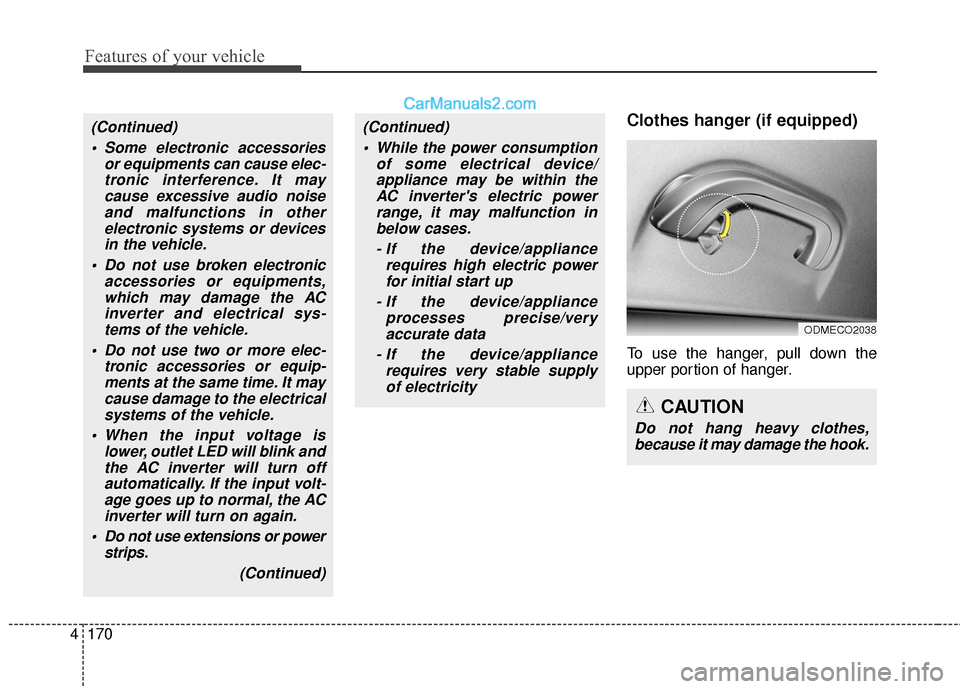
Clothes hanger (if equipped)
To use the hanger, pull down the
upper portion of hanger.
ODMECO2038
CAUTION
Do not hang heavy clothes,
because it may damage the hook.
(Continued)
Some electronic accessories or equipments can cause elec-tronic interference. It maycause excessive audio noiseand malfunctions in otherelectronic systems or devicesin the vehicle.
Do not use broken electronic accessories or equipments,which may damage the ACinverter and electrical sys-tems of the vehicle.
Do not use two or more elec- tronic accessories or equip-ments at the same time. It maycause damage to the electricalsystems of the vehicle.
When the input voltage is lower, outlet LED will blink andthe AC inverter will turn offautomatically. If the input volt-age goes up to normal, the ACinverter will turn on again.
Do not use extensions or power strips.
(Continued)(Continued) While the power consumption of some electrical device/appliance may be within theAC inverter's electric powerrange, it may malfunction inbelow cases.
- If the device/appliance requires high electric powerfor initial start up
- If the device/appliance processes precise/veryaccurate data
- If the device/appliance requires very stable supplyof electricity
Page 275 of 569
Features of your vehicle
172
4
Aux, USB and iPod®port
You can use the AUX port to connect
audio devices and the USB port to
plug in a USB device or iPod
®.
✽ ✽
NOTICE
When using a portable audio device
connected to the power outlet, noise
may occur during playback. If this
happens, use the power source of the
portable audio device.
❈ iPod®is a trademark of Apple Inc.
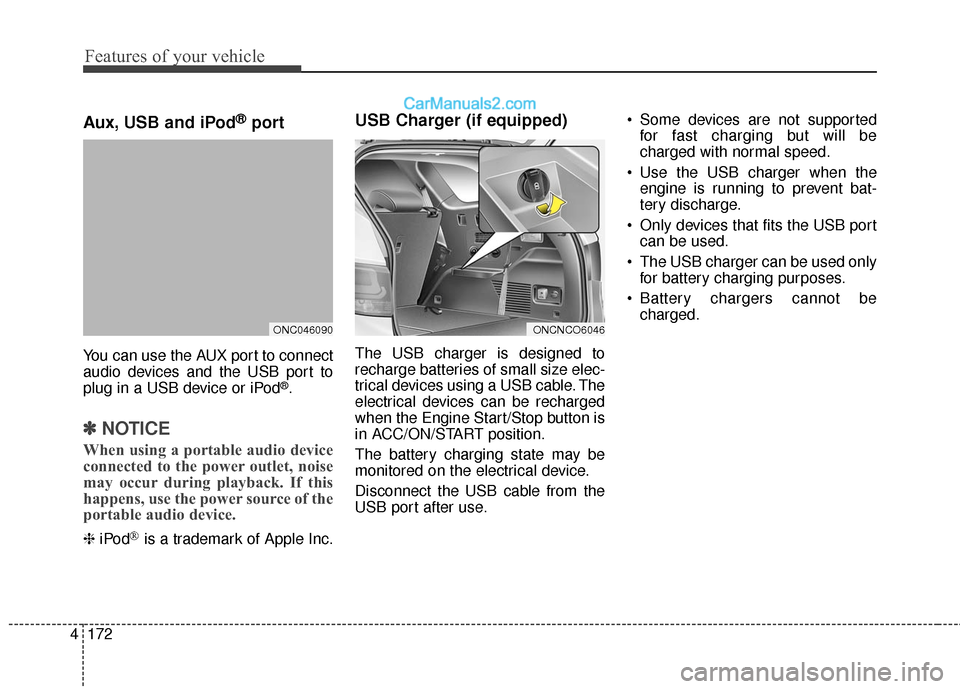
USB Charger (if equipped)
The USB charger is designed to
recharge batteries of small size elec-
trical devices using a USB cable. The
electrical devices can be recharged
when the Engine Start/Stop button is
in ACC/ON/START position.
The battery charging state may be
monitored on the electrical device.
Disconnect the USB cable from the
USB port after use. Some devices are not supported
for fast charging but will be
charged with normal speed.
Use the USB charger when the engine is running to prevent bat-
tery discharge.
Only devices that fits the USB port can be used.
The USB charger can be used only for battery charging purposes.
Battery chargers cannot be charged.
ONCNCO6046ONC046090
Page 280 of 569
4177
Features of your vehicle
✽
✽NOTICE
• If you install an aftermarket HID
headlamp, your vehicle's audio
and electronic device may mal-
function.
• Prevent chemicals such as per- fume, cosmetic oil, sun cream,
hand cleaner, and air freshener
from contacting the interior parts
because they may cause damage
or discoloration.
Antenna
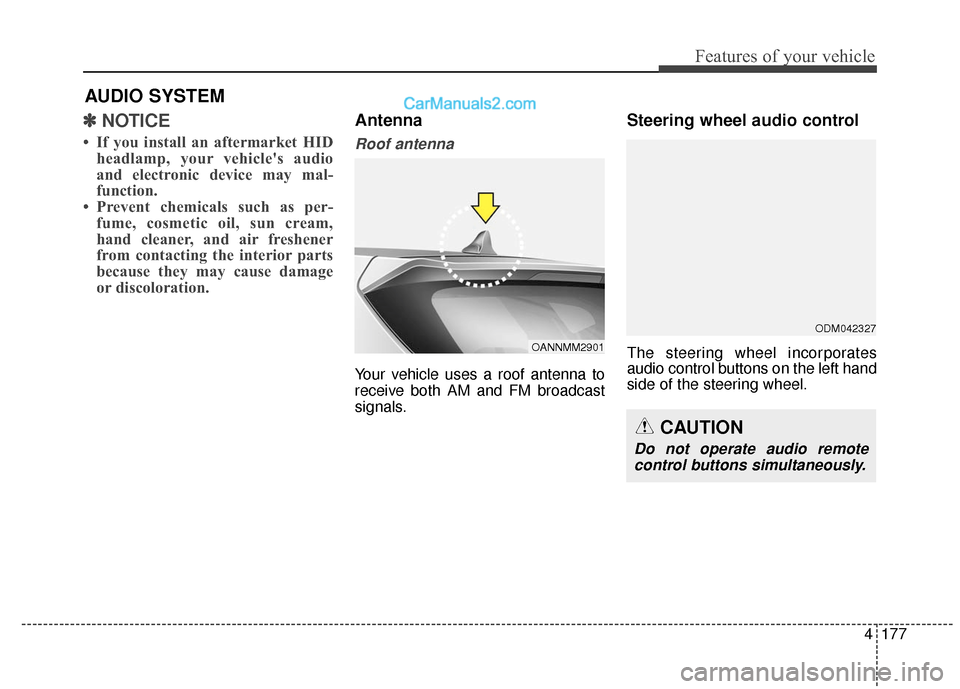
Roof antenna
Your vehicle uses a roof antenna to
receive both AM and FM broadcast
signals.
Steering wheel audio control
The steering wheel incorporates
audio control buttons on the left hand
side of the steering wheel.
AUDIO SYSTEM
OANNMM2901
CAUTION
Do not operate audio remote
control buttons simultaneously.
ODM042327
Page 281 of 569
Features of your vehicle
178
4
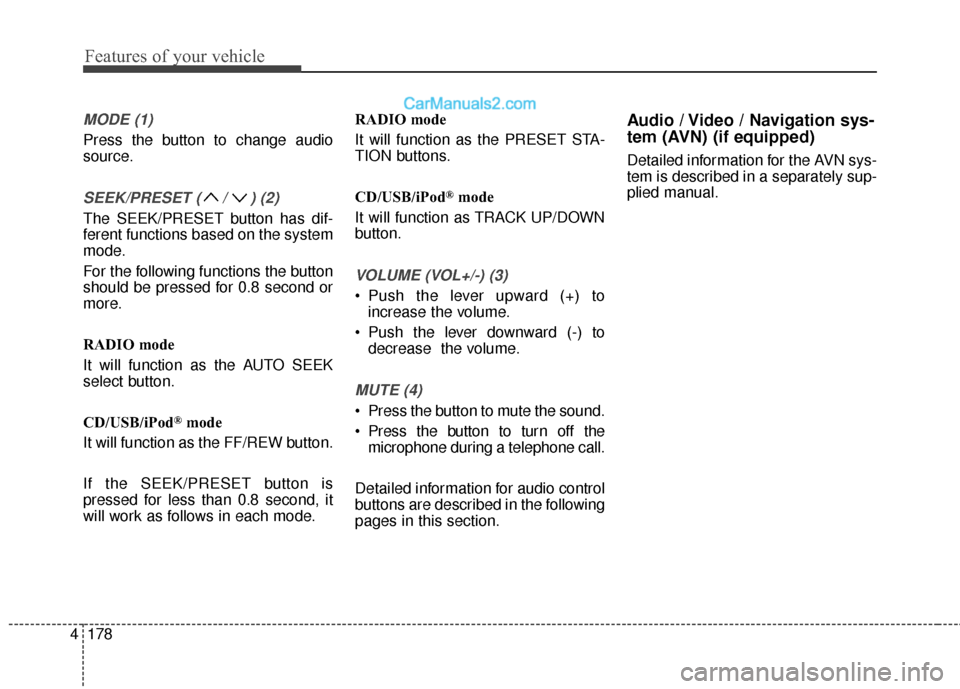
MODE (1)
Press the button to change audio
source.
SEEK/PRESET ( / ) (2)
The SEEK/PRESET button has dif-
ferent functions based on the system
mode.
For the following functions the button
should be pressed for 0.8 second or
more.
RADIO mode
It will function as the AUTO SEEK
select button.
CD/USB/iPod
®mode
It will function as the FF/REW button.
If the SEEK/PRESET button is
pressed for less than 0.8 second, it
will work as follows in each mode. RADIO mode
It will function as the PRESET STA-
TION buttons.
CD/USB/iPod
®mode
It will function as TRACK UP/DOWN
button.
VOLUME (VOL+/-) (3)
• Push the lever upward (+) to increase the volume.
Push the lever downward (-) to decrease the volume.
MUTE (4)
Press the button to mute the sound.
Press the button to turn off themicrophone during a telephone call.
Detailed information for audio control
buttons are described in the following
pages in this section.
Audio / Video / Navigation sys-
tem (AVN) (if equipped)
Detailed information for the AVN sys-
tem is described in a separately sup-
plied manual.
Page 282 of 569
4179
Features of your vehicle
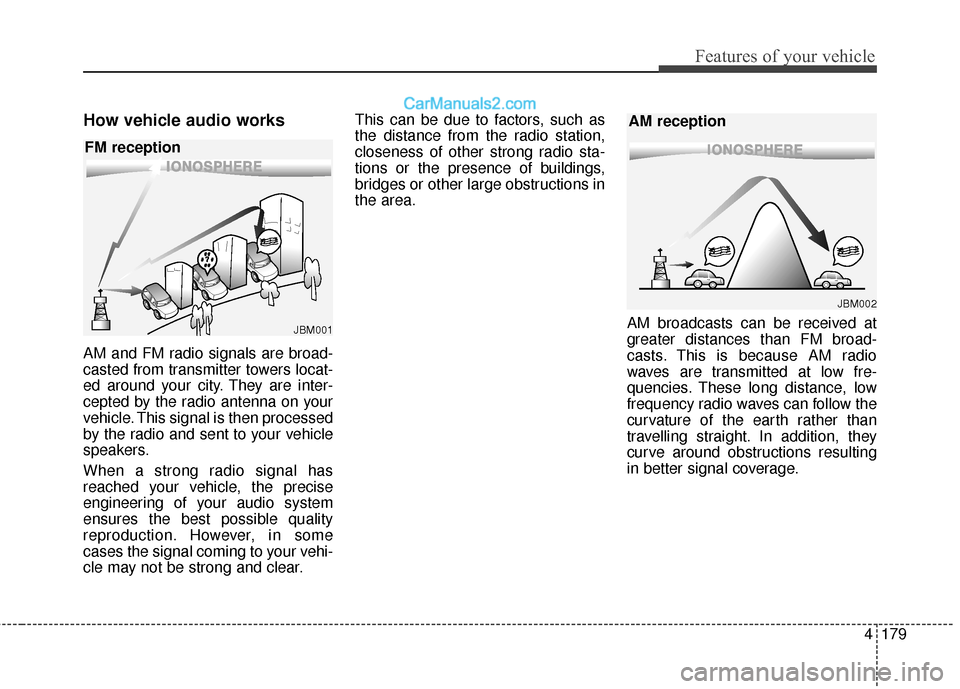
How vehicle audio works
AM and FM radio signals are broad-
casted from transmitter towers locat-
ed around your city. They are inter-
cepted by the radio antenna on your
vehicle. This signal is then processed
by the radio and sent to your vehicle
speakers.
When a strong radio signal has
reached your vehicle, the precise
engineering of your audio system
ensures the best possible quality
reproduction. However, in some
cases the signal coming to your vehi-
cle may not be strong and clear.This can be due to factors, such as
the distance from the radio station,
closeness of other strong radio sta-
tions or the presence of buildings,
bridges or other large obstructions in
the area.
AM broadcasts can be received at
greater distances than FM broad-
casts. This is because AM radio
waves are transmitted at low fre-
quencies. These long distance, low
frequency radio waves can follow the
curvature of the earth rather than
travelling straight. In addition, they
curve around obstructions resulting
in better signal coverage.
JBM001
FM reception
JBM002
AM reception
Page 284 of 569
4181
Features of your vehicle
Using a cellular phone or a two-way radio
When a cellular phone is used inside
the vehicle, noise may be produced
from the audio system. This does not
mean that something is wrong with
the audio equipment. In such a case,
try to operate mobile devices as far
from the audio equipment as possible.
Caring for CDs
If the temperature inside the car is too high, open the car windows to venti-
late before using the system.
It is illegal to copy and use MP3/WMA files without permission.
Use CDs that are created only by
lawful means.
Do not apply volatile agents, such as benzene and thinner, normal
cleaners and magnetic sprays
made for analogue disc onto CDs.
To prevent the disc surface from getting damaged, hold CDs by the
edges or the center hole only.
Clean the disc surface with a piece of soft cloth before playback (wipe
it from the center to the outside
edge).
Do not damage the disc surface or attach pieces of sticky tape or
paper.
Make certain only CDs are insert- ed into the CD player (Do not insert
more than one CD at a time).
Keep CDs in their cases after use to protect them from scratches or dirt. Depending on the type of CD-
R/CD-RW CDs, certain CDs may
not operate normally according to
the manufacturing companies. In
such circumstances, continued
use may cause malfunctions to
your audio system.
✽ ✽ NOTICE - Playing an
Incompatible Copy Protected
Audio CD
Some copy protected CDs, which do
not comply with international audio
CD standards (Red Book), may not
play on your car audio. Please note
that inabilities to properly play a
copy protected CD may indicate
that the CD is defective, not the CD
player.CAUTION
When using a communication system such as a cellular phoneor a radio set inside the vehicle,a separate external antennamust be fitted. When a cellularphone or a radio set is usedwith an internal antenna alone,it may interfere with the vehi-cle's electrical system andadversely affect safe operationof the vehicle.
WARNING
Do not use a cellular phone
while driving. Stop at a safe
location to use a cellular phone.