lock Hyundai Santa Fe 2018 Manual PDF
[x] Cancel search | Manufacturer: HYUNDAI, Model Year: 2018, Model line: Santa Fe, Model: Hyundai Santa Fe 2018Pages: 570, PDF Size: 16.8 MB
Page 217 of 570
Features of your vehicle
114
4
If you desire to deactivate the rear
parking assist system, press the
rear parking assist OFF button
again. (The indicator on the button
will illuminate.) To turn the system
on, press the button again. (The
indicator on the button will go off.)
This system will activate when backing up with the ignition switch
ON.
If the vehicle is moving at a speed
over 6 mph (10 km/h), the system
will be deactivated.
The sensing distance while the rear parking assist system is in
operation is approximately 47 in.
(120 cm).
When more than two objects are sensed at the same time, the clos-
est object will be recognized first. Types of warning sound
When an object is 47 in. to 24 in.
(120 cm to 61 cm) from the rear
bumper: Buzzer beeps intermit-
tently.
When an object is 23 in. to 12 in. (60 cm to 31 cm) from the rear
bumper: Buzzer beeps more fre-
quently.
When an object is within 11.8 in. (30 cm) of the rear bumper:
Buzzer sounds continuously.Non-operational conditions of
rear parking assist system
The rear parking assist system may
not operate properly when:
1. Moisture is frozen to the sensor. (It will operate normally when the
moisture has been cleared.)
2. The sensor is covered with foreign matter, such as snow or water, or
the sensor cover is blocked. (It will
operate normally when the materi-
al is removed or the sensor is no
longer blocked.)
3. Driving on uneven road surfaces (unpaved roads, gravel, bumps,
gradient).
4. Objects generating excessive noise (vehicle horns, loud motor-
cycle engines, or truck air brakes)
are within range of the sensor.
5. Heavy rain or water spray exists.
6. Wireless transmitters or mobile phones are within range of the
sensor.
7. Trailer towing.
Page 223 of 570
Features of your vehicle
120
4
Battery saver function
• The purpose of this feature is to
prevent the battery from being dis-
charged. The system automatically
turns off the parking lights when
the driver removes the ignition key
(smart key : turns off the engine)
and opens the driver-side door.
With this feature, the parking lights will be turned off automatically if
the driver parks on the side of the
road at night.
If necessary, to keep the lights on
when the ignition key is removed
(smart key : turns off the engine),
perform the following:
1) Open the driver-side door.
2) Turn the parking lights OFF and ON again using the light switch
on the steering column.
Headlamp delay (if equipped)
If you turn the ignition switch to the
ACC or OFF position with the head-
lights ON, the headlights remain on
for about 5 minutes. However, if the
driver's door is opened and closed,
the headlights are turned off after 15
seconds.
The headlights can be turned off by
pressing the lock button on the trans-
mitter (or smart key) twice or turning
the light switch to the OFF or Auto
position.
However, if you turn the light switch
to the Auto position when it is dark
outside, the headlights will not be
turned off.
You can activate or deactivate this
feature. Refer to "User Settings" in
this section.
LIGHTING
CAUTION
If the driver gets out of the vehi-cle through other doors (otherthan the driver's door), the bat-tery saver function does notoperate and the headlamp delaydoes not turn off automatically.This will cause the battery to bedischarged. In this case, makesure to turn off the lamp beforegetting out of the vehicle.
Page 230 of 570
4127
Features of your vehicle
Warning light and message
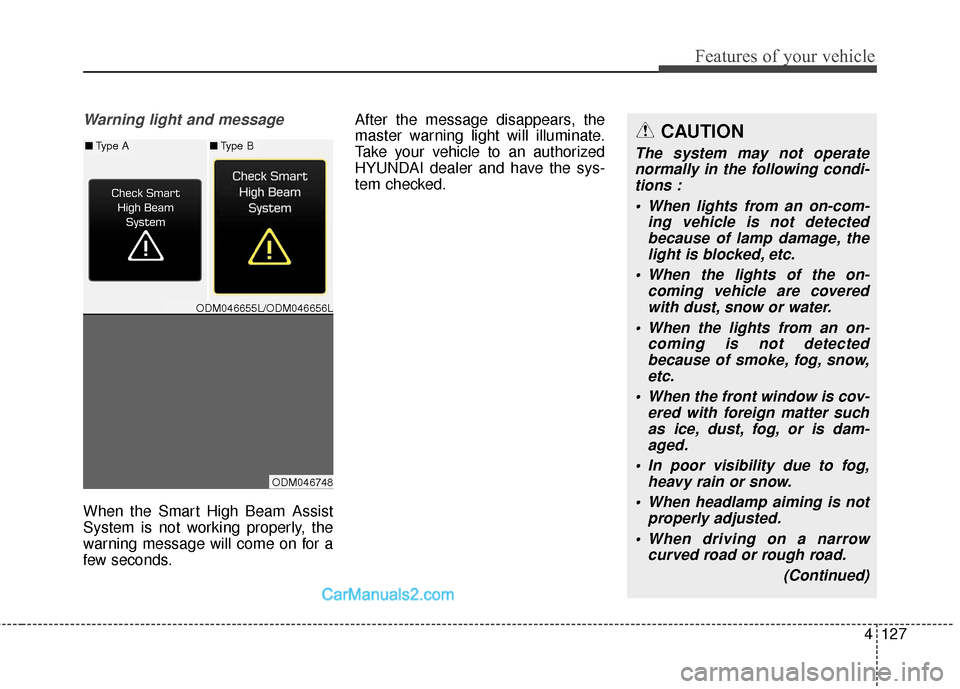
When the Smart High Beam Assist
System is not working properly, the
warning message will come on for a
few seconds.After the message disappears, the
master warning light will illuminate.
Take your vehicle to an authorized
HYUNDAI dealer and have the sys-
tem checked.
CAUTION
The system may not operate
normally in the following condi-tions :
When lights from an on-com- ing vehicle is not detectedbecause of lamp damage, thelight is blocked, etc.
When the lights of the on- coming vehicle are coveredwith dust, snow or water.
When the lights from an on- coming is not detectedbecause of smoke, fog, snow,etc.
When the front window is cov- ered with foreign matter suchas ice, dust, fog, or is dam-aged.
In poor visibility due to fog, heavy rain or snow.
When headlamp aiming is not properly adjusted.
When driving on a narrow curved road or rough road.
(Continued)■Type A■Type B
ODM046655L/ODM046656L
ODM046748
Page 237 of 570
Features of your vehicle
134
4
DOOR (5):
- The map lamp and room lampcomes on for approximately 30
seconds when doors are unlocked
with a transmitter or smart key as
long as the doors are not opened.
- When the ignition switch is in the ACC or LOCK/OFF position, if
any door is opened, the map
lamp and room lamp will stay on
for approximately 20 minutes. If
the door is closed, the lamps will
go out in 30 seconds.
- The map lamp and room lamp will go out immediately if the ignition
switch is changed to the ON posi-
tion with all doors closed.
- When the ignition switch is in the ON position, if any door is opened,
the map lamp and room lamp will
stay on continuously. If the door is
closed, the lamps will go out
immediately.
✽ ✽ NOTICE
When the lamp is turned on by
pressing the lens (1), the lamp does
not turn off even if the switch is in
the OFF position (3).
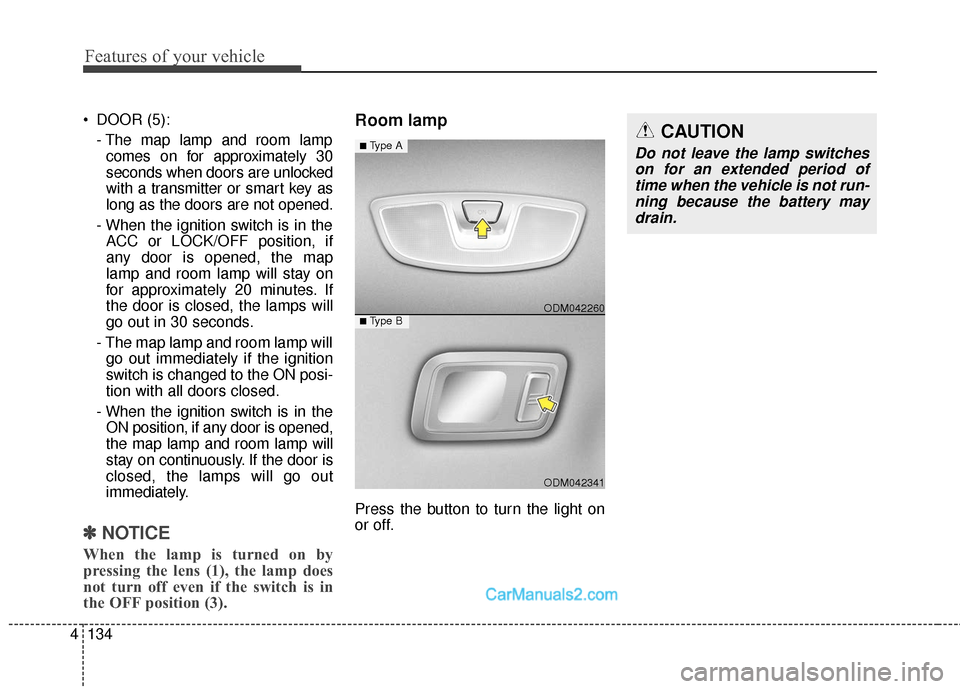
Room lamp
Press the button to turn the light on
or off.
ODM042341
■Type B ODM042260
■Type ACAUTION
Do not leave the lamp switches
on for an extended period oftime when the vehicle is not run-ning because the battery maydrain.
Page 239 of 570
Features of your vehicle
136
4
Headlamp welcome
When the headlight(light switch in
the headlight or AUTO position) is on
and all doors (and liftgate (tailgate))
are locked and closed, the headlight,
position light and tail light will come
on for 15 seconds if any of the below
is performed.
Without smart key system
- When the door unlock button ispressed on the transmitter.
With the smart key system - When the door unlock button ispressed on the smart key.
At this time, if you press the door lock
button (on the transmitter or smart
key), the lights will turn off immedi-
ately.
Interior light
When the interior light switch is in the
DOOR position and all doors (and
liftgate (tailgate)) are locked and
closed, the room lamp will come on
for 30 seconds if any of the below is
performed.
Without smart key system - When the door unlock button ispressed on the transmitter.
With the smart key system - When the door unlock button ispressed on the smart key.
- When the button of the outside door handle is pressed.
At this time, if you press the door lock
button, the lamps will turn off imme-
diately.
Pocket lamp
When all doors are locked and
closed, the pocket lamp will come on
for 15 seconds if any of the below is
performed.
Without smart key system - When the door unlock button ispressed on the transmitter.
With the smart key system - When the door unlock button ispressed on the smart key.
- When the button of the outside door handle is pressed.
- When the vehicle is approached with the smart key in possession.
At this time, if you press the door lock
button, the lamps will turn off imme-
diately.
WELCOME SYSTEM
Page 249 of 570
Features of your vehicle
146
4
Operation Tips
To prevent dust or unpleasant
fumes from entering the vehicle
through the ventilation system,
temporarily set the air intake con-
trol to the recirculated air position.
Be sure to return the control to the
fresh air position when the irritation
has passed to keep fresh air in the
vehicle. This will help keep the driv-
er alert and comfortable.
Air for the heating/cooling system is drawn in through the grilles just
ahead of the windshield. Care
should be taken that these are not
blocked by leaves, snow, ice or
other obstructions.
To prevent interior fog on the wind- shield, set the air intake control to
the fresh air position and fan speed
to the desired position, turn on the
air conditioning system, and adjust
the temperature control to desired
temperature.Air conditioning
HYUNDAI Air Conditioning Systems
are filled with environmentally friend-
ly R-134a refrigerant.
1. Start the engine. Push the air con- ditioning button.
2. Set the mode to the position.
3. Set the air intake control to the recirculated air position. However,
prolonged operation of the recircu-
lated air position will excessively
dry the air. In this case, change the
air position.
4. Adjust the fan speed control and temperature control to maintain
maximum comfort.
When maximum cooling is desired, set the temperature control to the
extreme left position then set the
fan speed control to the highest
speed.
✽ ✽ NOTICE
• While using the air conditioning
system, monitor the engine tem-
perature gauge closely while driv-
ing up hills or in heavy traffic
when outside temperatures are
high. Air conditioning system
operation may cause engine over-
heating. Continue to use the blow-
er fan but turn the air condition-
ing system off if the engine tem-
perature gauge indicates engine
overheating.
• Opening the windows in humid weather while operating the air
conditioning system may create
water droplets inside the vehicle.
Since excessive water droplets
may cause damage to electrical
equipment, air conditioning
should only be used with the win-
dows closed.
Page 265 of 570
Features of your vehicle
162
4
STORAGE COMPARTMENTS
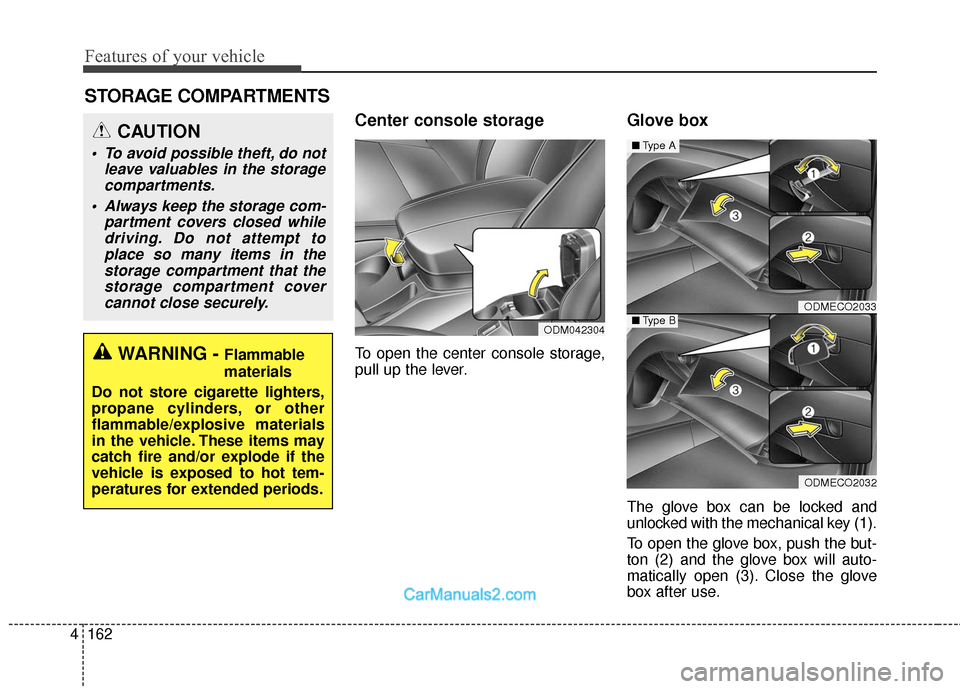
Center console storage
To open the center console storage,
pull up the lever.
Glove box
The glove box can be locked and
unlocked with the mechanical key (1).
To open the glove box, push the but-
ton (2) and the glove box will auto-
matically open (3). Close the glove
box after use.
ODMECO2033
ODMECO2032
■ Type A
■Type BODM042304
WARNING - Flammable
materials
Do not store cigarette lighters,
propane cylinders, or other
flammable/explosive materials
in the vehicle. These items may
catch fire and/or explode if the
vehicle is exposed to hot tem-
peratures for extended periods.
CAUTION
To avoid possible theft, do not leave valuables in the storagecompartments.
Always keep the storage com- partment covers closed whiledriving. Do not attempt toplace so many items in thestorage compartment that thestorage compartment covercannot close securely.
Page 267 of 570
Features of your vehicle
164
4
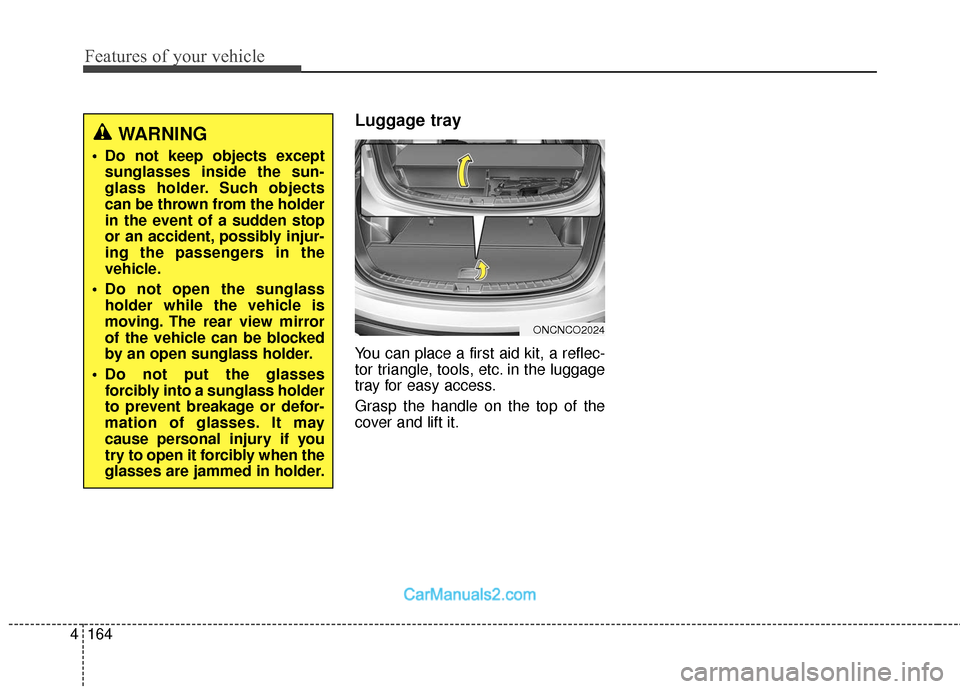
Luggage tray
You can place a first aid kit, a reflec-
tor triangle, tools, etc. in the luggage
tray for easy access.
Grasp the handle on the top of the
cover and lift it.
ONCNCO2024
WARNING
Do not keep objects except
sunglasses inside the sun-
glass holder. Such objects
can be thrown from the holder
in the event of a sudden stop
or an accident, possibly injur-
ing the passengers in the
vehicle.
Do not open the sunglass holder while the vehicle is
moving. The rear view mirror
of the vehicle can be blocked
by an open sunglass holder.
Do not put the glasses forcibly into a sunglass holder
to prevent breakage or defor-
mation of glasses. It may
cause personal injury if you
try to open it forcibly when the
glasses are jammed in holder.
Page 283 of 570
Features of your vehicle
180
4
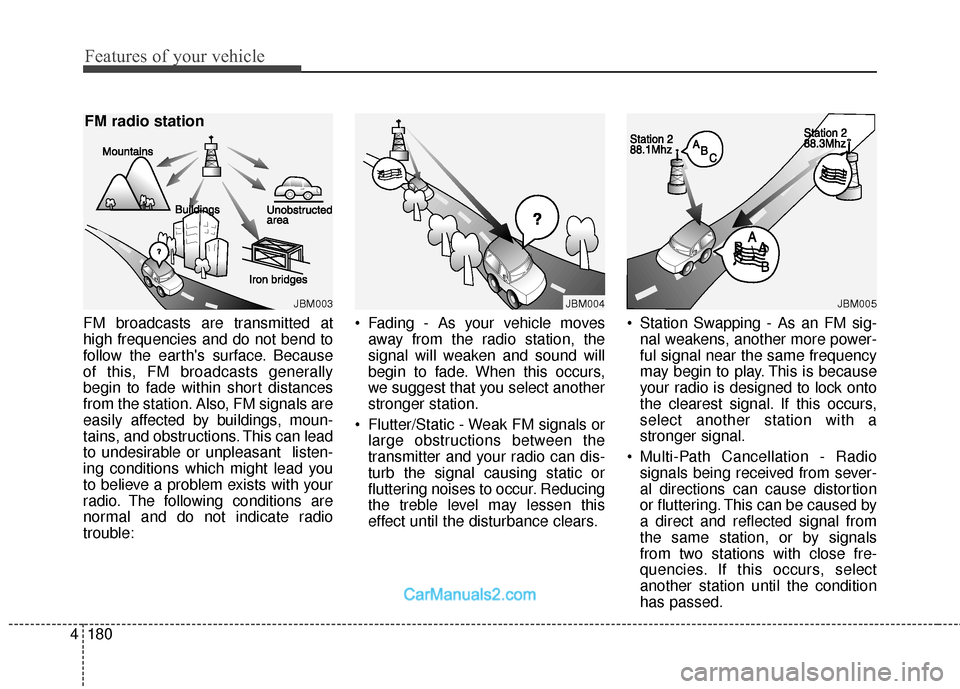
FM broadcasts are transmitted at
high frequencies and do not bend to
follow the earth's surface. Because
of this, FM broadcasts generally
begin to fade within short distances
from the station. Also, FM signals are
easily affected by buildings, moun-
tains, and obstructions. This can lead
to undesirable or unpleasant listen-
ing conditions which might lead you
to believe a problem exists with your
radio. The following conditions are
normal and do not indicate radio
trouble: Fading - As your vehicle moves
away from the radio station, the
signal will weaken and sound will
begin to fade. When this occurs,
we suggest that you select another
stronger station.
Flutter/Static - Weak FM signals or large obstructions between the
transmitter and your radio can dis-
turb the signal causing static or
fluttering noises to occur. Reducing
the treble level may lessen this
effect until the disturbance clears. Station Swapping - As an FM sig-
nal weakens, another more power-
ful signal near the same frequency
may begin to play. This is because
your radio is designed to lock onto
the clearest signal. If this occurs,
select another station with a
stronger signal.
Multi-Path Cancellation - Radio signals being received from sever-
al directions can cause distortion
or fluttering. This can be caused by
a direct and reflected signal from
the same station, or by signals
from two stations with close fre-
quencies. If this occurs, select
another station until the condition
has passed.
JBM003
FM radio station
JBM004JBM005
Page 297 of 570
55
Driving your vehicle
Before starting
Close and lock all doors.
Position the seat so that all con-trols are easily reached.
Adjust the inside and side view mir- rors.
Be sure that all lights work.
Check all gauges.
Check the operation of warning lights when the ignition switch is
turned to the ON position.
Release the parking brake and make sure the brake warning light
goes out.
For safe operation, be sure you are
familiar with your vehicle and its
equipment.WARNING- Driving under
the influence of alcohol or
drugs
Drinking and driving is danger-
ous. Drunk driving is the num-
ber one contributor to the high-
way death toll each year. Even a
small amount of alcohol will
affect your reflexes, percep-
tions and judgement. Driving
while under the influence of
drugs is as dangerous or more
dangerous than driving drunk.
You are much more likely to
have a serious accident if you
drink or take drugs and drive.
If you are drinking or taking
drugs, do not drive. Do not ride
with a driver who has been
drinking or taking drugs.
Choose a designated driver or
call a cab.WARNING
All passengers must be proper-
ly belted whenever the vehicle
is moving. Refer to "Seat belts"
in section 3 for more informa-
tion on their proper use.
WARNING
Always check the surrounding
areas near your vehicle for peo-
ple, especially children, before
putting a vehicle into D (Drive)
or R (Reverse).