Mirror Hyundai Santa Fe 2019 Owner's Guide
[x] Cancel search | Manufacturer: HYUNDAI, Model Year: 2019, Model line: Santa Fe, Model: Hyundai Santa Fe 2019Pages: 557, PDF Size: 14.8 MB
Page 357 of 557
5-83
Driving your vehicle
5
System Setting and Activation
System setting
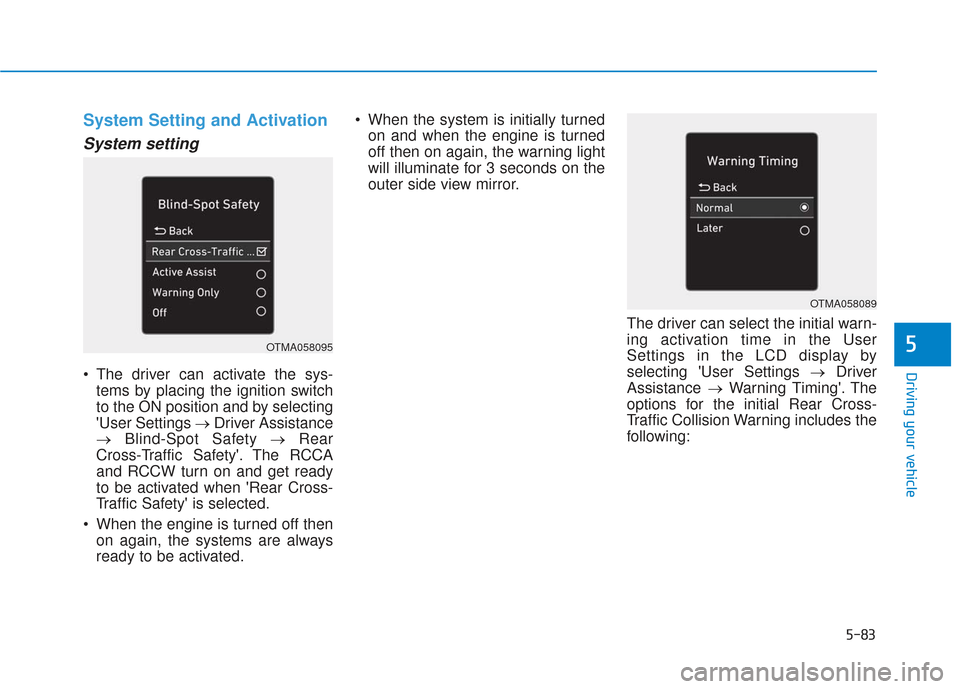
The driver can activate the sys-tems by placing the ignition switch
to the ON position and by selecting
'User Settings → Driver Assistance
→ Blind-Spot Safety → Rear
Cross-Traffic Safety'. The RCCA
and RCCW turn on and get ready
to be activated when 'Rear Cross-
Traffic Safety' is selected.
When the engine is turned off then on again, the systems are always
ready to be activated. When the system is initially turned
on and when the engine is turned
off then on again, the warning light
will illuminate for 3 seconds on the
outer side view mirror.
The driver can select the initial warn-
ing activation time in the User
Settings in the LCD display by
selecting 'User Settings →Driver
Assistance →Warning Timing'. The
options for the initial Rear Cross-
Traffic Collision Warning includes the
following:
OTMA058095
OTMA058089
Page 359 of 557
5-85
Driving your vehicle
5
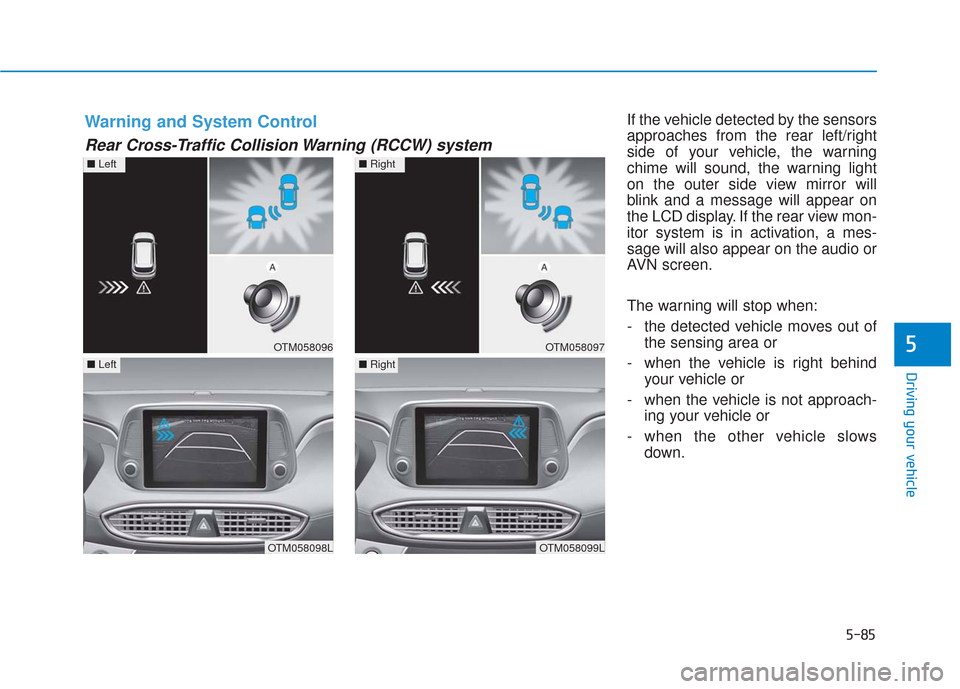
If the vehicle detected by the sensors
approaches from the rear left/right
side of your vehicle, the warning
chime will sound, the warning light
on the outer side view mirror will
blink and a message will appear on
the LCD display. If the rear view mon-
itor system is in activation, a mes-
sage will also appear on the audio or
AVN screen.
The warning will stop when:
- the detected vehicle moves out ofthe sensing area or
- when the vehicle is right behind your vehicle or
- when the vehicle is not approach- ing your vehicle or
- when the other vehicle slows down.Warning and System Control
Rear Cross-Traffic Collision Warning (RCCW) system
OTM058096
■Left
OTM058098L
■Left
OTM058097
■Right
OTM058099L
■Right
Page 361 of 557
5-87
Driving your vehicle
5
The brake control may not operate
properly according to the status of
the ESC (Electronic Stability
Control). The same warning mes-
sage is displayed on the instrument
cluster for this case also.
- When the ESC (Electronic StabilityControl) warning light is on.
- When the ESC (Electronic Stability Control) is engaged in a different
function.
The driver should always use
extreme caution while operat-
ing the vehicle, whether or not
the warning light on the outer
side view mirror illuminates or
there is a warning alarm.
Playing the vehicle audio sys-
tem at high volume may offset
the system's warning sounds.
If any other warning sound
such as seat belt warning
chime is already generated,
the Rear Cross-Traffic Collision
Warning system warning may
not sound.
Drive safely even though the
vehicle is equipped with a
Rear Cross-Traffic Collision
Warning system and Rear
Cross-Traffic Collision-Avoidance
Assist system. Do not solely
rely on the system but check
your surrounding when back-
ing the vehicle up.
The driver is responsible for
accurate brake control.
Always pay extreme caution
while driving. The Rear Cross-
Traffic Collision Warning sys-
tem and Rear Cross-Traffic
Collision-Avoidance Assist
system may not operate prop-
erly or unnecessarily operate
in accordance with your driv-
ing situations.
The Rear Cross-Traffic
Collision-Avoidance Assist
system is not a substitute for
safe driving practices, but a
convenience function only. It
is the responsibility of the
driver to always drive cau-
tiously to prevent unexpected
and sudden situations from
occurring. Pay attention to the
road conditions at all times.
WARNING
When the operation condition
of the Rear Cross-Traffic
Collision Warning system is
satisfied, the warning will
occur every time a vehicle
approaches the side or rear
of your stopped (0 mph vehi-
cle speed) vehicle.
The system's warning or
brake may not operate proper-
ly if the left or right of your
vehicle's rear bumper is
blocked by a vehicle or obsta-
cle.
CAUTION
Page 368 of 557
5-94
Driving your vehicle
LKA System Operation
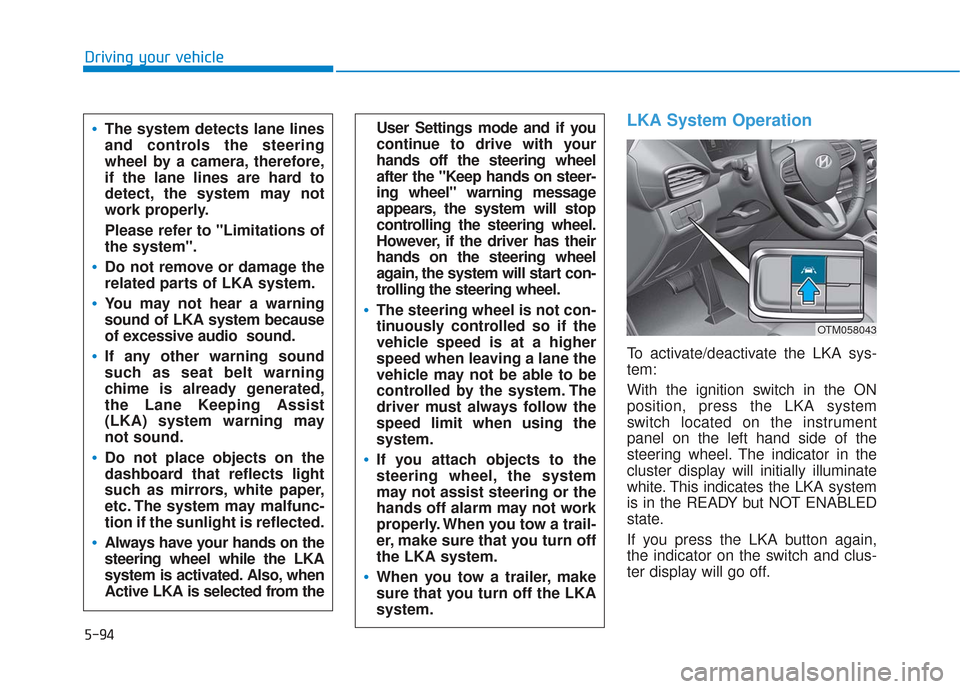
To activate/deactivate the LKA sys-
tem:
With the ignition switch in the ON
position, press the LKA system
switch located on the instrument
panel on the left hand side of the
steering wheel. The indicator in the
cluster display will initially illuminate
white. This indicates the LKA system
is in the READY but NOT ENABLED
state.
If you press the LKA button again,
the indicator on the switch and clus-
ter display will go off.
User Settings mode and if you
continue to drive with your
hands off the steering wheel
after the "Keep hands on steer-
ing wheel" warning message
appears, the system will stop
controlling the steering wheel.
However, if the driver has their
hands on the steering wheel
again, the system will start con-
trolling the steering wheel.
The steering wheel is not con-
tinuously controlled so if the
vehicle speed is at a higher
speed when leaving a lane the
vehicle may not be able to be
controlled by the system. The
driver must always follow the
speed limit when using the
system.
If you attach objects to the
steering wheel, the system
may not assist steering or the
hands off alarm may not work
properly. When you tow a trail-
er, make sure that you turn off
the LKA system.
When you tow a trailer, make
sure that you turn off the LKA
system.
The system detects lane lines
and controls the steering
wheel by a camera, therefore,
if the lane lines are hard to
detect, the system may not
work properly.
Please refer to "Limitations of
the system".
Do not remove or damage the
related parts of LKA system.
You may not hear a warning
sound of LKA system because
of excessive audio sound.
If any other warning sound
such as seat belt warning
chime is already generated,
the Lane Keeping Assist
(LKA) system warning may
not sound.
Do not place objects on the
dashboard that reflects light
such as mirrors, white paper,
etc. The system may malfunc-
tion if the sunlight is reflected.
Always have your hands on the
steering wheel while the LKA
system is activated. Also, when
Active LKA is selected from the
OTM058043
Page 374 of 557
5-100
Driving your vehicle
When external condition is inter-
vened
The brightness outside changes suddenly such as when entering or
exiting a tunnel, or when passing
under a bridge.
The brightness outside is too low such as when the headlamps are
not on at night or the vehicle is
going through a tunnel.
There is a boundary structure in the roadway such as a concrete
barrier, guardrail and reflector post
that is inadvertently being detected
by the camera.
When light coming from a street light or an oncoming vehicle is
reflected on a wet road surface
such as a puddle in the road.
The field of view in front is obstructed by sun glare.
There is not enough distance between you and the vehicle in
front to be able to detect the lane
marker or the vehicle ahead is driv-
ing on the lane marker. Driving on a steep grade, over a
hill, or when driving on a curved
road.
The adverse road conditions cause excessive vehicle vibrations while
driving.
The surrounding of the inside rear view mirror temperature is high
due to direct sunlight, etc. When front visibility is poor
The windshield or the camera lens
is blocked with dirt or debris.
The windshield glass is fogged up; a clear view of the road is obstruct-
ed.
Placing objects on the dashboard, etc.
The sensor cannot detect the lane because of fog, heavy rain or snow.
Page 379 of 557
5-105
Driving your vehicle
5
The Driver Attention Warning sys-
tem utilizes the camera sensor on
the front windshield for its opera-
tion. To keep the camera sensor in
the best condition, you should
observe the followings:
Do not disassemble the cameratemporarily to tint the window or
to attach any types of coatings
and accessories. If you disas-
semble a camera and assemble
it again, take your vehicle to an
authorized HYUNDAI dealer and
have the system checked for cal-
ibration.
NEVER install any accessories or stickers on the front wind-
shield, nor tint the front wind-
shield.
NEVER locate any reflective objects (i.e. white paper, mirror)
over the dashboard. Any light
reflection may cause a malfunc-
tion of the Driver Attention Alert
(DAW) system.
Pay extreme caution to keep the camera sensor out of water.
NOTICE
The Driver Attention Warning
(DAW) system may not properly
operate with limited alerting in
the following situations:
The lane detection perform-
ance is limited. (For more
details, refer to "Lane Keeping
Assist (LKA) system" in this
chapter.)
The vehicle is violently driven
or is abruptly turned for obsta-
cle avoidance (e.g. construc-
tion area, other vehicles, fallen
objects, bumpy road).
Forward drivability of the vehi-
cle is severely undermined
(possibly due to wide variation
in tire pressures, uneven tire
wear-out, toe-in/toe-out align-
ment).
The vehicle drives on a curvy
road.
The vehicle drives on a bumpy
road.
The vehicle drives through a
windy area.
The vehicle is controlled by the
following driving assist sys-
tems:
- Lane Keeping Assist (LKA)system
- Forward Collision-Avoidance Assist (FCA) system
- Smart Cruise Control (SCC) system
CAUTION
Playing the vehicle audio sys-
tem at high volume may offset
the Driver Attention Warning
(DAW) system warning sounds.
CAUTION
Page 400 of 557
5-126
Driving your vehicle
Information
The ESC system must be turned OFF
before rocking the vehicle.
If you are still stuck after rocking
the vehicle a few times, have the
vehicle pulled out by a tow vehicle
to avoid engine overheating, pos-
sible damage to the transmission,
and tire damage. See "Towing" in
chapter 6.
Smooth Cornering
Avoid braking or gear changing in
corners, especially when roads are
wet. Ideally, corners should always
be taken under gentle acceleration.
Driving at Night
Night driving presents more hazards
than driving in the daylight. Here are
some important tips to remember:
Slow down and keep more dis-tance between you and other vehi-
cles, as it may be more difficult to
see at night, especially in areas
where there may not be any street
lights.
Adjust your mirrors to reduce the glare from other driver's head-
lamps.
Keep your headlamps clean and properly aimed. Dirty or improper-
ly aimed headlamps will make it
much more difficult to see at night.
Avoid staring directly at the head- lamps of oncoming vehicles. You
could be temporarily blinded, and
it will take several seconds for your
eyes to readjust to the darkness.
Driving in the Rain
Rain and wet roads can make driving
dangerous. Here are a few things to
consider when driving in the rain or
on slick pavement:
Slow down and allow extra follow-ing distance. A heavy rainfall
makes it harder to see and
increases the distance needed to
stop your vehicle.
Turn OFF your Cruise Control.
Replace your windshield wiper blades when they show signs of
streaking or missing areas on the
windshield.
Tires should be properly main- tained with at least 2/32nds of an
inch of tread depth. If your tires do
not have enough tread, making a
quick stop on wet pavement can
cause a skid and possibly lead to
an accident. See "Tire replace-
ment" in chapter 7 .
Turn on your headlamps to make it easier for others to see you.
NOTICE
i
Page 498 of 557
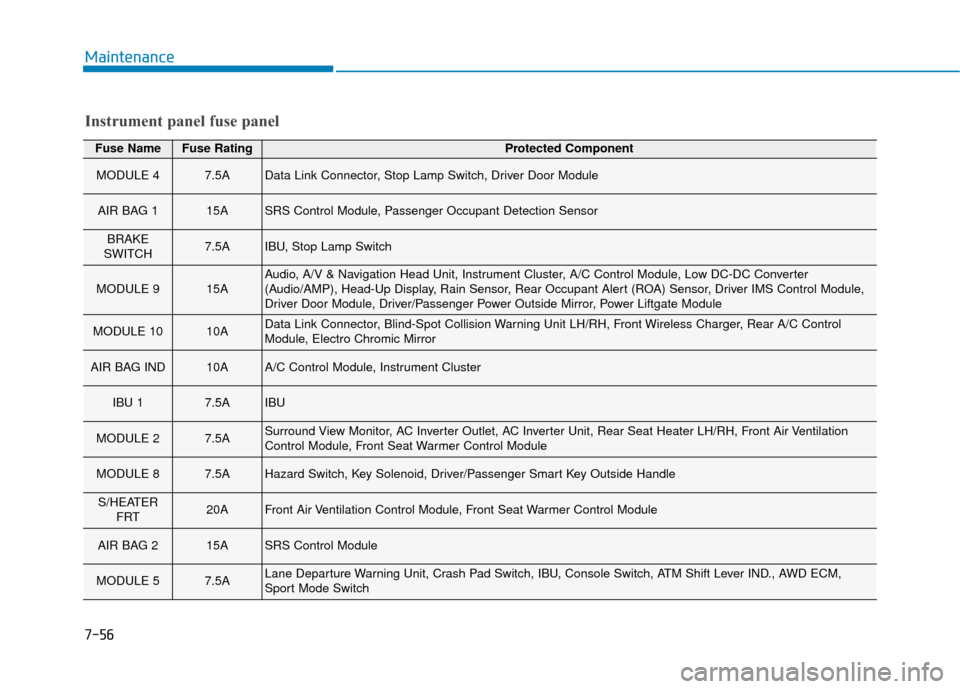
Fuse NameFuse RatingProtected Component
MODULE 47.5AData Link Connector, Stop Lamp Switch, Driver Door Module
AIR BAG 115ASRS Control Module, Passenger Occupant Detection Sensor
BRAKE
SWITCH7.5AIBU, Stop Lamp Switch
MODULE 915AAudio, A/V & Navigation Head Unit, Instrument Cluster, A/C Control Module, Low DC-DC Converter
(Audio/AMP), Head-Up Display, Rain Sensor, Rear Occupant Alert (ROA) Sensor, Driver IMS Control Module,
Driver Door Module, Driver/Passenger Power Outside Mirror, Power Liftgate Module
MODULE 1010AData Link Connector, Blind-Spot Collision Warning Unit LH/RH, Front Wireless Charger, Rear A/C Control
Module, Electro Chromic Mirror
AIR BAG IND10AA/C Control Module, Instrument Cluster
IBU 17.5AIBU
MODULE 27.5ASurround View Monitor, AC Inverter Outlet, AC Inverter Unit, Rear Seat Heater LH/RH, Front Air Ventilation
Control Module, Front Seat Warmer Control Module
MODULE 87.5AHazard Switch, Key Solenoid, Driver/Passenger Smart Key Outside Handle
S/HEATER FRT20AFront Air Ventilation Control Module, Front Seat Warmer Control Module
AIR BAG 215ASRS Control Module
MODULE 57.5ALane Departure Warning Unit, Crash Pad Switch, IBU, Console Switch, ATM Shift Lever IND., AWD ECM,
Sport Mode Switch
Instrument panel fuse panel
Maintenance
7-56
Page 500 of 557
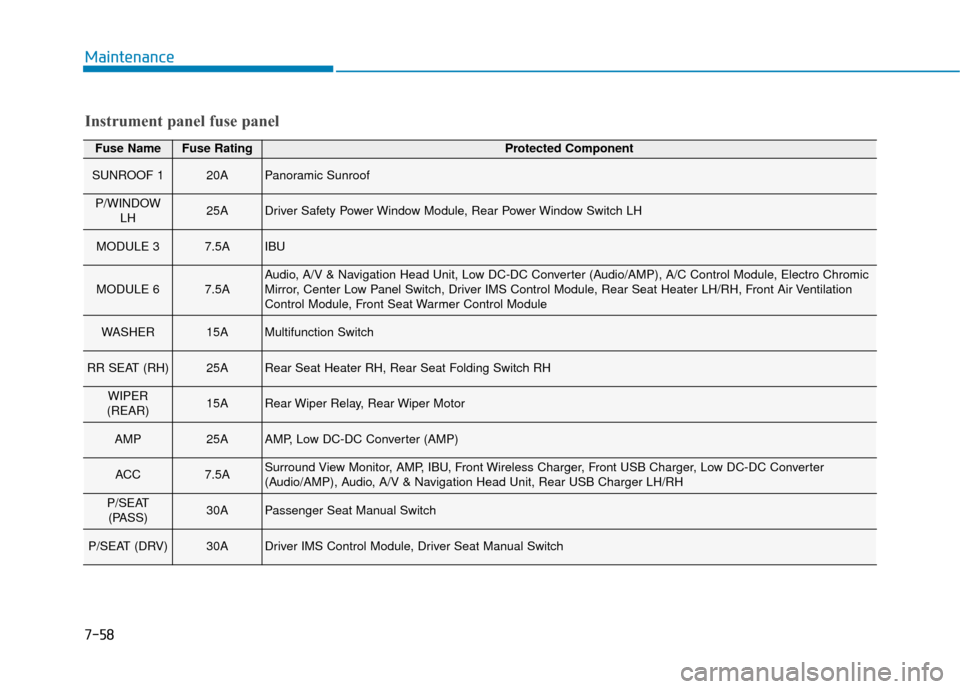
Fuse NameFuse RatingProtected Component
SUNROOF 120APanoramic Sunroof
P/WINDOWLH25ADriver Safety Power Window Module, Rear Power Window Switch LH
MODULE 37.5AIBU
MODULE 67.5AAudio, A/V & Navigation Head Unit, Low DC-DC Converter (Audio/AMP), A/C Control Module, Electro Chromic
Mirror, Center Low Panel Switch, Driver IMS Control Module, Rear Seat Heater LH/RH, Front Air Ventilation
Control Module, Front Seat Warmer Control Module
WASHER15AMultifunction Switch
RR SEAT (RH)25ARear Seat Heater RH, Rear Seat Folding Switch RH
WIPER
(REAR)15ARear Wiper Relay, Rear Wiper Motor
AMP25AAMP, Low DC-DC Converter (AMP)
ACC7.5ASurround View Monitor, AMP, IBU, Front Wireless Charger, Front USB Charger, Low DC-DC Converter
(Audio/AMP), Audio, A/V & Navigation Head Unit, Rear USB Charger LH/RH
P/SEAT (PASS)30APassenger Seat Manual Switch
P/SEAT (DRV)30ADriver IMS Control Module, Driver Seat Manual Switch
Instrument panel fuse panel
Maintenance
7-58
Page 503 of 557
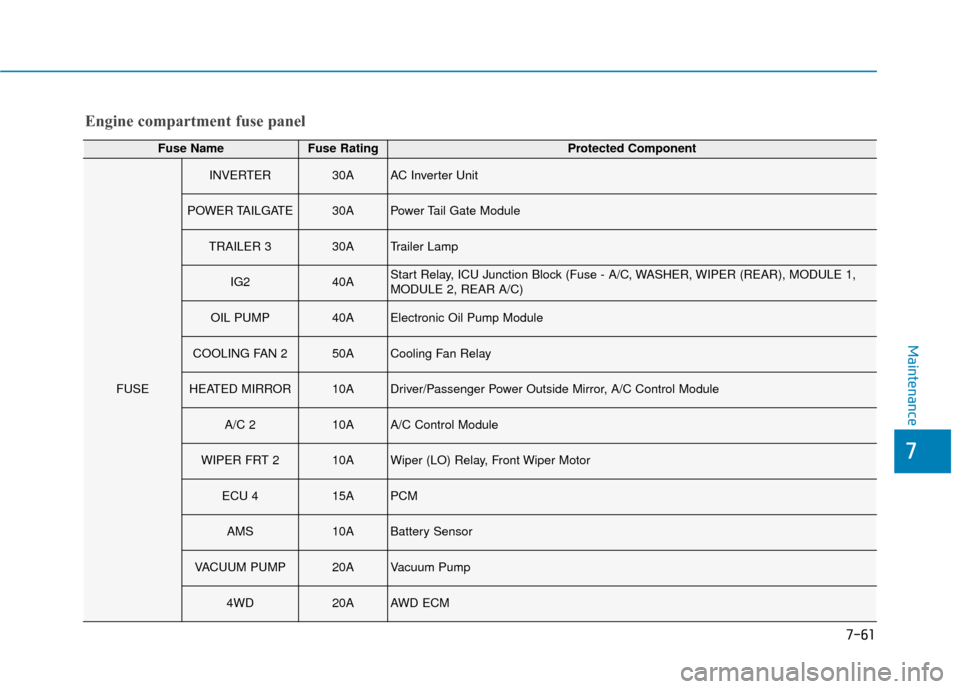
Engine compartment fuse panel
Fuse NameFuse RatingProtected Component
FUSE
INVERTER30AAC Inverter Unit
POWER TAILGATE30APower Tail Gate Module
TRAILER 330ATrailer Lamp
IG240AStart Relay, ICU Junction Block (Fuse - A/C, WASHER, WIPER (REAR), MODULE 1,
MODULE 2, REAR A/C)
OIL PUMP40AElectronic Oil Pump Module
COOLING FAN 250ACooling Fan Relay
HEATED MIRROR10ADriver/Passenger Power Outside Mirror, A/C Control Module
A/C 210AA/C Control Module
WIPER FRT 210AWiper (LO) Relay, Front Wiper Motor
ECU 415APCM
AMS10ABattery Sensor
VACUUM PUMP20AVacuum Pump
4WD20AAWD ECM
Maintenance
7
7-61