Drive modes Hyundai Santa Fe 2020 User Guide
[x] Cancel search | Manufacturer: HYUNDAI, Model Year: 2020, Model line: Santa Fe, Model: Hyundai Santa Fe 2020Pages: 557, PDF Size: 19.29 MB
Page 380 of 557
5-106
Driving your vehicle
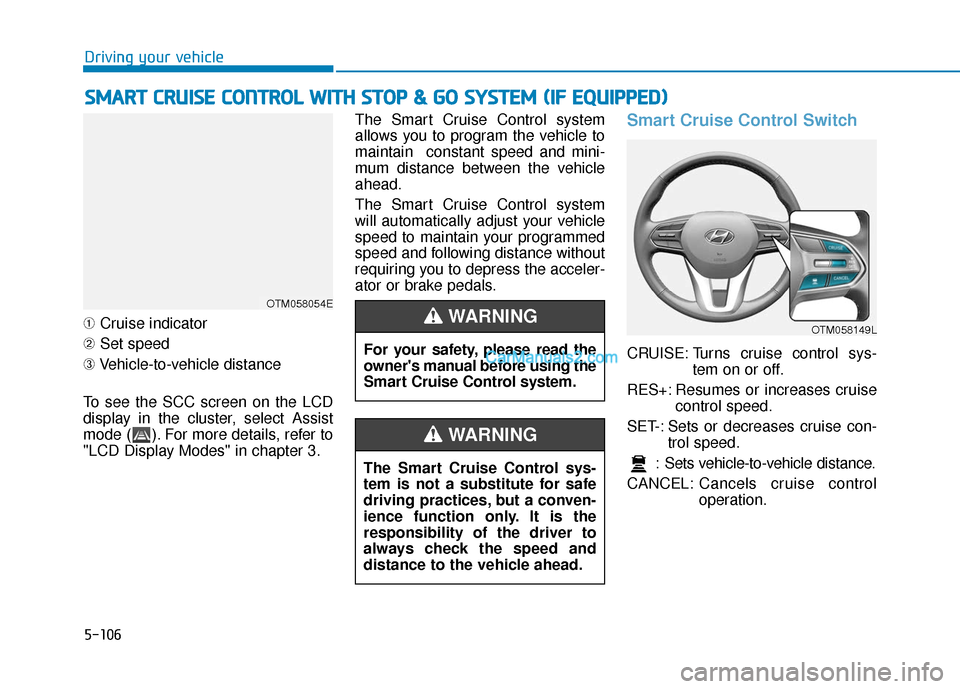
➀ Cruise indicator
➁ Set speed
➂ Vehicle-to-vehicle distance
To see the SCC screen on the LCD
display in the cluster, select Assist
mode ( ). For more details, refer to
"LCD Display Modes" in chapter 3. The Smart Cruise Control system
allows you to program the vehicle to
maintain constant speed and mini-
mum distance between the vehicle
ahead.
The Smart Cruise Control system
will automatically adjust your vehicle
speed to maintain your programmed
speed and following distance without
requiring you to depress the acceler-
ator or brake pedals.
Smart Cruise Control Switch
CRUISE: Turns cruise control sys-
tem on or off.
RES+: Resumes or increases cruise control speed.
SET-: Sets or decreases cruise con- trol speed.
: Sets vehicle-to-vehicle distance.
CANCEL: Cancels cruise control
operation.
S
SM
M A
AR
RT
T
C
C R
R U
U I
IS
S E
E
C
C O
O N
NT
TR
R O
O L
L
W
W I
IT
T H
H
S
S T
T O
O P
P
&
&
G
G O
O
S
S Y
Y S
ST
T E
EM
M
(
( I
IF
F
E
E Q
Q U
UI
IP
P P
PE
ED
D )
)
OTM058054E
For your safety, please read the
owner's manual before using the
Smart Cruise Control system.
WARNING
The Smart Cruise Control sys-
tem is not a substitute for safe
driving practices, but a conven-
ience function only. It is the
responsibility of the driver to
always check the speed and
distance to the vehicle ahead.
WARNING
OTM058149L
Page 550 of 557
I-7
If you have a flat tire while driving ..................................6-3
Ignition switchEngine Start/Stop button ..............................................5-9
Key ignition switch ......................................................5-6
Immobilizer system.........................................................3-12
Improtant safety precautions.............................................2-2 Air bag hazards ............................................................2-2
Always wear your seat belt ..........................................2-2
Control your speed .......................................................2-3
Driver distraction..........................................................2-2
Keep your vehicle in safe condition.............................2-3
Restrain all children .....................................................2-2
In case of emergency while driving..................................6-2
Indicator light..................................................................3-74
Inside rearview mirror ....................................................3-30
Instrument cluster ...........................................................3-66 Assist mode ................................................................3-93
Gauges and meters .....................................................3-68
Instrument panel illumination ....................................3-67
LCD display control ...................................................3-91
LCD display messages ...............................................3-85
LCD display modes ....................................................3-92
Shift indicator pop-up ................................................3-72
Transmission shift indicator .......................................3-71
Trip computer mode ...................................................3-93
User settings mode .....................................................3-95
Warning and indicator lights ......................................3-72
Instrument panel fuse replacement .................................7-53
Instrument panel overview ...............................................1-5 Interior care .....................................................................7-8\
1
Interior features
AC inverter ...............................................................3-171
Ashtray .....................................................................3-1\
68
Bottle holder .............................................................3-168
Cargo security screen ...............................................3-178
Clock ........................................................................\
3-175
Coat hook .................................................................3-176
Cup holder ................................................................3-168
Floor mat anchor(s) ..................................................3-176
Luggage net holder ...................................................3-177
Power outlet..............................................................3-170
Side curtain...............................................................3-180
Sunvisor ....................................................................3-16\
9
USB charger .............................................................3-173
Wireless cellular phone charging system .................3-173
Interior lamp AUTO cut................................................3-120
Interior lights.................................................................3-120 Front lamps...............................................................3-120
Interior lamp AUTO cut ...........................................3-120
Luggage compartment lamp .....................................3-121
Puddle lamp ..............................................................3-122
Rear lamps ................................................................3-121
Vanity mirror lamp ...................................................3-122
Interior overview...............................................................1-4
I
Index
Page 551 of 557

I-8
Jump starting .....................................................................6-4\
Key ignition switch ...........................................................5-6
LabelRefrigerant label .........................................................8-11
Tire sidewall labeling .................................................7-43
Tire specification and pressure label ..........................8-11
Vehicle certification label ...........................................8-10
Lane change signals ......................................................3-117
Lane Keeping Assist (LKA) system ...............................5-93
Lap/shoulder belt ............................................................2-28
LCD display LCD display modes ....................................................3-92
Assist mode ................................................................3-93
Master warning mode .................................................3-94
Quick guide ................................................................3-96
Trip computer mode ...................................................3-93
Turn By Turn (TBT) mode.........................................3-93
User settings mode .....................................................3-95
LCD display messages Check Blind-Spot Collision Warning system ............3-89
Check BRAKE SWITCH fuse ...................................3-86 Check Driver Attention Warning system ...................3-90
Check Forward Collision Avoidance Assist system...3-89
Check headlight ..........................................................3-89
Check headlight LED .................................................3-89
Check High Beam Assist (HBA) system ...................3-89
Check Lane Keeping Assist (LKA) system ...............3-90
Check Smart Cruise Control System .........................3-90
Check turn signal........................................................3-89
Door, Hood, Liftgate open indicator ..........................3-86
Engine overheated ......................................................3-88
Key not detected .........................................................3-85
Key not in vehicle ......................................................3-85
Lights mode ................................................................3-88
Low fuel .....................................................................3-8\
8
Low key battery..........................................................3-85
Low pressure ..............................................................3-87
Low washer fluid........................................................3-88
Press brake pedal to start engine ................................3-85
Press START button again .........................................3-85
Press START button with key ....................................3-86
Shift to P.....................................................................3-8\
5
Shift to P or N to start engine ....................................3-85
Sunroof open indicator ...............................................3-87
Window open indicator ..............................................3-87
Wiper mode ................................................................3-88
LCD display modes ........................................................3-92
Leading vehicle departure alert ....................................5-123
Index
J
K
L