3-13 Hyundai Santa Fe 2020 Owner's Manual
[x] Cancel search | Manufacturer: HYUNDAI, Model Year: 2020, Model line: Santa Fe, Model: Hyundai Santa Fe 2020Pages: 557, PDF Size: 19.29 MB
Page 14 of 557
1-3
Your vehicle at a glance
1
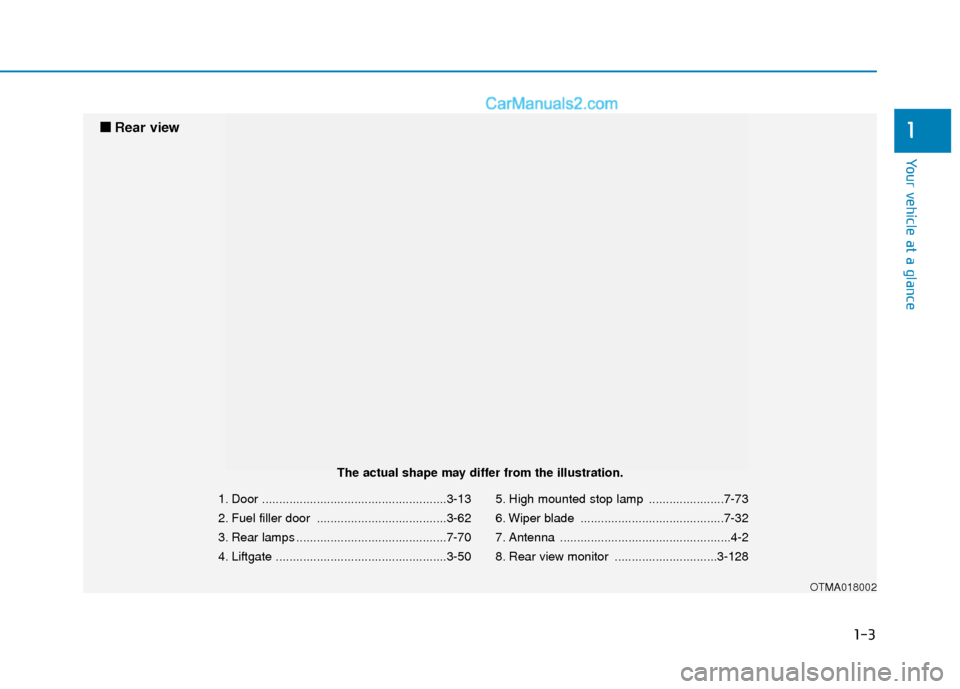
1. Door ......................................................3-13
2. Fuel filler door ......................................3-62
3. Rear lamps ............................................7-70
4. Liftgate ..................................................3-505. High mounted stop lamp ......................7-73
6. Wiper blade ..........................................7-32
7. Antenna ..................................................4-2
8. Rear view monitor ..............................3-128
OTMA018002
■
■
Rear view
The actual shape may differ from the illustration.
Page 16 of 557
I
IN
N S
ST
T R
R U
U M
M E
EN
N T
T
P
P A
A N
N E
EL
L
O
O V
VE
ER
R V
V I
IE
E W
W
(
( I
I)
)
The actual shape may differ from the illustration.
1-5
Your vehicle at a glance
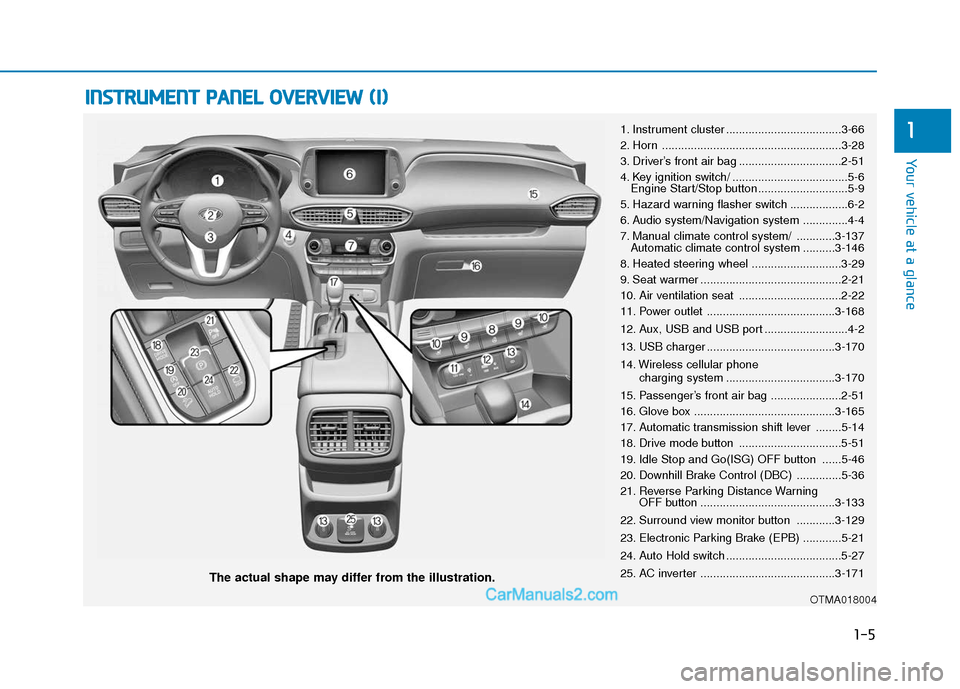
11. Instrument cluster ....................................3-66
2. Horn ........................................................3-28
3. Driver’s front air bag ................................2-51
4. Key ignition switch/ ....................................5-6
Engine Start/Stop button ............................5-9
5. Hazard warning flasher switch ..................6-2
6. Audio system/Navigation system ..............4-4
7. Manual climate control system/ ............3-137 Automatic climate control system ..........3-146
8. Heated steering wheel ............................3-29
9. Seat warmer ............................................2-21
10. Air ventilation seat ................................2-22
11. Power outlet ........................................3-168
12. Aux, USB and USB port ..........................4-2
13. USB charger ........................................3-170
14. Wireless cellular phone charging system ..................................3-170
15. Passenger’s front air bag ......................2-51
16. Glove box ............................................3-165
17. Automatic transmission shift lever ........5-14
18. Drive mode button ................................5-51
19. Idle Stop and Go(ISG) OFF button ......5-46
20. Downhill Brake Control (DBC) ..............5-36
21. Reverse Parking Distance Warning OFF button ..........................................3-133
22. Surround view monitor button ............3-129
23. Electronic Parking Brake (EPB) ............5-21
24. Auto Hold switch ....................................5-27
25. AC inverter ..........................................3-171
OTMA018004
Page 90 of 557

Convenient features of your vehicle
Accessing Your Vehicle .........................................3-4
Remote Key........................................................................\
.3-4
Smart Key ........................................................................\
....3-7
Immobilizer System .........................................................3-12
Door Locks ............................................................3-13
Operating Door Locks from Outside the Vehicle ....3-13
Operating Door Locks from Inside the Vehicle .......3-15
Automatic Door Lock and Unlock Features .............3-17
Child-Protector Rear Door Locks ...............................3-18
Electronic Child Safety Lock System .........................3-19
Safe Exit Assist (SEA) System .....................................3-20
Rear Occupant Alert (ROA) System ...........................3-21
Theft-Alarm System ............................................3-23
Driver Position Memory System ........................3-24
Storing Positions into Memory ..................................3-24
Recalling Positions from Memory...............................3-25
Resetting the Driver's Seat Memory System...........3-25
Easy Access Function ....................................................3-26
Steering Wheel .....................................................3-27
Electric Power Steering (EPS) .....................................3-27
Tilt Steering / Telescopic Steering .............................3-28
Horn ........................................................................\
............3-28
Heated Steering Wheel ..................................................3-29
Mirrors ...................................................................3-30
Inside Rearview Mirror ..................................................3-30
Side View Mirrors ...........................................................3-38
Reverse Parking Aid Function......................................3-40
Windows ................................................................3-41
Power Windows ...............................................................3-42
Panoramic Sunroof ..............................................3-45
Sunshade ........................................................................\
...3-46
Sliding the Sunroof .........................................................3-46
Tilting the Sunroof .........................................................3-47
Closing the Sunroof........................................................3-47
Resetting the Sunroof ...................................................3-48
Sunroof Open Warning ..................................................3-48
Exterior Features .................................................3-49
Hood ........................................................................\
...........3-49
Non-Powered Liftgate ...................................................3-50
Power Liftgate .................................................................3-52
Smart Liftgate ..................................................................3-59
Fuel Filler Door ................................................................3-62
Instrument Cluster ...............................................3-66
Instrument Cluster Control............................................3-67
Gauges and Meters ........................................................3-68
Transmission Shift Indicator .........................................3-71
Warning and Indicator Lights .......................................3-72
LCD Display Messages ...................................................3-85
3
Page 91 of 557
LCD Display ...........................................................3-91
LCD Display Control ........................................................3-91
LCD Display Modes .........................................................3-92
Trip Computer .....................................................3-106
Head Up Display (HUD).....................................3-110
Lighting................................................................3-112
Exterior Lights ...............................................................3-112
Interior Lights ................................................................3-120
Welcome System ...........................................................3-123
Wipers And Washers .........................................3-124
Front Windshield Wipers .............................................3-124
Front Windshield Washers ..........................................3-126
Rear Window Wiper and Washer..............................3-127
Driver Assist System .........................................3-128
Rear view monitor ........................................................3-128
Surround View Monitoring .........................................3-129
Blind-spot View Monitor system ..............................3-131
Reverse Parking Distance Warning system............3-133
Manual Climate Control System.......................3-137
Heating and Air Conditioning .....................................3-138
System Operation .........................................................3-142
System Maintenance....................................................3-144
Automatic Climate Control System ..................3-146
Automatic Temperature Control Mode ....................3-147
Manual Temperature Control Mode .........................3-148
System Operation .........................................................3-155
System Maintenance....................................................3-156
Windshield Defrosting and Defogging ............3-158
Auto Defogging System ..............................................3-160
Rear Window Defroster ..............................................3-162
Climate Control Additional Features ...............3-163
Cluster ionizer ................................................................3-163
Automatic Ventilation ...................................................3-163
Sunroof Inside Air Recirculation ...............................3-164
Auto comfort control ...................................................3-164
Storage Compartment .......................................3-165
Center Console Storage ..............................................3-165
Glove Box ........................................................................\
3-165
Sunglass Holder.............................................................3-166
Tray......................................................................\
.............3-166
Luggage Tray .................................................................3-167
3
Page 102 of 557
3-13
Convenient features of your vehicle
D
DO
O O
OR
R
L
L O
O C
CK
K S
S
3
If the system repeatedly does not
recognize the coding of the key, it is
recommended that you contact your
HYUNDAI dealer.
Do not attempt to alter this system or
add other devices to it. Electrical
problems could result that may make
your vehicle inoperable.
The transponder in your key is an
important part of the immobilizer
system. It is designed to give
years of trouble-free service, how-
ever you should avoid exposure to
moisture, static electricity and
rough handling. Immobilizer sys-
tem malfunction could occur.Information
This device complies with Part 15 of
the FCC rules.
Operation is subject to the following
three conditions:
1. This device may not cause harmful
interference.
2. This device must accept any inter- ference received, including inter-
ference that may cause undesired
operation.
3. Changes or modifications not expressly approved by the party
responsible for compliance could
void the user’s authority to operate
the device.
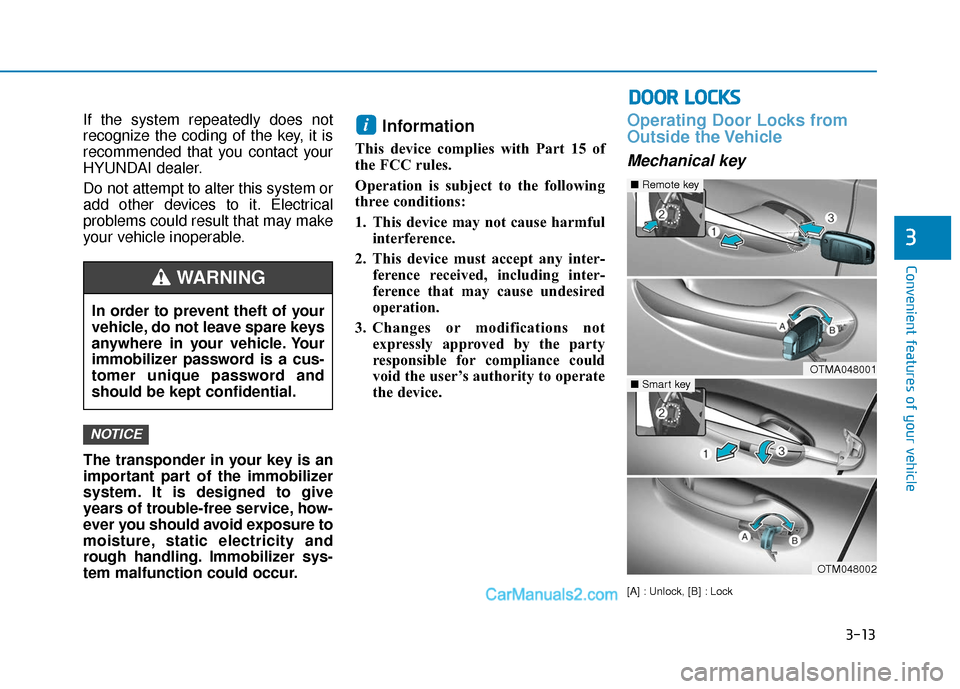
Operating Door Locks from
Outside the Vehicle
Mechanical key
[A] : Unlock, [B] : Lock
i
NOTICE
In order to prevent theft of your
vehicle, do not leave spare keys
anywhere in your vehicle. Your
immobilizer password is a cus-
tomer unique password and
should be kept confidential.
WARNING
OTMA048001
■Remote key
OTM048002
■Smart key
Page 219 of 557
3-130
Convenient features of your vehicle
Always keep the camera lens
clean. The camera may not work
normally if the lens is covered
with foreign material.
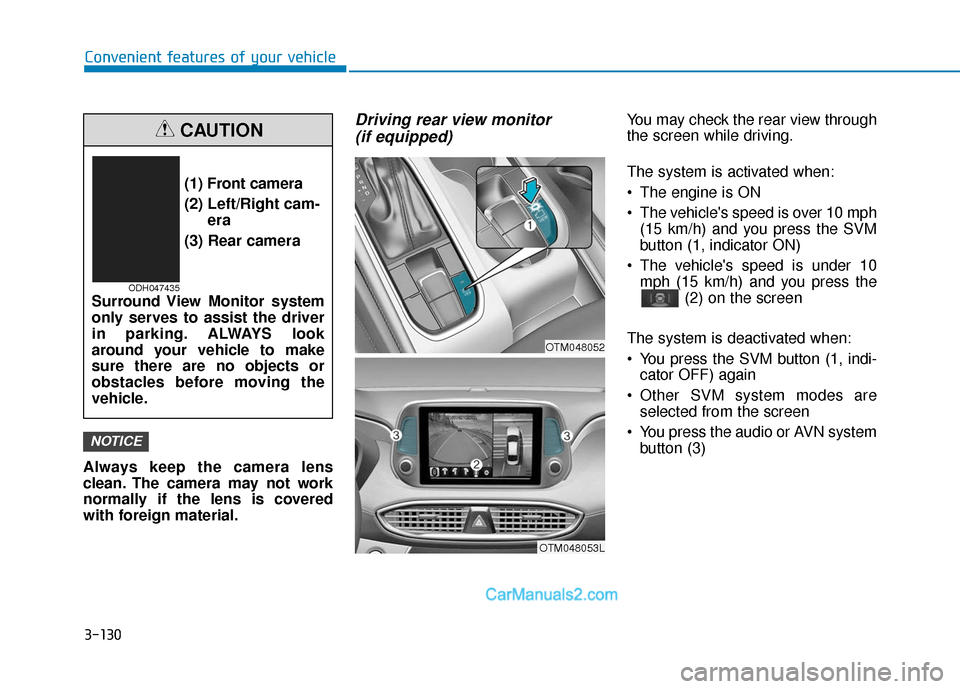
Driving rear view monitor (if equipped)You may check the rear view through
the screen while driving.
The system is activated when:
The engine is ON
The vehicle's speed is over 10 mph
(15 km/h) and you press the SVM
button (1, indicator ON)
The vehicle's speed is under 10 mph (15 km/h) and you press the (2) on the screen
The system is deactivated when:
You press the SVM button (1, indi- cator OFF) again
Other SVM system modes are selected from the screen
You press the audio or AVN system button (3)
NOTICE
(1) Front camera
(2) Left/Right cam- era
(3) Rear camera
Surround View Monitor system
only serves to assist the driver
in parking. ALWAYS look
around your vehicle to make
sure there are no objects or
obstacles before moving the
vehicle.
CAUTION
ODH047435
OTM048053L
OTM048052
Page 220 of 557
3-131
Convenient features of your vehicle
3
Information
• If vehicle speed is over 10 mph (15km/h)
- the rear image stays ON when therear view was on the screen
- screen (top, front wide, front right and front left) of other modes of
SVM system turns OFF and
switches to the original AVN
screen when other modes were on
the screen
• If the SVM system is ON and the vehicle speed is under 10 mph (15
km/h)
- the rear image stays ON when therear view was on the screen
- a pop-up for selecting the SVM mode (top, front wide, front right
and front left) appears when
pressing (2) on the screen • When the vehicle is backing up, the
rear image will appear on the
screen automatically regardless of
vehicle speed or SVM button (1)
status.
- If the rear image was ON, thescreen switches to the parking
assist screen.
- If the screen (top, front wide, front right and front left) of other
modes of SVM system was ON, the
screen for setting the initial rear
view mode appears.
- When the shift lever is moved from R (Reverse) to D (Drive), the
screen of the previous mode is dis-
played.
• A warning appears on the system when:
- The liftgate is opened
- The driver's door is opened
- The passenger's door is opened
- The outer side view mirror is folded
• If the system is not operating nor- mally, the system should be checked
by an authorized HYUNDAI dealer.
For more details, refer to the sep-
arately supplied manual with your
vehicle.
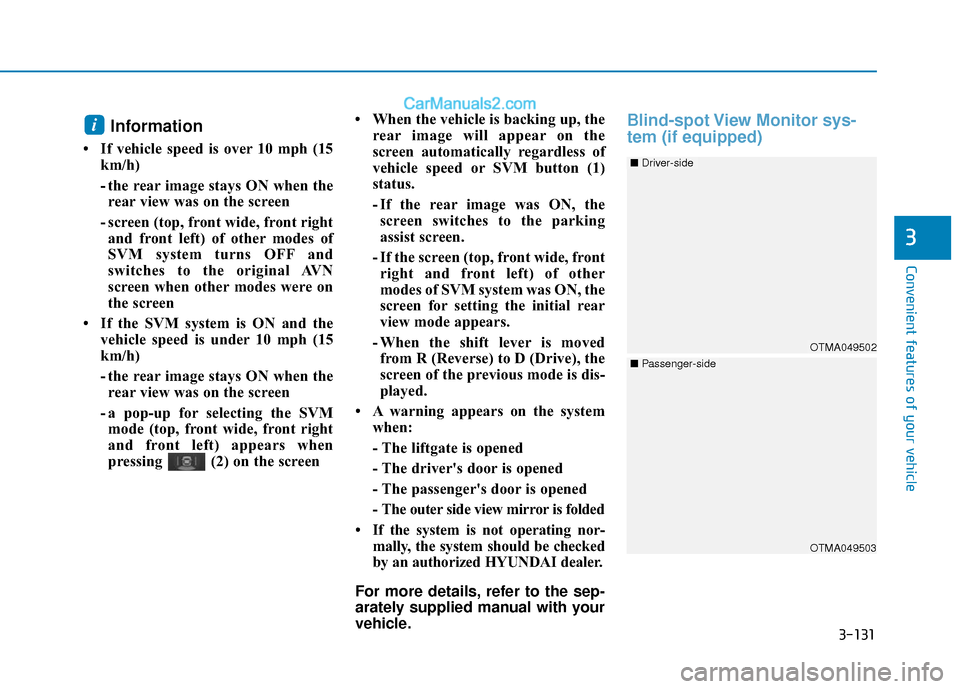
Blind-spot View Monitor sys-
tem (if equipped)i
OTMA049503
OTMA049502
■ Driver-side
■Passenger-side
Page 221 of 557
3-132
BVM (Blind-spot View Monitor) sys-
tem displays the driver-side or pas-
senger-side rear areas in the cluster
when the system is activated.
To turn on BVM system: Under condi-
tion BVM system is enabled in the
settings
1. The ignition switch is turned tothe ON position.
2. The turn signal is activated
To turn off BVM system
1. The ignition switch is turned to the OFF position.
2. The turn signal is deactivated
3. The hazard warning flasher is on
4. A warning screen pops up and takes priority over the Blind-Spot
View Monitor system.System setting
With the engine ON, the Blind-spot
View Monitor system turns on and
gets ready to be activated when the
'User Settings →Driver Assistance
→ Blind-spot safety →Blind-spot
view' is selected on the cluster. The
system stops operation when the set-
ting is deactivated.
Convenient features of your vehicle
Like all assistance systems,
BVM system has limitations.
Over-reliance on the system
may result in a collision.
Always look around your vehi-
cle to make sure there are no
objects or obstacles before
moving the vehicle in any
direction to prevent a colli-
sion.
Objects are closer than they
appear. Failure to visually
confirm that is safe to change
the lane before doing so may
result in crash and serious
injury or death.
Always keep the camera lens
clean. The camera may not
work normally if the lens is
covered with foreign material.
CAUTION
Page 222 of 557
![Hyundai Santa Fe 2020 Owners Manual 3-133
Convenient features of your vehicle
3
Reverse Parking Distance
Warning system (if equipped)
[A] : Sensor
The optional Reverse Parking
Distance Warning system assists the
driver during reverse mo](/img/35/16315/w960_16315-221.png "Hyundai Santa Fe 2020 Owners Manual 3-133
Convenient features of your vehicle
3
Reverse Parking Distance
Warning system (if equipped)
[A] : Sensor
The optional Reverse Parking
Distance Warning system assists the
driver during reverse mo")
3-133
Convenient features of your vehicle
3
Reverse Parking Distance
Warning system (if equipped)
[A] : Sensor
The optional Reverse Parking
Distance Warning system assists the
driver during reverse movement of
the vehicle by chiming if any object is
sensed within approximately 50 in
(120 cm) behind the vehicle.
This system is a supplemental sys-
tem that senses objects within the
range and location of the sensors, it
cannot detect objects in other areas
where sensors are not installed.
Operation of the ReverseParking Distance Warning system
Operating condition
This system will activate when
backing up with the ignition switch
in the ON position. However, if the
vehicle speed exceeds 3 mph (5
km/h), the system may not detect
objects.
If the vehicle speed exceeds 6 mph (10 km/h), the system will not
warn you even though objects are
detected.
When more than two objects are sensed at the same time, the clos-
est one will be recognized first.
ALWAYS look around your vehi-
cle to make sure there are not
any objects or obstacles before
moving the vehicle in any direc-
tion to prevent a collision.
Always pay close attention
when the vehicle is driven close
to objects, particularly pedestri-
ans, and especially children.
Be aware that some objects
may not be visible on the
screen or be detected by the
sensors, due to the objects
distance, size or material, all of
which can limit the effective-
ness of the sensor.
WARNING
OTMA049045
Page 223 of 557
3-134
Convenient features of your vehicle
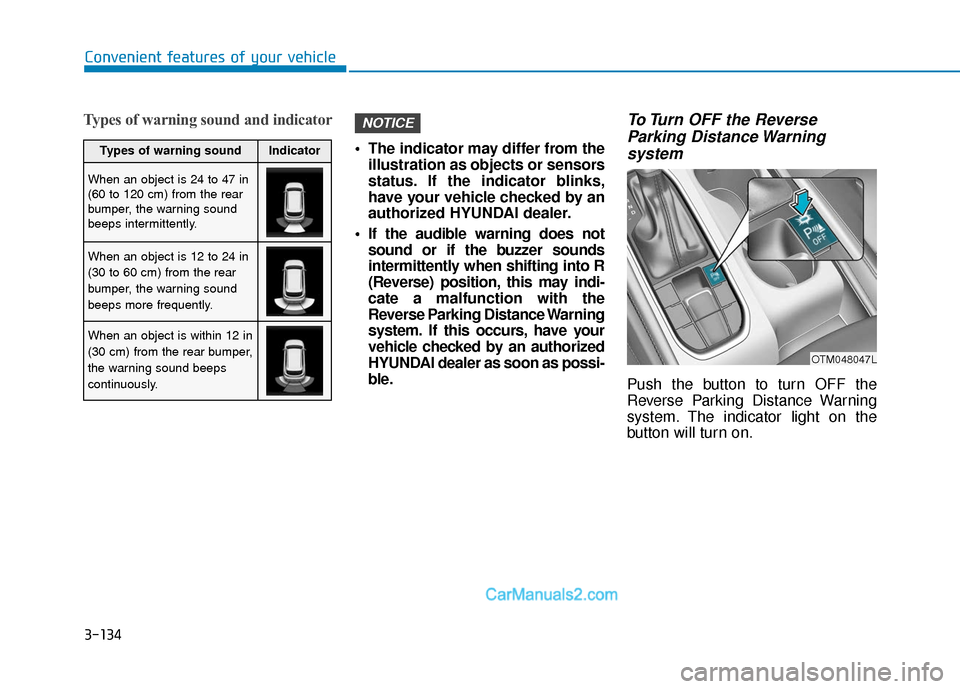
Types of warning sound and indicator
The indicator may differ from theillustration as objects or sensors
status. If the indicator blinks,
have your vehicle checked by an
authorized HYUNDAI dealer.
If the audible warning does not sound or if the buzzer sounds
intermittently when shifting into R
(Reverse) position, this may indi-
cate a malfunction with the
Reverse Parking Distance Warning
system. If this occurs, have your
vehicle checked by an authorized
HYUNDAI dealer as soon as possi-
ble.
To Turn OFF the ReverseParking Distance Warning system
Push the button to turn OFF the
Reverse Parking Distance Warning
system. The indicator light on the
button will turn on.
NOTICE
OTM048047L
Types of warning soundIndicator
When an object is 24 to 47 in
(60 to 120 cm) from the rear
bumper, the warning sound
beeps intermittently.
When an object is 12 to 24 in
(30 to 60 cm) from the rear
bumper, the warning sound
beeps more frequently.
When an object is within 12 in
(30 cm) from the rear bumper,
the warning sound beeps
continuously.