SCC Hyundai Santa Fe 2020 Owner's Manual
[x] Cancel search | Manufacturer: HYUNDAI, Model Year: 2020, Model line: Santa Fe, Model: Hyundai Santa Fe 2020Pages: 557, PDF Size: 19.29 MB
Page 181 of 557
3-92
Convenient features of your vehicle
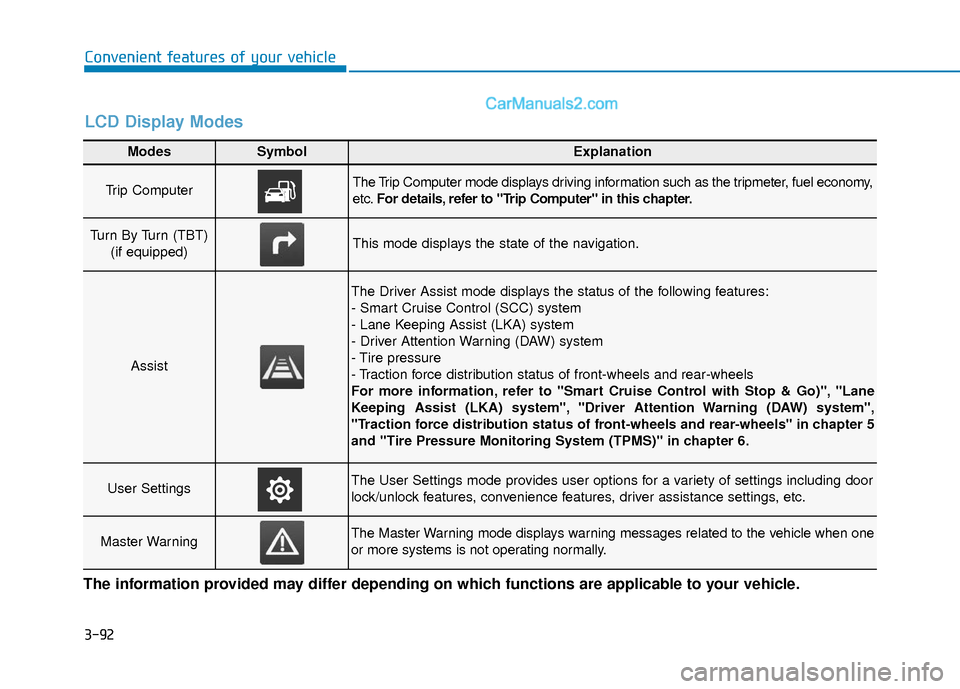
Modes SymbolExplanation
Trip Computer The Trip Computer mode displays driving information such as the tripmeter, fuel economy,
etc.For details, refer to "Trip Computer" in this chapter.
Turn By Turn (TBT)
(if equipped)This mode displays the state of the navigation.
Assist
The Driver Assist mode displays the status of the following features:
- Smart Cruise Control (SCC) system
- Lane Keeping Assist (LKA) system
- Driver Attention Warning (DAW) system
- Tire pressure
- Traction force distribution status of front-wheels and rear-wheels
For more information, refer to "Smart Cruise Control with Stop & Go)", "Lane
Keeping Assist (LKA) system", "Driver Attention Warning (DAW) system",
"Traction force distribution status of front-wheels and rear-wheels" in chapter 5
and "Tire Pressure Monitoring System (TPMS)" in chapter 6.
User SettingsThe User Settings mode provides user options for a variety of settings including door
lock/unlock features, convenience features, driver assistance settings, etc.
Master WarningThe Master Warning mode displays warning messages related to the vehicle when one
or more systems is not operating normally.
The information provided may differ depending on which functions are applicable to your vehicle.
LCD Display Modes
Page 182 of 557
3-93
Convenient features of your vehicle
3
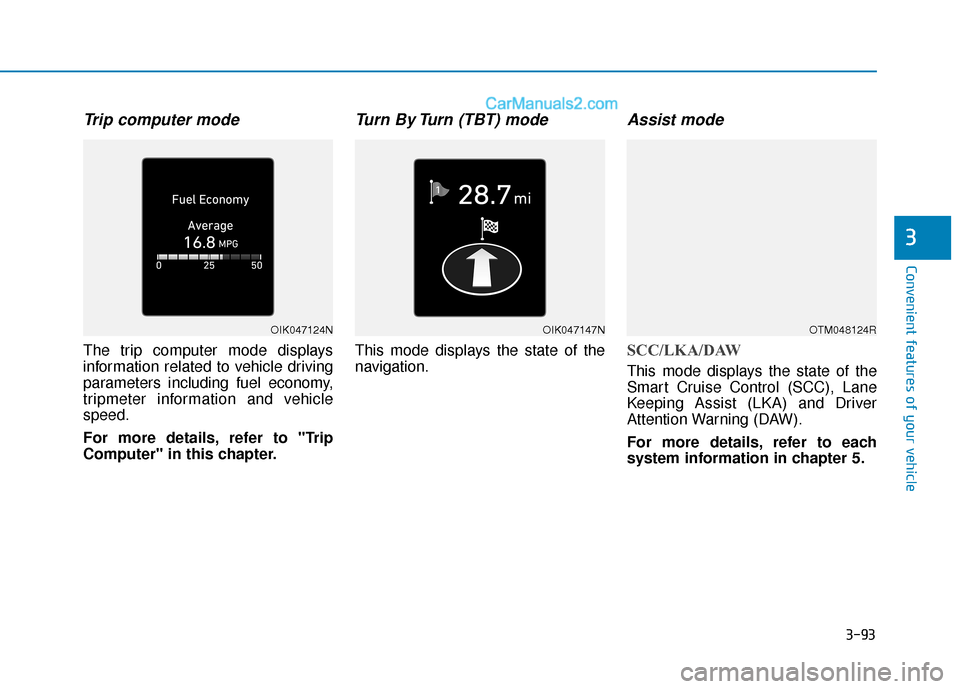
Trip computer mode
The trip computer mode displays
information related to vehicle driving
parameters including fuel economy,
tripmeter information and vehicle
speed.
For more details, refer to "Trip
Computer" in this chapter.
Turn By Turn (TBT) mode
This mode displays the state of the
navigation.
Assist mode
SCC/LKA/DAW
This mode displays the state of the
Smart Cruise Control (SCC), Lane
Keeping Assist (LKA) and Driver
Attention Warning (DAW).
For more details, refer to each
system information in chapter 5.
OIK047124NOIK047147NOTM048124R
Page 187 of 557
3-98
Convenient features of your vehicle
ItemsExplanation
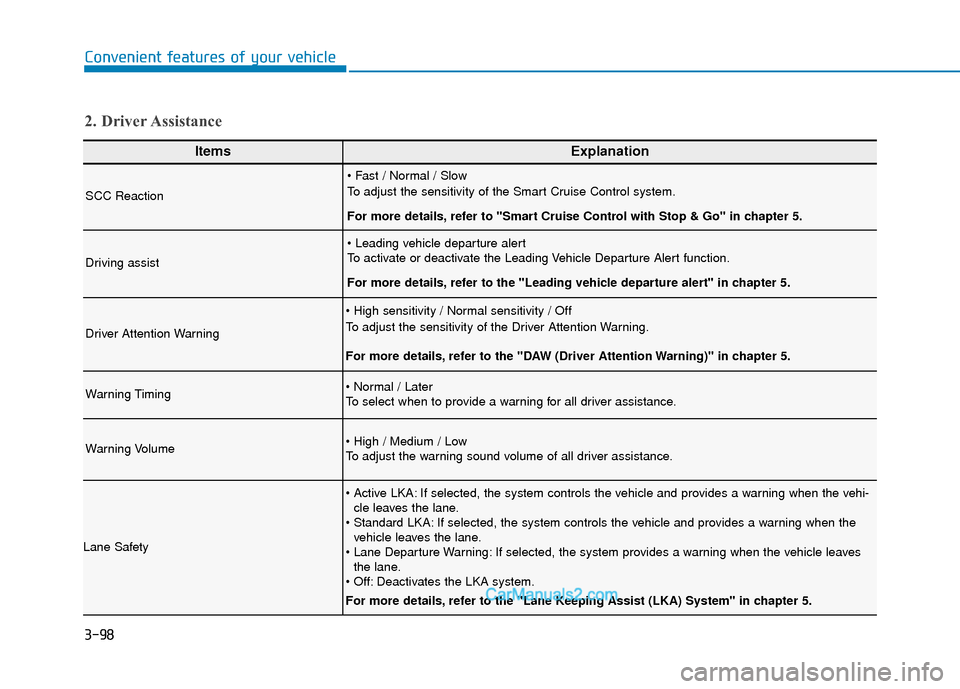
SCC Reaction
To adjust the sensitivity of the Smart Cruise Control system.
For more details, refer to ''Smart Cruise Control with Stop & Go'' in chapter 5.
Driving assist
To activate or deactivate the Leading Vehicle Departure Alert function.
For more details, refer to the "Leading vehicle departure alert" in chapter 5.
Driver Attention Warning
To adjust the sensitivity of the Driver Attention Warning.
For more details, refer to the "DAW (Driver Attention Warning)" in chapter 5.
Warning Timing
To select when to provide a warning for all driver assistance.
Warning Volume
To adjust the warning sound volume of all driver assistance.
Lane Safety
If selected, the system controls the vehicle and provides a warning when the vehi-cle leaves the lane.
If selected, the system controls the vehicle and provides a warning when the vehicle leaves the lane.
If selected, the system provides a warning when the vehicle leaves the lane.
Deactivates the LKA system.
For more details, refer to the "Lane Keeping Assist (LKA) System" in chapter 5.
2. Driver Assistance
Page 200 of 557
3-111
Convenient features of your vehicle
3
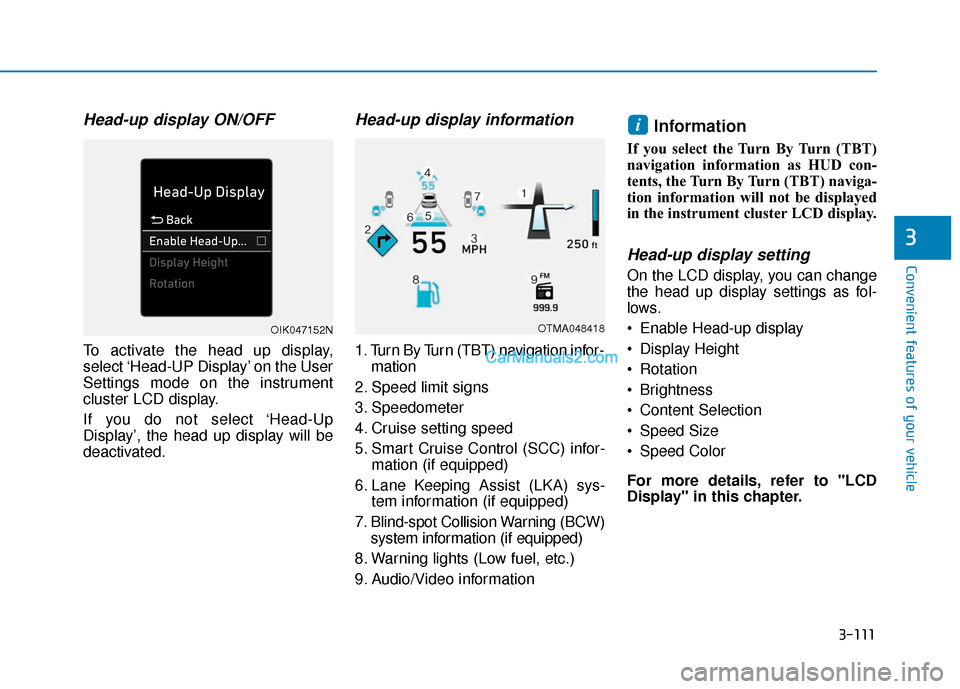
Head-up display ON/OFF
To activate the head up display,
select ‘Head-UP Display’ on the User
Settings mode on the instrument
cluster LCD display.
If you do not select ‘Head-Up
Display’, the head up display will be
deactivated.
Head-up display information
1. Turn By Turn (TBT) navigation infor-mation
2. Speed limit signs
3. Speedometer
4. Cruise setting speed
5. Smart Cruise Control (SCC) infor- mation (if equipped)
6. Lane Keeping Assist (LKA) sys- tem information (if equipped)
7. Blind-spot Collision Warning (BCW) system information (if equipped)
8. Warning lights (Low fuel, etc.)
9. Audio/Video information
Information
If you select the Turn By Turn (TBT)
navigation information as HUD con-
tents, the Turn By Turn (TBT) naviga-
tion information will not be displayed
in the instrument cluster LCD display.
Head-up display setting
On the LCD display, you can change
the head up display settings as fol-
lows.
Enable Head-up display
Display Height
Rotation
Brightness
Content Selection
Speed Size
Speed Color
For more details, refer to "LCD
Display" in this chapter.
i
OTMA048418OIK047152N
Page 379 of 557
5-105
Driving your vehicle
5
The Driver Attention Warning sys-
tem utilizes the camera sensor on
the front windshield for its opera-
tion. To keep the camera sensor in
the best condition, you should
observe the followings:
Do not disassemble the cameratemporarily to tint the window or
to attach any types of coatings
and accessories. If you disas-
semble a camera and assemble
it again, take your vehicle to an
authorized HYUNDAI dealer and
have the system checked for cal-
ibration.
NEVER install any accessories or stickers on the front wind-
shield, nor tint the front wind-
shield.
NEVER locate any reflective objects (i.e. white paper, mirror)
over the dashboard. Any light
reflection may cause a malfunc-
tion of the Driver Attention Alert
(DAW) system.
Pay extreme caution to keep the camera sensor out of water.
NOTICE
The Driver Attention Warning
(DAW) system may not properly
operate with limited alerting in
the following situations:
The lane detection perform-
ance is limited. (For more
details, refer to "Lane Keeping
Assist (LKA) system" in this
chapter.)
The vehicle is violently driven
or is abruptly turned for obsta-
cle avoidance (e.g. construc-
tion area, other vehicles, fallen
objects, bumpy road).
Forward drivability of the vehi-
cle is severely undermined
(possibly due to wide variation
in tire pressures, uneven tire
wear-out, toe-in/toe-out align-
ment).
The vehicle drives on a curvy
road.
The vehicle drives on a bumpy
road.
The vehicle drives through a
windy area.
The vehicle is controlled by the
following driving assist sys-
tems:
- Lane Keeping Assist (LKA)system
- Forward Collision-Avoidance Assist (FCA) system
- Smart Cruise Control (SCC) system
CAUTION
Playing the vehicle audio sys-
tem at high volume may offset
the Driver Attention Warning
(DAW) system warning sounds.
CAUTION
Page 380 of 557
5-106
Driving your vehicle
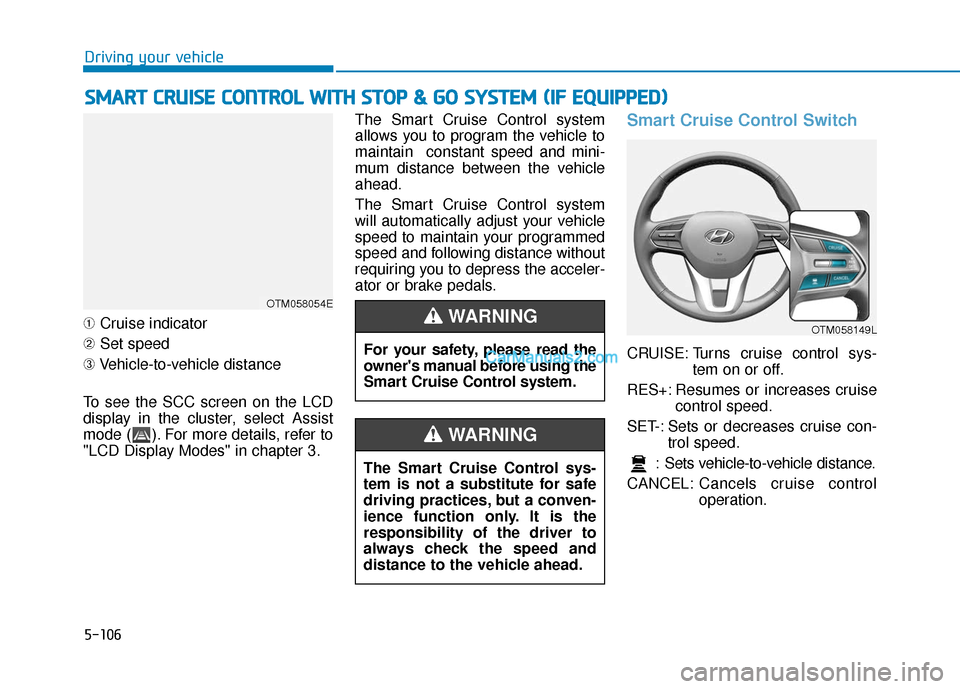
➀ Cruise indicator
➁ Set speed
➂ Vehicle-to-vehicle distance
To see the SCC screen on the LCD
display in the cluster, select Assist
mode ( ). For more details, refer to
"LCD Display Modes" in chapter 3. The Smart Cruise Control system
allows you to program the vehicle to
maintain constant speed and mini-
mum distance between the vehicle
ahead.
The Smart Cruise Control system
will automatically adjust your vehicle
speed to maintain your programmed
speed and following distance without
requiring you to depress the acceler-
ator or brake pedals.
Smart Cruise Control Switch
CRUISE: Turns cruise control sys-
tem on or off.
RES+: Resumes or increases cruise control speed.
SET-: Sets or decreases cruise con- trol speed.
: Sets vehicle-to-vehicle distance.
CANCEL: Cancels cruise control
operation.
S
SM
M A
AR
RT
T
C
C R
R U
U I
IS
S E
E
C
C O
O N
NT
TR
R O
O L
L
W
W I
IT
T H
H
S
S T
T O
O P
P
&
&
G
G O
O
S
S Y
Y S
ST
T E
EM
M
(
( I
IF
F
E
E Q
Q U
UI
IP
P P
PE
ED
D )
)
OTM058054E
For your safety, please read the
owner's manual before using the
Smart Cruise Control system.
WARNING
The Smart Cruise Control sys-
tem is not a substitute for safe
driving practices, but a conven-
ience function only. It is the
responsibility of the driver to
always check the speed and
distance to the vehicle ahead.
WARNING
OTM058149L
Page 389 of 557
5-115
Driving your vehicle
5
Sensor to Detect Distance to
the Vehicle Ahead
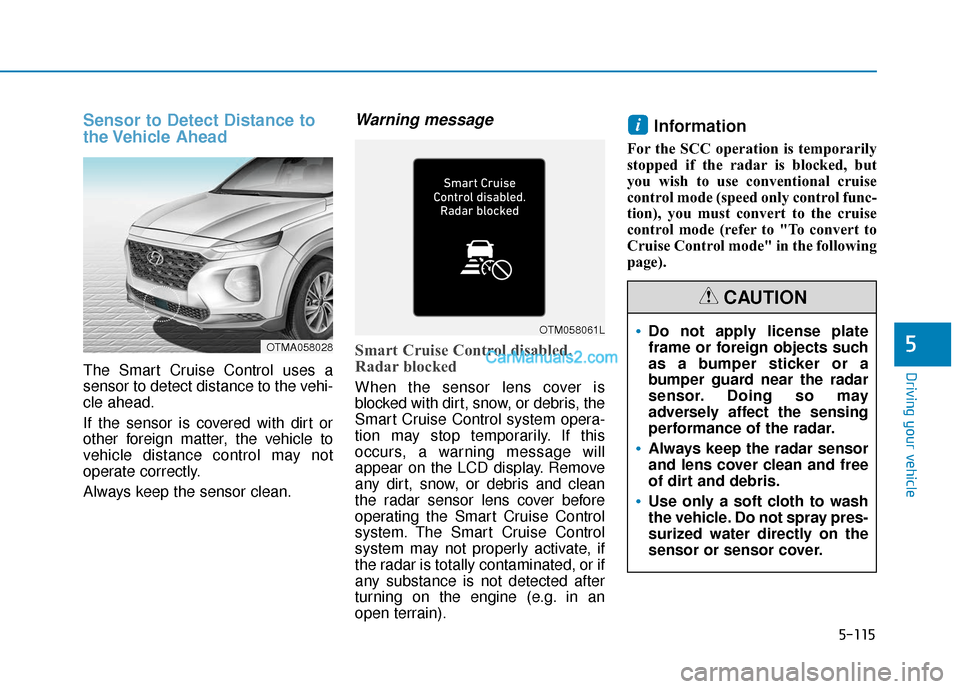
The Smart Cruise Control uses a
sensor to detect distance to the vehi-
cle ahead.
If the sensor is covered with dirt or
other foreign matter, the vehicle to
vehicle distance control may not
operate correctly.
Always keep the sensor clean.
Warning message
Smart Cruise Control disabled.
Radar blocked
When the sensor lens cover is
blocked with dirt, snow, or debris, the
Smart Cruise Control system opera-
tion may stop temporarily. If this
occurs, a warning message will
appear on the LCD display. Remove
any dirt, snow, or debris and clean
the radar sensor lens cover before
operating the Smart Cruise Control
system. The Smart Cruise Control
system may not properly activate, if
the radar is totally contaminated, or if
any substance is not detected after
turning on the engine (e.g. in an
open terrain).
Information
For the SCC operation is temporarily
stopped if the radar is blocked, but
you wish to use conventional cruise
control mode (speed only control func-
tion), you must convert to the cruise
control mode (refer to "To convert to
Cruise Control mode" in the following
page).
i
OTMA058028
OTM058061LDo not apply license plate
frame or foreign objects such
as a bumper sticker or a
bumper guard near the radar
sensor. Doing so may
adversely affect the sensing
performance of the radar.
Always keep the radar sensor
and lens cover clean and free
of dirt and debris.
Use only a soft cloth to wash
the vehicle. Do not spray pres-
surized water directly on the
sensor or sensor cover.
CAUTION
Page 390 of 557
5-116
Driving your vehicle
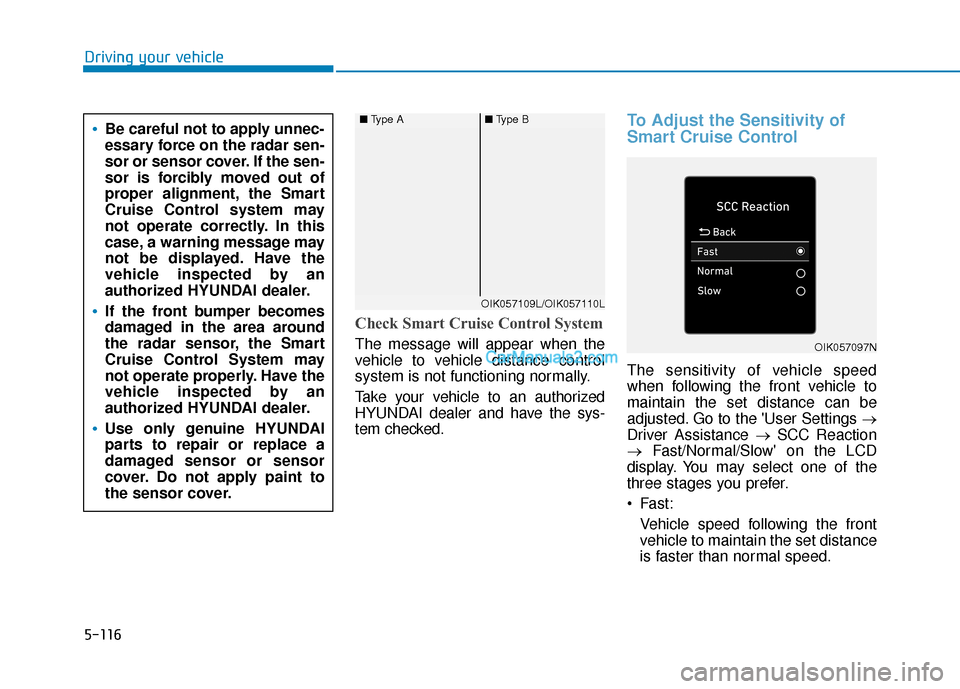
Check Smart Cruise Control System
The message will appear when the
vehicle to vehicle distance control
system is not functioning normally.
Take your vehicle to an authorized
HYUNDAI dealer and have the sys-
tem checked.
To Adjust the Sensitivity of
Smart Cruise Control
The sensitivity of vehicle speed
when following the front vehicle to
maintain the set distance can be
adjusted. Go to the 'User Settings →
Driver Assistance →SCC Reaction
→ Fast/Normal/Slow' on the LCD
display. You may select one of the
three stages you prefer.
Fast:
Vehicle speed following the front
vehicle to maintain the set distance
is faster than normal speed.
OIK057097N
■ Type A■Type B
OIK057109L/OIK057110L
Be careful not to apply unnec-
essary force on the radar sen-
sor or sensor cover. If the sen-
sor is forcibly moved out of
proper alignment, the Smart
Cruise Control system may
not operate correctly. In this
case, a warning message may
not be displayed. Have the
vehicle inspected by an
authorized HYUNDAI dealer.
If the front bumper becomes
damaged in the area around
the radar sensor, the Smart
Cruise Control System may
not operate properly. Have the
vehicle inspected by an
authorized HYUNDAI dealer.
Use only genuine HYUNDAI
parts to repair or replace a
damaged sensor or sensor
cover. Do not apply paint to
the sensor cover.
Page 397 of 557
5-123
Driving your vehicle
5
The Leading Vehicle Departure Alert
system alerts the driver of the depar-
ture of the vehicle in front when the
vehicle is stopped and the Smart
Cruise Control (SCC) system is in
activation.System Setting and Activation
System setting
With the engine ON, the Leading
Vehicle Departure Alert system turns
on and gets ready to be activated
when the 'User Settings →Driver
Assistance →Driving Assist →
Leading vehicle departure alert' is
selected selected in the cluster LCD
display. The system stops operation
when the setting is deactivated.
However, if the engine is turned off
then on again, the system maintains
the previous state.
System standby
While the Smart Cruise Control
(SCC) system is in operation, your
vehicle stops behind the vehicle in
front when it stops. The message is
displayed on the cluster within 3 sec-
onds after the stop and the system
will be in the standby position.
L L E
E A
A D
DI
IN
N G
G
V
V E
EH
H I
IC
C L
LE
E
D
D E
EP
P A
A R
RT
TU
U R
RE
E
A
A L
LE
E R
R T
T
(
( I
IF
F
E
E Q
Q U
UI
IP
P P
PE
ED
D )
)
OIK057107L
Page 398 of 557
5-124
Driving your vehicle
System activation
If the driver does not take action for a
certain period of time after the vehi-
cle in front departs, the message is
displayed on the cluster.
The vehicle departs automatically if
the accelerator pedal is depressed or
RES + or SET - toggle switch is
pushed up or down when there is a
vehicle in front.
The Smart Cruise Control (SCC)
system is deactivated if the accelera-
tor pedal is depressed or RES + or
SET - toggle switch is pushed up or
down when there is no vehicle in
front.
OTM058091L
Always check the front of the
vehicle and road conditions
before departure.
WARNING