lock HYUNDAI SANTA FE 2021 Owners Manual
[x] Cancel search | Manufacturer: HYUNDAI, Model Year: 2021, Model line: SANTA FE, Model: HYUNDAI SANTA FE 2021Pages: 636, PDF Size: 81.2 MB
Page 455 of 636
07
7-7 3
Limitations of the system
Navigation-based Smart Cruise Control
may not operate normally under the
following circumstances:
• The navigation is not working properly
• Speed limit and road information in
the navigation is not updated
• The map information and the actual
road is different because of real-time
GPS data or map information error
• The navigation searches for a route
while driving
• GPS signals are blocked in areas such
as a tunnel
• The navigation is updated while
driving
• Map information is not transmitted
due to infotainment system's
abnormal operation
• A road that divides into two or more
roads and joins again
• The driver goes off course the route
set in the navigation
• The route to the destination is
changed or canceled by resetting the
navigation •
The vehicle enters a service station or
rest area
• The speed limit of some sections
changes according to the road
situations
• Android Auto or Car Play is operating
• The navigation cannot detect the
current vehicle position (ex: elevated
roads including overpass adjacent to
general roads or nearby roads exist in
a parallel way)
• The navigation is being updated while
driving
• The navigation is being restarted while
driving
• There is bad weather, such as heavy
rain, heavy snow, etc.
• Driving on a road under construction
• Driving on a road that is controlled
• Driving on a road that is sharply
curved
• Driving on roads with intersections,
roundabouts, straight entrances and
exits, etc.
Page 468 of 636
Driver assistance system
7-86
• Highway Driving Assist may
inadvertently operate or turn off
depending on road conditions
(navigation information) and
surroundings.
• Lane Following Assist function may
be temporarily disabled when the
front view camera cannot detect
lanes properly or the hands-off
warning is on.
• You may not hear the warning sound
of Highway Driving Assist if the
surrounding is noisy.
• If the vehicle is driven at high speed
above a certain speed at a curve,
your vehicle may drive to one side or
may depart from the driving lane.
• When you are towing a trailer or
another vehicle, we recommend that
Highway Driving Assist is turned off
due to safety reasons.
• The hands–off warning message
may appear early or late depending
on how the steering wheel is held or
road conditions. Always have your
hands on the steering wheel while
driving.
• For your safety, please read the
owner's manual before using the
Highway Driving Assist.
• Highway Driving Assist will not
operate when the engine is started,
or when the detecting sensors or
navigation is being initialized.Limitations of the system
Highway Driving Assist may not operate
normally, or may not operate under the
following circumstances:
• The map information and the
actual road is different because the
navigation is not updated
• The map information and the actual
road is different because of real-time
GPS data or map information error
• The infotainment system is overloaded
by simultaneously performing
functions such as route search, video
playback, voice recognition, etc.
• GPS signals are blocked in areas such
as a tunnel
• The driver goes off course or the
route to the destination is changed or
canceled by resetting the navigation
• The vehicle enters a service station or
rest area
• Android Auto or Car Play is operating
• The navigation cannot detect the
current vehicle position (ex: elevated
roads including overpass adjacent to
general roads or nearby roads exist in
a parallel way)
For more details on the limitations of
the front view camera, front radar, front
corner radar and rear corner radar, refer
to “Forward Collision-Avoidance Assist
(FCA)” section in chapter 7.
Page 485 of 636
07
7-103
System malfunction and
limitations
System malfunction
OTM070125N
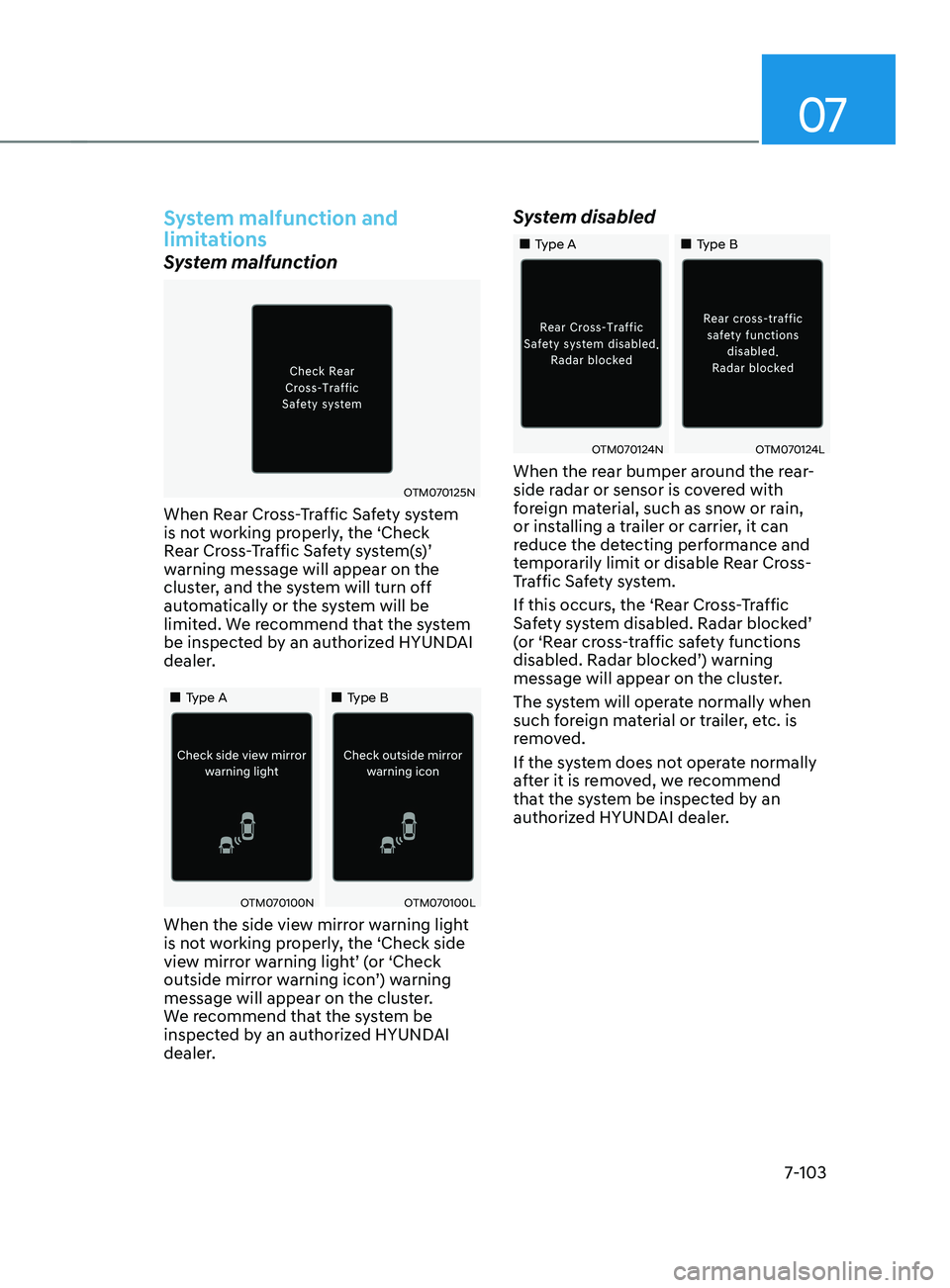
When Rear Cross-Traffic Safety system
is not working properly, the ‘Check
Rear Cross-Traffic Safety system(s)’
warning message will appear on the
cluster, and the system will turn off
automatically or the system will be
limited. We recommend that the system
be inspected by an authorized HYUNDAI
dealer.
„„Type A„„Type B
OTM070100NOTM070100L
When the side view mirror warning light
is not working properly, the ‘Check side
view mirror warning light’ (or ‘Check
outside mirror warning icon’) warning
message will appear on the cluster.
We recommend that the system be
inspected by an authorized HYUNDAI
dealer.
System disabled
„„Type A„„Type B
OTM070124NOTM070124L
When the rear bumper around the rear-
side radar or sensor is covered with
foreign material, such as snow or rain,
or installing a trailer or carrier, it can
reduce the detecting performance and
temporarily limit or disable Rear Cross-
Traffic Safety system.
If this occurs, the ‘Rear Cross-Traffic
Safety system disabled. Radar blocked’
(or ‘Rear cross-traffic safety functions
disabled. Radar blocked’) warning
message will appear on the cluster.
The system will operate normally when
such foreign material or trailer, etc. is
removed.
If the system does not operate normally
after it is removed, we recommend
that the system be inspected by an
authorized HYUNDAI dealer.
Page 491 of 636
07
7-109
Reverse Parking Distance Warning
• Reverse Parking Distance Warning
will operate when the gear is in R
(Reverse).
• Reverse Parking Distance Warning
detects a person, animal or object in
the rear when the vehicle’s rearward
speed is below 6 mph (10 km/h).
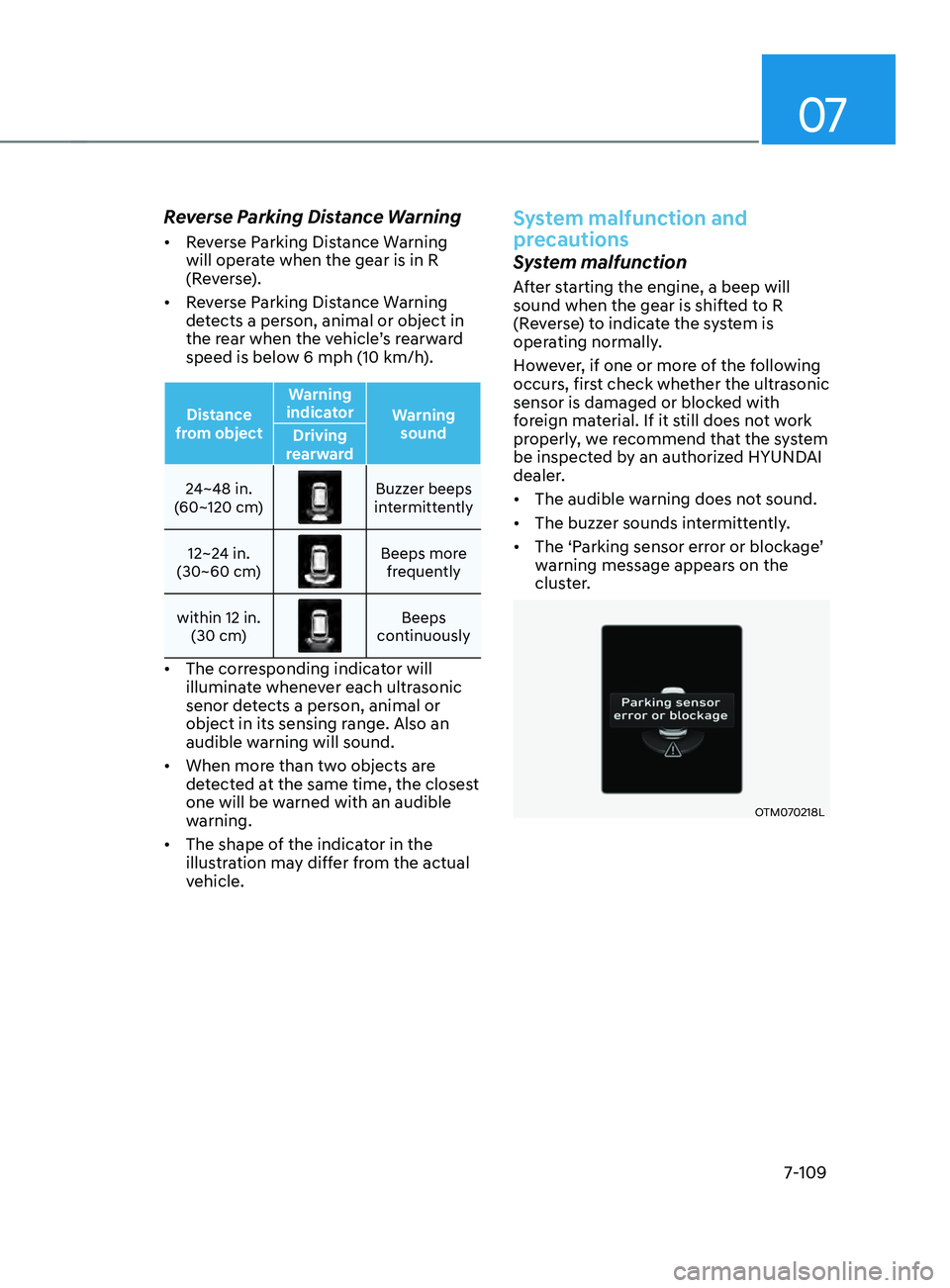
Distance
from object Warning
indicator Warning
sound
Driving
rearward
24~48 in.
(60~120 cm)
Buzzer beeps
intermittently
12~24 in.
(30~60 cm)
Beeps more frequently
within 12 in. (30 cm)
Beeps
continuously
• The corresponding indicator will
illuminate whenever each ultrasonic
senor detects a person, animal or
object in its sensing range. Also an
audible warning will sound.
• When more than two objects are
detected at the same time, the closest
one will be warned with an audible
warning.
• The shape of the indicator in the
illustration may differ from the actual
vehicle.
System malfunction and
precautions
System malfunction
After starting the engine, a beep will
sound when the gear is shifted to R
(Reverse) to indicate the system is
operating normally.
However, if one or more of the following
occurs, first check whether the ultrasonic
sensor is damaged or blocked with
foreign material. If it still does not work
properly, we recommend that the system
be inspected by an authorized HYUNDAI
dealer.
• The audible warning does not sound.
• The buzzer sounds intermittently.
• The ‘Parking sensor error or blockage’
warning message appears on the
cluster.
OTM070218L
Page 495 of 636
07
7-113
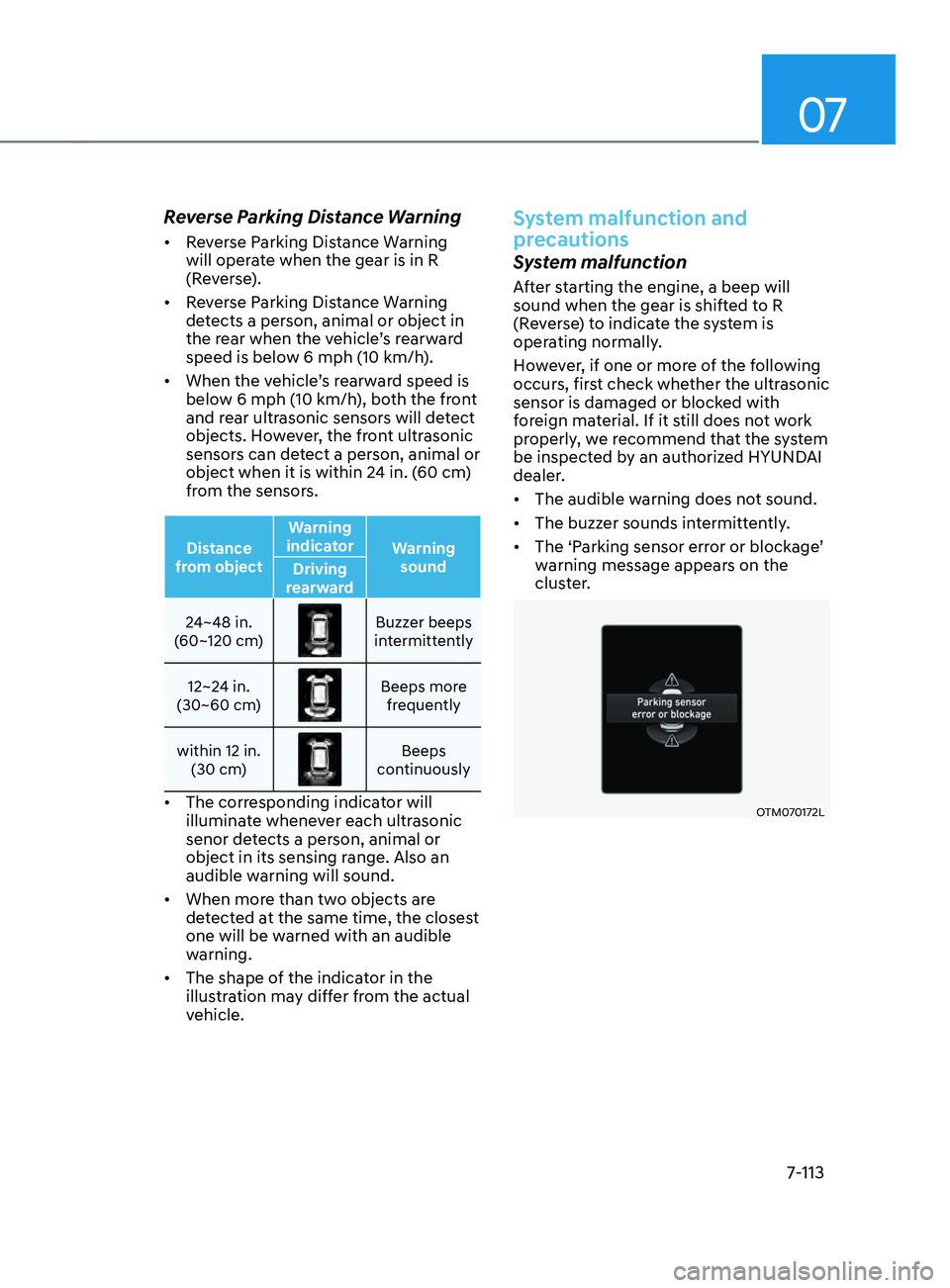
Reverse Parking Distance Warning
• Reverse Parking Distance Warning
will operate when the gear is in R
(Reverse).
• Reverse Parking Distance Warning
detects a person, animal or object in
the rear when the vehicle’s rearward
speed is below 6 mph (10 km/h).
• When the vehicle’s rearward speed is
below 6 mph (10 km/h), both the front
and rear ultrasonic sensors will detect
objects. However, the front ultrasonic
sensors can detect a person, animal or
object when it is within 24 in. (60 cm)
from the sensors.
Distance
from object Warning
indicator Warning
sound
Driving
rearward
24~48 in.
(60~120 cm)
Buzzer beeps
intermittently
12~24 in.
(30~60 cm)
Beeps more frequently
within 12 in. (30 cm)
Beeps
continuously
• The corresponding indicator will
illuminate whenever each ultrasonic
senor detects a person, animal or
object in its sensing range. Also an
audible warning will sound.
• When more than two objects are
detected at the same time, the closest
one will be warned with an audible
warning.
• The shape of the indicator in the
illustration may differ from the actual
vehicle.
System malfunction and
precautions
System malfunction
After starting the engine, a beep will
sound when the gear is shifted to R
(Reverse) to indicate the system is
operating normally.
However, if one or more of the following
occurs, first check whether the ultrasonic
sensor is damaged or blocked with
foreign material. If it still does not work
properly, we recommend that the system
be inspected by an authorized HYUNDAI
dealer.
• The audible warning does not sound.
• The buzzer sounds intermittently.
• The ‘Parking sensor error or blockage’
warning message appears on the
cluster.
OTM070172L
Page 501 of 636
07
7-119
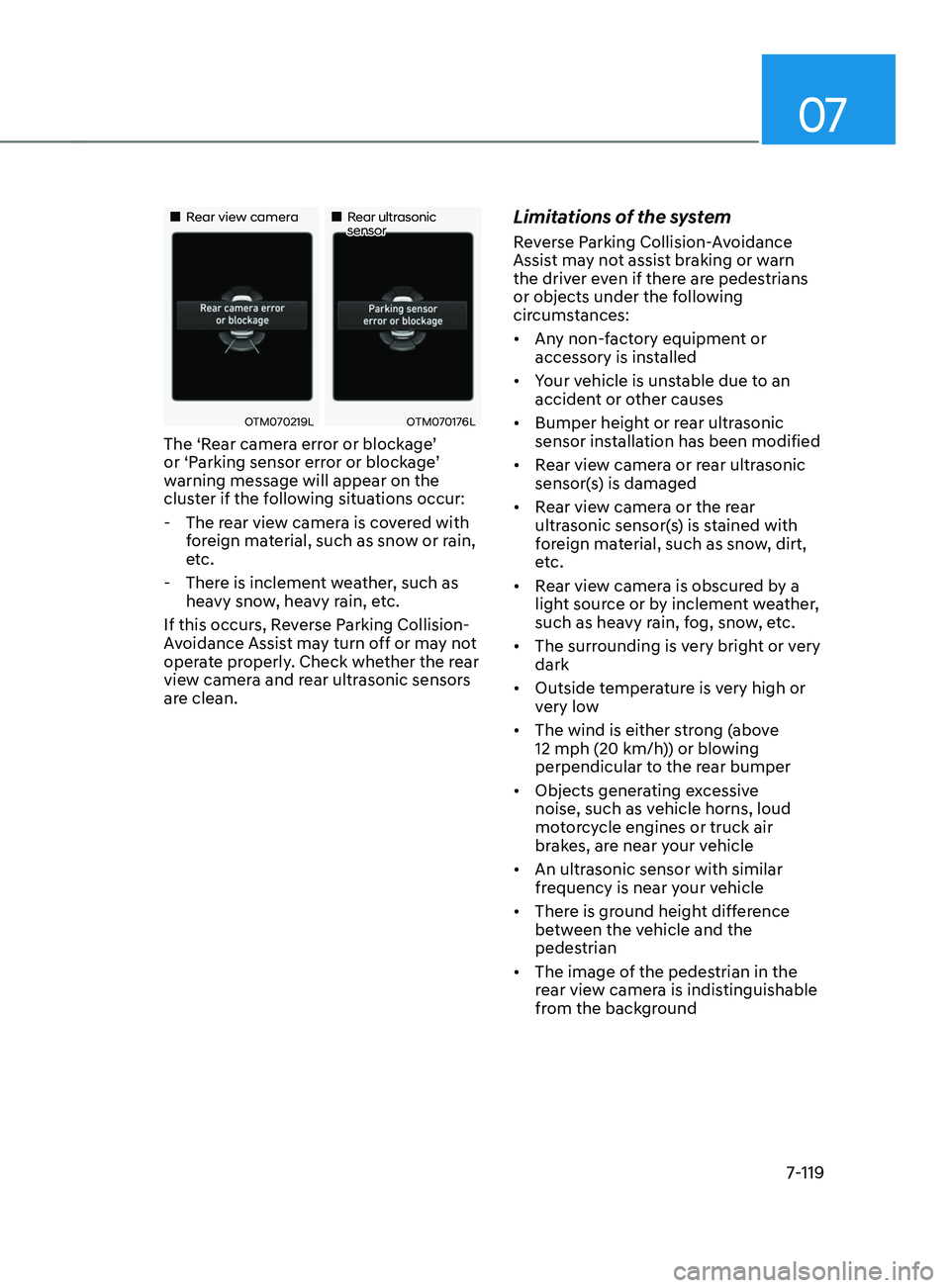
„„Rear view camera„„Rear ultrasonic sensor
OTM070219LOTM070176L
The ‘Rear camera error or blockage’
or ‘Parking sensor error or blockage’
warning message will appear on the
cluster if the following situations occur:
- The rear vie
w camera is covered with
foreign material, such as snow or rain,
etc.
- There is inclemen
t weather, such as
heavy snow, heavy rain, etc.
If this occurs, Reverse Parking Collision-
Avoidance Assist may turn off or may not
operate properly. Check whether the rear
view camera and rear ultrasonic sensors
are clean.
Limitations of the system
Reverse Parking Collision-Avoidance
Assist may not assist braking or warn
the driver even if there are pedestrians
or objects under the following
circumstances:
• Any non-factory equipment or
accessory is installed
• Your vehicle is unstable due to an
accident or other causes
• Bumper height or rear ultrasonic
sensor installation has been modified
• Rear view camera or rear ultrasonic
sensor(s) is damaged
• Rear view camera or the rear
ultrasonic sensor(s) is stained with
foreign material, such as snow, dirt,
etc.
• Rear view camera is obscured by a
light source or by inclement weather,
such as heavy rain, fog, snow, etc.
• The surrounding is very bright or very
dark
• Outside temperature is very high or
very low
• The wind is either strong (above
12 mph (20 km/h)) or blowing
perpendicular to the rear bumper
• Objects generating excessive
noise, such as vehicle horns, loud
motorcycle engines or truck air
brakes, are near your vehicle
• An ultrasonic sensor with similar
frequency is near your vehicle
• There is ground height difference
between the vehicle and the
pedestrian
• The image of the pedestrian in the
rear view camera is indistinguishable
from the background
Page 507 of 636
07
7-125
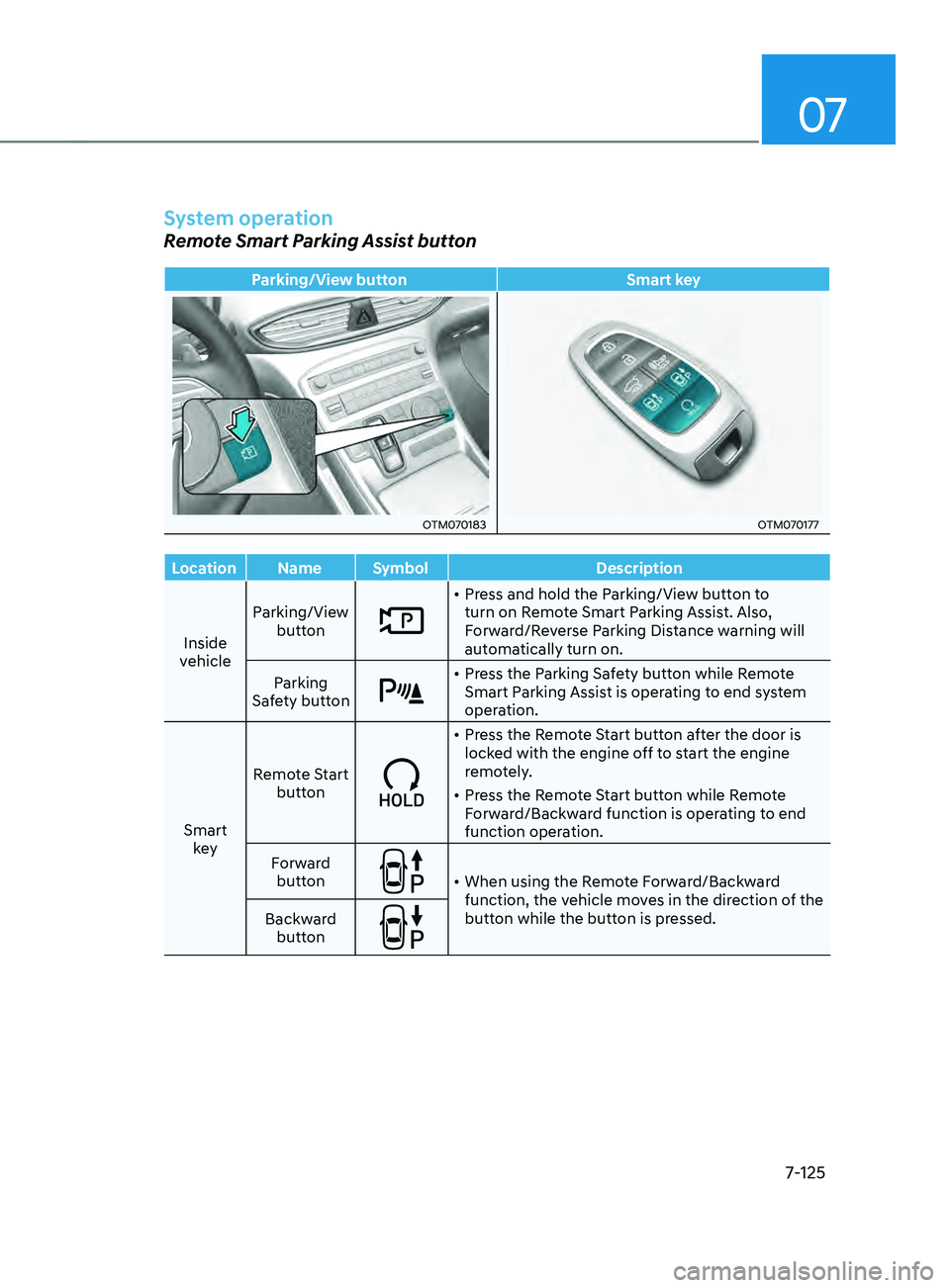
System operation
Remote Smart Parking Assist button
Parking/View buttonSmart key
OTM070183OTM070177
Location Name Symbol Description
Inside
vehicle Parking/View
button
• Press and hold the Parking/View button to
turn on Remote Smart Parking Assist. Also,
Forward/Reverse Parking Distance warning will
automatically turn on.
Parking
Safety button
• Press the Parking Safety button while Remote
Smart Parking Assist is operating to end system
operation.
Smart key Remote Start
button
• Press the Remote Start button after the door is
locked with the engine off to start the engine
remotely.
• Press the Remote Start button while Remote
Forward/Backward function is operating to end
function operation.
Forward button
• When using the Remote Forward/Backward
function, the vehicle moves in the direction of the
button while the button is pressed.
Backward
button
Page 508 of 636
Driver assistance system
7-126
Remote Forward/Backward
Operating order
Remote Forward/Backward operates in
the following order:
1.
Getting r
eady to remotely move
forward and in reverse
2.
Remo
tely moving forward and in
reverse
1. Getting ready to remotely move forward
and in r
everse
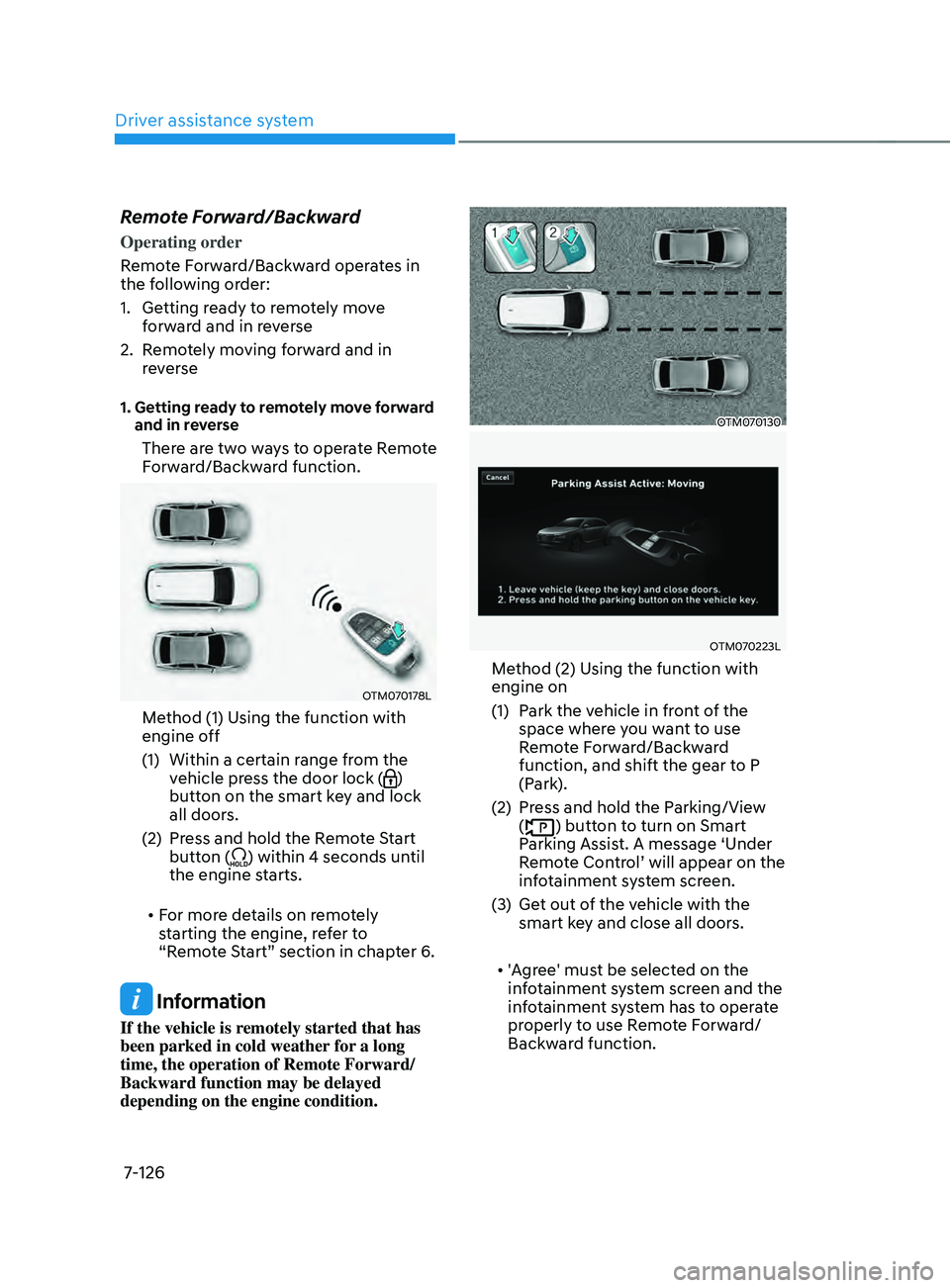
There are two ways to operate Remote
Forward/Backward function.
OTM070178L
Method (1) Using the function with
engine off
(1)
Within a certain range fr
om the
vehicle press the door lock (
)
button on the smart key and lock
all doors.
(2)
Press and hold the R
emote Start
button (
) within 4 seconds until
the engine starts.
• For more details on remotely
starting the engine, refer to
“Remote Start” section in chapter 6.
Information
If the vehicle is remotely started that has
been parked in cold weather for a long
time, the operation of Remote Forward/
Backward function may be delayed
depending on the engine condition.
OTM070130
OTM070223L
Method (2) Using the function with
engine on
(1)
Park the v
ehicle in front of the
space where you want to use
Remote Forward/Backward
function, and shift the gear to P
(Park).
(2)
Press and hold the P
arking/View
(
) button to turn on Smart
Parking Assist. A message ‘Under
Remote Control’ will appear on the
infotainment system screen.
(3)
Get out o
f the vehicle with the
smart key and close all doors.
• 'Agree' must be selected on the
infotainment system screen and the
infotainment system has to operate
properly to use Remote Forward/
Backward function.
Page 510 of 636
Driver assistance system
7-128
• When remotely moving forward
using method (2), it is recognized
as a parking situation, and will
immediately control the steering
wheel according to the condition
ahead to assist with entering the
parking space and aligning the
vehicle. However, performance
may reduce depending on the
pedestrians, animals, shape of
objects, location, etc. around the
vehicle.
• For moving remotely in reverse,
both method (1) and (2) aligns the
steering wheel first, and then will
only move the vehicle straight.
• When remotely moving forward or
in reverse is completed, the vehicle
will automatically shift to P (Park)
and engage EPB (Electronic Parking
Brake). CAUTION
• When using Remote Remote
Forward/Backward function, make
sure that all passengers have gotten
out of the vehicle.
• If the vehicle’s battery is discharged
or Remote Smart Parking Assist
malfunctions when parked in a
narrow parking space, Remote
Forward/Backward function will not
operate. Always park your vehicle in
a space wide enough for you to get in
or out of your vehicle.
• Please note that depending on the
parking space, you may not be able
to exit from the space you have
entered by using Remote Forward/
Backward function.
• After parking, the surrounding may
change due to the movement of
surrounding vehicles. If this occurs,
Remote Forward/Backward function
may not operate.
• Before leaving the vehicle, close
windows and sunroofs, and make
sure the engine is off before locking
the doors.
Page 525 of 636
08
8 -7
If your temperature gauge indicates
overheating, you experience a loss of
power, or hear loud pinging or knocking,
the engine may be overheating. If this
happens, you should:
1.
Pull off the r
oad and stop as soon as it
is safe to do so.
2.
Shift the gear to P (P
ark) and set the
parking brake. If the air conditioning is
ON, turn it OFF.
3.
If engine coolant is running out under
the v
ehicle or steam is coming out
from the hood, stop the engine. Do
not open the hood until the coolant
has stopped running or the steaming
has stopped. If there is no visible
loss of engine coolant and no steam,
leave the engine running and check
to be sure the engine cooling fan is
operating. If the fan is not running,
turn the engine off.
WARNING
While the engine is running,
keep hands, clothing and tools
away from the moving parts
such as the cooling fan and
drive belt to prevent serious
injury. 4.
Check for coolan
t leaking from the
radiator, hoses or under the vehicle. (If
the air conditioning had been in use, it
is normal for cold water to be draining
from it when you stop.)
5.
If engine coolant is leaking out, s
top
the engine immediately and call the
nearest authorized HYUNDAI dealer
for assistance.
WARNING
Never remove the engine
coolant cap and/or water-
cooled intercooler coolant
cap or the drain plug while the
engine and radiator are hot.
Hot coolant and steam may blow out
under pressure, causing serious injury.
Turn the engine off and wait until the
engine cools down. Use extreme care
when removing the coolant cap. Wrap
a thick towel around it, and turn it
counterclockwise slowly to the first
stop. Step back while the pressure is
released from the cooling system. When
you are sure all the pressure has been
released, press down on the cap, using
a thick towel, and continue turning
counterclockwise to remove it.
IF THE ENGINE OVERHEATS