ECO mode HYUNDAI SANTA FE 2021 Owner's Guide
[x] Cancel search | Manufacturer: HYUNDAI, Model Year: 2021, Model line: SANTA FE, Model: HYUNDAI SANTA FE 2021Pages: 636, PDF Size: 81.2 MB
Page 299 of 636
06
6-11
Starting the engine
WARNING
• Always wear appropriate shoes when
operating your vehicle. Unsuitable
shoes, such as high heels, ski boots,
sandals, flipflops, etc., may interfere
with your ability to use the brake and
accelerator pedals.
• Do not start the vehicle with the
accelerator pedal depressed.
The vehicle can move which can lead
to an accident.
• Wait until the engine rpm is normal.
The vehicle may suddenly move if
the brake pedal is released when the
rpm is high.
Information
• The vehicle will start by pressing the
Engine Start/Stop button, only when
the smart key is in the vehicle.
• Even if the smart key is in the vehicle,
and when it is far away from the driver,
the engine may not start.
• When the Engine Start/Stop button
is in the ACC or ON position, if any
door is open, the system checks for the
smart key. When the smart key is not
in the vehicle, the “
” indicator
will blink and the warning 'Key not in
vehicle' will come on. When all doors
are closed, the chime will also sound for
about 5 seconds. Keep the smart key in
the vehicle. Starting the gasoline engine
1.
Alwa
ys carry the smart key with you.
2.
Make sur
e the parking brake is
applied.
3.
Make sur
e the shift lever/button is in
P(Park).
4.
Depress the br
ake pedal.
5.
Press the E
ngine Start/Stop button.
Information
•
Do not wait for the engine to warm up
while the vehicle remains stationary.
Start driving at moderate engine
speeds. Steep accelerating and
decelerating should be avoided.
• Always start the vehicle with your foot
on the brake pedal. Do not depress the
accelerator while starting the vehicle.
Do not race the engine while warming
it up.
Information
If the Engine Start/Stop button is pressed
while the engine is pre-heating, the engine
may start.
Page 305 of 636
06
6-17
4. Press and hold the OK button on
the steering wheel for more than 1
second.
5.
When the message ‘Vehicle will s
tay in
(N). Change gear to cancel’ (or ‘N will
stay engaged when the vehicle is Off’)
will appear on the cluster LCD display,
press the Engine Start/Stop button
while depressing the brake pedal.
However, if you open the driver's
door, the gear will automatically
shift to P (Park) and the Engine Start/
Stop button will change to the OFF
position.
NOTICE
With the gear in N (Neutral) the Engine
Start/Stop button will be in the ACC
position. Note that the doors cannot be
locked in the ACC position. The battery
may discharge if left in the ACC position
for a long period.
D (Drive)
This is the normal driving position. The
transmission will automatically shift
through an 8-gear sequence, providing
the best fuel economy and power.
To start the vehicle forward, push the D
(Drive) button by depressing the brake
pedal with the engine ON. (button type)
Then depress the accelerator pedal
smoothly.
For extra power when passing another
vehicle or driving uphill, depress the
accelerator fully. The transmission will
automatically downshift to the next
lower gear (or gears, as appropriate).
When the vehicle is stopped in D (Drive)
position, if you open the driver’s door
with the seat belt unfastened, the gear is
shifted to P (Park) position automatically.
(button type)
However while the vehicle is moving in D
(Drive) position, if you open the driver’s
door with the seat belt unfastened, the
gear may not shift to P (Park) position
automatically to protect the automatic
transmission.
The DRIVE MODE switch, located on the
shift lever console, allows the driver to
switch from NORMAL/COMFORT mode
to SPORT or ECO mode. (if equipped)
For more Details, refer to "Drive Mode
Integrated Control System" later in this
chapter.
Page 308 of 636
Driving your vehicle
6-20
Shift button held down
The warning message appears on the
LCD display, when the shift button is
pressed continuously or the shift button
does not properly operate. Clean the
surroundings of gear shift button.
If this message appears again, we
recommend you to have the vehicle
inspected by an authorized HYUNDAI
dealer.
Shifter system malfunction! Service
immediately
The warning message appears on the
LCD display, when the transmission
or the shift button does not properly
operate in the P (Park) position.
In this case, we recommend you to
immediately have the vehicle inspected
by an authorized HYUNDAI dealer.
Check shift controls
The warning message appears on the
LCD display, when there is a malfunction
with transmission shift button.
In this case, we recommend you to
immediately have the vehicle inspected
by an authorized HYUNDAI dealer.
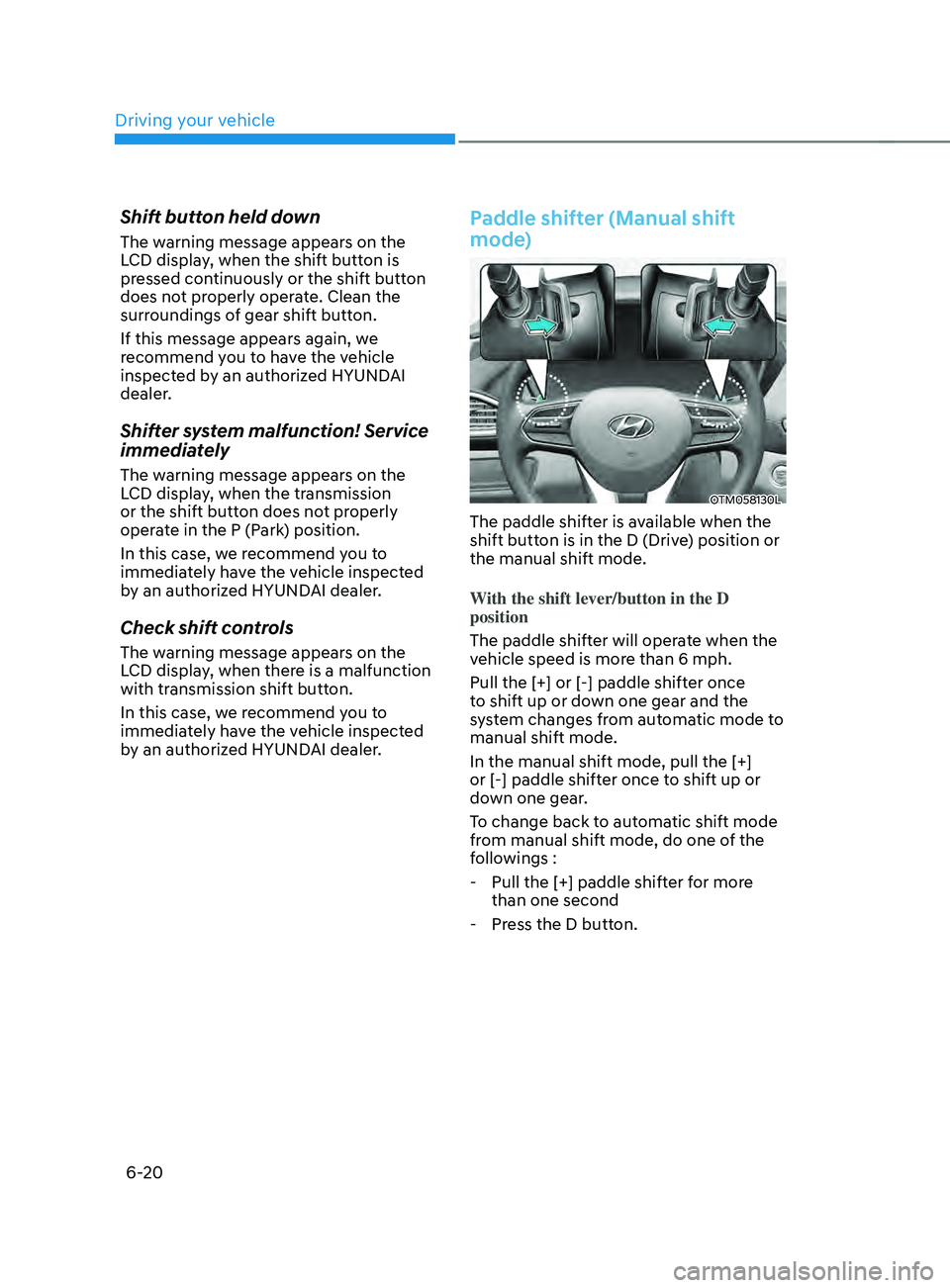
Paddle shifter (Manual shift
mode)
OTM058130L
The paddle shifter is available when the
shift button is in the D (Drive) position or
the manual shift mode.
With the shift lever/button in the D
position
The paddle shifter will operate when the
vehicle speed is more than 6 mph.
Pull the [+] or [-] paddle shifter once
to shift up or down one gear and the
system changes from automatic mode to
manual shift mode.
In the manual shift mode, pull the [+]
or [-] paddle shifter once to shift up or
down one gear.
To change back to automatic shift mode
from manual shift mode, do one of the
followings :
- Pull the [+] paddle shifter f
or more
than one second
- Press the D butt
on.
Page 309 of 636
06
6-21
The manual shift mode also changes
back to automatic shift mode in one of
following situations
- When the accelera
tor pedal is gently
depressed for more than 6 seconds
while driving
- When the vehicle s
tops
Information
If the [+] and [-] paddle shifters are pulled
at the same time, gear shift may not occur.
Good driving practices
• Never move the shift button from
P (Park) or N (Neutral) to any other
position with the accelerator pedal
depressed.
• Never move the shift lever/button into
P (Park) when the vehicle is in motion.
Be sure the vehicle is completely
stopped before you attempt to shift
into R (Reverse) or D (Drive).
• Do not move the shift button to N
(Neutral) when driving. Doing so
may result in an accident because
of a loss of engine braking and the
transmission could be damaged.
• Driving uphill or downhill, Shift
to D (Drive) to drive forward or R
(Reverse) to drive backwards, and
check the gear position indicated
on the cluster before driving. If you
drive in the opposite direction of the
selected gear, the engine will turn
off and a serious accident might be
occurred due to the degraded brake
performance.
• Do not drive with your foot resting
on the brake pedal. Even light, but
consistent pedal pressure can result
in the brakes overheating, brake wear
and possibly even brake failure.
• When driving with shifter paddles,
slow down before shifting to a lower
gear. Otherwise, the lower gear may
not be engaged if the engine rpms are
outside of the allowable range.
• Always apply the parking brake when
leaving the vehicle. Do not depend on
placing the transmission in P (Park) to
keep the vehicle from moving.
Page 317 of 636
06
6-29
D (Drive)
This is the normal driving position. The
transmission will automatically shift
through a 8-gear sequence, providing
the best fuel economy and power.
To start the vehicle forward, push the D
(Drive) button by depressing the brake
pedal with the engine ON. Then depress
the accelerator pedal smoothly. For extra
power when passing another vehicle or
driving uphill, depress the accelerator
fully. The transmission will automatically
downshift to the next lower gear (or
gears, as appropriate). When the vehicle
is stopped in D (Drive) position, if you
open the driver’s door with the seat belt
unfastened, the gear is shifted to P (Park)
position automatically.
However when the vehicle moves in D
(Drive) position, if you open the driver’s
door with the seat belt unfastened,
the gear may be not shifted to P (Park)
position automatically for protecting the
dual clutch transmission.
The DRIVE MODE switch, located on
the shift lever/button console, allows
the driver to switch from NORMAL/
COMFORT mode to SPORT or ECO mode.
(if equipped)
For more details, refer to “Drive Mode
Integrated Control System” later in this
chapter. Shift-lock system
For your safety, the automatic
transmission has a shift-lock system
which prevents shifting the transmission
from P (Park) or N (Neutral) to R
(Reverse) or D (Drive) unless the brake
pedal is depressed.
To shift the transmission from P (Park)
into R (Reverse):
1.
Depress and hold the br
ake pedal.
2.
Start the engine or place the ignition
s
witch in the ON position.
3.
Depress the br
ake pedal and move the
shift lever to R (Reverse). (shift lever
type)
Depress the brake pedal and push the
R (Reverse) button. (shift button type)
When the battery is discharged:
The shift buttons will not function when
the battery is discharged.
In emergencies, do the following
to move the shift lever/button to N
(Neutral) on a level ground.
1.
Connect the batt
ery cables from
another vehicle or from a another
battery to the jump-starting terminals
inside the engine compartment.
For more details, refer to “Jump
Starting” in chapter 7.
2.
Release the parking br
ake with the
ignition switch in the ON position.
3.
Shift the gear to the N(N
eutral)
position refer to the “Stay in Neutral
when vehicle is Off” in this chapter.
Page 320 of 636
Driving your vehicle
6-32
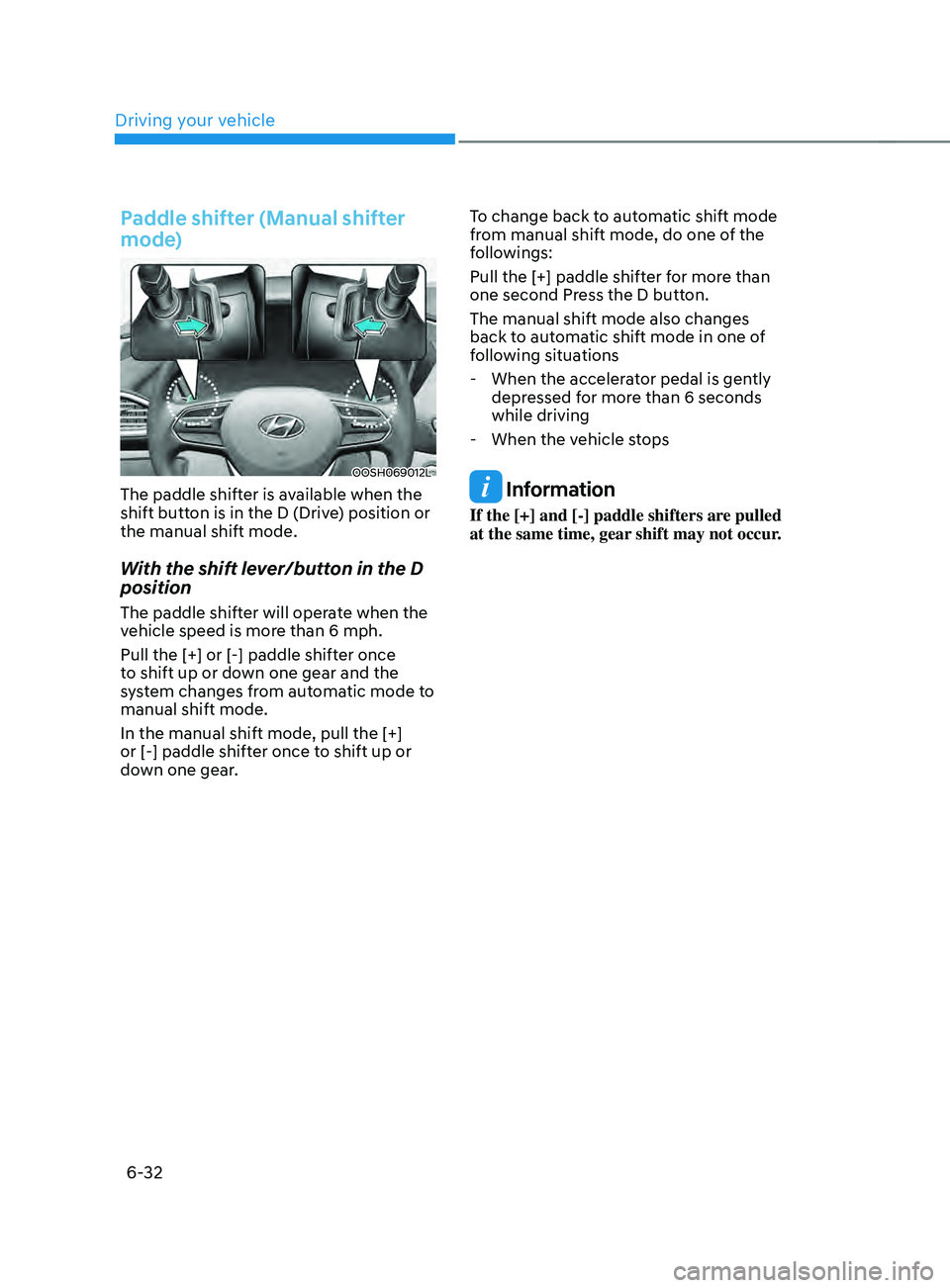
Paddle shifter (Manual shifter
mode)
OOSH069012L
The paddle shifter is available when the
shift button is in the D (Drive) position or
the manual shift mode.
With the shift lever/button in the D
position
The paddle shifter will operate when the
vehicle speed is more than 6 mph.
Pull the [+] or [-] paddle shifter once
to shift up or down one gear and the
system changes from automatic mode to
manual shift mode.
In the manual shift mode, pull the [+]
or [-] paddle shifter once to shift up or
down one gear.To change back to automatic shift mode
from manual shift mode, do one of the
followings:
Pull the [+] paddle shifter for more than
one second Press the D button.
The manual shift mode also changes
back to automatic shift mode in one of
following situations
- When the accelera
tor pedal is gently
depressed for more than 6 seconds
while driving
- When the vehicle s
tops
Information
If the [+] and [-] paddle shifters are pulled
at the same time, gear shift may not occur.
Page 324 of 636
Driving your vehicle
6-36
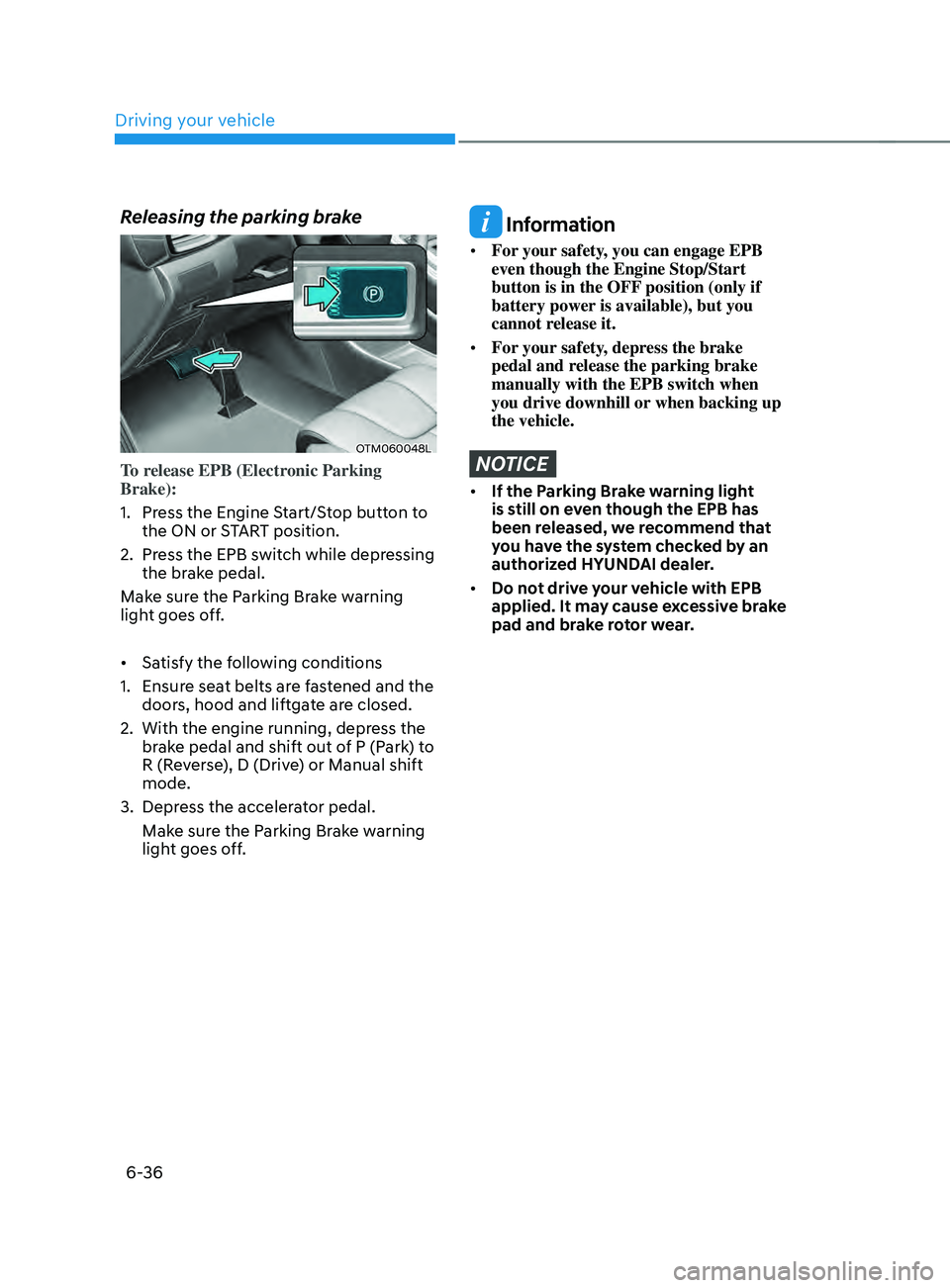
Releasing the parking brake
OTM060048L
To release EPB (Electronic Parking
Brake):
1.
Press the E
ngine Start/Stop button to
the ON or START position.
2.
Press the EPB s
witch while depressing
the brake pedal.
Make sure the Parking Brake warning
light goes off.
• Satisfy the following conditions
1.
Ensur
e seat belts are fastened and the
doors, hood and liftgate are closed.
2.
With the engine running, depress the
br
ake pedal and shift out of P (Park) to
R (Reverse), D (Drive) or Manual shift
mode.
3.
Depress the acceler
ator pedal.
Make sure the Parking Brake warning
light goes off.
Information
• For your safety, you can engage EPB
even though the Engine Stop/Start
button is in the OFF position (only if
battery power is available), but you
cannot release it.
• For your safety, depress the brake
pedal and release the parking brake
manually with the EPB switch when
you drive downhill or when backing up
the vehicle.
NOTICE
• If the Parking Brake warning light
is still on even though the EPB has
been released, we recommend that
you have the system checked by an
authorized HYUNDAI dealer.
• Do not drive your vehicle with EPB
applied. It may cause excessive brake
pad and brake rotor wear.
Page 331 of 636
06
6-43
Anti-lock Brake System (ABS)
WARNING
Anti-Lock Braking System (ABS) or
Electronic Stability Control (ESC)
system will not prevent accidents
due to improper or dangerous driving
maneuvers. Even though vehicle
control is improved during emergency
braking, always maintain a safe
distance between you and objects
ahead of you. Vehicle speeds should
always be reduced during extreme
road conditions. The braking distance
for vehicles equipped with ABS or ESC
may be longer than for those without
these systems in the following road
conditions.
Drive your vehicle at reduced speeds
during the following conditions:
• Rough, gravel or snow-covered
roads.
• On roads where the road surface is
pitted or has different surface height.
• Tire chains are installed on your
vehicle.
The safety features of ABS or ESC
equipped vehicle should not be tested
by high speed driving or cornering. This
could endanger the safety of yourself or
others.
ABS is an electronic braking system that
helps prevent a braking skid. ABS allows
the driver to steer and brake at the same
time.
Using ABS
To obtain the maximum benefit from
your ABS in an emergency situation,
do not attempt to modulate your brake
pressure and do not try to pump your
brakes. Depress your brake pedal as hard
as possible.
When you apply your brakes under
conditions which may lock the wheels,
you may hear sounds from the brakes,
or feel a corresponding sensation in the
brake pedal. This is normal and it means
your ABS is active.
ABS does not reduce the time or distance
it takes to stop the vehicle.
Always maintain a safe distance from the
vehicle in front of you.
ABS will not prevent a skid that results
from sudden changes in direction, such
as trying to take a corner too fast or
making a sudden lane change. Always
drive at a safe speed for the road and
weather conditions.
ABS cannot prevent a loss of stability.
Always steer moderately when braking
hard. Severe or sharp steering wheel
movement can still cause your vehicle to
veer into oncoming traffic or off the road.
On loose or uneven road surfaces,
operation of the anti-lock brake system
may result in a longer stopping distance
than for vehicles equipped with a
conventional brake system.
The ABS (
) warning light will stay
on for several seconds after the Engine
Start/Stop button is in the ON position.
Page 334 of 636
Driving your vehicle
6-46
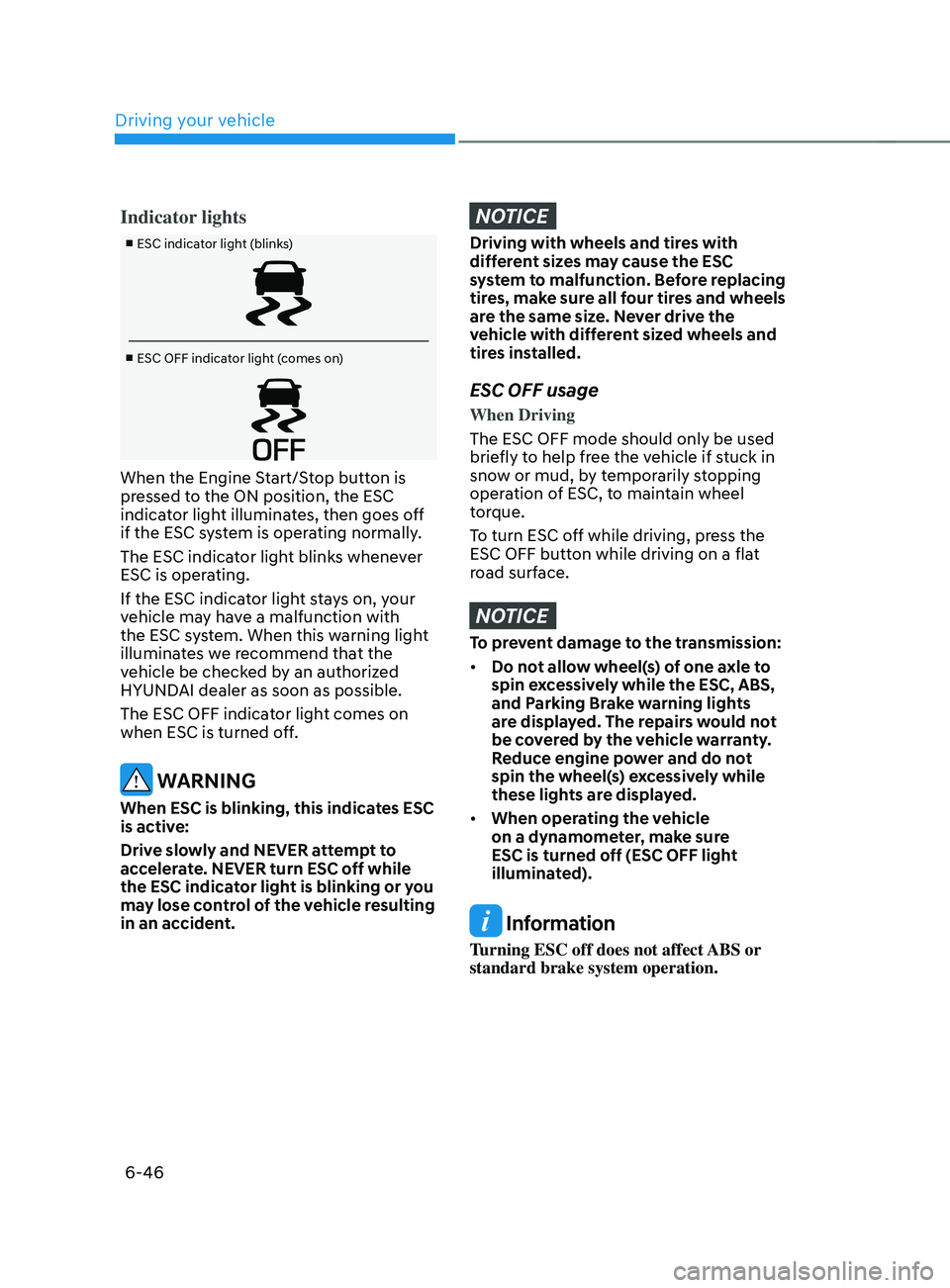
Indicator lights
■ ESC indicator light (blinks)
■ ESC OFF indicator light (comes on)
When the Engine Start/Stop button is
pressed to the ON position, the ESC
indicator light illuminates, then goes off
if the ESC system is operating normally.
The ESC indicator light blinks whenever
ESC is operating.
If the ESC indicator light stays on, your
vehicle may have a malfunction with
the ESC system. When this warning light
illuminates we recommend that the
vehicle be checked by an authorized
HYUNDAI dealer as soon as possible.
The ESC OFF indicator light comes on
when ESC is turned off.
WARNING
When ESC is blinking, this indicates ESC
is active:
Drive slowly and NEVER attempt to
accelerate. NEVER turn ESC off while
the ESC indicator light is blinking or you
may lose control of the vehicle resulting
in an accident.
NOTICE
Driving with wheels and tires with
different sizes may cause the ESC
system to malfunction. Before replacing
tires, make sure all four tires and wheels
are the same size. Never drive the
vehicle with different sized wheels and
tires installed.
ESC OFF usage
When Driving
The ESC OFF mode should only be used
briefly to help free the vehicle if stuck in
snow or mud, by temporarily stopping
operation of ESC, to maintain wheel
torque.
To turn ESC off while driving, press the
ESC OFF button while driving on a flat
road surface.
NOTICE
To prevent damage to the transmission:
• Do not allow wheel(s) of one axle to
spin excessively while the ESC, ABS,
and Parking Brake warning lights
are displayed. The repairs would not
be covered by the vehicle warranty.
Reduce engine power and do not
spin the wheel(s) excessively while
these lights are displayed.
• When operating the vehicle
on a dynamometer, make sure
ESC is turned off (ESC OFF light
illuminated).
Information
Turning ESC off does not affect ABS or
standard brake system operation.
Page 337 of 636
06
6-49
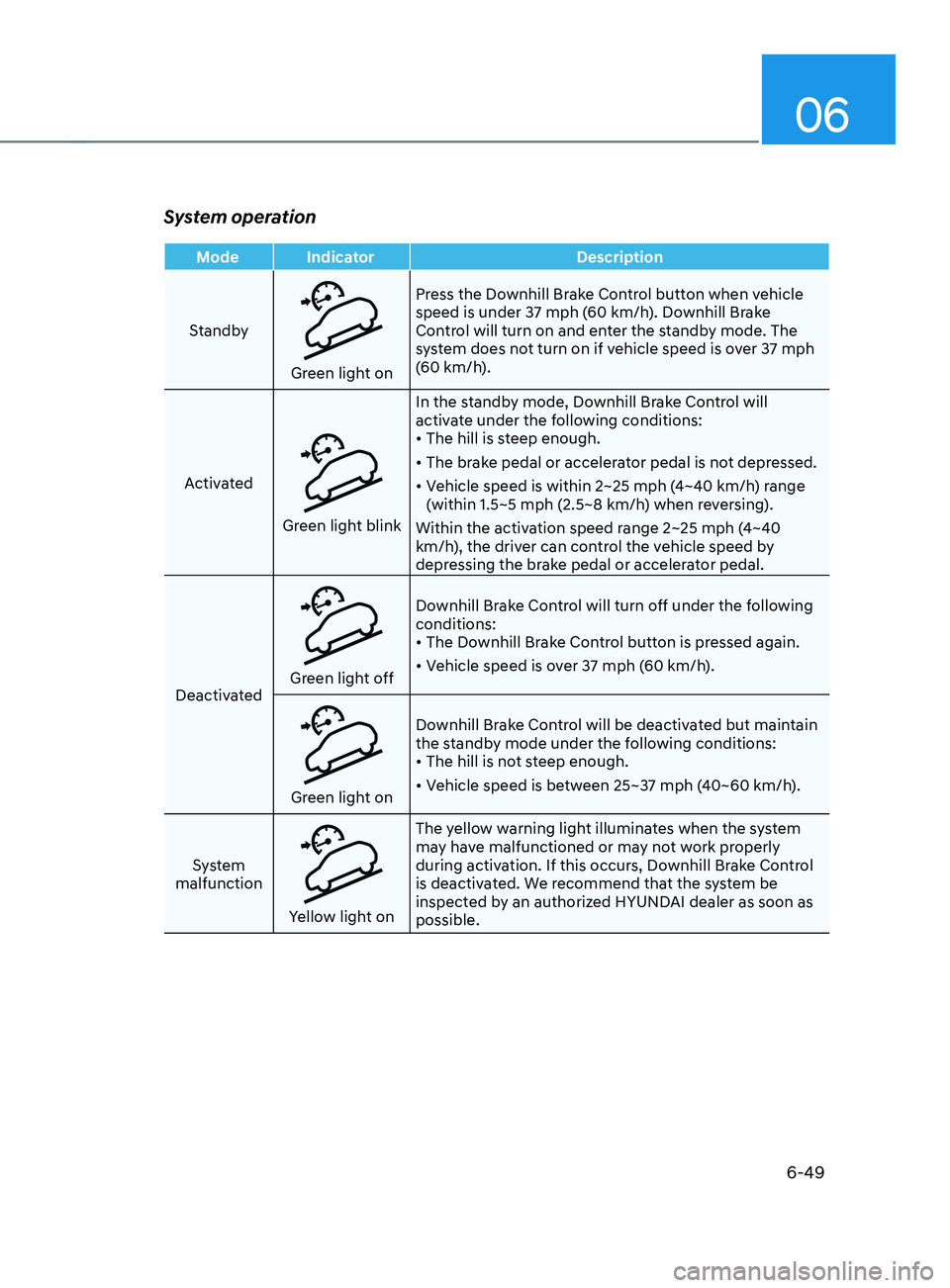
System operation
Mode IndicatorDescription
Standby
Green light on Press the Downhill Brake Control button when vehicle
speed is under 37 mph (60 km/h). Downhill Brake
Control will turn on and enter the standby mode. The
system does not turn on if vehicle speed is over 37 mph
(60 km/h).
Activated
Green light blink In the standby mode, Downhill Brake Control will
activate under the following conditions:
•
The hill is steep enough.
• The brake pedal or accelerator pedal is not depressed.
• Vehicle speed is within 2~25 mph (4~40 km/h) range
(within 1.5~5 mph (2.5~8 km/h) when reversing).
Within the activation speed range 2~25 mph (4~40
km/h), the driver can control the vehicle speed by
depressing the brake pedal or accelerator pedal.
Deactivated
Green light off Downhill Brake Control will turn off under the following
conditions:
•
The Downhill Brake Control button is pressed again.
• Vehicle speed is over 37 mph (60 km/h).
Green light on Downhill Brake Control will be deactivated but maintain
the standby mode under the following conditions:
•
The hill is not steep enough.
• Vehicle speed is between 25~37 mph (40~60 km/h).
System
malfunction
Yellow light on The yellow warning light illuminates when the system
may have malfunctioned or may not work properly
during activation. If this occurs, Downhill Brake Control
is deactivated. We recommend that the system be
inspected by an authorized HYUNDAI dealer as soon as
possible.