reverse HYUNDAI SANTA FE 2021 Repair Manual
[x] Cancel search | Manufacturer: HYUNDAI, Model Year: 2021, Model line: SANTA FE, Model: HYUNDAI SANTA FE 2021Pages: 636, PDF Size: 81.2 MB
Page 517 of 636
07
7-135
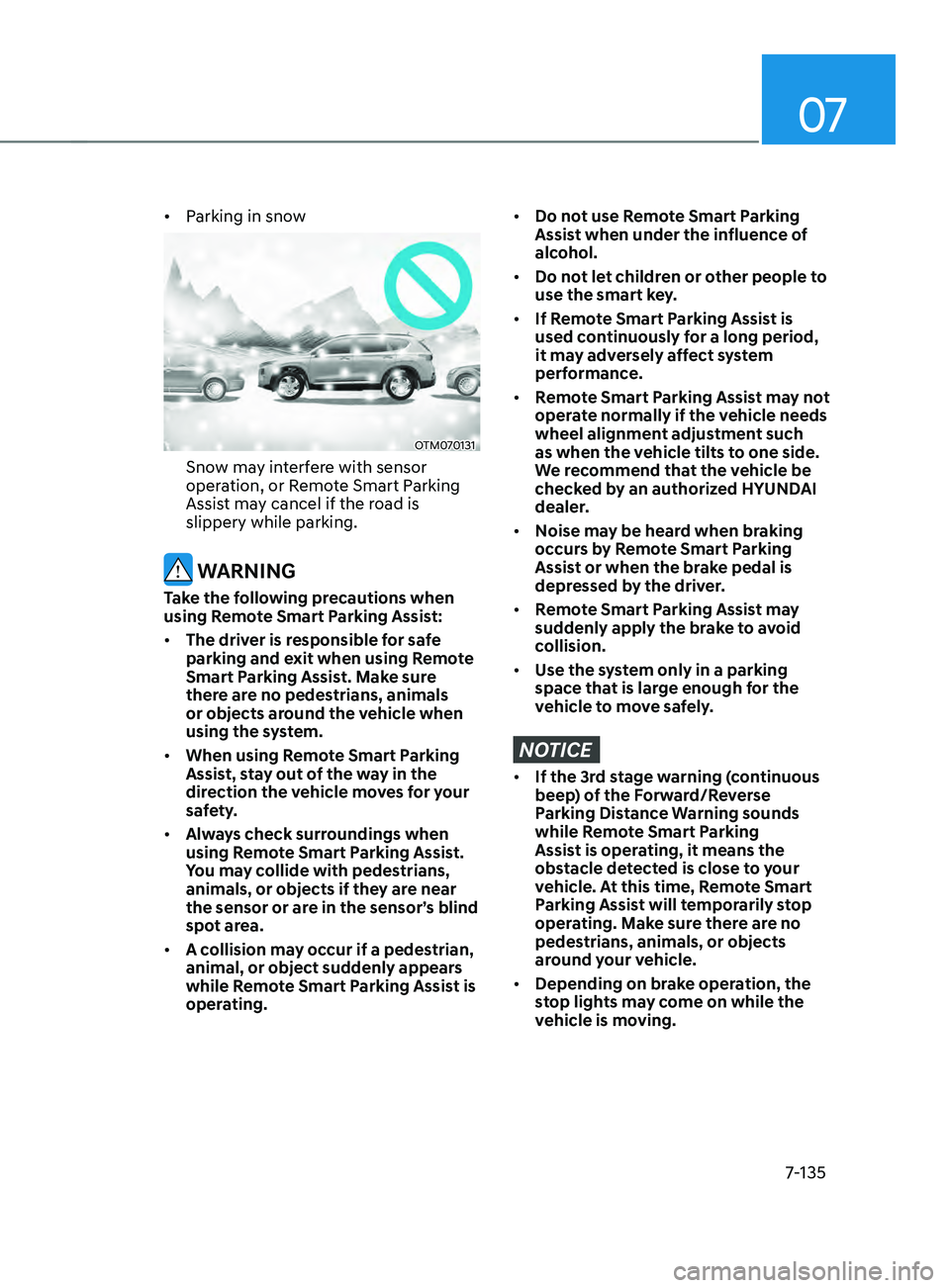
• Parking in snow
OTM070131
Snow may interfere with sensor
operation, or Remote Smart Parking
Assist may cancel if the road is
slippery while parking.
WARNING
Take the following precautions when
using Remote Smart Parking Assist:
• The driver is responsible for safe
parking and exit when using Remote
Smart Parking Assist. Make sure
there are no pedestrians, animals
or objects around the vehicle when
using the system.
• When using Remote Smart Parking
Assist, stay out of the way in the
direction the vehicle moves for your
safety.
• Always check surroundings when
using Remote Smart Parking Assist.
You may collide with pedestrians,
animals, or objects if they are near
the sensor or are in the sensor’s blind
spot area.
• A collision may occur if a pedestrian,
animal, or object suddenly appears
while Remote Smart Parking Assist is
operating.
• Do not use Remote Smart Parking
Assist when under the influence of
alcohol.
• Do not let children or other people to
use the smart key.
• If Remote Smart Parking Assist is
used continuously for a long period,
it may adversely affect system
performance.
• Remote Smart Parking Assist may not
operate normally if the vehicle needs
wheel alignment adjustment such
as when the vehicle tilts to one side.
We recommend that the vehicle be
checked by an authorized HYUNDAI
dealer.
• Noise may be heard when braking
occurs by Remote Smart Parking
Assist or when the brake pedal is
depressed by the driver.
• Remote Smart Parking Assist may
suddenly apply the brake to avoid
collision.
• Use the system only in a parking
space that is large enough for the
vehicle to move safely.
NOTICE
• If the 3rd stage warning (continuous
beep) of the Forward/Reverse
Parking Distance Warning sounds
while Remote Smart Parking
Assist is operating, it means the
obstacle detected is close to your
vehicle. At this time, Remote Smart
Parking Assist will temporarily stop
operating. Make sure there are no
pedestrians, animals, or objects
around your vehicle.
• Depending on brake operation, the
stop lights may come on while the
vehicle is moving.
Page 524 of 636
Emergency situations
8-6
9. Start the engine of the assisting
vehicle and let it run at approximately
2,000 rpm for a few minutes. Then
start your vehicle.
10. Keep your vehicle operating for at
least 30 minutes at idle or driving to
assure your battery receives enough
charge to be able to start on its
own after the vehicle is shut off. A
complete dead battery may require
as long as 60 minutes runtime to fully
recharge it. If vehicle is run for less,
the battery may not restart.
If your vehicle will not start after a
few attempts, it probably requires
servicing. In this event please seek
qualified assistance. If the cause of your
battery discharging is not apparent, we
recommend that you have your vehicle
checked by an authorized HYUNDAI
dealer.
Disconnect the jumper cables in the
exact reverse order you connected them:
1.
Disconnect the jumper cable from the
black, nega
tive (-) chassis ground of
your vehicle (4).
2.
Disconnect the other end o
f the
jumper cable from the black, negative
(-) battery/chassis ground of the
assisting vehicle (3).
3.
Disconnect the second jumper cable
from the r
ed, positive (+) battery/
jumper terminal of the assisting
vehicle (2).
4.
Disconnect the other end o
f the
jumper cable from the red, positive (+)
jumper terminal of your vehicle (1).
Information
An inappropriately disposed
battery can be harmful to
the environment and human
health. Dispose of the battery
according to your local law(s) or
regulations.
NOTICE
To prevent damage to your vehicle:
• Only use a 12-volt power supply
(battery or jumper system) to jump
start your vehicle.
• Do not attempt to jump start your
vehicle by push-starting.
Page 539 of 636
08
8-21
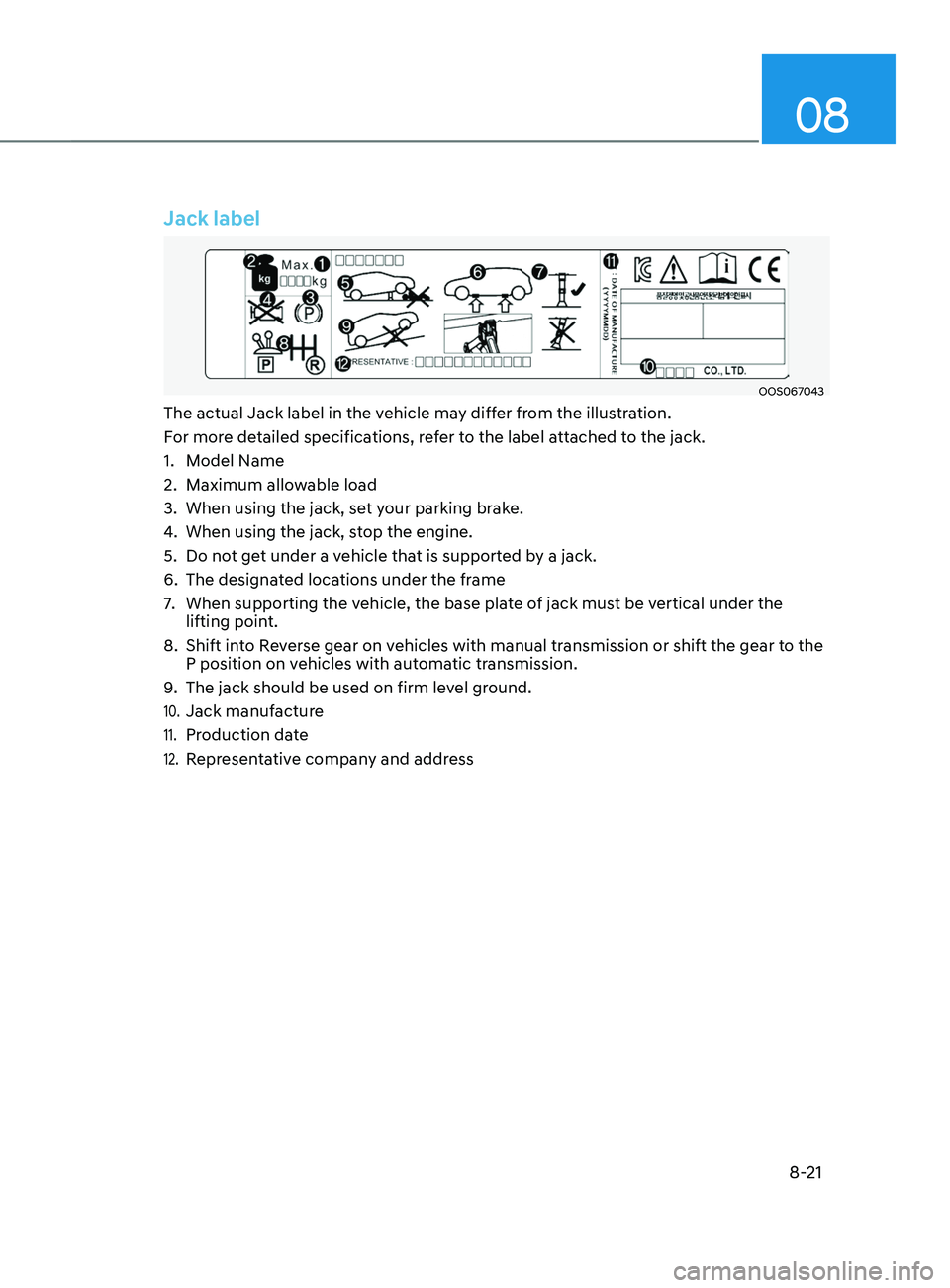
Jack label
OOS067043
The actual Jack label in the vehicle may differ from the illustration.
For more detailed specifications, refer to the label attached to the jack.
1.
Model Name
2.
Maximum allow
able load
3.
When using the jack, set y
our parking brake.
4.
When using the jack, st
op the engine.
5.
Do not ge
t under a vehicle that is supported by a jack.
6.
The designat
ed locations under the frame
7.
When supporting the vehicle, the base pla
te of jack must be vertical under the
lifting point.
8.
Shift int
o Reverse gear on vehicles with manual transmission or shift the gear to the
P position on vehicles with automatic transmission.
9.
The jack should be used on firm lev
el ground.
10. Jack manufacture
11. Production date
12. Representative company and address
Page 573 of 636
09
9-23
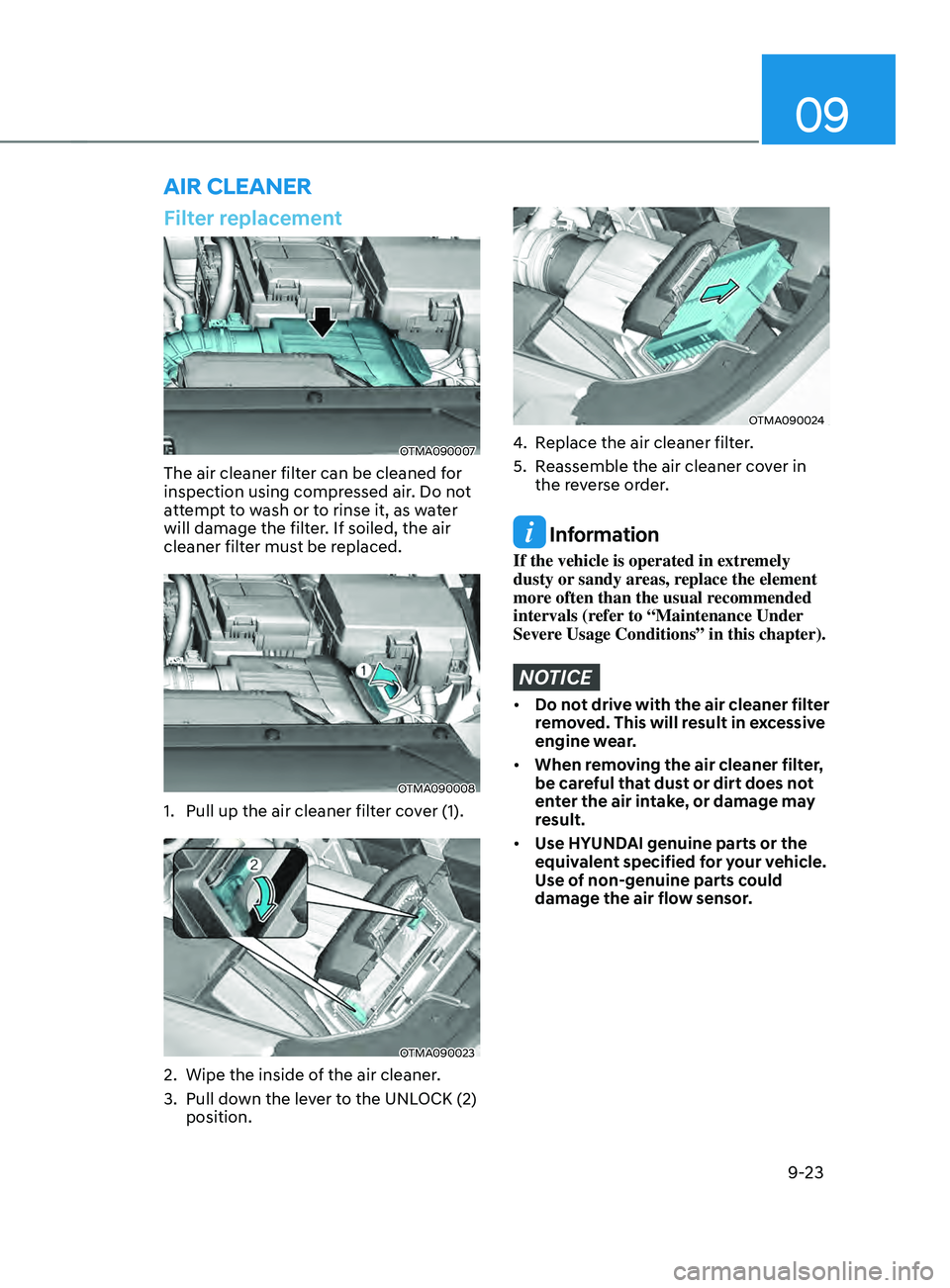
Filter replacement
OTMA090007
The air cleaner filter can be cleaned for
inspection using compressed air. Do not
attempt to wash or to rinse it, as water
will damage the filter. If soiled, the air
cleaner filter must be replaced.
OTMA090008
1. Pull up the air cleaner filter cover (1).
OTMA090023
2. Wipe the inside of the air cleaner .
3.
Pull down the le
ver to the UNLOCK (2)
position.
OTMA090024
4. Replace the air cleaner filter.
5.
Reassemble the air cleaner co
ver in
the reverse order.
Information
If the vehicle is operated in extremely
dusty or sandy areas, replace the element
more often than the usual recommended
intervals (refer to “Maintenance Under
Severe Usage Conditions” in this chapter).
NOTICE
• Do not drive with the air cleaner filter
removed. This will result in excessive
engine wear.
• When removing the air cleaner filter,
be careful that dust or dirt does not
enter the air intake, or damage may
result.
• Use HYUNDAI genuine parts or the
equivalent specified for your vehicle.
Use of non-genuine parts could
damage the air flow sensor.
AIR CLEANER
Page 576 of 636
Maintenance
9-26
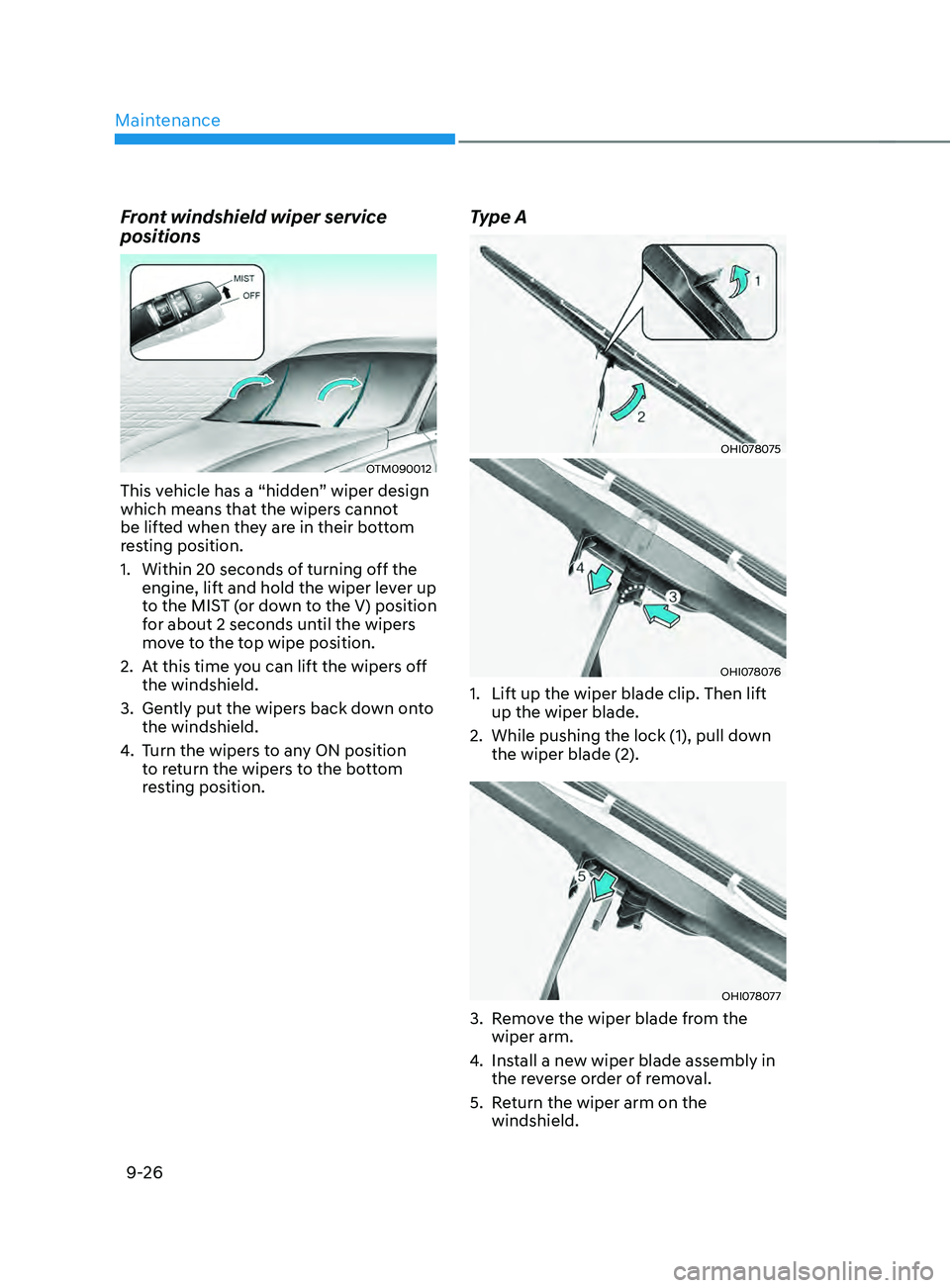
Front windshield wiper service
positions
OTM090012
This vehicle has a “hidden” wiper design
which means that the wipers cannot
be lifted when they are in their bottom
resting position.
1.
Within 20 seconds of turning o
ff the
engine, lift and hold the wiper lever up
to the MIST (or down to the V) position
for about 2 seconds until the wipers
move to the top wipe position.
2.
At this time y
ou can lift the wipers off
the windshield.
3.
Gently put the wiper
s back down onto
the windshield.
4.
Turn the wiper
s to any ON position
to return the wipers to the bottom
resting position.
Type A
OHI078075
OHI078076
1. Lift up the wiper blade clip. Then lift
up the wiper blade.
2.
While pushing the lock (1), pull down
the wiper blade (2).
OHI078077
3. Remove the wiper blade from the
wiper arm.
4.
Install a ne
w wiper blade assembly in
the reverse order of removal.
5.
Re
turn the wiper arm on the
windshield.
Page 603 of 636
09
9-53
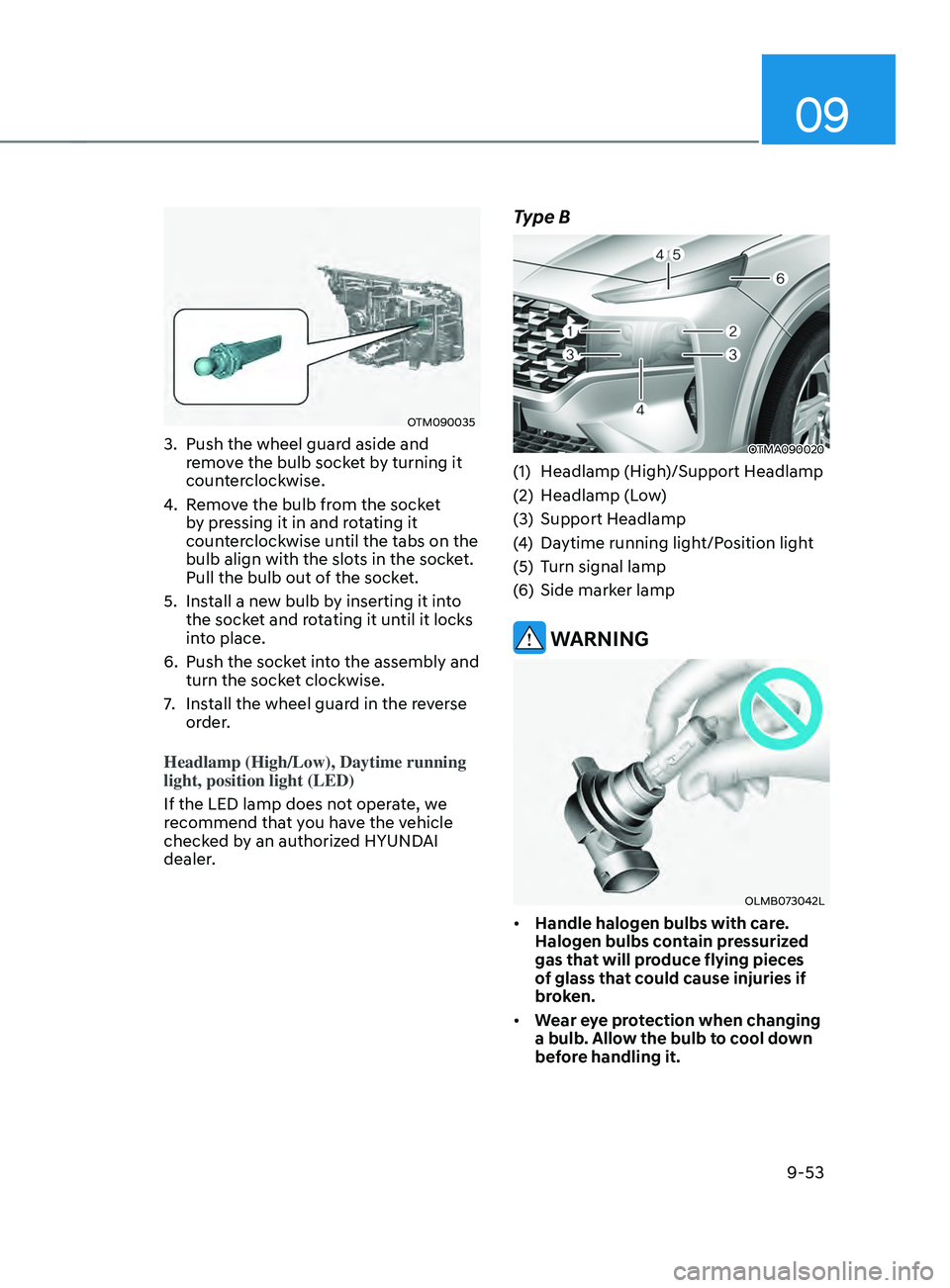
OTM090035
3. Push the wheel guard aside and
remove the bulb socket by turning it
counterclockwise.
4.
Remo
ve the bulb from the socket
by pressing it in and rotating it
counterclockwise until the tabs on the
bulb align with the slots in the socket.
Pull the bulb out of the socket.
5.
Install a ne
w bulb by inserting it into
the socket and rotating it until it locks
into place.
6.
Push the socke
t into the assembly and
turn the socket clockwise.
7.
Install the wheel guar
d in the reverse
order.
Headlamp (High/Low), Daytime running
light, position light (LED)
If the LED lamp does not operate, we
recommend that you have the vehicle
checked by an authorized HYUNDAI
dealer.
Type B
OTMA090020
(1) Headlamp (High)/Support Headlamp
(2)
Headlamp (L
ow)
(3)
Support Headlamp
(4
)
Daytime running ligh
t/Position light
(5)
Turn signal lamp
(
6)
Side marker lamp
WARNING
OLMB073042L
• Handle halogen bulbs with care.
Halogen bulbs contain pressurized
gas that will produce flying pieces
of glass that could cause injuries if
broken.
• Wear eye protection when changing
a bulb. Allow the bulb to cool down
before handling it.
Page 604 of 636
Maintenance
9-54
• Always handle them carefully, and
avoid scratches and abrasions. If
the bulbs are lit, avoid contact with
liquids.
• Never touch the glass with bare
hands. Residual oil may cause the
bulb to overheat and burst when lit.
• A bulb should be operated only when
installed in a headlamp.
• If a bulb becomes damaged or
cracked, replace it immediately and
carefully dispose of it.
Lamps
If the LED lamp does not operate, we
recommend that you have the vehicle
checked by an authorized HYUNDAI
dealer.
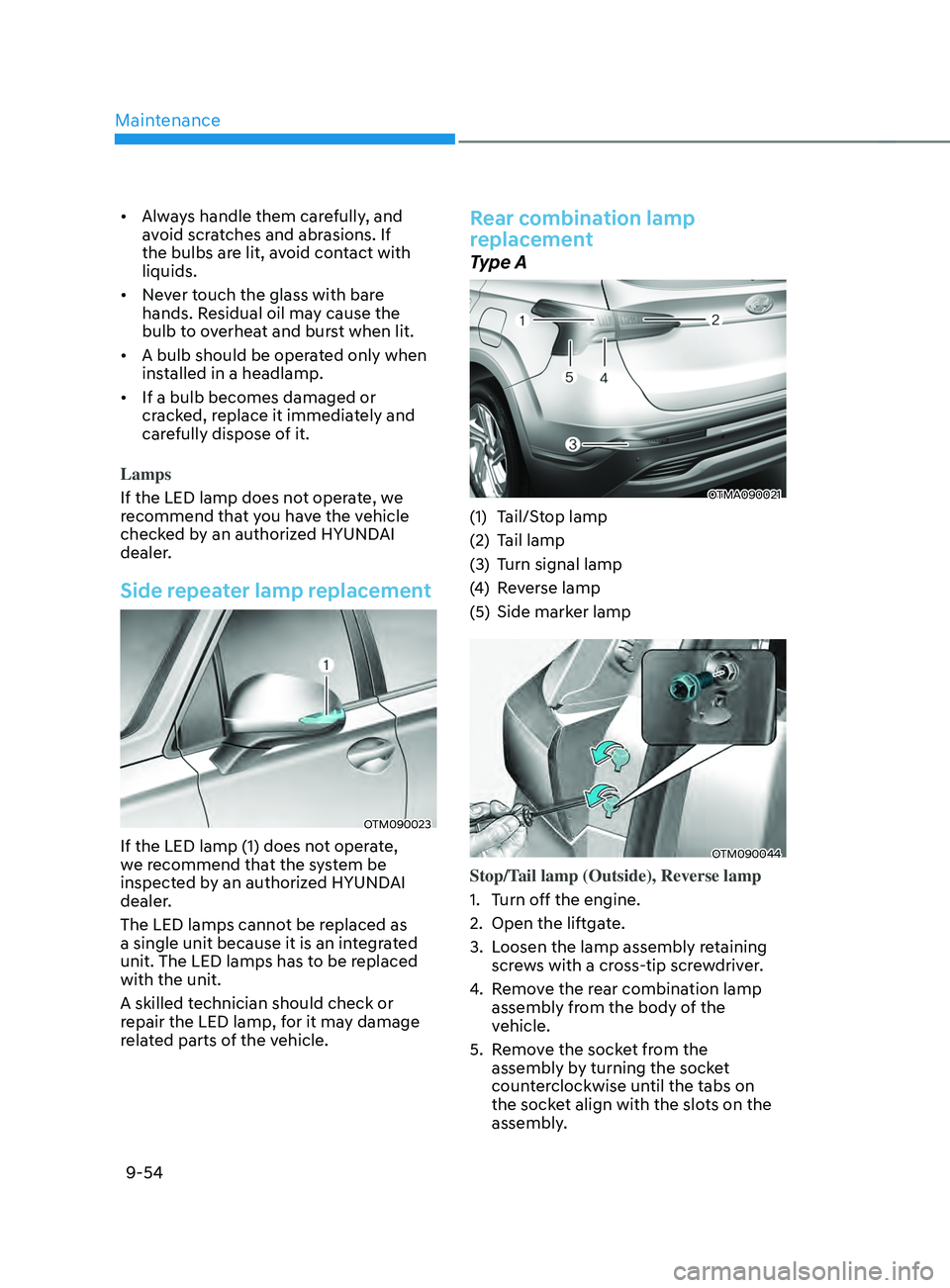
Side repeater lamp replacement
OTM090023
If the LED lamp (1) does not operate,
we recommend that the system be
inspected by an authorized HYUNDAI
dealer.
The LED lamps cannot be replaced as
a single unit because it is an integrated
unit. The LED lamps has to be replaced
with the unit.
A skilled technician should check or
repair the LED lamp, for it may damage
related parts of the vehicle.
Rear combination lamp
replacement
Type A
OTMA090021
(1) Tail/Stop lamp
(2)
Tail lamp
(3
)
Turn signal lamp
(4
)
Re
verse lamp
(5)
Side marker lamp
OTM090044
Stop/Tail lamp (Outside), Reverse lamp
1.
Turn o
ff the engine.
2.
Open the liftga
te.
3.
Loosen the lamp assembly r
etaining
screws with a cross-tip screwdriver.
4.
Remo
ve the rear combination lamp
assembly from the body of the
vehicle.
5.
Remo
ve the socket from the
assembly by turning the socket
counterclockwise until the tabs on
the socket align with the slots on the
assembly.
Page 606 of 636

Maintenance
9-56
7. Install the socket into the assembly by
aligning the tabs on the socket with
the slots in the assembly. Push the
socket into the assembly and turn the
socket clockwise.
8.
Reins
tall the lamp assembly to the
body of the vehicle.
Turn signal lamp
If these lamps do not operate, we
recommend that you have the vehicle
checked by an authorized HYUNDAI
dealer.
Type B
OTMA090022
(1) Tail/Stop lamp
(2)
St
op lamp
(3)
Turn signal lamp
(4
)
Re
verse lamp
(5)
Side marker lamp
OTM090044
Reverse lamp
1.
Turn o
ff the engine.
2.
Open the liftga
te.
3.
Loosen the lamp assembly r
etaining
screws with a cross-tip screwdriver.
4.
Remo
ve the rear combination lamp
assembly from the body of the
vehicle.
5.
Remo
ve the socket from the
assembly by turning the socket
counterclockwise until the tabs on
the socket align with the slots on the
assembly.
Page 608 of 636
Maintenance
9-58
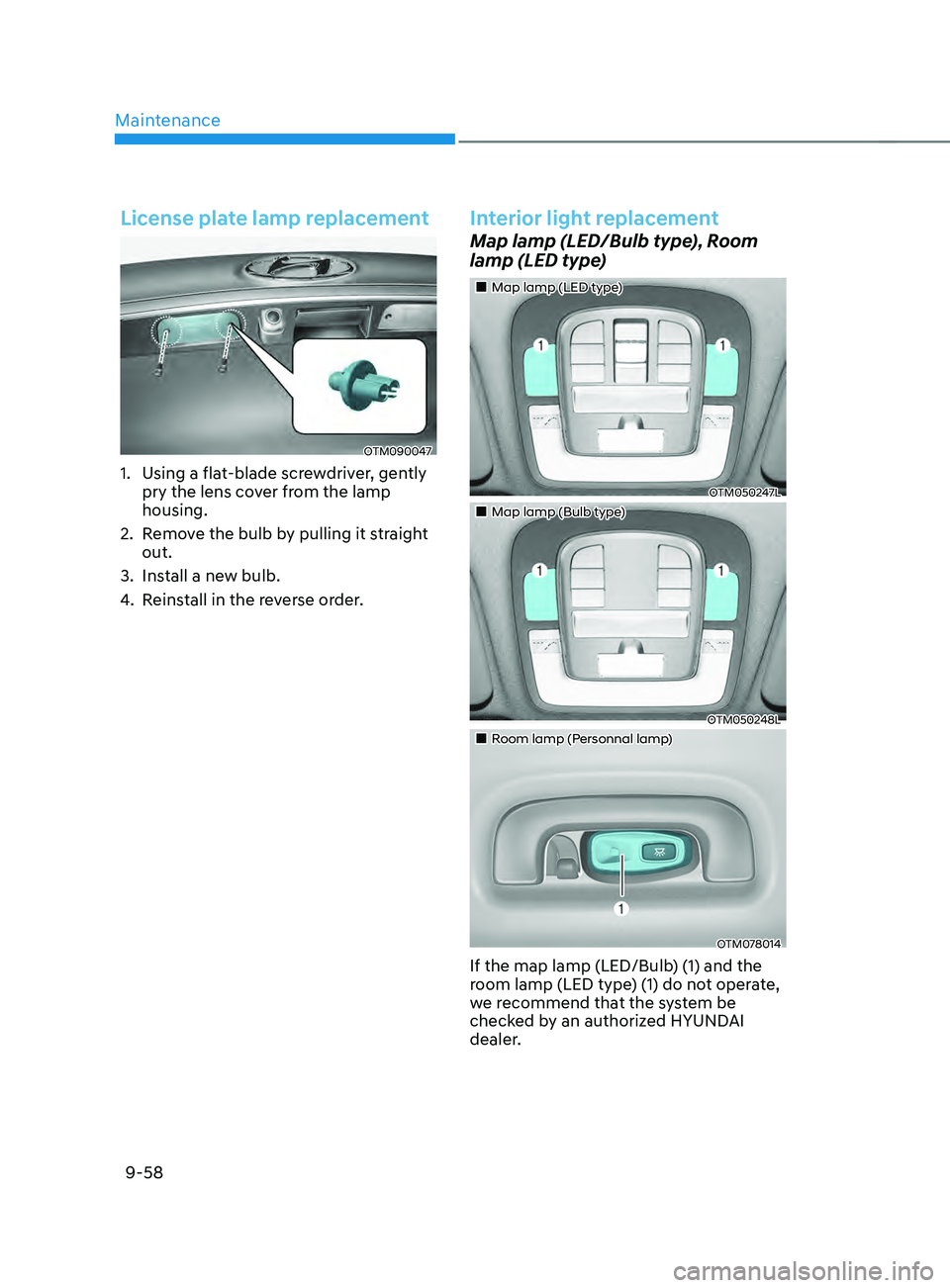
License plate lamp replacement
OTM090047
1. Using a flat-blade screwdriver, gently
pry the lens cover from the lamp
housing.
2.
Remo
ve the bulb by pulling it straight
out.
3.
Install a ne
w bulb.
4.
Reins
tall in the reverse order.
Interior light replacement
Map lamp (LED/Bulb type), Room
lamp (LED type)
„„Map lamp (LED type)
OTM050247L
„„Map lamp (Bulb type)
OTM050248L
„„Room lamp (Personnal lamp)
OTM078014
If the map lamp (LED/Bulb) (1) and the
room lamp (LED type) (1) do not operate,
we recommend that the system be
checked by an authorized HYUNDAI
dealer.
Page 628 of 636

Index
I-6
Exterior features........................................................................\
......................... 5-136
Roof side rails ........................................................................\
.........................5-136
Exterior overview (I)
........................................................................\
..................... 2-2
Exterior overview (II)
........................................................................\
.................... 2-3
F
Forward Collision–A
voidance Assist (FCA) (Sensor fusion)
...............................7-2
System malfunction and limitations ................................................................. 7-10
System operation ........................................................................\
........................ 7-6
System settings ........................................................................\
........................... 7-4
Forward/Reverse Parking Distance
Warning (PDW)
.......................................7
-111
System malfunction and precautions ..............................................................7-1
13
System operation ........................................................................\
....................7-
111
System settings ........................................................................\
.......................7
-111
Four wheel drive (4WD)
........................................................................\
.............. 6-52
Emergency precautions ........................................................................\
............6-58
Four Wheel Drive (4WD) operation ................................................................6-53
Reducing the risk of a rollover ........................................................................\
. 6-59
Fuses
........................................................................\
............................................ 9-41
Engine compartment panel fuse replacement ...................................................9-43
Fuse/relay panel description ........................................................................\
..... 9-44
Instrument panel fuse replacement ...................................................................9-42
H
Hazard warning flasher
........................................................................\
.................. 8-2
Head-Up Display (HUD)
........................................................................\
............ 5-80
Head-up display information ........................................................................\
....5-80
Head-up display settings ........................................................................\
.......... 5-80
Precautions while using the head-up display ...................................................5-81
High Beam
Assist (HBA)
........................................................................\
........... 5-86
System malfunction and limitations .................................................................5-87
System operation ........................................................................\
...................... 5-87
System settings ........................................................................\
......................... 5-86
Highway Driving
Assist (HDA)
........................................................................\
. 7-81
System malfunction and limitations .................................................................7-85
System operation ........................................................................\
...................... 7-83
System settings ........................................................................\
......................... 7-82