engine HYUNDAI SANTA FE CALLIGRAPHY 2021 Owners Manual
[x] Cancel search | Manufacturer: HYUNDAI, Model Year: 2021, Model line: SANTA FE CALLIGRAPHY, Model: HYUNDAI SANTA FE CALLIGRAPHY 2021Pages: 636, PDF Size: 81.2 MB
Page 481 of 636
07
7-99
OTM070141N
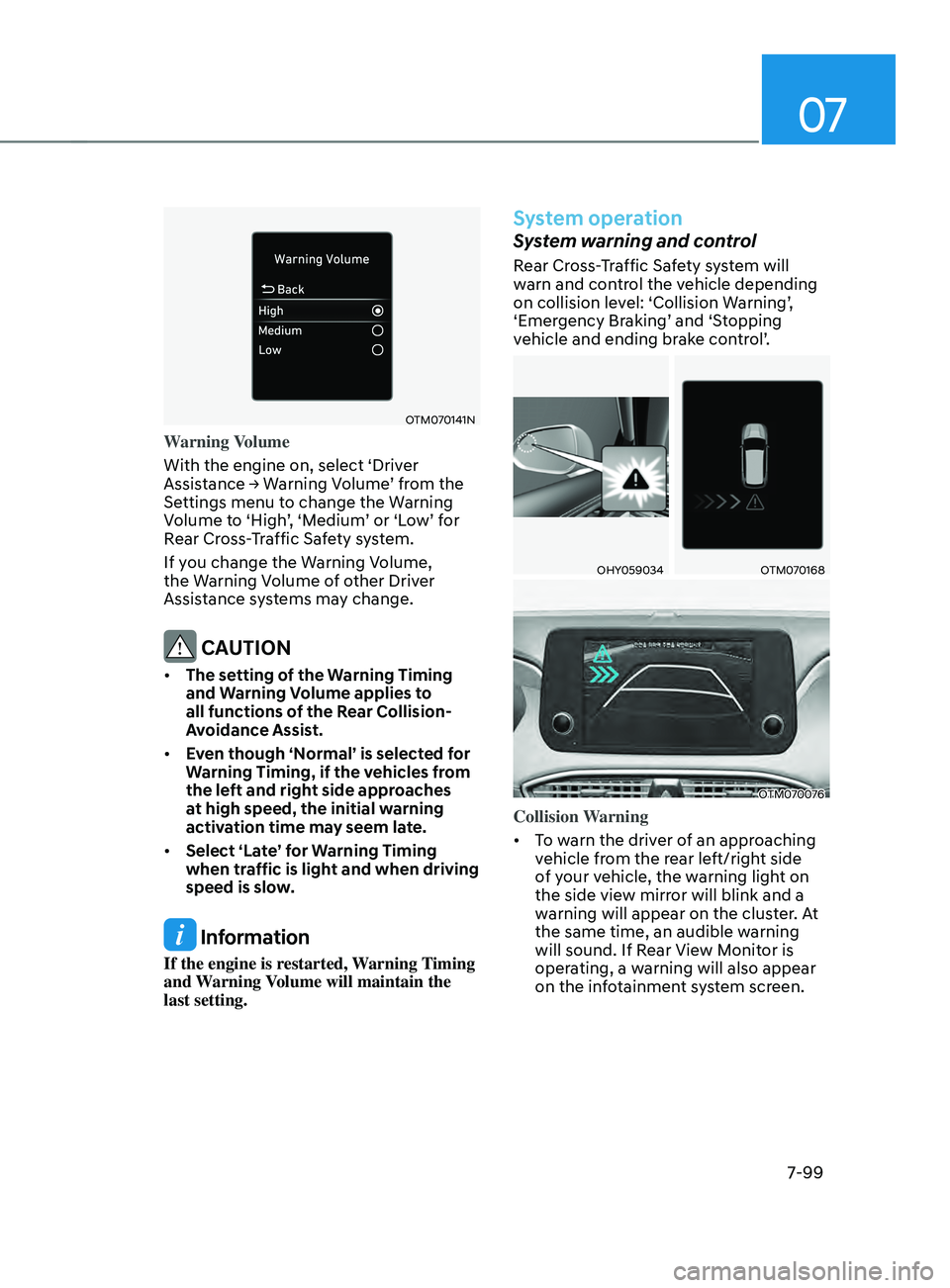
Warning Volume
With the engine on, select ‘Driver
Assistance
→ W
arning
V
olume’
fr
om
the Settings menu t
o change the Warning
Volume to ‘High’, ‘Medium’ or ‘Low’ for
Rear Cross-Traffic Safety system.
If you change the Warning Volume,
the Warning Volume of other Driver
Assistance systems may change.
CAUTION
• The setting of the Warning Timing
and Warning Volume applies to
all functions of the Rear Collision-
Avoidance Assist.
• Even though ‘Normal’ is selected for
Warning Timing, if the vehicles from
the left and right side approaches
at high speed, the initial warning
activation time may seem late.
• Select ‘Late’ for Warning Timing
when traffic is light and when driving
speed is slow.
Information
If the engine is restarted, Warning Timing
and Warning Volume will maintain the
last setting.
System operation
System warning and control
Rear Cross-Traffic Safety system will
warn and control the vehicle depending
on collision level: ‘Collision Warning’,
‘Emergency Braking’ and ‘Stopping
vehicle and ending brake control’.
OHY059034OTM070168
OTM070076
Collision Warning
• To warn the driver of an approaching
vehicle from the rear left/right side
of your vehicle, the warning light on
the side view mirror will blink and a
warning will appear on the cluster. At
the same time, an audible warning
will sound. If Rear View Monitor is
operating, a warning will also appear
on the infotainment system screen.
Page 486 of 636
Driver assistance system
7-104
WARNING
• Even though the warning message
does not appear on the cluster, Rear
Cross-Traffic Safety system may not
operate properly.
• Rear Cross-Traffic Safety system may
not operate properly in an area (for
example: open terrain), where any
substance are not detected after
turning ON the engine.
CAUTION
Turn off Rear Cross-Traffic Safety
system to install a trailer, carrier, etc.,
or remove the trailer, carrier, etc. to use
Rear Cross-Traffic Safety system.
Limitations of the system
Rear Cross-Traffic Safety system may
not operate normally, or the system
may operate unexpectedly under the
following circumstances:
• Departing from where trees or grass
are overgrown
• Departing from where roads are wet
• Speed of the approaching vehicle is
fast or slow
Braking control may not work, driver’s
attention is required in the following
circumstances:
• The vehicle severely vibrates while
driving over a bumpy road, uneven
road or concrete patch
• Driving on a slippery surface due to
snow, water puddle, ice, etc.
• The tire pressure is low or a tire is
damaged
• The brake is reworked
• Remote Smart Parking Assist is
operating (if equipped)
CAUTION
For more details on the limitations of
the rear corner radar, refer to “Blind-
Spot Collision-Avoidance Assist (BCA)”
section in chapter 7.
WARNING
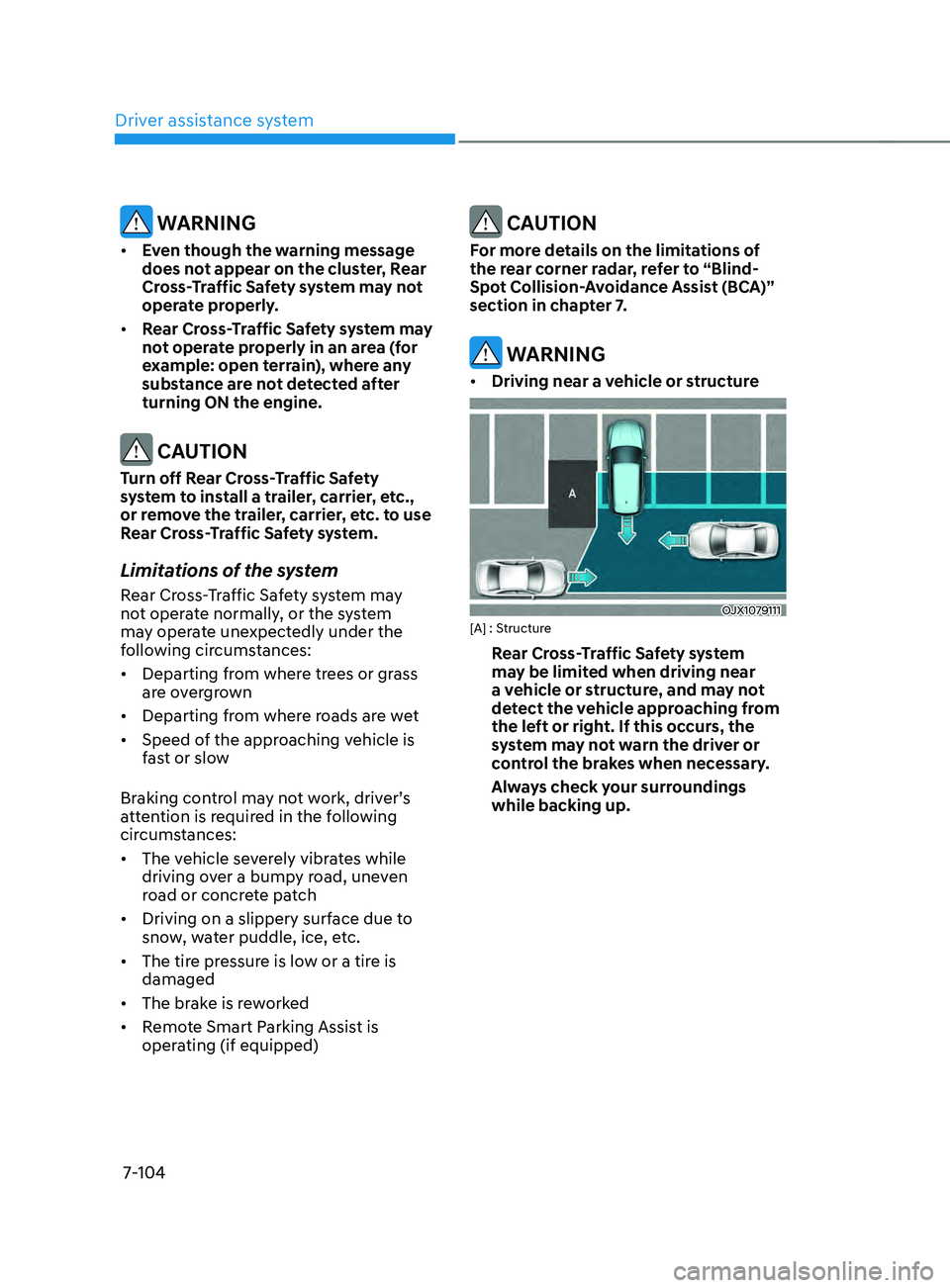
• Driving near a vehicle or structure
OJX1079111[A] : Structure
Rear Cross-Traffic Safety system
may be limited when driving near
a vehicle or structure, and may not
detect the vehicle approaching from
the left or right. If this occurs, the
system may not warn the driver or
control the brakes when necessary.
Always check your surroundings
while backing up.
Page 491 of 636
07
7-109
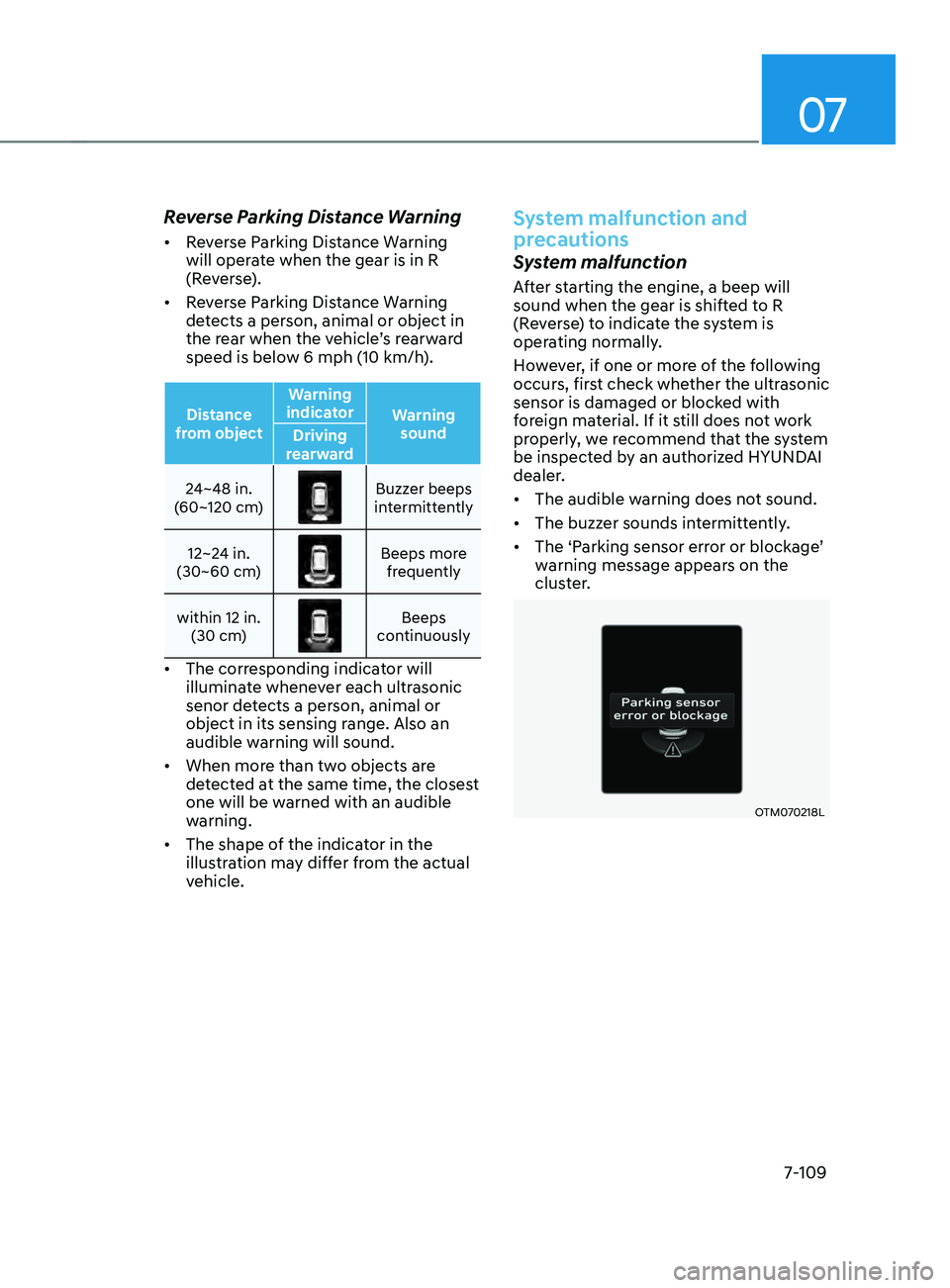
Reverse Parking Distance Warning
• Reverse Parking Distance Warning
will operate when the gear is in R
(Reverse).
• Reverse Parking Distance Warning
detects a person, animal or object in
the rear when the vehicle’s rearward
speed is below 6 mph (10 km/h).
Distance
from object Warning
indicator Warning
sound
Driving
rearward
24~48 in.
(60~120 cm)
Buzzer beeps
intermittently
12~24 in.
(30~60 cm)
Beeps more frequently
within 12 in. (30 cm)
Beeps
continuously
• The corresponding indicator will
illuminate whenever each ultrasonic
senor detects a person, animal or
object in its sensing range. Also an
audible warning will sound.
• When more than two objects are
detected at the same time, the closest
one will be warned with an audible
warning.
• The shape of the indicator in the
illustration may differ from the actual
vehicle.
System malfunction and
precautions
System malfunction
After starting the engine, a beep will
sound when the gear is shifted to R
(Reverse) to indicate the system is
operating normally.
However, if one or more of the following
occurs, first check whether the ultrasonic
sensor is damaged or blocked with
foreign material. If it still does not work
properly, we recommend that the system
be inspected by an authorized HYUNDAI
dealer.
• The audible warning does not sound.
• The buzzer sounds intermittently.
• The ‘Parking sensor error or blockage’
warning message appears on the
cluster.
OTM070218L
Page 495 of 636
07
7-113
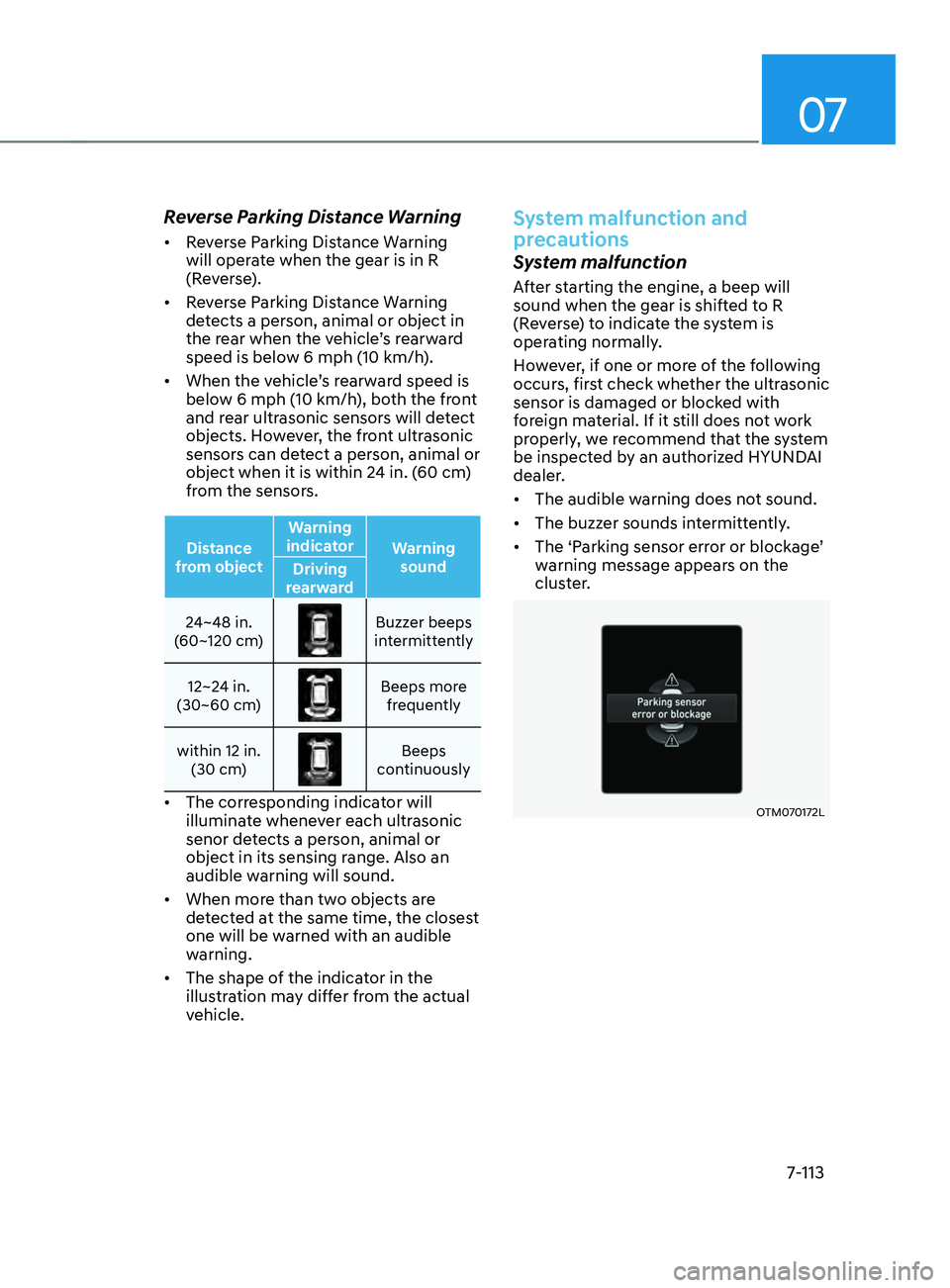
Reverse Parking Distance Warning
• Reverse Parking Distance Warning
will operate when the gear is in R
(Reverse).
• Reverse Parking Distance Warning
detects a person, animal or object in
the rear when the vehicle’s rearward
speed is below 6 mph (10 km/h).
• When the vehicle’s rearward speed is
below 6 mph (10 km/h), both the front
and rear ultrasonic sensors will detect
objects. However, the front ultrasonic
sensors can detect a person, animal or
object when it is within 24 in. (60 cm)
from the sensors.
Distance
from object Warning
indicator Warning
sound
Driving
rearward
24~48 in.
(60~120 cm)
Buzzer beeps
intermittently
12~24 in.
(30~60 cm)
Beeps more frequently
within 12 in. (30 cm)
Beeps
continuously
• The corresponding indicator will
illuminate whenever each ultrasonic
senor detects a person, animal or
object in its sensing range. Also an
audible warning will sound.
• When more than two objects are
detected at the same time, the closest
one will be warned with an audible
warning.
• The shape of the indicator in the
illustration may differ from the actual
vehicle.
System malfunction and
precautions
System malfunction
After starting the engine, a beep will
sound when the gear is shifted to R
(Reverse) to indicate the system is
operating normally.
However, if one or more of the following
occurs, first check whether the ultrasonic
sensor is damaged or blocked with
foreign material. If it still does not work
properly, we recommend that the system
be inspected by an authorized HYUNDAI
dealer.
• The audible warning does not sound.
• The buzzer sounds intermittently.
• The ‘Parking sensor error or blockage’
warning message appears on the
cluster.
OTM070172L
Page 497 of 636
07
7-115
REVERsE pARkIng COLLIsIOn-AVOID AnCE A ssIsT (pC A) (IF
EQUIppED)
Reverse Parking Collision-Avoidance
Assist will warn the driver or will
assist with braking to help reduce the
possibility of collision with a pedestrian
or an object when backing up.
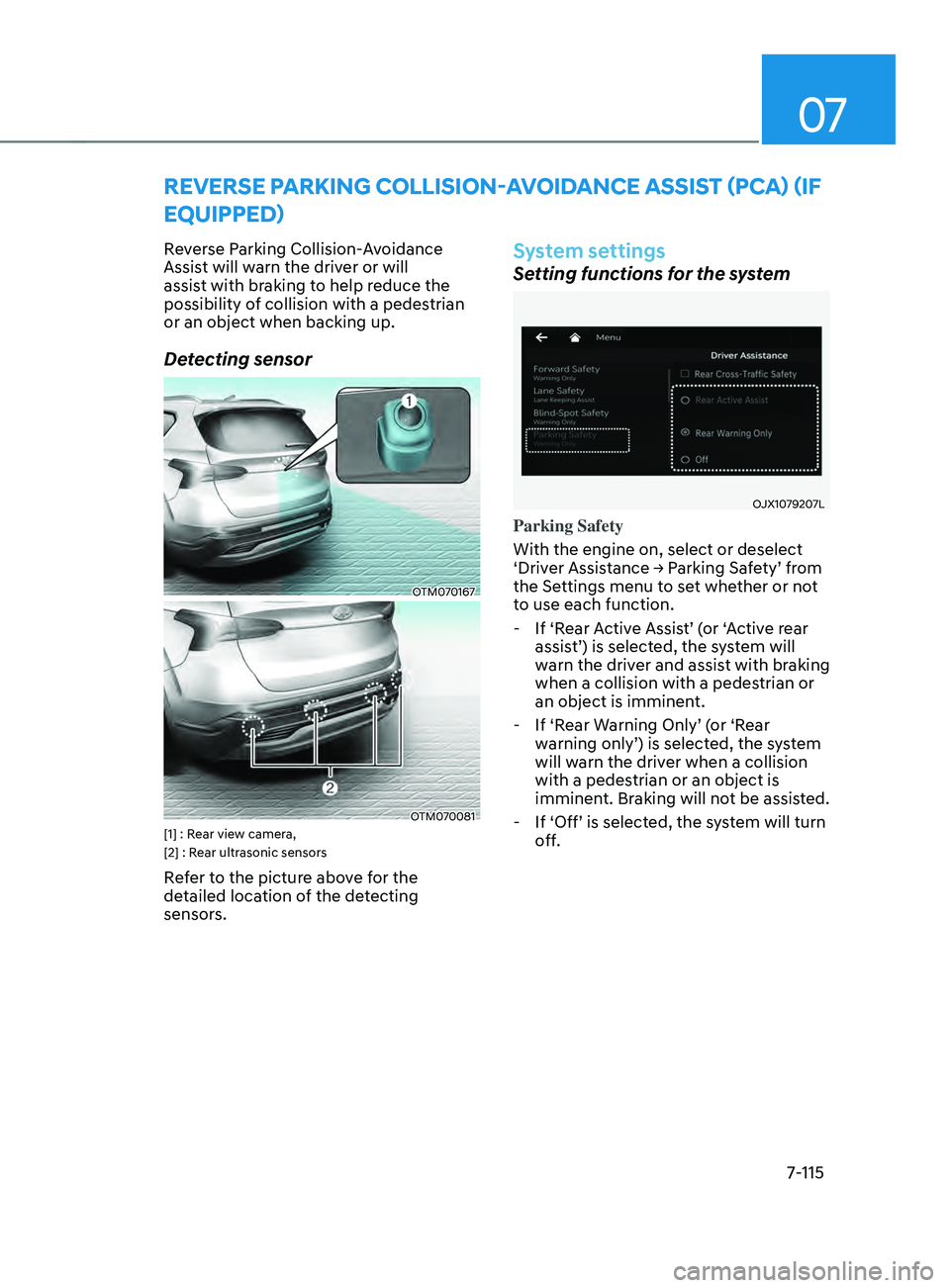
Detecting sensor
OTM070167
OTM070081[1] : Rear view camera,
[2] : Rear ultrasonic sensors
Refer to the picture above for the
detailed location of the detecting
sensors.
System settings
Setting functions for the system
OJX1079207L
Parking Safety
With the engine on, select or deselect
‘Driver
Assis
tance
→ P
arking
Sa
fety’
fr
om
the Settings menu t
o set whether or not
to use each function.
- If ‘Rear A
ctive Assist’ (or ‘Active rear
assist’) is selected, the system will
warn the driver and assist with braking
when a collision with a pedestrian or
an object is imminent.
- If ‘Rear W
arning Only’ (or ‘Rear
warning only’) is selected, the system
will warn the driver when a collision
with a pedestrian or an object is
imminent. Braking will not be assisted.
- If ‘Off’ is selected, the s
ystem will turn
off.
Page 498 of 636
Driver assistance system
7-116
OJX1079245L
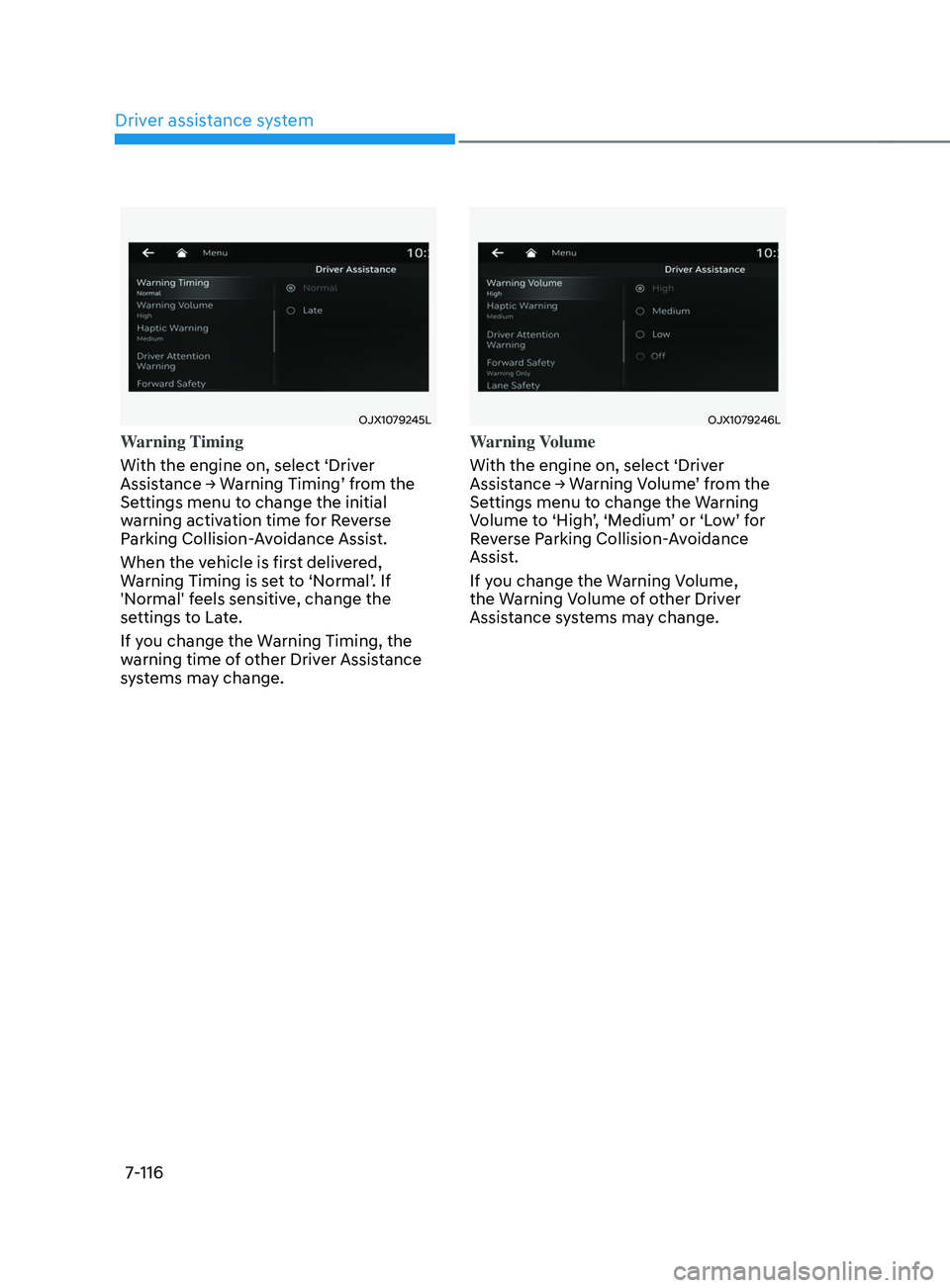
Warning Timing
With the engine on, select ‘Driver
Assistance
→ W
arning
Timing’ fr
om
the Settings menu t
o change the initial
warning activation time for Reverse
Parking Collision-Avoidance Assist.
When the vehicle is first delivered,
Warning Timing is set to ‘Normal’. If
'Normal' feels sensitive, change the
settings to Late.
If you change the Warning Timing, the
warning time of other Driver Assistance
systems may change.
OJX1079246L
Warning Volume
With the engine on, select ‘Driver
Assistance
→ W
arning
V
olume’
fr
om
the Settings menu t
o change the Warning
Volume to ‘High’, ‘Medium’ or ‘Low’ for
Reverse Parking Collision-Avoidance
Assist.
If you change the Warning Volume,
the Warning Volume of other Driver
Assistance systems may change.
Page 501 of 636
07
7-119
„„Rear view camera„„Rear ultrasonic sensor
OTM070219LOTM070176L
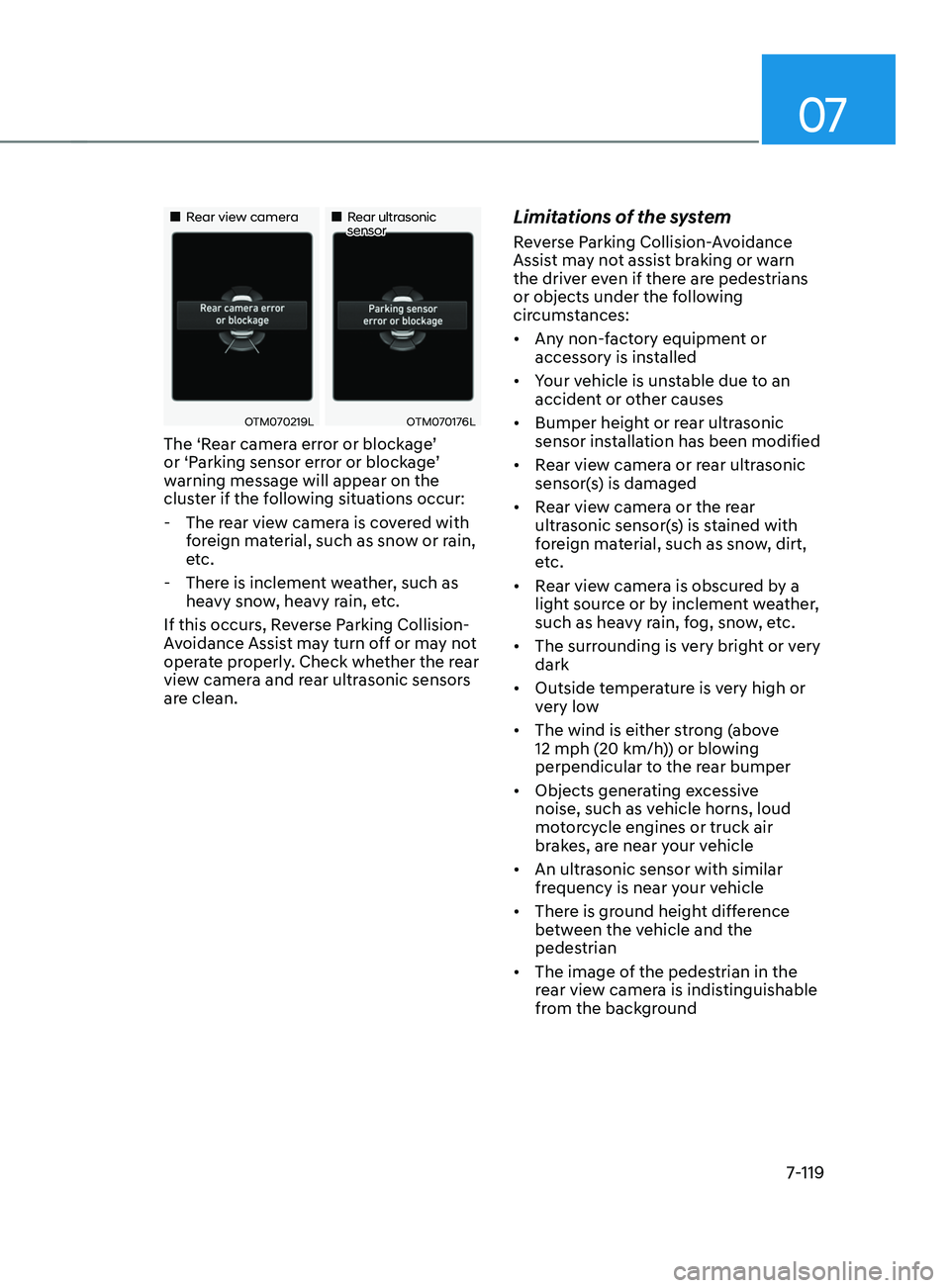
The ‘Rear camera error or blockage’
or ‘Parking sensor error or blockage’
warning message will appear on the
cluster if the following situations occur:
- The rear vie
w camera is covered with
foreign material, such as snow or rain,
etc.
- There is inclemen
t weather, such as
heavy snow, heavy rain, etc.
If this occurs, Reverse Parking Collision-
Avoidance Assist may turn off or may not
operate properly. Check whether the rear
view camera and rear ultrasonic sensors
are clean.
Limitations of the system
Reverse Parking Collision-Avoidance
Assist may not assist braking or warn
the driver even if there are pedestrians
or objects under the following
circumstances:
• Any non-factory equipment or
accessory is installed
• Your vehicle is unstable due to an
accident or other causes
• Bumper height or rear ultrasonic
sensor installation has been modified
• Rear view camera or rear ultrasonic
sensor(s) is damaged
• Rear view camera or the rear
ultrasonic sensor(s) is stained with
foreign material, such as snow, dirt,
etc.
• Rear view camera is obscured by a
light source or by inclement weather,
such as heavy rain, fog, snow, etc.
• The surrounding is very bright or very
dark
• Outside temperature is very high or
very low
• The wind is either strong (above
12 mph (20 km/h)) or blowing
perpendicular to the rear bumper
• Objects generating excessive
noise, such as vehicle horns, loud
motorcycle engines or truck air
brakes, are near your vehicle
• An ultrasonic sensor with similar
frequency is near your vehicle
• There is ground height difference
between the vehicle and the
pedestrian
• The image of the pedestrian in the
rear view camera is indistinguishable
from the background
Page 502 of 636
Driver assistance system
7-120
• The pedestrian is near the rear edge of
the vehicle
• The pedestrian is not standing upright
• The pedestrian is either very short or
very tall for the system to detect
• The pedestrian or cyclist is wearing
clothing that easily blends into the
background, making it difficult to
detect
• The pedestrian is wearing clothing
that does not reflect ultrasonic waves
well
• Size, thickness, height, or shape of
the object does not reflect ultrasonic
waves well (e.g., pole, bush, curbs,
carts, edge of a wall, etc.)
• The pedestrian or the object is moving
• The pedestrian or the object is very
close to the rear of the vehicle
• A wall is behind the pedestrian or the
object
• The object is not located at the rear
center of your vehicle
• The object is not parallel to the rear
bumper
• The road is slippery or inclined
• The driver backs up the vehicle
immediately after shifting to R
(Reverse)
• The driver accelerates or circles the
vehicle Reverse Parking Collision-Avoidance
Assist may unnecessarily warn the driver
or assist with braking even if there are
no pedestrians or objects under the
following circumstances:
•
Any non-factory equipment or
accessory is installed
• Your vehicle is unstable due to an
accident or other causes
• Bumper height or rear ultrasonic
sensor installation has been modified
• Your vehicle height is low or high
due to heavy loads, abnormal tire
pressure, etc.
• Rear view camera or the rear
ultrasonic sensor(s) is stained with
foreign material, such as snow, dirt,
etc.
• The pattern on the road is mistaken
for a pedestrian
• There is shadow or light reflecting on
the ground
• Pedestrians or objects are around the
path of the vehicle
• Objects generating excessive
noise, such as vehicle horns, loud
motorcycle engines or truck air
brakes, are near your vehicle
• Your vehicle is backing towards a
narrow passage or parking space
• Your vehicle is backing towards an
uneven road surface, such as an
unpaved road, gravel, bump, gradient,
etc.
• A trailer or carrier is installed on the
rear of your vehicle
• An ultrasonic sensor with similar
frequency is near your vehicle
Page 506 of 636
Driver assistance system
7-124
CAUTION
Take the following precautions to
maintain optimal performance of the
detecting sensors:
• Never disassemble the detecting
sensor or sensor assembly, or apply
any impact on it.
• If the detecting sensor have been
replaced or repaired, we recommend
that you have your vehicle inspected
by an authorized HYUNDAI dealer.
• Remote Smart Parking Assist
may malfunction if the vehicle
bumper height or ultrasonic sensor
installation has been modified
or damaged. Any non-factory
installed equipment or accessories
may also interfere with the sensor
performance.
• When the ultrasonic sensor is frozen
or stained with snow, dirt, or water,
the sensor may be not operate until
the stains are removed using a soft
cloth.
• Do not push, scratch or strike the
ultrasonic sensor. Sensor damage
could occur.
• Do not spray the ultrasonic sensors
or its surrounding area directly with
a high pressure washer.
System settings
Settings functions for the system
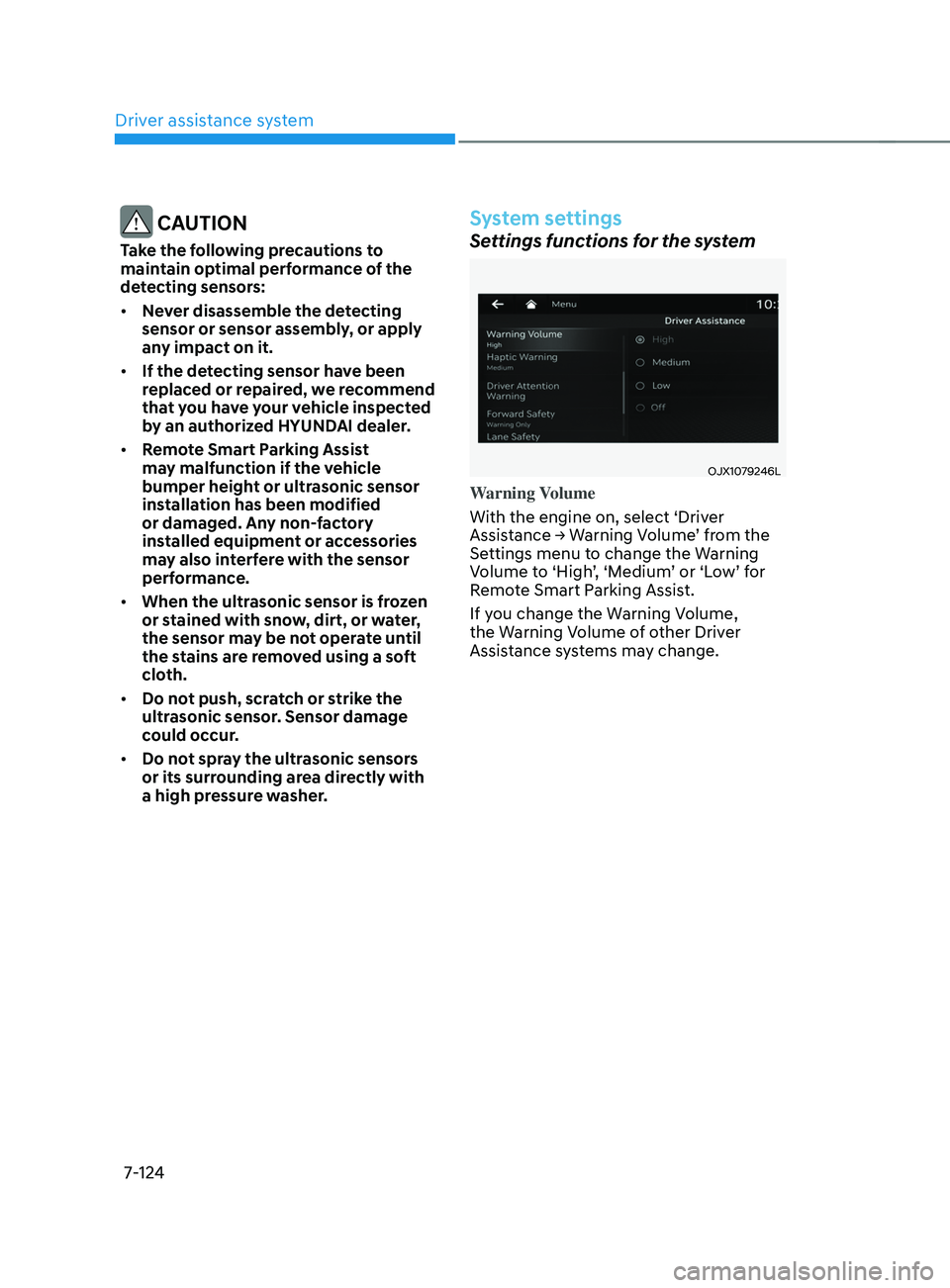
OJX1079246L
Warning Volume
With the engine on, select ‘Driver
Assistance
→ W
arning
V
olume’
fr
om
the Settings menu t
o change the Warning
Volume to ‘High’, ‘Medium’ or ‘Low’ for
Remote Smart Parking Assist.
If you change the Warning Volume,
the Warning Volume of other Driver
Assistance systems may change.
Page 507 of 636
07
7-125
System operation
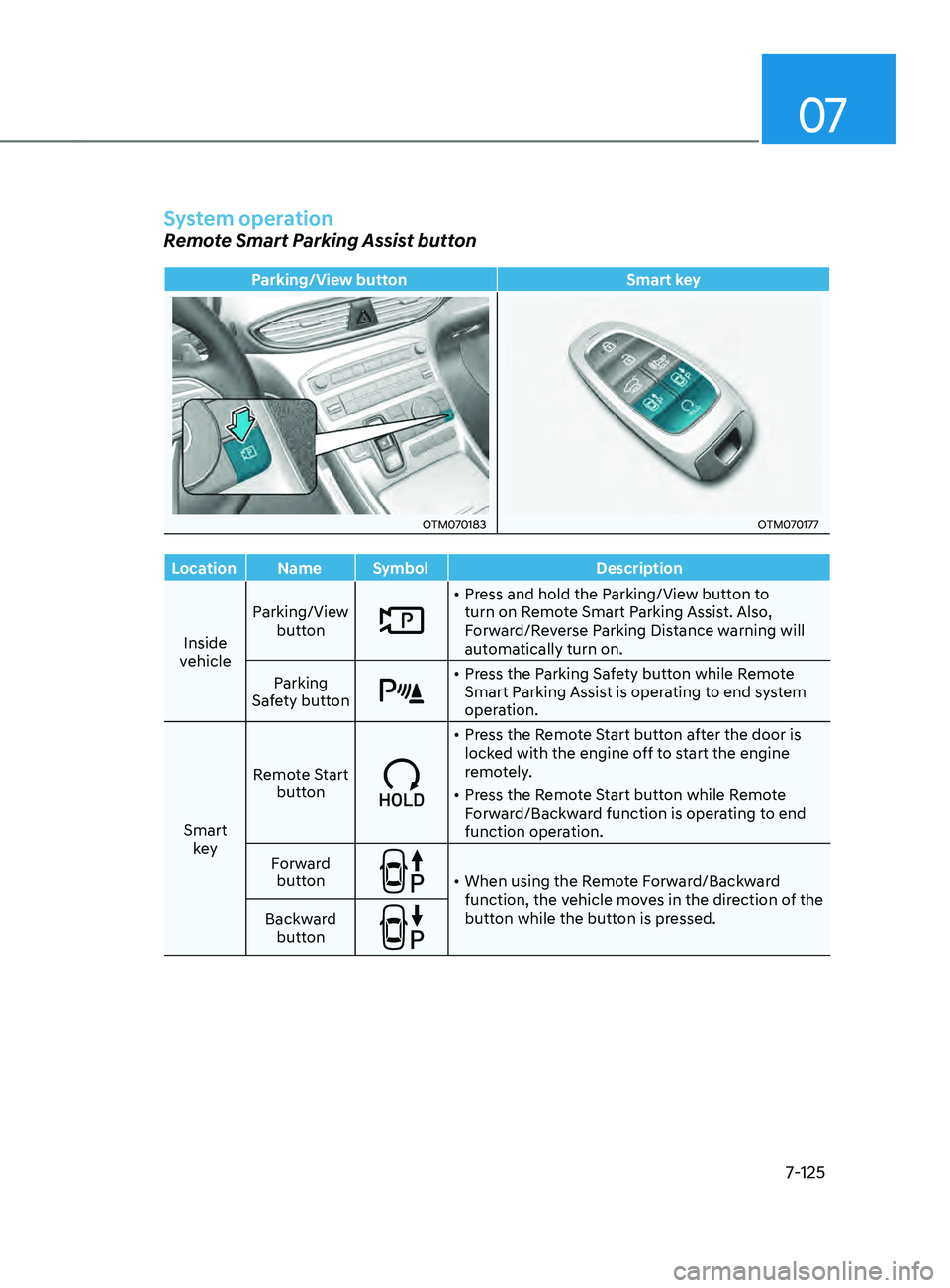
Remote Smart Parking Assist button
Parking/View buttonSmart key
OTM070183OTM070177
Location Name Symbol Description
Inside
vehicle Parking/View
button
• Press and hold the Parking/View button to
turn on Remote Smart Parking Assist. Also,
Forward/Reverse Parking Distance warning will
automatically turn on.
Parking
Safety button
• Press the Parking Safety button while Remote
Smart Parking Assist is operating to end system
operation.
Smart key Remote Start
button
• Press the Remote Start button after the door is
locked with the engine off to start the engine
remotely.
• Press the Remote Start button while Remote
Forward/Backward function is operating to end
function operation.
Forward button
• When using the Remote Forward/Backward
function, the vehicle moves in the direction of the
button while the button is pressed.
Backward
button