start stop button HYUNDAI SANTA FE HYBRID 2021 Owner's Manual
[x] Cancel search | Manufacturer: HYUNDAI, Model Year: 2021, Model line: SANTA FE HYBRID, Model: HYUNDAI SANTA FE HYBRID 2021Pages: 598, PDF Size: 66.6 MB
Page 131 of 598
04
4-19
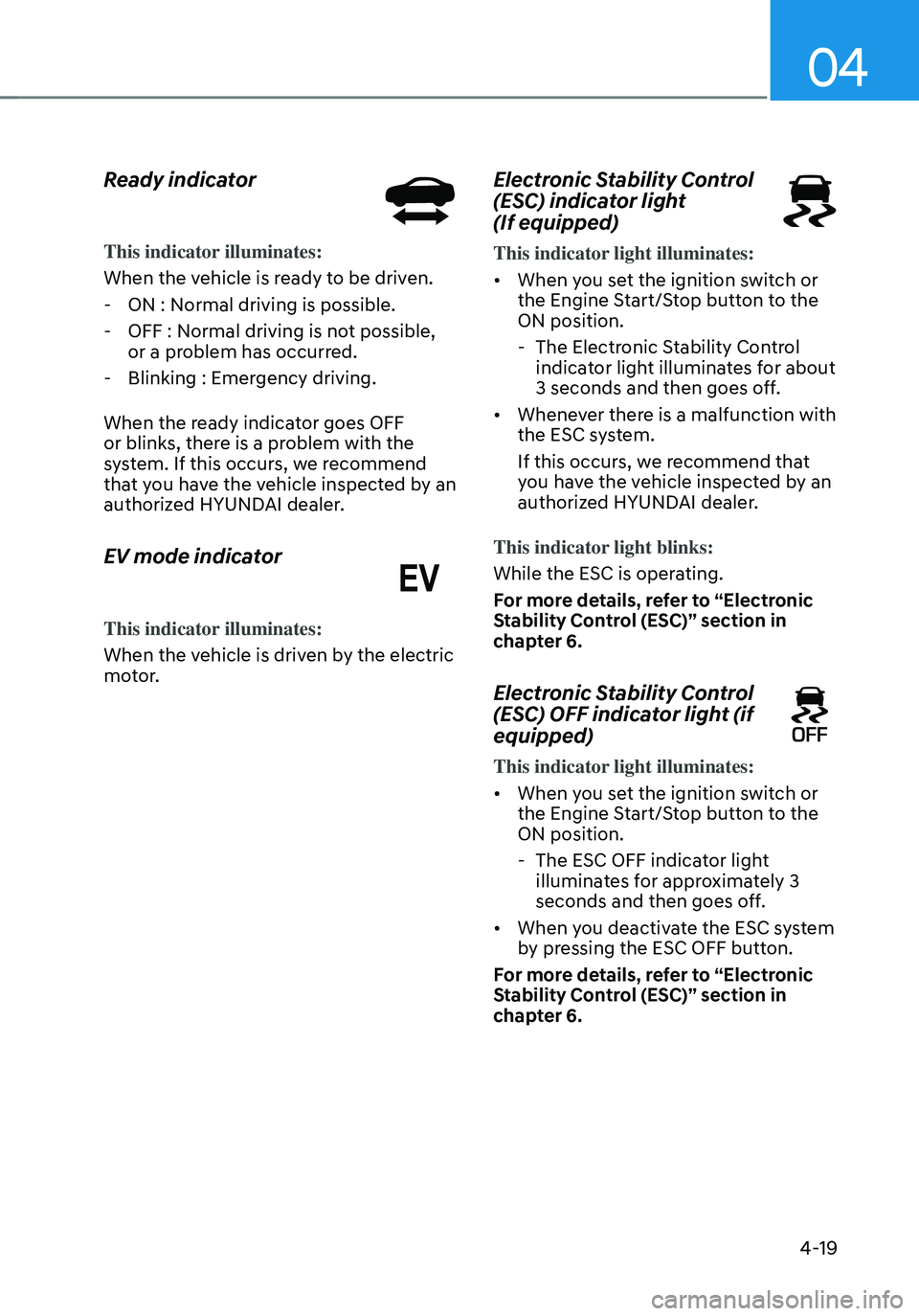
Ready indicator
This indicator illuminates:
When the vehicle is ready to be driven.
-ON : Normal driving is possible.
-OFF : Normal driving is not possible,
or a problem has occurred.
-Blinking : Emergency driving.
When the ready indicator goes OFF
or blinks, there is a problem with the
system. If this occurs, we recommend
that you have the vehicle inspected by an
authorized HYUNDAI dealer.
EV mode indicator
This indicator illuminates:
When the vehicle is driven by the electric
motor.
Electronic Stability Control
(ESC) indicator light
(If equipped)
This indicator light illuminates:
• When you set the ignition switch or
the Engine Start/Stop button to the
ON position.
- The Electronic Stability Control
indicator light illuminates for about
3 seconds and then goes off.
• Whenever there is a malfunction with
the ESC system.
If this occurs, we recommend that
you have the vehicle inspected by an
authorized HYUNDAI dealer.
This indicator light blinks:
While the ESC is operating.
For more details, refer to “Electronic
Stability Control (ESC)” section in
chapter 6.
Electronic Stability Control
(ESC) OFF indicator light (if
equipped)
This indicator light illuminates:
• When you set the ignition switch or
the Engine Start/Stop button to the
ON position.
- The ESC OFF indicator light
illuminates for approximately 3
seconds and then goes off.
• When you deactivate the ESC system
by pressing the ESC OFF button.
For more details, refer to “Electronic
Stability Control (ESC)” section in
chapter 6.
Page 132 of 598
Instrument cluster
4-20
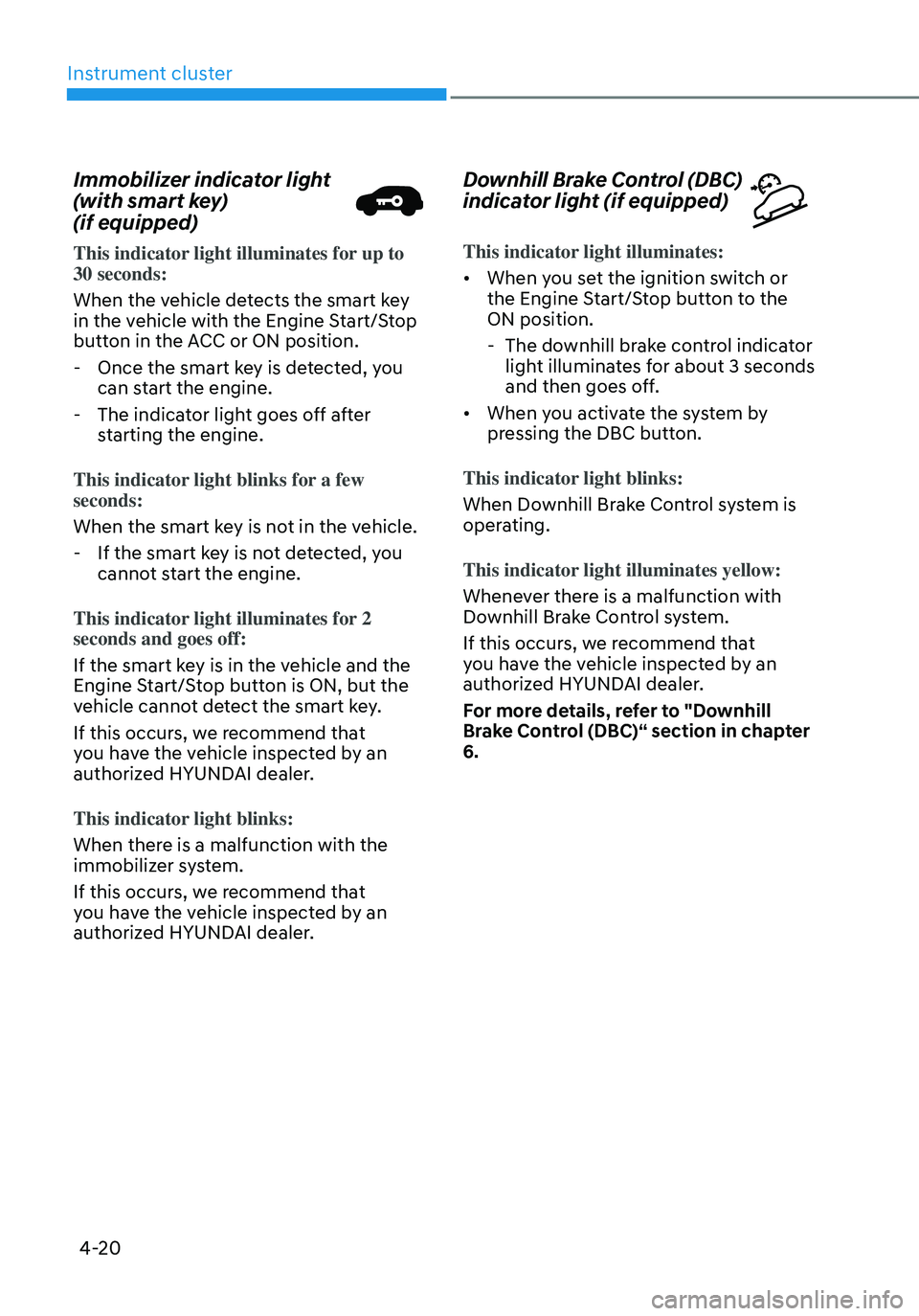
Immobilizer indicator light
(with smart key)
(if equipped)
This indicator light illuminates for up to 30 seconds:
When the vehicle detects the smart key
in the vehicle with the Engine Start/Stop
button in the ACC or ON position.
-Once the smart key is detected, you
can start the engine.
-The indicator light goes off after
starting the engine.
This indicator light blinks for a few
seconds:
When the smart key is not in the vehicle.
- If the smart key is not detected, you
cannot start the engine.
This indicator light illuminates for 2
seconds and goes off:
If the smart key is in the vehicle and the
Engine Start/Stop button is ON, but the
vehicle cannot detect the smart key.
If this occurs, we recommend that
you have the vehicle inspected by an
authorized HYUNDAI dealer.
This indicator light blinks:
When there is a malfunction with the
immobilizer system.
If this occurs, we recommend that
you have the vehicle inspected by an
authorized HYUNDAI dealer.
Downhill Brake Control (DBC)
indicator light (if equipped)
This indicator light illuminates:
• When you set the ignition switch or
the Engine Start/Stop button to the
ON position.
- The downhill brake control indicator
light illuminates for about 3 seconds
and then goes off.
• When you activate the system by
pressing the DBC button.
This indicator light blinks:
When Downhill Brake Control system is
operating.
This indicator light illuminates yellow:
Whenever there is a malfunction with
Downhill Brake Control system.
If this occurs, we recommend that
you have the vehicle inspected by an
authorized HYUNDAI dealer.
For more details, refer to "Downhill
Brake Control (DBC)“ section in chapter
6.
Page 134 of 598
Instrument cluster
4-22
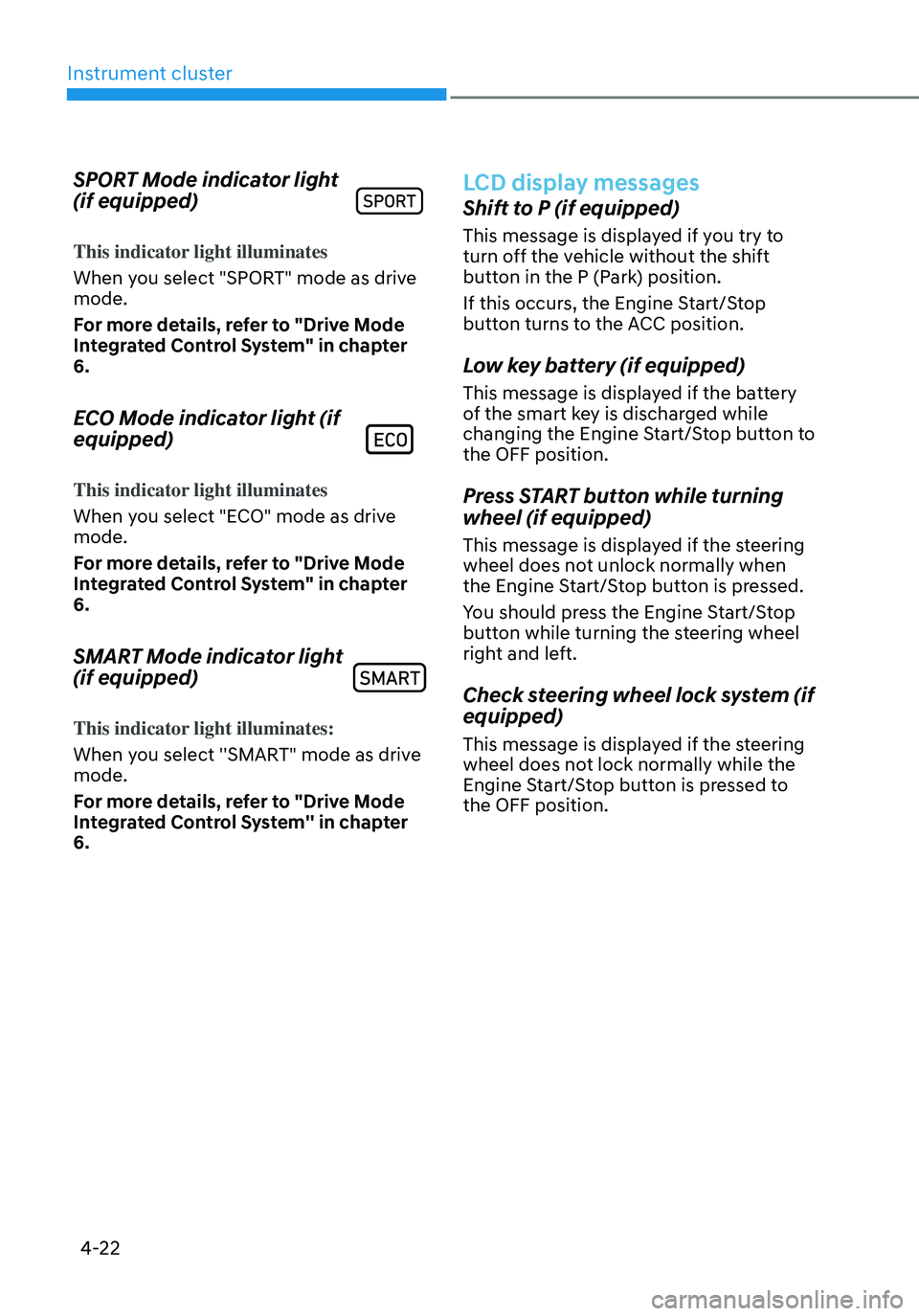
SPORT Mode indicator light
(if equipped)
This indicator light illuminates
When you select "SPORT" mode as drive
mode.
For more details, refer to "Drive Mode
Integrated Control System" in chapter
6.
ECO Mode indicator light (if
equipped)
This indicator light illuminates
When you select "ECO" mode as drive
mode.
For more details, refer to "Drive Mode
Integrated Control System" in chapter
6.
SMART Mode indicator light
(if equipped)
This indicator light illuminates:
When you select ''SMART" mode as drive
mode.
For more details, refer to "Drive Mode
Integrated Control System'' in chapter
6.
LCD display messages
Shift to P (if equipped)
This message is displayed if you try to
turn off the vehicle without the shift
button in the P (Park) position.
If this occurs, the Engine Start/Stop
button turns to the ACC position.
Low key battery (if equipped)
This message is displayed if the battery
of the smart key is discharged while
changing the Engine Start/Stop button to
the OFF position.
Press START button while turning
wheel (if equipped)
This message is displayed if the steering
wheel does not unlock normally when
the Engine Start/Stop button is pressed.
You should press the Engine Start/Stop
button while turning the steering wheel
right and left.
Check steering wheel lock system (if
equipped)
This message is displayed if the steering
wheel does not lock normally while the
Engine Start/Stop button is pressed to
the OFF position.
Page 135 of 598
04
4-23
Press brake pedal to start engine (if
equipped)
This message is displayed if the Engine
Start/Stop button changes to the ACC
position twice by pressing the button
repeatedly without depressing the brake
pedal.
You can start the vehicle by depressing
the brake pedal and then pressing the
Engine Start/Stop button.
Key not in vehicle (if equipped)
This message is displayed if the smart
key is not in the vehicle when you press
the Engine Start/ Stop button.
When attempting to start the vehicle,
always have the smart key with you.
Key not detected (if equipped)
This message is displayed if the smart
key is not detected when you press the
Engine Start/Stop button.
Press START button again (if
equipped)
This message is displayed if you were
unable to start the vehicle when the
Engine Start/Stop button was pressed.
If this occurs, attempt to start the engine
by pressing the Engine Start/ Stop button
again.
If the warning message appears each
time you press the Engine Start/Stop
button, we recommend that you have
the vehicle inspected by an authorized
HYUNDAI dealer.
Press START button with key (if
equipped)
This message is displayed if you press
the Engine Start/Stop button while the
warning message “Key not detected” is
displayed.
At this time, the immobilizer indicator
light blinks.
Check BRAKE SWITCH fuse (if
equipped)
This message is displayed if the brake
switch fuse is disconnected.
You need to replace the fuse with a new
one before starting the engine.
If that is not possible, you can start the
engine by pressing the Engine Start/
Stop button for 10 seconds in the ACC
position.
12V battery discharging due to
additional electrical devices (if
equipped)
This message is displayed if the 12V
battery voltage is weak due to any
non-factory electrical accessories (ex.
dashboard camera) while parking. Be
careful that the battery is not discharged.
If the message appears after removing
the non-factory electrical accessories,
we recommend that you have the vehicle
inspected by an authorized HYUNDAI
dealer.
Page 150 of 598
Instrument cluster
4-38
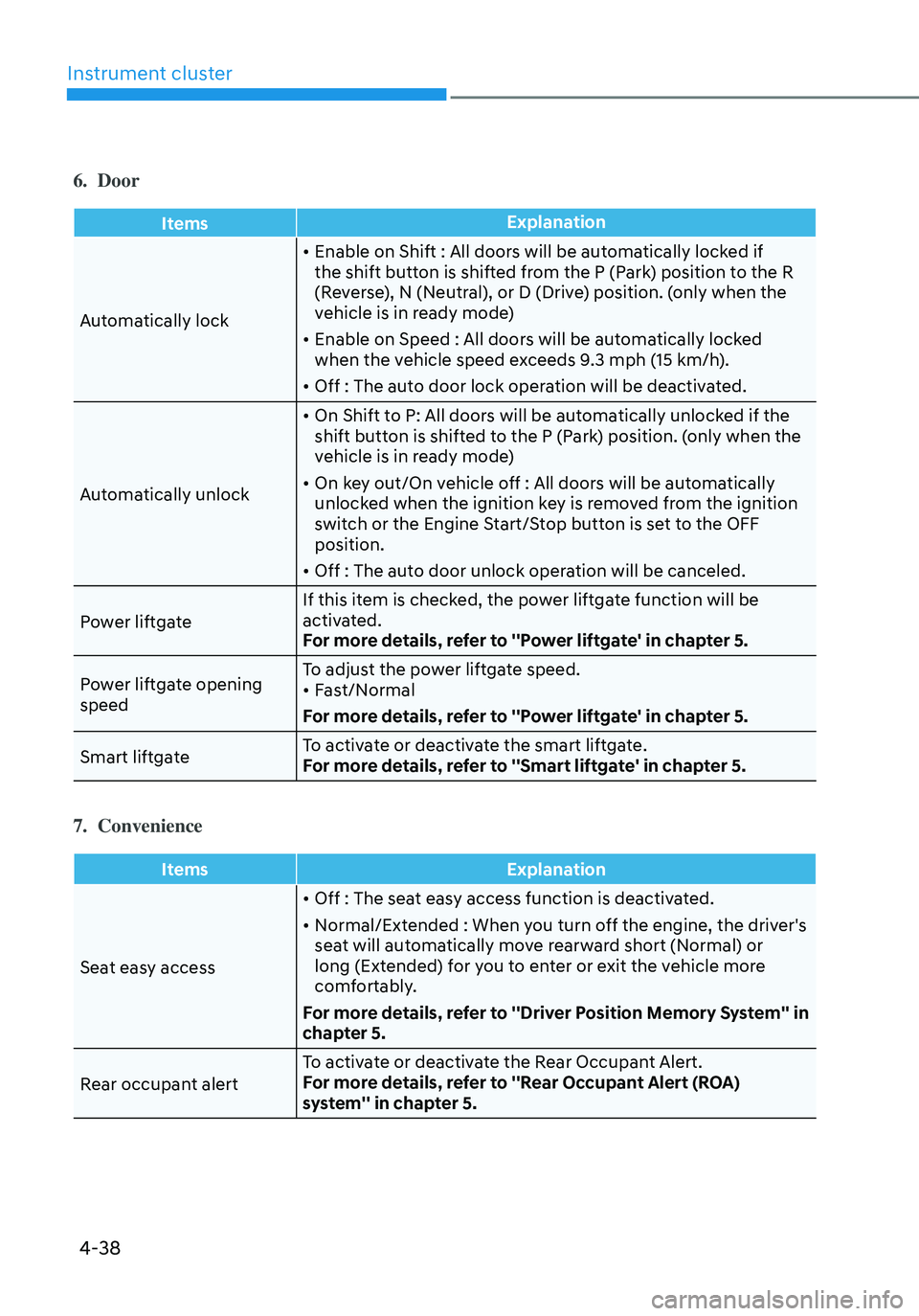
6. Door
ItemsExplanation
Automatically lock
• Enable on Shift : All doors will be automatically locked if
the shift button is shifted from the P (Park) position to the R
(Reverse), N (Neutral), or D (Drive) position. (only when the
vehicle is in ready mode)
• Enable on Speed : All doors will be automatically locked
when the vehicle speed exceeds 9.3 mph (15 km/h).
• Off : The auto door lock operation will be deactivated.
Automatically unlock
• On Shift to P: All doors will be automatically unlocked if the
shift button is shifted to the P (Park) position. (only when the
vehicle is in ready mode)
• On key out/On vehicle off : All doors will be automatically
unlocked when the ignition key is removed from the ignition
switch or the Engine Start/Stop button is set to the OFF
position.
• Off : The auto door unlock operation will be canceled.
Power liftgate If this item is checked, the power liftgate function will be
activated.
For more details, refer to ''Power liftgate' in chapter 5.
Power liftgate opening
speed To adjust the power liftgate speed.
• Fast/Normal
For more details, refer to ''Power liftgate' in chapter 5.
Smart liftgate To activate or deactivate the smart liftgate.
For more details, refer to ''Smart liftgate' in chapter 5.
7. Convenience
Items
Explanation
Seat easy access
• Off : The seat easy access function is deactivated.
• Normal/Extended : When you turn off the engine, the driver's
seat will automatically move rearward short (Normal) or
long (Extended) for you to enter or exit the vehicle more
comfortably.
For more details, refer to ''Driver Position Memory System'' in
chapter 5.
Rear occupant alert To activate or deactivate the Rear Occupant Alert.
For more details, refer to ''Rear Occupant Alert (ROA)
system'' in chapter 5.
Page 164 of 598
Convenient features
5-6
Even though you press the outside
door handle button, the doors will not
lock and the chime will sound for three
seconds if any of the following occur:
• The Smart Key is in the vehicle.
• The Engine Start/Stop button is in
ACC or ON position.
• Any door except the liftgate is open.
CAUTION
When you leave your vehicle with
the smart key, make sure to press the
button on the front door handle or
touch the touch sensor on the front
door handle to lock the doors after
close all of the doors, the hood and the
trunk. If you do not press the button
or touch the touch sensor firmly, the
doors might not be locked so please use
caution.
WARNING
Do not leave the Smart Key in your
vehicle with unsupervised children.
Unattended children could press the
Engine Start/ Stop button and may
operate power windows or other
controls, or even make the vehicle
move, which could result in serious
injury or death.
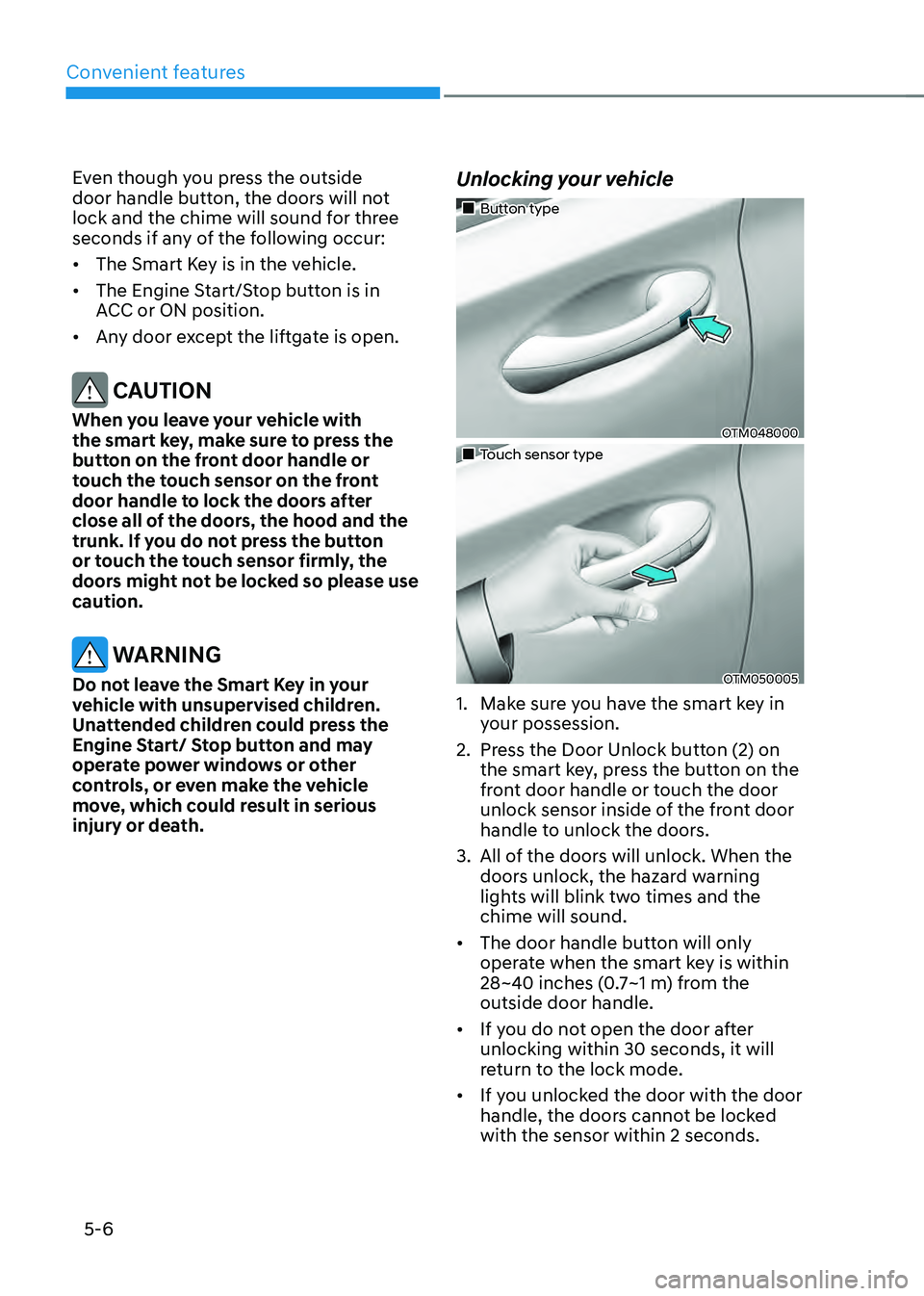
Unlocking your vehicle
„„Button type
OTM048000
„„Touch sensor type
OTM050005
1. Make sure you have the smart key in
your possession.
2. Press the Door Unlock button (2) on
the smart key, press the button on the
front door handle or touch the door
unlock sensor inside of the front door
handle to unlock the doors.
3. All of the doors will unlock. When the
doors unlock, the hazard warning
lights will blink two times and the
chime will sound.
• The door handle button will only
operate when the smart key is within
28~40 inches (0.7~1 m) from the
outside door handle.
• If you do not open the door after
unlocking within 30 seconds, it will
return to the lock mode.
• If you unlocked the door with the door
handle, the doors cannot be locked
with the sensor within 2 seconds.
Page 165 of 598
05
5 -7
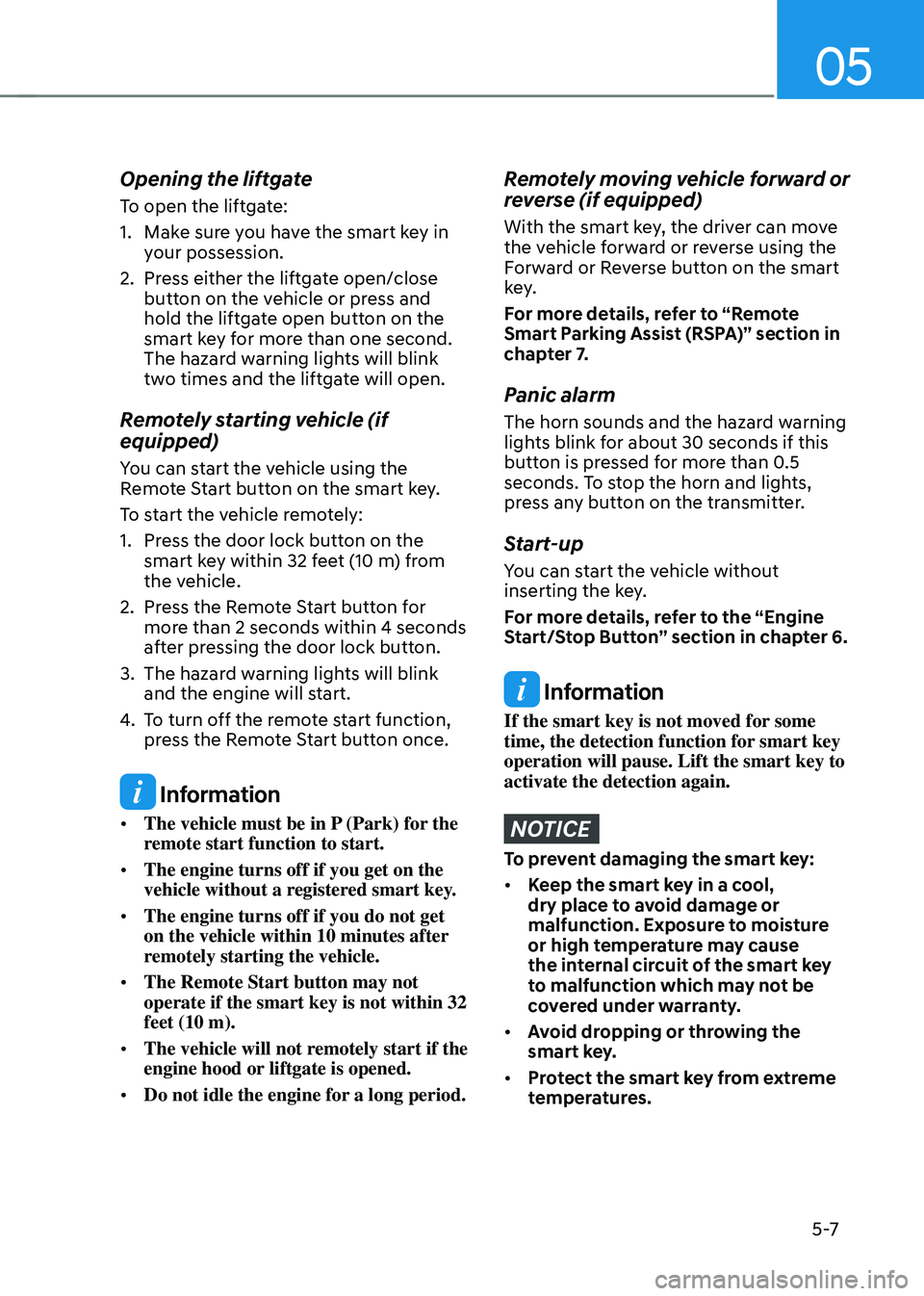
Opening the liftgate
To open the liftgate:
1. Make sure you have the smart key in
your possession.
2. Press either the liftgate open/close
button on the vehicle or press and
hold the liftgate open button on the
smart key for more than one second.
The hazard warning lights will blink
two times and the liftgate will open.
Remotely starting vehicle (if
equipped)
You can start the vehicle using the
Remote Start button on the smart key.
To start the vehicle remotely:
1. Press the door lock button on the
smart key within 32 feet (10 m) from
the vehicle.
2. Press the Remote Start button for
more than 2 seconds within 4 seconds
after pressing the door lock button.
3. The hazard warning lights will blink
and the engine will start.
4. To turn off the remote start function,
press the Remote Start button once.
Information
• The vehicle must be in P (Park) for the
remote start function to start.
• The engine turns off if you get on the
vehicle without a registered smart key.
• The engine turns off if you do not get
on the vehicle within 10 minutes after
remotely starting the vehicle.
• The Remote Start button may not
operate if the smart key is not within 32
feet (10 m).
• The vehicle will not remotely start if the
engine hood or liftgate is opened.
• Do not idle the engine for a long period.
Remotely moving vehicle forward or
reverse (if equipped)
With the smart key, the driver can move
the vehicle forward or reverse using the
Forward or Reverse button on the smart
key.
For more details, refer to “Remote
Smart Parking Assist (RSPA)” section in
chapter 7.
Panic alarm
The horn sounds and the hazard warning
lights blink for about 30 seconds if this
button is pressed for more than 0.5
seconds. To stop the horn and lights,
press any button on the transmitter.
Start-up
You can start the vehicle without
inserting the key.
For more details, refer to the “Engine
Start/Stop Button” section in chapter 6.
Information
If the smart key is not moved for some
time, the detection function for smart key
operation will pause. Lift the smart key to
activate the detection again.
NOTICE
To prevent damaging the smart key:
• Keep the smart key in a cool,
dry place to avoid damage or
malfunction. Exposure to moisture
or high temperature may cause
the internal circuit of the smart key
to malfunction which may not be
covered under warranty.
• Avoid dropping or throwing the
smart key.
• Protect the smart key from extreme
temperatures.
Page 168 of 598
Convenient features
5-10
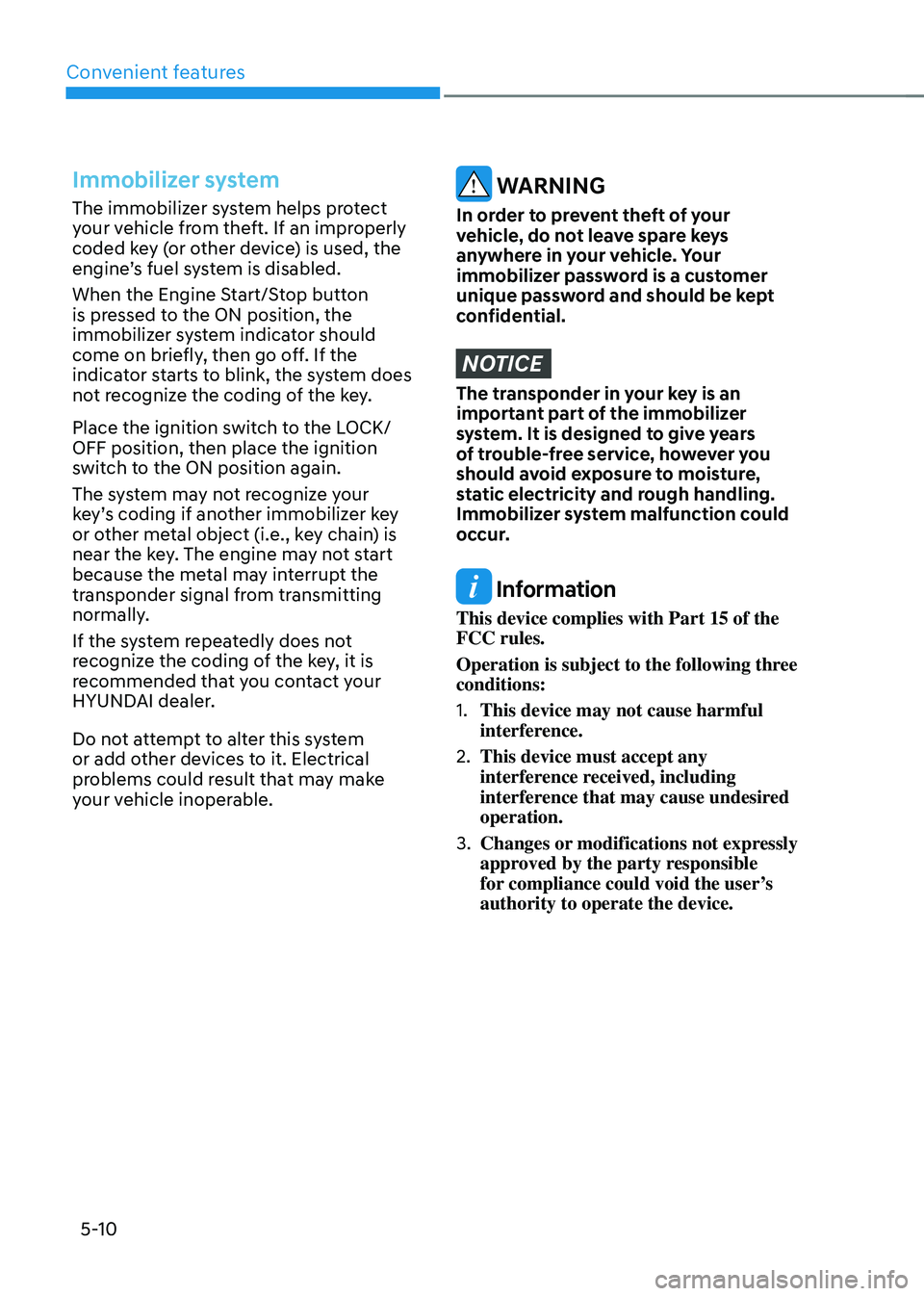
Immobilizer system
The immobilizer system helps protect
your vehicle from theft. If an improperly
coded key (or other device) is used, the
engine’s fuel system is disabled.
When the Engine Start/Stop button
is pressed to the ON position, the
immobilizer system indicator should
come on briefly, then go off. If the
indicator starts to blink, the system does
not recognize the coding of the key.
Place the ignition switch to the LOCK/
OFF position, then place the ignition
switch to the ON position again.
The system may not recognize your
key’s coding if another immobilizer key
or other metal object (i.e., key chain) is
near the key. The engine may not start
because the metal may interrupt the
transponder signal from transmitting
normally.
If the system repeatedly does not
recognize the coding of the key, it is
recommended that you contact your
HYUNDAI dealer.
Do not attempt to alter this system
or add other devices to it. Electrical
problems could result that may make
your vehicle inoperable. WARNING
In order to prevent theft of your
vehicle, do not leave spare keys
anywhere in your vehicle. Your
immobilizer password is a customer
unique password and should be kept
confidential.
NOTICE
The transponder in your key is an
important part of the immobilizer
system. It is designed to give years
of trouble-free service, however you
should avoid exposure to moisture,
static electricity and rough handling.
Immobilizer system malfunction could
occur.
Information
This device complies with Part 15 of the
FCC rules.
Operation is subject to the following three
conditions:
1. This device may not cause harmful
interference.
2. This device must accept any
interference received, including
interference that may cause undesired
operation.
3. Changes or modifications not expressly
approved by the party responsible
for compliance could void the user’s
authority to operate the device.
Page 173 of 598
05
5-15
After unlock the door or start up the
vehicle with digital key, even though
the driver tries to lock the doors by the
central door lock switch, the door lock
will be once locked and immediately
released at the moment of door closed.
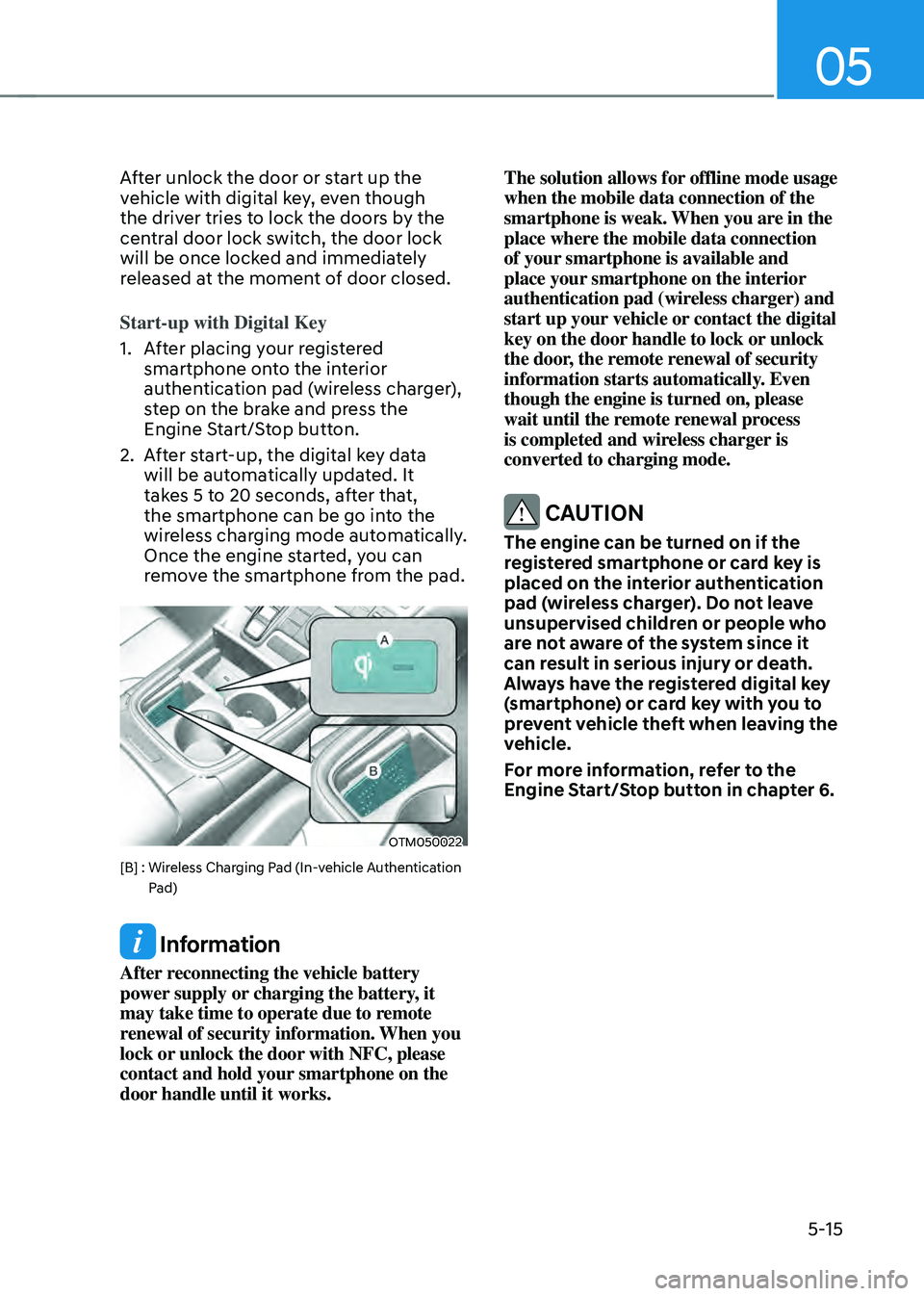
Start-up with Digital Key
1. After placing your registered
smartphone onto the interior
authentication pad (wireless charger),
step on the brake and press the
Engine Start/Stop button.
2. After start-up, the digital key data
will be automatically updated. It
takes 5 to 20 seconds, after that,
the smartphone can be go into the
wireless charging mode automatically.
Once the engine started, you can
remove the smartphone from the pad.
OTM050022
[B] : Wireless Charging Pad (In-vehicle Authentication Pad)
Information
After reconnecting the vehicle battery
power supply or charging the battery, it
may take time to operate due to remote
renewal of security information. When you
lock or unlock the door with NFC, please
contact and hold your smartphone on the
door handle until it works. The solution allows for offline mode usage
when the mobile data connection of the
smartphone is weak. When you are in the
place where the mobile data connection
of your smartphone is available and
place your smartphone on the interior
authentication pad (wireless charger) and
start up your vehicle or contact the digital
key on the door handle to lock or unlock
the door, the remote renewal of security
information starts automatically. Even
though the engine is turned on, please
wait until the remote renewal process
is completed and wireless charger is
converted to charging mode.
CAUTION
The engine can be turned on if the
registered smartphone or card key is
placed on the interior authentication
pad (wireless charger). Do not leave
unsupervised children or people who
are not aware of the system since it
can result in serious injury or death.
Always have the registered digital key
(smartphone) or card key with you to
prevent vehicle theft when leaving the
vehicle.
For more information, refer to the
Engine Start/Stop button in chapter 6.
Page 174 of 598
Convenient features
5-16
Remote Control with Digital Key
To use the remote control function with
your android smartphone, Bluetooth
must be turned on.
Remote Control Connection with Digital
Key
1. Open Hyundai digital key application
on the smartphone. Select the
vehicle to activate the remote control
function as a main vehicle.
2. Approach with the activated
smartphone app to your vehicle
and you can check whether the
connection is available. If it enables
your smartphone to connect, connect
with your vehicle by pressing the
connect button. The remote control
function is activated after completing
the process.
Remote Control Operation with Digital
Key
You can execute the remote control
operation including door lock/unlock,
panic on/off, remote start / remote
stop and trunk opening. The icon for
each function will be highlighted and
alarm/vibration also provided when the
operation is performed.
Note that you cannot lock your vehicle
using the Hyundai digital key app if any
of the following occurs:
• The POWER button is in ACC or ON
position.
• Any doors are open.
When the smartphone and the vehicle
are connected by the Bluetooth function
but the remote control command
cannot be received over 5 minutes, the
remote control connection is cancelled
automatically.
CAUTION
• If metallic window tint was applied
to your vehicle, it may cause
bad Bluetooth connection or
performance degradation of the
digital key.
• If multiple users operate the remote
control function simultaneously, the
connection between the digital key
and the vehicle might result in failed
commands. Please connect and
operate the remote control function
only the necessary user.
• When using the remote control
operation, the driver (the remote
control user) should leave the vehicle
after confirming the door lock (the
chime sounds once and the hazard
warning lights blink).
• The remote functions of the Digital
Key app enables the vehicle to be
controlled from a set distance. If
the digital key or the vehicle goes
beyond the operable distance, the
remote control function might be
disconnected or cancelled.
• If the digital key (smartphone) is
connected with the vehicle for the
remote control, the driver with the
key goes far away from the vehicle,
the function might not work.
• If the remote control operation
is executed where the mobile
connection is weak, Bluetooth
connection is poor due to several
Bluetooth devices or there is an
object such as metal or concrete, it
might be delayed or the operable
distance might decrease. You should
not cover the smartphone with your
hand or place other devices which
can cause frequency interference. It
may result in poor performance.
• If the remote control function is not
available, please use NFC function to
lock or unlock the doors.