power steering HYUNDAI SANTA FE HYBRID 2021 Owners Manual
[x] Cancel search | Manufacturer: HYUNDAI, Model Year: 2021, Model line: SANTA FE HYBRID, Model: HYUNDAI SANTA FE HYBRID 2021Pages: 598, PDF Size: 66.6 MB
Page 32 of 598
![HYUNDAI SANTA FE HYBRID 2021 Owners Manual 2-4
Vehicle Information, Consumer Information and Reporting Safety Defects
The actual shape may differ from the illustration.
OTMA020001C[A] : Type A, [B] : Type B
1. Inside door handle ..............](/img/35/56184/w960_56184-31.png "HYUNDAI SANTA FE HYBRID 2021 Owners Manual 2-4
Vehicle Information, Consumer Information and Reporting Safety Defects
The actual shape may differ from the illustration.
OTMA020001C[A] : Type A, [B] : Type B
1. Inside door handle ..............")
2-4
Vehicle Information, Consumer Information and Reporting Safety Defects
The actual shape may differ from the illustration.
OTMA020001C[A] : Type A, [B] : Type B
1. Inside door handle ................................5-28
2. Power window switches ......................5-54
3. Power window lock switch .................5-56
/Electronic child safety lock button
....5-30
4. Side view mirror folding button ............5-51
5. Side view mirror control switch ............5-51
6. Central door lock switch ......................5-28
7. Instrument panel illumination control
switch
......................................................4-5
8. Lane Safety button ................................7-19
9. Power Liftgate open/close button ......5-66
10. ESC (Electronic Stability Control) OFF
button
....................................................6-28
11. EPB (Electronic Parking Brake) switch .6-19
12. Steering wheel ......................................5-36
13. Steering wheel tilt/telescopic switch ...5-37
14. Fuse box ................................................9-43
15. Hood release lever ................................5-63
16. Seat ..........................................................3-3
INTERIOR OVERVIEW
Page 53 of 598
Seats & Safety System
3-8
Power adjustment (if equipped)
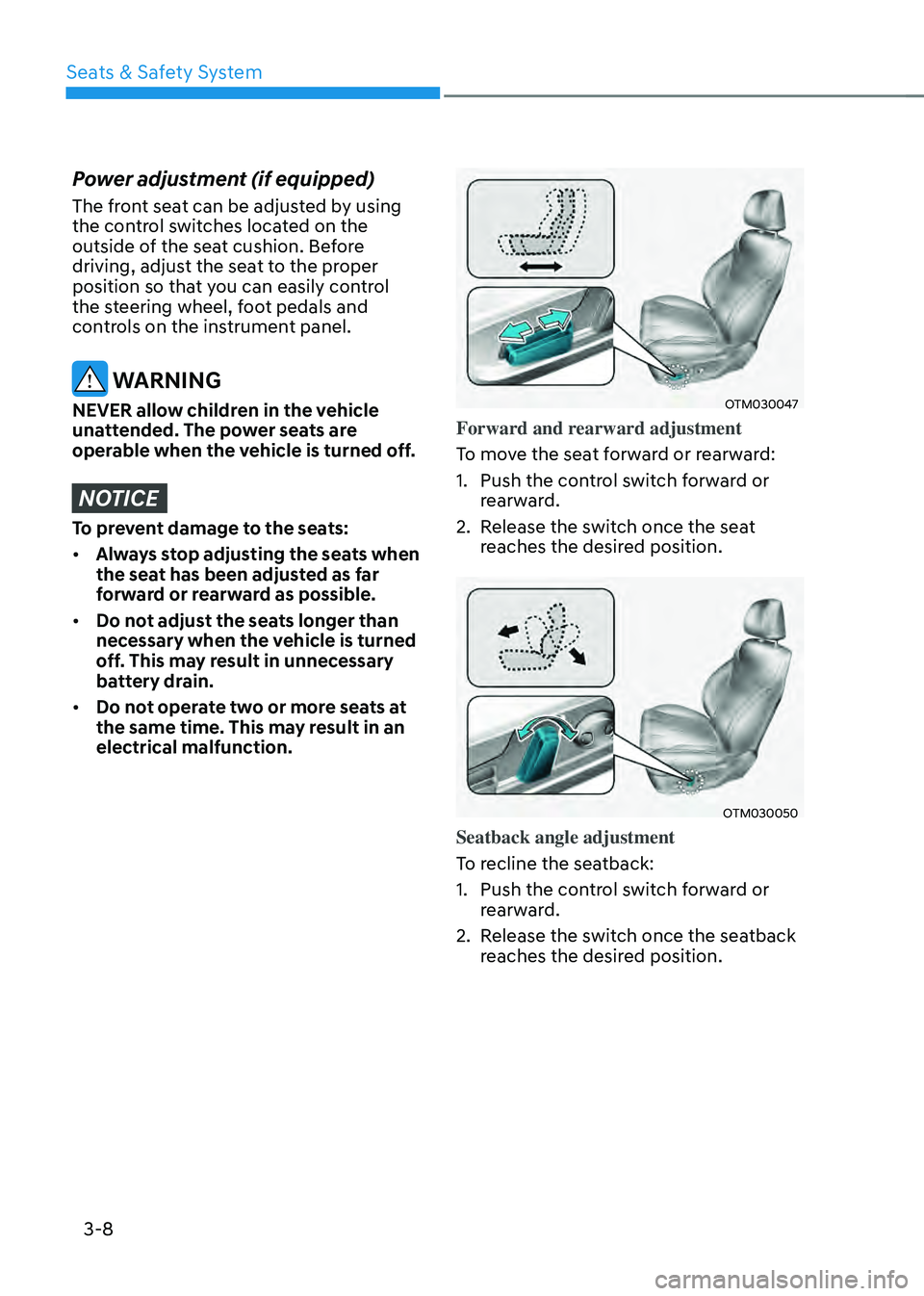
The front seat can be adjusted by using
the control switches located on the
outside of the seat cushion. Before
driving, adjust the seat to the proper
position so that you can easily control
the steering wheel, foot pedals and
controls on the instrument panel.
WARNING
NEVER allow children in the vehicle
unattended. The power seats are
operable when the vehicle is turned off.
NOTICE
To prevent damage to the seats:
• Always stop adjusting the seats when
the seat has been adjusted as far
forward or rearward as possible.
• Do not adjust the seats longer than
necessary when the vehicle is turned
off. This may result in unnecessary
battery drain.
• Do not operate two or more seats at
the same time. This may result in an
electrical malfunction.
OTM030047
Forward and rearward adjustment
To move the seat forward or rearward:
1. Push the control switch forward or
rearward.
2. Release the switch once the seat
reaches the desired position.
OTM030050
Seatback angle adjustment
To recline the seatback:
1. Push the control switch forward or
rearward.
2. Release the switch once the seatback
reaches the desired position.
Page 113 of 598

4.Instrument cluster
Instrument cluster
Instrument cluster ........................................................................\
....................4-4Instrument cluster control ........................................................................\
...................4-5
Instrument panel illumination ........................................................................\
...........4-5
Gauges and meters ........................................................................\
..............................4-5
Speedometer ........................................................................\
.....................................4-5
Power gauge ........................................................................\
.....................................4-6
Fuel gauge ........................................................................\
.........................................4-6
Hybrid battery SOC (State of Charge) gauge ...........................................................4 -7
Outside temperature gauge ........................................................................\
..............4 -7
Odometer ........................................................................\
..........................................4-8
Distance to empty ........................................................................\
............................4-8
Fuel economy (for 12.3-inch cluster) ......................................................................4-9
Transmission shift indicator ........................................................................\
................4-9
Automatic transmission shift indicator ...................................................................4-9
Warning and indicator lights ........................................................................\
.............4-10
Seat belt warning light ........................................................................\
....................4-10
Air bag warning light ........................................................................\
.......................4-10
Parking brake & Brake fluid warning light ..............................................................4-10
Regenerative brake warning light ........................................................................\
....4-11
Anti-lock Brake System (ABS) warning light ...........................................................4-11
Electronic Brake Force Distribution (EBD) system warning light .........................4-12
Electric Power Steering (EPS) warning light ..........................................................4-12
Malfunction Indicator Lamp (MIL) ........................................................................\
..4-13
Electronic Parking Brake (EPB) warning light ........................................................4-13
AUTO HOLD indicator light ........................................................................\
.............4-13
Charging system warning light ........................................................................\
.......4-14
Engine oil pressure warning light ........................................................................\
...4-14
Low fuel level warning light ........................................................................\
............4-15
Service warning light ........................................................................\
.......................4-15
Exhaust system (GPF) warning light .......................................................................4-15
Master warning light ........................................................................\
........................4-16
Low tire pressure warning light ........................................................................\
......4-16
Forward Safety warning light ........................................................................\
...........4-17
Lane Safety indicator light ........................................................................\
...............4-17
4 Wheel Drive (4WD) warning light ........................................................................\
.4-17
4 Wheel Drive (4WD) LOCK indicator light ..............................................................4-17
LED headlight warning light ........................................................................\
............4-18
Icy road warning light ........................................................................\
......................4-18
Ready indicator ........................................................................\
................................4-19
4
Page 124 of 598
Instrument cluster
4-12
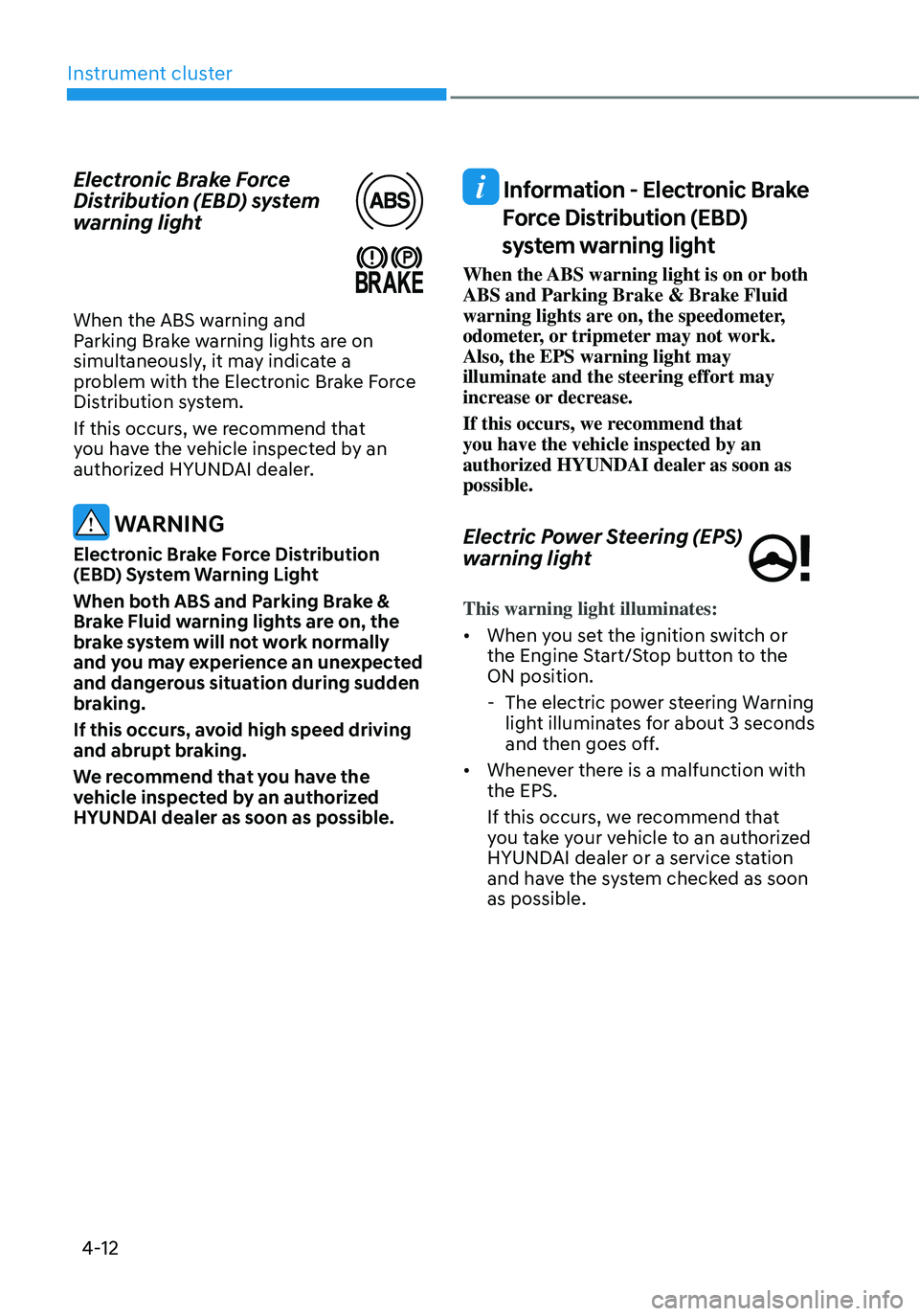
Electronic Brake Force
Distribution (EBD) system
warning light
When the ABS warning and Parking Brake warning lights are on
simultaneously, it may indicate a
problem with the Electronic Brake Force
Distribution system.
If this occurs, we recommend that
you have the vehicle inspected by an
authorized HYUNDAI dealer.
WARNING
Electronic Brake Force Distribution
(EBD) System Warning Light
When both ABS and Parking Brake &
Brake Fluid warning lights are on, the
brake system will not work normally
and you may experience an unexpected
and dangerous situation during sudden
braking.
If this occurs, avoid high speed driving
and abrupt braking.
We recommend that you have the
vehicle inspected by an authorized
HYUNDAI dealer as soon as possible.
Information - Electronic Brake
Force Distribution (EBD)
system warning light
When the ABS warning light is on or both
ABS and Parking Brake & Brake Fluid
warning lights are on, the speedometer,
odometer, or tripmeter may not work.
Also, the EPS warning light may
illuminate and the steering effort may
increase or decrease.
If this occurs, we recommend that
you have the vehicle inspected by an
authorized HYUNDAI dealer as soon as
possible.
Electric Power Steering (EPS)
warning light
This warning light illuminates:
• When you set the ignition switch or
the Engine Start/Stop button to the
ON position.
-The electric power steering Warning
light illuminates for about 3 seconds
and then goes off.
• Whenever there is a malfunction with
the EPS.
If this occurs, we recommend that
you take your vehicle to an authorized
HYUNDAI dealer or a service station
and have the system checked as soon
as possible.
Page 159 of 598

Convenient features
Accessing your vehicle ........................................................................\
.............5-4Smart key ........................................................................\
..............................................5-4
Immobilizer system ........................................................................\
............................5-10
Hyundai Digital Key ........................................................................\
.............................5-11
Door locks........................................................................\
................................. 5-27Operating door locks from outside the vehicle........................................................5-27
Operating door locks from inside the vehicle ..........................................................5-28
Auto door lock/unlock features ........................................................................\
......... 5-30
Electronic child safety lock
........................................................................\
...............5-30
Theft-alarm system ........................................................................\
.................5-32
Integrated memory system
........................................................................\
....5-33Storing memory positions ........................................................................\
.................5-33
Recalling memory positions ........................................................................\
..............5-34
Resetting the system ........................................................................\
.........................5-34
Easy access function ........................................................................\
..........................5-35
Steering wheel ........................................................................\
........................5-36Electric Power Steering (EPS) ........................................................................\
............5-36
Tilt / Telescopic steering ........................................................................\
....................5-37
Heated steering wheel ........................................................................\
.......................5-37
Horn ........................................................................\
..................................................... 5-38
Mirrors ........................................................................\
.....................................5-39Inside rearview mirror ........................................................................\
........................5-39
Side view mirrors ........................................................................\
...............................5-50
Reverse parking aid ........................................................................\
............................5-52
Windows ........................................................................\
..................................5-54Power windows ........................................................................\
..................................5-55
Panoramic sunroof ........................................................................\
..................5-58Sunshade ........................................................................\
............................................5-59
Sliding the sunroof ........................................................................\
.............................5-59
Tilting the sunroof ........................................................................\
.............................5-60
Closing the sunroof ........................................................................\
...........................5-60
Resetting the sunroof ........................................................................\
........................5-61
Sunroof open warning ........................................................................\
.......................5-62
5.Convenient features
5
Page 161 of 598

Climate control additional features ..............................................................5-106Auto defogging system ........................................................................\
....................5-106
Auto dehumidify ........................................................................\
................................5-107
Recirculating air when washer fluid is used ...........................................................5-108
Sunroof inside air recirculation ........................................................................\
.......5-108
Auto. Controls That Use Climate Control Settings (for driver’s seat) ...................5-108
Storage compartment ........................................................................\
...........5-109Center console storage ........................................................................\
....................5-109
Glove box ........................................................................\
..........................................5-109
Tr a y ........................................................................\
.....................................................5-110
Luggage tray ........................................................................\
......................................5-110
Interior features ........................................................................\
......................5-111Cup holder ........................................................................\
..........................................5-111
Ashtray ........................................................................\
...............................................5-112
Sunvisor ........................................................................\
.............................................5-112
Power outlet ........................................................................\
......................................5-113
USB charger ........................................................................\
.......................................5-114
AC Inverter ........................................................................\
.........................................5-114
Wireless smart phone charging system ...................................................................5-116
Clock ........................................................................\
..................................................5-119
Coat hook ........................................................................\
...........................................5-119
Floor mat anchor(s) ........................................................................\
..........................5-120
Side curtain ........................................................................\
.......................................5-120
Luggage net holder ........................................................................\
...........................5-121
Cargo security screen ........................................................................\
.......................5-122
Exterior features ........................................................................\
.....................5-123Roof side rails ........................................................................\
....................................5-123
Infotainment system ........................................................................\
..............5-124USB Port ........................................................................\
............................................5-124
Antenna ........................................................................\
.............................................5-124
Steering wheel remote controls ........................................................................\
......5-124
Infotainment system ........................................................................\
.........................5-125
Voice recognition
........................................................................\
..............................5-125
Bluetooth® Wireless Technology ........................................................................\
.....5-126
5. Convenient features
5
Page 194 of 598
Convenient features
5-36
Electric Power Steering (EPS)
The system assists you with steering the
vehicle. If the vehicle is turned off or
if the power steering system becomes
inoperative, you may still steer the
vehicle, but it will require increased
steering effort.
Should you notice any change in the
effort required to steer during normal
vehicle operation, we recommend that
you have the system checked by an
authorized HYUNDAI dealer.
CAUTION
If Electric Power Steering does not
operate normally, the warning light and the message ‘Check motor driven
power steering’ will illuminate on the
instrument cluster. You may steer the
vehicle, but it will require increased
steering efforts. We recommend that
you take the vehicle to an authorized
HYUNDAI dealer and have the system
checked as soon as possible.
Information
The following symptoms may occur during
normal vehicle operation:
• The steering effort may be high
immediately after pressing the Engine
Start/Stop button to the ON position.
This happens as the system performs
the EPS system diagnostics. When the
diagnostics are completed, the steering
wheel effort will return to its normal
condition.
• When the battery voltage is low, you
might have to put more steering effort.
However, it is a temporary condition so
that it will return to normal condition
after charging the battery.
• A click noise may be heard from the
EPS relay after the Engine Start/Stop
button is in the ON or OFF position.
• Motor noise may be heard when the
vehicle is at a stop or at a low driving
speed.
• When you operate the steering wheel
in low temperatures, abnormal noise
may occur. If the temperature rises, the
noise will disappear. This is a normal
condition.
• When an error is detected from EPS,
the steering effort assist function will
not be activated in order to prevent
fatal accidents. Instrument cluster
warning lights may be on or the
steering effort may be high. If these
symptoms occur, drive the vehicle
to a safe area as soon as it is safe to
do so. We recommend that you have
the system checked by an authorized
HYUNDAI dealer as soon as possible.
STEERING WHEEL
Page 282 of 598
Convenient features5-124
INFOTAINMENT SYSTEM
NOTICE
• If you install an aftermarket HID
head lamp, your vehicle’s audio and
electronic devices may not function
properly.
• Prevent chemicals such as perfume,
cosmetic oil, sun cream, hand
cleaner, and air freshener from
contacting the interior parts
because they may cause damage or
discoloration.
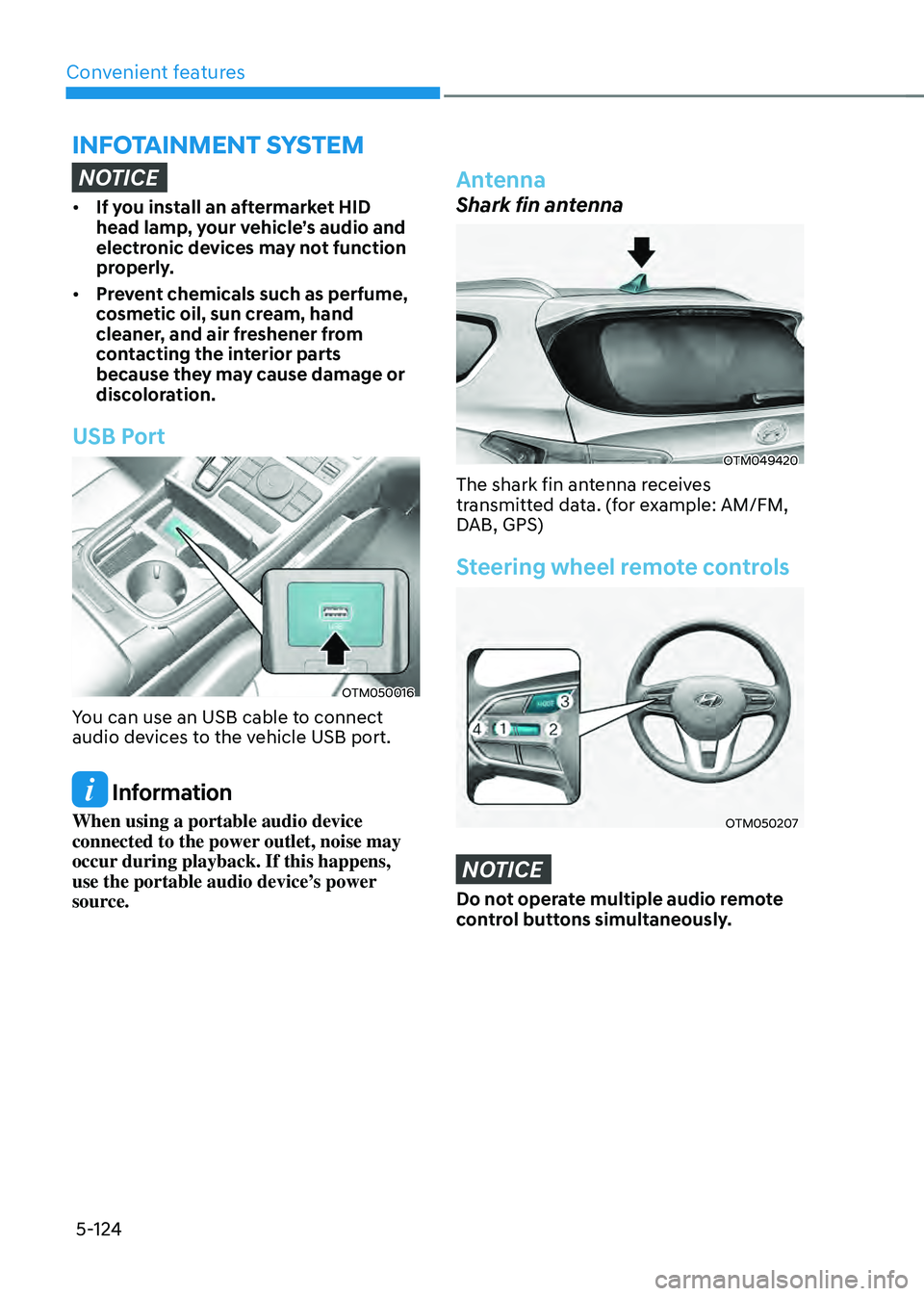
USB Port
OTM050016
You can use an USB cable to connect
audio devices to the vehicle USB port.
Information
When using a portable audio device
connected to the power outlet, noise may
occur during playback. If this happens,
use the portable audio device’s power
source.
Antenna
Shark fin antenna
OTM049420
The shark fin antenna receives
transmitted data. (for example: AM/FM,
DAB, GPS)
Steering wheel remote controls
OTM050207
NOTICE
Do not operate multiple audio remote
control buttons simultaneously.
Page 289 of 598
06
6-5
IGNITION SWITCH
WARNING
To reduce the risk of SERIOUS INJURY or
DEATH, take the following precautions:
• NEVER allow children or any person
who is unfamiliar with the vehicle to
touch the ignition switch or related
parts. Unexpected and sudden
vehicle movement can occur.
• NEVER reach through the steering
wheel for the ignition switch, or any
other control, while the vehicle is in
motion. The presence of your hand
or arm in this area may cause a loss
of vehicle control resulting in an
accident.
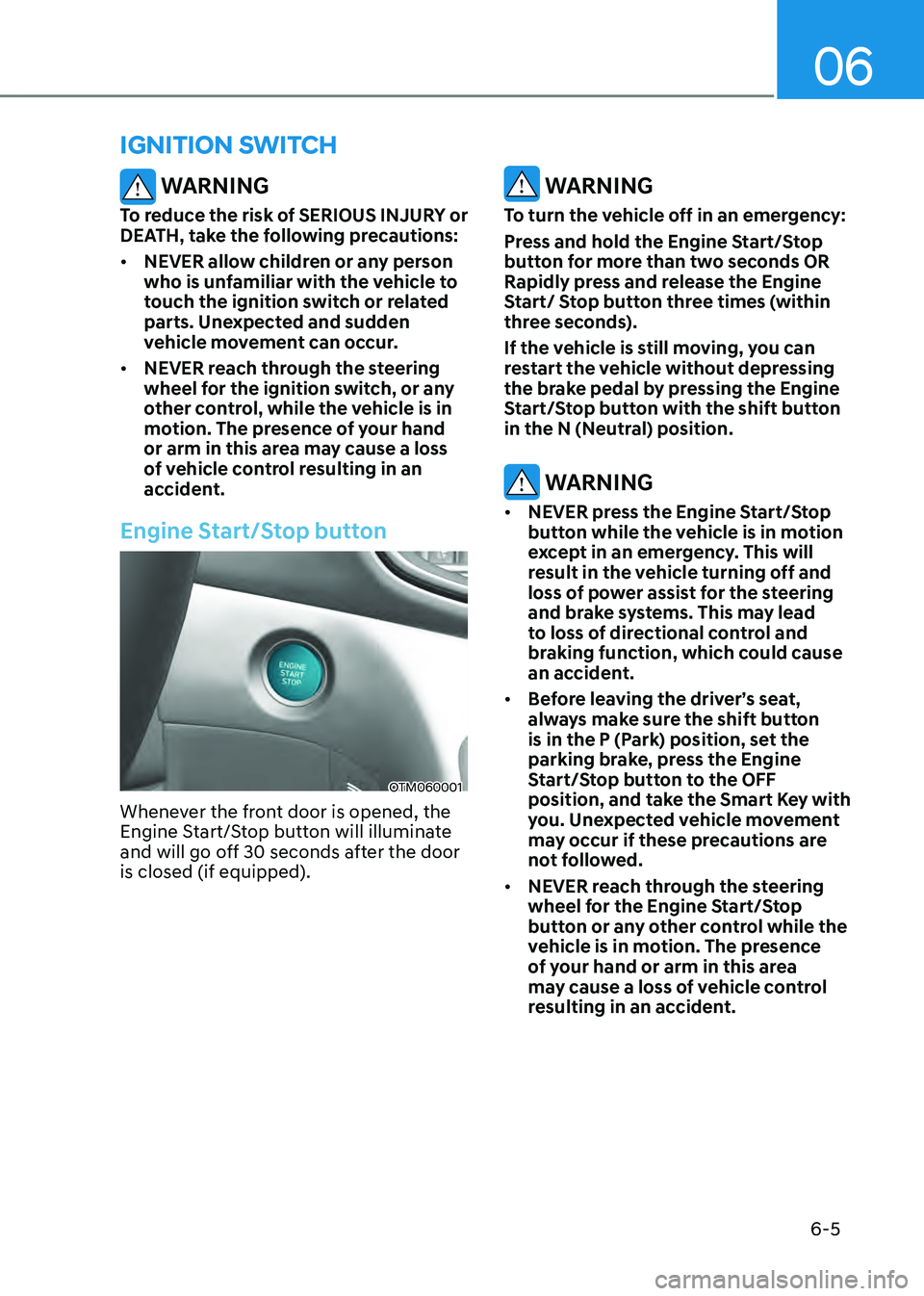
Engine Start/Stop button
OTM060001
Whenever the front door is opened, the
Engine Start/Stop button will illuminate
and will go off 30 seconds after the door
is closed (if equipped).
WARNING
To turn the vehicle off in an emergency:
Press and hold the Engine Start/Stop
button for more than two seconds OR
Rapidly press and release the Engine
Start/ Stop button three times (within
three seconds).
If the vehicle is still moving, you can
restart the vehicle without depressing
the brake pedal by pressing the Engine
Start/Stop button with the shift button
in the N (Neutral) position.
WARNING
• NEVER press the Engine Start/Stop
button while the vehicle is in motion
except in an emergency. This will
result in the vehicle turning off and
loss of power assist for the steering
and brake systems. This may lead
to loss of directional control and
braking function, which could cause
an accident.
• Before leaving the driver’s seat,
always make sure the shift button
is in the P (Park) position, set the
parking brake, press the Engine
Start/Stop button to the OFF
position, and take the Smart Key with
you. Unexpected vehicle movement
may occur if these precautions are
not followed.
• NEVER reach through the steering
wheel for the Engine Start/Stop
button or any other control while the
vehicle is in motion. The presence
of your hand or arm in this area
may cause a loss of vehicle control
resulting in an accident.
Page 290 of 598
Driving your vehicle
6-6
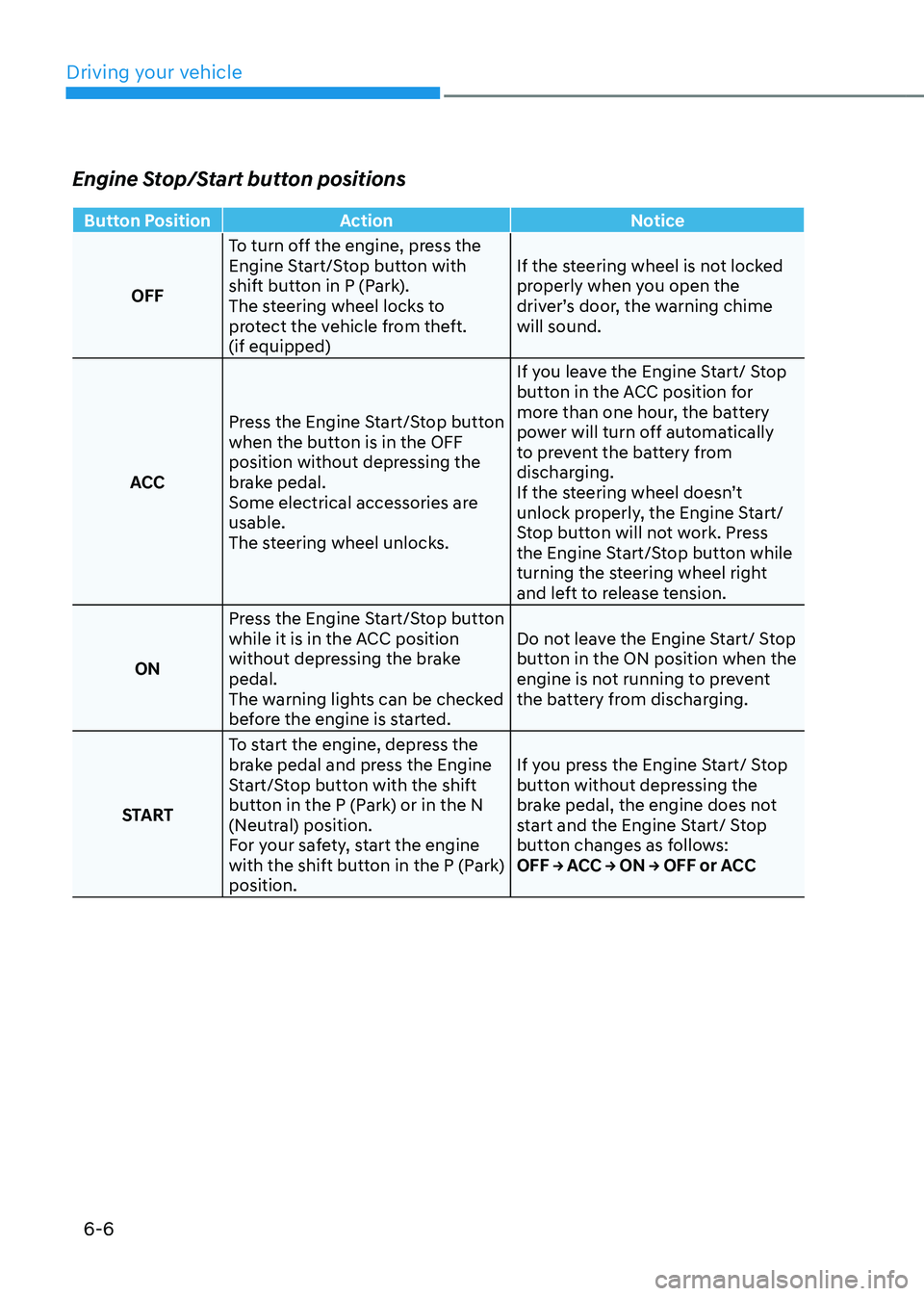
Engine Stop/Start button positions
Button PositionAction Notice
OFF To turn off the engine, press the
Engine Start/Stop button with
shift button in P (Park).
The steering wheel locks to
protect the vehicle from theft.
(if equipped) If the steering wheel is not locked
properly when you open the
driver’s door, the warning chime
will sound.
ACC Press the Engine Start/Stop button
when the button is in the OFF
position without depressing the
brake pedal.
Some electrical accessories are
usable.
The steering wheel unlocks. If you leave the Engine Start/ Stop
button in the ACC position for
more than one hour, the battery
power will turn off automatically
to prevent the battery from
discharging.
If the steering wheel doesn’t
unlock properly, the Engine Start/
Stop button will not work. Press
the Engine Start/Stop button while
turning the steering wheel right
and left to release tension.
ON Press the Engine Start/Stop button
while it is in the ACC position
without depressing the brake
pedal.
The warning lights can be checked
before the engine is started. Do not leave the Engine Start/ Stop
button in the ON position when the
engine is not running to prevent
the battery from discharging.
START To start the engine, depress the
brake pedal and press the Engine
Start/Stop button with the shift
button in the P (Park) or in the N
(Neutral) position.
For your safety, start the engine
with the shift button in the P (Park)
position. If you press the Engine Start/ Stop
button without depressing the
brake pedal, the engine does not
start and the Engine Start/ Stop
button changes as follows:
OFF → ACC → ON → OFF or ACC