buttons Hyundai Santa Fe Sport 2015 Owner's Guide
[x] Cancel search | Manufacturer: HYUNDAI, Model Year: 2015, Model line: Santa Fe Sport, Model: Hyundai Santa Fe Sport 2015Pages: 785, PDF Size: 13.38 MB
Page 399 of 785
![Hyundai Santa Fe Sport 2015 Owners Guide Features of your vehicle
306 4
Outgoing Volume
Press the key Select
[Phone] Select [Outgoing Volume]
Use the , buttons to adjust the
outgoing volume level.
✽NOTICE
While on a call, the volume can](/img/35/16759/w960_16759-398.png "Hyundai Santa Fe Sport 2015 Owners Guide Features of your vehicle
306 4
Outgoing Volume
Press the key Select
[Phone] Select [Outgoing Volume]
Use the , buttons to adjust the
outgoing volume level.
✽NOTICE
While on a call, the volume can")
Features of your vehicle
306 4
Outgoing Volume
Press the key Select
[Phone] Select [Outgoing Volume]
Use the , buttons to adjust the
outgoing volume level.
✽NOTICE
While on a call, the volume can be
changed by using the key.
Turning Bluetooth System Off
Press the key Select
[Phone] Select [Bluetooth System
Off]
Once
Bluetooth®Wireless
Technology is turned off,
Bluetooth®
Wireless Technology related features
will not be supported within the audio
system.
✽NOTICE
To t u r n Bluetooth®Wireless
Technology back on, go to
[Phone] and press “Yes”.SETUP
SETUP
SEEK
TRACK
SETUP
Page 419 of 785
![Hyundai Santa Fe Sport 2015 Owners Guide Features of your vehicle
326 4
Streaming Audio
Press the key Select
[Phone] Select [Streaming Audio]
When Streaming Audio is turned on,
you can play music files saved in
your
Bluetooth®Wireless
Tec](/img/35/16759/w960_16759-418.png "Hyundai Santa Fe Sport 2015 Owners Guide Features of your vehicle
326 4
Streaming Audio
Press the key Select
[Phone] Select [Streaming Audio]
When Streaming Audio is turned on,
you can play music files saved in
your
Bluetooth®Wireless
Tec")
Features of your vehicle
326 4
Streaming Audio
Press the key Select
[Phone] Select [Streaming Audio]
When Streaming Audio is turned on,
you can play music files saved in
your
Bluetooth®Wireless
Technology device through the audio
system.
Outgoing Volume
Press the key Select
[Phone] Select [Outgoing Volume]
Use the , buttons to adjust the
outgoing volume level.
✽NOTICE
While on a call, the volume can be
changed by using the key.
Turning Bluetooth System Off
Press the key Select
[Phone] Select [Bluetooth System
Off]
Once
Bluetooth®Wireless
Technology is turned off,
Bluetooth®
Wireless Technology related features
will not be supported within the audio
system.
SETUP
SEEK
TRACK
SETUP SETUP
Page 428 of 785
![Hyundai Santa Fe Sport 2015 Owners Guide 4335
Features of your vehicle
SETUP
Starting Mode
Press the key to display the
Setup screen.
You can select and control options
related to [Display], [Sound],
[Clock/Calendar], [Phone] and
[System].](/img/35/16759/w960_16759-427.png "Hyundai Santa Fe Sport 2015 Owners Guide 4335
Features of your vehicle
SETUP
Starting Mode
Press the key to display the
Setup screen.
You can select and control options
related to [Display], [Sound],
[Clock/Calendar], [Phone] and
[System].")
4335
Features of your vehicle
SETUP
Starting Mode
Press the key to display the
Setup screen.
You can select and control options
related to [Display], [Sound],
[Clock/Calendar], [Phone] and
[System].
Display Settings
Adjusting the Brightness
Press the key Select
[Display] Select [Brightness]
Use the , buttons to adjust the
screen brightness or set the
Brightness on Automatic, Daylight, or
Night mode.
Press the button to reset.
1) Automatic : Adjusts the brightness
automatically
2) Daylight : Always maintains the
brightness on high
3) Night : Always maintains the
brightness on low
Pop-up Mode
Press the key Select
[Display] Select [Mode Pop up]
This feature is used to display the
Pop-up Mode screen when entering
radio and media modes.
When this feature is turned on,
pressing the or key
will display the Pop-up Mode screen.
✽NOTICE
The media Pop-up Mode screen can
be displayed only when two or more
media modes have been connected.
MEDIA RADIO
SETUP
Default
SETUP SETUP
Page 429 of 785
![Hyundai Santa Fe Sport 2015 Owners Guide Features of your vehicle
336 4
Text Scroll
Press the key Select
[Display] Select [Text Scroll]
This feature is used to scroll text dis-
played on the screen when it is too
long to be displayed at onc](/img/35/16759/w960_16759-428.png "Hyundai Santa Fe Sport 2015 Owners Guide Features of your vehicle
336 4
Text Scroll
Press the key Select
[Display] Select [Text Scroll]
This feature is used to scroll text dis-
played on the screen when it is too
long to be displayed at onc")
Features of your vehicle
336 4
Text Scroll
Press the key Select
[Display] Select [Text Scroll]
This feature is used to scroll text dis-
played on the screen when it is too
long to be displayed at once.
When turned on, the text is repeat-
edly scrolled. When turned off, the
text is scrolled just once.
MP3 Information Display
Press the key Select
[Display] Select [Media Display]
This feature is used to change the
information displayed within USB
and MP3 CD modes.
1) Folder File : Displays file name
and folder name
2) Album Artist Song : Displays
album name/artist name/song
Sound Settings
Sound Settings
Press the key Select
[Sound] Select [Sound Setting]
Use the , , , buttons to
adjust the Fader/Balance settings.
Use the , buttons to adjust the
Bass/Middle/Treble settings.
Press the button to reset.
Default
SETUP
SETUP SETUP
Page 431 of 785
![Hyundai Santa Fe Sport 2015 Owners Guide Features of your vehicle
338 4
Touch Screen Beep
Press the key Select
[Sound] Select [Touch Screen
Beep]
This feature is used to turn the touch
screen beep on/off.
Blue Link Voice Volume
Press the](/img/35/16759/w960_16759-430.png "Hyundai Santa Fe Sport 2015 Owners Guide Features of your vehicle
338 4
Touch Screen Beep
Press the key Select
[Sound] Select [Touch Screen
Beep]
This feature is used to turn the touch
screen beep on/off.
Blue Link Voice Volume
Press the")
Features of your vehicle
338 4
Touch Screen Beep
Press the key Select
[Sound] Select [Touch Screen
Beep]
This feature is used to turn the touch
screen beep on/off.
Blue Link Voice Volume
Press the key Select
[Sound] Select [Blue Link Voice
Vol.]
Turn the TUNE knob to adjust the
Blue Link Voice Volume.
❈Blue Link® may differ depending
on the selected audio.
Clock/Calendar Setting
Clock Setting
Press the key Select
[Clock/Calendar] Select [Clock
Settings]
Use the , buttons to set the
Hour, Minutes and AM/PM setting.
✽NOTICE
Press and hold the key (over
0.8 seconds) to set the
Clock/Calendar screen.CLOCK
SETUP
SETUP SETUP
Page 432 of 785
![Hyundai Santa Fe Sport 2015 Owners Guide 4339
Features of your vehicle
Calendar Setting
Press the key Select
[Clock/Calendar] Select [Calendar
Settings]
Use the , buttons to set the
Month, Day and Year setting.
Time Format
Press the key](/img/35/16759/w960_16759-431.png "Hyundai Santa Fe Sport 2015 Owners Guide 4339
Features of your vehicle
Calendar Setting
Press the key Select
[Clock/Calendar] Select [Calendar
Settings]
Use the , buttons to set the
Month, Day and Year setting.
Time Format
Press the key")
4339
Features of your vehicle
Calendar Setting
Press the key Select
[Clock/Calendar] Select [Calendar
Settings]
Use the , buttons to set the
Month, Day and Year setting.
Time Format
Press the key Select
[Clock/Calendar] Select [Time Format]
This feature is used to change the
clock format between 12hr or 24hr.
Clock Display
Press the key Select
[Clock/Calendar] Select [Clock Display
(Power off)].
This feature is used to display a clock
on the screen when the audio sys-
tem is turned off.
SETUP SETUP SETUP
Page 505 of 785
![Hyundai Santa Fe Sport 2015 Owners Guide Features of your vehicle
412 4
RADIO MODE
Basic Mode Screen
1. Mode Display
Displays currently operating mode.
2. Frequency
Displays the current frequency.
3. Preset
Displays current preset number [1]](/img/35/16759/w960_16759-504.png "Hyundai Santa Fe Sport 2015 Owners Guide Features of your vehicle
412 4
RADIO MODE
Basic Mode Screen
1. Mode Display
Displays currently operating mode.
2. Frequency
Displays the current frequency.
3. Preset
Displays current preset number [1]")
Features of your vehicle
412 4
RADIO MODE
Basic Mode Screen
1. Mode Display
Displays currently operating mode.
2. Frequency
Displays the current frequency.
3. Preset
Displays current preset number [1] ~
[6].
4. Preset Display
Displays preset buttons.
5. Info
Displays broadcast information.
6. HD
Changes HD Radio channels.
7. A.store
Automatically saves frequencies with
superior reception to Preset buttons.
Page 506 of 785
4413
Features of your vehicle
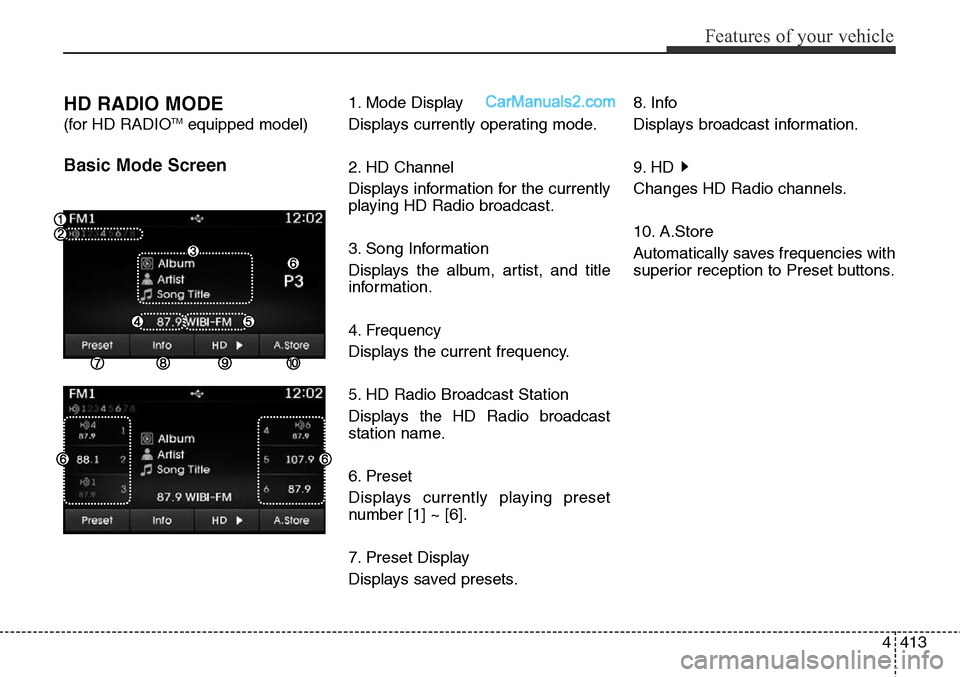
HD RADIO MODE
(for HD RADIOTMequipped model)
Basic Mode Screen
1. Mode Display
Displays currently operating mode.
2. HD Channel
Displays information for the currently
playing HD Radio broadcast.
3. Song Information
Displays the album, artist, and title
information.
4. Frequency
Displays the current frequency.
5. HD Radio Broadcast Station
Displays the HD Radio broadcast
station name.
6. Preset
Displays currently playing preset
number [1] ~ [6].
7. Preset Display
Displays saved presets.8. Info
Displays broadcast information.
9. HD
Changes HD Radio channels.
10. A.Store
Automatically saves frequencies with
superior reception to Preset buttons.
Page 507 of 785
![Hyundai Santa Fe Sport 2015 Owners Guide Features of your vehicle
414 4
Switching to Radio Mode
Pressing the key will change
the operating mode in order of FM1
➟FM2➟AM➟XM1➟XM2➟XM3
If [Mode Pop up] is turned on within
[Display], th](/img/35/16759/w960_16759-506.png "Hyundai Santa Fe Sport 2015 Owners Guide Features of your vehicle
414 4
Switching to Radio Mode
Pressing the key will change
the operating mode in order of FM1
➟FM2➟AM➟XM1➟XM2➟XM3
If [Mode Pop up] is turned on within
[Display], th")
Features of your vehicle
414 4
Switching to Radio Mode
Pressing the key will change
the operating mode in order of FM1
➟FM2➟AM➟XM1➟XM2➟XM3
If [Mode Pop up] is turned on within
[Display], then pressing the
key will display the Radio
Pop-up Mode screen.
Turn the TUNE knob to move the
focus. Press the knob to select.
Searching Radio Frequencies
Using Seek
Press the key to play the
previous/next frequency.
Using TUNE
Turn the TUNE knob to select the
desired frequency.
• FM : Increases/decreased by
200kHz
• AM : Increases/decreased by
10kHz
Using Radio Mode
Selecting Presets/Saving Presets
Press the button to display
the broadcast information for the fre-
quency saved to each button.
Press the ~ buttons to play
the desired preset.
✽NOTICE
While listening to a frequency you
want to save as a preset, press and
hold one of the ~ preset
buttons (over 0.8 seconds) to save
the current frequency to the selected
preset.
61
61
PresetSEEK
TRACK
RADIO
SETUP
RADIO
Page 508 of 785
![Hyundai Santa Fe Sport 2015 Owners Guide 4415
Features of your vehicle
Auto Store
Press the button to automati-
cally save receivable frequencies to
Preset buttons.
✽NOTICE
While Auto Store is operating, press-
ing the [Cancel] button aga](/img/35/16759/w960_16759-507.png "Hyundai Santa Fe Sport 2015 Owners Guide 4415
Features of your vehicle
Auto Store
Press the button to automati-
cally save receivable frequencies to
Preset buttons.
✽NOTICE
While Auto Store is operating, press-
ing the [Cancel] button aga")
4415
Features of your vehicle
Auto Store
Press the button to automati-
cally save receivable frequencies to
Preset buttons.
✽NOTICE
While Auto Store is operating, press-
ing the [Cancel] button again will
cancel Auto Store and restore the
previous frequency.
Scan
Press the key to preview fre-
quencies with superior reception for
5 seconds each.
Press and hold the key (over
0.8 seconds) to preview presets for 5
seconds each.
Once scan is complete, the previous
frequency will be restored.
While Scan is operating, pressing
the key will cancel the scan
operation.
Listening to HD Radio
Stations
HD Radio Technology is a digital
radio technology used by AM and
FM radio station to transmit audio
and data via a digital signal in con-
junction with their analog signals.
While listening to the radio, the HD
Radio icon will become displayed if
receiving an HD Radio broadcast.
Changing HD Radio stations
Press the button to change
HD Radio station.
Viewing Station Information
Press the button to view sta-
tion information.Info
SCAN
SCAN
SCAN
A.Store