light Hyundai Santa Fe Sport 2015 Service Manual
[x] Cancel search | Manufacturer: HYUNDAI, Model Year: 2015, Model line: Santa Fe Sport, Model: Hyundai Santa Fe Sport 2015Pages: 785, PDF Size: 13.38 MB
Page 149 of 785
Features of your vehicle
56 4
Electric power steering (EPS)
The power steering uses a motor to
assist you in steering the vehicle. If
the engine is off or if the power steer-
ing system becomes inoperative, the
vehicle may still be steered, but it will
require increased steering effort.
The motor driven power steering is
controlled by a power steering con-
trol unit which senses the steering
wheel torque and vehicle speed to
command the motor.
The steering becomes heavier as the
vehicle’s speed increases and
becomes lighter as the vehicle’s
speed decreases for optimum steer-
ing control.
Should you notice any change in the
effort required to steer during normal
vehicle operation, have the power
steering checked by an authorized
HYUNDAI dealer.
✽NOTICE
The following symptoms may occur
during normal vehicle operation:
• The EPS warning light does not
illuminate.
• The steering gets heavy immedi-
ately after turning the ignition
switch on. This happens as the sys-
tem performs the EPS system
diagnostics. When the diagnostics
is completed, the steering wheel
will return to its normal condition.
• A click noise may be heard from
the EPS relay after the ignition
switch is turned to the ON or
LOCK (OFF) position.
• A motor noise may be heard when
the vehicle is at a stop or at a low
driving speed.
• If the Electric Power Steering
System does not operate normally,
the warning light will illuminate on
the instrument cluster. The steer-
ing wheel may become difficult to
control or operate abnormally.
Take your vehicle to an authorized
HYUNDAI dealer and have the
vehicle checked as soon as possible.
(Continued)
STEERING WHEEL
CAUTION
• If the Electric Power Steering
System does not operate nor-
mally, the warning light will
illuminate on the instrument
cluster. The steering wheel
may become difficult to con-
trol or operate abnormally.
Take your vehicle to an
authorized HYUNDAI dealer
and have the vehicle checked
as soon as possible.
• When you operate the steer-
ing wheel in low temperature,
abnormal noise could occur. If
temperature rises, the noise
will disappear. This is a normal
condition.
• When the vehicle is stationary,
if you turn the steering wheel
all the way to the left or right
continuously, the steering
wheel becomes heavier from
the end. But this is for your
safety, not system malfunc-
tion. As time passes, the
steering wheel return to its
normal condition.
Page 150 of 785
457
Features of your vehicle
(Continued)
• When you operate the steering
wheel in low temperature, abnor-
mal noise could occur. If tempera-
ture rises, the noise will disappear.
This is a normal condition.
• When the charging system warn-
ing light comes on or the voltage is
low (When the alternator (or bat-
tery) does not operate normally or
it malfunctions), the steering wheel
may get heavy and become diffi-
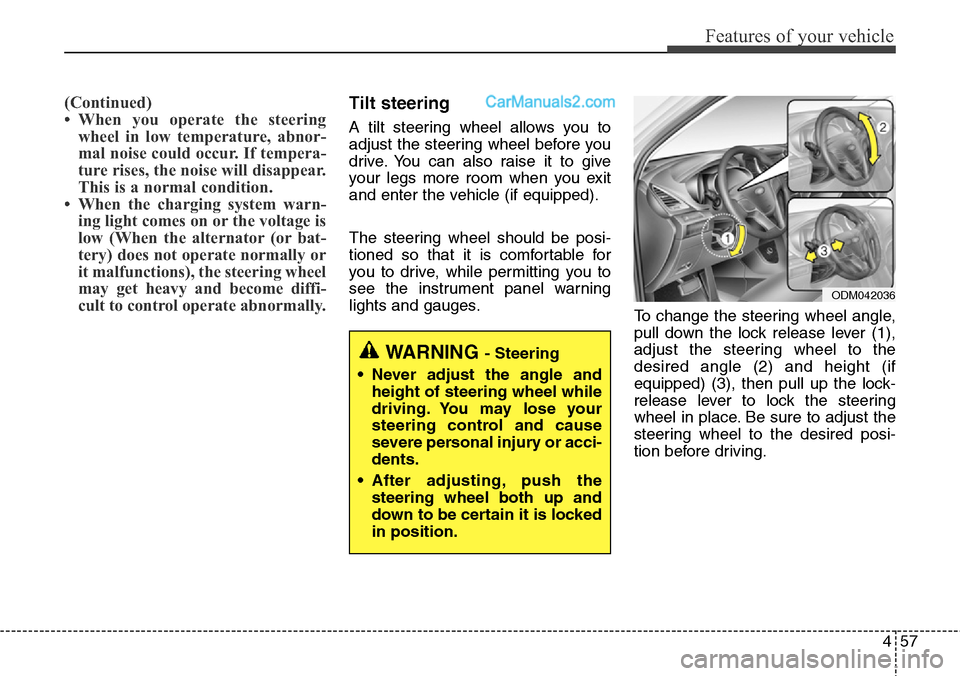
cult to control operate abnormally.Tilt steering
A tilt steering wheel allows you to
adjust the steering wheel before you
drive. You can also raise it to give
your legs more room when you exit
and enter the vehicle (if equipped).
The steering wheel should be posi-
tioned so that it is comfortable for
you to drive, while permitting you to
see the instrument panel warning
lights and gauges.
To change the steering wheel angle,
pull down the lock release lever (1),
adjust the steering wheel to the
desired angle (2) and height (if
equipped) (3), then pull up the lock-
release lever to lock the steering
wheel in place. Be sure to adjust the
steering wheel to the desired posi-
tion before driving.
WARNING - Steering
• Never adjust the angle and
height of steering wheel while
driving. You may lose your
steering control and cause
severe personal injury or acci-
dents.
• After adjusting, push the
steering wheel both up and
down to be certain it is locked
in position.
ODM042036
Page 153 of 785
Features of your vehicle
60 4
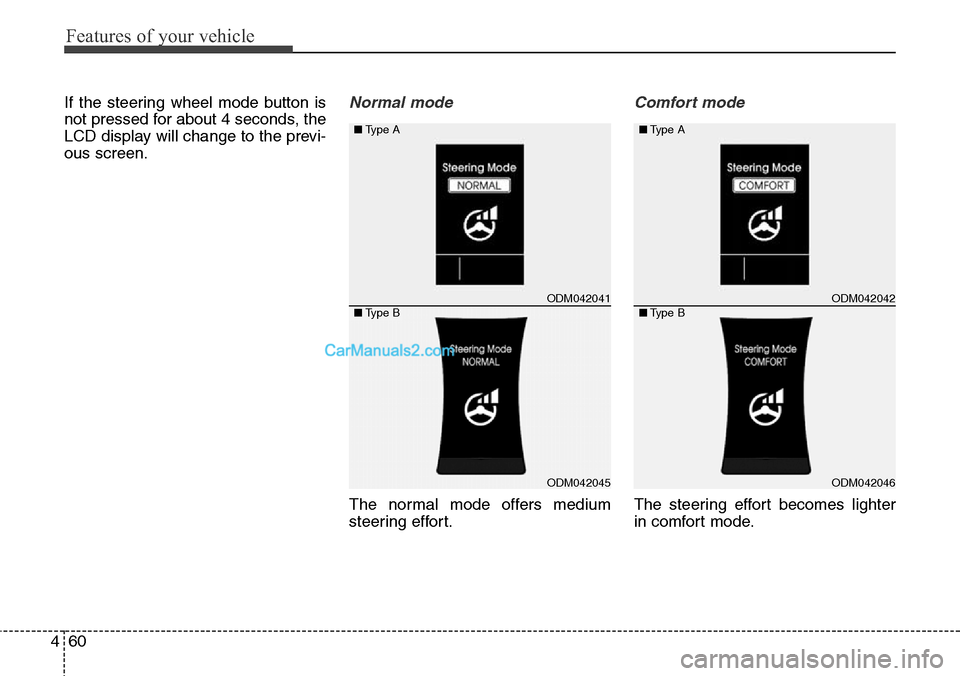
If the steering wheel mode button is
not pressed for about 4 seconds, the
LCD display will change to the previ-
ous screen.Normal mode
The normal mode offers medium
steering effort.
Comfort mode
The steering effort becomes lighter
in comfort mode.
ODM042041
ODM042045
■Type A
■Type BODM042042
ODM042046 ■Type A
■Type B
Page 155 of 785
Features of your vehicle
62 4
MIRRORS
Inside rearview mirror
Adjust the rearview mirror so that the
center view through the rear window
is seen. Make this adjustment before
you start driving.
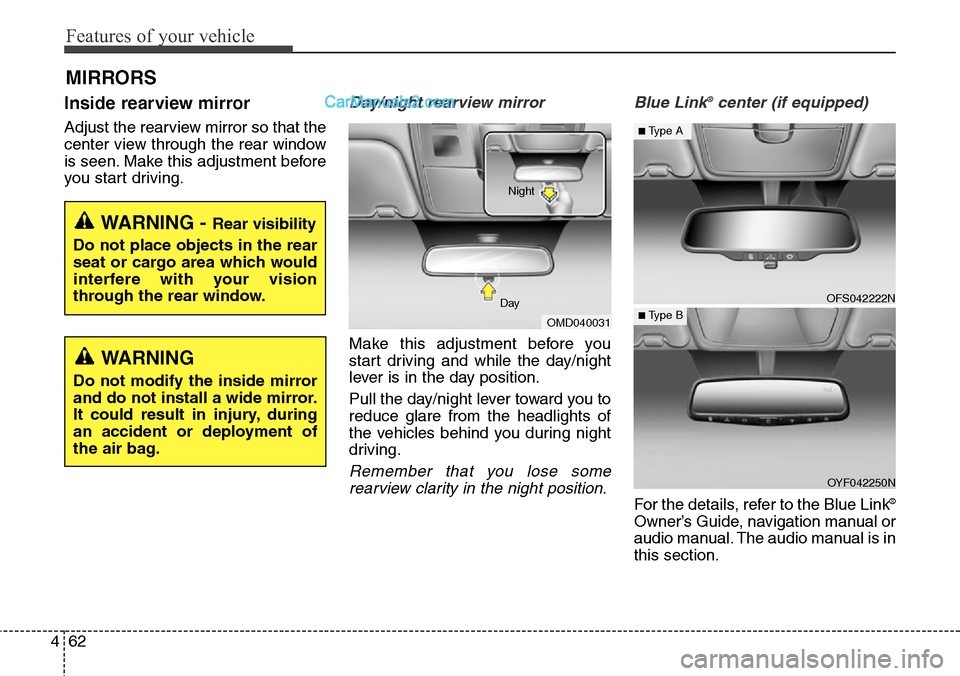
Day/night rearview mirror
Make this adjustment before you
start driving and while the day/night
lever is in the day position.
Pull the day/night lever toward you to
reduce glare from the headlights of
the vehicles behind you during night
driving.
Remember that you lose some
rearview clarity in the night position.Blue Link
®center (if equipped)
For the details, refer to the Blue Link®
Owner’s Guide, navigation manual or
audio manual. The audio manual is in
this section.
WARNING - Rear visibility
Do not place objects in the rear
seat or cargo area which would
interfere with your vision
through the rear window.
OMD040031 DayNight
WARNING
Do not modify the inside mirror
and do not install a wide mirror.
It could result in injury, during
an accident or deployment of
the air bag.
OFS042222N
OYF042250N
■Type A
■ Type B
Page 156 of 785
463
Features of your vehicle
Electric chromic mirror (ECM)
with compass
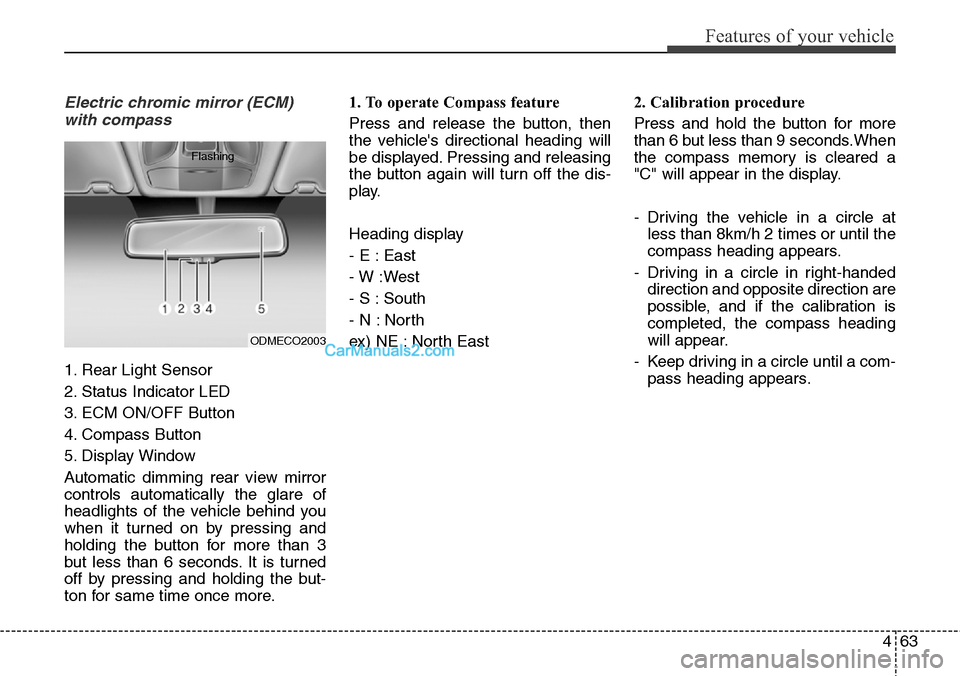
1. Rear Light Sensor
2. Status Indicator LED
3. ECM ON/OFF Button
4. Compass Button
5. Display Window
Automatic dimming rear view mirror
controls automatically the glare of
headlights of the vehicle behind you
when it turned on by pressing and
holding the button for more than 3
but less than 6 seconds. It is turned
off by pressing and holding the but-
ton for same time once more.1. To operate Compass feature
Press and release the button, then
the vehicle's directional heading will
be displayed. Pressing and releasing
the button again will turn off the dis-
play.
Heading display
- E : East
- W :West
- S : South
- N : North
ex) NE : North East2. Calibration procedure
Press and hold the button for more
than 6 but less than 9 seconds.When
the compass memory is cleared a
"C" will appear in the display.
- Driving the vehicle in a circle at
less than 8km/h 2 times or until the
compass heading appears.
- Driving in a circle in right-handed
direction and opposite direction are
possible, and if the calibration is
completed, the compass heading
will appear.
- Keep driving in a circle until a com-
pass heading appears.
ODMECO2003 Flashing
Page 159 of 785
Features of your vehicle
66 4
Electric chromic mirror (ECM)
with compass and HomeLink®
system (if equipped)
Your vehicle may be equipped with a
Gentex Automatic-Dimming Mirror
with a Z-Nav™ Electronic Compass
Display and an Integrated HomeLink
®
Wireless Control System.
During nighttime driving, this feature
will automatically detect and reduce
rearview mirror glare while the com-
pass indicates the direction the vehi-
cle is pointed. The HomeLink
®
Universal Transceiver allows you to
activate your garage door(s), electric
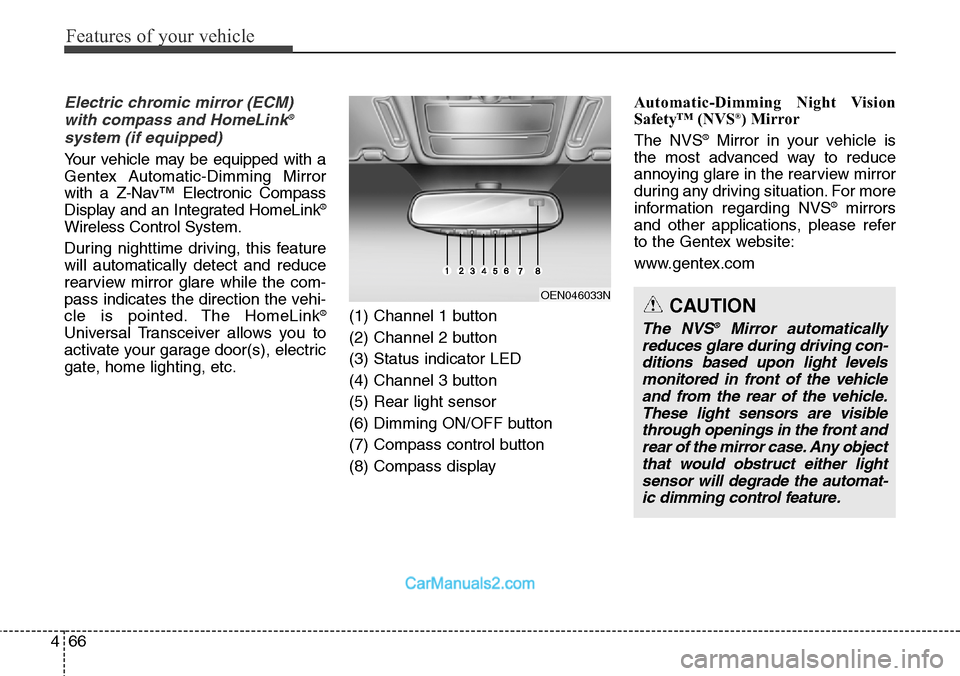
gate, home lighting, etc.(1) Channel 1 button
(2) Channel 2 button
(3) Status indicator LED
(4) Channel 3 button
(5) Rear light sensor
(6) Dimming ON/OFF button
(7) Compass control button
(8) Compass display Automatic-Dimming Night Vision
Safety™ (NVS
®) Mirror
The NVS®Mirror in your vehicle is
the most advanced way to reduce
annoying glare in the rearview mirror
during any driving situation. For more
information regarding NVS
®mirrors
and other applications, please refer
to the Gentex website:
www.gentex.com
OEN046033NCAUTION
The NVS®Mirror automatically
reduces glare during driving con-
ditions based upon light levels
monitored in front of the vehicle
and from the rear of the vehicle.
These light sensors are visible
through openings in the front and
rear of the mirror case. Any object
that would obstruct either light
sensor will degrade the automat-
ic dimming control feature.
Page 162 of 785
469
Features of your vehicle
1. Press and hold the button for
more than 6 seconds. When the
compass memory is cleared a "C"
will appear in the display.
2. To calibrate the compass, drive
the vehicle in 2 complete circles at
less than 8 km/h (5 mph).
Integrated HomeLink
®Wireless Control
System
The HomeLink
®Wireless Control
System provides a convenient way to
replace up to three hand-held radio-
frequency (RF) transmitters with a
single built-in device. This innovative
feature will learn the radio frequency
codes of most current transmitters to
operate devices such as gate opera-
tors, garage door openers, entry
door locks, security systems, even
home lighting. Both standard and
rolling code-equipped transmitters
can be programmed by following the
outlined procedures. Additional
HomeLink
®information can be found
at: www.homelink.com or by calling
1-800-355-3515.Retain the original transmitter of the
RF device you are programming for
use in other vehicles as well as for
future HomeLink
®programming. It is
also suggested that upon the sale of
the vehicle, the programmed
HomeLink
®buttons be erased for
security purposes.
CAUTION
Before programming HomeLink®
to a garage door opener or gate
operator, make sure that people
and objects are out of the way of
the device to prevent potential
harm or damage. Do not use
HomeLink
®with any garage door
opener that lacks the safety stop
and reverse features required by
U.S. federal safety standards
(this includes any garage door
opener model manufactured
before April 1, 1982). A garage
door that cannot detect an object
- signaling the door to stop and
reverse - does not meet current
U.S. federal safety standards.
Using a garage door opener with-
out these features increases the
risk of serious injury or death.
Page 163 of 785
Features of your vehicle
70 4
Programming HomeLink®
✽NOTICE
• When programming a garage
door opener, it is advised to park
the vehicle outside of the garage.
• It is recommended that a new bat-
tery be placed in the hand-held
transmitter of the device being pro-
grammed to HomeLink
®for quick-
er training and accurate transmis-
sion of the radio-frequency signal.
• Some vehicles may require the
ignition switch to be turned to the
second (or "accessories") position
for programming and/or opera-
tion of HomeLink.
• In the event that there are still pro-
gramming difficulties or questions
after following the programming
steps listed below, contact
HomeLink
®at: www.homelink.com
or 1-800-355-3515.
Standard programming
To train most devices, follow these
instructions:
1. For first-time programming, press
and hold the two outside buttons,
HomeLink
®Channel 1 and Channel
3 Buttons, until the indicator light
begins to flash (after 20 seconds).
Release both buttons. Do not hold
the buttons for longer than 30 sec-
onds.
2. Position the end of your hand-held
transmitter 1-3 inches (2-8 cm)
away from the HomeLink
®buttons
while keeping the indicator light in
view.
3. Simultaneously press and hold
both the HomeLink
®and hand-
held transmitter button. DO NOT
release the buttons until step 4
has been completed.
4. While continuing to hold the but-
tons the red Indicator Status LED
will flash slowly and then rapidly
after HomeLink
®successfully
trains to the frequency signal from
the hand-held transmitter. Release
both buttons.5. Press and hold the just-trained
HomeLink
®button and observe
the red Status Indicator LED. If the
indicator light stays on constantly,
programming is complete and
your device should activate when
the HomeLink
®button is pressed
and released.
6. To program the remaining two
HomeLink
®buttons, follow steps 2
through 5.
Page 164 of 785
471
Features of your vehicle
Rolling code programming
Rolling code devices which are
"code-protected" and manufactured
after 1996 may be determined by the
following:
• Reference the device owner's
manual for verification.
• The handheld transmitter appears
to program the HomeLink
®
Universal Transceiver but does not
activate the device.
• Press and hold the trained
HomeLink button. The device has
the rolling code feature if the indi-
cator light flashes rapidly and then
turns solid after 2 seconds.To train rolling code devices, follow
these instructions:
1. At the garage door opener receiver
(motor-head unit) in the garage,
locate the "learn" or "smart" button.
This can usually be found where the
hanging antenna wire is attached to
the motor-head unit. Exact location
and color of the button may vary by
garage door opener brand. If there
is difficulty locating the training but-
ton, reference the device owner's
manual or please visit our Web site
at www.homelink.com.
2. Firmly press and release the
"learn" or "smart" button (which
activates the "training light").
✽NOTICE
There are 30 seconds in which to ini-
tiate step3.
3. Return to the vehicle and firmly
press, hold for two seconds and
then release the desired
HomeLink
®button. Repeat the
"press/hold/release" sequence a
second time to complete the pro-
gramming. (Some devices may
require you to repeat this
sequence a third time to complete
the programming.)
4. Press and hold the just-trained
HomeLink
®button and observe
the red Status Indicator LED. If the
indicator light stays on constantly,
programming is complete and
your device should activate.
5. To program the remaining two
HomeLink
®buttons, follow either
steps 1 through 4 above for other
Rolling Code devices or steps 2
through 5 in Standard Programming
for standard devices.
Page 165 of 785
Features of your vehicle
72 4
Gate operator & Canadian pro-
gramming
During programming, your handheld
transmitter may automatically stop
transmitting. Continue to press the
Integrated HomeLink
®Wireless
Control System button (note steps 2
through 4 in the Standard
Programming portion of this docu-
ment) while you press and re-press
("cycle") your handheld transmitter
every two seconds until the frequen-
cy signal has been learned. The indi-
cator light will flash slowly and then
rapidly after several seconds upon
successful training.
Operating HomeLink
®
To operate, simply press and release
the programmed HomeLink®button.
Activation will now occur for the
trained device (i.e. garage door
opener, gate operator, security sys-
tem, entry door lock, home/office
lighting, etc.). For convenience, the
hand-held transmitter of the device
may also be used at any time.Reprogramming a single
HomeLink
®button
To program a new device to a previ-
ously trained HomeLink
®button, fol-
low these steps:
1. Press and hold the desired
HomeLink
®button. Do NOT release
until step 4 has been completed.
2. When the indicator light begins to
flash slowly (after 20 seconds),
position the handheld transmitter 1
to 3 inches away from the
HomeLink
®surface.
3. Press and hold the handheld
transmitter button. The HomeLink
®
indicator light will flash, first slowly
and then rapidly.
4. When the indicator light begins to
flash rapidly, release both buttons.
5. Press and hold the just-trained
HomeLink
®button and observe
the red Status Indicator LED. If the
indicator light stays on constantly,
programming is complete and
your new device should activate.Erasing HomeLink
®buttons
Individual buttons cannot be erased.
However, to erase all three pro-
grammed buttons:
1. Press and hold the two outer
HomeLink
®buttons until the indi-
cator light begins to flash-after 20
seconds.
2. Release both buttons. Do not hold
for longer than 30 seconds.
The Integrated HomeLink
®Wireless
Control System is now in the training
(learn) mode and can be pro-
grammed at any time following the
appropriate steps in the Programming
sections above.
FCC ID: NZLZTVHL3
IC: 4112A-ZTVHL3