change time Hyundai Santa Fe Sport 2016 Service Manual
[x] Cancel search | Manufacturer: HYUNDAI, Model Year: 2016, Model line: Santa Fe Sport, Model: Hyundai Santa Fe Sport 2016Pages: 763, PDF Size: 37.75 MB
Page 459 of 763
4367
Features of your vehicle
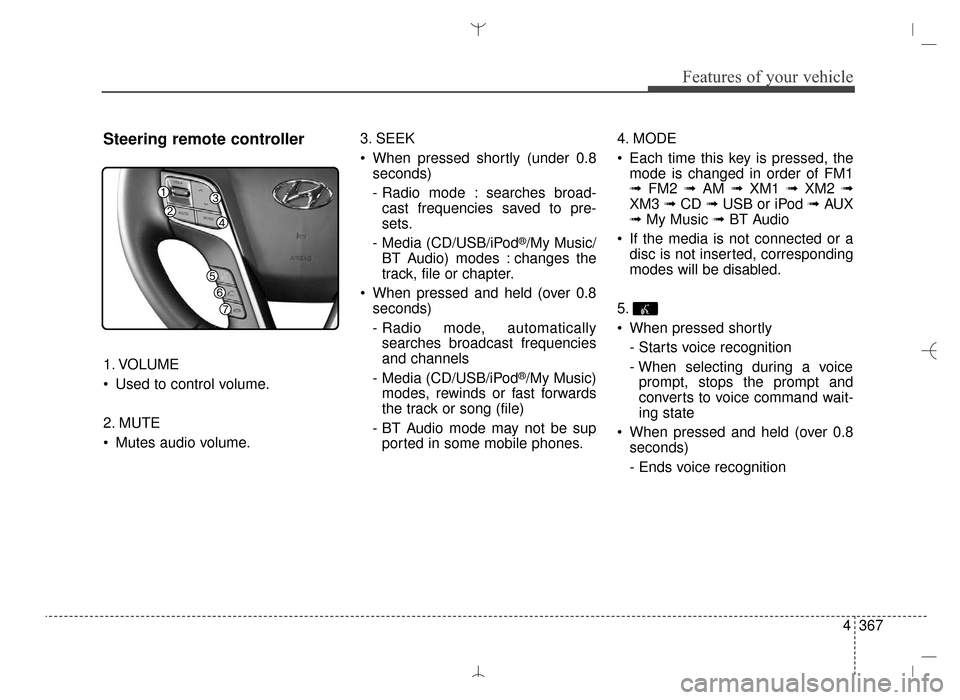
Steering remote controller
1. VOLUME
Used to control volume.
2. MUTE
Mutes audio volume.3. SEEK
When pressed shortly (under 0.8
seconds)
- Radio mode : searches broad-cast frequencies saved to pre-
sets.
- Media (CD/USB/iPod
®/My Music/
BT Audio) modes : changes the
track, file or chapter.
When pressed and held (over 0.8 seconds)
- Radio mode, automaticallysearches broadcast frequencies
and channels
- Media (CD/USB/iPod
®/My Music)
modes, rewinds or fast forwards
the track or song (file)
- BT Audio mode may not be sup ported in some mobile phones. 4. MODE
Each time this key is pressed, the
mode is changed in order of FM1
➟ FM2 ➟ AM ➟ XM1 ➟ XM2 ➟
XM3 ➟ CD ➟ USB or iPod ➟ AUX
➟ My Music ➟ BT Audio
If the media is not connected or a disc is not inserted, corresponding
modes will be disabled.
5.
When pressed shortly - Starts voice recognition
- When selecting during a voiceprompt, stops the prompt and
converts to voice command wait-
ing state
When pressed and held (over 0.8 seconds)
- Ends voice recognition
AN HMA 4D (303~AUDIO 1).QXP 6/9/2015 4:25 PM Page 367
Page 473 of 763
4381
Features of your vehicle
AUDIO CD MODE
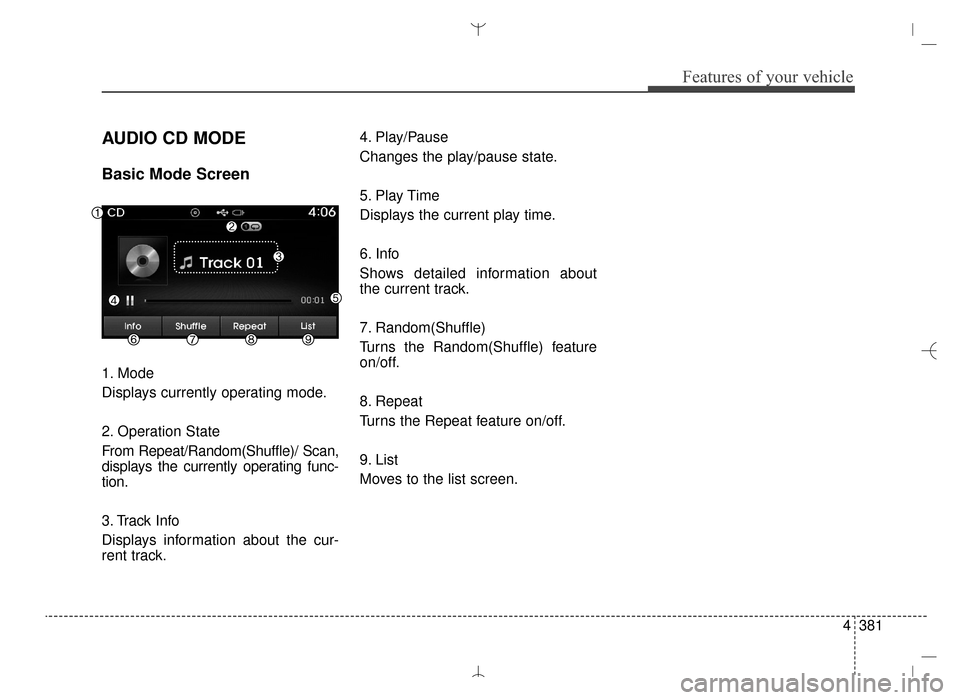
Basic Mode Screen
1. Mode
Displays currently operating mode.
2. Operation State
From Repeat/Random(Shuffle)/ Scan,
displays the currently operating func-
tion.
3. Track Info
Displays information about the cur-
rent track.4. Play/Pause
Changes the play/pause state.
5. Play Time
Displays the current play time.
6. Info
Shows detailed information about
the current track.
7. Random(Shuffle)
Turns the Random(Shuffle) feature
on/off.
8. Repeat
Turns the Repeat feature on/off.
9. List
Moves to the list screen.
AN HMA 4D (303~AUDIO 1).QXP 6/9/2015 4:25 PM Page 381
Page 476 of 763

Features of your vehicle
384
4
MP3 CD MODE
Basic Mode Screen
1. Mode
Displays currently operating mode.
2. Operation State
From Repeat/Random(Shuffle)/
Scan, displays the currently operat-
ing function.
3. File Index
Displays the current file number. 4. File Info
Displays information about the cur-
rent file.
5. Play/Pause
Changes the play/pause state.
6. Play Time
Displays the current play time.
7. Info
Shows detailed information about
the current file.
8. Random(Shuffle)
Turns the Random(Shuffle) feature
on/off.
9. Repeat
Turns the Repeat feature on/off.
10. Copy
Copies the current file into My Music11. List
Moves to the list screen.
AN HMA 4D (303~AUDIO 1).QXP 6/9/2015 4:25 PM Page 384
Page 479 of 763
4387
Features of your vehicle
Random (Shuffle)
Press the button to play files
in random (Shuffle) order.
Each time the button is pressed, the
feature changes in order of Random
(Shuffle) Folder ➟Random (Shuffle)
All ➟Off.
Random (Shuffle) Folder : Plays all files within the current folder in
Random (Shuffle) order.
Random (Shuffle) All : Plays all files in Random (Shuffle) order.
Repeat
Press the button to repeat the
current file or folder.
Each time the button is pressed, the
feature changes in order of Repeat
➟ Repeat Folder ➟ Off.
Repeat: Repeats the current file.
Repeat Folder: Repeats all files within the current Folder.
Copying Files
Press the button to copy the
current file into My Music.
✽ ✽ NOTICE
Selecting another feature during
copying will display a pop-up asking
whether you wish to cancel copying.
To cancel, select 'Yes'.
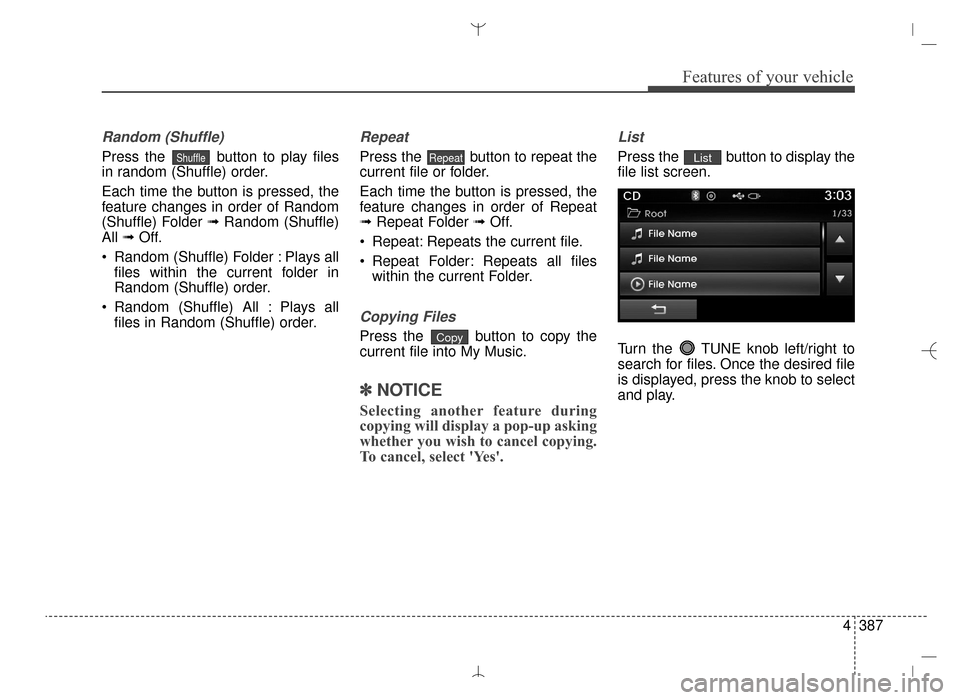
List
Press the button to display the
file list screen.
Turn the TUNE knob left/right to
search for files. Once the desired file
is displayed, press the knob to select
and play.List
Copy
RepeatShuffle
AN HMA 4D (303~AUDIO 1).QXP 6/9/2015 4:25 PM Page 387
Page 482 of 763
Features of your vehicle
390
4
USB MODE
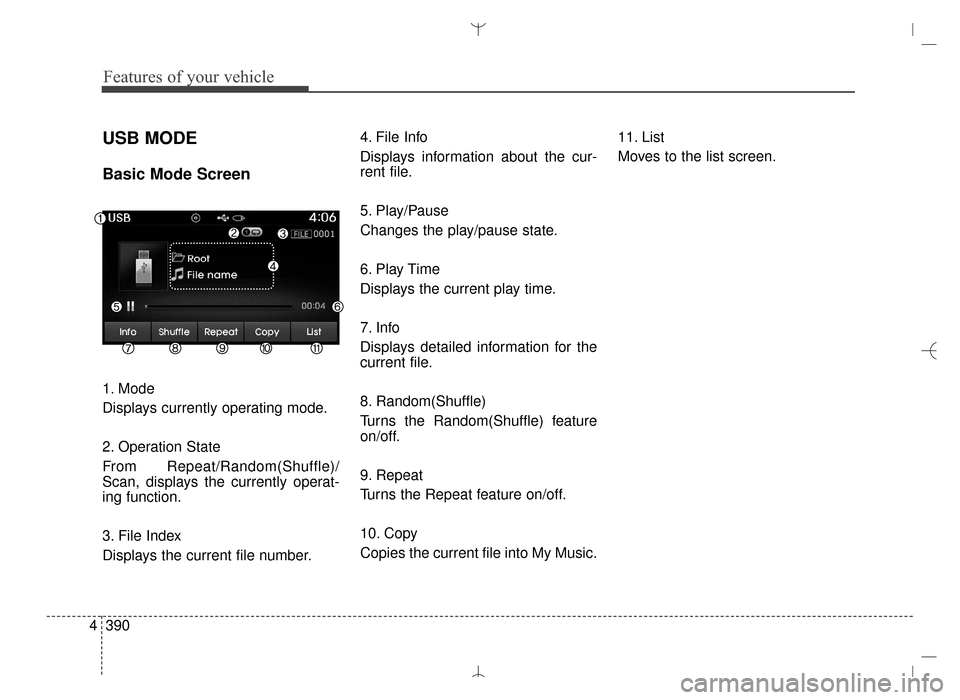
Basic Mode Screen
1. Mode
Displays currently operating mode.
2. Operation State
From Repeat/Random(Shuffle)/
Scan, displays the currently operat-
ing function.
3. File Index
Displays the current file number. 4. File Info
Displays information about the cur-
rent file.
5. Play/Pause
Changes the play/pause state.
6. Play Time
Displays the current play time.
7. Info
Displays detailed information for the
current file.
8. Random(Shuffle)
Turns the Random(Shuffle) feature
on/off.
9. Repeat
Turns the Repeat feature on/off.
10. Copy
Copies the current file into My Music.
11. List
Moves to the list screen.
AN HMA 4D (303~AUDIO 1).QXP 6/9/2015 4:25 PM Page 390
Page 485 of 763
4393
Features of your vehicle
Random(Shuffle)
Press the button to play files
in random (Shuffle) order.
Each time the button is pressed, the
feature changes in order of Random
(Shuffle) Folder ➟Random (Shuffle)
All ➟Off.
Random (Shuffle) Folder : Plays the files in the current folder in ran-
dom (Shuffle) order.
Random (Shuffle) All : Plays all files in random (Shuffle) order.
Repeat
Press the button to repeat the
current file or folder.
Each time the button is pressed, the
feature changes in order of Repeat
➟ Repeat Folder ➟ Off.
Repeat (Icon) : Repeats the cur- rent file.
Repeat Folder (Icon) : Repeats all files within the current folder.
Copying Files
Press the button to copy the
current file into My Music.
✽ ✽ NOTICE
Selecting another feature during
copying will display a pop-up asking
whether you wish to cancel copying.
To cancel, select 'Yes'.
List
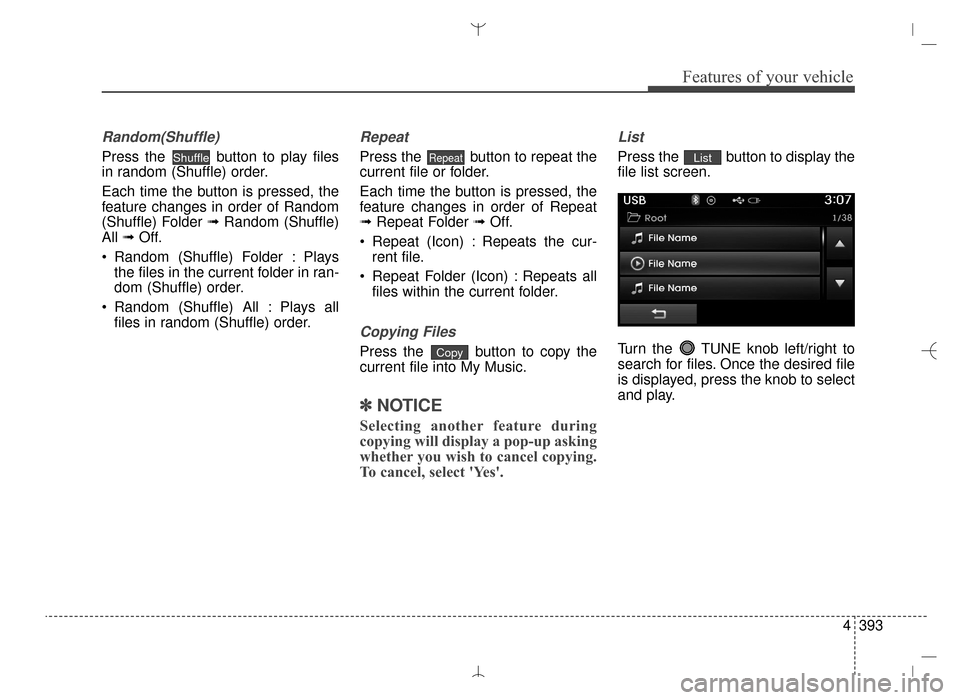
Press the button to display the
file list screen.
Turn the TUNE knob left/right to
search for files. Once the desired file
is displayed, press the knob to select
and play.List
Copy
RepeatShuffle
AN HMA 4D (303~AUDIO 1).QXP 6/9/2015 4:25 PM Page 393
Page 487 of 763
4395
Features of your vehicle
iPod®MODE
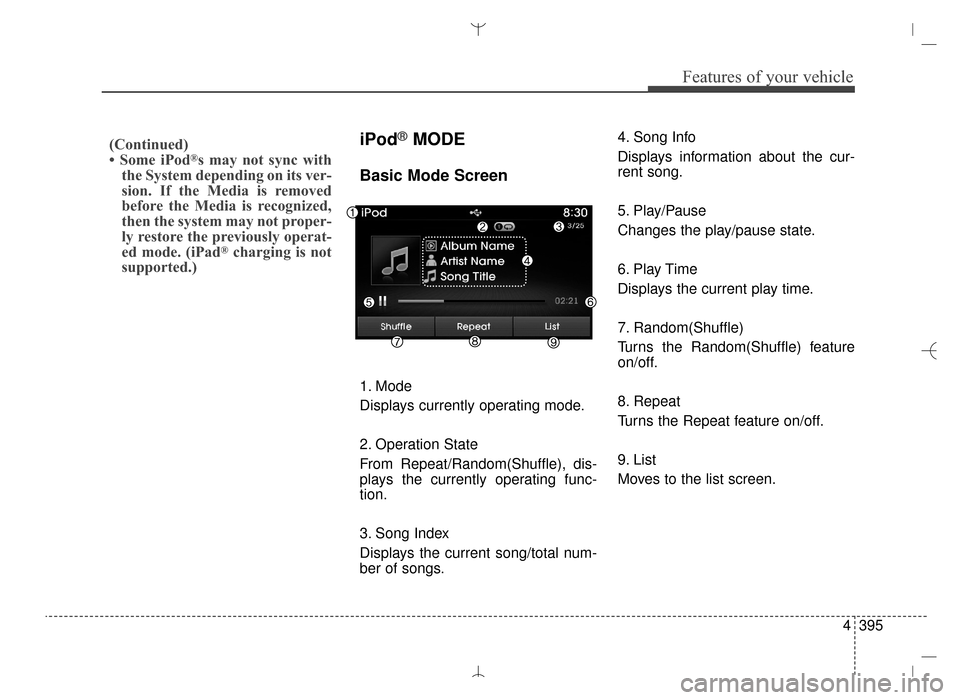
Basic Mode Screen
1. Mode
Displays currently operating mode.
2. Operation State
From Repeat/Random(Shuffle), dis-
plays the currently operating func-
tion.
3. Song Index
Displays the current song/total num-
ber of songs.4. Song Info
Displays information about the cur-
rent song.
5. Play/Pause
Changes the play/pause state.
6. Play Time
Displays the current play time.
7. Random(Shuffle)
Turns the Random(Shuffle) feature
on/off.
8. Repeat
Turns the Repeat feature on/off.
9. List
Moves to the list screen.
(Continued)
• Some iPod®s may not sync with
the System depending on its ver-
sion. If the Media is removed
before the Media is recognized,
then the system may not proper-
ly restore the previously operat-
ed mode. (iPad
®charging is not
supported.)
AN HMA 4D (303~AUDIO 1).QXP 6/9/2015 4:25 PM Page 395
Page 490 of 763

Features of your vehicle
398
4
iPod®Mode Menu
Within this mode, you will have
access to the Random (Shuffle),
Repeat and List features.
Random (Shuffle)
Press the button to play
songs in random (Shuffle) order.
Each time the button is pressed, the
feature changes in order of Random
(Shuffle) Album ➟ Random (Shuffle)
All ➟ Off.
Random (Shuffle) Album : Shuffle Album plays album in Random
(Shuffle) order.
Random (Shuffle) All : Plays all songs in Random (Shuffle) order.
Repeat
Press the button to repeat the
current song. Press the button again
to turn the repeat feature off.
Repeat : Repeats the current song
List
Press the button to display the
Category Menu.
Turn the TUNE knob left/right to
search for the desired category.
Once you find the desired category,
press the TUNE knob to select
and play.List
Repeat
Shuffle
AN HMA 4D (303~AUDIO 1).QXP 6/9/2015 4:25 PM Page 398
Page 492 of 763
Features of your vehicle
400
4
MY MUSIC MODE
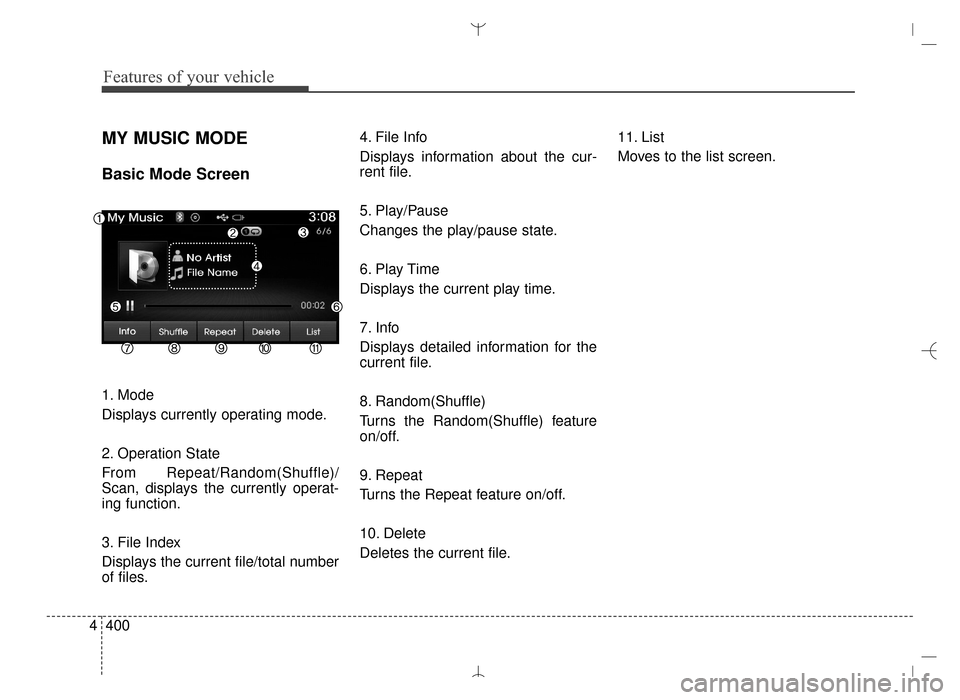
Basic Mode Screen
1. Mode
Displays currently operating mode.
2. Operation State
From Repeat/Random(Shuffle)/
Scan, displays the currently operat-
ing function.
3. File Index
Displays the current file/total number
of files. 4. File Info
Displays information about the cur-
rent file.
5. Play/Pause
Changes the play/pause state.
6. Play Time
Displays the current play time.
7. Info
Displays detailed information for the
current file.
8. Random(Shuffle)
Turns the Random(Shuffle) feature
on/off.
9. Repeat
Turns the Repeat feature on/off.
10. Delete
Deletes the current file.
11. List
Moves to the list screen.
AN HMA 4D (303~AUDIO 1).QXP 6/9/2015 4:25 PM Page 400
Page 522 of 763
![Hyundai Santa Fe Sport 2016 Service Manual Features of your vehicle
430
4
Time Format
Press the key Select
[Clock/Calendar] Select [Time Format]
This feature is used to change the
clock format between 12hr or 24hr.
Clock Display
Press the ke](/img/35/16754/w960_16754-521.png "Hyundai Santa Fe Sport 2016 Service Manual Features of your vehicle
430
4
Time Format
Press the key Select
[Clock/Calendar] Select [Time Format]
This feature is used to change the
clock format between 12hr or 24hr.
Clock Display
Press the ke")
Features of your vehicle
430
4
Time Format
Press the key Select
[Clock/Calendar] Select [Time Format]
This feature is used to change the
clock format between 12hr or 24hr.
Clock Display
Press the key Select
[Clock/Calendar] Select [Clock
Display (Power off)].
This feature is used to display a clock
on the screen when the audio sys-
tem is turned off.SETUP SETUP
AN HMA 4D (303~AUDIO 1).QXP 6/9/2015 4:25 PM Page 430