clock setting Hyundai Santa Fe Sport 2016 Owner's Manual
[x] Cancel search | Manufacturer: HYUNDAI, Model Year: 2016, Model line: Santa Fe Sport, Model: Hyundai Santa Fe Sport 2016Pages: 763, PDF Size: 37.75 MB
Page 282 of 763
Features of your vehicle
190
4
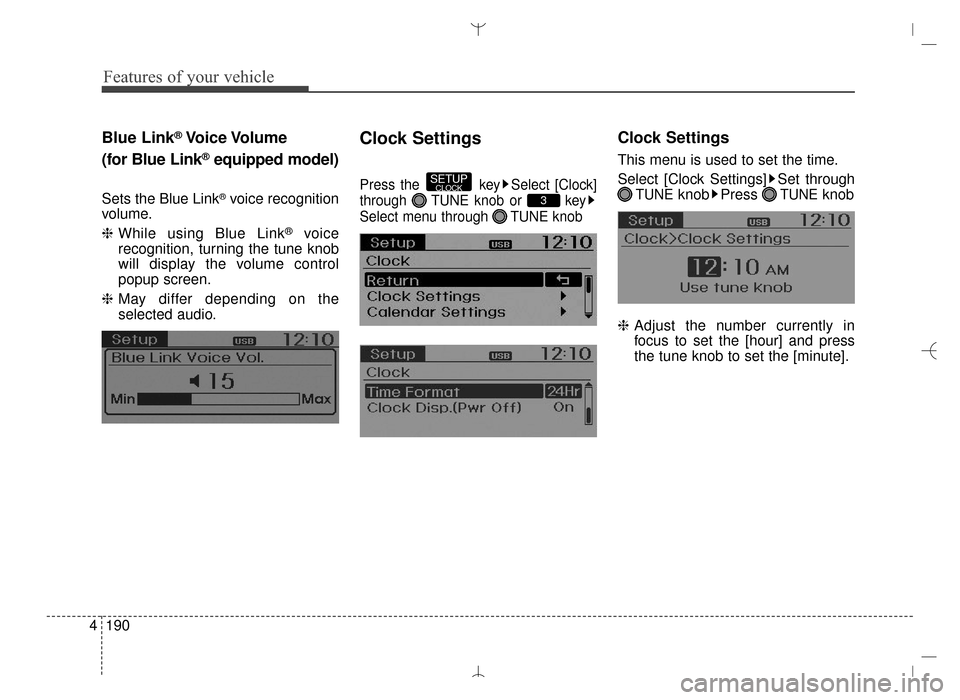
Blue Link®Voice Volume
(for Blue Link
®equipped model)
Sets the Blue Link®voice recognition
volume.
❈ While using Blue Link
®voice
recognition, turning the tune knob
will display the volume control
popup screen.
❈ May differ depending on the
selected audio.
Clock Settings
Press the key Select [Clock]
through TUNE knob or key
Select menu through TUNE knob
Clock Settings
This menu is used to set the time.
Select [Clock Settings] Set through
TUNEknob Press TUNEknob
❈ Adjust the number currently in
focus to set the [hour] and press
the tune knob to set the [minute].3
SETUPCLOCK
AN HMA 4C (169~AUDIO 1).QXP 6/25/2015 2:05 PM Page 190
Page 283 of 763
![Hyundai Santa Fe Sport 2016 Owners Manual 4191
Features of your vehicle
Calendar Settings
This menu is used to set the date
(MM/DD/YYYY).
Select [Calendar Settings]] Set
through TUNE knob Press
TUNE knob
❈Adjust the number currently in
foc](/img/35/16754/w960_16754-282.png "Hyundai Santa Fe Sport 2016 Owners Manual 4191
Features of your vehicle
Calendar Settings
This menu is used to set the date
(MM/DD/YYYY).
Select [Calendar Settings]] Set
through TUNE knob Press
TUNE knob
❈Adjust the number currently in
foc")
4191
Features of your vehicle
Calendar Settings
This menu is used to set the date
(MM/DD/YYYY).
Select [Calendar Settings]] Set
through TUNE knob Press
TUNE knob
❈Adjust the number currently in
focus to make the settings and
press the tune knob to move to the
next setting. (Set in order of
Year/Month/Day)
Time Format
This function is used to set the 12/24
hour time format of the audio system.
Select [Time Format] Set 12Hr /
24Hr through
TUNEknob
Clock Display when Power is
OFF
Select [Clock Disp.(Pwr Off)]Set
/ through TUNE knob
: Displays time/date on screen
: Turn off.
Off
On
OffOn
AN HMA 4C (169~AUDIO 1).QXP 6/25/2015 2:05 PM Page 191
Page 384 of 763
![Hyundai Santa Fe Sport 2016 Owners Manual Features of your vehicle
292
4
SETUP
Starting Mode
Press the key to display the
Setup screen.
You can select and control options
related to [Display], [Sound],
[Clock/Calendar], [Phone] and
[System].](/img/35/16754/w960_16754-383.png "Hyundai Santa Fe Sport 2016 Owners Manual Features of your vehicle
292
4
SETUP
Starting Mode
Press the key to display the
Setup screen.
You can select and control options
related to [Display], [Sound],
[Clock/Calendar], [Phone] and
[System].")
Features of your vehicle
292
4
SETUP
Starting Mode
Press the key to display the
Setup screen.
You can select and control options
related to [Display], [Sound],
[Clock/Calendar], [Phone] and
[System].
Display Settings
Adjusting the Brightness
Press the key Select
[Display] Select [Brightness]
Use the , buttons to adjust the
screen brightness or set the
Brightness on Automatic, Daylight, or
Night mode.
Press the button to reset.
1) Automatic : Adjusts the brightness
automatically
2) Daylight : Always maintains the brightness on high
3) Night : Always maintains the
brightness on low
Pop-up Mode
Press the key Select
[Display] Select [Mode Pop up]
This feature is used to display the
Pop-up Mode screen when entering
radio and media modes.
When this feature is turned on,
pressing the or key
will display the Pop-up Mode screen.
✽ ✽ NOTICE
The media Pop-up Mode screen can
be displayed only when two or more
media modes have been connected.
MEDIA RADIO
SETUP
Default
SETUP SETUP
AN HMA 4C (169~AUDIO 1).QXP 6/25/2015 2:05 PM Page 292
Page 387 of 763
![Hyundai Santa Fe Sport 2016 Owners Manual 4295
Features of your vehicle
Touch Screen Beep
Press the key Select
[Sound] Select [Touch Screen
Beep]
This feature is used to turn the touch
screen beep on/off.
Blue Link Voice Volume
Press the k](/img/35/16754/w960_16754-386.png "Hyundai Santa Fe Sport 2016 Owners Manual 4295
Features of your vehicle
Touch Screen Beep
Press the key Select
[Sound] Select [Touch Screen
Beep]
This feature is used to turn the touch
screen beep on/off.
Blue Link Voice Volume
Press the k")
4295
Features of your vehicle
Touch Screen Beep
Press the key Select
[Sound] Select [Touch Screen
Beep]
This feature is used to turn the touch
screen beep on/off.
Blue Link Voice Volume
Press the key Select
[Sound] Select [Blue Link Voice
Vol.]
Turn the TUNE knob to adjust the
Blue Link Voice Volume.
❈Blue Link
®may differ depending on
the selected audio.
Clock/Calendar Setting
Clock Setting
Press the key Select
[Clock/Calendar] Select [Clock
Settings]
Use the , buttons to set the
Hour, Minutes and AM/PM setting.
✽ ✽ NOTICE
Press and hold the key (over
0.8 seconds) to set the Clock/
Calendar screen.CLOCK
SETUP
SETUP SETUP
AN HMA 4C (169~AUDIO 1).QXP 6/25/2015 2:05 PM Page 295
Page 388 of 763
![Hyundai Santa Fe Sport 2016 Owners Manual Features of your vehicle
296
4
Calendar Setting
Press the key Select
[Clock/Calendar] Select [Calendar
Settings]
Use the , buttons to set the
Month, Day and Year setting.
Time Format
Press the key](/img/35/16754/w960_16754-387.png "Hyundai Santa Fe Sport 2016 Owners Manual Features of your vehicle
296
4
Calendar Setting
Press the key Select
[Clock/Calendar] Select [Calendar
Settings]
Use the , buttons to set the
Month, Day and Year setting.
Time Format
Press the key")
Features of your vehicle
296
4
Calendar Setting
Press the key Select
[Clock/Calendar] Select [Calendar
Settings]
Use the , buttons to set the
Month, Day and Year setting.
Time Format
Press the key Select
[Clock/Calendar] Select [Time Format]
This feature is used to change the
clock format between 12hr or 24hr.
Clock Display
Press the key Select
[Clock/Calendar] Select [Clock
Display (Power off)].
This feature is used to display a clock
on the screen when the audio sys-
tem is turned off.SETUP SETUP SETUP
AN HMA 4C (169~AUDIO 1).QXP 6/25/2015 2:05 PM Page 296
Page 411 of 763
![Hyundai Santa Fe Sport 2016 Owners Manual 4319
Features of your vehicle
SETUP
Display Settings
Press the key Select [Display]through TUNE knob or key
Select menu through TUNE knob
Mode Pop up
[Mode Pop up] Changes /
selection mode
Durin](/img/35/16754/w960_16754-410.png "Hyundai Santa Fe Sport 2016 Owners Manual 4319
Features of your vehicle
SETUP
Display Settings
Press the key Select [Display]through TUNE knob or key
Select menu through TUNE knob
Mode Pop up
[Mode Pop up] Changes /
selection mode
Durin")
4319
Features of your vehicle
SETUP
Display Settings
Press the key Select [Display]through TUNE knob or key
Select menu through TUNE knob
Mode Pop up
[Mode Pop up] Changes /
selection mode
During On state, press the or key to display the mode
change pop up screen.
Media Display
When playing an MP3 file, select the
desired display info from ‘Folder/File’
or ‘Album/Artist/Song’.
Sound Settings
Press the key Select [Sound]
through TUNE knob or key
Select menu through TUNE knob
2
SETUPCLOCK
MEDIA
RADIO
OffOn
1
SETUPCLOCK
AN HMA 4D (303~AUDIO 1).QXP 6/9/2015 4:25 PM Page 319
Page 413 of 763
![Hyundai Santa Fe Sport 2016 Owners Manual 4321
Features of your vehicle
Voice Recognition Volume
Adjusts voice recognition volume.
Select [Voice Recognition Vol.] Set
volume of
TUNEknob
Blue Link®Voice Volume
(for Blue Link®equipped model)](/img/35/16754/w960_16754-412.png "Hyundai Santa Fe Sport 2016 Owners Manual 4321
Features of your vehicle
Voice Recognition Volume
Adjusts voice recognition volume.
Select [Voice Recognition Vol.] Set
volume of
TUNEknob
Blue Link®Voice Volume
(for Blue Link®equipped model)")
4321
Features of your vehicle
Voice Recognition Volume
Adjusts voice recognition volume.
Select [Voice Recognition Vol.] Set
volume of
TUNEknob
Blue Link®Voice Volume
(for Blue Link®equipped model)
Sets the Blue Link®voice recognition
volume.
❈ While using Blue Link
®voice
recognition, turning the tune knob
will display the volume control
popup screen.
❈ May differ depending on the
selected audio.
Clock Settings
Press the key Select [Clock]
through TUNE knob or key
Select menu through TUNE knob
3
SETUPCLOCK
AN HMA 4D (303~AUDIO 1).QXP 6/9/2015 4:25 PM Page 321
Page 414 of 763
![Hyundai Santa Fe Sport 2016 Owners Manual Features of your vehicle
322
4
Clock Settings
This menu is used to set the time.
Select [Clock Settings] Set through
TUNEknob Press TUNEknob
❈ Adjust the number currently in
focus to set the [hour]](/img/35/16754/w960_16754-413.png "Hyundai Santa Fe Sport 2016 Owners Manual Features of your vehicle
322
4
Clock Settings
This menu is used to set the time.
Select [Clock Settings] Set through
TUNEknob Press TUNEknob
❈ Adjust the number currently in
focus to set the [hour]")
Features of your vehicle
322
4
Clock Settings
This menu is used to set the time.
Select [Clock Settings] Set through
TUNEknob Press TUNEknob
❈ Adjust the number currently in
focus to set the [hour] and press
the tune knob to set the [minute].
Calendar Settings
This menu is used to set the date.
Select [Calendar Settings] Set
through
TUNE knob Press
TUNE knob
❈ Adjust the number currently in
focus to make the settings and
press the tune knob to move to the
next setting.
Time Format
This function is used to set the 12/24
hour time format of the audio system.
Select [Time Format] Set 12Hr /
24Hr through
TUNEknob
Clock Display when Power is
OFF
Select [Clock Disp.(Pwr Off)]Set
/ through TUNE knob
: Displays time/date on screen
Turn off.
Off
On
OffOn
AN HMA 4D (303~AUDIO 1).QXP 6/9/2015 4:25 PM Page 322
Page 518 of 763
![Hyundai Santa Fe Sport 2016 Owners Manual Features of your vehicle
426
4
SETUP
Starting Mode
Press the key to display the
Setup screen.
You can select and control options
related to [Display], [Sound],
[Clock/Calendar], [Phone] and
[System].](/img/35/16754/w960_16754-517.png "Hyundai Santa Fe Sport 2016 Owners Manual Features of your vehicle
426
4
SETUP
Starting Mode
Press the key to display the
Setup screen.
You can select and control options
related to [Display], [Sound],
[Clock/Calendar], [Phone] and
[System].")
Features of your vehicle
426
4
SETUP
Starting Mode
Press the key to display the
Setup screen.
You can select and control options
related to [Display], [Sound],
[Clock/Calendar], [Phone] and
[System].
Display Settings
Adjusting the Brightness
Press the key Select
[Display] Select [Brightness]
Use the , buttons to adjust the
screen brightness or set the
Brightness on Automatic, Daylight, or
Night mode.
Press the button to reset.
1) Automatic : Adjusts the brightness
automatically
2) Daylight : Always maintains the brightness on high
3) Night : Always maintains the
brightness on low
Pop-up Mode
Press the key Select
[Display] Select [Mode Pop up]
This feature is used to display the
Pop-up Mode screen when entering
radio and media modes.
When this feature is turned on,
pressing the or key
will display the Pop-up Mode screen.
✽ ✽ NOTICE
The media Pop-up Mode screen can
be displayed only when two or more
media modes have been connected.
MEDIA RADIO
SETUP
Default
SETUP SETUP
AN HMA 4D (303~AUDIO 1).QXP 6/9/2015 4:25 PM Page 426
Page 521 of 763
![Hyundai Santa Fe Sport 2016 Owners Manual 4429
Features of your vehicle
Blue Link Voice Volume
Press the key Select
[Sound] Select [Blue Link Voice
Vol.]
Turn the TUNE knob to adjust the
Blue Link Voice Volume.
❈Blue Link
®may differ de](/img/35/16754/w960_16754-520.png "Hyundai Santa Fe Sport 2016 Owners Manual 4429
Features of your vehicle
Blue Link Voice Volume
Press the key Select
[Sound] Select [Blue Link Voice
Vol.]
Turn the TUNE knob to adjust the
Blue Link Voice Volume.
❈Blue Link
®may differ de")
4429
Features of your vehicle
Blue Link Voice Volume
Press the key Select
[Sound] Select [Blue Link Voice
Vol.]
Turn the TUNE knob to adjust the
Blue Link Voice Volume.
❈Blue Link
®may differ depending on
the selected audio.
Clock/Calendar Setting
Clock Setting
Press the key Select
[Clock/Calendar] Select [Clock
Settings]
Use the , buttons to set the
Hour, Minutes and AM/PM setting.
✽ ✽ NOTICE
Press and hold the key (over
0.8 seconds) to set the Clock/
Calendar screen.
Calendar Setting
Press the key Select
[Clock/Calendar] Select [Calendar
Settings]
Use the , buttons to set the
Month, Day and Year setting.SETUP
CLOCK
SETUP
SETUP
AN HMA 4D (303~AUDIO 1).QXP 6/9/2015 4:25 PM Page 429